






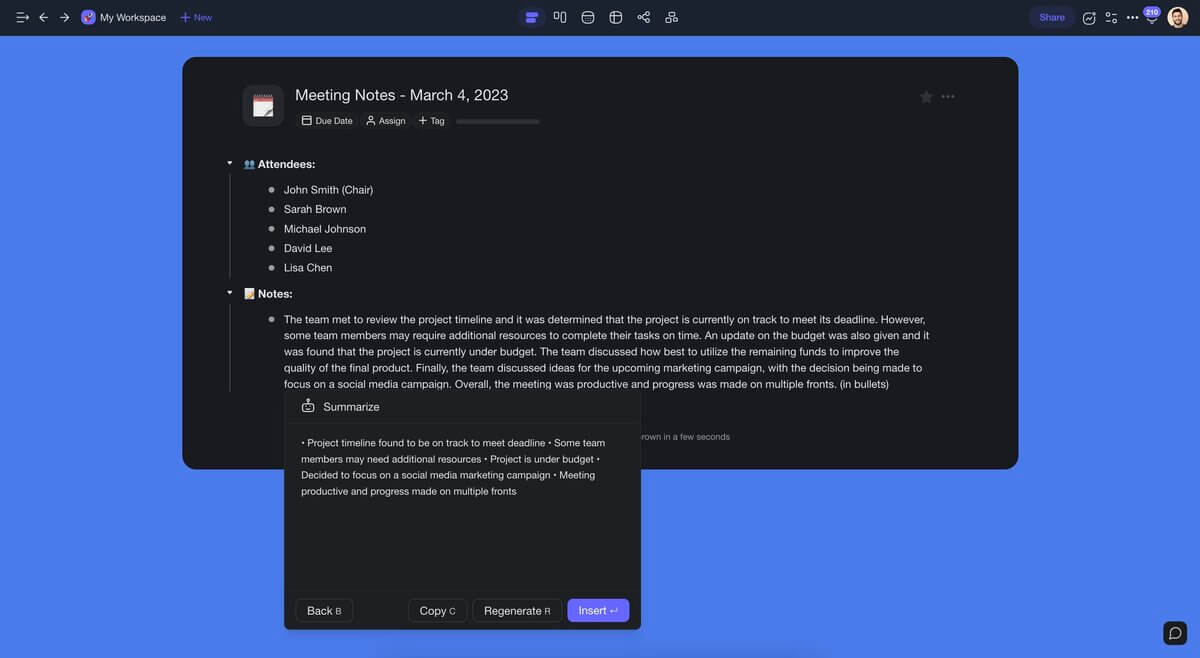
Outlining is the highest-leverage writing activity most people skip.
A good outline turns a blank page into a structured plan in seconds. It prevents the two most common writing failures: starting without direction and reorganizing after 2,000 words of scattered thoughts.
TL;DR: Taskade AI Outliner generates structured outlines instantly from any topic. Type
/outlinein any project, describe what you need, and AI creates a hierarchical structure you can edit, expand, and visualize across all project views. Connect outlines to AI agents with built-in tools and automations with 100+ integrations to turn structure into execution. Try it free →
The Taskade AI Outliner eliminates the blank-page problem. Type /outline in any project, describe your topic, and AI generates a complete hierarchical structure in seconds — not in a separate chat window, but directly inside your workspace where you can edit, assign, and execute.
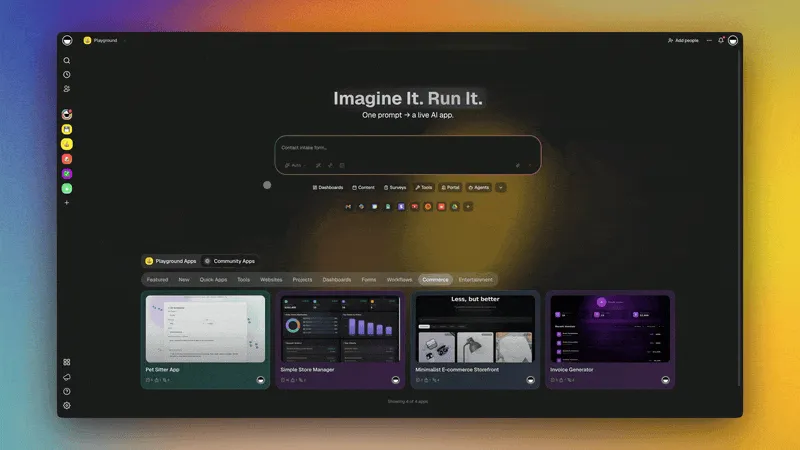
How the AI Outlining Workflow Works
The AI Outliner is not a standalone tool. It is the starting point of a workflow that flows from idea to structured outline to expanded content to living project.
The key insight: your outline is not a throwaway document. It becomes the structure for your entire project — visible in every view, connected to AI agents, and powered by automations.
Getting Started: The /outline Command
Simply input your topic, type /outline, and let Taskade do the rest — saving you time organizing your ideas, notes, and streamlining your workflow.
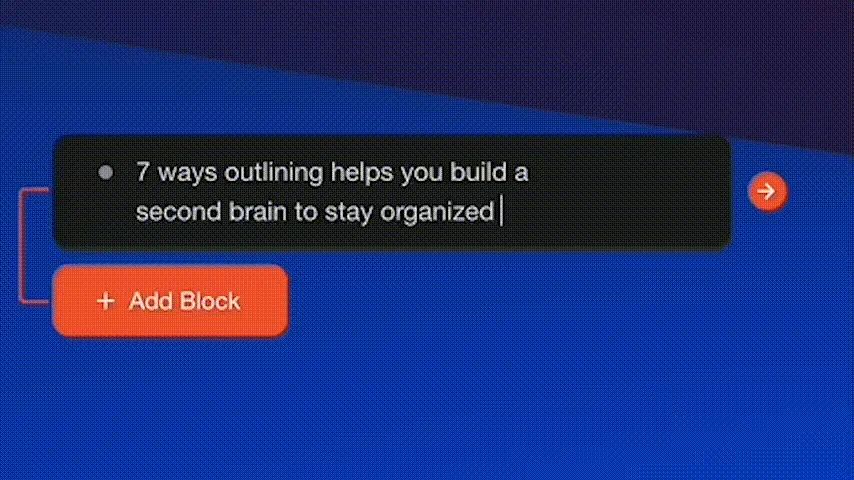
Create an /outline automatically from anywhere in your project, in any view.
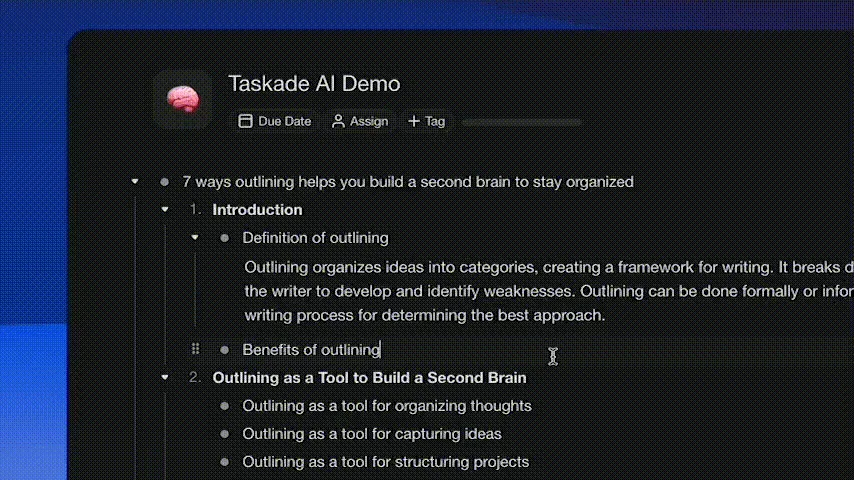
With a basic structure in place, use /expand to fill in the rest of your outline effortlessly. Each expanded section inherits the context of the parent outline, so the content stays coherent and on-topic.
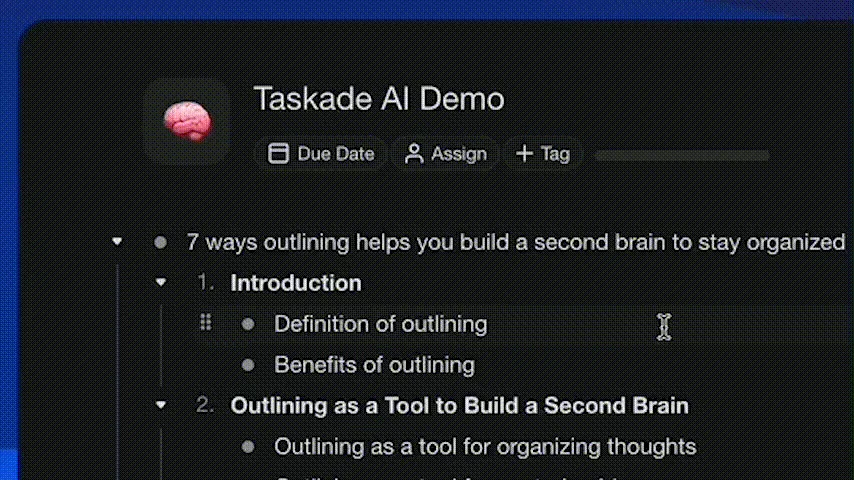
To try all AI commands, simply type /ai in any project. And if you are looking for ways to get started instantly, check out our free AI templates.
Learn more about AI commands →
What You Can Outline
The AI Outliner adapts to any content type. Here are the most common use cases with example prompts and the views that work best for each.
Content Types and Best Views
| Content Type | Example Prompt | Best View | Output |
|---|---|---|---|
| Blog posts | "Outline a 3,000-word guide to remote team management" | List | Headers, subheaders, talking points |
| Project plans | "Outline a website redesign project with milestones" | Gantt | Tasks, subtasks, dependencies, timeline |
| Meeting agendas | "Outline a 60-minute quarterly review meeting" | List | Topics, time allocations, action items |
| Course curricula | "Outline a 12-week data science course" | Board | Modules, lessons, assessments per week |
| Research papers | "Outline an academic paper on AI in healthcare" | List | Lit review, methodology, findings, discussion |
| Product specs | "Outline a PRD for a mobile payment feature" | Table | Requirements, acceptance criteria, priority |
| Business plans | "Outline a business plan for a SaaS startup" | Mind Map | Market, product, financials, team |
| Event plans | "Outline a 500-person conference logistics plan" | Board | Venue, speakers, marketing, operations |
Each outline generates a structured hierarchy that you can edit, reorder, and expand. The structure carries across multiple project views — an outline created in List view renders instantly as a Mind Map, Board, or Gantt chart.
AI Outliner in All Project Views
Every outline you generate works across all views in Taskade. The same data, different visualization — pick the view that matches how you think about your content.
| View | How Outlines Appear | Best For |
|---|---|---|
| List | Hierarchical bullet points with collapsible sections | Writing, meeting notes, sequential planning |
| Board | Kanban columns for each top-level heading, cards for subtopics | Content tracking, sprint planning |
| Calendar | Outline items with deadlines shown on calendar grid | Editorial calendars, event planning |
| Table | Spreadsheet rows with columns for status, assignee, priority | Project management, requirement tracking |
| Mind Map | Visual branches radiating from central topic | Brainstorming, topic exploration, research |
| Gantt | Timeline bars showing duration and dependencies | Project scheduling, course timelines |
| Org Chart | Hierarchical tree showing parent-child relationships | Organizational planning, taxonomy design |
Switch between views anytime. An outline generated as a list becomes a mind map with one click. A mind map restructured into columns becomes a board. No data is lost when you change views.
Learn more about project views →
AI Outliner vs ChatGPT vs Notion AI vs Google Docs vs Traditional Outlining
The AI Outliner is not the only way to generate outlines. Here is how it compares to the most common alternatives.
| Feature | Taskade AI Outliner | ChatGPT | Notion AI | Google Docs | Traditional (Manual) |
|---|---|---|---|---|---|
| Generation speed | Seconds (in-workspace) | Seconds (in chat window) | Seconds (in-page) | N/A | 15-30 minutes |
| Output location | Directly in project workspace | Separate chat, copy-paste required | In-page block | In document | In document |
| Views available | List, Board, Calendar, Table, Mind Map, Gantt, Org Chart | Text only | List, Board, Calendar, Table | Document only | Whatever tool you use |
| Expansion | /expand on any section in-place | Follow-up prompts in chat | "Continue writing" | None | Manual |
| Task assignment | Built-in (add assignees, deadlines) | None | Built-in | Comments only | Varies |
| AI agents | built-in tools, persistent memory, custom agents | Single chat thread | Limited AI blocks | None | None |
| Automations | 100+ integrations, triggers, workflows | None | Limited (Zapier via API) | Google Workspace only | None |
| Collaboration | Real-time, role-based access (Owner through Viewer) | Share chat link | Real-time, roles | Real-time, roles | Varies |
| Pricing | Free / $10 / $25 per month | Free / $20 per month | Free / $10 per month | Free (Google account) | Free |
| From outline to app | Taskade Genesis builds live apps from outlines | Not available | Not available | Not available | Not available |
The critical difference: in ChatGPT, your outline lives in a chat window. In Taskade, your outline lives in your workspace where it connects to AI agents, automations, team collaboration, and multiple project views. The outline is not a throwaway — it becomes the project.
Connecting Outlines to AI Agents

The AI Outliner generates structure. AI agents bring that structure to life.
What AI Agents Add to Outlining
| Agent Capability | How It Helps Outlining | Example |
|---|---|---|
| Content expansion | Expand any outline section with detailed paragraphs | "Expand the pricing strategy section with market data" |
| Research assistance | Add supporting evidence, statistics, and citations | "Add industry benchmarks to the competitive analysis" |
| Restructuring | Reorganize outline hierarchy based on feedback | "Move the implementation timeline before the budget section" |
| Gap analysis | Identify missing topics or weak sections | "What am I missing in this product requirements outline?" |
| Multi-format output | Convert outline to different formats | "Turn this outline into a presentation script" |
| Persistent memory | Remember project context across sessions | Agent recalls your brand voice and previous decisions |
AI agents in Taskade support built-in tools and maintain persistent memory, so they remember your project context, writing preferences, and previous decisions across sessions. Create custom agents specialized for specific domains — an academic writing agent, a business strategy agent, or a technical documentation agent.
From Outline to Living App with Taskade Genesis
The most powerful outcome of an outline is not a document. It is a living application.
Taskade Genesis takes your outline structure and builds a complete application — with Projects for content, Agents for AI assistance, and Automations for workflows. Over 150,000 apps have been built with Genesis since launch.
Example: Outline to Course Portal
- Generate outline:
/outline "12-week data science bootcamp with weekly modules, assignments, and quizzes" - Review and edit: Restructure modules, add prerequisites, adjust difficulty progression
- Send to Genesis: Describe the outline as a Genesis prompt: "Build a course portal from this curriculum outline with student enrollment, progress tracking, AI tutoring, and automated grading"
- Genesis builds: Complete learning portal with lesson pages, quiz engine, student dashboard, and AI tutor
- Publish: Share with students, embed on your website, or add a custom domain
The outline becomes the architecture. Genesis builds the application. AI agents power the intelligence. Automations handle the execution.
This is Workspace DNA in action — Memory (your outline in Projects) feeds Intelligence (AI agents that expand and refine) which triggers Execution (automations that deliver and track) which creates new Memory (student progress, feedback data).
Global Notifications and Hide Completed Items
Alongside the AI Outliner, Taskade includes workspace-wide features that keep your projects clean and your team informed.
Global Notifications
Customize notification preferences for every folder and workspace from a single page. Global notifications give you a unified feed of all activity — comments, mentions, task updates, and project changes — so you do not have to check each project individually.
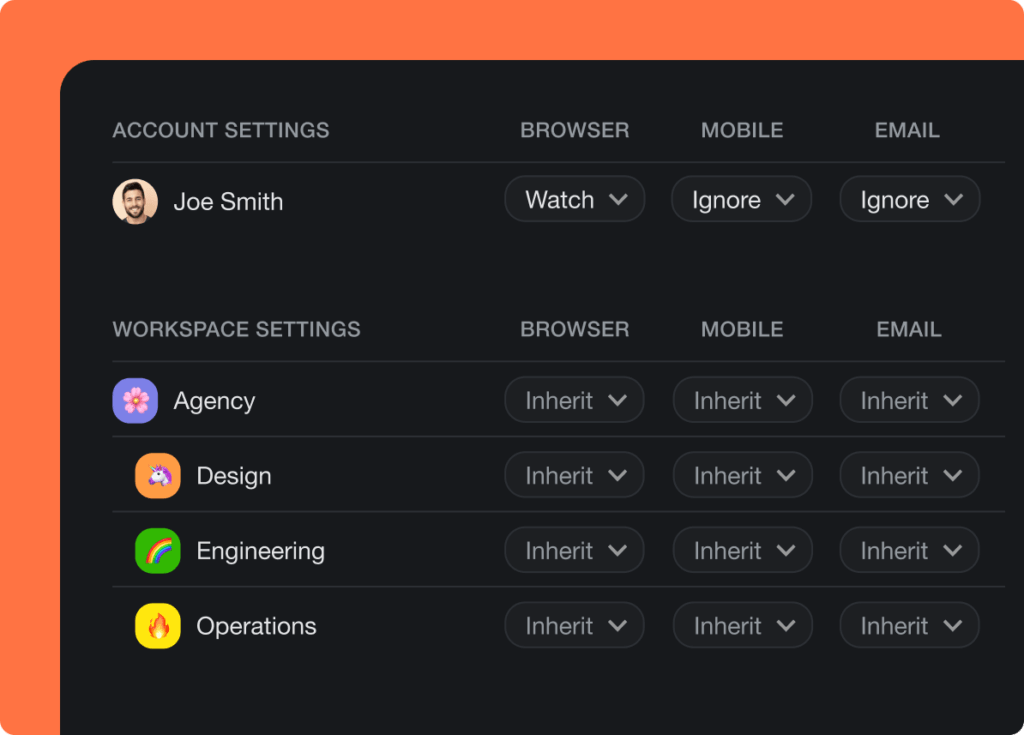
Learn more about notifications →
Hide Completed Items
Hide completed tasks and notes across entire folders or workspaces. This setting applies automatically to all team members, keeping focus on active work.
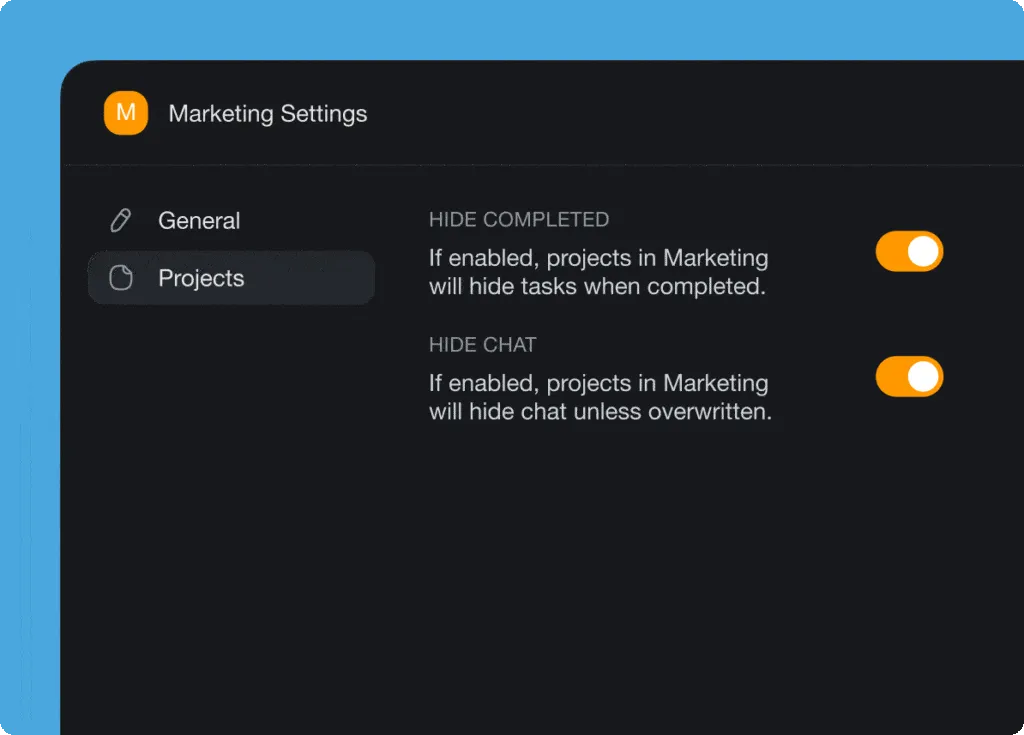
Both features work together: global notifications ensure you never miss important updates, while hide completed items keeps your workspace focused on what still needs attention.
Learn more about workspace settings →
Tips for Better AI Outlines
Prompt Engineering for Outlines
| Technique | Example Prompt | Why It Works |
|---|---|---|
| Specify depth | "Create a 3-level outline for..." | Controls how detailed the hierarchy gets |
| Define audience | "Outline for senior engineering managers..." | Adjusts terminology and focus areas |
| Set constraints | "Outline in exactly 5 main sections with 3 subsections each" | Produces balanced, predictable structure |
| Include context | "Outline a blog post about AI in healthcare, targeting CTOs at mid-size hospitals" | Generates more relevant and targeted content |
| Request format | "Outline with action verbs for each heading" | Produces scannable, task-oriented structure |
After Generating
- Reorder sections — drag and drop to match your preferred flow
- Expand key sections — use
/expandon the sections that need the most detail - Assign tasks — add team members to specific sections for collaborative writing
- Set deadlines — attach dates and track progress in Calendar or Gantt view
- Connect agents — use AI agents for ongoing research, editing, and fact-checking
- Automate delivery — set up automations to notify stakeholders when sections are complete
Build Your Outlining Workflow
- Open Taskade and create a new project
- Type
/outlineand describe your topic - Review the generated structure and reorder as needed
- Use
/expandto fill in key sections - Switch to Mind Map to visualize the hierarchy
- Assign sections to team members for collaborative editing
- Connect AI agents for ongoing expansion and research
- Set up automations for progress tracking and notifications
Writing a meeting agenda, business plan, research paper, or bestselling novel? It has never been easier to get your ideas in order and turn them into a solid plan. With the AI Outliner and /outline, you will have a clear, organized structure ready to go in seconds.
Now you can focus on what really matters.
Read more:
- Build Your First AI App: 12 Beginner Examples
- 10 Personal AI Workspaces (Second Brain)
- What is Vibe Coding?
- Stop Worshipping Prompts, Start Building Workflows
- 8 AI Education Portals and Study Dashboards
- How to Build a Room Booking Dashboard
Explore Taskade AI:
- AI App Builder — Build complete applications from a single prompt
- AI Agent Builder — Create custom AI agents with built-in tools
- AI Workflow Automation — Automate any business process
- AI Dashboard Builder — Generate analytics dashboards
Build with Genesis:
- Browse All Generator Templates — Apps, dashboards, websites, and more
- Browse Agent Templates — AI agents for every use case
- Explore Community Apps — Clone and customize
- Explore Templates — Ready-to-use templates

Frequently Asked Questions
What is the Taskade AI Outliner feature?
Taskade AI Outliner lets you generate structured outlines instantly from any topic by typing the /outline command in any project. Instead of starting from a blank page, describe what you want to outline and AI creates a hierarchical structure with main topics, subtopics, and supporting details. The AI Outliner works across multiple project views: List, Board, Calendar, Table, Mind Map, Gantt, and Org Chart. An outline generated in list view can be instantly visualized as a mind map or board.
How does AI improve the outlining process?
AI improves outlining in three ways. Speed: generating a first-draft outline takes seconds instead of 15-30 minutes of manual brainstorming. Structure: AI creates logically organized hierarchies based on the topic, ensuring you do not miss key subtopics. Expansion: once you have a skeleton, AI can expand individual points into detailed content or suggest related topics. The result is a faster, more thorough workflow where human judgment guides direction while AI handles content generation.
Can I use AI to outline different types of content?
Yes. AI outlining works across virtually any content type including blog posts with headers and talking points, project plans with milestones and subtasks, meeting agendas with discussion topics and time allocations, research papers with literature reviews and methodology sections, and course curricula with modules and learning objectives. In Taskade you can switch between multiple views after outlining. Turn an article outline into a board for tracking or view a project plan as a Gantt chart.
How does the Taskade AI Outliner compare to ChatGPT for outlining?
ChatGPT generates text outlines in a chat window that you must copy and paste into your work tool. Taskade AI Outliner generates structured outlines directly inside your workspace where you can edit, expand, assign tasks, set deadlines, and visualize in multiple project views. The outline becomes a living document connected to AI agents with built-in tools, automations with 100+ integrations, and real-time collaboration with role-based access from Owner through Viewer.
What AI models power the Taskade AI Outliner?
Taskade uses 15+ frontier models from OpenAI, Anthropic, and Google. The system auto-routes to the best model for each task. Unlike single-model tools, Taskade selects the optimal model for outline generation, content expansion, and summarization. All models are available on Pro plans starting at $10 per month.
Can AI agents help refine and expand outlines in Taskade?
Yes. After generating an initial outline with /outline, you can use AI agents with built-in tools to expand sections, add supporting evidence, generate counterarguments, suggest related topics, and restructure the hierarchy. Agents maintain persistent memory so they remember your project context across sessions. You can also create custom agents specialized in specific domains like academic research or business strategy.
Does the AI Outliner work in Mind Map and Board views?
Yes. The AI Outliner works across multiple project views: List, Board, Calendar, Table, Mind Map, Gantt, and Org Chart. An outline generated in List view automatically renders as a Mind Map with branches for each section, a Board with columns for each major topic, or a Gantt chart with timeline estimates. Switch views anytime without losing data or structure.
How do I turn an AI outline into a complete document or app?
Use the /expand command on any section to generate detailed content. For documents, expand each heading into full paragraphs with supporting evidence. For apps, describe the outline in a Taskade Genesis prompt and Genesis builds a live application from the structure with Projects for content, Agents for AI assistance, and Automations for workflows. Over 150,000 apps have been built with Genesis since launch.
What are the best use cases for the AI Outliner?
The most common use cases are blog posts and articles with SEO-optimized heading structures, project plans with task breakdowns and milestones, meeting agendas with discussion topics and time allocations, course curricula with modules and learning objectives, research papers with literature review sections, and product requirement documents with feature specifications. Each outline can be expanded, assigned to team members, and tracked across multiple project views.
Is the AI Outliner included in the free plan?
Yes. The AI Outliner is available on all Taskade plans including the free tier. Free plans include limited AI generations. For unlimited outlining, content expansion, and access to all 15+ frontier models, upgrade to Pro at $10 per month or Business at $25 per month. Visit the pricing page for full plan details.