






"It’s on the tip of my tongue, just give me a minute!" Let’s face it, the human brain is not the most reliable tool for keeping and retrieving information. Luckily, there are dozens of note-taking apps that can double as a powerful backup brain. The question is, which one should you choose?
In today's article, we compare Notion, Obsidian, and Taskade to see which one of those apps is worthy of the "best second brain app" title. We take a look at core features, pricing, and the all-important "ease of use" factor. So buckle up — by the end of this article, you won't just be looking for a second brain app, you'll know exactly which one speaks your language. 🧠
💡 Before you start... Want to learn more about other similar tools? Check our comparison of the best knowledge base apps (click) when you're done reading.
📌 6 Essential Features Of Good Second Brain Apps
The market for productivity apps is booming. But not every tool deserves a "second brain" badge. Ok, there’s no such thing. But there are still a few things you should keep in mind.
According to Tiago Forte, the creator of the Building a Second Brain (BASB) system, there are several characteristics of good second brain software. Some like quick capture and search are a must. Others like multiple viewing panes are nice to have, but you can do without them.
Here are six critical features your second brain app must have:
📥 Quick Capture
Building a second brain is a life-long journey, and like any other habit, it requires commitment. But if your second brain app is difficult to use, you’re up for an unpleasant surprise.
The muse comes knocking when you least expect it. You don’t want to scroll through five screens and click ten buttons to add a note. By the time you find the right option, the idea will be gone.
The same is true for refining notes. You should be able to comfortably edit and organize your second brain entries wherever you are, using a computer, a smartphone, or a web browser.
⚡ Spotless Performance
Let’s say your second brain has grown to hundreds (or thousands) of entries. It’s like a lush garden, a thing to care for and admire. Except, weeds are everywhere and maintenance is hell.
A good note-taking app should give you enough headroom to scale without compromises. And that also means the performance has to keep up with the growing repository of notes.
Your tool of choice may work ok with a dozen notes in the pool. But building a second brain is a life-long process, so plan for the long game. You don’t want to face pesky limitations — think long loading times, lags, and crashes — and be forced to jump ship a few years from now
🎨 Essential Formatting
At a minimum, your second brain app should let you bold, highlight, and underline text. It doesn’t hurt to have more advanced options, but you don’t need them to make things work.
There are two good reasons why less is better.
First, Forte’s Progressive Summarization — you can learn more about it in our second brain review — involves just three steps: bolding, highlighting, and underlining. And that’s it.
Second, the user interface of the app you’ll end up using shouldn’t distract you from the creative process. The more options you have, the more likely you’ll be to tweak things ad nauseam instead of working. You don't want to get bogged down in endless customization.
🔎 Powerful Search
There’s no point creating a second brain if you can’t find and retrieve information when you need it. Keeping track of 5, 10, or 20 entries is easy. But if your goal is to store thousands of notes — a typical scenario in the second brain space — you need something better.
Your second brain app should "look" beyond the note title and search in the contents as well as meta-data. Forte also recommends auto-complete, but that’s a bonus rather than a necessity.
The whole point of a second brain is to make your life easier, not to create a digital labyrinth where you can't find anything. If you're going to commit to storing all your valuable ideas, insights, and information, then your app better be up to the task when it's time to retrieve them.
📎 Support for Images and Attachments
A picture is worth a thousand words — this adage is surprisingly relevant in the digital age. Your second brain will blend different types of content, so your note-taking app must keep up.
A typical second brain can include:
✅ to-do,
🌄 images,
🎞️ videos,
🌐 bookmarks,
⏺️ voice recordings,
🔢 spreadsheets,
and a few more depending on your endgame. Make sure you can upload images, videos, and other files from your devices. Files tend to be quite large these days so avoid low file size caps.
🔓 Private-First Philosophy (With Optional Sharing)
Building a second brain happens in two dimensions.
There’s a "collector’s approach" where you ingest ideas, snippets of conversations, book highlights, and article clippings, and keep all those gems to yourself, all private and secure.
And then there’s a "creator’s approach" where you use the second brain as a stepping stone to create new value — articles, books, projects — and share the outcomes with the world.
Your second brain app should let you do both — keep your notes safe (preferably with multi-factor authentication and good encryption) but also give you a creative outlet when you need it.
And now, let’s take a closer look at our contenders.
⚪️ What Is Notion?
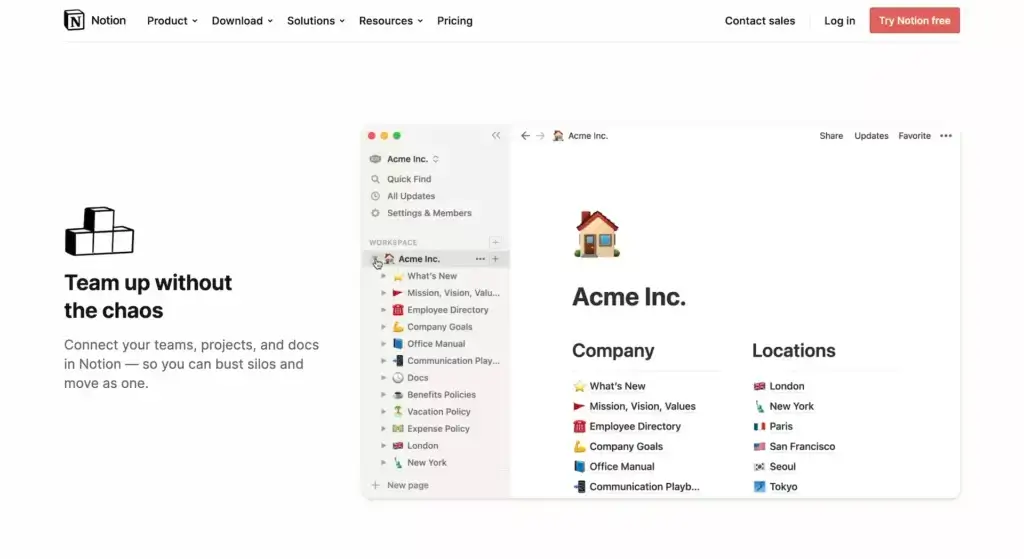
Notion user interface — a top-level workspace with two columns of nested pages
Notion aspires to be many things — a note-taking app, a project management tool, a collaboration space for teams, and recently, a smart writing assistant powered by OpenAI's GPT language model. It also happens to be a solid second brain app with a few tricks up its sleeve.
Notion is built around databases, which are essentially collections of nested projects. You can think of a Notion database as a notebook with an unlimited number of blank pages. Each page can store notes, to-dos, images, or videos inside Lego-like blocks.
So, what is a block exactly?
Blocks function as discrete units of information. They can contain various types of content such as text, checklists, images, or embedded files. They're easy to move around too. Need to reorganize a section? Just drag the blog and drop it where it belongs. It's that simple.
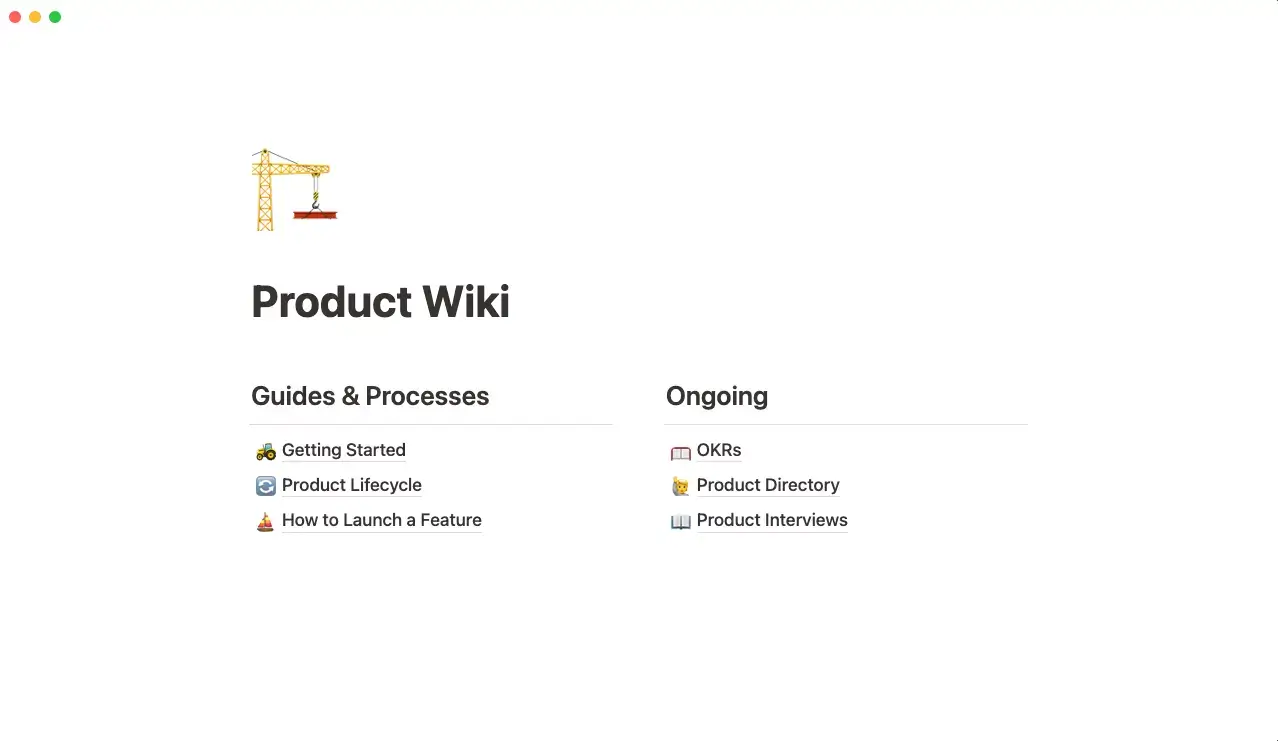
Notion blocks in action — each section heading is a separate block
This multidimensional content hierarchy makes it very easy to capture, organize, and retrieve knowledge — just the thing you need when there are hundreds of notes floating around.
The Good — Key Features Of Notion
Notion includes (almost) everything you need to build a second brain.
The editor is simple but complete. It features quintessential formatting tweaks—bold, italics, underline, and highlights—but also adds a few cherries on top like equations and code blocks.
Content organization happens on several planes.
As you already know, your second brain can be chunked into clusters of pages called databases. But Notion takes it a step further. Each page can have its own subpages, all combined together with bi-directional backlinks that make navigation much easier.
Finally, pages in Notion can have several properties like type, priority, due dates, or owner. The same is true for blocks that can be anything from text or image to a bookmark or checklist.
Top Feature — Notion AI
Notion AI is the most recent update to the platform that adds a writing assistant powered by OpenAI's GPT-3 algorithm. The new feature lets you generate, proofread, and edit written content using built-in commands. It's both a thinking tool and a project management aid in one.
There are two main ways to use AI in Notion. You can start with a blank page and let AI generate the project structure based on your instructions. Or can use Notion AI to develop, proofread, and iterate on existing content like a professional editor.
The Bad — Notion Cons
While Notion’s no-code pedigree lets you design your second-brain workflow from scratch, the ultimate flexibility comes at a cost. In this case, it’s the time it takes to fully master the system.
The user interface may seem minimalist, but there’s a lot going on under the surface. If you’re new to the second brain space and want to get started quickly, Notion can be intimidating.
If you’re a seasoned note-taker, though, you’ll probably stomach the steeper learning curve and lack of structure, even if it takes you a while to set things up and figure out the best approach.
How Much Does Notion Cost?
Notion offers four pricing tiers: one for personal users, two for teams, and one for enterprise clients. The free plan is limited to 5 guest users. If you want to collaborate or share your second brain, expect to pay anywhere from $5 to $10, depending on your use case.
🟣 What Is Obsidian?
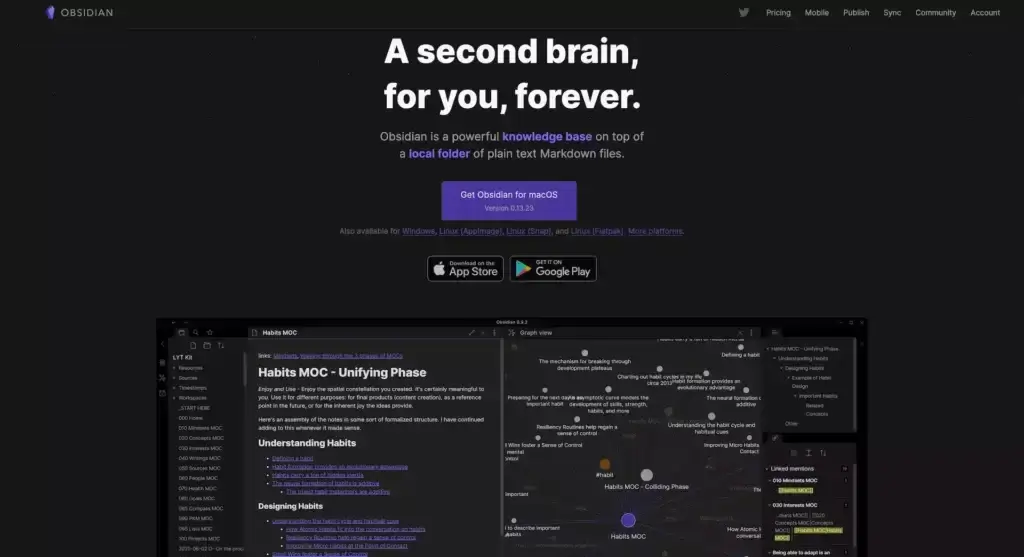
Obsidian, a relative newcomer to the note-taking space, is an offline-first note-taking app — this makes it somewhat of an underdog — that stores notes in local Markdown (.md) files.
The centerpiece of Obsidian is a knowledge graph (Obsidian calls it the "Graph view"). The graph is a visual representation of all your notes and the links that tie them together. Each note is shown as an interactive node you can click on to open the note in a separate pane.
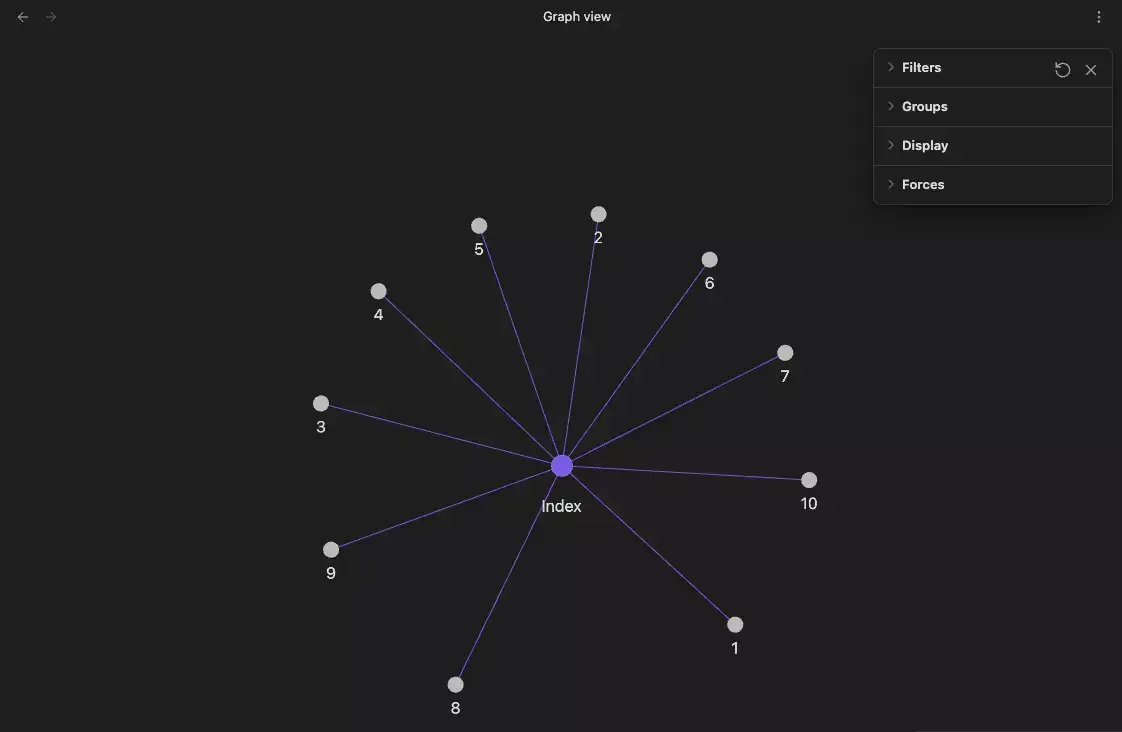
Obsidian Graph view
The knowledge graph is a natural evolution of the somewhat stale art of note-taking. Not only does it put notes in a context, but it also simplifies navigation between entries, which is one of the reasons why methodologies like Linking Your Thinking are so popular among Obsidian users.
The Good — Key Features of Obsidian
Apart from the knowledge graph, Obsidian stands out in a few other areas.
First, it defaults to Markdown files, which means you’re not stuck with a proprietary format. It's also keyboard-centric, so you can format notes without taking your hands off the keyboard.
Second, Obsidian doesn’t sync notes to the cloud, at least not by default. Files are stored locally inside what Obsidian calls a "Vault." You can still sync notes using external cloud storage like Dropbox or subscribe to a paid "Obsidian Sync" tier to keep your notes on multiple devices.
Finally, Obsidian offers a wide selection of first-party and community plugins that extend its functionality. Some add features like to-do tracking or Kanban boards, while others simply refine the existing set of tools and give users more control over the interface and workflow.
Obsidian supports folders and #tags — you need a plugin to get the most out of the latter — but the bulk of content organization happens via linking. Links are displayed at the bottom of each page, and you can jump between entries in your knowledge base using a separate pane.
As of this writing, Obsidian doesn't support native AI features.
Top Feature — Obsidian Offline Mode
"Can Obsidian be used offline?"
Yes. In fact, the local-first philosophy is one of its strongest arguments in the Notion vs. Obsidian debate. A combination of plaintext documents and offline mode means that you don't need an internet connection to write, edit, or organize your notes inside an Obsidian vault.
The Bad — Obsidian Cons
Using Markdown in Obsidian is fun if you're willing to accept a few limitations.
While you can use different heading types, apply bold, italicize text, and even insert code, anything fancier like highlighting text or creating tables will require some workarounds.
Strike two is no co-editing. The privacy-first approach is commendable. But it also throws a wrench in the works of collaboration, making it a no-go for teams and organizations.
Finally, Obsidian isn't built for task management. While you can add basic checkboxes, you're going to need additional community plugins if you want to track due dates and manage tasks.
How Much Does Obsidian Cost?
Obsidian is free for personal use. You don’t have to create a new account since the app works locally on your device. The free tier gives you access to the API, core plugins, and community support. The $25 "Catalyst" plan lets you support developers and access early builds of the app.
Obsidian also includes two add-on services — "Obsidian Sync" ($10/month) and "Obsidian Publish" ($20/month). The first add-on unlocks a proprietary cloud sync and version history. The second lets you publish notes online and customize the appearance of live sites.
🤖 2026 Update: The Second Brain Meets AI Agents
The second brain landscape shifted dramatically in 2025-2026. The question is no longer "which app stores notes better?" — it's "which system thinks alongside you?"
Obsidian's AI Evolution: Bases + Claude Code
Obsidian shipped two pivotal updates that reshaped how power users work:
Bases (2025) — Structured data views (tables, boards, calendars) inside notes, eliminating the need for the Dataview plugin. Nick Milo's Ideaverse Pro demonstrated Bases for project dashboards, daily note calendars, and an "On This Day" journal that resurfaces notes from the same date across years. Read our full history of Obsidian for the complete timeline.
Claude Code + Obsidian Workflow (2026) — A growing community now pairs Obsidian vaults with Claude Code (Anthropic's CLI agent) as a persistent AI context layer. A CLAUDE.md file at the vault root instructs the AI on how to navigate folders, retrieve context, and log decisions back. The result: AI agents with persistent memory across conversations — effectively turning a note-taking app into an AI knowledge operating system.
Notion's AI Play: Writing Assistant + Databases
Notion responded with Notion AI ($8-10/month add-on) — a writing assistant that summarizes pages, generates drafts, and answers questions from your workspace. It's useful for text-heavy knowledge work, but it's an assistant, not an agent. It cannot autonomously execute multi-step workflows, build apps, or maintain persistent context across sessions.
What's Missing From Both
Neither Obsidian nor Notion offers all three capabilities that define the AI-native second brain:
| Capability | Notion | Obsidian | What's Needed |
|---|---|---|---|
| AI that writes and edits | ✅ Notion AI | ⚠️ Plugins only | Writing assistance |
| AI that acts autonomously | ❌ | ❌ | Multi-step agent workflows |
| AI that remembers across sessions | ❌ | ⚠️ Via CLAUDE.md hack | Persistent workspace memory |
| AI that automates workflows | ❌ | ❌ | Triggered actions + integrations |
This is exactly where the next contender bridges the gap.
🐑 Why Taskade Is The Best Alternative to Notion and Obsidian
Ok, let's start with proper introductions.
Taskade is a modern outliner, a note-taking application, and a project management platform. It's also a powerful second brain app for capturing 📥, organizing 🗂️, and sharing 🌐 ideas!

You don’t have to choose between a private second brain and collaboration features anymore. With Taskade, you can have both, wrapped in an elegant, secure, and minimalist tool.
🤖 Plan, write, and execute with the power of AI (more on that below).
👁️ Seamlessly transform notes into lists, boards, mind maps, and more.
🔎 Search, #tag, and organize your second brain any way you like.
🔗 Connect thoughts and ideas with powerful bi-directional backlinks.
📱 Access notes on all your devices (Mac, Windows, Linux, Android, iOS, web).
⚡️ Work faster with keyboard shortcuts and Markdown support.
✏️ Embrace team collaboration, chat, and task management in one unified workspace.
🎨 Pick from hundreds of templates and project generators.
And here's the best part.
Taskade features a set of versatile AI tools powered by OpenAI's GPT-4 language model.
The AI Assistant is your creative sidekick that "lives" inside every project. The Assistant will help you create document outlines, generate and expand on content, proofread your notes, rewrite text in several different ways, and answer questions, all accessible with intuitive /AI commands.
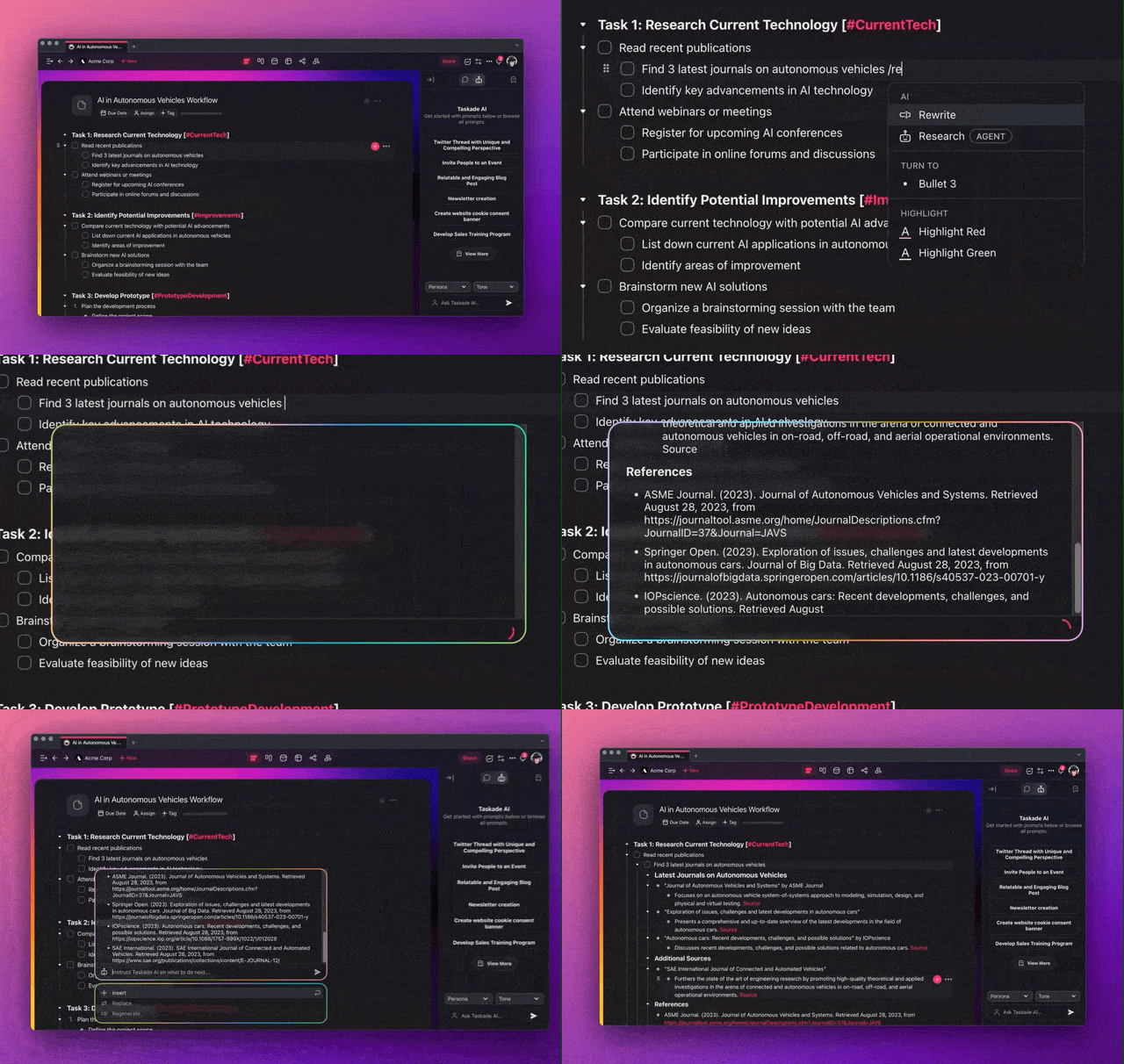
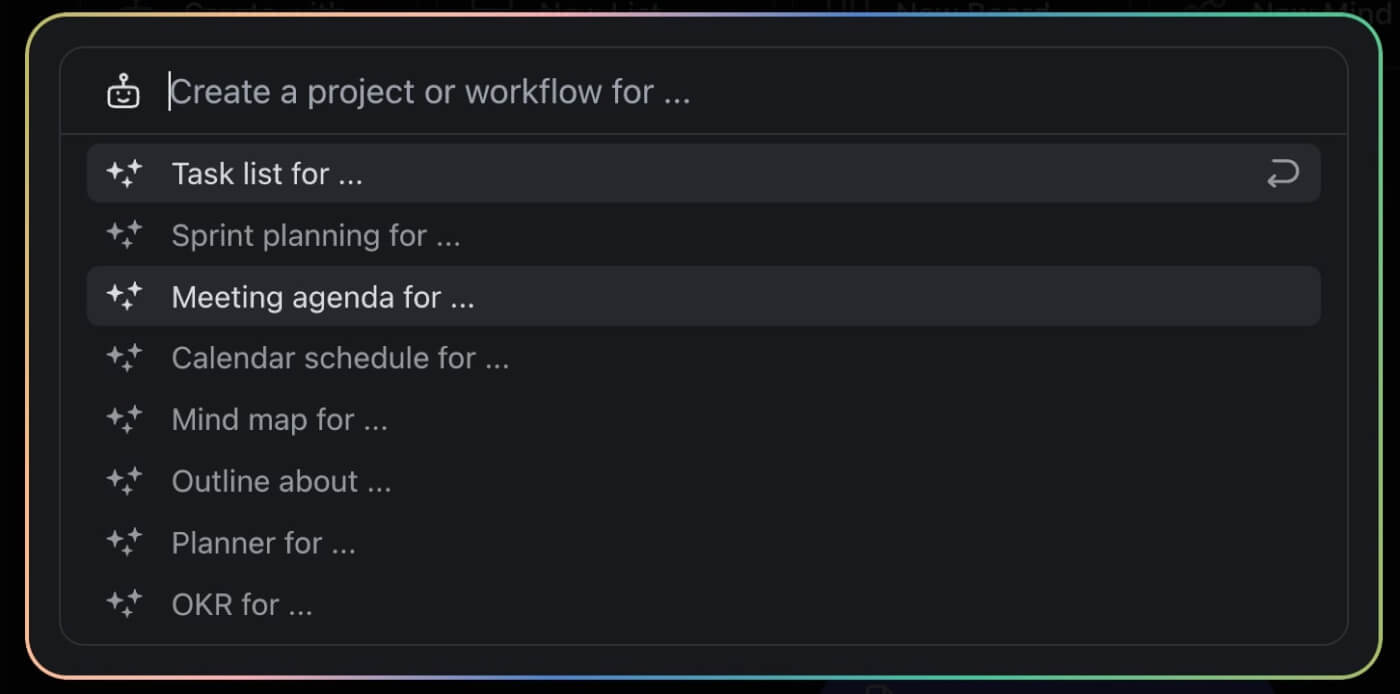
Next up is the AI Generator. Imagine you can describe your project in detail and watch the project structure magically appear on the screen, complete with tasks, deadlines, and even potential obstacles and solutions. Well, you don't have to imagine it anymore.
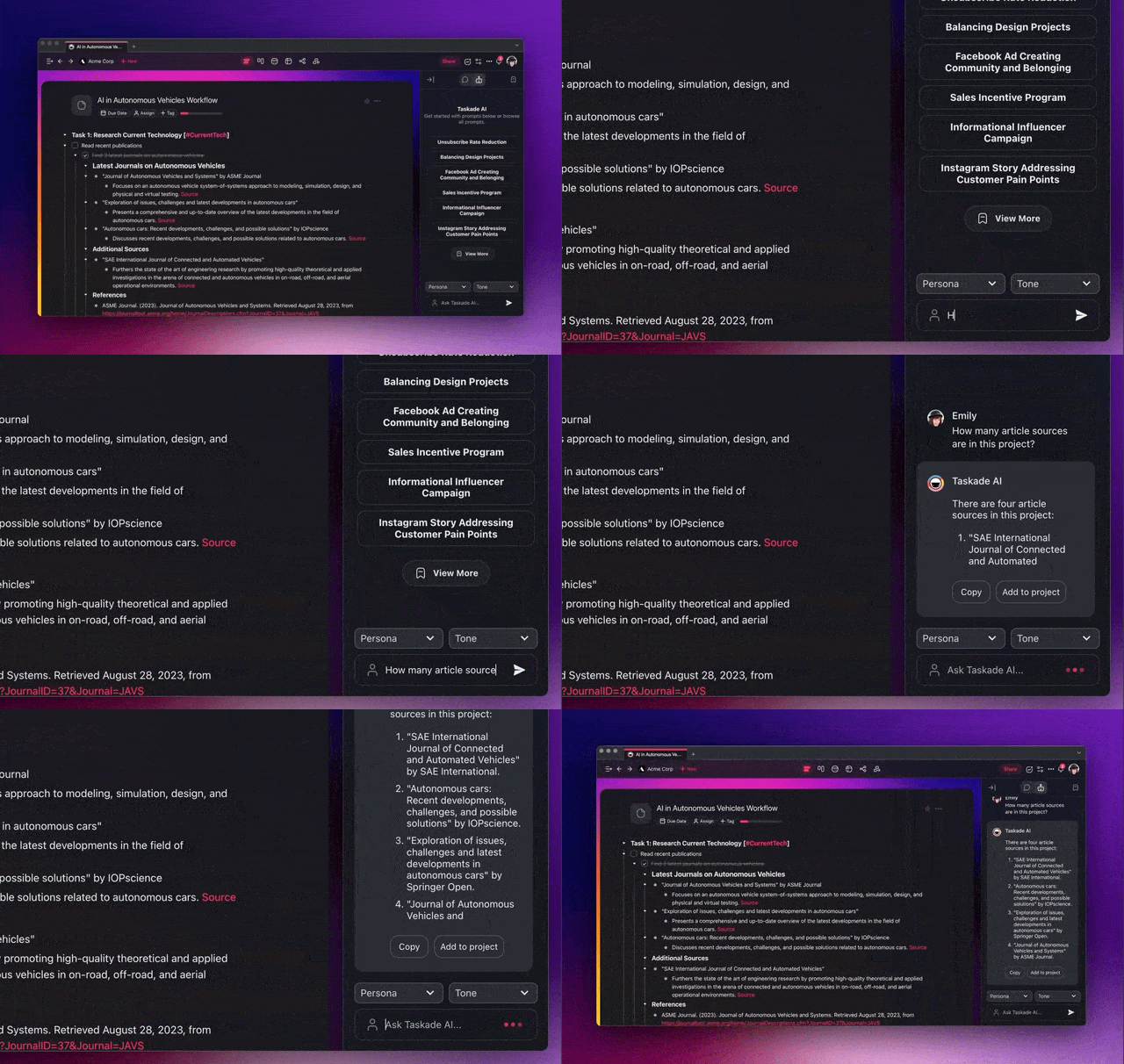
And if you get stuck, you can always ask the AI Chat for help. Thanks to the power of GPT-4, you can engage in productive conversations to brainstorm, troubleshoot, or clarify your ideas. The AI Chat acts as a diligent work partner, an expert advisor, and a trusty problem-solver.
Want to learn more? 🤩
🧬 Your Second Brain, Alive
While Notion and Obsidian store information, Taskade Genesis brings your knowledge to life. Build AI-powered applications from a single prompt — agents trained on your notes that can answer questions, execute tasks, and grow with you. It's called vibe coding, and it transforms your second brain into living software.
What Taskade Genesis gives you that Notion and Obsidian can't:
| Capability | Notion | Obsidian | Taskade Genesis |
|---|---|---|---|
| AI agents trained on your data | $20+/user/mo (Business plan) | Plugins only | ✅ Built-in, 22+ tools |
| Agents run while you sleep | ❌ | ❌ | ✅ Background agents (Pro+) |
| Build complete apps from a prompt | ❌ | ❌ | ✅ Living apps with custom domains |
| Automation workflows | Basic triggers | ❌ | ✅ 100+ integrations, durable execution |
| Knowledge sync frequency | Not documented | Local files only | Manual → Daily → Hourly → Real-time by plan |
| Project views | 4 (list, board, calendar, timeline) | Text + graph | 8 (List, Board, Calendar, Table, Mind Map, Gantt, Org Chart) |
| Publish to custom domain | $8-10/mo extra (Business+) | ❌ | ✅ Included on Pro ($16/mo for 10 users) |
| Community gallery | Templates (1.4M) | Community plugins | 150,000+ apps, agents, and workflows to clone |
| Persistent agent memory | Limited | ❌ | ✅ All models, all conversations |
| Pricing (10 users) | $200/mo (Business) | Free (local) | $16/mo (Pro, 10 users included) |
Your second brain shouldn't just store. It should think, act, and remember. Browse 150,000+ community-built apps or build your own from a prompt.
Sign up to build your second brain with Taskade AI! 🤖
🤖 Custom AI Agents: Create an AI-powered knowledge base, with agents that help capture, categorize, and retrieve information.
🪄 AI Generator: Use AI to structure and generate notes, documents, articles, and other types of content using natural-language prompts.
✏️ AI Assistant: Use AI to integrate new information into your knowledge system and ensure it's well-organized and readily accessible.
🗂️ AI Prompt Templates Library: Explore AI prompt templates specifically designed for knowledge capture and synthesis.
💬 AI Chat: Engage in conversational learning with AI. Probe deeper into topics, clarify doubts, or explore new ideas to expand your knowledge.
📄 Media Q&A: Use AI's analytical power to map out and understand the ideas and patterns in your documents, spreadsheets, and other resources.
And much more...

Frequently Asked Questions for Notion vs Obsidian
Is Obsidian better than Notion?
It depends on your needs. Obsidian excels in linking notes and offline use, while Notion is better for collaboration and database management.
What are the disadvantages of Obsidian?
Obsidian lacks built-in collaboration features and may have a steeper learning curve compared to Notion.
Is Obsidian really worth it?
Yes, if you prioritize offline access, local storage, and advanced note-linking.
Is Obsidian completely free?
Yes, Obsidian offers a free version, with optional paid features for additional functionality.
What app is better than Obsidian?
Taskade can be a better option than Obsidian for those seeking collaborative features, multiple project views, and advanced AI tools, in addition to robust task and project management capabilities.