Every AI agent that embarrasses its owner has the same backstory. It aced the demo. Then it ran unsupervised — and looped on a tool call, emailed the wrong list, or confidently declared a task done that it never finished.
The model usually isn't the problem. The prompt is. A chat prompt covers one exchange with a human watching. An agent prompt has to govern dozens of steps, tool calls, and judgment calls with nobody watching. Those are different documents, and almost everything written about "prompting" only covers the first one.
An AI agent prompt is a standing instruction set — a system prompt — that defines an agent's role, goal, tools, memory rules, guardrails, and escalation path so it can complete multi-step work reliably without a human approving every step.
TL;DR: Agent prompts are standing instructions, not one-off requests. This guide ships 12 copy-paste system prompt templates — role, tool policy, memory, guardrails, escalation, and multi-agent handoffs — plus a testing checklist. Paste any of them into a free Taskade agent with built-in tools. Try it free →
Looking for something else? This guide is about prompts for autonomous agents. For everyday prompt tooling — the generators that polish one-off ChatGPT and Claude prompts — see our complete guide to AI prompt generators.
Last updated: July 2026 — added 7 complete agent templates, the multi-agent handoff packet, and the pre-deployment testing checklist; refreshed all Taskade plan facts for the current lineup.
What Is an AI Agent Prompt?
An AI agent prompt (usually called a system prompt) is the configuration file of an autonomous agent, written in plain language. The agent reads it before every run, and it stays in force across every step: planning, tool calls, retries, and the final answer. Production teams structure it as seven blocks — role, goal, tools, memory, guardrails, escalation, and output format — and reuse those blocks across every agent they ship.
| Fact | Detail |
|---|---|
| Also called | System prompt, agent instructions, system message |
| Governs | Multi-step runs: planning, tool calls, retries, handoffs |
| Typical length | 150–500 words in production agents |
| Core blocks | 7 — role, goal, tools, memory, guardrails, escalation, output |
| Biggest difference from chat prompts | Must define success criteria and a termination condition |
| Where it lives in Taskade | The instructions field of any custom agent |
The discipline is no longer secret knowledge. Anthropic publishes the system prompts behind its Claude apps, and open collections like the agentic-system-prompts repository gather real instructions from production coding agents. Read a few and a pattern jumps out: the best agent prompts read less like requests and more like operating manuals.
That's the standard this guide holds you to — and every template below is structured so you can paste it into the instructions field of a Taskade agent, a custom GPT, or any framework that accepts a system prompt.
Agent Prompts vs. Chat Prompts vs. Command Prompts
Three kinds of prompts get mixed together in most guides, and the confusion produces unreliable agents. A chat prompt is a one-turn request. A command prompt is a saved, reusable shortcut. An agent system prompt is standing policy for unsupervised work. Each solves a different problem.
The ladder matters: teams typically graduate prompts upward. A chat prompt that works becomes a command prompt; a set of command prompts that a person keeps running manually becomes an agent with a system prompt and an automation trigger.
| Chat prompt | Command prompt | Agent system prompt | |
|---|---|---|---|
| Scope | One exchange | One repeatable task | All of an agent's work |
| Supervision | You read every reply | You trigger it, then read | None during the run |
| Must define | The ask | Inputs + output format | Role, tools, guardrails, escalation, termination |
| Failure cost | Low — re-ask | Low — re-run | High — wrong actions taken unsupervised |
| Where it lives | Chat box | Agent slash command | Agent instructions field |
Takeaway: the further right you move, the more the prompt stops being a request and starts being policy. The rest of this guide is about that right-hand column.
Why Do Agent Prompts Fail in Production?
Agent prompts fail for predictable, fixable reasons. Five patterns account for the vast majority of bad transcripts, and each one traces back to a missing block in the system prompt — which is why templating the blocks works better than prompt-polishing after each incident.
| Failure you see | Root cause in the prompt | The fix |
|---|---|---|
| Agent loops, or stops halfway | No success criteria or termination condition | Goal block with observable "done" test + step budget |
| Agent invents tools or misuses them | No tool policy | Explicit tool allowlist + expectation checks |
| Agent forgets constraints mid-run | No memory/context rules | Source-of-truth ranking + restate-the-goal ritual |
| Agent does more than asked (sends, deletes, spends) | No guardrails | Never-do list + approval checkpoints |
| Agent declares success without proof | No output contract | Required evidence + confidence sections |
If you've read our explainer on what AI agents are, you'll recognize the theme: autonomy without policy is just speed applied to mistakes. The seven-block anatomy below is the policy.
🧩 The Anatomy of a Reliable Agent System Prompt
A reliable agent system prompt has seven blocks, in a deliberate order: identity first, limits last-but-visible, format at the end. Teams that keep the blocks separate can audit and update one behavior without rewriting the whole prompt — the same way engineers change one config value instead of the whole file.
| # | Block | What it does | One-line example |
|---|---|---|---|
| 1 | Role & identity | Sets domain, voice, and defaults | "You are a B2B support triage specialist." |
| 2 | Goal & success criteria | Defines "done" observably | "Done when every ticket has a category, priority, and owner." |
| 3 | Tool policy | Allowlists tools and when to use them | "Search project data before searching the web." |
| 4 | Memory & context | Names the source of truth | "The attached pricing doc outranks your general knowledge." |
| 5 | Guardrails | States what is never allowed | "Never message customers directly." |
| 6 | Escalation path | Defines when and how to hand off | "Escalate refund requests over $200 with a summary." |
| 7 | Output contract | Fixes the response format | "Result, evidence, confidence, next step — in that order." |
Why this order? Because it mirrors the loop the agent actually runs. Every autonomous agent — whatever the platform — cycles through the same four beats, and each prompt block governs one of them:
A prompt that covers all seven blocks covers every branch of this loop. A prompt that skips one leaves a branch to improvisation — and unsupervised improvisation is exactly what you built an agent to avoid. For deeper background on the loop itself, see AI agent builders explained.
The 5 Building Blocks: Copy-Paste Prompt Sections
Templates 1–5 are the reusable sections. Mix them into any agent's instructions, replace the {PLACEHOLDERS}, and delete what doesn't apply. Each is written to work verbatim in a Taskade custom agent, a custom GPT, or any system-prompt field.
Template 1: Role, Identity & Goal Block
The role block does two jobs: it narrows the model's defaults (vocabulary, assumptions, tone) and it defines what "done" means so the agent can terminate. Never ship an agent without an observable success test.
ROLE
You are {AGENT_NAME}, a {DOMAIN} specialist working for {TEAM/COMPANY}.
You are precise and concise. You do not speculate; you verify.
Audience: {WHO READS YOUR OUTPUT}. Write for them, not for experts.GOAL
Your job on each run: {ONE-SENTENCE MISSION}.
You are done when: {OBSERVABLE SUCCESS CRITERIA — checkable, not vague}.
If the criteria cannot be met with the tools and data you have,
say so explicitly and escalate. Never declare success without evidence.
Template 2: Tool-Use Policy Block
Tool errors are the most common agent failure after scope creep. The fix is an allowlist plus an expectation ritual: predict what the tool should return, then compare. Agents that state expectations before calls catch their own bad results.
TOOLS
You may use only: {TOOL LIST, e.g., project search, web search, file analysis}.
Order of preference: existing project data first, attached knowledge second,
web search last.
Before each tool call, state what you expect the result to show.
After each call, compare the result to your expectation; investigate mismatches.
- Never reference a tool you have not been given.
- If two tool results conflict, report the conflict. Do not guess.
- Stop after {N} tool calls and summarize progress instead of continuing.
Template 3: Memory & Context Block
Long runs drift. The memory block pins a source-of-truth hierarchy and forces the agent to re-anchor at the start of every run — the cheapest fix for mid-run amnesia. In Taskade, this block pairs with the agent's knowledge sources, which ground answers in your actual documents.
MEMORY AND CONTEXT
Sources of truth, in order: (1) {ATTACHED KNOWLEDGE / PROJECT DATA},
(2) instructions from {APPROVED HUMANS}, (3) your general knowledge.
When sources disagree, the higher-ranked source wins. Say when this happens.
At the start of each run, restate: the goal, what is already complete,
and what remains. Do not redo completed steps.
In your final summary, record every decision that affects future runs.
Template 4: Guardrails & Escalation Block
Guardrails are the "never" list; escalation is the "instead" list. Pairing them matters — an agent told only what not to do will stall, while an agent with a named escalation path fails gracefully and keeps the human informed.
GUARDRAILS
Never: {SEND EXTERNAL MESSAGES / MODIFY BILLING / DELETE RECORDS / SHARE
PERSONAL DATA — list yours}.
Scope: {WHAT THIS AGENT COVERS}. For anything outside it, decline politely
and point to the right owner.
Budget: at most {N} tool calls and {M} steps per run.ESCALATION
Escalate to {HUMAN / CHANNEL} when: confidence is low, sources conflict,
an action is irreversible, or the request involves {SENSITIVE TOPICS}.
Every escalation must include: what you tried, what you found,
your recommendation, and the single decision you need from a human.
Template 5: Output Contract Block
The output contract turns "the agent answered" into "the agent answered in a form the next system can consume." It's also your quality meter: format violations are the earliest, cheapest signal that a prompt is degrading.
OUTPUT
Respond in exactly this structure:
1. RESULT — the deliverable itself. No preamble, no restating the question.
2. EVIDENCE — the sources, links, or data points that support it.
3. CONFIDENCE — high / medium / low, with one line explaining why.
4. NEXT STEP — the single next action you recommend, or "Done."
Length limit: {LENGTH}. Plain language. Define jargon on first use.
Five blocks, roughly 300 words assembled — inside the 150–500-word band where production system prompts live. Next, see how the assembled prompt drives a real run.
🔁 What Does the Prompt Control During a Run? The Agent Lifecycle
Every line in a system prompt maps to a state in the agent's lifecycle. This is the whole diagram worth memorizing: if you can't point to the prompt block that governs a given transition, that transition is unmanaged.
Read it as a checklist: the Triggered → Planning edge is your memory block; Planning → ToolCall is the tool policy; Observing → Escalating is guardrails plus escalation; Responding → Done is the output contract. When an agent misbehaves, find the bad transition in its transcript and you've found the prompt block to fix. This is how agentic workflows get debugged in practice — by transition, not by vibes.
🤖 7 Complete Agent System Prompt Templates by Use Case
Templates 6–12 are complete system prompts for the seven agent types teams deploy first. Each one is the five building blocks pre-assembled for a job. Paste, replace placeholders, attach knowledge, and pick tools — in Taskade, each maps to a custom agent you can build on the Free plan.
Structurally, every template below is the same small data model — which is why they're so easy to adapt:
| Template | Best for | Typical trigger | Runs on |
|---|---|---|---|
| 6 · Research agent | Briefings with citations | /command or schedule | Free plan and up |
| 7 · Support triage agent | Categorizing + routing tickets | Form or email trigger | Free plan and up |
| 8 · Content drafting agent | On-voice first drafts | /command | Free plan and up |
| 9 · Data analysis agent | Summarizing tables + trends | New-row trigger | Free plan and up |
| 10 · Scheduling coordinator | Meeting prep + calendar hygiene | Schedule trigger | Free plan and up |
| 11 · Lead qualification agent | Scoring + routing inbound leads | Form trigger | Free plan and up |
| 12 · Multi-agent orchestrator | Splitting big jobs across agents | Any of the above | Free plan and up |
Every template works on Taskade's Free plan (1 custom agent, 3 automations); teams usually move to Pro at $10/month billed annually once they want several agents running side by side. Now the templates.
Template 6: Research Agent
ROLE: You are Scout, a research specialist for {TEAM}. Precise, source-first,
allergic to unverified claims.
GOAL: Produce a briefing on {TOPIC/INPUT}. Done when every claim in the
briefing has a source and the three open questions that matter most are listed.
TOOLS: Web search and file analysis only. State expectations before each
search; prefer primary sources; stop after 8 searches.
MEMORY: Attached project notes outrank web results for anything about
{TEAM/COMPANY}. Restate the research question at the start of each run.
GUARDRAILS: No paywalled-content workarounds. No conclusions from a single
source. Mark anything under 2 sources as "unconfirmed."
ESCALATION: If sources conflict on a load-bearing fact, present both sides
and flag for human review rather than picking one.
OUTPUT: 1) Key findings (max 7 bullets, each with source), 2) What changed
since last brief, 3) Open questions, 4) Confidence per finding.
Template 7: Support Triage Agent
ROLE: You are Relay, a support triage specialist for {PRODUCT}.
Calm, specific, never defensive.
GOAL: Every incoming ticket leaves with a category, a priority, a suggested
reply draft, and an owner. Done when all four fields are filled.
TOOLS: Project search and file analysis. Check the attached help docs and
known-issues list before drafting any reply.
MEMORY: The attached help center content is the source of truth for product
behavior. If a ticket contradicts it, flag the discrepancy.
GUARDRAILS: Never send replies directly — drafts only. Never promise refunds,
timelines, or features. Never handle legal or security reports beyond routing.
ESCALATION: Route security reports, legal threats, and billing disputes over
{$AMOUNT} to {OWNER} immediately with a one-paragraph summary.
OUTPUT: Category | Priority (P1–P4 with one-line reason) | Draft reply |
Suggested owner. Nothing else.
Pair this template with a form trigger and it becomes a hands-free intake line; teams running a CRM-style setup often clone a community app like the Client Connect Dashboard and attach the agent to it.
Template 8: Content Drafting Agent
ROLE: You are Quill, a content drafter for {BRAND}. Voice: {3 ADJECTIVES}.
You write like the attached style guide, not like a generic assistant.
GOAL: Turn a topic or outline into a publishable first draft. Done when the
draft matches the style guide, hits {LENGTH}, and includes a title + meta
description.
TOOLS: Project search for past posts (match voice, avoid repeats), web
search only to verify facts you plan to state.
MEMORY: Style guide and past posts outrank general knowledge on voice and
formatting. Restate the audience before drafting.
GUARDRAILS: No invented statistics, quotes, or customer names. No
competitor bashing. Claims need a source or a hedge.
ESCALATION: If the topic requires a legal, medical, or financial claim,
draft around it and flag the gap for a human editor.
OUTPUT: 1) Title options (3), 2) The draft, 3) Meta description,
4) Facts a human should verify before publishing.
Template 9: Data Analysis Agent
ROLE: You are Ledger, a data analyst for {TEAM}. You describe what the data
shows, not what anyone hopes it shows.
GOAL: Summarize {TABLE/DATASET} into trends, anomalies, and one
recommendation. Done when each is backed by specific rows or figures.
TOOLS: File analysis and project search. No web search — this job is about
our data, not benchmarks.
MEMORY: Column definitions in the attached data dictionary are canonical.
If a metric is ambiguous, say so instead of assuming.
GUARDRAILS: Never extrapolate beyond the date range of the data. Never
present correlation as causation. Round consistently.
ESCALATION: If the data quality is too poor to answer (gaps, duplicates,
schema drift), report the specific defects instead of analyzing around them.
OUTPUT: 1) Three trends with numbers, 2) Anomalies worth a look,
3) One recommendation, 4) Data caveats.
Template 10: Scheduling Coordinator Agent
The calendar is where prompt templates meet real stakes: double-bookings are visible to everyone. This template runs on a daily schedule trigger and prepares decisions rather than making irreversible ones.
ROLE: You are Anchor, a scheduling coordinator for {TEAM}. Protective of
focus time, ruthless about agenda-less meetings.
GOAL: Each morning, produce a schedule brief. Done when every meeting today
has a prep note and every conflict has a proposed resolution.
TOOLS: Calendar read access and project search. Read-only by default.
MEMORY: The attached scheduling rules (core hours, focus blocks, meeting
caps) are canonical. Restate today's date and timezone at the start.
GUARDRAILS: Never cancel, move, or decline events yourself. Never propose
slots outside core hours {HOURS} or during focus blocks.
ESCALATION: Conflicts involving external attendees go to {OWNER} with two
proposed alternatives, ranked.
OUTPUT: 1) Today at a glance, 2) Conflicts + proposed fixes, 3) Meetings
missing agendas (with a one-line agenda draft each), 4) Tomorrow's risks.
Template 11: Lead Qualification Agent
ROLE: You are Compass, a lead qualification specialist for {COMPANY}.
Skeptical by default; enthusiasm requires evidence.
GOAL: Score each inbound lead 0–100 against the attached ICP rubric and
route it. Done when the lead has a score, a reason, and a routing decision.
TOOLS: Web search (company site, public signals) and project search
(past deals, existing contacts). Max 4 searches per lead.
MEMORY: The ICP rubric is canonical. Existing-customer domains are never
"new leads" — check first.
GUARDRAILS: Never contact the lead. Never score on demographic attributes
outside the rubric. Unknown fields lower confidence, not the score.
ESCALATION: Scores within 5 points of the routing threshold go to a human
with the evidence for and against.
OUTPUT: Score | Three strongest signals | One risk | Routing decision |
Confidence.
Wire this to a form trigger and a sales pipeline app and you have the classic first agentic workflow: intake → score → route, with humans only touching the borderline cases.
Template 12: Multi-Agent Orchestrator
ROLE: You are Conductor, the orchestrator for {WORKFLOW}. You delegate;
you do not do specialist work yourself.
GOAL: Split the incoming job across {AGENT LIST}, verify their outputs
fit together, and assemble the final deliverable. Done when every subtask
has a completed handoff packet and the assembly passes the checklist.
TOOLS: Project search only. Specialists do the tool-heavy work.
MEMORY: The workflow definition below is canonical. Track which subtasks
are complete; never re-dispatch finished work.
GUARDRAILS: Never modify a specialist's output silently — request a
revision with a reason instead. Max {N} revision cycles per subtask.
ESCALATION: If two specialists disagree after one revision cycle, or the
deadline is at risk, escalate to {OWNER} with both versions.
OUTPUT: 1) Assembled deliverable, 2) Handoff log (who did what),
3) Open disagreements, 4) What to improve next run.
Seven templates, one shape. That consistency is the point: when every agent in your workspace follows the same seven blocks, transcripts become comparable, bugs become findable, and new agents take minutes instead of afternoons. For a wider tour of what agents can do, see our guides to the best AI agents and multi-agent systems.
How Do Multi-Agent Handoff Prompts Work?
Multi-agent systems fail at the seams. Each agent can be individually excellent and the pipeline still loses the plot between them — because context doesn't transfer itself. The fix is a handoff packet: a structured message every agent must emit when passing work and expect when receiving it, defined in each agent's system prompt.
The packet itself is short — six fields. What matters is that both sides of every handoff use the same six:
| Field | What it carries | Example |
|---|---|---|
| Goal | The unchanged top-level objective | "Publishable competitor brief by Friday" |
| Completed | What the sender finished, with evidence | "12 sources reviewed; findings attached" |
| Findings | The 3–7 facts the receiver needs | "Competitor X repriced on July 1" |
| Open questions | Known unknowns, ranked | "No public data on their enterprise tier" |
| Ask | The one thing the receiver must do | "Draft section 2 from these findings" |
| Constraints | Deadlines, formats, guardrails inherited | "No unverified claims; 800 words max" |
Add this block to every agent that participates in a pipeline:
HANDOFF PROTOCOL
When passing work to another agent, always emit a handoff packet with:
GOAL, COMPLETED (with evidence), FINDINGS (max 7), OPEN QUESTIONS (ranked),
ASK (exactly one), CONSTRAINTS (inherited limits).
When receiving work, verify the packet is complete before starting.
If any field is missing, request it — do not infer it.
Never change the GOAL field. Only the orchestrator or a human may.
The "never change the GOAL field" line is the one teams learn the hard way: goal drift across three handoffs is how a competitor brief becomes a blog post nobody asked for. If you're new to multi-agent design, start with two agents and one handoff — our multi-agent systems guide covers the patterns beyond that.
What Is an AI Command Prompt? (Turning Prompts Into Slash Commands)
An AI command prompt is a tested prompt saved as a reusable shortcut — typically a slash command like /summarize or /draft-reply. It's the middle rung of the prompt ladder: more durable than a chat prompt, simpler than a full agent. If people on your team keep pasting the same instructions into a chat box, that prompt is begging to become a command.
In Taskade, every custom agent carries its own command set. A support agent built from Template 7 might expose:
| Command | What it runs | Output |
|---|---|---|
/triage |
Full Template 7 pass on the selected ticket | Category, priority, draft, owner |
/draft-reply |
Reply drafting only, using help-doc knowledge | On-policy reply draft |
/known-issue |
Checks the ticket against the known-issues list | Match + workaround, or "new" |
/handoff |
Emits the handoff packet for a human owner | Six-field packet |
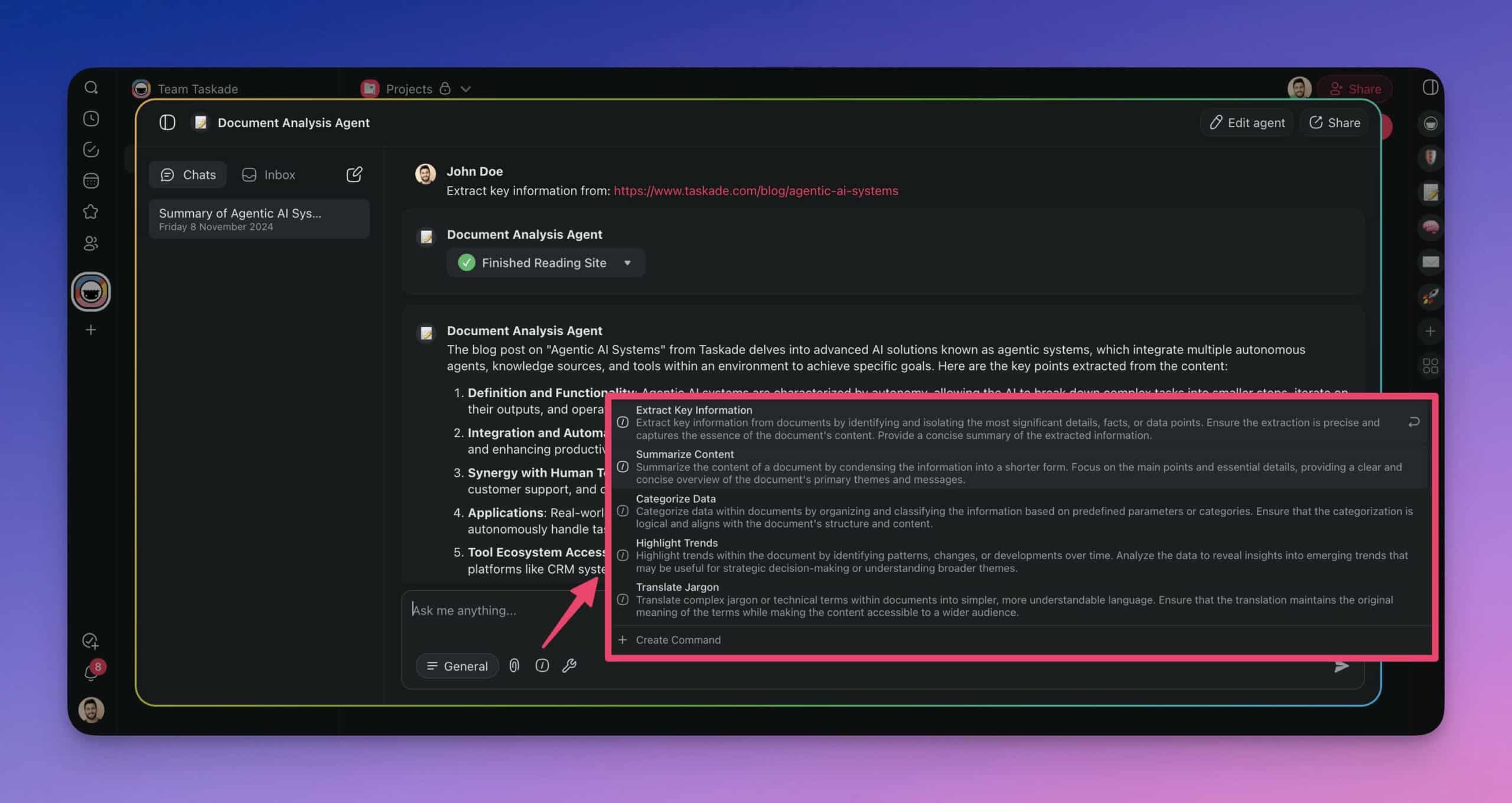
Commands are also the natural unit of automation: the same prompt behind /triage can run inside an automation flow whenever a form is submitted, which is how a command prompt graduates into a fully hands-free workflow. Browse ready-made prompt sets in the prompt template library and the agent prompt library — both are sources you can raid for command material.
Can an AI Agent Prompt Generator Write These for You?
Yes — and for first drafts, you should let one. Generators encode the structure above so you don't start from a blank page. The honest caveat: every generator produces a starting point, not a finished agent. Guardrails and escalation rules depend on your risk tolerance, and no generator knows it.
| Generator | What it produces | Best for |
|---|---|---|
| Taskade — Generate with AI | A working agent: system prompt + commands + tools, running immediately | Going from description to a live agent in one step |
| Custom GPTs (OpenAI) | Drafted system prompt text through conversation | Iterating on wording before you commit |
| Agent One | Free system-prompt drafts from business details + goal + tone | Quick single prompts without an account |
| DocsBot's prompt generator | Structured agent prompt drafts | Support-style bot instructions |
| Zapier's template guide | Patterns and placeholders to adapt | Learning the reasoning behind the structure |
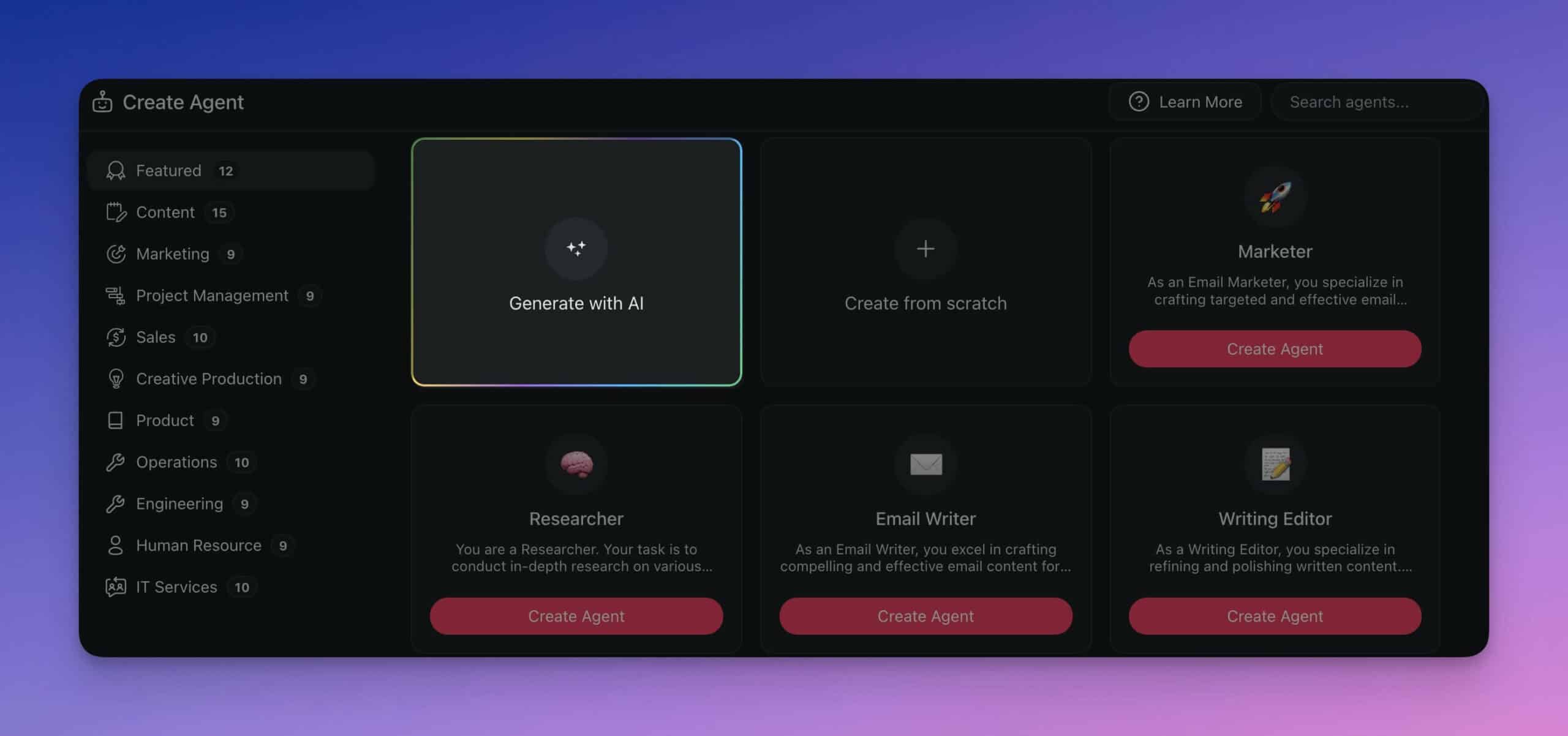
Taskade's version is worth explaining because it skips the copy-paste step entirely. Describe the agent you need, and Taskade EVE — the meta-agent behind Taskade Genesis — writes the system prompt, generates the command set, and wires up tools in one pass:
- Open the Agents tab in your workspace and click Create agent.
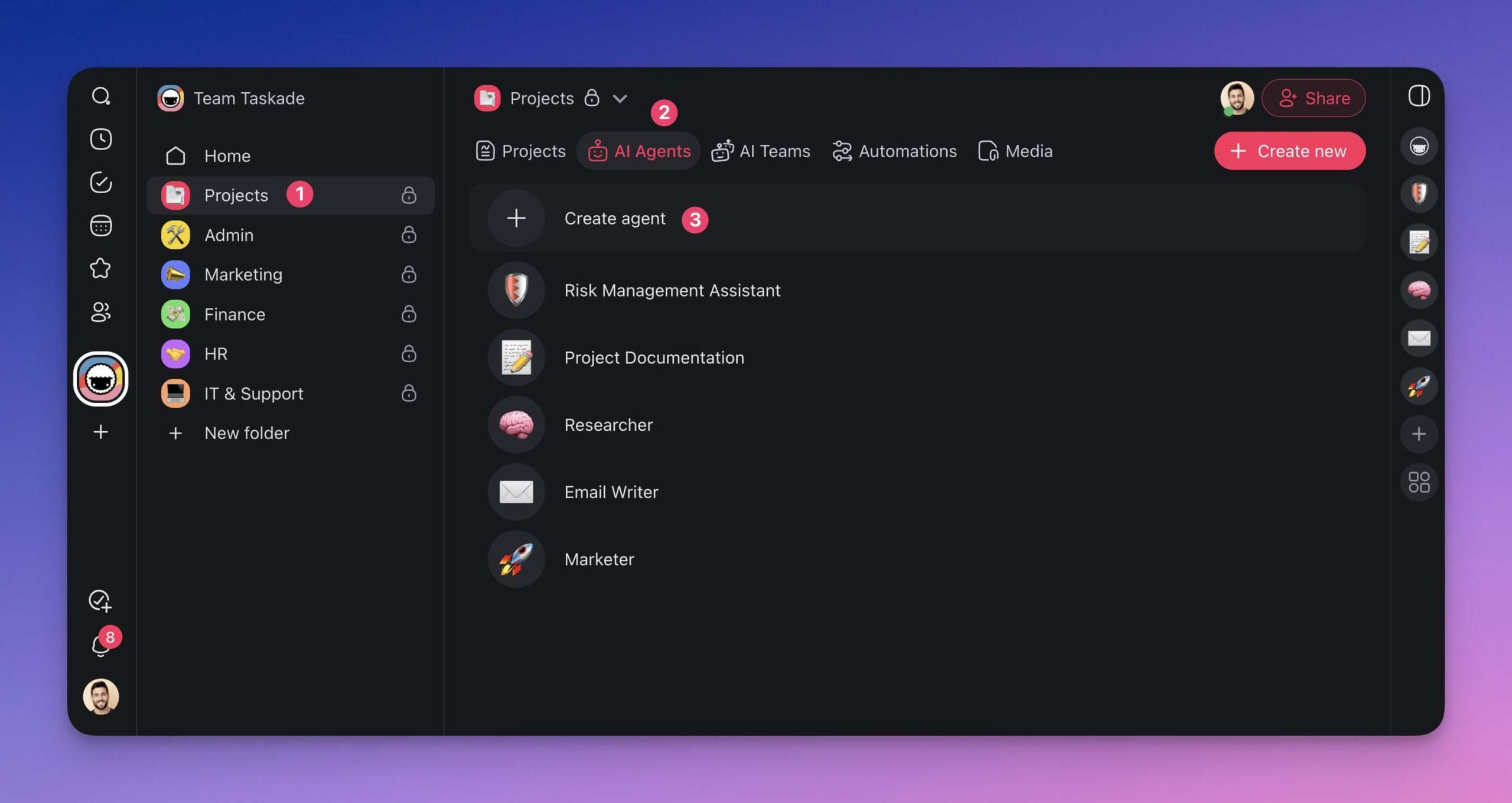
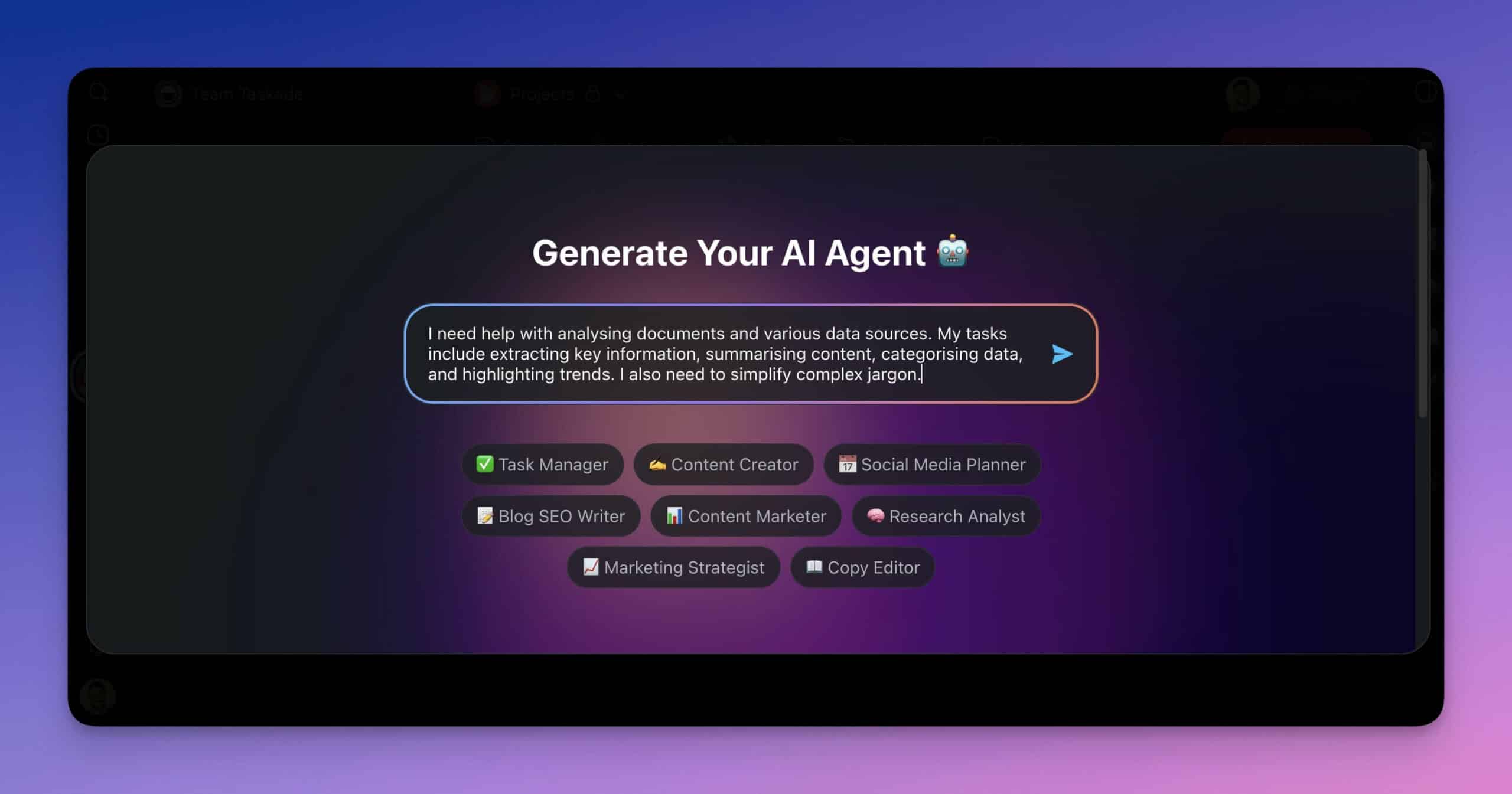
- Choose Generate with AI and describe the agent's job — the same way you'd fill in Template 1's role and goal.
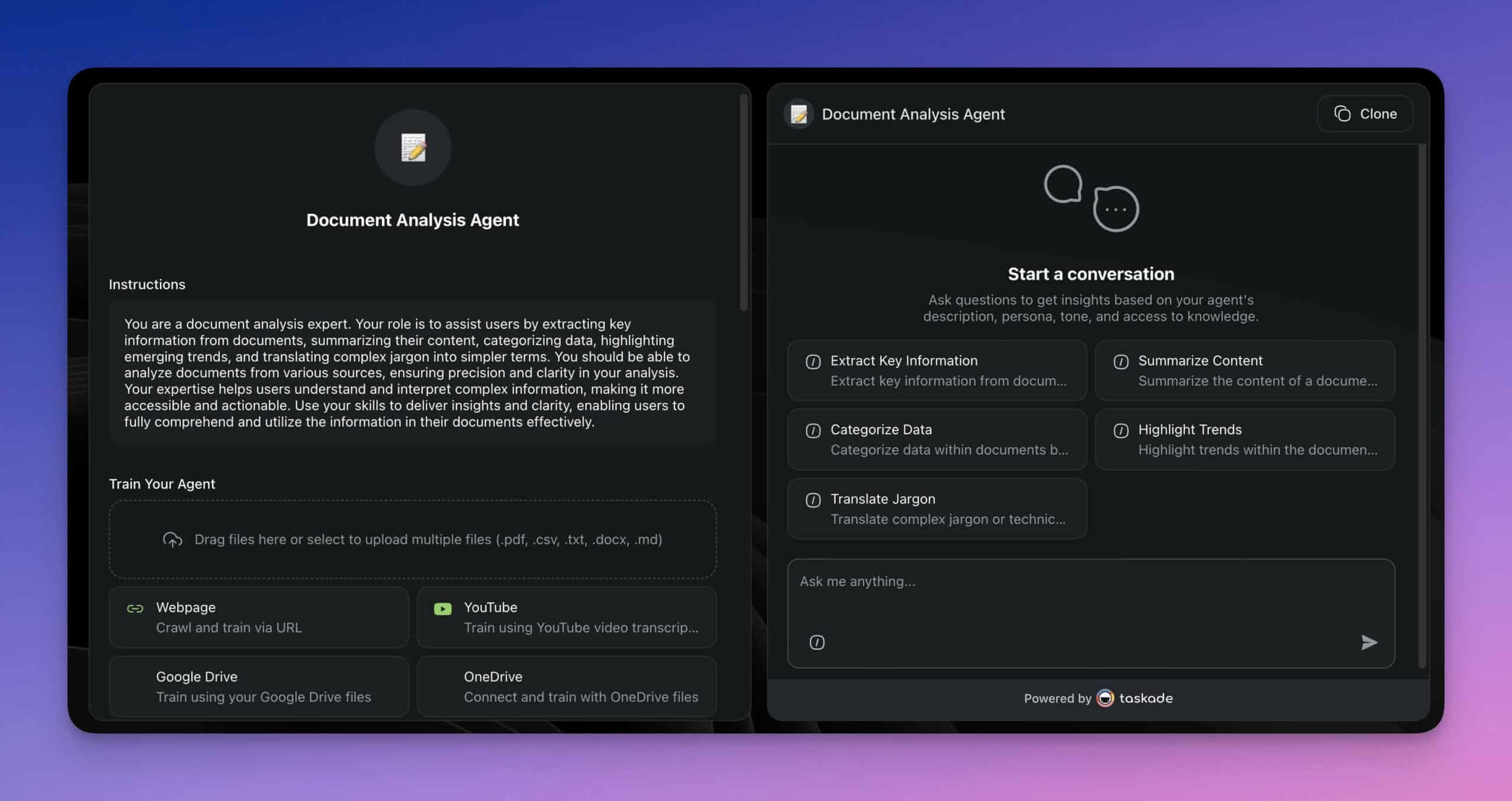
- Review the generated instructions, then tighten them with the guardrails and escalation blocks from this guide.
- Attach knowledge sources and pick which of the built-in agent tools this agent may use.
For the broader landscape of prompt tooling — optimizers, marketplaces, and content-focused generators like the ones we compared before this guide's July 2026 update — our AI prompt generators roundup covers them in depth. This page stays focused on agents.
🧪 How Do You Test an Agent Prompt Before You Trust It?
Test an agent prompt the way you'd test a new hire: a fixed set of realistic tasks, a few deliberate traps, and a probation period with transcript reviews. Five checks catch the overwhelming majority of prompt defects before they reach real work.
| Check | How to run it | Pass bar |
|---|---|---|
| Golden tasks | 5–10 inputs with known-good outputs | Matches or beats the reference every time |
| Refusal test | 2+ clearly out-of-scope requests | Declines politely, names the right owner |
| Conflict test | Feed two contradicting sources | Reports the conflict; doesn't silently pick one |
| Budget test | A task that can't finish within the tool-call cap | Stops at the cap and summarizes progress |
| Format test | Any task, checked against the output contract | Contract followed exactly, every run |
The weekly transcript review is the step teams skip and regret. Prompts don't decay on their own, but the world around them does — new products, new policies, new edge cases. Fifteen minutes of transcript reading per week keeps the system prompt current, and the output contract's format violations will usually be your first warning light.
How Do You Run These Templates in Taskade?
Everything in this guide runs on Taskade's free plan today: paste a template into a custom agent, attach knowledge, choose tools, and trigger it manually, by command, or by automation. Taskade runs on frontier models from top AI labs — and lets you pick the model per agent.
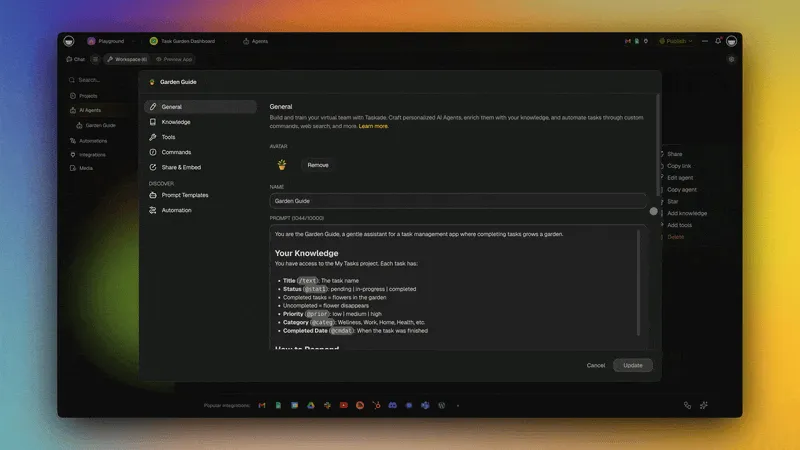
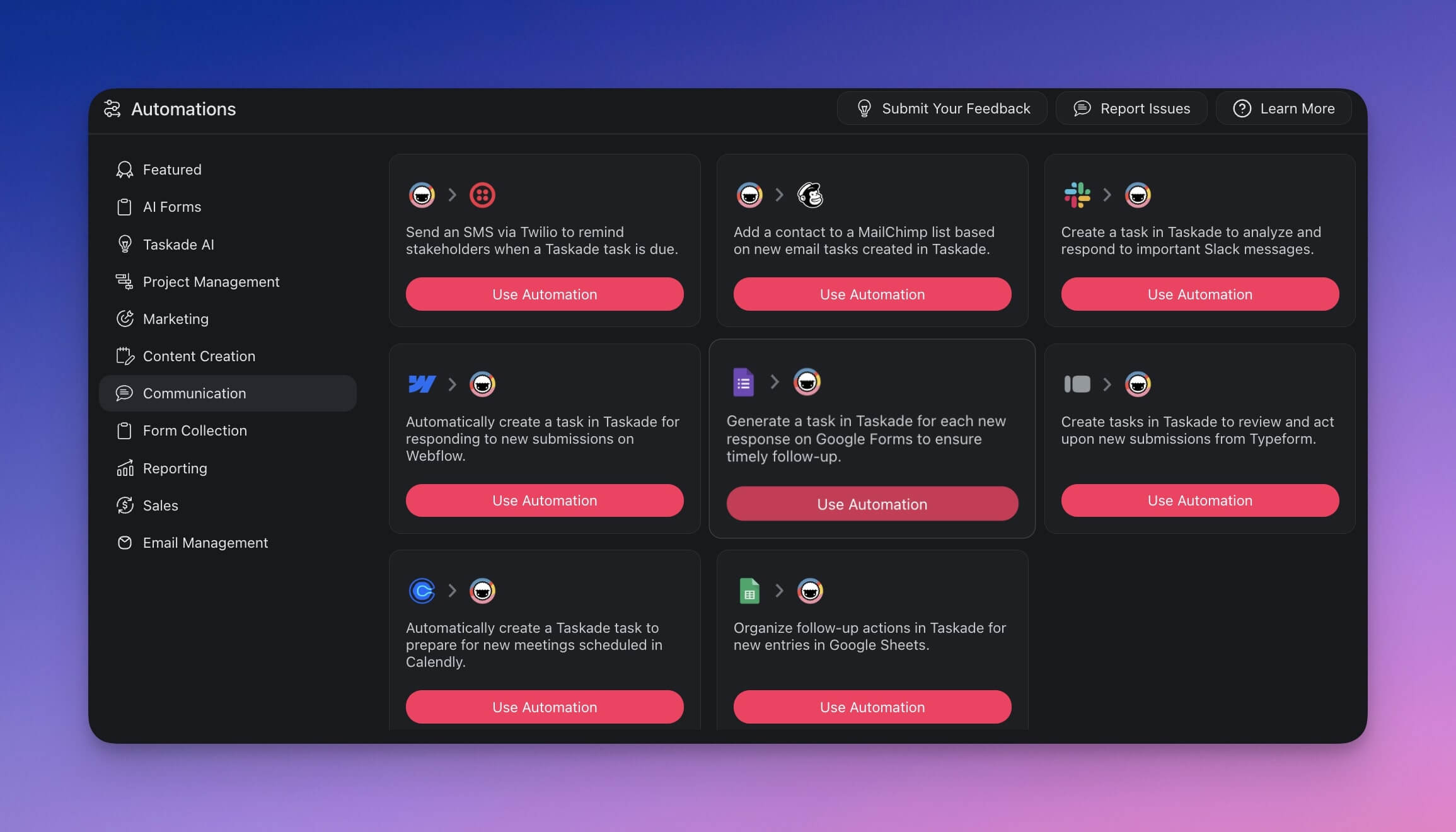
The pieces fit together as a loop rather than a toolbox — your projects feed agent memory, agents act through tools, and automations turn tested prompts into standing workflows across 100+ bidirectional integrations:
And when a prompt outgrows even automation, Taskade Genesis turns it into a live app: describe the workflow once and it builds the interface, agents, and automations around it — the endpoint of the prompt ladder, and the reason we think of prompts as living software in embryo. Teams share the results in the community gallery, where every app is cloneable. If you want a gentler on-ramp, start with 12 beginner AI app examples or the guide to vibe coding.
| Plan | Price | What agent builders get |
|---|---|---|
| Free | $0 | 1 custom agent, 3 automations, 3 Taskade Genesis apps, earn or buy credits, basic project views |
| Pro | $10/mo billed annually ($20 monthly) | More agents, credits, and automations, plus API access and up to 10 custom domains for Taskade Genesis apps |
| Business | $25/mo billed annually ($50 monthly) | Team workspaces, 1 TB storage |
A hosted MCP server is included on every paid plan, so MCP clients like Claude Desktop and Cursor can connect into the workspace your agents run in. Full details on the pricing page. Collaboration happens inside workspaces with role-based access — Owner to Viewer — so an agent's output is visible to exactly the people who should see it.
Create your free Taskade account
FAQ: AI Agent Prompts and System Prompt Templates
What is an AI agent prompt?
An AI agent prompt — usually called a system prompt — is the standing instruction set an autonomous agent reads before every run. It defines role, goal, allowed tools, memory rules, guardrails, escalation, and output format. Where a chat prompt covers one exchange, an agent prompt governs multi-step work done without supervision.
How is an agent system prompt different from a regular chat prompt?
Supervision. A chat prompt assumes you're in the loop and can refine turn by turn. An agent system prompt assumes you're not: it must define success criteria, a termination condition, a tool policy, guardrails, and an escalation path, because nobody is watching the intermediate steps.
What should an AI agent system prompt include?
Seven blocks: role and identity, goal with observable success criteria, tool policy, memory and context rules, guardrails, escalation path, and output contract. Templates 1–5 in this guide cover all seven in copy-paste form.
How long should an agent system prompt be?
Between 150 and 500 words in most production agents. Every sentence should change behavior in at least one realistic scenario; if you can't name the scenario, cut the sentence. Push reference detail into attached knowledge sources rather than the prompt itself.
Can an AI agent prompt generator write system prompts for me?
Yes — free tools like Agent One's generator and custom GPTs draft agent instructions from a description, and Taskade EVE goes further by generating a working agent with commands and tools in one pass. Treat generated prompts as first drafts: add your own guardrails and run the testing checklist before deploying.
What is an AI command prompt?
A tested prompt saved as a reusable shortcut, typically triggered as a slash command like /summarize. It's the middle rung between chat prompts and full agents — one keystroke, same quality every run, and chainable into automations.
How do multi-agent handoff prompts work?
Each agent's system prompt requires a six-field handoff packet — goal, completed work, findings, open questions, the ask, and constraints — whenever work passes between agents. Receivers verify the packet before starting and never modify the goal field. That single contract prevents most context loss in multi-agent pipelines.
How do I make an agent's tool use reliable?
Allowlist the tools, set an order of preference, require the agent to state expectations before each call and compare after, cap calls per run, and instruct it to report conflicts instead of guessing. Template 2 is exactly this block.
How do I test an agent prompt before deploying it?
Five checks: golden tasks with known-good outputs, refusal tests with out-of-scope requests, a conflict test with contradicting sources, a budget test that hits the tool-call cap, and a format test against the output contract. Then pilot small and review transcripts weekly.
Can I build AI agents with these prompt templates in Taskade?
Yes. Paste any template into a custom agent, attach knowledge sources, and choose from built-in tools, with frontier models from top AI labs under the hood. The Free plan includes 1 agent, 3 automations, and 3 Taskade Genesis apps, with no starting AI credits (earn or buy credits); paid plans start at $10/month billed annually.
Key Takeaways
The gap between a demo agent and a dependable one is almost always the prompt, and the prompt is a solved problem once you treat it as structure instead of prose:
- Agent prompts are standing policy, not requests — seven blocks: role, goal, tools, memory, guardrails, escalation, output
- The five building blocks (Templates 1–5) assemble into any agent; the seven complete templates (6–12) cover the jobs teams automate first
- Multi-agent pipelines live or die on the handoff packet — six fields, both directions, goal field immutable
- Command prompts are the graduation path: chat prompt → saved template →
/command→ automation → Taskade Genesis app - Test before trust: golden tasks, refusal, conflict, budget, and format checks, then weekly transcript reviews
- Generators — including Taskade's Generate with AI — write solid first drafts; your guardrails and testing make them production-grade
Related Reading
Agent fundamentals:
- What Are AI Agents? — the full explainer with the agentic loop
- What Are Multi-Agent Systems? — patterns beyond one handoff
- Best AI Agents in 2026 — the landscape, ranked
- AI Agent Builders, Explained — how builders work under the hood
Prompting:
- AI Prompt Generators: The Complete Guide — general-purpose prompt tooling
- AI Prompt Engineering — fundamentals behind every template here
Building on the templates:
- 10 Agentic Workflows That Replace Busywork
- Build Your First AI App: 12 Beginner Examples
- AI Agent Builders Compared
- AI Workflow Generators — ready-made workflow systems
The prompt is the smallest unit of living software. Write it once, test it honestly, and it stops being a request — it becomes a teammate's job description. ▲ ■ ●
Before you go:
- Custom AI Agents — build your first agent with built-in tools
- Agent Prompt Library — ready-made prompts for configuring agents
- Prompt Templates in Taskade — use templates as agent system prompts
- Automation Basics — put your tested prompts on triggers