







Updated September 2026. This guide was re-verified against vendor sources for a second time. PromptPerfect's shutdown, previously undated, now has a confirmed date: it stopped taking new signups in June 2026 and went offline September 1, 2026. Anthropic's Console prompt generator and improver remain undocumented, and OpenAI is still winding down reusable prompt objects ahead of the November 30, 2026 shutdown of
v1/prompts— both are now covered under Sources rather than as ranked entries. In their place, and in PromptPerfect's, three maintained free generators join the ranking: Jotform's AI Prompt Generator, SurePrompts, and Promptsera. Full citations are in the Sources list at the end.
Start Here: The Prompt Scaffold You Can Copy Right Now
The highest-return change you can make to any prompt is adding four missing parts — role, context, task, and format. No tool is required. Copy the block below, fill in the brackets, and paste it into ChatGPT, Claude, Gemini, or any other model. This is the same structure every generator in this guide is trying to produce for you.
You are a [role — e.g. senior product marketing manager].Context:
- [what you are working on]
- [who the audience is]
- [constraints: length, deadline, tone, what to avoid]
- [any facts the model cannot guess: names, dates, numbers]
Task: [one sentence, one verb — e.g. "Draft the launch email."]
Format: [exact output shape — e.g. "Subject line, 120-word body,
one call to action. Markdown. No preamble."]
Filled in, it looks like this:
You are a senior product marketing manager.Context:
- We launch a shared inbox feature next Tuesday.
- Audience is existing customers on paid plans, mostly ops leads.
- Tone: direct, no hype. Under 150 words. Do not use the word "excited".
- The feature is free on all paid tiers.
Task: Draft the launch email.
Format: Subject line, 120-word body, one call to action. Markdown.
Two more blocks handle most of the remaining cases. For reasoning work, append a thinking instruction:
Think step by step and show your working before the final answer.
For classification, extraction, or anything where consistency matters, add two or three examples:
Extract the company and role from each message.Input: "I'm a senior engineer at Stripe."
Output: {"company": "Stripe", "role": "senior engineer"}
Input: "Head of design, Figma."
Output: {"company": "Figma", "role": "head of design"}
Input: "I lead growth at Notion."
Output:
That is the whole technique. Everything below is about which tool applies it for you, stores it, and — in one case — runs it. If you want a thousand of these already written, the Taskade prompt library holds 1,800+ curated prompts across 48 categories, free on every plan including Free.
A note on "free, no login" generators
Several third-party sites generate a prompt without an account, and they are listed in the no-login table below. Taskade is not one of them. Browsing the 1,800+ prompt library is free and open with no account, but generating, saving, and running prompts inside a workspace requires a free Taskade account. We would rather say that plainly than send you to a signup wall you were not expecting.
What Is an AI Prompt Generator?
An AI prompt generator is a tool that helps you compose, store, refine, and reuse prompts for language and image models — turning a rough idea into a structured instruction the model can execute in one pass. Type a goal, get back prompt text with role, context, task, and format already filled in. In 2024 the category was mostly searchable libraries. In 2026 it has split into four shapes, and knowing which shape a tool is tells you most of what it can do.
A prompt library is a collection you browse and copy — PromptHero, prompts.chat, the official example galleries from model vendors. A prompt generator lets you author, test, and version prompts with templating and variables — Promptmetheus, LangSmith Prompt Hub. A prompt marketplace lets creators sell individual prompts with licensing — PromptBase is the canonical example. A prompt platform bundles all three and adds execution, so the prompt becomes something that runs; Taskade Genesis is the entry in this guide that sits there.
Knowing the shape prevents expensive mistakes: buying a marketplace license when you needed a library wastes budget, and picking a library when you need execution leaves prompts stranded in a tab forever.
Text, image, and code prompts are not the same shape
Text prompts reward structure and few-shot examples. Image prompts for Midjourney, DALL-E, and Stable Diffusion reward sensory detail plus weighted parameters like --ar 16:9 --stylize 250. Code prompts reward explicit types, constraints, and test examples. Most tools in this guide specialize in one shape, which is why "best prompt generator" has no single answer.
Prompt engineering versus context engineering
Prompt engineering is the craft of writing one good instruction. Context engineering is the discipline of assembling the whole environment the model sees — memory, documents, retrieved knowledge, tool definitions, and agent history — so that any decent prompt works. Our companion guide, Context Engineering for Teams, covers the full framework, and the context engineering field guide covers the practical patterns.
Why Structured Prompts Beat Ad-Hoc Prompts
Structured prompts beat ad-hoc prompts because they remove the model's guesswork. A structured prompt answers the four questions every model silently asks — who am I, what do I know, what do I do, what shape is the answer — before generation starts. Anthropic has published benchmark results showing that automated prompt restructuring alone measurably lifted classification accuracy, with no model change and no fine-tuning.
The mechanics are simple. An ad-hoc prompt like "write something about our product launch" forces the model to guess the audience, the length, the tone, and the format. Each guess is a chance to miss. A structured prompt makes those decisions explicit, so the model spends its capacity on quality instead of interpretation.
The left path is why ad-hoc prompting feels slow even on fast models: the time is not in generation, it is in your retries. Each failure you can see in an output maps to one missing component, which makes debugging a prompt mechanical instead of mystical:
| What you see in the output | What's missing | The one-line fix |
|---|---|---|
| Right facts, wrong voice | Role | "You are a [senior PMM / staff engineer / support lead]." |
| Confident but generic | Context | Paste the actual details: product, audience, dates, constraints |
| Does a different task than intended | Task | One sentence, one verb: "Draft the launch email." |
| Correct content, unusable shape | Format | "Return a subject line, 120-word body, one CTA link." |
| Skips reasoning, jumps to answer | Thinking instruction | "Think step by step before answering." |
| Inconsistent across runs | Examples | Add 2–3 input to output pairs (few-shot) |
The shape of the payoff, illustratively — each component you add removes one class of retry:
That chart is the entire business case for a prompt generator: the tool's job is to make the right-hand bar your default.
How We Ranked and Compared These Tools
We compared prompt generators on six criteria, then re-verified every entry's status against the vendor's own site in August 2026:
- Library depth — how many curated prompts are available out of the box.
- Model coverage — whether the tool works across OpenAI, Anthropic, Google, and image models.
- Authoring — variables, templating, evals, version control.
- Team features — sharing, permissions, and workspace integration.
- Execution — whether the prompt runs, or just sits in a library.
- Pricing — what the free tier genuinely includes, and the cheapest paid seat.
Two reference prompts you can run yourself
Feature lists are easy to fake; output is not. These are the two prompts we use to compare generators. They take about ten minutes to run across any shortlist and they expose most of the differences that matter.
Reference prompt A (text, no parameters):
You are a SaaS content strategist. Write a 120-word product launch
email for a new AI note-taking app called "Mira" aimed at busy founders.
Return a subject line, the body, and one CTA link.
Reference prompt B (image):
A minimal flat-illustration hero image of a founder at a standing desk
talking to a friendly AI assistant, warm pastel palette, soft lighting,
16:9. Optimize for Midjourney.
What to look for in each output:
| What to score | Why it matters |
|---|---|
| Did the tool return a usable result on the free tier? | "Free" has to mean free at the point of use, not a trial wall. |
| Was the text prompt model-tuned (GPT vs Claude vs Gemini phrasing)? | Model-specific tuning is a real 2026 differentiator. |
Did the image prompt include real parameters (--ar 16:9 --stylize)? |
A generator that drops the flags is not built for Midjourney. |
| What do you walk away with — a string, or something you can run? | This is the column most of the category skips. |
| Is the tool still maintained? | Four entries in this category changed status in the last year. |
That last row is not theoretical. Between the 2025 and 2026 versions of this guide, one tool went offline entirely, one began sunsetting, and two vendors stopped documenting their prompt tooling.
The TSK-1 Benchmark: The Grade That Counts
The ranking above scores the tools. The harder test is whether the underlying model can take one prompt and build a complete, working app from it. That is what the TSK-1 Benchmark grades — models build real apps, and we check whether the app opens and runs, whether it built what was asked for, whether it looks right, and whether the data actually saves. See the dated evidence at /tsk. Two findings that matter when a prompt has to produce something that runs:
- GPT-5.6 Luna sticks closest to your words — from early through mid-August it echoed all 32 questions of a real customer's client sign-up form word for word, and it was the only model that laid out neatly structured scoring rubrics (Aug 7, 2026).
- GLM-5.2 was the only model to decline an unrequested login wall (Jul 30, 2026) — correct behavior when the prompt never asked for one.
The 15 Best AI Prompt Generators in 2026
Here is the whole field on one map, grouped by the four shapes from the primer. A tool's family tells you most of what it can and cannot do before you read a word of the review.
1. Taskade Genesis — Best for Turning a Prompt Into a Working App
Taskade Genesis is the entry in this guide whose output is software rather than text. You describe what you want in one prompt box, and it assembles a running app — a dashboard, portal, form, or internal tool — using your workspace documents and memory as context. It runs on 15+ frontier models from OpenAI, Anthropic, and open-weight providers, with per-prompt model switching so you can compare answers and keep the winner.
The prompt side is the Taskade prompt library: 1,800+ curated prompts across 48 categories, each tagged by model and use case, one click from your projects. If you want a prompt written for you right now rather than picked from a shelf, the AI prompt generator does that in the browser, and the image prompt generator handles visual work. The agent builder layers a large built-in toolkit on top — web search, code execution, file analysis, custom slash commands — so a prompt can become a persistent teammate rather than a single reply.
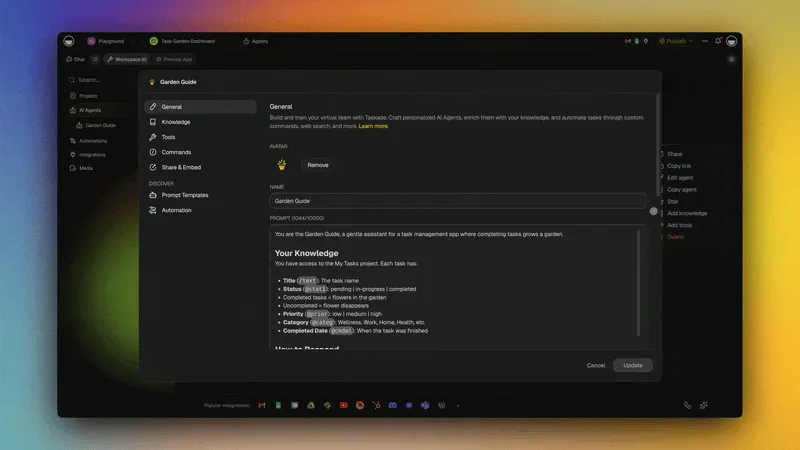
Here is a real Genesis app you can preview and clone. It is a Content Agent Chatbot kit — not a prompt generator, but a working example of what a prompt turns into on this platform: four projects, one AI agent, and three automations behind a shareable link.
Strengths: only entry whose output runs; 1,800+ curated prompts; 15+ models with side-by-side comparison; a large built-in toolkit; 100+ integrations; role-based access from Owner to Viewer.
Weaknesses: the library is smaller than PromptHero's user-submitted catalog; no anonymous no-login generator; image prompts are a newer section.
Pricing: Free (11,000 credits to start, up to 3 Taskade Genesis apps), then Pro $10/mo billed annually ($20 monthly), Business $25/mo, Max $100/mo, Enterprise $250/mo, all billed annually. Full ladder on the pricing page.
Best for: anyone whose real goal is the outcome, not the instruction.
2. PromptHero — Best Image Prompt Library
PromptHero hosts one of the largest public catalogs of user-submitted prompts, searchable by model and visual style, and it has shifted its focus toward AI image generation. The browse experience is free and its Midjourney and Stable Diffusion coverage is the reason most people bookmark it.
One licensing detail matters before you use anything from it commercially: creations made on PromptHero's free tier are all public, and licensed for personal use only. Paid plans change that. Read the terms before you put a free-tier output in a client deck.
Strengths: very large catalog; strong image coverage; free browsing; active community.
Weaknesses: authoring tools are basic; no workspace integration; no execution; free-tier creations are public and personal-use only.
Pricing: free to browse; paid plans add private generations and premium features.
Best for: finding a ready-made image prompt in a specific visual style.
3. prompts.chat — Best Fully Free Prompt Library
prompts.chat is the descendant of the original Awesome ChatGPT Prompts collection, and it is the cleanest genuinely free option in this guide: 100% free, open source, and self-hostable. There is no paid tier to graduate to and no account required to browse or copy. Prompts are organized by persona and task, with a searchable interface and a copy button on every entry.
Because it is open source, teams that cannot send prompts to a third-party service can run their own instance. That is a real advantage in regulated environments and one no commercial competitor here matches.
Strengths: completely free; open source; self-hostable; no account; broad persona catalog.
Weaknesses: no authoring or versioning tools; no team permissions; no execution layer.
Pricing: free.
Best for: copying a solid starting prompt in seconds, or self-hosting a library your team controls.
4. Google AI Studio — Best Official Free Surface for Gemini
Google AI Studio is the first-party place to write, test, and tune prompts for Gemini models, and Google states it is free of charge in all available regions. You get a prompt editor with system instructions, adjustable parameters, saved prompt history, and a direct path to API code once a prompt works.
For anyone building on Gemini, this replaces guesswork with the vendor's own defaults. It is also a reasonable free playground for comparing how the same structured prompt behaves at different temperature and token settings, which is hard to do inside a consumer chat interface.
Strengths: official Gemini tuning; free in available regions; parameter control; exports to API code.
Weaknesses: Gemini-only; developer-oriented interface; no team prompt library or permissions.
Pricing: free of charge in all available regions; you pay only for production API usage.
Best for: anyone whose primary model is Gemini.
5. AIPRM — Best ChatGPT Browser Extension
AIPRM injects a curated prompt catalog directly into the ChatGPT, Claude, and Gemini web interfaces, so templates are one click away inside the tab you already have open. It remains actively maintained — the extension was last updated 28 July 2026 and the vendor reports over one million users.
The one requirement to know: using it needs an AIPRM account in addition to your model account. The catalog skews heavily toward SEO and marketing templates, which is either the main draw or the main limitation depending on your job.
Strengths: zero setup inside your existing chat tab; large free catalog; actively maintained.
Weaknesses: browser extension only; requires an AIPRM account; SEO and marketing prompts dominate; no team workflows.
Pricing: free tier; paid plans above it, with AIPRM Plus around $10/month billed yearly.
Best for: people who live in the ChatGPT web UI all day.
6. PromptBase — Best for Selling and Licensing Prompts
PromptBase is the original prompt marketplace. Creators list text and image prompts, buyers license them, and the platform handles payment. It popularized the idea that a well-tuned Midjourney or GPT prompt is a sellable digital good, and it still leads the category on paid transaction volume.
There is also a sizable free section, which makes it useful as a library even if you never buy anything. Quality control is mixed by design — it is a marketplace, not a curated catalog — so read the sample outputs before purchasing.
Strengths: established marketplace; licensing and payments built in; strong Midjourney seller base; large free section.
Weaknesses: variable quality; not designed for team use; no workspace integration.
Pricing: free to browse; individual prompts typically sell in the low single-digit dollars, with a marketplace fee on sales.
Best for: selling prompts as standalone digital goods.
7. Originality.AI Prompt Generator — Best Free Generator That Also Runs the Prompt
Originality.AI ships a free prompt generator that does something most free tools do not: after generating a structured prompt, it can execute it against OpenAI, Anthropic, and Gemini models from the same page. That closes the copy-paste loop for a one-off task without opening another tab.
It is a single-page tool rather than a platform — there is no library, no versioning, and no team layer — but as a fast, free way to turn a rough idea into a structured prompt and see the result immediately, it is the most complete of the free web generators.
Strengths: free; structured output; executes across three model providers in place.
Weaknesses: no prompt library or storage; no versioning or team features; it is a lead surface for a separate content-detection product.
Pricing: the prompt generator is free.
Best for: a fast one-off prompt you also want to run immediately.
8. LangSmith Prompt Hub — Best for Developers
LangSmith Prompt Hub, part of LangChain's platform, versions prompts the way Git versions code, runs evals against datasets, and integrates with LangChain's agent framework. For teams building LLM apps in Python or TypeScript, it is the closest thing to prompts-as-code that feels native to the rest of their tooling.
The free tier is genuinely usable rather than a demo: the Developer plan is $0 per seat, limited to one seat, with 5,000 base traces per month. That is enough to version a real prompt set and run evals before you commit budget.
Strengths: prompt versioning; dataset-backed evals; strong observability; real free tier.
Weaknesses: assumes the LangChain ecosystem; not designed for non-developers; single seat on free.
Pricing: Developer $0/seat (1 seat, 5,000 base traces/month); paid plans above for teams.
Best for: LangChain-based engineering teams that treat prompts as production assets.
9. Promptmetheus — Best Prompt IDE
Promptmetheus is a full prompt-engineering IDE with variables, datasets, A/B testing, and cost tracking. It treats a prompt as a composable object you build from blocks, test across inputs, and measure — the closest thing in this guide to an editor built for prompts specifically.
Pricing is the caveat. We could not confirm a free tier beyond a trial: the cheapest named plan is $29/month, with a 7-day trial in front of it. Budget for it as a paid tool.
Strengths: IDE-grade authoring; datasets and A/B testing; cost tracking per variant.
Weaknesses: steep learning curve; overkill for simple prompts; no confirmable free tier.
Pricing: 7-day trial, then from $29/month; team tiers above.
Best for: prompt engineers who need measurement, not just storage.
10. Promptitude — Best for Chaining Prompts Into Workflows
Promptitude focuses on chaining prompts into multi-step workflows. You define inputs, outputs, and the transformations between steps, then call the finished chain through an API. It is roughly what a code framework offers, packaged as a product for people who do not want to write the orchestration themselves.
It is best understood as middleware: strong at turning a sequence of prompts into a callable endpoint, thin on library content and on the non-technical surfaces a broad team needs.
Strengths: visual chaining; API delivery; approachable for non-engineers.
Weaknesses: less mature than code frameworks for complex agents; limited prompt library; fewer integrations than a workspace platform.
Pricing: free starter tier; paid plans scale with usage.
Best for: small teams that want a prompt chain behind an API without writing orchestration code.
11. Snack Prompt — Best Social Prompt Feed
Snack Prompt is a prompt-sharing platform built around a social feed, tags, and creator follows. It favors curation over volume, and the interface is closer to a visual discovery app than a database. If you like finding prompts the way you find recipes — by scrolling and saving — this is the most pleasant option here.
The trade-off is depth. There is no versioning, no permissions model, and no execution, so it works better as a daily source of ideas than as the system of record for a team's prompts.
Strengths: clean interface; curated quality; free; creator feeds worth following.
Weaknesses: smaller catalog; no execution layer; no team features.
Pricing: free, with an optional paid upgrade.
Best for: a low-effort daily source of prompt ideas.
12. Jotform AI Prompt Generator — Best for Multi-Model, No-Login Prompts
Jotform's AI Prompt Generator takes a rough idea and returns a structured prompt tuned for the model you pick, with no account required and no daily cap beyond hourly rate limiting. It covers more ground than most single-purpose generators: ChatGPT, Gemini, Claude, and Ollama for text, plus Stable Diffusion, Flux, DALL-E, and Midjourney for images — and it adjusts prompt length automatically, giving shorter prompts to fast models like Claude Haiku or GPT-4o and longer, more detailed prompts to slower models like Claude Opus.
Strengths: free with no login; covers text and image models in one tool; length-aware tuning per target model; backed by an established company with a long product history.
Weaknesses: no saved prompt history or library without a separate Jotform account; not built for team permissions or versioning.
Pricing: the prompt generator itself is free and unlimited; Jotform's own paid plans start at $39/month ($34/month billed annually) for unrelated form and agent features.
Best for: a fast, no-login prompt for either a text model or an image model from one tool.
13. SurePrompts — Best for Template-Driven Prompt Building
SurePrompts builds expert-level prompts from plain English with no signup required to start, backed by a library of 330+ professional templates spanning writing, coding, marketing, and support use cases. A live preview updates as you fill in each field, so you can see the finished prompt take shape before you copy it out to ChatGPT, Claude, or Gemini.
Strengths: no signup needed to create a prompt; large template library; real-time preview while building; 30-day money-back guarantee on the paid tier.
Weaknesses: the free plan's built-in AI generator is capped at 3 prompts a month; the deeper template set and team workspaces are paid.
Pricing: Free (110+ templates, 3 AI generations/month, 100 saved prompts); Pro at $2.50/month billed annually for 200 monthly AI generations, 210+ premium templates, and team workspaces.
Best for: starting from a structured template rather than a blank generator box.
14. Promptsera — Best Free, No-Login Generator Across Text, Image, and Video
Promptsera is a fully free prompt generator with no login and no credit system, covering the widest model range of any tool in this guide: GPT-4, Claude 3, Gemini, DeepSeek, Mistral, and Llama 3 for text; Midjourney, DALL-E 3, Stable Diffusion, and FLUX for images; and Sora, Veo, Runway, and Kling for video.
Strengths: genuinely free with no login, no account, and no hidden credit system; the only tool in this guide that covers text, image, and video prompts together.
Weaknesses: no saved history or team features, since there is no account to attach them to; newer and less established than the vendor-native tools above it.
Pricing: free.
Best for: one free stop for a text, image, or video prompt with zero setup.
15. Taskade Prompt Library — Best Curated Library for Work Prompts
The Taskade prompt library is the in-product catalog that ships with every workspace: 1,800+ curated prompts across 48 categories, covering marketing, engineering, research, sales, operations, education, and creative work. Every prompt is tagged by model and use case and already shaped in the frameworks described later in this guide.
It is free to browse without an account and free to use on every plan, including Free. The difference from an open-web library is proximity: a prompt here is one click from the project, agent, or app you would paste it into, so it does not end its life in a clipboard.
Strengths: 1,800+ curated, framework-shaped prompts; free on every plan; browsable without an account; flows into agents and apps.
Weaknesses: smaller than PromptHero's user-submitted catalog; running prompts requires a free account.
Pricing: included with every Taskade plan, including Free.
Best for: work prompts you intend to reuse rather than read once.
AI Prompt Generator Comparison Matrix
All fifteen tools in one table. Prices are the cheapest paid entry point where we could verify it in August 2026; where a vendor's pricing shifts or is unpublished, the cell says so rather than guessing.
| Tool | Free tier | Cheapest paid | Models | Output you keep | Team features | Status |
|---|---|---|---|---|---|---|
| Taskade Genesis | 11,000 credits from verified signup and first build, plus activation milestones; 3 apps | Pro $10/mo billed annually | 15+ (OpenAI, Anthropic, open-weight) | A running app | Owner-to-Viewer roles | Active |
| PromptHero | Browse free; creations public, personal use | Paid plan for private use | Multi (image-led) | A prompt string | No | Active |
| prompts.chat | Fully free, open source | None | Model-agnostic | A prompt string | Self-host | Active |
| Google AI Studio | Free in all available regions | API usage only | Gemini | A tuned prompt + API code | No | Active |
| AIPRM | Free catalog (AIPRM account) | Plus ~$10/mo billed yearly | GPT, Claude, Gemini | A pasted template | Limited | Active |
| PromptBase | Free section | Per-prompt purchase | Multi | A licensed string | No | Active |
| Originality.AI | Free generator | n/a for this tool | OpenAI, Anthropic, Gemini | A string, executed in place | No | Active |
| LangSmith Hub | Developer $0 (1 seat, 5k traces/mo) | Paid team plans | Multi | A versioned string | Yes | Active |
| Promptmetheus | 7-day trial only | $29/mo | Multi | A tested string | Yes | Active |
| Promptitude | Free starter | Usage-based | Multi | A callable chain | Yes | Active |
| Snack Prompt | Free feed | Optional upgrade | Multi | A prompt string | No | Active |
| Jotform AI Prompt Generator | Free, no login, unlimited (rate-limited) | $39/mo (unrelated form features) | GPT, Claude, Gemini, Ollama, image models | A tuned prompt string | No | Active |
| SurePrompts | Free (110+ templates, 3 AI gens/mo) | $2.50/mo billed annually | Multi | A structured prompt | Team workspaces on Pro | Active |
| Promptsera | Free, no login, no credits | n/a | GPT-4, Claude 3, Gemini, DeepSeek, Mistral, Llama 3 + image/video | A prompt string | No | Active |
| Taskade prompt library | Free on every plan | Included | 15+ | A reusable prompt | Owner-to-Viewer roles | Active |
Two columns decide most buying choices. Free tier is no longer a differentiator — nearly every maintained tool ships a usable one, so price rarely settles the question. Output you keep does: thirteen of these hand you a string that you still have to paste, run, and rebuild next week. One hands you a callable chain. One hands you an app.
A fair caveat in the other direction: a few tools now run the prompt rather than only printing it. Originality.AI executes across three providers in place, and Google AI Studio runs and exports to code. Text is still where they stop, but the gap is narrower than it was a year ago.
Which Prompt Tool Do You Actually Need?
Most guides compare features. The better question is which tool finishes the job you have. This table maps common jobs to a starting point and the result you should have in roughly ten minutes.
| Your job | Best starting point | What you'll have in ~10 minutes |
|---|---|---|
| Get a better prompt right now, no account | The scaffold above, or prompts.chat | A structured prompt you paste anywhere |
| Write a month of social posts | Taskade prompt library marketing prompts | A drafted content calendar you can edit |
| Draft a sales follow-up sequence | A structured prompt plus an AI agent | A 5-email sequence an agent can send on a trigger |
| Build a client sign-up form or portal | Taskade Genesis | A shareable app with a database behind it |
| Generate product or brand images | prompts.chat, PromptHero | Ready-to-paste Midjourney or DALL-E prompts |
| Tune a prompt for Gemini specifically | Google AI Studio | A parameter-tuned prompt plus API code |
| Version prompts and run evals | LangSmith Prompt Hub | A versioned prompt set with a passing eval |
| Sell or license individual prompts | PromptBase | A listed prompt with usage licensing |
The same logic as a decision tree — start at the top with the job you actually have:
  WHICH PROMPT TOOL DO YOU ACTUALLY NEED?
  ───────────────────────────────────────
  What's the job?
  │
  ├─ Just write a better prompt now ──────▶  SCAFFOLD       → the block at the top of
  │                                                            this page (no account)
  │
  ├─ Browse for inspiration ──────────────▶  LIBRARY        → prompts.chat, PromptHero
  │
  ├─ Tune for one specific model ─────────▶  VENDOR TOOL    → Google AI Studio (Gemini),
  │                                                            Claude Cookbook (Claude)
  │
  ├─ Sell or license a prompt ────────────▶  MARKETPLACE    → PromptBase
  │
  ├─ Version & eval prompts like code ────▶  GENERATOR/IDE  → LangSmith, Promptmetheus
  │
  └─ Turn the prompt into something your ─▶  PLATFORM       → Taskade Genesis
     team can actually run
Free and No-Login Prompt Generators
The best free prompt generators need no account at all: type a rough idea and get a structured prompt back in seconds. These third-party tools do exactly that. All were reachable and re-verified in September 2026. Each returns a text string; none stores it for you.
| Tool | What it does | Login? | Watch for |
|---|---|---|---|
| prompts.chat | Open-source prompt library, copy any entry | No | A library, not a generator |
| QuillBot | One-box prompt rewriter for writing tasks | No | Writing-focused |
| Prompt Cowboy | Rough idea to detailed structured prompt | No | Text prompts only |
| Feedough | Unlimited free text prompts | No | Ad-supported page |
| TripleTen | Beginner-friendly guided prompt builder | No | Limited advanced controls |
| Originality.AI | Generates and executes across three providers | No | Lead surface for another product |
| Google AI Studio | Official Gemini prompt tuning | Google account | Gemini only |
| Jotform | Multi-model text and image prompts, length-tuned per model | No | Saved history needs a Jotform account |
| Promptsera | Text, image, and video prompts in one tool | No | Newer, smaller vendor |
| SurePrompts | 330+ templates, prompt builder with live preview | No (free tier) | AI generations capped at 3/month free |
To be explicit about our own product: Taskade does not offer an anonymous no-login prompt generator. The 1,800+ prompt library is free to browse without an account, and a free account — 11,000 credits to start, no card — is what unlocks generating, saving, and running prompts in a workspace. If a no-account text string is all you need, one of the tools above is the faster route, and the scaffold at the top of this page needs no tool at all.
How to Write Better Prompts
Picking a generator is half the work; the other half is knowing what to type. Most prompt advice reduces to a handful of named frameworks, and each one is a memory aid for the same idea: tell the model who it is, what it knows, what to do, and how to answer.
| Framework | Stands for | Best for | One-line example |
|---|---|---|---|
| APE | Audience, Purpose, Execution | Beginner default, most everyday tasks | "For busy founders, to drive signups, write a 120-word launch email." |
| RACE | Role, Action, Context, Expectation | Business deliverables | "As a CFO analyst, summarize this report for the board in 300 words." |
| CARE | Context, Action, Result, Example | Support and user-centered writing | "Given this ticket, draft a reply that resolves it; match this sample tone." |
| ROSES | Role, Objective, Scenario, Expected solution, Steps | Complex, multi-step work | "As a PM, plan a launch on a two-week runway; list the steps." |
| RISE | Role, Input, Steps, Expectation | Process and how-to docs | "As a technical writer, turn these notes into a step-by-step guide." |
| TAG | Task, Action, Goal | Quick one-offs | "Rewrite this subject line to lift open rate." |
| CLEAR | Context, Length, Examples, Audience, Role | Reports and summaries | "Reviewing a Q2 report; 300 words; data-first tone; audience is the CFO." |
Start with APE and graduate to RACE for business deliverables. All of them collapse back into the role-context-task-format scaffold at the top of this page, which is why that block is the only one worth memorizing. The Taskade prompt library ships 1,800+ prompts already shaped in these frameworks, so you copy a proven structure instead of reciting an acronym.
Chain-of-thought prompting
For reasoning tasks, append Think step by step before answering or ask the model to show its work. Chain-of-thought prompting measurably improves math, logic, and multi-hop reasoning on frontier models.
You are a data analyst. Given the CSV below, compute the week-over-week
change in active users. Think step by step and show your calculation
before the final number.
Few-shot examples
Few-shot prompting — giving two to five examples of input and desired output — is the highest-leverage single change for classification, extraction, and formatting tasks. Models anchor strongly to the examples, so their quality matters more than their quantity. The extraction block in the scaffold section is a complete few-shot example you can adapt.
Before and After: Worked Prompt Examples
The fastest way to internalize the scaffold is to watch the same request go from ad-hoc to structured. Four worked examples follow — one per major medium — each showing what most people type, the structured rewrite, and the single change that mattered most.
Writing: from "write a blog post" to a publishable draft
Before:
Write a blog post about time management for remote teams.
The model returns 800 generic words that could have been published in 2019 — no audience, no angle, no structure.
After:
You are a senior content strategist for a B2B SaaS blog.
Context: Audience is engineering managers running 5-15 person remote
teams. Our angle: meetings are not the problem, unowned decisions are.
Task: Write a 900-word post arguing that angle, with 2 concrete rituals
teams can adopt this week.
Format: H1, hook paragraph, 3 H2s, one takeaway box, no bullet spam.
What mattered most: the angle in the context block. Role and format tighten the output, but a stated point of view is what turns filler into an argument. The model mirrors the specificity you give it.
Coding: from "fix this function" to a reviewed patch
Before:
Fix this function, it's slow.
[pasted code]
The model guesses at the bottleneck, rewrites style along the way, and hands back code you now have to diff by eye.
After:
You are a senior backend engineer reviewing a Node.js service.
Context: This function processes 10k records per call. It currently
takes ~4s; target is under 500ms. We cannot add dependencies or
change the function signature.
Task: Identify the bottleneck, then return an optimized version.
Format: (1) One-paragraph diagnosis. (2) The patched function only —
no unrelated style changes. (3) A 3-case test plan proving parity.
What mattered most: the constraints and the demanded test plan. Code prompts fail on scope creep; fencing the change and requiring proof converts a rewrite into a review.
Images: from "a cool logo" to an art-directed description
Before:
A cool minimalist logo for my productivity app.
After (Midjourney):
Flat vector logo mark for a productivity app called "Mira": a single
origami paper crane mid-fold, geometric, two-color palette (deep
indigo #2B2D64 + warm coral), generous negative space, centered on
white, no text, no gradients --ar 1:1 --stylize 180 --no photorealism
What mattered most: replacing adjectives with decisions. "Cool" and "minimalist" ask the model to art-direct; the after-prompt does the art direction — subject, geometry, palette, negative space — and uses --no to fence off failure modes. The same principle works in DALL-E and Stable Diffusion without the flags: describe the picture, not your feelings about it.
Agents: from "help with my inbox" to a working teammate
Before:
You are an email assistant. Help me manage my inbox.
An agent instructed this way replies conversationally. It has a persona but no job, no tools, and no idea when it is done.
After:
You are a triage agent for a customer support inbox.
Context: We promise first response within 4 hours. Categories:
billing, bug, feature request, spam. Billing and bugs are urgent.
Task: For each new email — classify it, draft a reply in our voice
(warm, direct, no corporate filler), and flag urgent items.
Tools: You may search the help center and read the customer's plan.
Stop condition: Never send without human approval; queue drafts instead.
Format: Return category, urgency, and the draft, as three labeled fields.
What mattered most: tools and the stop condition — the two lines that do not exist in chat prompting. An agent prompt is a job description: what it may touch, and where its authority ends. This is the shape Taskade's agent builder expects, which is why a prompt written this way drops into a working agent without a rewrite.
| Use case | The line that does the heavy lifting | Failure it prevents |
|---|---|---|
| Writing | A stated angle in the context block | Generic, publish-nowhere drafts |
| Coding | Constraints plus a required test plan | Scope creep and unverified patches |
| Images | Decisions instead of adjectives | The model art-directing at random |
| Agents | Tools plus a stop condition | A chatbot cosplaying as an agent |
10 Copy-Paste Prompts for 2026
The best free AI prompts are structured ones, and there are more of them available at no cost than most people realize. The Taskade prompt library ships 1,800+ curated, framework-shaped prompts free on every plan. prompts.chat is fully free and open source. PromptBase runs a large free section. Google, OpenAI, and Anthropic all publish official prompt examples free.
| Free source | What you get free | Best for |
|---|---|---|
| Taskade prompt library | 1,800+ curated, framework-shaped prompts across 48 categories | Work prompts you intend to reuse |
| prompts.chat | The full open-source catalog | Personas and general-purpose starters |
| PromptBase free section | Thousands of community prompts | Volume browsing, image prompts |
| PromptHero | Large user-submitted catalog, free to browse | Midjourney and image styles |
| Official vendor examples | Model-tuned examples from Google, OpenAI, Anthropic | Matching a specific model's phrasing |
| The ten prompts below | Copy-paste, model-agnostic | Starting right now |
The ten below are model-agnostic — the same text works in GPT, Claude, and Gemini. Replace the bracketed parts.
| # | Use case | Prompt name |
|---|---|---|
| 1 | Marketing | Product launch email |
| 2 | Writing | Blog outline from a keyword |
| 3 | Engineering | Code review checklist |
| 4 | Operations | Meeting notes to action items |
| 5 | Research | Paper synthesis |
| 6 | Sales | Outbound email personalization |
| 7 | Design | Brand voice generator |
| 8 | Product | Feature write-up from a user interview |
| 9 | Support | Knowledge base article |
| 10 | Strategy | SWOT analysis from a company URL |
1. Product launch email
You are a senior product marketing manager.
Context: [product name] launches [date]. Key features: [list].
Task: Write a launch email to existing customers.
Format: Subject line, 120-word body, one CTA link.
2. Blog outline from a keyword
You are an SEO content strategist.
Context: Target keyword is "[keyword]" with intent [informational / commercial].
Task: Produce a 1,500-word blog outline that can rank on page one.
Format: H1, 8 H2s, 2-3 H3 bullets under each, and a meta description.
3. Code review checklist
You are a senior staff engineer.
Context: Reviewing a [language] pull request that [summary of change].
Task: Produce a checklist for the reviewer covering correctness, tests, performance, and security.
Format: Markdown checklist grouped by category.
4. Meeting notes to action items
You are an operations lead.
Context: Below is a raw meeting transcript.
Task: Extract action items with owner and due date.
Format: Markdown table with columns Owner, Action, Due.
5. Research synthesis
You are a research analyst.
Context: Three abstracts are provided.
Task: Produce a synthesis with agreements, disagreements, and open questions.
Format: Three labeled sections, 100 words each.
6. Outbound email personalization
You are a senior SDR.
Context: Prospect: [name, title, company]. Recent trigger: [signal].
Task: Draft a 90-word cold email that references the trigger.
Format: Subject, body, CTA.
7. Brand voice generator
You are a brand strategist.
Context: Company sells [product] to [audience].
Task: Produce a brand voice guide.
Format: Three adjectives, three "we are / we are not" lines, and one sample paragraph.
8. Feature write-up from a user interview
You are a product manager.
Context: Transcript of a user interview is below.
Task: Draft a feature write-up.
Format: Problem, user, solution, scope, non-goals, risks.
9. Knowledge base article
You are a technical writer.
Context: Feature [name] ships next week.
Task: Draft a help center article.
Format: Title, summary, step-by-step, troubleshooting, related links.
10. SWOT analysis from a company URL
You are a strategy consultant.
Context: Target company homepage is [url].
Task: Produce a SWOT analysis.
Format: Four quadrants, three bullets each, plus a one-sentence summary.
What Is the Best ChatGPT Prompt Generator?
The best ChatGPT prompt generator depends on where you want the prompt to live. If you work inside the ChatGPT web tab all day, AIPRM is the strongest pick — it injects a large template catalog directly into the interface, with a free tier and paid plans from about $10/month billed yearly. For a free one-off with no account, QuillBot and Originality.AI both return a structured, ChatGPT-ready prompt in seconds.
| If you want... | Best ChatGPT prompt generator | Cost |
|---|---|---|
| Templates inside the ChatGPT tab | AIPRM browser extension | Free; Plus from ~$10/mo billed yearly |
| A free one-off prompt, no login | QuillBot or Originality.AI | Free |
| An open-source library you can self-host | prompts.chat | Free |
| Prompts you reuse across a team | Taskade prompt library | Free on every plan |
| The prompt as a running app | Taskade Genesis | Free plan; Pro $10/mo billed annually |
One nuance worth knowing: a "ChatGPT prompt" is just a well-structured prompt. The same role-context-task-format scaffold works word for word in Claude and Gemini. Tools marketing themselves as ChatGPT-specific are mostly distributing through ChatGPT's audience, not doing anything GPT-exclusive. The genuine exceptions are vendor-native surfaces like Google AI Studio for Gemini, which tune phrasing and parameters for one model family.
Image and Video Prompt Generators
Prompt generation in 2026 is no longer text-only, and the grammar changes with the medium. Image prompts reward sensory detail plus weighted parameters: a Midjourney prompt appends flags like --ar 16:9 --stylize 250 --chaos 20 after the scene description, while DALL-E and Stable Diffusion lean on plain description and negative prompts.
Video prompts flip the grammar again. Sora-class models respond better to a natural-language storyboard — scene, camera motion, lighting, pacing, duration — than to a list of flags. Describe the shot the way you would describe it to a cinematographer: "slow dolly-in on a founder at a standing desk, warm morning light, 8 seconds, cinematic."
| Medium | What the prompt rewards | Best starting points |
|---|---|---|
| Image (Midjourney) | Sensory detail plus --ar, --stylize, --chaos flags |
prompts.chat, PromptHero |
| Image (DALL-E / Stable Diffusion) | Description plus negative prompts | PromptHero, Taskade prompts |
| Video (Sora and similar) | Natural-language storyboard: scene, camera, lighting, duration | Scene-description prompting, Taskade prompts |
One licensing reminder for commercial work: PromptHero's free-tier creations are public and licensed for personal use only. Check any image source's terms before a client deliverable.
Every generator on this page starts from a rough idea and writes a prompt forward. The reverse direction — starting from an image you already have and reconstructing the prompt that could have made it — is its own skill; see image prompt generators for tools that reverse-engineer a prompt from a picture.
Prompt Engineering Is Becoming Context Engineering
The biggest shift in 2026 is that prompt engineering as a standalone discipline is shrinking. Frontier models are good enough that a decent prompt works most of the time. What moves the needle now is context — the documents, memory, tools, and agent history surrounding the prompt. The category has moved through five phases in four years:
A 2024 workflow was "write a great prompt, paste it into ChatGPT." A 2026 workflow is "define the context pipeline, attach the tools, pick the model, press run." The prompt is still there, but it is a small part of the whole setup. That is also why four entries in this guide changed status in a year: standalone prompt tooling is being absorbed into the surfaces where the work happens.
In a workspace, context has three layers that feed each other — Memory (your projects, notes, and decisions), Intelligence (AI agents with a large built-in toolkit — web search, code, file analysis, and more — that acts on what memory knows), and Execution (automations and 100+ integrations that ship the result and write it back to memory).
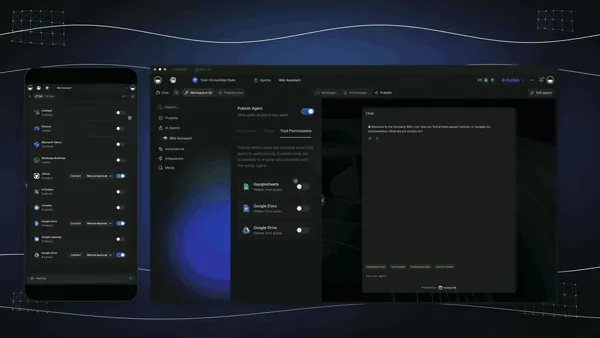
This is the practical end state: an agent built from one prompt can plan, call tools from its built-in toolset, and verify its own work before handing back a result. The full framework is in Context Engineering for Teams.
Prompt Generator Buying Guide for Teams
Choosing a prompt tool at team scale is different from picking one for yourself. Four questions settle most evaluations.
Does it live where work already happens? Proximity is the single biggest predictor of adoption. A prompt library behind a separate login is ignored within a month; one inside the same workspace as projects, docs, and chat gets used daily.
How does it handle permissions? A team past 50 seats needs them. Can a marketing manager publish a prompt only the marketing team sees? Can a legal prompt be locked to one role? Taskade's role-based access, from Owner down to Viewer, maps onto prompt sharing directly. Most open-web prompt libraries have no permissions at all.
What is the eval story? If prompts sit in revenue-generating work, you need to know when one regresses. LangSmith Prompt Hub and Promptmetheus lead here. Tools with no eval story are fine personally and risky at team scale.
Does it lock you in? Export is the test: can you pull your prompt library out as JSON or markdown on demand? OpenAI's own prompt-object deprecation is a live example of why owning your prompt text matters more than where you store it.
Where Prompt Generation Is Going in 2027
Standalone prompt tools are consolidating into the surfaces where work happens. Three shifts are visible in the 2026 status changes above.
- Vendor tooling absorbs generic optimizers. Model vendors ship their own tuning surfaces, and the independent optimizer category shrinks — one retirement and two deprecations in a single year is the clearest signal.
- Evals become table stakes. Running a prompt without an eval will feel like shipping code without a test, and buyers will ask about eval coverage in procurement.
- Multi-agent choreography replaces single prompts. One prompt kicks off a team of agents that delegate to each other — a planner splits the goal, workers run tools, a reviewer checks the output. This is already how multi-agent collaboration works in practice.
What We Found
If you want a free open-source library, use prompts.chat. If you want image prompts, use PromptHero or prompts.chat and check the licensing. If you build on Gemini, use Google AI Studio. If you live in the ChatGPT tab, use AIPRM. If you version prompts like code, use LangSmith Prompt Hub. If you want to sell prompts, use PromptBase. And if you want the prompt to stop being text — to become an app your team opens, with agents and automations attached — use Taskade Genesis.
Whichever you pick, the scaffold at the top of this page does most of the work. Structure is the part that transfers between tools; everything else is storage. Write the structure once, and let your workspace do the remembering. ▲ ■ ●
Create a free Taskade account and turn your next prompt into something that runs — 1,800+ prompts included, 11,000 credits to start, no card required.
FAQ
How do I write a good AI prompt?
Give the model four things: a role, the context it needs, one clear task, and the exact output format. Add two or three examples for classification or extraction work, and ask it to think step by step for reasoning tasks. Avoid vague adjectives like "good" or "better," and always state the output shape you expect — JSON, a table, or a checklist. The scaffold at the top of this page is a copy-paste version.
What is the best AI prompt generator in 2026?
There is no single best AI prompt generator — pick by job. prompts.chat is the best free open-source library, Google AI Studio is the best official free surface for Gemini, AIPRM is the best in-tab ChatGPT extension, and LangSmith Prompt Hub is the best developer option with versioning and evals. Taskade Genesis is the best pick when you want the prompt to become a working app rather than a text string, with 15+ frontier models and a large built-in toolkit (web search, code, file analysis, and more).
What is the best free AI prompt generator?
prompts.chat is the best fully free option because it is open source, self-hostable, and has no account requirement and no paid tier. Google AI Studio is free of charge in every region where it is available and tunes prompts for Gemini. For prompts you can run against your own work, the Taskade prompt library ships 1,800+ curated prompts free on every plan, including Free.
Is there a free AI prompt generator with no login?
Yes, several third-party tools generate prompts without an account, including QuillBot, Prompt Cowboy, Feedough, TripleTen, and Originality.AI. Each returns a text string you copy elsewhere. Taskade does not offer a no-login generator: browsing the 1,800+ prompt library is free and open, but generating and saving prompts inside a workspace requires a free Taskade account, which includes 11,000 credits to start.
What are the best prompts for ChatGPT in 2026?
The best ChatGPT prompts follow a role-context-task-format structure: start with a persona, give a complete context block, describe the task in one clear sentence, then specify the output format. The same structure works word for word in Claude and Gemini. The Taskade prompt library includes 1,800+ ready-to-copy examples across marketing, engineering, research, and operations.
Prompt engineering vs context engineering — what is the difference?
Prompt engineering is the craft of writing a single instruction that gets the best answer from a model. Context engineering is the discipline of assembling the full working context — memory, documents, tools, and agent history — so that any reasonable prompt works. In 2026 teams are shifting from static prompt libraries to context pipelines inside their workspace. The full framework is in Context Engineering for Teams.
Which prompt framework is best — APE, RACE, or CARE?
There is no single best framework; pick by job. APE (Audience, Purpose, Execution) is the beginner default that covers most everyday tasks. RACE (Role, Action, Context, Expectation) suits business deliverables. CARE (Context, Action, Result, Example) suits support and user-centered writing. Start with APE and graduate to RACE. The Taskade prompt library ships 1,800+ prompts already shaped in these frameworks.
What is the best prompt generator for Midjourney?
prompts.chat and PromptHero are the best starting points, because both let you browse and remix high-ranking image prompts with parameters like --ar, --stylize, and --chaos. PromptHero now focuses on AI image generation, and its free creations are public and licensed for personal use only — check the terms before commercial use.
What is the best prompt generator for developers?
LangSmith Prompt Hub, because it versions prompts like code, runs evals against datasets, and plugs into LangChain pipelines. Its Developer tier is $0 per seat for one seat with 5,000 base traces per month. Promptmetheus is an IDE-style alternative, though its cheapest named plan is $29 per month after a 7-day trial.
What is the difference between AI prompt generators and AI agent builders?
Prompt generators produce text you paste into a chat interface. AI agent builders wire that text into a persistent worker that runs tools, remembers context, and executes over time. Taskade covers both: a 1,800+ prompt library for the text, and an agent builder that turns any prompt into a working teammate with a large built-in toolkit (web search, code, file analysis, and more) and persistent memory.
Is PromptPerfect still available in 2026?
No. PromptPerfect is shut down. Jina AI, its parent company (acquired by Elastic in October 2025), stopped taking new signups in June 2026 and took the service offline on September 1, 2026, with saved user data scheduled for deletion on October 1, 2026. The product no longer appears in Jina AI's own listing. If you had prompts saved there, that export window has closed. Google AI Studio and the Claude Cookbook metaprompt notebook are the maintained alternatives.
What is the best AI prompt generator for teams?
Taskade Genesis is the strongest pick for teams because it pairs the prompt library with role-based access from Owner to Viewer, 100+ bidirectional integrations, and shareable apps, so a prompt becomes something teammates open rather than copy. Team pricing runs Pro $10/mo, Business $25/mo, Max $100/mo, and Enterprise $250/mo, all billed annually.
Sources
Primary vendor sources for the status changes and pricing facts in this guide, verified August 2026 and re-checked September 2026. URLs are listed as plain text.
- OpenAI — API deprecations, reusable prompt objects and
v1/promptsshutdown:https://developers.openai.com/api/docs/deprecations - Anthropic — Prompting best practices (now hosting the former prompt generator and prompt improver URLs):
https://docs.claude.com/en/docs/build-with-claude/prompt-engineering/overview - Anthropic — Claude Cookbook metaprompt notebook:
https://github.com/anthropics/anthropic-cookbook - Jina AI — PromptPerfect shutdown notice, offline since September 1, 2026:
https://promptperfect.jina.ai/ - Jina AI — product listing (PromptPerfect no longer listed):
https://jina.ai/ - Elastic — acquisition of Jina AI, October 2025:
https://www.elastic.co/blog - Google — AI Studio, free of charge in all available regions:
https://aistudio.google.com/ - LangSmith — pricing, Developer plan $0/seat with 5,000 base traces per month:
https://www.langchain.com/pricing-langsmith - Promptmetheus — pricing, 7-day trial then paid plans from $29/month:
https://promptmetheus.com/pricing - AIPRM — Chrome Web Store listing, updated 28 July 2026, 1M+ users:
https://chromewebstore.google.com/detail/aiprm-for-chatgpt/ojnbohmppadfgpejeebfnmnknjdlckgj - PromptHero — pricing and free-creation licensing terms:
https://prompthero.com/pricing - prompts.chat — open-source prompt library:
https://prompts.chat/ - Originality.AI — free AI prompt generator:
https://originality.ai/ai-prompt-generator - Jotform — AI Prompt Generator, free access and model coverage:
https://www.jotform.com/ai/best-ai-prompt-generator/ - SurePrompts — pricing and template count:
https://sureprompts.com/ - Promptsera — free, no-login prompt generator:
https://promptsera.com/ - Taskade — plan pricing and free-tier credit grant:
https://www.taskade.com/pricing
Related Reading
- TSK-1 Benchmark — the benchmark that grades models on building complete, working apps, with dated evidence for every finding
- AI Agent Builders: The 2026 Guide
- The AI Agents Taxonomy
- Context Engineering for Teams: The AI Workspace Guide
- Context Engineering Field Guide for 2026
- The Living App Movement
- Best AI Flowchart Makers in 2026
- Best AI Dashboard Builders in 2026
- Best PDF to Notes AI Tools
- Best AI Translation Tools in 2026
- Best Vibe Coding Tools and AI App Builders Compared
- 15 Best Claude Code Alternatives in 2026
- Free AI App Builders
- The Remix Economy: How People Build With AI
- What People Actually Build With AI
- How to Build Custom AI Agents
- The Taskade Genesis prompt guide
- Taskade Genesis overview
- How automations execute
- Taskade prompt library
- Taskade AI Apps
- Taskade AI Agents
- Taskade automations
- Taskade Community Gallery