







It’s been a while since we discussed team collaboration on the blog. But now that we’ve introduced more cool AI-powered features into Taskade (we’ll get to that in a bit), it’s the perfect time to revisit the topic.
So, grab your coffee, and let’s get started. ☕️
New to the topic? Start with the basics of project management.
Here’s the thing — even in the world of AI, effective team collaboration is still king. After all, algorithms can't beat the magic of a well-coordinated team.
Well, at least for now. 😮💨
So, what will you learn from this article?
We're going to unpack the nuts and bolts of team collaboration and explain how Taskade fits into the picture. You’ll also pick up a few tricks along the way.
But before we get to that part, let’s discuss some basics.
🤝 What Is Team Collaboration?
A simple question, right? But there is no simple answer. Partly because it seems so natural, and partly because it’s really easy to overlook its nuances.

Ever watched a basketball game? Players passing, shooting, scoring. But behind the scenes, it's a synergy of strategy and communication. Each player has unique responsibilities, from the point guard to the center defending the rim.
This is the essence of team collaboration.
Just as in basketball, companies thrive on the same principles — each employee brings unique skills and perspectives, contributing to the success.
The role of a manager in this environment is similar to that of a coach, guiding the team and fostering an atmosphere of trust and cooperation.
Now, let’s give team collaboration a more formal definition.
Team collaboration is the process where individuals with diverse skills and ideas unite, exchange insights, and aim for a common objective. It's about combining strengths, respecting each other's contributions, and making things happen with greater efficiency.
So, why is it so important? Let’s look at the data.
Over half of the workforce sees collaboration as a lifeline for their jobs. A whopping 75% of employees think teamwork is crucial, and yet, 86% of leaders point to a lack of collaboration as the main cause of workplace mishaps.(1)
But we’re just scratching the surface here. Let’s dig deeper.
🏔️ The Foundation of Team Collaboration
In 1954, deep in Oklahoma's Robbers Cave State Park, a group of psychologists ran an interesting experiment. They split boys at a Summer camp into two groups, setting them up to compete against each other.(2)
Pretty soon, these groups in a full-fledged conflict.
But then, the people running the experiment changed things up. They threw problems at the boys that neither group could fix on their own.
Now, the boys had to work together. The opposing groups started helping each other out, and pretty soon, they weren't enemies anymore.
The lesson for today?
Sometimes, people clash; different ideas cause friction. The trick is to arrange the pieces of the collaboration puzzle so they fit together just right.
The question is, what makes teams thrive?
Communication
Ever played the game of telephone? It's fun until the message gets lost, which, unfortunately, isn't as amusing when it happens in the middle of a project.
According to the Project Management Institute, a third of projects fail because of ineffective communication.(2) That's a lot of resources and money wasted.
Who said what? When? Why does the final product look like a Picasso in his abstract phase? Good communication can save teams from a lot of trouble.
Mutual Respect
A study by Google’s Project Aristotle found that psychological safety, a fancy term for feeling respected and safe to take risks, is key for team success.(3)
Teams that value each other's input are the ones scoring the goals.
So, next time you’re rolling your eyes at a teammate's idea, remember that respect is a two-way street. The idea you doubt might just be the game-winner.
Trust
Did you know that 74% of people at high-trust workspaces report less stress?(4)
That's a lot of chill vibes for just believing in your teammates. It's about knowing that when you pass the ball, someone's going to be there to catch it and run.
Without trust, your team is just a bunch of people who happen to work in the same environment. With trust, you’re a squad that has each other's backs.
Building trust doesn’t happen overnight, though. It’s the small things, like showing up, following through, and being honest.
So, be that person who catches the ball.
Alignment
According to Harvard Business Review, companies where employees' daily actions are closely connected to the company's goals tend to outperform others, being more than double as likely to lead in their fields.(5)
Getting aligned means setting clear objectives, sure.
But it’s also about getting everyone to buy into the why. Because when you know why you’re doing something, the how gets a lot easier.
Accountability
Accountability might sound like a corporate buzzword, but it's pretty simple. It's about owning what you do, the good, the bad, and everything in between.
Committing to your goals with someone gives you a 65% chance of success. The American Society of Training and Development found an even more interesting stat: regular accountability check-ins bump the success rate to 95%.(6)
So, how do you make accountability part of your team’s DNA?
You start small. Set clear expectations, give feedback, and celebrate the wins. When someone drops the ball, don't point fingers but learn from it.
🚀 Setting Your Team Up For Success
Enhancing employee engagement boils down to two main strategies — refining how individuals operate and improving how the team functions as a whole.
Let’s make the most of both. 👇
Open Communication Channels
The “effective communication is key” mantra? Yeah, it's cliché. But talking, listening, sharing, and understanding is fuel for employee engagement.
(ironically, the last three are surprisingly difficult to come by).
So, how do we get there?
Diversify communication tools: Think beyond email. Mix chats, video calls, and project management platforms to supercharge team performance.
Cultivate a feedback culture: Make two-way feedback part of the team culture. Encourage constructive criticism and difficult conversations.
Run focused meetings: Keep meetings concise, with a clear agenda, and limit participants to those necessary for the discussion.
Set clear guidelines: Clarify when to use chat, calls, or emails. Clear communication rules will help your team curb knowledge fragmentation.
Don't have a future-proof digital toolbox for your team? Check out list of best AI project management tools to get started.
Sharpen Skills
Personal growth is non-negotiable.
Every employee should actively work on enhancing their skills. Whether it's through online courses, workshops, or mentoring, making constant upskilling part of company culture pays off in the long run.
Here are a few tips that will help you get your team up to speed:
Provide training opportunities: Make sure that everyone has access to training. Individual development makes the team stronger as a whole.
Hunt for workshops: Keep an eye out for workshops or seminars in your field. Hands-on sessions are goldmines for picking up new tricks.
Invite mentors: Don't underestimate the power of a good mentor. They've been there, done that, and can help team performance.
Cross-Train: Encourage each team member to volunteer for projects outside their usual scope. It's a great way to broaden skill sets.
Simplify
Ever felt that team engagement is bogged down by complex processes?
Wondering why your team is always in meetings that could've been emails?
Or why they’re juggling a dozen collaboration tools when one would do?
If your workflow is getting in the way, it’s time to streamline:
Automate repetitive tasks: Task management, scheduling, research — look for opportunities to put time-consuming tasks on autopilot.
Embrace asynchronous communication: Not every discussion requires an immediate response. Use async channels to reduce interruptions.
Implement regular check-ins instead of constant meetings: Instead of daily or weekly status meetings, consider having brief check-in sessions.
Use project management methodologies: Make the most of project management methodologies and strategies like Agile, Kanban, or Scrum.
Consolidate tools: Choose a versatile platform that integrates communication, project tracking, and document storage.
And speaking of tools, let’s talk about Taskade. 🥳
🐑 Using Taskade For Effective Team Collaboration
First, the introductions — what is Taskade?
Imagine a smart platform where you can jot down ideas, track projects, tasks, and goals, and keep your entire team in the loop.
All that without switching between multiple windows or apps.
Taskade is the ultimate productivity platform where projects and ideas come to life, with a dash of AI magic. It’s the only tool your team needs to get stuff done.
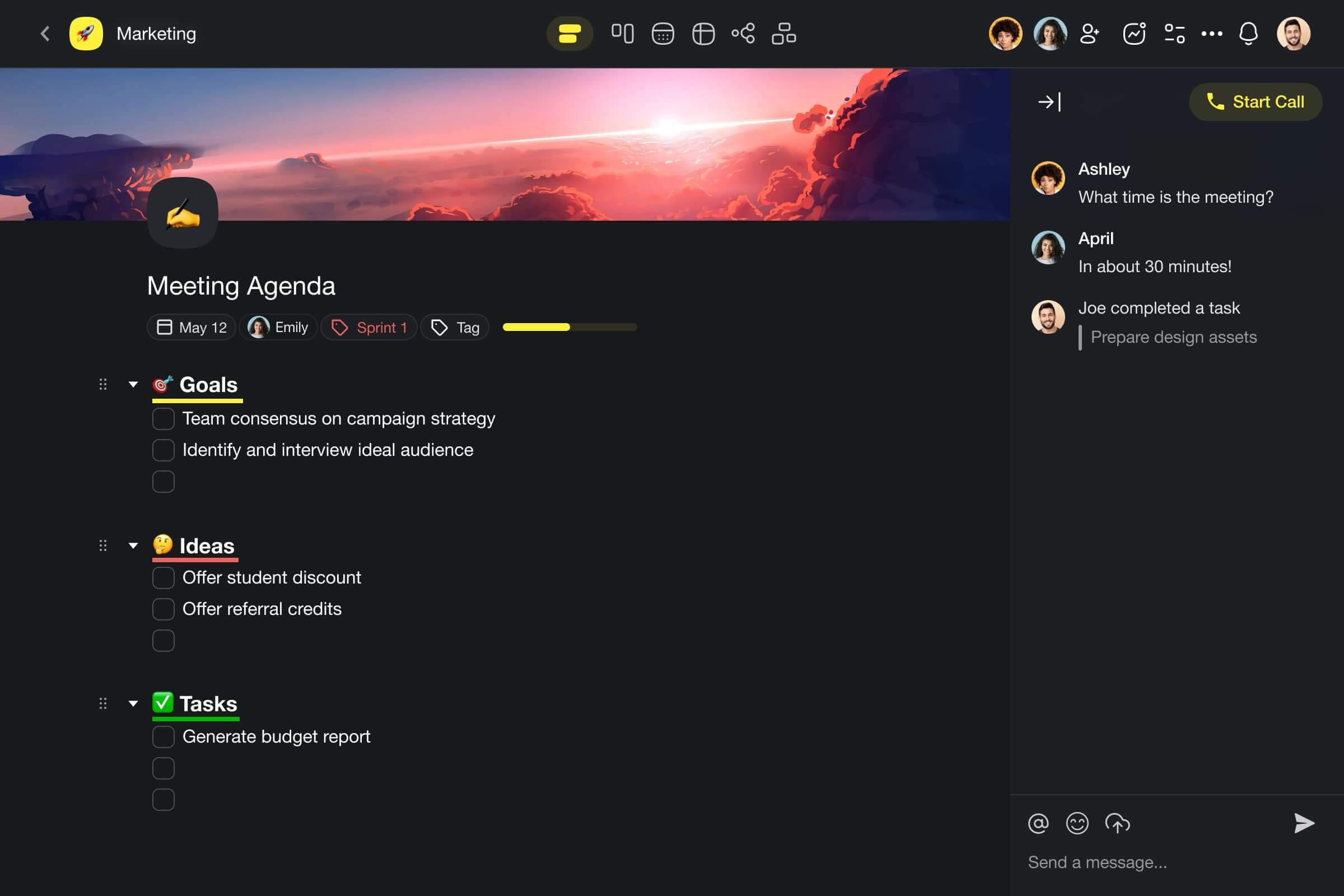
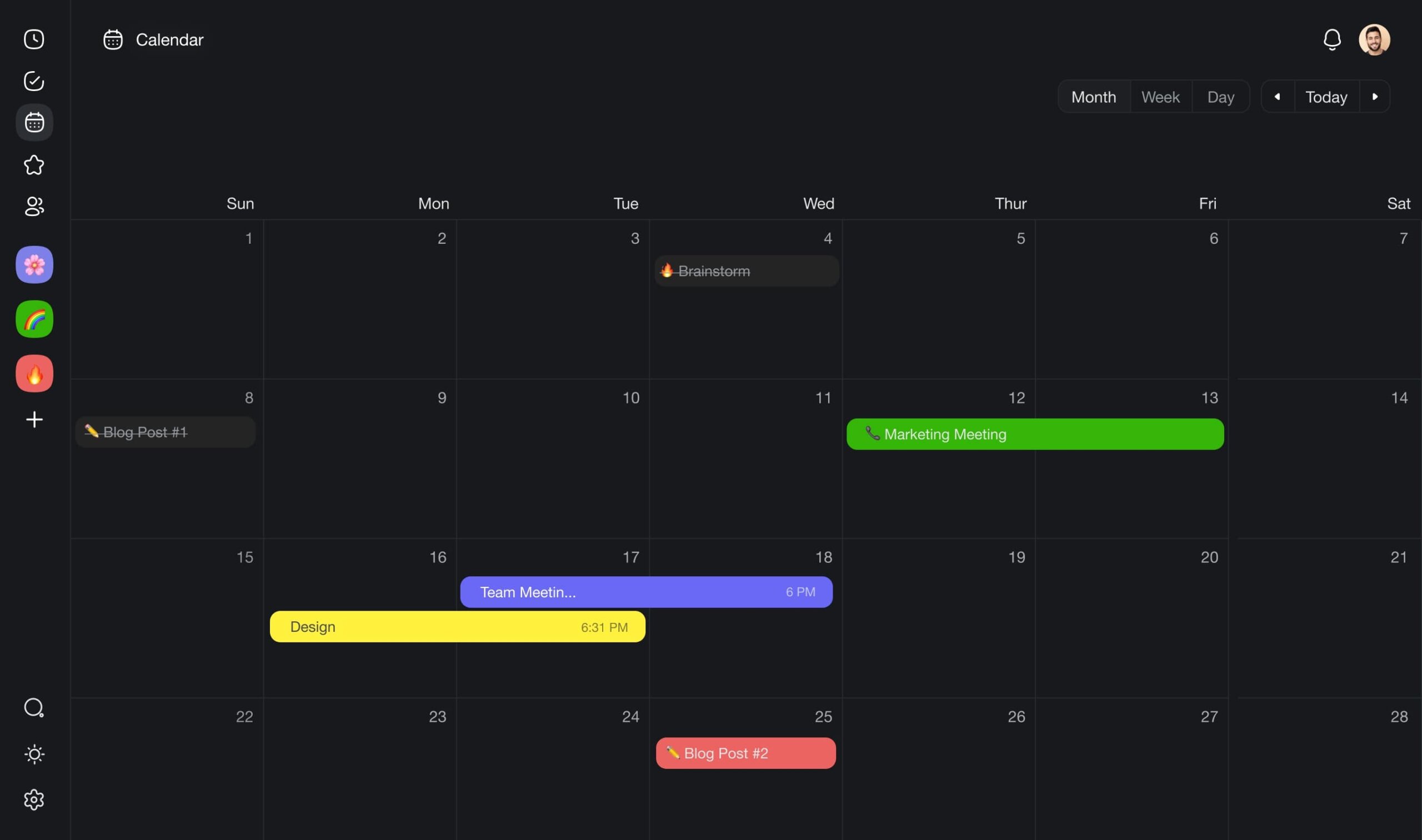
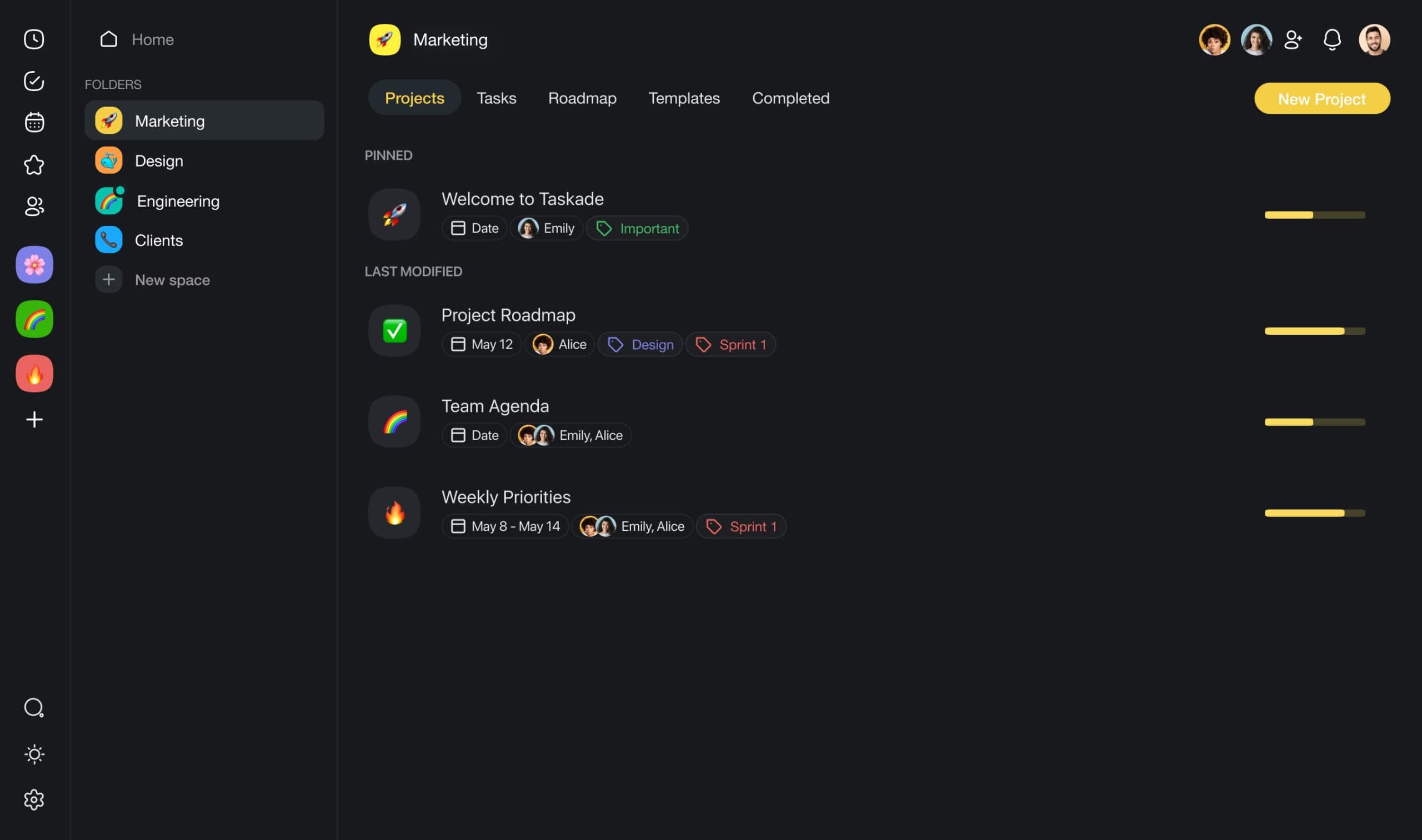
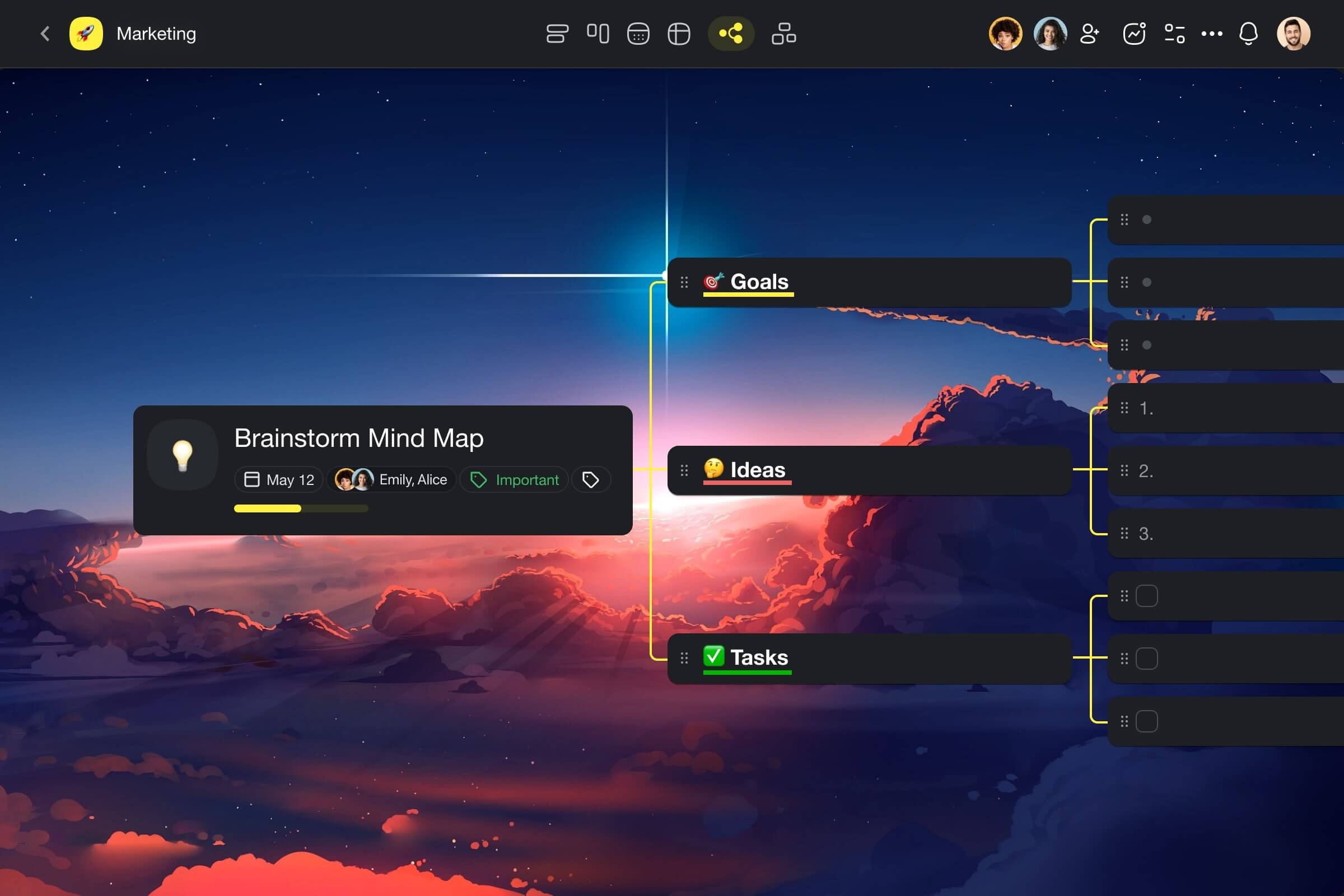
Here's how you can use Taskade to boost team collaboration.
Achieve Organizational Harmony
Ever tried juggling? 🤹
Not the circus act, but managing several projects at the same time. You've got tasks piling up, deadlines creeping closer, and everyone's asking, "What's next?"
It's a lot. Keeping everything organized and everyone in sync? Even tougher.
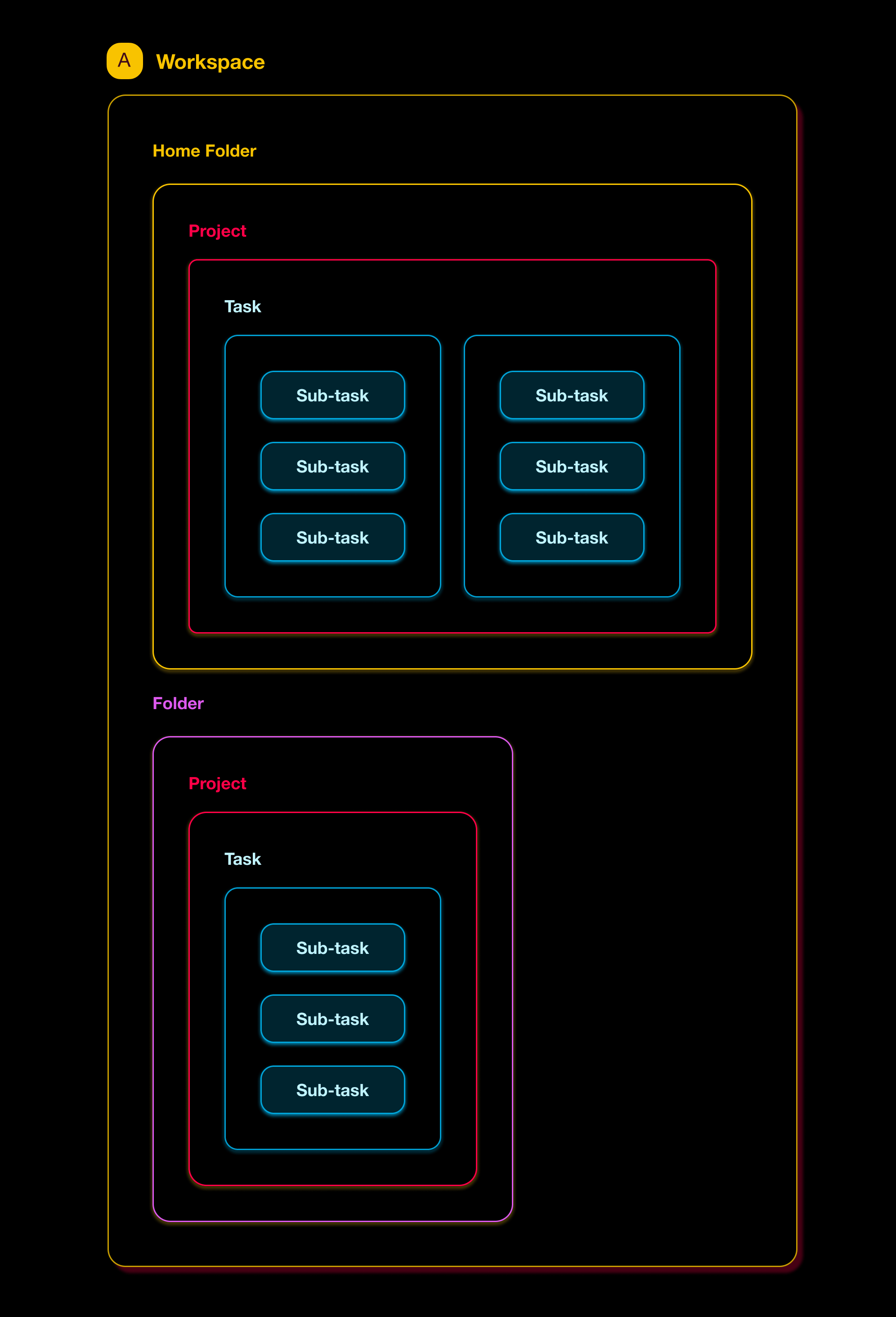
Taskade’s solution is simple — a three-tier hierarchy of workspaces, folders, and projects. Think of it as your organizational toolbox.
Workspaces are at the top. These are your big-picture zones, each one a separate universe for different businesses, departments, or teams.
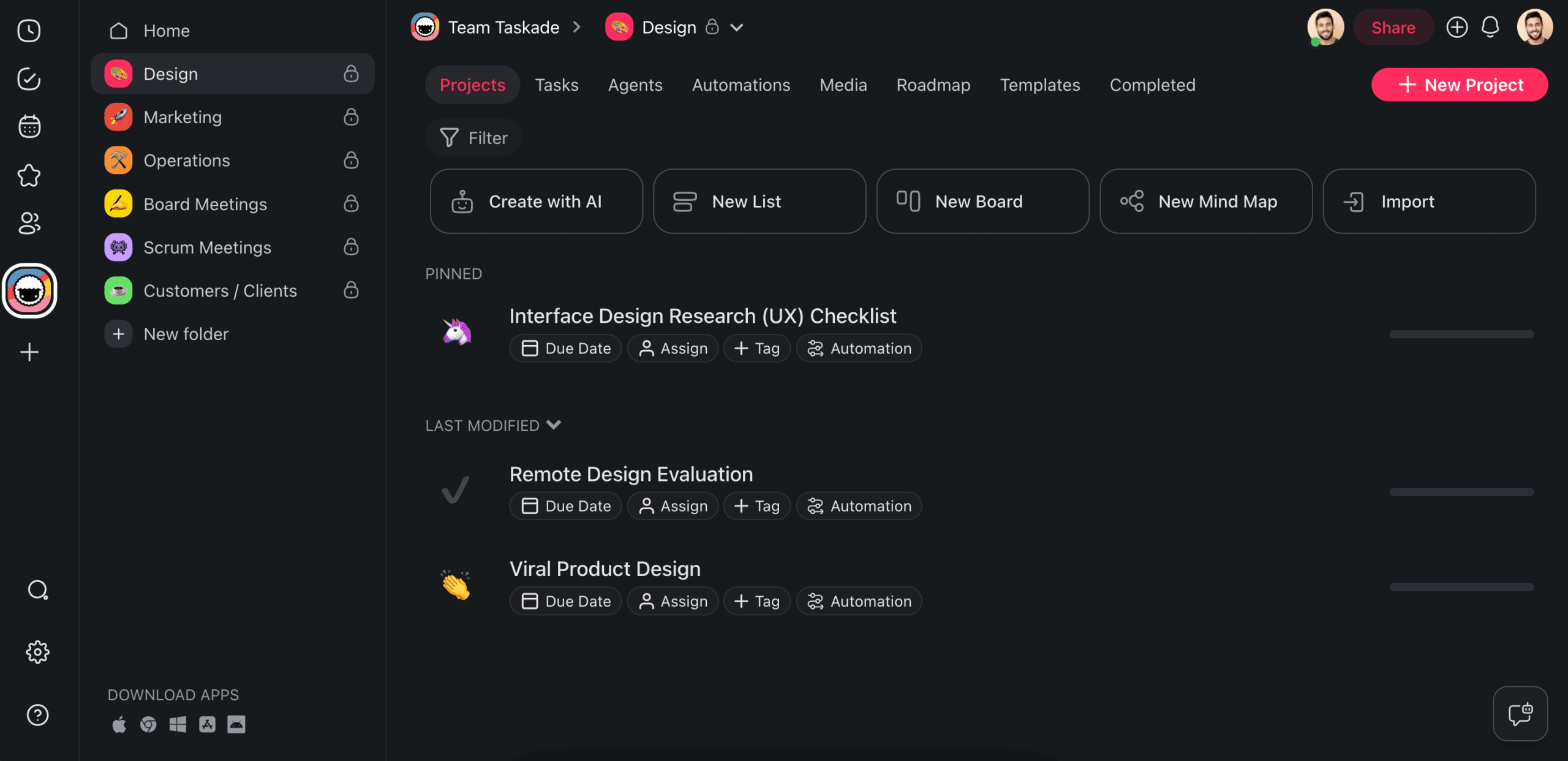
Dive a bit deeper, and you hit folders. Here's where you categorize your projects — it’s just like putting files into drawers so you know exactly where they are.
Finally, projects. This is where the magic happens. Each project is a digital space for storing all your tasks, goals, ideas, notes, mind maps, and conversations.
Together, these three levels give you a bird’s eye view all the way down to the gritty details. Just so nothing slips through the cracks in the heat of the battle.
Embrace AI Features
AI technology moves fast, and staying up-to-date can feel like running on a treadmill that's cranked up all the way to the highest speed setting.
Is integrating AI into your team's routine more trouble than it's worth?
Can’t decide which AI model is the best match for your workflow?
Is there an AI tool out there that can understand the nuances of your work?
Taskade AI is a natural extension of your team’s workflow that boosts productivity without the existential crisis of adapting to new tech.
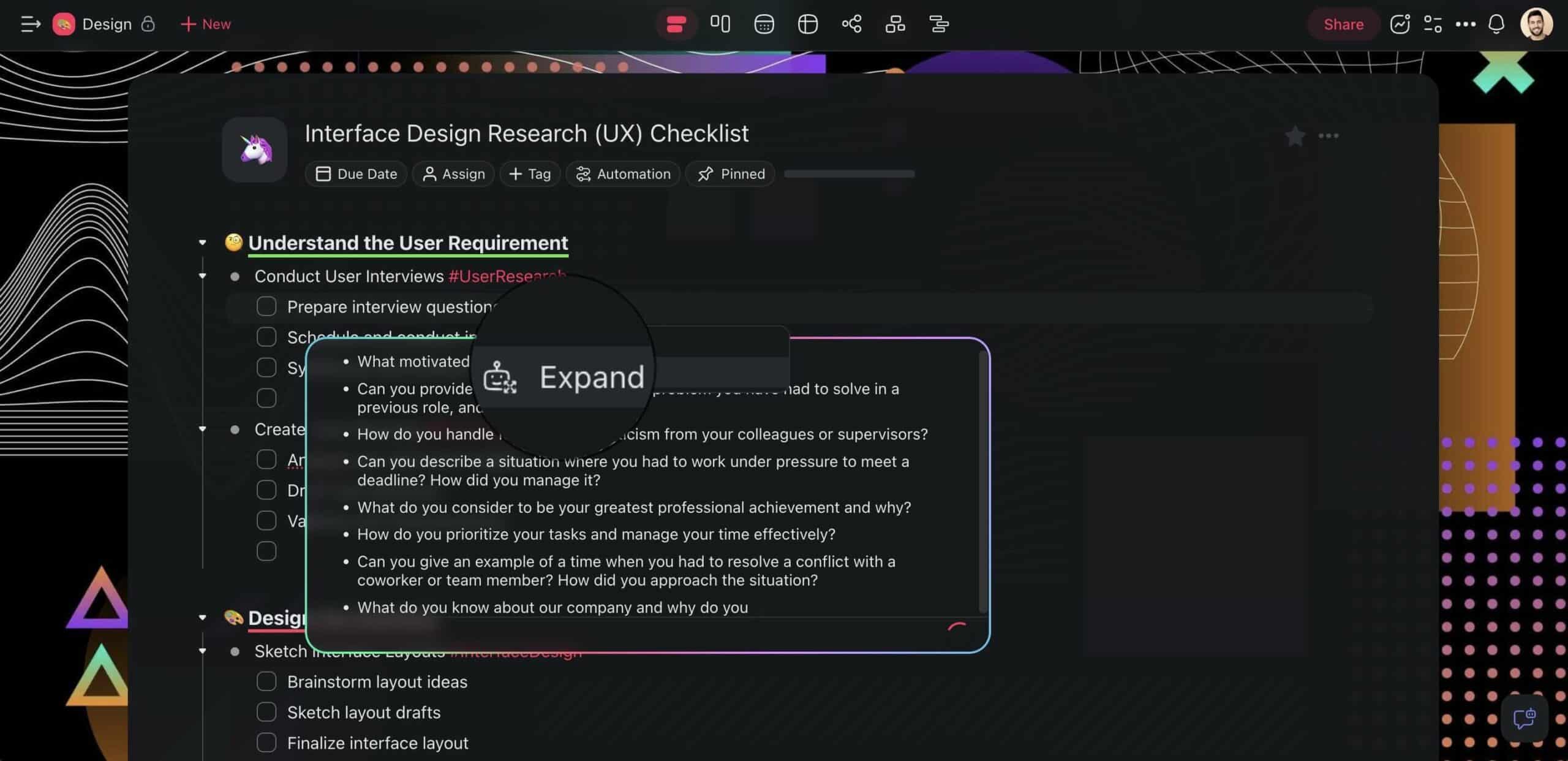
First off, the AI Assistant — this is your team's new go-to tool for instant communication and brainstorming. It helps with writing, editing, and proofreading in the project editor. The built-in commands will also help you brainstorm, organize tasks, and summarize content.
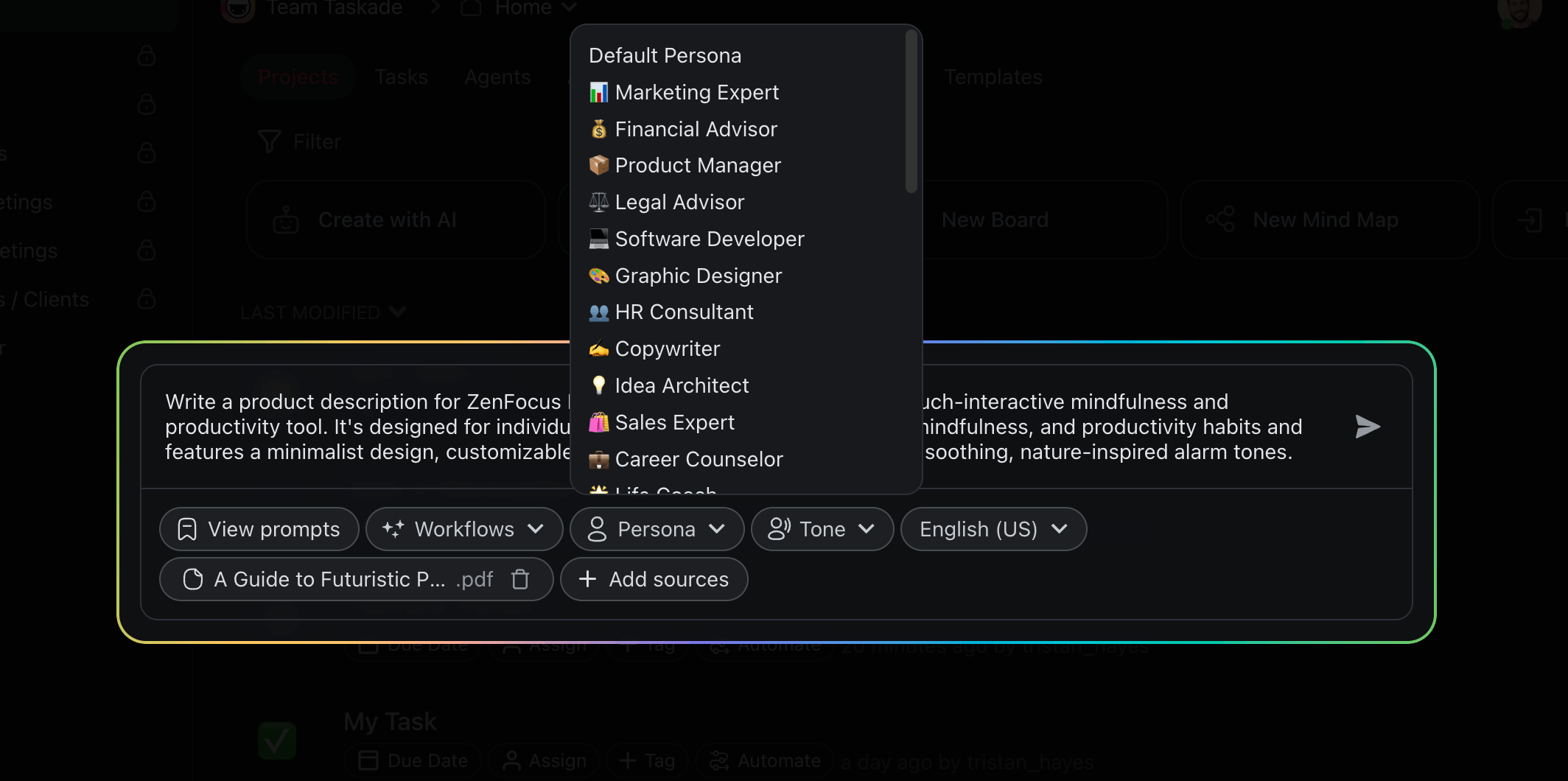
Next up, the AI Project Studio — think of it as the Star Trek Replicator 🛸 but for project management. For the non-nerds out there, this feature can generate structured projects based on natural language prompts and seed documents.
Describe what you’re working on, sit back, and wait for the magic to happen. 🪄
Check our AI project management generators for inspiration.
Then there are Custom AI Agents tailored to automate repetitive tasks, analyze data to uncover insights, and even predict project outcomes.
For instance, you can can delegate time-consuming data analysis to one agent, while another automates your scheduling and follow-ups.
Want to learn more?
Check Taskade's pricing page for a full list of AI-powered features.
Work the Way You Want
Remember how we said that every project is an infinite digital canvas?
From garden-variety lists to boards, mind maps, and calendars, you can transform your work in many different ways in an instant without losing context.
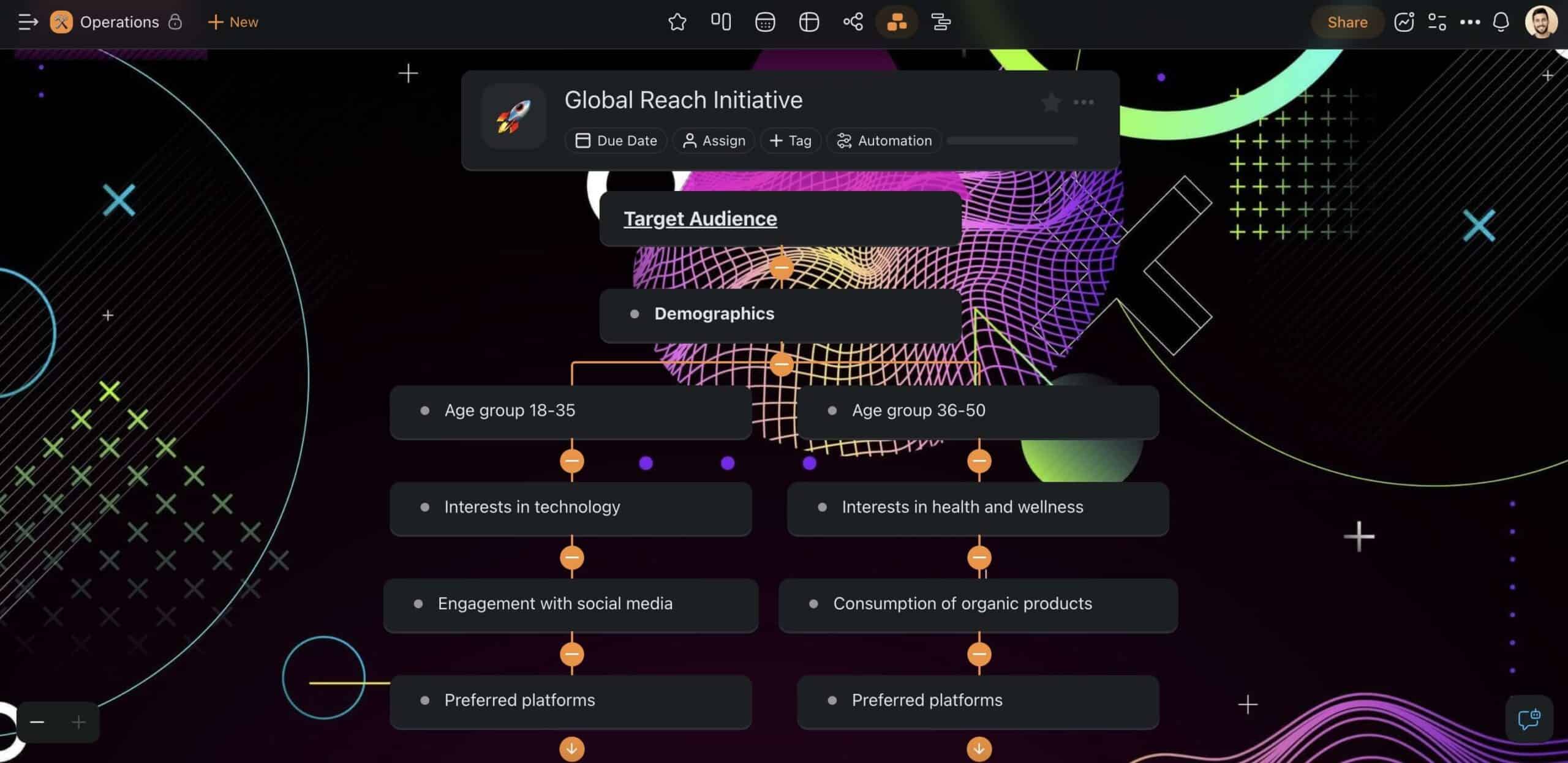
Let’s say you’re working on planning a team retreat. You can outline the itinerary in a list format, assign tasks and deadlines on a board, brainstorm activity ideas on a mind map, and visualize the schedule on a calendar — all in one place.
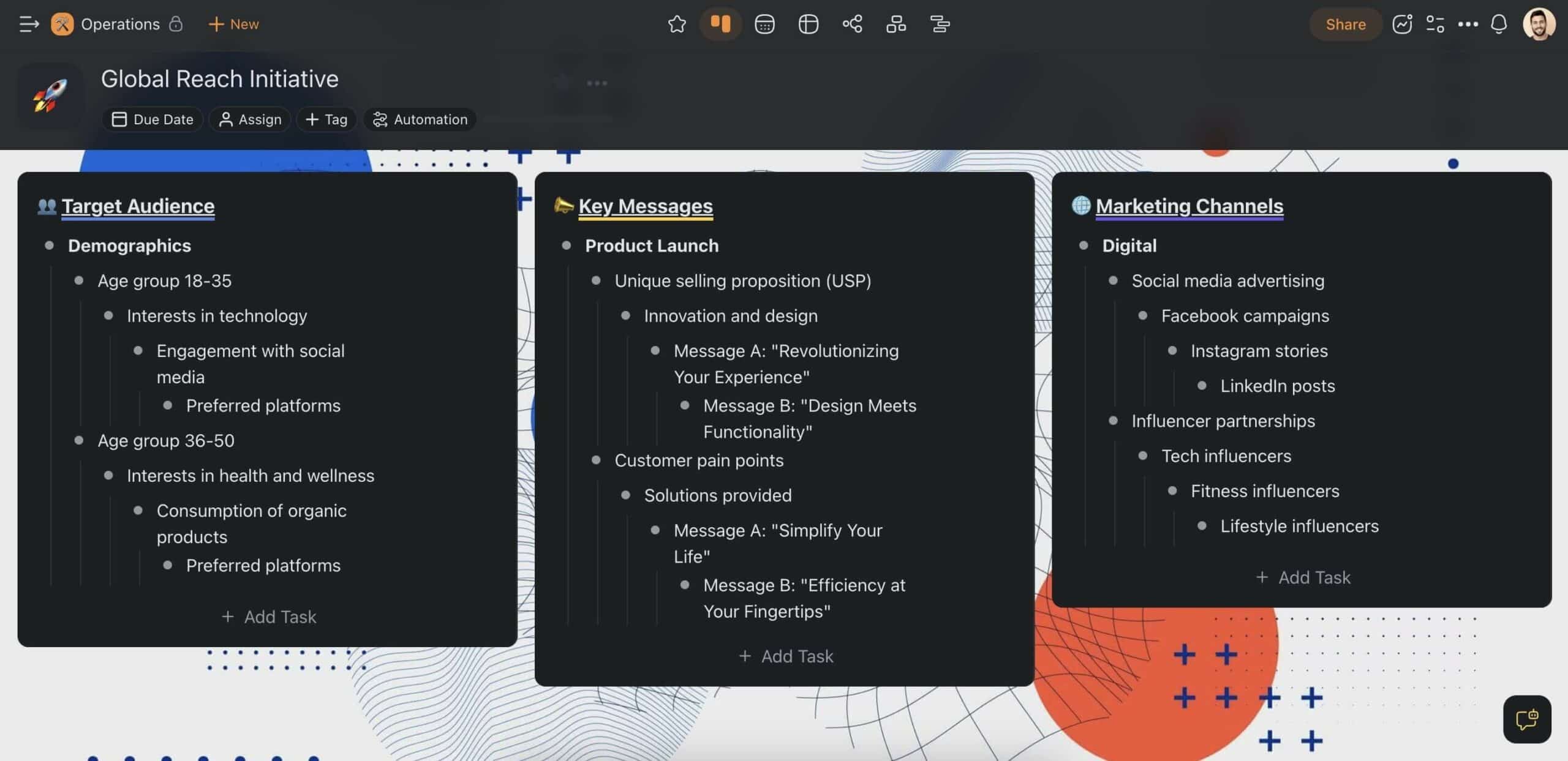
Sometimes, you may need to tackle multiple things at once. It’s easy.
Your team can collaborate on the same project, at the same time, in different views. That means that everybody can work at their own pace, contributing ideas and expertise to the project in a way that suits them best.
It’s that simple! 🥳
Ready to launch? Grab this project planning checklist template to start.
👋 Parting Words
Now that you know how to boost team collaboration, it's time to act.
With the strategies we've explored, your team is set to scale new heights. So, keep those communication lines open, trust in your team's abilities, respect each other's contributions, and watch as the collaborative effort turns into success.
So, are you ready to build a future-proof, collaborative team?
Create a free Taskade AI account and 10x team performance! 🤖
🔗 Resources
https://www.zippia.com/advice/workplace-collaboration-statistics/
https://hbr.org/2013/05/creating-the-best-workplace-on-earth
🧬 Build Team Workspaces with Genesis
Taskade Genesis creates complete team systems from a single prompt — no coding required:
| What You Describe | What Genesis Creates |
|---|---|
| "Build a team dashboard" | Project tracker + AI assistant + automation |
| "Create a meeting system" | Scheduler + notes + follow-up workflows |
| "Design an onboarding portal" | Training hub + progress tracking + AI help |
Your living workspace includes:
- 🤖 Custom AI Agents — Team AI assistants
- 🧠 Projects & Memory — Shared team knowledge
- ⚡️ 100+ Integrations — Team automation
Read more:
- 10 AI Ops Dashboards — Team coordination
- 8 Best AI Tools for Team Productivity — Full comparison
Explore Taskade Hubs:
- AI Project Management Generators — Team tools
- AI Productivity Agents — Work assistants
- AI Project Management Automations — Team workflows
- Browse Community Apps — Clone and customize

Frequently Asked Questions
How does Taskade AI enhance team collaboration?
Taskade AI enhances collaboration through: AI agents that work alongside team members as digital assistants (generating content, managing tasks, answering questions from your knowledge base), real-time collaborative editing across multiple project views, built-in video conferencing for face-to-face communication, AI-powered project generation from natural language descriptions, and smart automation that handles routine coordination tasks. Teams report spending less time on admin and more time on creative, high-value work.
What AI features does Taskade offer for team productivity?
Taskade's AI features include: custom AI agents with built-in tools and persistent memory, AI-powered project generation (describe a project, get a complete plan), multi-model support (15+ models from OpenAI, Anthropic, and Google), AI assistant integrated into the project editor for writing and editing, AI chat for brainstorming and problem-solving, workflow automation with AI decision-making, and AI-powered search across your entire workspace knowledge base.
Can Taskade replace multiple collaboration tools?
Yes. Taskade combines capabilities that typically require 4-5 separate tools: task management (replacing Asana/Trello), team chat (replacing Slack channels for project communication), video conferencing (replacing Zoom for team meetings), collaborative documents (replacing Google Docs for shared editing), and AI assistants (replacing standalone ChatGPT). This consolidation reduces context switching, subscription costs, and the data fragmentation that comes from spreading work across multiple platforms.
How do AI agents work in Taskade?
Taskade AI agents are customizable digital assistants that live in your workspace. You create an agent by defining its role, personality, knowledge sources (documents, websites, project data), and custom commands. Agents can generate content, answer questions, manage tasks, run automations, and collaborate with other agents. They maintain persistent memory across sessions, support 15+ AI models, and can be deployed with custom tools and slash commands for quick access to common actions.