







The Critical Path Method (CPM) is one of the most effective project scheduling techniques ever developed. Created in the 1950s by DuPont and Remington Rand, CPM identifies the longest sequence of dependent tasks in a project, which determines the minimum completion time. In 2026, AI agents and Gantt views automate the manual calculations that once made CPM tedious. This guide covers everything you need to get started.
TL;DR: CPM identifies the longest chain of dependent tasks (the critical path) to determine your project's minimum timeline. Any delay on the critical path delays the entire project. Taskade combines multiple project views including Gantt with AI agents that automate duration estimation, dependency analysis, and critical path monitoring. Try Taskade free

What Is the Critical Path Method (CPM)?
The Critical Path Method is a project management technique that identifies the longest sequence of dependent tasks from start to finish. This longest sequence, called the critical path, determines the shortest possible project duration.
Think of it as the main power line in a circuit. If it is interrupted, the entire system goes dark. Every other task in the project depends on the critical path for timing and flow.
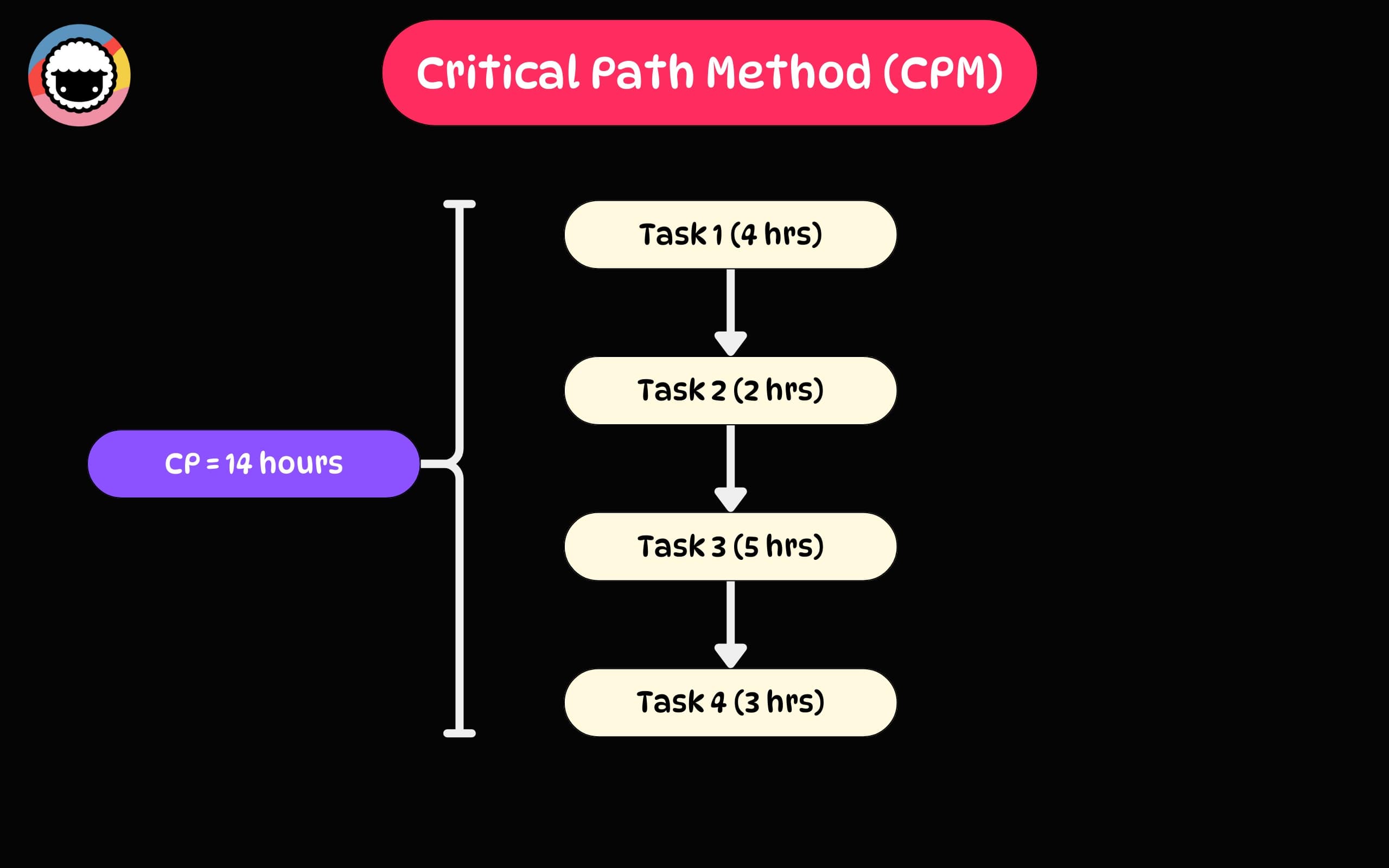
Unlike other project management methodologies, CPM focuses specifically on task dependencies and timing. It identifies bottlenecks, highlights tasks that cannot slip without delaying the project, and shows where schedule flexibility exists.
CPM answers three fundamental questions:
- What is the shortest time to complete this project? The critical path duration.
- Which tasks must stay on schedule? Critical path tasks with zero float.
- Where do we have scheduling flexibility? Non-critical tasks with positive float.
New to project management? Start with our project management basics guide.
Key Concepts of the Critical Path Method
Understanding CPM requires familiarity with five core concepts. Each builds on the previous one.
Activities and Dependencies
Activities are the individual tasks that make up a project. Each has a defined start, end, and duration. Dependencies are the logical relationships between tasks that specify the order of execution.
There are four dependency types:
| Dependency Type | Meaning | Example |
|---|---|---|
| Finish-to-Start (FS) | Task B starts after Task A finishes | Foundation must finish before framing starts |
| Start-to-Start (SS) | Task B starts when Task A starts | Testing starts when coding starts |
| Finish-to-Finish (FF) | Task B finishes when Task A finishes | Documentation finishes when development finishes |
| Start-to-Finish (SF) | Task B finishes when Task A starts | Rare; used in just-in-time scheduling |
Most projects use Finish-to-Start dependencies. Together, activities and dependencies form the project's scheduling framework.
Activity Durations
Duration is the time needed to complete each task. Accurate estimates are the foundation of reliable CPM analysis.
Short estimates create resource gaps and delays when tasks overrun. Long estimates waste resources and inflate costs. The best estimates draw on historical data from similar projects and input from the team members doing the work.
| Estimation Method | Description | Best For |
|---|---|---|
| Expert judgment | Team members estimate based on experience | Tasks with internal expertise |
| Analogous | Use durations from similar past projects | Recurring project types |
| Parametric | Calculate based on measurable units (e.g., lines of code) | Quantifiable work |
| Three-point (PERT) | Average of optimistic, most likely, and pessimistic estimates | Uncertain or novel tasks |
Critical Path
The critical path is the longest sequence of dependent tasks through the project network. It determines the project's minimum completion time.
Key properties of the critical path:
- Every task on the critical path has zero float (no scheduling flexibility)
- A delay on any critical path task delays the entire project
- The critical path can shift during a project as durations change
- A project can have multiple critical paths if two sequences have equal duration
Float (Slack)
Float is the time a task can be delayed without affecting downstream tasks or the project end date.
- Total float: How long a task can slip without delaying the project deadline
- Free float: How long a task can slip without delaying the next task's earliest start
Tasks on the critical path have zero float. Tasks off the critical path have positive float, giving you scheduling flexibility for resource reallocation.
Network Diagram
A network diagram visually maps all tasks, their dependencies, and the flow from project start to finish. Nodes represent activities, arrows show dependencies, and the critical path is highlighted as the longest route through the network.
In this example, the critical path is A → C → E (the longest chain, shown in pink). Tasks B and D have float and can slip without delaying the project.
Benefits of Using the Critical Path Method
Better, Faster Decisions
Research shows that poor decisions contribute to 47% of project failures. CPM gives project managers a clear framework for prioritizing resources and effort on the tasks that directly affect the project deadline.
When a stakeholder requests a scope change, CPM instantly reveals whether it affects the critical path. If it does not, you can accommodate it without schedule risk. If it does, you know exactly how much time it will add.
Clear Roles and Accountability
Teams that collaborate effectively are 50% more productive. CPM clarifies who is responsible for each task and when their work must be complete. This visibility eliminates confusion, reduces overlap, and creates clear accountability.
Every team member can see how their tasks connect to the broader project timeline. When people understand that their task is on the critical path, they prioritize accordingly.
Accurate Time Estimates
The Project Management Institute reports that nearly half of projects finish late. CPM uses task dependencies and systematic duration analysis to produce more reliable timelines than gut-feel estimates.
By incorporating historical data and team input, CPM estimates improve over time. AI agents accelerate this by analyzing past projects and adjusting predictions automatically.
Resource Optimization
CPM reveals which tasks have float and which do not. This lets you reallocate resources from non-critical tasks to critical ones when the schedule is at risk. You can also level resources across the project to avoid overallocation.
| Scenario | Without CPM | With CPM |
|---|---|---|
| Task delay occurs | Unclear impact on deadline | Instant visibility: critical path shift or absorbed by float |
| Resource shortage | Random reallocation | Move resources from high-float tasks to critical path |
| Scope change request | Guesswork on schedule impact | Precise timeline calculation |
| Stakeholder status update | Subjective progress report | Data-driven: % of critical path complete |
How to Implement CPM in Your Project
Step 1: Identify All Tasks
Start by listing every task your project requires. Capture the full scope and define each task clearly so nothing slips through.
- List tasks for every project phase
- Get input from team members who will do the work
- Be specific about what each task involves
- Check for missed subtasks or dependencies
- Arrange tasks in logical groups
Use Taskade's List view to organize tasks quickly. You can switch to Board view to group tasks by phase, or Mind Map view to brainstorm the full task breakdown.
Step 2: Determine Task Dependencies
Map out how tasks connect. Identify which tasks must finish before others can start.
- Document all predecessor-successor relationships
- Discuss with your team to validate dependencies
- Distinguish mandatory dependencies (concrete must finish before plumbing) from preferential ones (design review before coding)
- Use Gantt charts to visualize dependency chains
- Identify potential bottlenecks where multiple tasks converge
Step 3: Estimate Task Durations
Assign realistic time estimates to each task. Tap team expertise, reference historical data, and factor in potential delays.
- Collaborate with team members for ground-level estimates
- Reference durations from similar past projects
- Factor in potential delays and risk buffers
- Use three-point estimation for uncertain tasks
- Review and adjust estimates as the project progresses
AI-Powered Duration Estimation
Taskade AI agents can analyze historical project data to generate duration estimates automatically. Here is how to set one up.
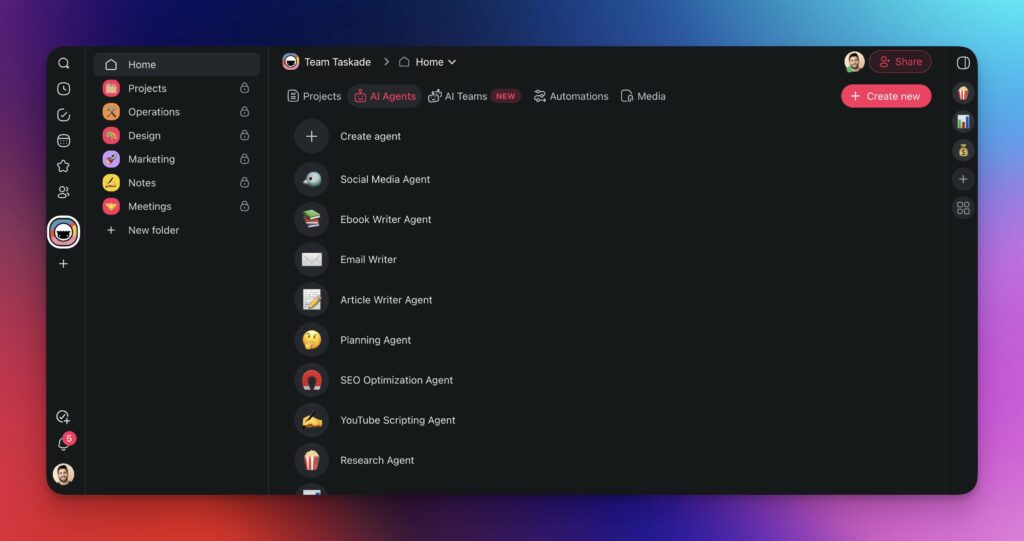
- Go to your workspace and navigate to the Agents tab.
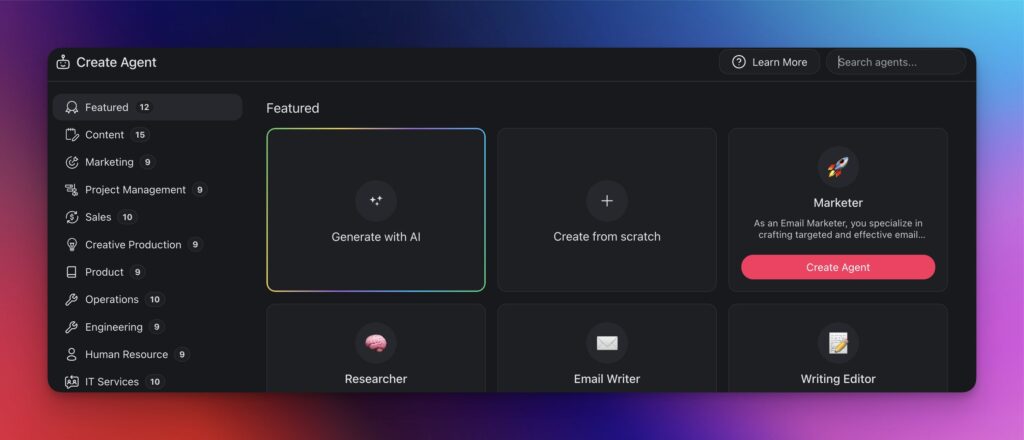
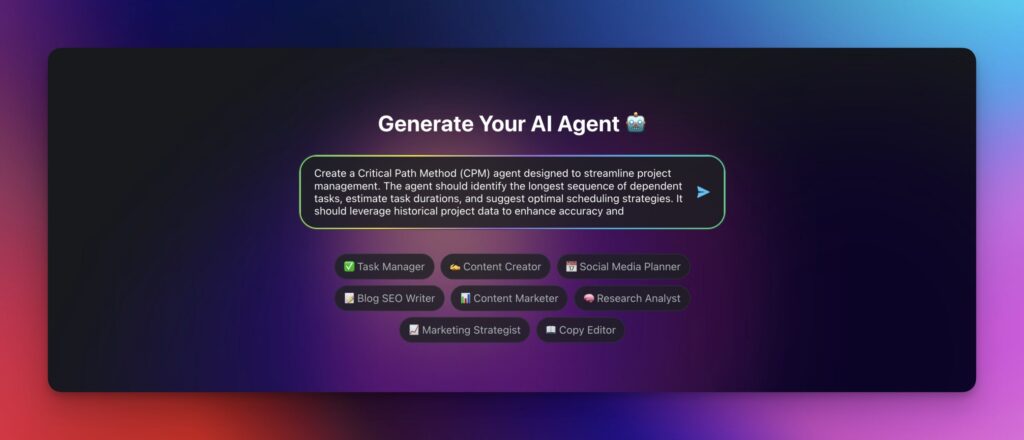
- Click Create agent and Generate with AI.
- Describe your agent's purpose:
Create a CPM scheduling agent that estimates task durations based on historical project data, identifies dependencies, and calculates critical paths.
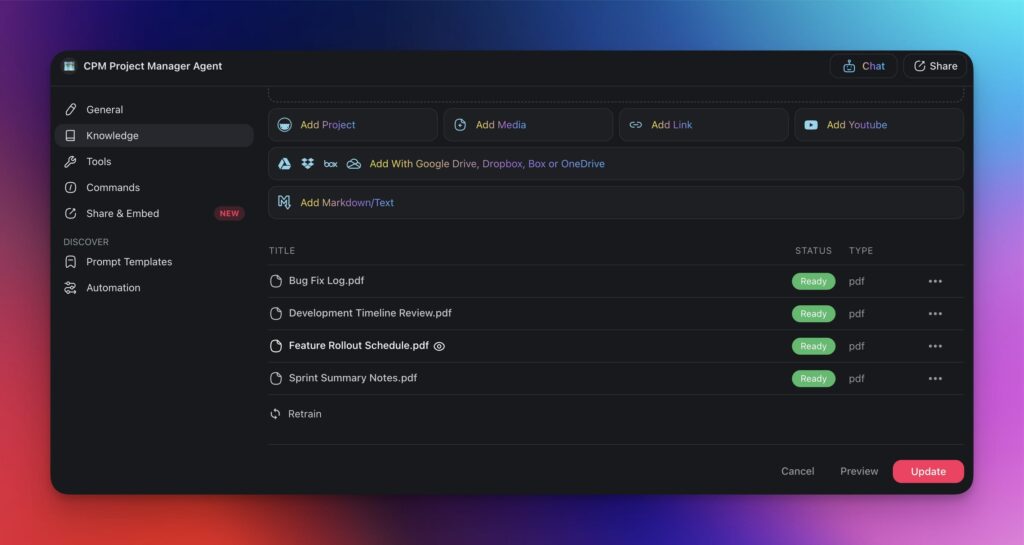
- Upload historical project documents to the agent's Knowledge tab.
- Ask the agent to estimate durations for your new project. It will reference past projects and provide data-backed estimates.
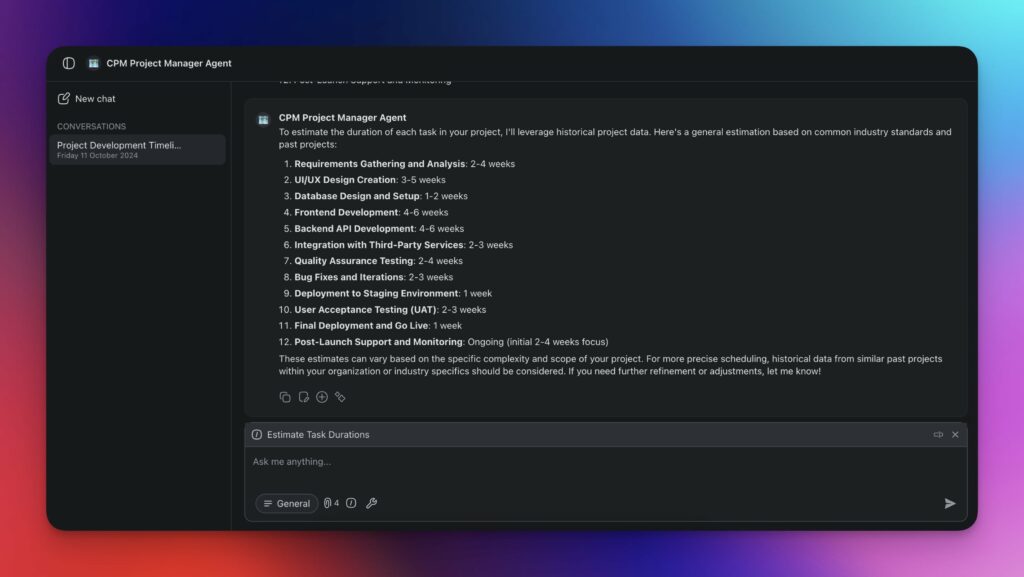
The agent maintains persistent memory, so it improves its estimates as you complete more projects and upload more data.
Step 4: Create a Network Diagram
Build a visual representation of your project showing tasks, dependencies, and the flow from start to finish.
You can use Taskade's Mind Map view to map dependencies visually, or create a structured network in the Gantt view where dependencies are shown as connecting lines between task bars.
In this software project example, the critical path (pink) runs: Requirements → Technical Design → Backend → API Integration → Testing → Deployment → Launch (45 days). UX Design and Frontend Development have float.
Step 5: Calculate the Critical Path
With your network diagram complete, calculate the critical path using forward and backward passes.
Forward Pass (calculate Earliest Start and Earliest Finish):
- Start at the first task: ES = 0, EF = ES + Duration
- For each subsequent task: ES = maximum EF of all predecessors
- The final task's EF equals the project's minimum duration
Backward Pass (calculate Latest Start and Latest Finish):
- Start at the last task: LF = project duration, LS = LF - Duration
- For each preceding task: LF = minimum LS of all successors
- Tasks where ES = LS have zero float and are on the critical path
Example calculation for the software project:
| Task | Duration | ES | EF | LS | LF | Float | Critical? |
|---|---|---|---|---|---|---|---|
| Requirements | 5 | 0 | 5 | 0 | 5 | 0 | Yes |
| Tech Design | 8 | 5 | 13 | 5 | 13 | 0 | Yes |
| UX Design | 6 | 5 | 11 | 7 | 13 | 2 | No |
| Backend Dev | 15 | 13 | 28 | 13 | 28 | 0 | Yes |
| Frontend Dev | 12 | 11 | 23 | 16 | 28 | 5 | No |
| API Integration | 5 | 28 | 33 | 28 | 33 | 0 | Yes |
| Testing | 8 | 33 | 41 | 33 | 41 | 0 | Yes |
| Deployment | 3 | 41 | 44 | 41 | 44 | 0 | Yes |
| Launch | 1 | 44 | 45 | 44 | 45 | 0 | Yes |
The critical path duration is 45 days. UX Design has 2 days of float, and Frontend Development has 5 days of float.
AI-Powered CPM with Taskade

Using the Gantt View for Critical Path Visualization
Taskade's Gantt view is one of multiple project views (List, Board, Calendar, Table, Mind Map, Gantt, Org Chart) that visualize task timelines and dependencies.
In the Gantt view, you can:
- Map task dependencies with connecting lines between bars
- Identify the critical path by finding the longest dependency chain
- Spot scheduling conflicts where tasks overlap or resources are overallocated
- Adjust timelines by dragging task bars to reschedule
- Switch to Table view for detailed duration and date data
The Gantt view integrates with AI agents, so you can ask your CPM agent to analyze the current project and recommend schedule optimizations directly from the project workspace.
AI Agent Capabilities for CPM
Taskade AI agents with built-in tools bring capabilities that manual CPM analysis cannot match:
| Capability | Manual CPM | AI-Powered CPM |
|---|---|---|
| Duration estimation | Team guesses or historical lookup | AI analyzes past projects and predicts durations |
| Dependency identification | Manual mapping | AI suggests dependencies based on task descriptions |
| Critical path calculation | Forward/backward pass (tedious) | Instant calculation as tasks change |
| What-if analysis | Recalculate manually for each scenario | AI models multiple scenarios simultaneously |
| Risk detection | Experience-based judgment | AI flags patterns that historically caused delays |
| Progress monitoring | Manual status updates | AI tracks changes and alerts when critical path shifts |
Automating CPM Workflows
Combine AI agents with workflow automation to keep your critical path analysis current:
- Trigger: Task status changes in the project
- Agent action: CPM agent recalculates critical path and float
- Agent action: Agent identifies if the critical path has shifted
- Action: If critical path changed, notify project manager via Slack
- Action: Update project dashboard with current timeline
This automation ensures your critical path analysis stays accurate without manual recalculation. Learn more in the automation getting started guide.
Practical CPM Applications by Industry
Construction Projects
Construction is the original domain for CPM. Sequential phases like site preparation, foundation, framing, plumbing, electrical, and roofing create clear dependency chains.
Example critical path: permits (10 days) → excavation (5 days) → foundation (8 days) → framing (15 days) → rough plumbing/electrical (7 days) → insulation (3 days) → drywall (5 days) → finishing (10 days) = 63 days minimum.
Delays in permits or inspections halt the entire sequence. CPM helps construction managers schedule crews, coordinate material deliveries, and account for weather disruptions.
Software Development
Software projects follow phases like requirements, design, development, testing, and deployment. While Agile methodologies allow iteration within sprints, cross-sprint dependencies and release timelines benefit from CPM analysis.
Use Taskade's Board view for sprint planning and Gantt view for cross-sprint dependency tracking. AI agents can identify when a delayed sprint task affects downstream releases.
Product Launches
Product launches coordinate multiple teams: engineering, marketing, sales, support, and operations. CPM reveals which team's deliverables are on the critical path.
Example: if marketing materials cannot ship until engineering provides final screenshots, and engineering is delayed, CPM shows the cascading impact on the launch date. AI agents can model alternative scenarios and recommend parallel workstreams.
Event Planning
Events have hard deadlines (the event date) that make CPM especially valuable. Venue booking, vendor contracts, marketing, logistics, and setup all have dependencies. CPM identifies which vendor delays threaten the event timeline.
CPM vs. Other Scheduling Methods
| Method | Focus | Best For | Limitation |
|---|---|---|---|
| CPM | Longest dependency chain, deterministic | Well-understood projects | Single time estimate per task |
| PERT | Probabilistic time estimates | Uncertain/novel projects | More complex to calculate |
| Gantt Charts | Visual timeline | Communication and tracking | Does not identify critical path alone |
| Agile/Scrum | Iterative delivery | Software development | Limited cross-sprint dependency analysis |
| Kanban | Work-in-progress limits | Continuous flow work | No time-based scheduling |
| Critical Chain | Resource constraints + buffers | Resource-constrained projects | Requires cultural shift |
CPM pairs naturally with Gantt charts for visualization and can complement Agile for cross-team dependency management. Taskade supports all of these with multiple project views in a single workspace.
Key Takeaways
The Critical Path Method remains one of the most effective scheduling techniques available. Combined with AI agents and modern project management tools, it becomes even more powerful.
- CPM identifies the longest dependency chain to determine minimum project duration
- Tasks on the critical path have zero float and directly affect the deadline
- Forward and backward passes calculate earliest/latest start times and float for every task
- Taskade's Gantt view visualizes dependencies and timelines across multiple project views
- AI agents automate duration estimation, dependency analysis, and critical path monitoring
- Workflow automation keeps CPM analysis current as projects evolve
- CPM complements Agile methodologies for cross-sprint planning
Automate Your Project Scheduling with Taskade AI
Taskade combines multiple project views, AI agents with built-in tools, and workflow automation to make CPM analysis effortless.
Sign up for Taskade and plan smarter
Explore More:
- What Are Gantt Charts? — Visual project scheduling
- Project Management Basics — Getting started guide
- Popular PM Methodologies — Compare approaches
- Custom AI Agents — Build scheduling agents with persistent memory
- Automation Getting Started — Automate project workflows
- Task Dependencies — Understanding task relationships
- 20 Best Kanban Board Apps — Visual workflow management
- Community Gallery — Project management templates and AI apps
- Taskade Pricing — Free, Pro $10/mo billed annually, Business $25/mo billed annually

Frequently Asked Questions
What is the Critical Path Method (CPM) in project management?
The Critical Path Method (CPM) is a project scheduling technique developed in the 1950s by DuPont and Remington Rand. It identifies the longest sequence of dependent tasks (the critical path) that determines the minimum project duration. Any delay on a critical path task directly delays the entire project. Tasks not on the critical path have float, meaning they can slip without affecting the deadline. CPM helps project managers focus resources on the tasks that matter most for on-time delivery.
How do you calculate the critical path?
Calculate the critical path in four steps. First, list all tasks with their durations and dependencies. Second, draw a network diagram showing task sequences. Third, perform a forward pass to calculate the earliest start and finish for each task, then a backward pass for the latest start and finish. Fourth, identify tasks with zero float where earliest start equals latest start. These form the critical path, and its duration equals the minimum project timeline.
What is float (slack) in the Critical Path Method?
Float, also called slack, is the amount of time a task can be delayed without affecting the project end date. Tasks on the critical path have zero float, meaning any delay pushes the project deadline. Tasks off the critical path have positive float, meaning they can be delayed by their float amount without impact. Understanding float helps project managers prioritize resources and identify schedule flexibility for non-critical activities.
How can AI improve Critical Path analysis in 2026?
AI agents can automate CPM calculations that are tedious to do manually. They compute forward and backward passes automatically, identify critical paths, calculate float for all tasks, and flag when changes to task estimates would alter the critical path. In Taskade, AI agents can analyze historical project data to predict task durations, detect potential bottlenecks, and recommend resource reallocation in real time.
What is the difference between CPM and PERT?
CPM uses deterministic (single-point) time estimates for each task, making it best for projects where durations are well understood. PERT (Program Evaluation and Review Technique) uses three time estimates per task: optimistic, most likely, and pessimistic. PERT accounts for uncertainty and is better for research or novel projects. Both methods identify critical paths, but PERT provides probabilistic completion dates.
How does the Gantt view help with Critical Path Method?
A Gantt view visualizes tasks as horizontal bars on a timeline, showing durations, dependencies, and overlaps at a glance. In Taskade, the Gantt view is one of multiple project views that lets you map task sequences, identify the longest dependency chain, and spot scheduling conflicts. When combined with AI agents, the Gantt view becomes a dynamic CPM tool that updates critical path calculations as tasks change.
What tools support Critical Path Method analysis?
Project management tools like Taskade, Microsoft Project, and Primavera support CPM analysis. Taskade offers a unique advantage by combining multiple project views including Gantt and Board with AI agents that can automate duration estimation, dependency analysis, and critical path calculation. AI agents with persistent memory can learn from past projects to improve future estimates.
Can CPM be used with Agile methodologies?
Yes, CPM can complement Agile by identifying dependencies between sprints, releases, or cross-team deliverables. While Agile prioritizes flexibility and iteration, some project phases have hard dependencies that benefit from critical path analysis. Taskade supports both approaches with multiple project views including Board view for Agile and Gantt view for CPM, plus AI agents that bridge the two methodologies.
What industries use the Critical Path Method?
CPM is widely used in construction, software development, manufacturing, event planning, product launches, and any industry with sequential task dependencies. Construction projects use CPM to sequence foundation, framing, plumbing, and finishing phases. Software teams use it to map requirements, design, coding, testing, and deployment phases. Taskade AI agents can adapt CPM analysis to any industry.
How do you handle changes to the critical path during a project?
When task durations or dependencies change, recalculate the critical path immediately. A delay on a critical task shifts the project deadline. Adding resources to critical tasks (crashing) or restructuring dependencies (fast-tracking) can recover lost time. In Taskade, AI agents monitor project changes and automatically flag when the critical path shifts, helping teams respond before delays cascade.