
Definition: An AI CRM builder turns a plain-English description of how you sell into a working CRM. With Taskade Genesis, you describe your contacts, your pipeline stages, and your follow-up rules, and you get a live CRM that fits the way you already work.
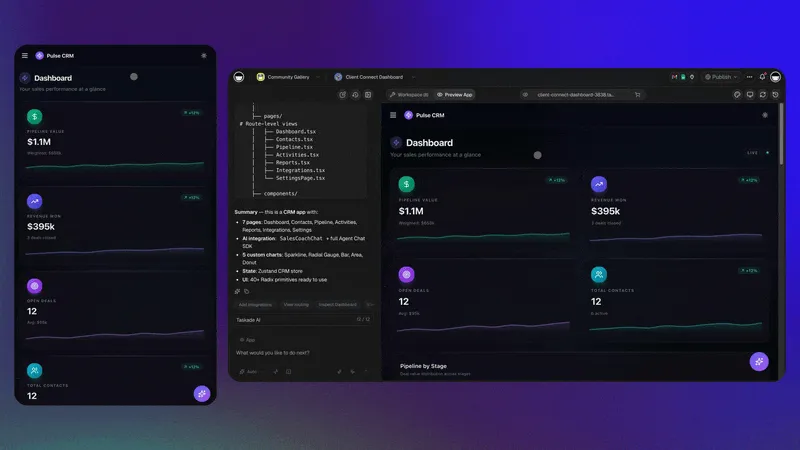
TL;DR: Describe how you sell and Taskade Genesis builds a custom CRM, no code, with contacts, a visual pipeline, follow-up reminders, and an embedded AI agent that drafts emails and flags stale deals. Part of 150,000+ apps built on the platform. Build yours free.
You already know what your CRM should do. You are tracking deals in a spreadsheet, your inbox, sticky notes, or your head right now. An AI CRM builder takes that mental model and makes it real, so the next lead lands in a system instead of a tab you forget to reopen.
What Is an AI CRM Builder?
An AI CRM builder creates a custom contact-and-pipeline system from a written description instead of a setup wizard. You explain who you sell to and how a deal moves from new to won. Taskade Genesis builds the contact records, the pipeline stages, the views, and the follow-up automations to match. No templates to bend, no fields to wire by hand.
The result is a CRM shaped around your process, not a generic one you spend a week configuring. Add a stage by asking. Change a follow-up rule the same way.
From One Prompt to a Living CRM
You write one prompt. Taskade Genesis builds a CRM that captures contacts, moves deals through your stages, reminds you to follow up, and keeps an AI agent on hand to draft the next message. Everything below runs inside your Workspace, connected so a lead, its deal, and its reminders stay linked.
The contacts list and the pipeline are connected projects, so updating a deal updates everywhere it appears. The embedded agent is one of Taskade's AI teammates, equipped with built-in tools for web search, drafting, and follow-up.
Why Build a Custom CRM?
A custom CRM fits your sales process on day one, so your team logs deals instead of fighting a setup. Off-the-shelf CRMs ask you to map your work onto their fields, pay for seats and modules you never touch, and relearn the tool every time the vendor ships an update. A CRM built from your own description skips all of that.
You get only the stages, fields, and views you named. You change them by asking, the same way you described them. The system grows with your process instead of capping it.
Taskade CRM vs a Spreadsheet vs an Admin Panel
A Taskade Genesis CRM gives you the speed of a spreadsheet with the structure of real software, and no engineer to keep it alive. A spreadsheet is fast to start but has no reminders, no roles, and no agent. A hand-built SQL admin panel is powerful but needs a developer for every change. The AI CRM builder sits where most operators actually need to be.
| What you need | Spreadsheet front-end | SQL admin panel | Taskade Genesis CRM |
|---|---|---|---|
| Time to first working version | Minutes | Weeks of dev work | Minutes from one prompt |
| Pipeline stages and views | Manual columns | Custom-coded | multiple project views built in |
| Follow-up reminders | None, or fragile macros | Custom-coded | Reliable automation workflows |
| Built-in AI assistant | None | None | Embedded agent, built-in tools |
| Change a field or rule | Re-do formulas | File a dev ticket | Ask in plain English |
| Share with clients | Risky, all-or-nothing | Custom login build | Built-in logins |
| Who maintains it | You, carefully | A developer | The platform |
What Your Pipeline Looks Like
Every deal sits in a stage, and you see the whole board at a glance. Drag a deal forward as it progresses, and the connected contact and reminders move with it. The same data also renders as a list, table, or calendar, so you pick the view that fits the moment.
  NEW            CONTACTED        PROPOSAL         WON
 ┌──────────┐   ┌──────────┐    ┌──────────┐    ┌──────────┐
 │ Acme Co  │   │ Vela LLC │    │ Orbit Inc│    │ Pine Ltd │
 │ $4,200   │   │ $9,000   │    │ $22,500  │    │ $15,000  │
 │ web form │   │ referral │    │ inbound  │    │ referral │
 ├──────────┤   ├──────────┤    └──────────┘    └──────────┘
 │ Lumen Co │   │ Reef Inc │      1 deal           1 deal
 │ $3,100   │   │ $6,750   │
 │ outbound │   │ web form │     ↑ agent flags any deal
 └──────────┘   └──────────┘       untouched for 7 days
   2 deals        2 deals
What You Can Build
Contact and lead management
- Capture leads from forms and 100+ integrations
- Organize contacts by stage, source, owner, or priority
- Assign new leads by team or territory
- Keep a full activity history on every record
Pipeline tracking
- A visual pipeline with the stages you name
- Deal values and status at a glance
- Alerts when a deal needs attention
- Notes and call logs in one place
Customer communication
- Email and call logging with the contact
- Templates the embedded agent can draft from
- Meeting scheduling through your integrations
- A timeline of every touch
Automation
- Welcome sequences for new leads
- Follow-up reminders before deals go cold
- Stage-change notifications to the right person
- Daily or weekly pipeline reports
Example CRM Prompts
Simple sales CRM
"Build a CRM for my consulting business. I need to track leads, log calls, and see my pipeline. Send me a daily email with deals that need follow-up."
Real estate CRM
"Create a CRM for real estate. Track buyers and sellers, property interests, showing schedules, and transaction stages. Alert me when a client has not been contacted in 7 days."
Agency CRM
"Build a CRM for my marketing agency. Track prospects, proposals sent, and active clients. Include project status for each client and monthly retainer values."
CRM Features by Role
For sales reps
- A daily task list of who to contact
- One-click logging for calls and emails
- A mobile-friendly interface
- Fast lead entry from anywhere
For sales managers
- Pipeline visibility across the whole team
- Team activity and performance views
- Status reporting on demand
- Deal review workflows
For business owners
- Revenue and conversion tracking
- Pipeline health at a glance
- A daily summary in your inbox
- Team utilization
Getting Started
- Describe your sales process. Name your stages, activities, and the metrics you watch.
- Taskade Genesis builds your CRM. Contacts, pipeline, views, and automations.
- Import existing data, or start fresh with your next lead.
- Invite your team. Share with built-in logins, no extra accounts.
- Iterate by asking. Refine fields, stages, and reminders in plain English.
Build Your CRM
Here is what to build in Taskade: a CRM your whole team logs into. You see a pipeline board where every deal sits in a stage, drag forward as it closes, with the connected contact and notes attached. Reps log in to update their own deals, and an embedded agent drafts the next follow-up and flags any deal that has gone quiet. Every morning a summary of stale deals lands in your inbox, with no spreadsheet to babysit.
Describe how you sell and build it free with Taskade Genesis.
Related: Taskade as a CRM (Learn) · AI Client Portal · Database Projects · Living Dashboards · AI Form Builder · Automation · Community Gallery