
Definition: An AI client portal is a private, branded space where each client logs in to see their own projects, files, and progress. With Taskade Genesis you describe the portal in plain English and get a working version with logins, updates that keep themselves current, and a custom domain on Pro and up.
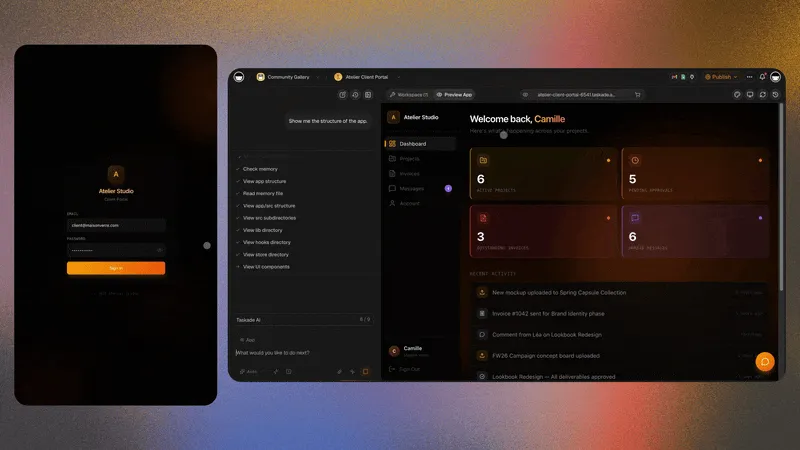
You already run a version of this today. It lives in shared folders, a thread of "any update?" emails, and a spreadsheet only you understand. A client portal moves all of that into one place your clients can open themselves, so the question they used to email you answers itself on screen.
TL;DR: A client portal gives each client their own login, and you match their projects, files, and status to it. Taskade Genesis builds one from a single prompt, with built-in email logins (GenesisAuth) on every plan and a custom domain on Pro and up. Pro is $10 a month billed yearly. See plans and prices. Clone the client portal app.
What Is an AI Client Portal?
An AI client portal is a secure space where each client signs in, and you match their records to that login so they see only their own work: active projects, shared documents, milestones, and messages. The operator manages everything from one view, and the client sees a clean, branded slice. Taskade Genesis builds the whole thing from a plain-English prompt, with no code.
The difference from a shared folder or a status email is ownership. The portal is the single source of truth. When you mark a deliverable done or upload a file, the client's view reflects it the moment they open the page. Nobody re-types a status, and nobody waits on a reply to know where things stand.
How Does a Client Portal Work?
A client opens your portal link, signs in with their email, and lands on the space you scoped to their login. Behind that login, connected projects hold the data, Taskade EVE keeps the layout sensible, and reliable automation workflows send the update emails. The flow below shows what happens from the client's click to the screen they see.
The portal updates itself because the data and the display are the same thing. You are not maintaining a status page on the side. You run the work, and the client view is a window onto it.
Who Sees What
A good client portal shows three people three different things from the same underlying data. The operator runs everything, the client sees a private slice, and the login layer decides who gets in. The table maps the three roles so you can picture the boundaries before you build.
| Role | What they see | What they can do |
|---|---|---|
| Operator (you) | Every client space, cross-client progress, files, and team assignments | Build and brand the portal, update projects, manage who has access |
| Client (logged in) | Their own projects, documents, milestones, and message history only | Track status, download files, send messages, approve deliverables |
| Anyone without a login | A sign-in screen, or an optional password gate | Nothing until they create an account and sign in |
Access is handled by GenesisAuth, the built-in email sign-in, on every plan. Clients create an account on your portal with their email and log in. You can search, disable, or remove them in App Settings → People & Access → App Users. There are no roles and no invites. For an extra layer you can add password protection on Pro and above, and on Pro plans and up you can serve the portal from your own custom domain with automatic SSL.
What You Can Build Into a Portal
The portal carries the everyday surfaces clients ask for: a place to see progress, a place to find files, and a place to talk to you. Each one is a normal part of the app, not a bolt-on.
  ┌─────────────────────────────────────────────────┐
  │  ACME CO. CLIENT PORTAL            Hi, Jordan ▾  │
  ├─────────────────────────────────────────────────┤
  │  PROJECTS              FILES           MESSAGES   │
  │  ▸ Website redesign    ▸ Brand kit     ● 2 new    │
  │    ████████░░  80%     ▸ Contract.pdf             │
  │  ▸ Q3 campaign         ▸ Invoice #214             │
  │    ███░░░░░░░  30%                                │
  ├─────────────────────────────────────────────────┤
  │  NEXT MILESTONE   Homepage review · due Fri       │
  │  [ Approve deliverable ]   [ Request a call ]     │
  └─────────────────────────────────────────────────┘
- Project tracking in any of the project views: List, Board, Table, Mind Map, Docs View, Gantt Chart, Calendar, Actionsheet, and Org Chart, so progress reads the way the work actually flows.
- File sharing with upload, download, and a clear home for contracts, deliverables, and invoices.
- Messaging and comments so questions and approvals stay attached to the project, not buried in an inbox.
- Automatic updates through reliable automation workflows: an email when a milestone ships, a nudge when an approval is pending.
Portal features and plan gates
| Feature | Where you set it | Plan |
|---|---|---|
| Client sign-in (App Users) | App Settings → People & Access → App Users | Every plan |
| Per-client data (row scoping) | Publish → "Private per-user data" → "Enable row scoping" | Every plan (needs sign-in) |
| Publish on a Taskade link | Publish → Private, Secret, or Public | Every plan |
| Password | Publish → Password | Pro and above |
| Custom domain | Publish → "Add Custom Domain" | Pro and above |
| Branding, SEO, and social previews | Publish → Branding | Business and above |
| Visit analytics | Publish → Analytics | Business and above |
| Remove the Taskade watermark | Publish → "Show Watermark" | Any paid plan |
Row scoping is opt-in and off by default. Pick an owner field for each private project, then test with a second client account before you launch.
Portal Types
Most operators build one of four portal shapes. Each is the same engine pointed at a different relationship.
Project portals. Track deliverables, timelines, and approvals for active engagements.
Support portals. Let clients submit tickets, follow resolution, and read a knowledge base.
Account portals. Surface invoices, plan details, and account information in one place.
Onboarding portals. Walk a new client through tasks, document uploads, and a clear "you're set up" finish line.
Example Portal Prompts
You describe the portal the way you would explain it to a new hire. Taskade Genesis reads the prompt and assembles the projects, the logins, and the layout.
Agency client portal. "Create a client portal for my marketing agency. Each client sees their projects, can approve deliverables, view invoices, and message our team. Send an email notification when a deliverable is ready."
Consultant portal. "Build a portal for my consulting clients. They can see project status, open shared documents, request a call, and read session notes."
Service portal. "Make a customer portal for my home services business. Clients see upcoming appointments, past service history, request new work, and view invoices."
Each prompt produces a live app you can refine in conversation. Want a different home screen, an extra status, or a branded color? Ask, and Taskade EVE reshapes it. Taskade EVE builds with frontier models from top AI labs.
Frequently Asked Questions
Do clients need a Taskade account to log in?
No. Clients create an account on your portal with their own email address through GenesisAuth, the built-in login layer. There is no extra tool to connect, and sign-in works on every plan. You can disable or remove any App User at any time. Then match each client's records to their login so they see only their own space, and test that with a second account before you launch.
Can I put the portal on my own domain?
Yes, on Pro plans and up. Custom domains let you serve the portal from your own address with automatic SSL, so clients see your brand the whole way through. On lower tiers the portal still works on a Taskade URL.
How does the portal stay up to date?
The portal and the work are the same data. When you update a project, the client's view reflects it the next time they open the page. Reliable automation workflows handle the outbound side, sending an email when a milestone ships or an approval is waiting.
Can different clients see different things?
Yes, once you configure it. Each client logs in, and you match their projects, files, and messages to that login so they open only their own. Signing in identifies the client, and matching the records is what keeps one client out of another's data. Set it up and test it with a second account. The operator sees every space from a single view to manage the whole book of business.
How much does it cost to build one?
You can start on the free plan. Built-in email logins are included on every plan, password protection needs Pro or above, and custom domains are part of Pro ($10/mo) and up. Pricing runs Free, Pro $10/mo (Popular), Business $25/mo, Max $100/mo, and Enterprise $250/mo, all billed annually.
What if I need to change the layout later?
Describe the change in plain English. Taskade EVE reshapes the portal in conversation, the same way it built the first version. You are never editing code or rebuilding from scratch.
Build Your Client Portal
A client portal is the cleanest version of work you are already doing in folders, email, and a spreadsheet. In Taskade Genesis it becomes a Client/Member Portal: a branded space where each client logs in with their email, sees their own projects and files, and watches progress update on its own. You build it from one prompt and run it from a single operator view. Behind the login, connected projects hold the data and automations send the updates, so the "any news?" email stops arriving because the answer is already on screen.
Browse real portals in the Community Gallery, then describe yours in Taskade Genesis and watch it come to life.
Related pages: Living Portals · Custom Domains · GenesisAuth Logins · App Users · App Publishing · App Builder · Build a Customer Portal (Learn)