
Definition: Conversational development is the practice of creating, modifying, and maintaining software applications through natural language dialogue with AI systems. Instead of writing code, dragging UI elements, or configuring visual workflows, you describe what you want and refine the result by continuing the conversation.
Conversational development is the interaction model that powers Taskade Genesis, where 150,000+ applications have been built through prompt-driven dialogue. It runs on your Workspace DNA: the app remembers your data, reasons over it with frontier models from top AI labs, and runs reliable automation workflows. The result is living software, not a one-time code drop.
You are already doing a version of this. When you describe a tool to a colleague ("I need something that tracks who booked, sends the reminder, and flags the no-shows"), you have already specified the app. Conversational development lets you say that to the builder instead, and get back something live.
TL;DR: Conversational development means you build software by describing it, not coding it. Taskade Genesis turns plain-English dialogue into live apps with databases, AI agents, and automations. 150,000+ apps built. Code generators hand you files to deploy; conversational development keeps a deployed app you refine by talking. Build one free →
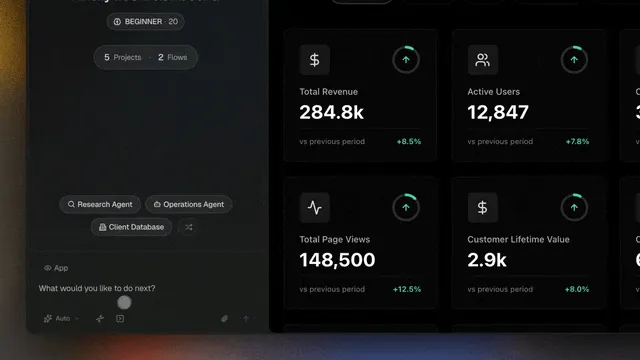
The Evolution of Software Creation
| Era | Paradigm | Primary Interface | Who Can Build |
|---|---|---|---|
| 1950s-2000s | Traditional coding | Text editors, IDEs | Professional developers |
| 2010s | No-code/low-code | Visual drag-and-drop | Technical users |
| 2023-2024 | Vibe coding | AI + code editors | Developers with AI assistance |
| 2025-2026 | Conversational development | Natural language dialogue | Anyone who can describe what they need |
How Conversational Development Works
Conversational development works as a loop, not a one-shot. You describe what you want, the builder generates a complete live app, you see the result, and you ask for changes in plain English. The app deploys instantly and stays live while you keep refining. There is no separate build, deploy, or hosting step to manage.
The Dialogue Loop
- Describe. Tell the builder what you want in natural language.
- Generate. Taskade Genesis creates a complete app: data, layout, logins, and any automations.
- Review. See the live result instantly, with real data you can enter.
- Refine. Ask for changes: "Add a chart showing weekly trends" or "Email me when a request comes in below budget."
- Keep talking. The app is already live and shareable. Every later message edits the running app in place.
This loop continues indefinitely. Your app is never "done." It evolves through ongoing conversation as your needs change, which is what makes it living software.
The arrow back from "refine" to "build" is the part that matters. With code generators, that loop ends at deploy and you start a new round of files. With conversational development, the loop never closes. See the Genesis Loop for how that becomes a self-reinforcing cycle.
What Makes It Different
Conversational development differs from earlier approaches in one structural way: it removes the build step entirely. Traditional coding, no-code tools, and vibe coding all hand you something you still have to assemble, configure, or deploy. Conversational development hands you a running app and lets you change it by talking.
From traditional coding: No syntax to learn, no debugging, no deployment pipeline. Taskade Genesis handles all technical implementation.
From no-code tools: No visual configuration, no drag-and-drop, no understanding of databases or APIs. You describe what you want in words.
From vibe coding: Vibe coding tools still produce code files that require deployment and hosting. Conversational development produces deployed, living software with databases, AI agents, and automations included.
Build vs Runtime: Code Generators vs Living Software
The clearest way to understand conversational development is build-time versus runtime. A code generator does its work at build time and stops: you get files, then you own the deployment, hosting, database, and every later change. Conversational development works at runtime: the app is always live, and your conversation is the editor.
| What you get | Code generators | Conversational development |
|---|---|---|
| The deliverable | Source code files | A deployed, running app |
| Where the work happens | Build time, then it stops | Runtime, continuously |
| Deployment & hosting | You set it up and maintain it | Built in, automatic |
| Database | You wire one up | Connected projects, ready to use |
| Logins for end users | You build auth | Built-in email sign-in (GenesisAuth) |
| Custom domain | You configure DNS | One setting on Pro+, with automatic SSL |
| Making a change later | New code, re-deploy | Send another message |
| AI agents & automation | Add-ons you integrate | Included from the first prompt |
The "connected projects" row is the part most tools skip. Your data lives in real projects you can also open as a board, table, or calendar. The app and the data are the same thing, so editing one updates the other.
Conversational Development Patterns
Three patterns cover most real builds: plan it out loud first, start small and grow, or point at a tool you already know. All three are just ways of describing the same thing, an app, with different amounts of detail up front. Pick the one that matches how clearly you can already picture the result.
PATTERN              YOU SAY                                  YOU GET BACK
─────────────────    ──────────────────────────────────      ─────────────────────────
Specification        "Here is our whole intake workflow..."   A planned app, built to spec
Iterative            "Build a feedback form" → add a chart    A small app that keeps growing
Example-driven       "Like Calendly, but for tutoring"        A familiar shape, your data
The Specification Conversation
For complex applications, have a planning conversation first:
- "I need a project management tool for a 5-person marketing team. Let me tell you about our workflow..."
- The AI asks clarifying questions about users, features, and integrations
- You confirm the plan, and the AI builds it
The Iterative Enhancement
Start simple, add complexity through conversation:
- "Build a feedback form" → basic form created
- "Add a 5-star rating system" → rating added
- "Send me a Slack message when someone rates below 3 stars" → automation configured
- "Show me analytics on average ratings by week" → dashboard added
The Example-Driven Build
Show the AI what you want by describing existing tools:
- "Build something like Calendly but for our tutoring service. Students pick a subject, choose a tutor, and book a 30-minute session."
Why Conversational Development Matters
Conversational development matters because it lets the person who understands the problem build the tool, without waiting on a developer or learning to code. Most business software needs go unmet because building is too slow and too technical. Describing an app in plain English removes both barriers at once.
- Anyone can build. The operator who runs the process is the one who describes the tool. No engineering background required.
- Speed. Minutes instead of months. Refining through conversation is faster than code, review, and deploy cycles.
- AI-native. Apps built through conversation come with AI agents and automations by default, not bolted on later.
- Living software. Conversational apps are never frozen. They evolve through ongoing dialogue, staying aligned with how your work actually changes.
Conversational Development Best Practices
- Be specific in your first description. More detail produces a better first build. See prompt engineering for how to frame a request.
- Change one thing at a time. Ask for one edit per message rather than ten at once. It is easier to see what each change did.
- Describe the "why". "I need a CRM because we keep losing track of follow-ups" gives more context than "build a CRM."
- Test with real data. Enter actual records and walk through a real use case before you share the app.
- Put your knowledge in an agent. Configure an AI agent with your business context so the app reasons the way you would.
What You Can Build by Talking
Conversational development covers the everyday business tools that used to need a developer: dashboards, client portals, CRMs, trackers, booking systems, intake forms, and internal approval flows. Each one ships live, with built-in logins and reliable automation workflows, from a single conversation.
Further Reading:
- What Is Vibe Coding?: the predecessor paradigm that conversational development builds on.
- Best AI App Builders Compared: how conversational development tools stack up.
Frequently Asked Questions About Conversational Development
What is conversational development?
Conversational development is creating software through natural language dialogue with AI. Instead of writing code or using visual builders, you describe what you want, review the result, and refine through conversation. Taskade Genesis is a conversational development platform with 150,000+ apps built.
Is conversational development the same as vibe coding?
Not exactly. Vibe coding usually involves AI-assisted code generation where you still work with code files, deployment, and hosting. Conversational development produces deployed living software with databases, AI agents, and automations, with no code or DevOps involved.
What is the difference between build-time and runtime in app building?
A code generator works at build time: it produces files once, then stops, and you own the deployment and every later change. Conversational development works at runtime: the app is always live, and each new message edits the running app in place. That runtime model is what makes it living software.
Can conversational development replace traditional programming?
For many business apps (dashboards, portals, forms, internal tools, CRMs), yes. For specialized systems needing custom algorithms, real-time processing, or hardware-level optimization, traditional programming still applies. The 80/20 rule holds: conversational development handles most everyday business needs.
What can you build with conversational development?
Customer portals, booking systems, CRM tools, feedback forms, project dashboards, internal approval workflows, inventory trackers, and event registration systems, among others. Each ships live with built-in email logins and reliable automation workflows. See the App Builder for the full range of Taskade Genesis capabilities.
Do I need any coding background to use it?
No. Conversational development is built for the operator who runs the process, not for engineers. If you can describe the tool you need in plain English, you can build it. Taskade Genesis handles databases, logins, and deployment for you.
What You Would Build in Taskade
Picture the simplest version of this for your own work: an ops dashboard. You describe it once, "show me today's bookings, this week's revenue, and anything overdue," and Taskade Genesis builds a live dashboard pulling from your connected projects. You open it each morning and see the numbers update as your team enters data. A teammate logs in with their email and sees the same view, no spreadsheet to refresh. An automation flags anything overdue and messages you before it becomes a problem. When you want a new tile next month, you do not file a ticket. You just say so, and the running dashboard changes.
That is conversational development: one prompt, then an ongoing conversation, with a real tool at the other end. Build yours free →
Related Wiki Pages: Vibe Coding, The Genesis Loop, App Builder, Living Software, No-Code App Builder, Prompt Engineering