

TL;DR: Float is a polished resource scheduler billed per scheduled person: Starter $7 and Pro $12 per person per month billed annually (verified October 2026). Taskade Genesis builds the agency utilization and capacity board from one prompt, on your own data, next to the delivery work, with AI agents and automations included. Free Forever, Pro $10/mo billed annually. Try Taskade Genesis free →
See the alternative working - clone in 60 seconds
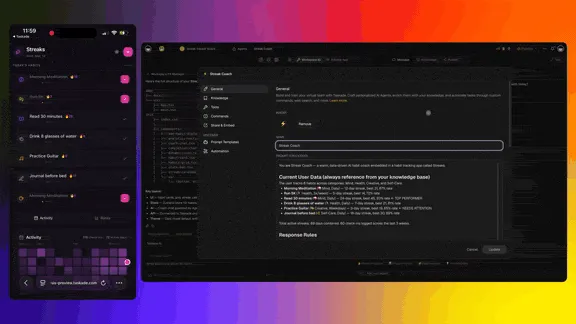
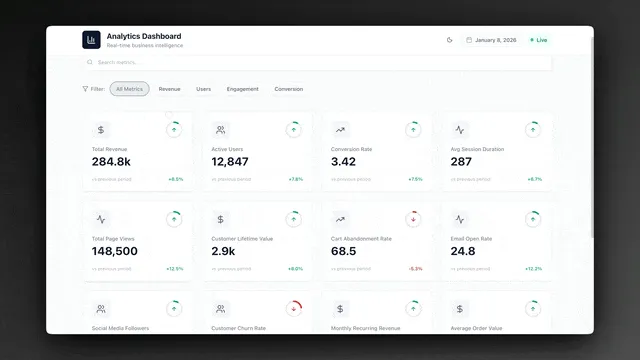
No signup, no credit card. Generate a Float-style agency utilization board →
| Capability | Float | Taskade Genesis |
|---|---|---|
| Pricing (starting) | $7-$12 per scheduled person/mo billed annually | $0 Free · $10/mo Pro billed annually (10 seats) |
| Build your own utilization app | ❌ | ✅ |
| Built-in AI agents | Limited | ✅ built-in tools |
| Utilization next to delivery tasks | Integrations | ✅ Same workspace |
| Workspace DNA loop | ❌ | ✅ ▲ Memory · ■ Intelligence · ● Execution |
Utilization next to delivery, not another seat tax
Utilization is four Monday questions: who is overbooked, who has slack, which clients burned the retainer, and what happens if the pitch closes. Float answers with a beautiful schedule. Taskade Genesis answers by making capacity a first-class board beside client work.
Deep guide: Float alternative for agency utilization (2026).
What is Taskade Genesis?
Taskade Genesis is the AI app builder inside the Taskade workspace. Founded by John Xie, Dionis Loire, and Stan Chang in 2017, Taskade is a Y Combinator-backed platform.
Taskade Genesis takes a single prompt and ships a live app: UI, database (Table view), AI agents, and workflow automations. Apps include email-and-password sign-in on every plan, password protection on Pro and above, and custom domains on Pro and above. The workspace behind the app offers multiple project views, including List, Board, Table, Calendar, and Gantt Chart (Gantt Chart needs a paid plan).
What is Float?
Float is a resource scheduling and capacity planning product for agencies and professional services teams. Float says more than 4,500 professional services teams use it, and reviewers praise its schedule clarity and planner UX.
Float at a glance (verified October 2026): Priced per scheduled person. Starter $7 and Pro $12 per person per month billed annually, or $8.50 and $14 monthly. Enterprise by quote for teams of 100 or more. 30-day trial on Pro with no credit card. Guests who are not scheduled are free.
What each Float plan adds:
- Starter: resource scheduling, capacity and time off management, project scoping, project role suggestions, and API and integrations access.
- Pro: time tracking, AI people experience profiles, client rate cards with multiple currencies, project cost estimates, advanced reporting and live dashboards, and SSO.
- Enterprise: onboarding and training, help with integrations and data imports, SLAs and custom contracts, and priority support.
Float connects to Google Calendar, Outlook Calendar, Slack, and Zapier, and it publishes an MCP server for AI assistants.
The strengths are real. The trade-offs show up for contractor-heavy agencies:
- Per-person pricing. Every designer on the grid is a billable seat.
- Hidden capacity. Finance hesitates to schedule flex contractors, so side spreadsheets return.
- Schedule vs delivery gap. Capacity lives in one tool, and client work lives in another.
Why agencies choose Taskade Genesis
Capacity as a living board
- App generation: Seats, retainers, week-ahead load from one prompt
- AI agents: Ask who is free for a pitch, flag over-100-percent rows
- Automations: Weekly digest to Slack, nudge soft bookings to confirmed
- Same workspace: Utilization argues with the delivery board in one system
Flat-rate vs per-scheduled-person math
Taskade flat-rate plans:
- Free Forever: 2 workspace members, unlimited projects, 3 Taskade Genesis apps, 1 AI agent
- Pro: $10/month billed annually ($20 monthly), up to 10 seats
- Business: $25/month billed annually ($50 monthly), unlimited seats
- Max / Enterprise: $100 / $250 per month billed annually
The per-seat loop agencies know
Taskade Genesis puts capacity on a workspace plan, not a headcount meter for every name on the grid.
Use Float and Taskade together
Many agencies keep Float as the scheduling canvas and run client delivery in Taskade. Float includes API access on every plan, so a Taskade automation can talk to it through the generic HTTP Request action and your own Float API key.
Example automation: "won deal to staffed project"
- Add a Task Completed trigger on your Taskade sales pipeline project. Mark a deal complete when the client signs.
- Add an HTTP Request action that creates the matching project in Float with your Float API key. Check the Float API documentation for the endpoint and fields.
- Add an agent step that reads the scope notes and drafts a staffing request: roles, hours per week, and start date.
- Post the staffing request to the resourcing channel in Slack.
- Create the client delivery project in Taskade from your onboarding template.
Weekly utilization digest. A second flow runs on a Monday Schedule trigger, pulls the week's allocations from the Float API, and writes them into your Taskade capacity board. An agent then answers questions like "who is over 100 percent this week?" next to the client work.
Float stays the source of truth for the schedule. Taskade holds the scope, the client conversation, and the follow-up work.
The Workspace DNA advantage
Every Taskade Genesis app runs on Workspace DNA.
- Memory: People, retainers, and projects across Board, Table, and Calendar
- Intelligence: Agents with built-in tools over live capacity records
- Execution: Reliable automations across 100+ integrations
Float brilliantly executes the schedule canvas. Taskade Genesis runs the full Memory → Intelligence → Execution loop next to client delivery.
Pricing comparison
Float list prices below are per scheduled person per month billed annually, verified on float.com in October 2026. Monthly billing costs more ($8.50 Starter, $14 Pro). Taskade prices are per workspace, billed annually.
| Team on schedule | Float Starter ($7) | Float Pro ($12) | Taskade |
|---|---|---|---|
| 8 people | $56/mo | $96/mo | Pro $10/mo (Free covers 2 members) |
| 15 people | $105/mo | $180/mo | Business $25/mo |
| 25 people | $175/mo | $300/mo | Business $25/mo |
| 40 people | $280/mo | $480/mo | Business $25/mo |
The comparison is not like for like. Float's price buys a dedicated scheduler with resource finance, and Pro adds time tracking. Taskade's price buys a workspace with projects, AI agents, automations, and Taskade Genesis apps, and you build the capacity board yourself from a prompt. On Free, you earn free AI credits with referrals and invites, and you can upgrade any time.
Choose Taskade if...
- You need utilization next to delivery tasks and client portals
- Per-scheduled-person pricing fights your contractor model
- You want agents that query live capacity
- You prefer flat workspace plans over headcount meters
Choose Float if...
- Schedule UX is the product. Float gives resource managers a polished planner canvas, scheduling in hours or percentages, placeholders for unfilled roles, and project role suggestions.
- Resource finance matters. Float Pro links the schedule to money with rate cards in several currencies, cost estimates, budget burn, and margin dashboards.
- You want time tracking in the scheduler. Prefilled timesheets in Float Pro compare planned hours with actuals without a second tool.
Frequently asked questions
How much does Float cost in 2026?
Float Starter is $7 and Pro is $12 per scheduled person per month billed annually, or $8.50 and $14 monthly (verified October 2026). Enterprise is priced by quote. Unscheduled guests are free.
Does Float have a free plan?
No. Float offers a 30-day trial on Pro with no credit card. Taskade has a Free Forever plan with 2 workspace members, unlimited projects, 3 Taskade Genesis apps, and 1 AI agent.
Can an agency run utilization on Taskade Genesis?
Yes, for week-ahead load, retainers, soft and hard bookings, and who is over 100 percent. Start from the Float alternative agency utilization kit.
Can I use Float and Taskade together?
Yes. Float includes API access on every plan, so a Taskade automation can create Float projects and read allocations through the HTTP Request action with your own Float API key.
Does Taskade Genesis include time tracking?
No. Taskade has no timesheets. Add custom fields for planned and actual hours and ask an agent to total them, or keep Float Pro for time tracking.
Which AI models does Taskade Genesis use?
Taskade Genesis runs frontier models from top AI labs, with TSK-Auto as the default. Built in, with no key, paid plans can pick OpenAI GPT models, xAI Grok and open-weight models such as DeepSeek, Qwen, Kimi and GLM. On Pro and up, you can bring your own OpenAI, Anthropic or Google Vertex AI API key (BYOK), so Claude runs in your agents on your own Anthropic account. In automations, the OpenAI, Anthropic, Google Gemini, Groq and OpenRouter connectors run on your own key. Model lineup as of October 2026.
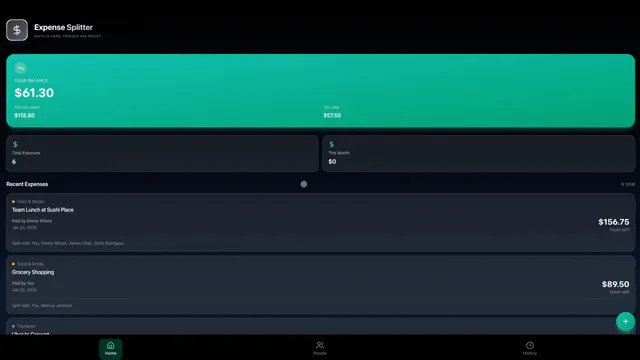
Clone a living agency utilization system
Capacity beside delivery - not a disconnected spreadsheet.
Get started with Taskade Genesis
Build an agency utilization board from one prompt. Database, agents, and automations included.
Explore Taskade Genesis
- AI App Builder - Build complete apps from one prompt
- AI Agent Platform - Digital teammates that work 24/7
- AI Automation Platform - Workflow automation across 100+ tools
- Community Gallery - Clone and customize live apps
- Pricing - Flat-rate plans, no per-person schedule tax
Learn the Taskade Genesis architecture
- First-app guide - 5-minute tutorial
- How Workspace DNA Works - The architecture explained
- Custom AI Agents - The Intelligence pillar
- Projects & Databases - The Memory pillar
Related comparisons
- Free HoneyBook Alternative - Own your client-business system
- Free Airtable Alternative - AI apps beyond bases
- Free Monday.com Alternative - Work OS without per-seat sprawl
Related reading
- The Build Without Permission article - Our manifesto
- Float Alternative for Agency Utilization 2026 - Capacity guide
- How Workspace DNA Works - The architecture