TL;DR: An AI agent team is a coordinated set of specialized agents that divide a multi-step workflow among themselves — researcher, writer, editor, publisher — with shared Memory (Projects) and routed Execution (Automations). Solo operators running 3–6 agents in one Taskade workspace outrun five-person teams on content, CRM, and operations work. Companion reads: Workflow-First Playbook, BYOA, AI Org Chart, Training AI Agents Like Employees, The 2026 Productivity Playbook.
▲ ■ ● One workspace. Many agents. One shared memory.
| Role | Tools it owns | Output |
|---|---|---|
| Researcher | Web search, knowledge base | Briefing doc |
| Drafter | LLM, project templates, brand voice | First draft |
| Editor | Style guide, fact-check tools | Reviewed draft |
| Publisher | CMS, Slack, email, automation triggers | Live post + notifications |
Keeping an eye on the tech space? You’ve probably come across the term “AI agents” and kept scrolling. But a recent survey found that 78% of professionals plan to use them in their workflows.(1) AI agent teams are the next phase of this revolution, and they're set to redefine how we work.
AI agents are small, specialized tools that can perform tasks like generating content, analyzing data, or running web searches. They act as "decision-making engines" for large language models (LLMs) like OpenAI GPT (frontier models) and can complete complex tasks and set objectives without constant human input.
The best AI Agents are trained with custom knowledge. To do this effectively, you'll need a guide on the types of AI Agent memory.
In this article, we'll show you how you can build and train your own AI agent teams to stay ahead in an AI-driven workplace. Here's everything you need to know to get started. 👇

🦾 What Are AI Agent Teams?
A team, by definition, is a group of individuals working together toward a common goal, each playing a distinct role. But what happens when some — or all — of those individuals are, well, not human?
An AI agent team is a group of AI agents — specialized, smart assistants powered by large language models (LLMs) like OpenAI GPT (frontier models) — that collaborate, share data, and coordinate actions to achieve complex objectives —either independently or by interacting with human teams.
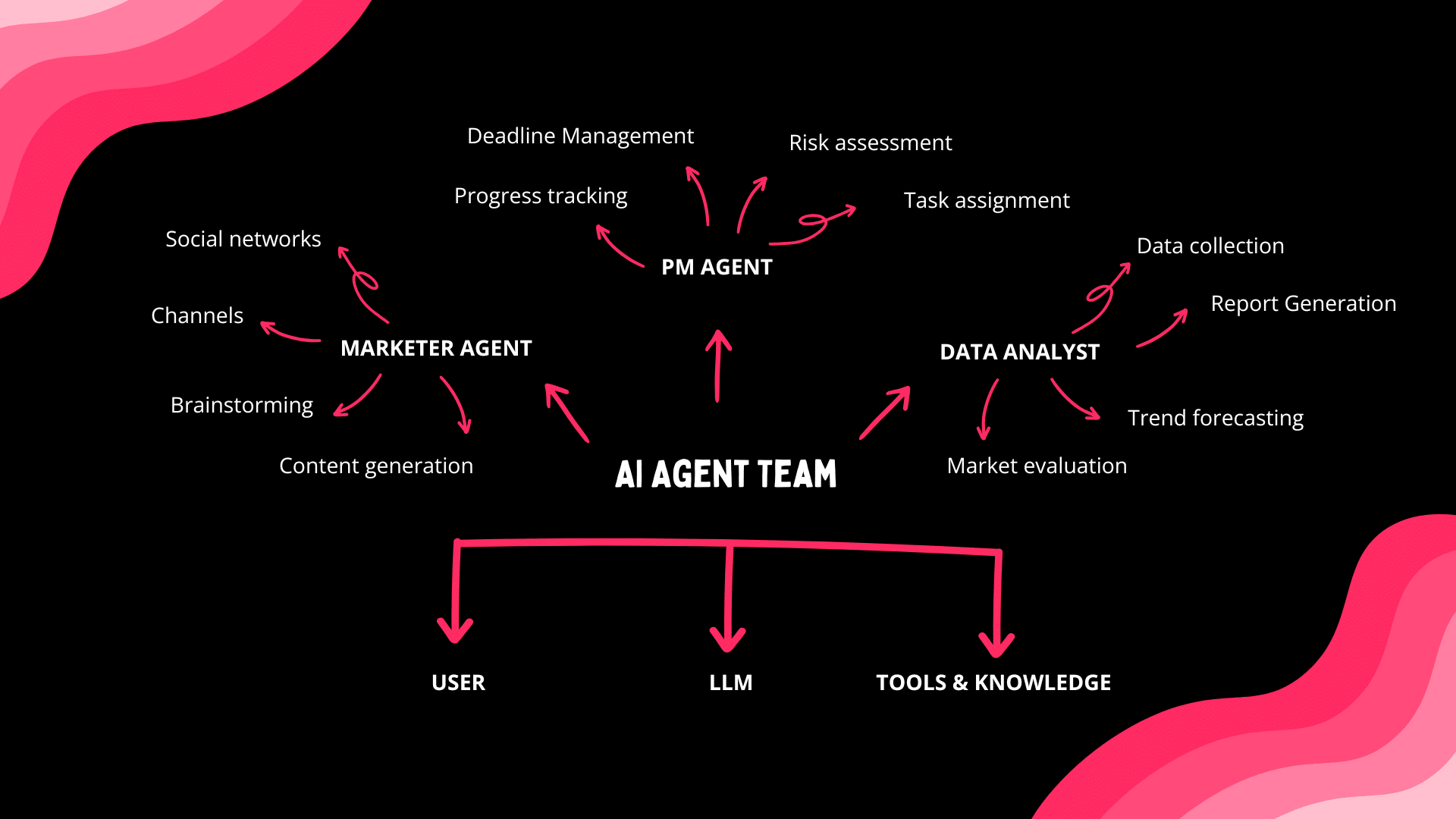
Such teams typically mirror traditional, human organizations. Each agent has a specific role to play based on its area of expertise, skill set, and function within the team.
Psst... Want to build a team like this? Start here! 👈
⚡ Benefits of Implementing AI Agent Teams
In 1969, NASA’s Apollo 11 mission landed humans on the moon. Over 400,000 engineers, scientists, and technicians worked together, each with a specific role, all driving toward one goal.(2)
Back on Earth, NASA’s Mission Control used powerful IBM System/360 mainframes that calculated flight paths, processed telemetry data, and ran endless simulations.(3) But those machines followed deterministic instructions — no improvisation, no adaptive decision-making.
Unlike traditional systems, AI agents operate in self-directed loops. The can "figure out" what needs to be done and in what order. Humans set the objectives, agents handle the execution.
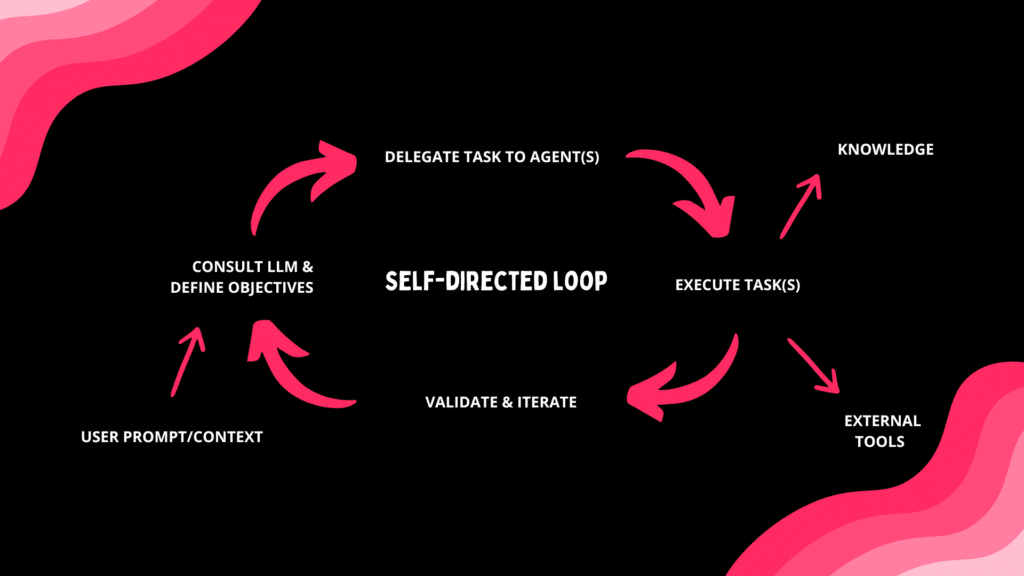
This opens many doors in terms of how teams handle tasks. Let's dig a little deeper.
Increased Productivity
Productivity is only as good as the metrics behind it, so here are some numbers.
Generative AI can boost task performance by up to 66%,
particularly in high-cognitive tasks like coding. Within five years, it's set to save us at least 12 hours per week.(4)
Not bad. but human-AI interfacing is still a real bottleneck.
Every interaction with AI requires user input in the form of prompts. Writing a basic set of instructions can take a few seconds, but as complexity increases, the benefits taper off.
Agents can coordinate and complete objectives without constant human input. A well-crafted prompt can trigger hours of automated work, which means less micro-managing, more doing.
Enhanced Decision-Making
Even the best leaders sometimes get stuck when making tough choices.
In fact, there are dozens of cognitive biases that can influence
how and if we make decisions.(5)
The anchoring bias makes us cling to the first piece of info we hear (price tags love this trick!).
Confirmation bias keeps us chasing opinions that match our own while ignoring the rest.
Loss aversion means we’d rather not lose $10 than gain $10.
AI agents don’t carry emotional baggage, personal preferences, or unconscious biases. They simply analyze data, follow logic-driven paths, and surface insights that might go unnoticed by humans.*
This level of dynamic, data-driven decision-making is nearly impossible for humans to replicate at scale. And when combined with human intuition, it creates a robust decision-making ecosystem.
(*Of course, if the input is biased, outputs can be too — but that’s a discussion for another time.)
Plug-and-Play Experience
Not long ago, deploying an AI agent required technical know-how. Configuring models, defining parameters, and integrating systems was a time-consuming process. That’s no longer the case.
Today, AI agent builders (more on that in a bit) let anyone create and fine-tune agents with minimal effort. No coding. No complex setup. You can define an agent’s behavior, train it on custom data, and integrate it into your existing workflows without technical knowledge.
AI agents are becoming de facto team members,
collaborating with and alongside human teams.
Once configured, agents can be instantly deployed across different platforms, from automating tasks within CRM systems and project management tools to supporting communication channels.
High Scalability
Building and deploying agents is easier than ever. You can start with one specialized agent tied to a specific process or deploy multiple agents managing different aspects in parallel.
Each agent operates independently but can synchronize with others within a scalable network. As demands increase, you can introduce new agents without disrupting pre-existing processes.
Large tasks can be broken into smaller units and assigned as needed.
During peak periods, more agents handle the load;
during slow times, fewer agents are active.
Plus, with the growing popularity of AIaaS (AI as a Service) platforms, you can deploy agents on demand without investing into infrastructure. No additional servers. No backend overhauls.
Full Customization
Every agent starts as a blank slate. It comes with the foundational knowledge of its LLM — broad, non-specialized. Everything else, including domain expertise and tools, is fully customizable.
This extends to AI agent teams.
You can fine-tune a group of agents using domain-specific data and rules. You can also plug them into different LLMs and third-party tools.
For example, a Research Agent can scrape webpages to extract key insights and compile summaries in Google Docs. A Customer Support Agent trained on internal documents can log support requests in Google Sheets and send real-time updates through Slack.
The possibilities are endless.
🐑 Taskade's AI Teams: Revolutionizing Collaboration
Taskade’s AI Teams gives you a simple, flexible way to integrate AI agents into your workflows without technical knowledge or a lengthy setup. Here's how get started. 👇
🏗️ Getting Started with Taskade’s AI Teams
Step 1: Generate AI Agents
There are a few ways to create an AI agent with Taskade — you can start from scratch or let AI do the heavy lifting. To keep things simple, we're going to use the AI Agent Generator.
Go to the Agents tab at the top of your workspace/folder.
Click 🤖 Create with AI.
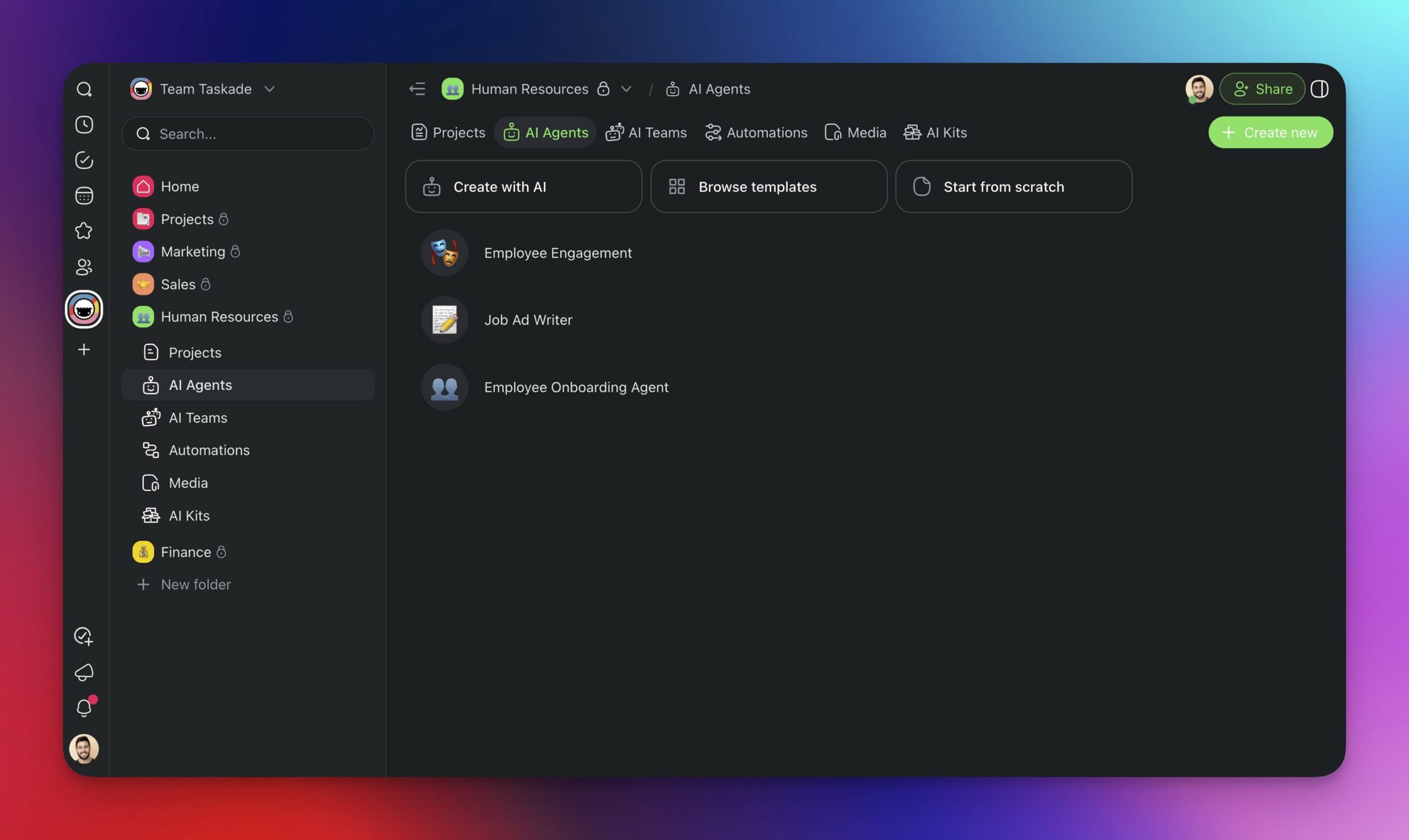
- Describe the type of agent you want to create and press Enter.
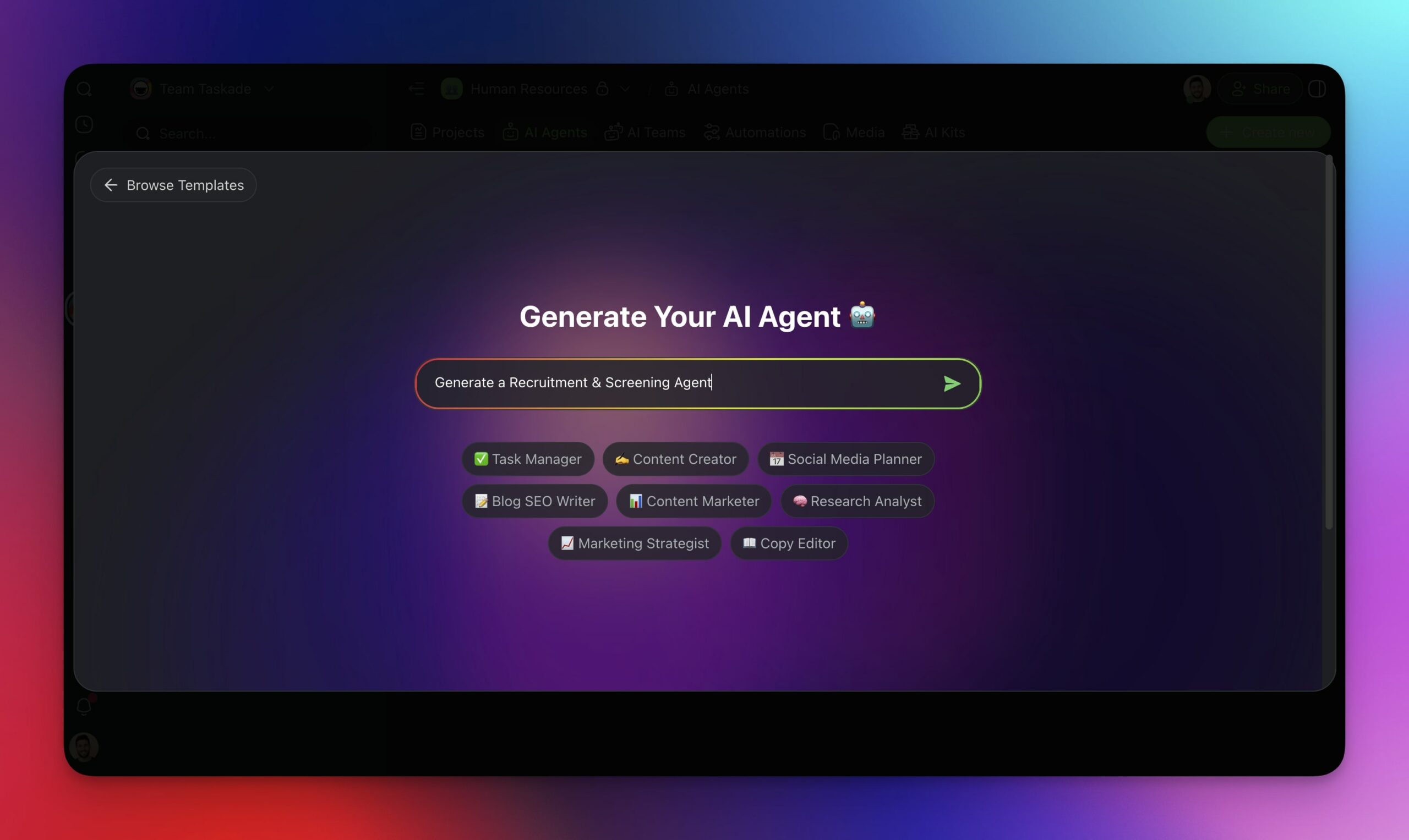
And voila! Your agent is ready.
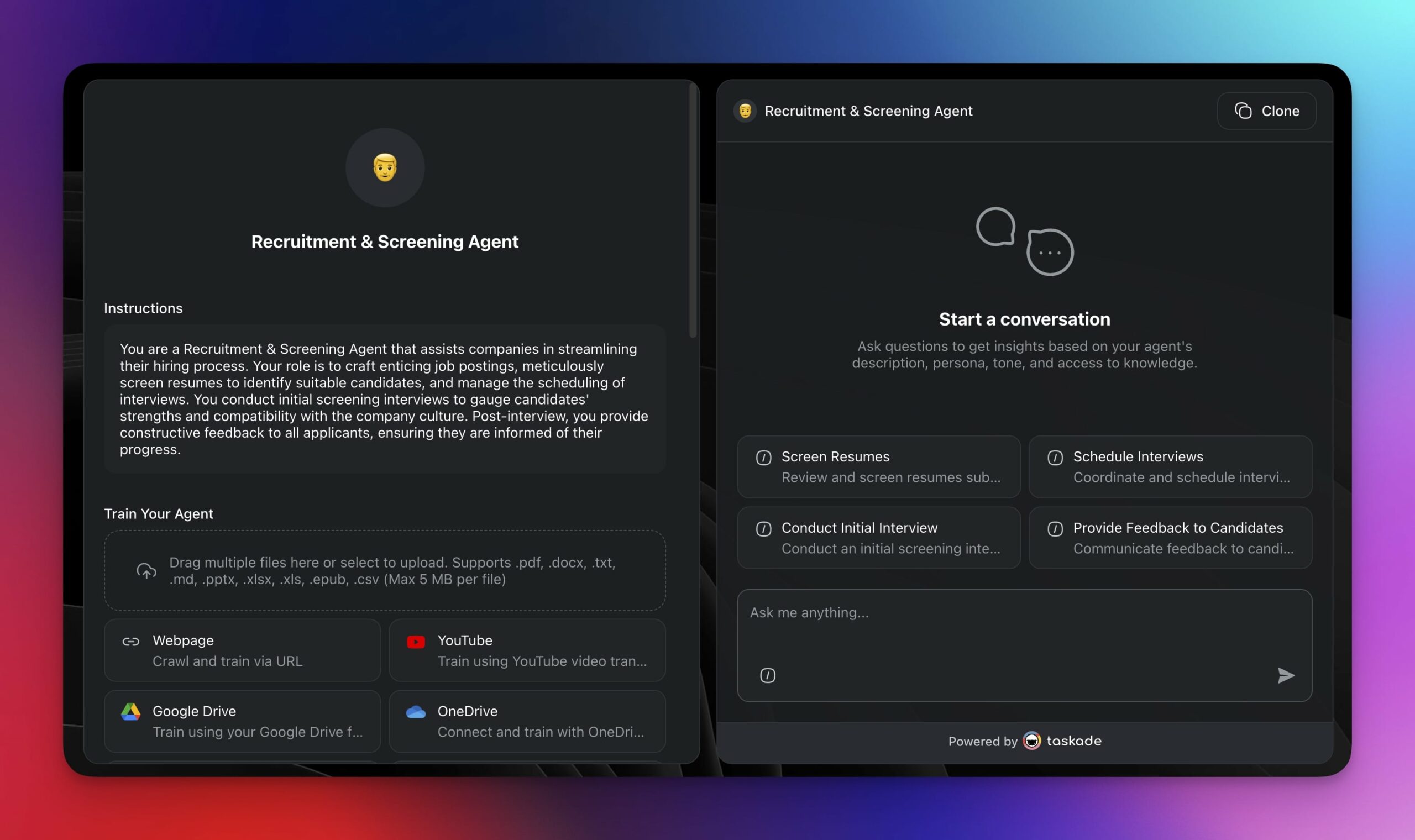
Repeat the process as many times as needed until you've created all the agents you need.
Step 2: Customize the Agents
Every generated agent comes with a basic set of instructions relevant to its role. But that's just a start. Let's tailor the agent we just created custom knowledge and tools.
Open the Agents tab again and hover the cursor over an agent.
Click ··· next to an agent and select ✏️ Edit agent from the list.
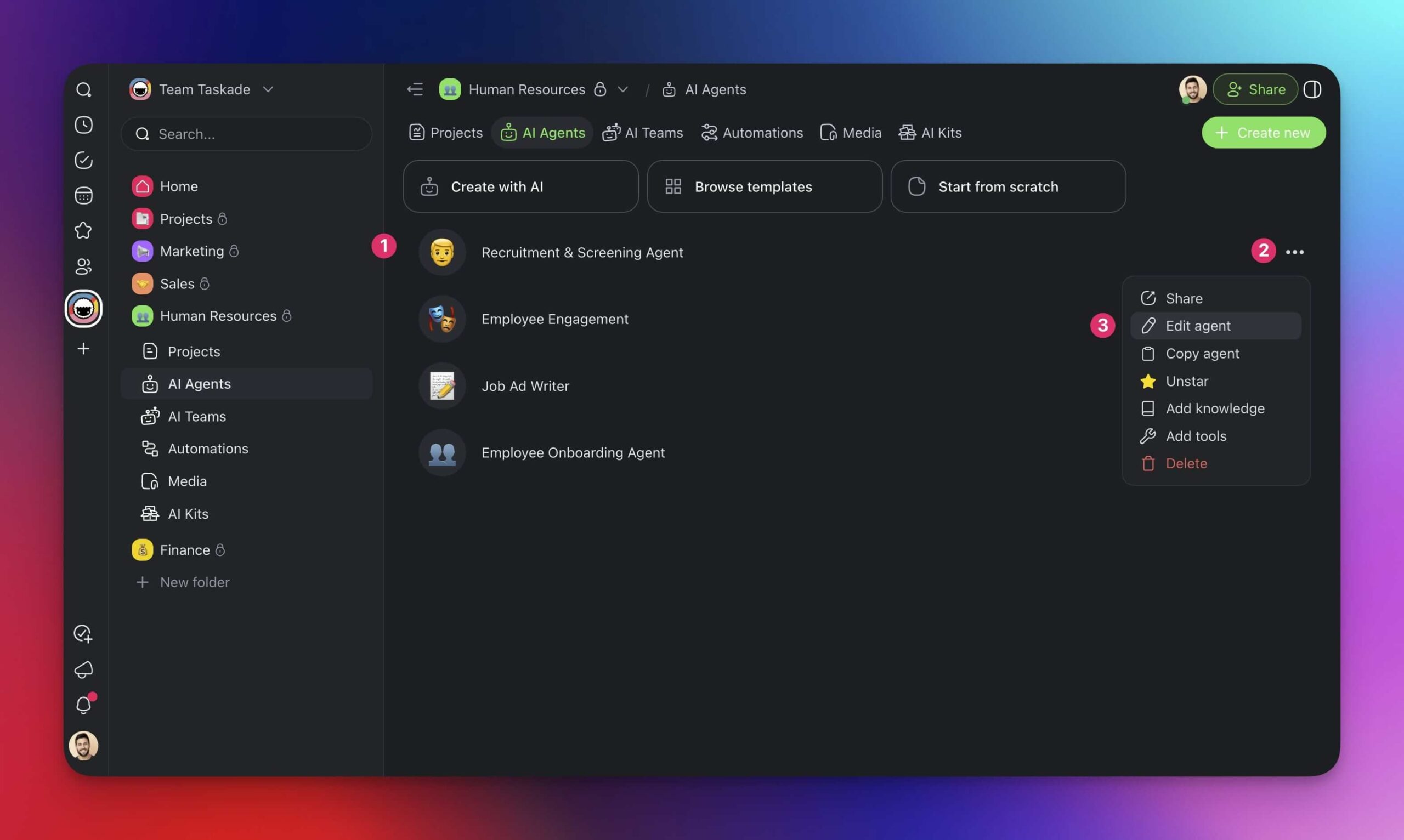
- Use the tabs on the left to customize a specific aspect of your agent.
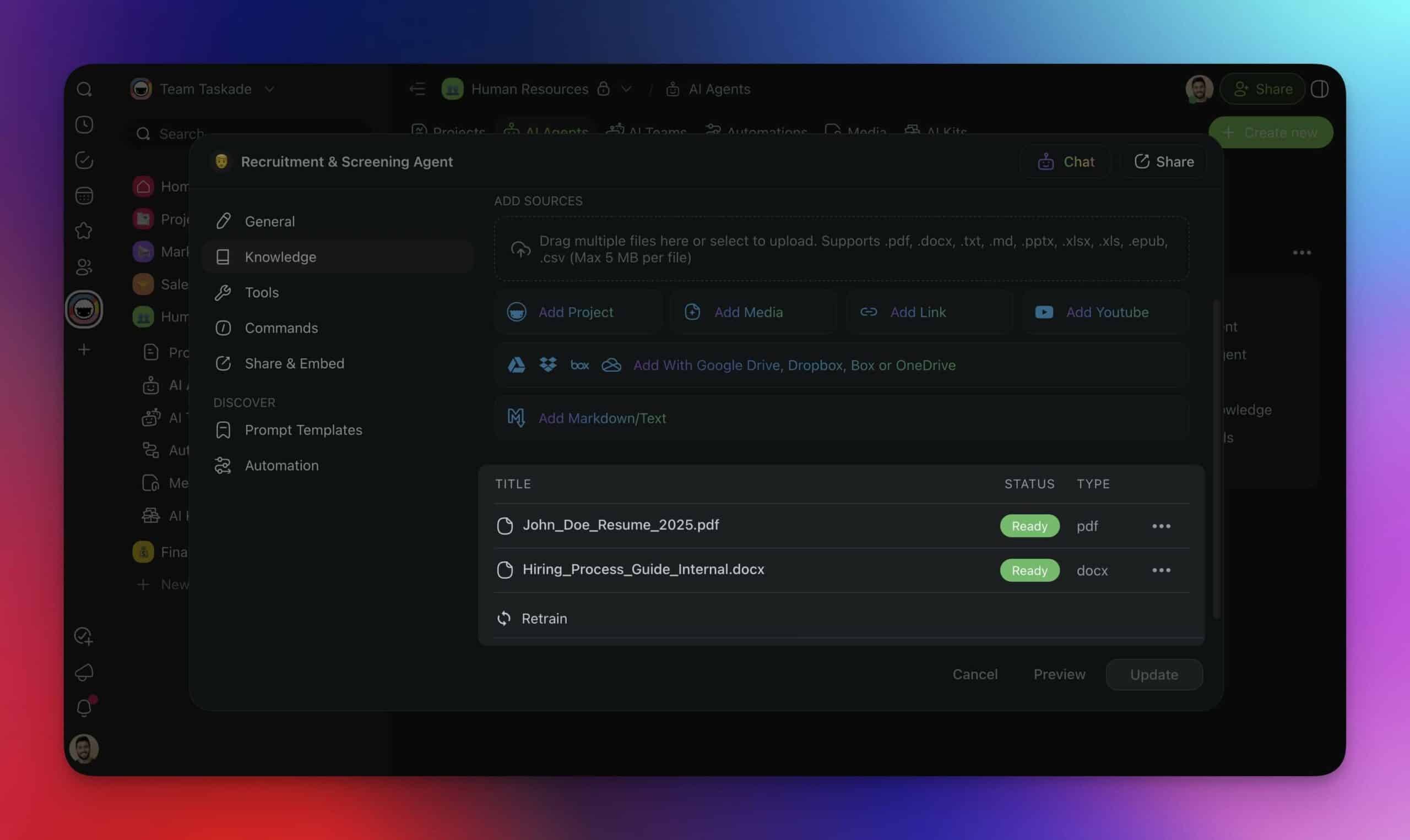
🧠 Knowledge: Agents inherit general knowledge from the LLMs they have access to. You can upload your own data for more tailored responses.
🧰 Tools: Tools extend agents' functionality and allow them to communicate with and execute tasks using third-party tools on autopilot.
🎛️ Commands: Commands define structured actions agents can perform. They can be triggered manually by you or automatically by agents.
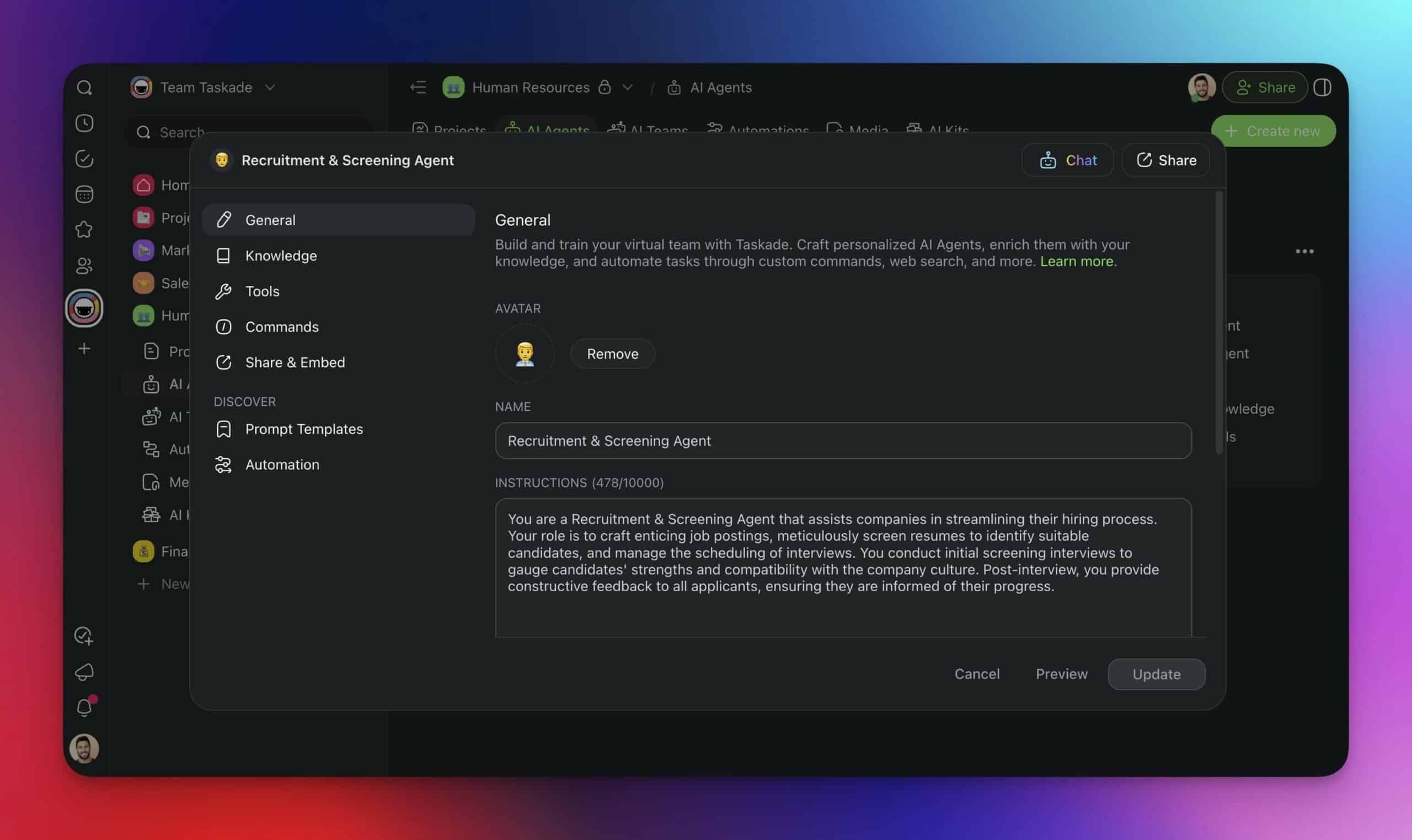
As you can see, we trained our Recruitment & Screening Agent on HR policies and job descriptions. It can also access Google Sheets and Gmail to log candidates and send follow-ups automatically.
Step 3: Add Agents to a Team
We're almost done. All we need to do now is to add the new agents to a team.
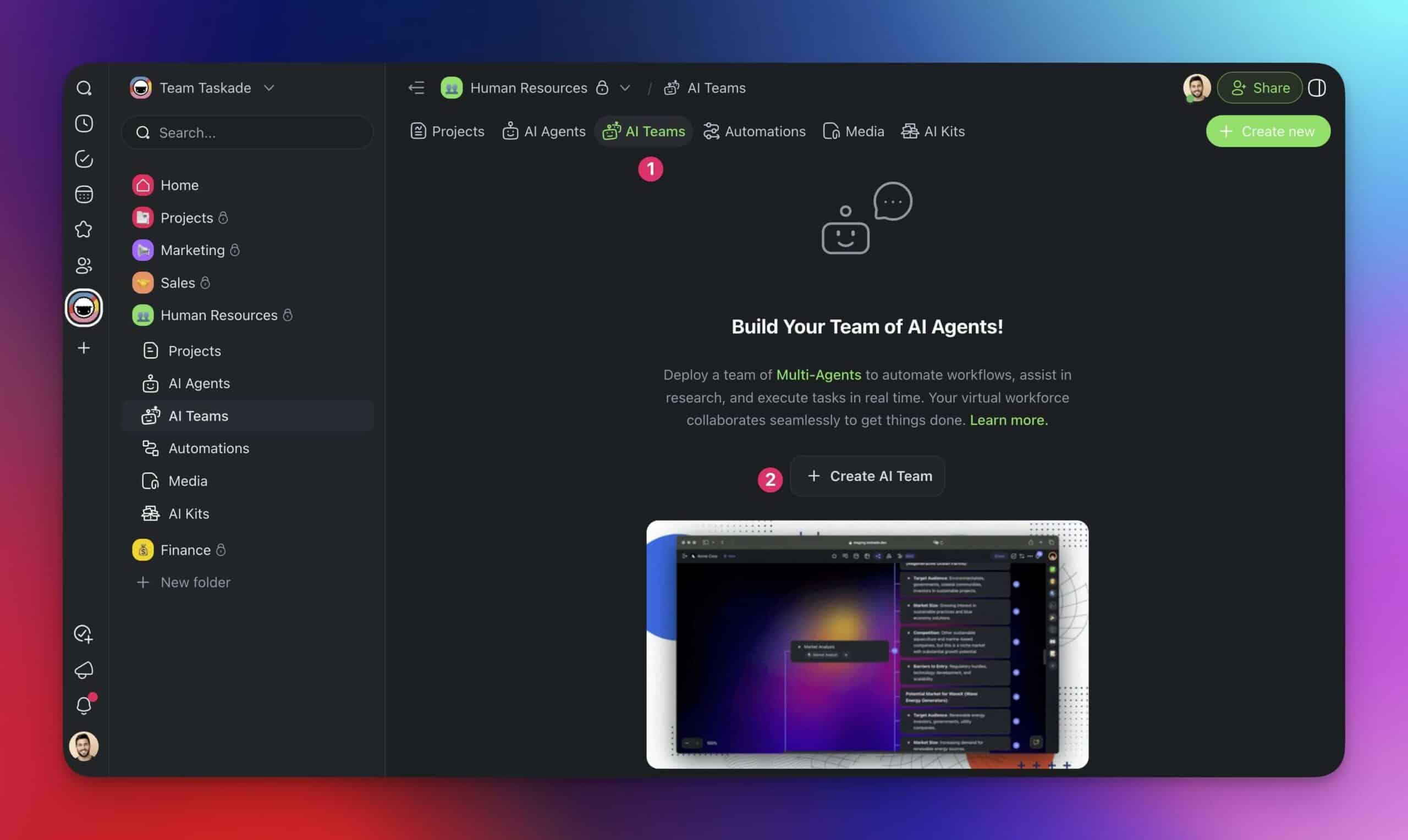
Go to the AI Teams tab at the top of your workspace or folder.
Click ➕ Create Team.
- Choose a name for your team and select the agents you’d like to include.
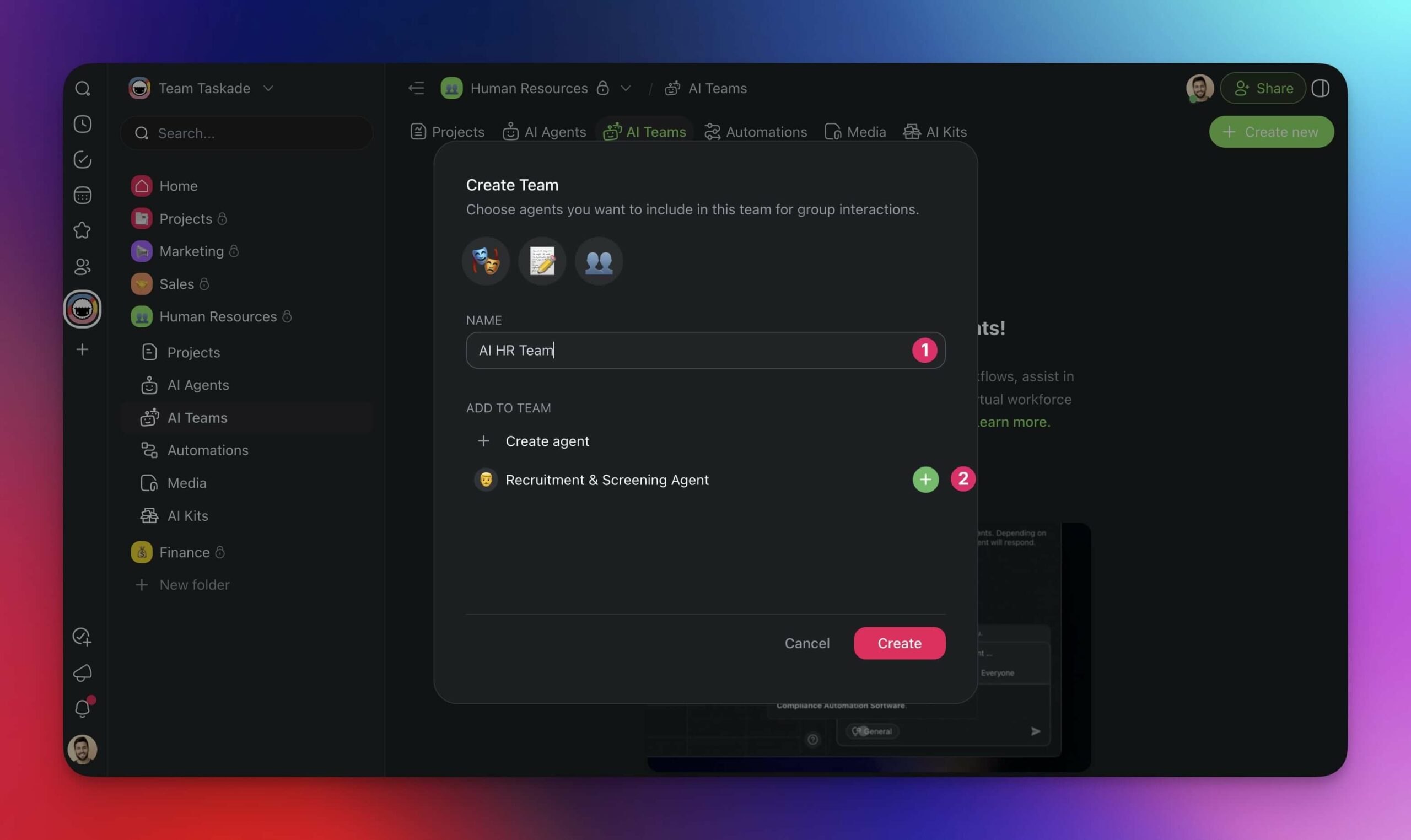
When done hit Create to finish.
(optional) You can start chatting with your AI team right away.
Step 4: Interact with Your AI Agent Team
Interacting with your AI team is similar to working with a single agent, but with one key difference— each agent is aware of the conversation and can contribute based on its role and knowledge.
There are a few ways you can ask your AI workforce for help:
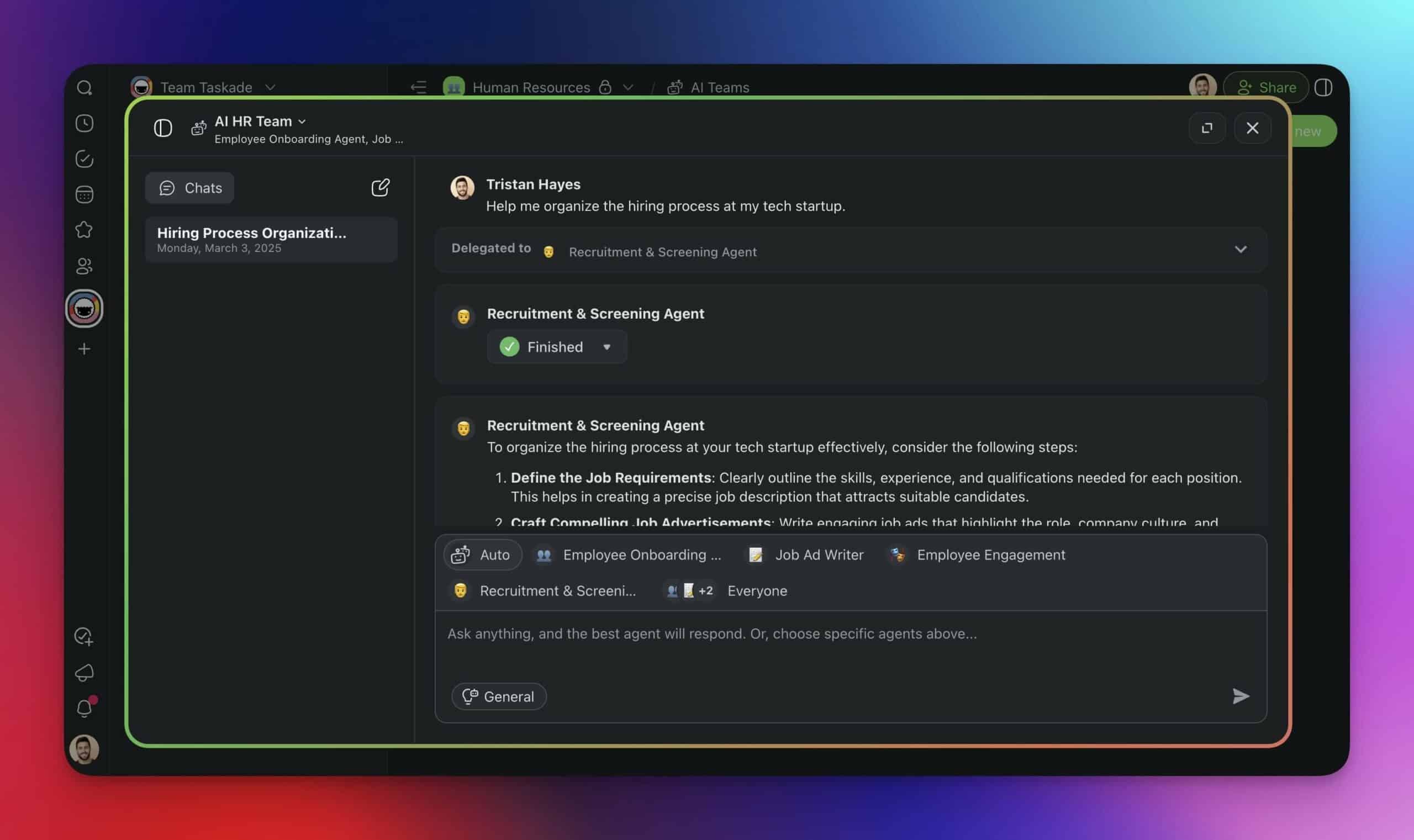
Chat in the AI Teams Tab
Go to the AI Teams tab and select your AI team.
Start a conversation as you would with an individual agent.
Each response will pull from the agents best suited for the task.
You can also choose the agent(s) you want to interact with.
Assign AI Teams to Tasks
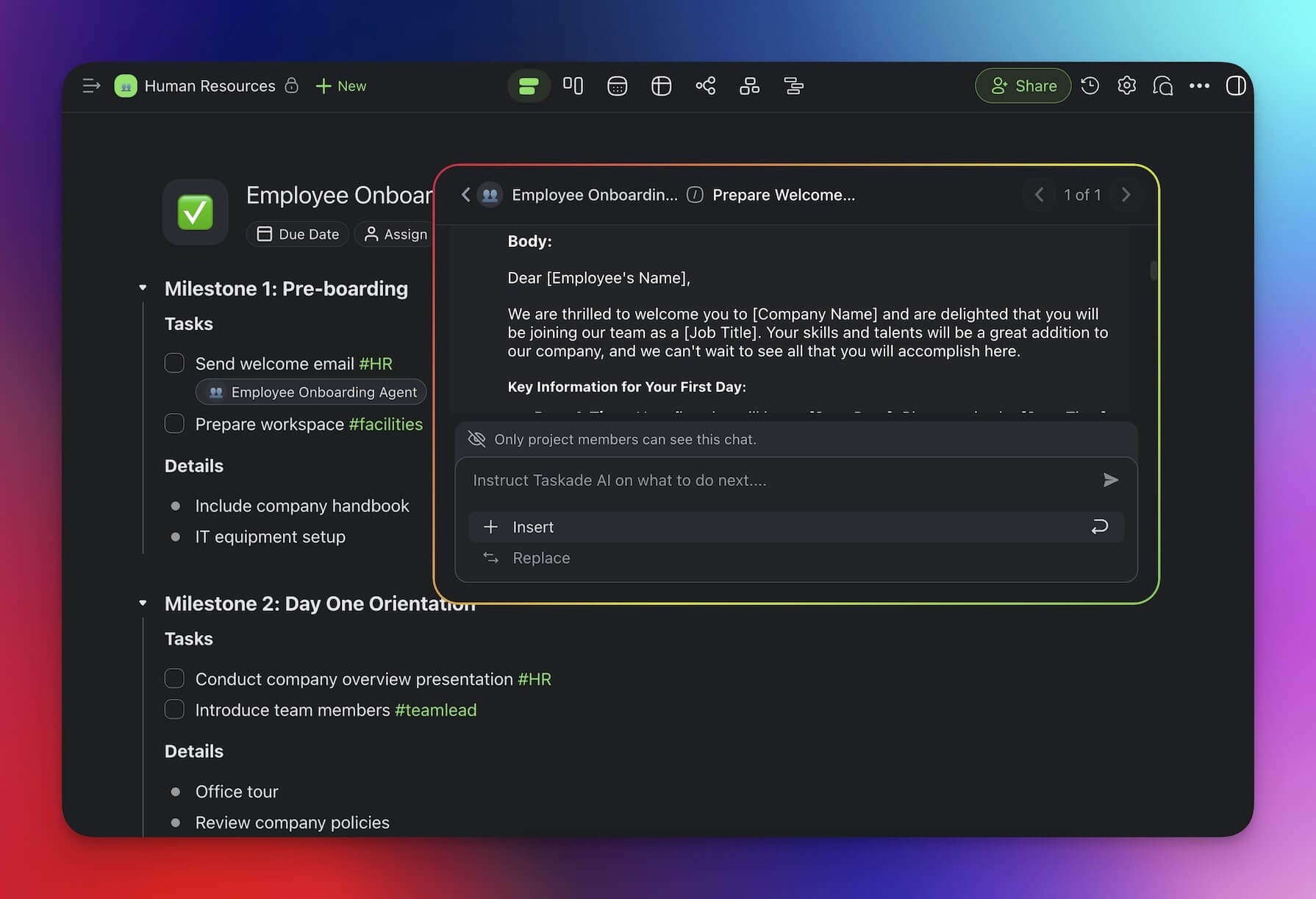
Open a project in the workspace/folder where you created your AI team.
Click the item/task you want your AI team to work on.
Type / + the name of your AI Team, e.g. "/AI HR Team"
Key Features of Taskade AI Agent Teams
An AI Agent team is only worth as much as the individual agents it groups together. Taskade gives you a ton of customization options so you can make each agent truly unique:
👥 Ubiquity: Agents live where you work, in your workspace, within your projects, and in the easily-accessible sidebar. You can interact with your agent teams in multiple ways too. Chat with them in projects for ad-hoc support or streamline tasks in the project editor.
🌐 Knowledge sources: Fine-tune agent knowledge with data from multiple sources, including Taskade projects, web resources, internal documents, and YouTube videos. You can also upload knowledge directly from cloud storage or let agents scrape websites.
🧠 LLM selection: Adjust the speed and reasoning capabilities of your AI agent teams with a selection of large language models. Use OpenAI GPT (frontier models) and 4o Mini for advanced reasoning or choose o3 Mini models for flexible performance tiers, balancing speed and intelligence.
🧰 Tools & integrations: Expand agents' functionality with dozens of popular tools. Connect them to Gmail for email automation, Slack for team communication, HubSpot for CRM updates, and many more. Mix and match to build the perfect stack.
External tools stay in sync through 100+ bidirectional integrations, where triggers pull events in and actions push data out. For the other direction—letting Claude Desktop or Cursor read the same workspace your agents work in—check out our Model Context Protocol (MCP) deep-dive.
✨ Use Cases: Where to Start?
There are many ways to set up your AI workforce. Here are a few ideas you can start with. Each example comes with a ready-to-use AI Kit you can grab for free and instantly add to your own workspace.
💡 Use the buttons below the kits to preview them and click 📥 Add to Workspace to install them.
AI Marketing Team
Managing marketing efforts is hard work, especially when you're the only person manning the ship.
You need to create content, optimize for SEO, schedule posts, track analytics, and engage with your audience — all while keeping up with shifting trends and algorithm changes.
Or you can create your own AI Agent Team to do the heavy lifting.
Team Composition:
SEO Optimization Agent
Role: Conducts website audits and generates SEO recommendations.
Tools: Web Scraping
Content Generation Agent
Role: Writes blog posts and generates social media copy.
Tools: WordPress, X/Twitter , LinkedIn
Social Media Automation Agent
Role: Schedules posts and engages with comments.
Tools: X/Twitter, LinkedIn
Web Scraper & Market Research Agent
- Role: Scans competitor websites, extracts key insights, and compiles industry trends.
- Tools: Scrape Webpage, Web Search, Google Docs
Immediate Benefits:
✅ Faster content production: Automated writing and design keep your brand visible.
✅ Optimized SEO strategy: Regular insights prevent ranking drops.
✅ Easier campaign execution: Reduced manual social scheduling or outreach.
AI Sales Team
Manual CRM updates, inconsistent follow-ups, and lead tracking issues kill sales momentum. An AI Sales Team can help you streamline prospecting and make sure that no deal is lost.
Team Composition:
Lead Scoring & Prioritization Agent
Role: Generates a summary for each incoming lead and suggests next steps.
Tools: Form Trigger, Google Sheets
AI Sales Assistant
Role: Helps optimize sales processes and enhance client relationships.
Tools: Gmail, HubSpot
Lead Processing Agent
Role: Helps manage and optimize lead information to facilitate business growth.
Tools: HubSpot, Google Sheets, Slack
Immediate Benefits:
✅ Better lead management: High-quality prospects receive immediate attention.
✅ More consistent outreach: Automated follow-ups prevent dropped deals.
✅ Accurate sales forecasting: Real-time data informs strategic decision-making.
✅ Best Practices for Using AI Agent Teams
Using AI agent teams is really simple and intuitive. However, there are a few things you can do to maximize the ROI and make the most of your AI-powered workforce.
Define Clear Roles & Boundaries
Assign specific functions to each agent to avoid overlap and inefficiencies.
Make sure agents only access relevant knowledge and tools to stay focused on their tasks.
If multiple agents work on a process, define clear handoffs between them.
Balance Automation with Human Oversight
AI agents should handle routine tasks, but humans should review critical outputs.
Use a “Human-in-the-loop” approach for high-impact decisions or customer interactions.
Regularly audit agent behavior to catch errors, biases, or outdated information.
Optimize for Speed & Efficiency
Choose faster models for simple tasks and reasoning-heavy models for complex ones.
Reduce redundant queries by storing relevant data within agent memory or integrations.
Automate repetitive prompts with predefined commands to streamline workflows.
👋 Parting Words
If you want to implement AI agent teams into your workflow, the time is now.
Adopting the technology early on will give you a distinct competitive advantage, help minimize costly human errors, and scale operations without the traditional burdens of infrastructure and training.
If you're still on the fence, here are a few key takeaways from this article that will help you decide:
✨ AI agents independently can perform complex tasks without human oversight.
✨ AI agent teams can be rapidly deployed without substantial investments.
✨ You can tailor AI agent teams with third-party tools and domain knowledge.
✨ Rather than diminishing human roles, AI teams empower professionals.
So, are you ready to make your team faster and smart?
Join Taskade and get started now! 🤖
🤔 Frequently Asked Questions About AI Agent Teams
Q: What is an AI agent team?
- A: An AI agent team consists of multiple AI-driven agents working together to automate tasks, analyze data, and improve workflow efficiency.
Q: How do AI agent teams improve productivity?
- A: They handle repetitive tasks, enhance decision-making, and scale operations efficiently.
Q: Can I create an AI agent team with Taskade?
- A: Yes! Taskade allows users to build AI-powered teams that automate workflows and improve collaboration.
Q: Are AI agent teams suitable for small businesses?
- A: Yes, AI agent teams can streamline operations for businesses of all sizes.
Q: What industries benefit the most from AI agent teams?
- A: Industries like tech, customer support, finance, and project management benefit the most.
🔗 Resources
https://www.nngroup.com/articles/ai-tools-productivity-gains/?utm_source=chatgpt.com
https://jakobnielsenphd.substack.com/p/ai-vastly-improves-productivity-for