






You can create a kanban board in Excel with one task table, a status drop-down and one FILTER formula for each board column. When you change a task's status, its card moves to the right column. Every step below works in Excel for the web, which is free with a Microsoft account.
TL;DR: Keep every task in one table with a Status column, then put a FILTER formula under each board column, so cards move when the status changes. FILTER runs in Excel for the web, Microsoft 365, Excel 2021 and Excel 2024. Older versions use the manual card method at the end. (Microsoft FILTER guide)
Quick answer
To create a kanban board in Excel, keep every task in one table with a Status column, then use a FILTER formula under each board column so cards move when you change the status. The board updates by itself, and it works in Excel for the web. For background on the method, read the kanban method entry.
Here is the board you are building, in plain text:
Sheet "Tasks" (the data)                Sheet "Board" (the view)
+---------------+-------+--------+      +-------------+-------------+-------------+
| Task          | Owner | Status |      | To Do       | Doing (3)   | Done        |
+---------------+-------+--------+      +-------------+-------------+-------------+
| Write brief   | Ana   | Doing  |  =>  | Pick venue  | Write brief | Book flights|
| Pick venue    | Sam   | To Do  |      | Send invites| Draft agenda|             |
| Book flights  | Ana   | Done   |      |             |             |             |
| Draft agenda  | Lee   | Doing  |      +-------------+-------------+-------------+
| Send invites  | Sam   | To Do  |       Change Status on "Tasks" and the card moves.
+---------------+-------+--------+
What you need before you start
The table lists the Excel features each step uses. All of them run in Excel for the web, and only FILTER needs a newer version of Excel.
| Step | Excel feature | Excel for the web, Microsoft 365, 2021, 2024 | Excel 2019 and older |
|---|---|---|---|
| 1 | Table with a name | Yes | Yes |
| 2 | Data Validation list | Yes | Yes |
| 3 | A second sheet | Yes | Yes |
| 4 | FILTER (dynamic array) | Yes | No: use the manual method |
| 5 | Conditional formatting with a formula | Yes | Yes |
| 6 | COUNTIF | Yes | Yes |
The version list for FILTER comes from Microsoft's FILTER page, checked on 2026-10-19.
How to create a kanban board in Excel, step by step
The six steps below take you from a blank workbook to a board with colored cards and a WIP limit. Each step ends with a check, so you know it worked.
Step 1: Make one task table
Rename the first sheet to Tasks. Copy the starter rows below and paste them into cell A1. The columns are separated by tabs, so Excel splits them into cells.
Task	Owner	Status	Due
Write brief	Ana	Doing	2026-10-21
Pick venue	Sam	To Do	2026-10-23
Book flights	Ana	Done	2026-10-19
Draft agenda	Lee	Doing	2026-10-24
Send invites	Sam	To Do	2026-10-27
Click any cell in the data and press Ctrl+T (Cmd+T on a Mac). Keep My table has headers checked. Then open the Table Design tab (called Table on the web) and change the table name to Tasks. The formulas in Step 4 use that name.
You are done when the header row shows filter arrows and the table name box reads Tasks.
Step 2: Limit Status to your columns
Select the cells under Status. Choose Data > Data Validation, set Allow to List, and type your board columns in Source:
To Do,Doing,Done
Click OK. Now a card can only sit in a column that exists, and a typo cannot hide a task. To add a column such as Review later, add it to this list and to the board in Step 3.
You are done when each Status cell shows a drop-down with your column names.
Step 3: Draw the board
Add a second sheet with the + button and name it Board. Type the column names in row 1, exactly as they appear in the Status list: To Do in A1, Doing in B1 and Done in C1. Make the header cells bold, set the column width to about 30, and give each header a fill color.
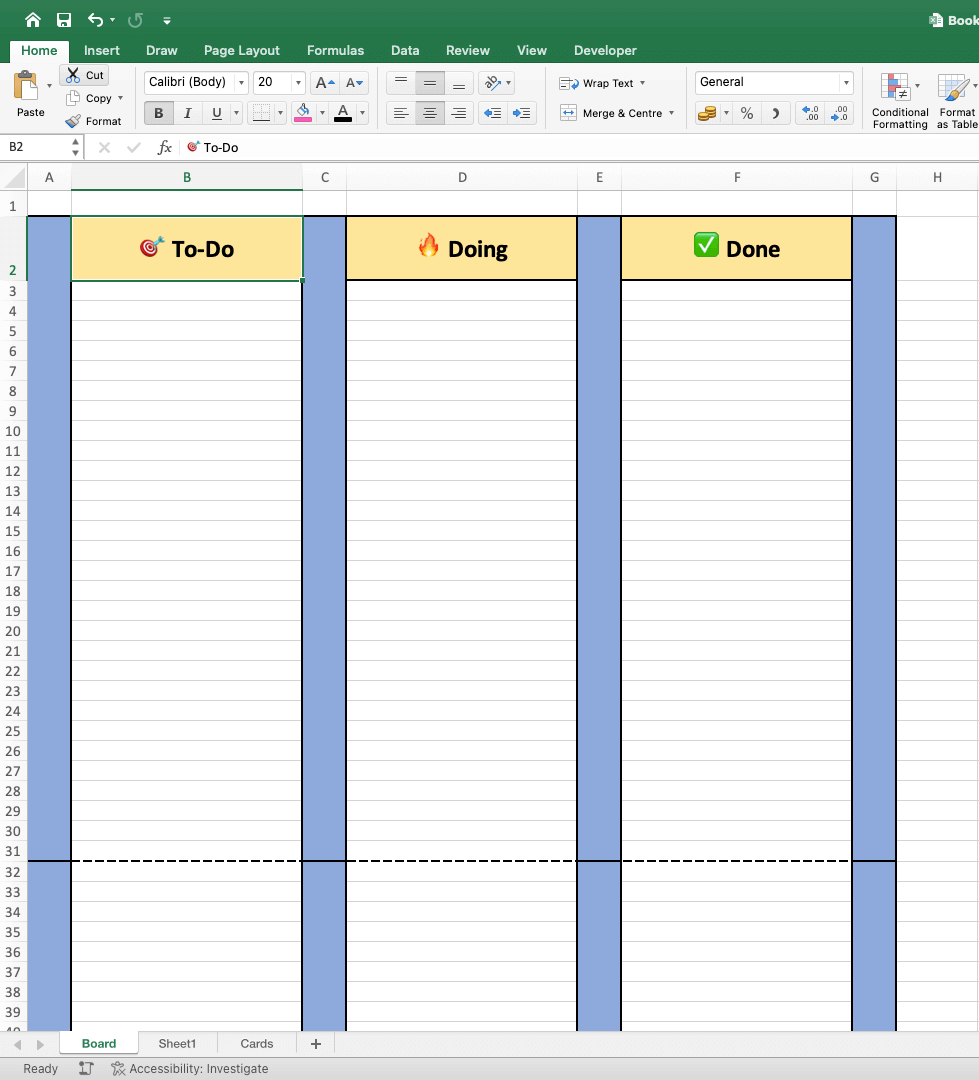
You are done when the Board sheet shows three labeled columns side by side.
Step 4: Fill each column with FILTER
Click cell A2 on the Board sheet and type:
=FILTER(Tasks[Task],Tasks[Status]=A$1,"Nothing here")
Press Enter. Every task whose Status is To Do spills down column A. Copy A2 to B2 and C2. The A$1 reference shifts to B$1 and C$1, so each column shows its own cards. The third part, "Nothing here", shows when a column is empty. Without it, Excel shows a #CALC! error.
To put the owner on each card, use this version instead:
=FILTER(Tasks[Task]&" ("&Tasks[Owner]&")",Tasks[Status]=A$1,"Nothing here")
Now go back to the Tasks sheet and change "Pick venue" from To Do to Doing. You are done when the card moves to the Doing column on the Board sheet by itself. To keep the nearest deadline at the top, sort the Tasks table by Due. FILTER keeps the table order.
Step 5: Color the cards
Select A2:C30 on the Board sheet. Choose Home > Conditional Formatting > New Rule, pick the rule type that uses a formula, and enter:
=A2<>""
Set a light fill and a border, so every filled cell looks like a card. Add one rule per person to color cards by owner, for example:
=ISNUMBER(SEARCH("(Ana)",A2))
You are done when each card has a fill, and Ana's cards share one color.
Step 6: Add a WIP limit
A WIP limit caps the cards in a column, so the team finishes work before it starts more. Type the limit in cell E1 of the Board sheet, for example 3. Count the Doing cards in E2:
=COUNTIF(Tasks[Status],"Doing")
Select the Doing header (B1) and add a formatting rule with a red fill:
=COUNTIF(Tasks[Status],"Doing")>$E$1
You are done when the Doing header turns red as soon as a fourth card enters the column. Excel warns you, but it does not block the move.
Formula reference for an Excel kanban board
Seven formulas cover most kanban questions in Excel: what is in each column, whose card it is, what is late, how long work takes, and whether a column is over its limit. Each formula reads the Tasks table from Step 1, so the whole board updates when one Status cell changes.
| Question | Formula (Board sheet) | Where it goes |
|---|---|---|
| Cards in this column | =FILTER(Tasks[Task],Tasks[Status]=A$1,"Nothing here") |
Row 2 of each column |
| Cards with the owner | =FILTER(Tasks[Task]&" ("&Tasks[Owner]&")",Tasks[Status]=A$1,"Nothing here") |
Row 2 of each column |
| One owner's swimlane | =FILTER(Tasks[Task],(Tasks[Status]=B$1)*(Tasks[Owner]=$A3),"") |
One row for each person |
| Cards in a column | =COUNTIF(Tasks[Status],B$1) |
Next to each header |
| Late cards not done | =COUNTIFS(Tasks[Status],"<>Done",Tasks[Due],"<"&TODAY()) |
A summary cell |
| Cycle time for a card | =IF([@Finished]="","",[@Finished]-[@Started]) |
A new Tasks column |
| Over the WIP limit? | =COUNTIF(Tasks[Status],"Doing")>$E$1 |
A rule on the Doing header |
The swimlane formula multiplies two tests, so a card shows only when both the status and the owner match. Put the owner names in column A from row 3 down, and the board becomes a grid of people by stage. Cycle time needs two date columns, Started and Finished, that you fill when a card enters Doing and Done.
Worked example: a WIP limit at work
The board below has a WIP limit of 3 in Doing. Ana moves a fourth card into Doing on Monday, 19 October 2026:
            TO DO (1)        DOING (4 / limit 3)   DONE (1)
            ------------     -------------------   -----------
 Ana                         Write brief           Book flights
                             Send invites  <- new
 Lee                         Draft agenda
 Sam        Pick venue       Order badges Doing header turns red: COUNTIF = 4, E1 = 3
Team rule: finish one Doing card before you pull a new one
Excel shows the problem but does not block the move. The team decides what to finish first. That rule, "stop starting, start finishing", is the core of the kanban method.
How a status change moves a card
The board is a view of the Tasks table, not a second copy of the data. The diagram shows what happens when you change one cell.
Free kanban template for Excel
This is the whole template: the task table from Step 1 and the three formulas from Steps 4 and 6. Paste the table into A1 on a sheet named Tasks, name the table Tasks, then paste the formulas into a sheet named Board.
Board!A1   To Do
Board!B1   Doing
Board!C1   Done
Board!A2   =FILTER(Tasks[Task]&" ("&Tasks[Owner]&")",Tasks[Status]=A$1,"Nothing here")
Board!B2   copy of A2
Board!C2   copy of A2
Board!E1   3
Board!E2   =COUNTIF(Tasks[Status],"Doing")
No download is needed. Because the board reads the table, you can add as many tasks as you like: type a new row under the table and it joins the board.
| Template part | What it does |
|---|---|
| Tasks table | Holds every card, its owner, status and due date |
| Status drop-down | Keeps each card in a real column |
| FILTER under each header | Draws the cards for that column |
| COUNTIF and E1 | Watches the WIP limit |
Make the same board in Google Sheets
Google Sheets has a FILTER function, but it has no third argument for an empty result. Wrap it in IFERROR and use plain ranges:
=IFERROR(FILTER(Tasks!A2:A100,Tasks!C2:C100=A$1),"Nothing here")
Use Data > Data validation for the Status drop-down and Format > Conditional formatting > Custom formula is for the card colors.
Using Excel 2019 or older?
Excel 2019 and older have no FILTER function, so build the cards by hand. This was the original method in this guide, and it still works in every version:
- Create two sheets named Board and Cards.
- On the Board sheet, label B2, D2 and F2 as To Do, Doing and Done, and use fill colors for the column dividers.
- On the Cards sheet, color a block of cells (for example A1:A9) as a card, and type the title, due date and owner inside it.
- Make one card style per type, such as yellow for normal work and red for urgent work.
- Cut and paste each card into its column on the Board sheet, and move it again when the work moves.
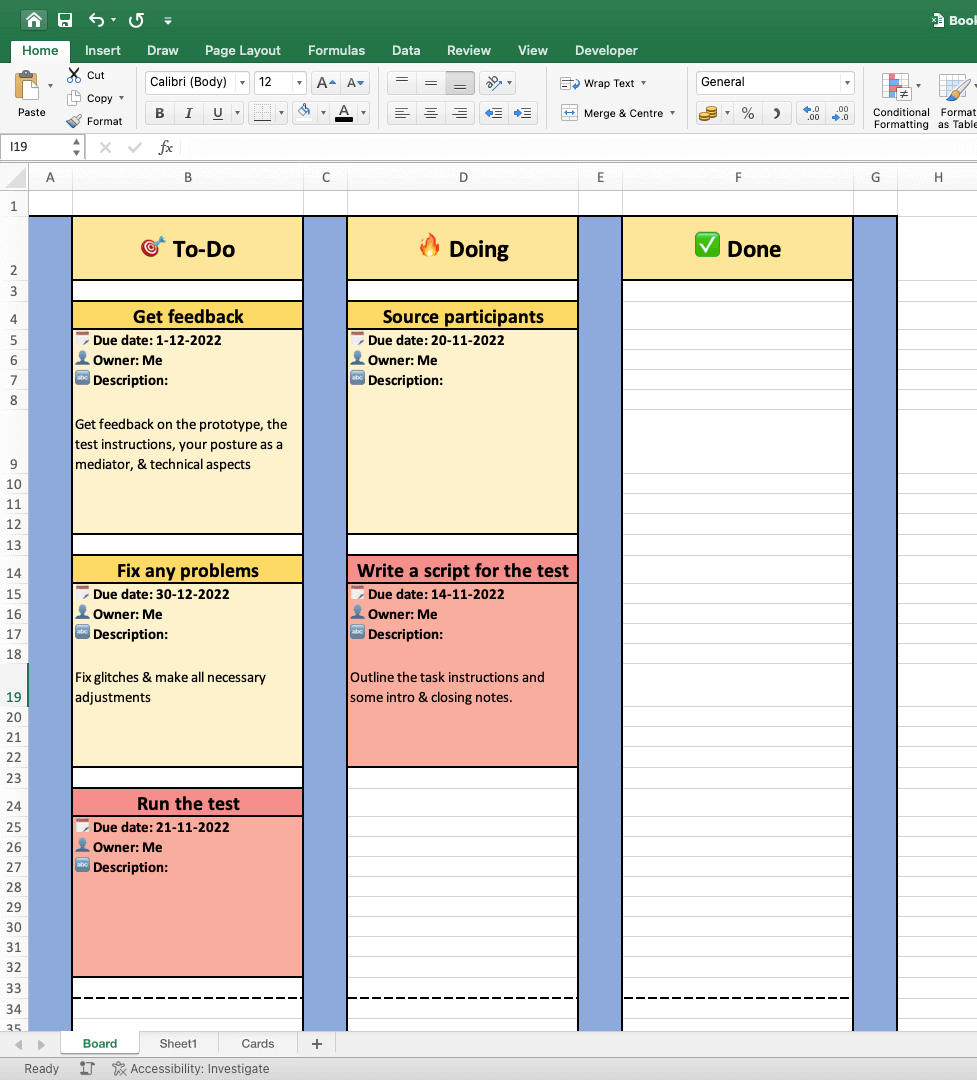
The manual board looks good, but every move is a cut and paste. The formula board in Steps 1 to 6 needs only a status change.
When to move from Excel to a kanban app
Move when more than one person moves cards, when you need due-date reminders, or when you want the board on your phone. An Excel board has no notifications and no drag and drop. Our list of the best kanban board apps compares 12 apps with their free plans and prices.
| Need | Excel board | Kanban app |
|---|---|---|
| Personal board, one file | Works well | Works well |
| Drag and drop | No: change the Status cell | Yes |
| Due-date reminders | No | Yes |
| Comments on a card | Cell notes only | Built in |
| Several people moving cards | Shared file in OneDrive | Live board for the team |
Your Tasks table moves in one step. Save the Tasks sheet as CSV and import it into Taskade, where each row becomes a task you can open in the Board view, a list or a calendar. If your team already uses Trello, you can also import Trello boards. To start fresh, use the kanban board template or the AI kanban board generator.
Turn the board into a live app
A kanban board can also run as a small app. In Taskade Genesis, one prompt builds a live app with its own database, such as a hiring board, a content pipeline or a support queue, and Taskade EVE edits it with you in chat. An AI agent can triage new cards, and automations with 100+ integrations move cards or send alerts when the status changes.
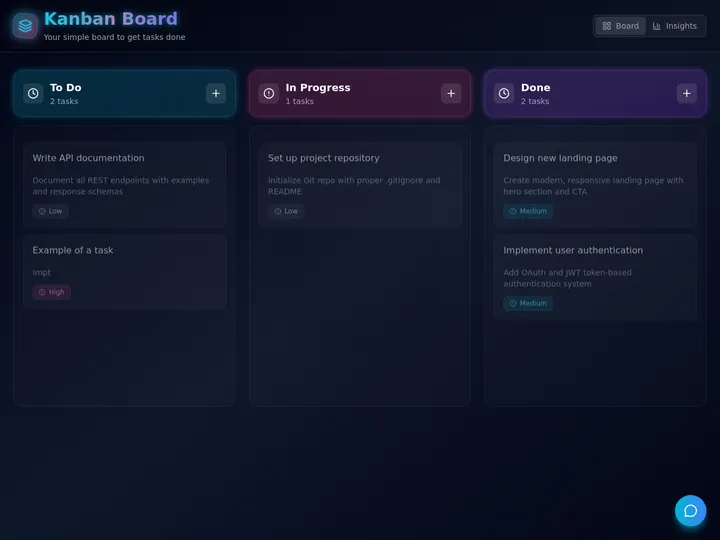
Clone the kanban board app from the Community Gallery and share it with a link. The Free plan includes 3 Taskade Genesis apps, 1 AI agent and 2 members, and starts with 0 AI credits. Pro is $10 a month billed annually. Build a board app from a prompt
Limitations of an Excel kanban board
An Excel kanban board is a useful personal tool with clear limits:
- No drag and drop. You move a card by changing a cell, not by dragging it.
- No reminders. A red header or row only helps when someone opens the file.
- FILTER needs a newer Excel. Excel 2019 and older use the manual method.
Taskade has limits too: Free covers 2 members, and Gantt Chart and Org Chart are on Pro and up. Pro is $10 a month billed annually for up to 10 users. See the Taskade plans for the full table.
More guides on boards and spreadsheets
- Build a checklist from the same table: how to create a to-do list in Excel
- Put the due dates on a month grid: how to create a calendar in Excel
- Read the review of Trello and the history of simple kanban boards
- Compare a kanban board with a scrum board
- Read the history of spreadsheets
- Learn the rules behind the board: agile workflow and agile metrics
- Pick a board app: Trello alternatives
- Plan the cards with the Eisenhower Matrix
Frequently asked questions
How do I make a kanban board in Excel?
Keep every task in one table with a Status column, limit Status to your board columns with a drop-down, then put a FILTER formula under each column header on a Board sheet. When you change a task's status, its card moves to the matching column. It works in Excel for the web for free.
Is there a free kanban template for Excel?
Yes. This guide includes a starter task table and three formulas that you paste into a blank workbook to get a working To Do, Doing and Done board. No file download is needed, and the template works in Excel for the web, Microsoft 365, Excel 2021 and Excel 2024.
Can I drag and drop cards on an Excel kanban board?
Not with the formula method. You move a card by changing its Status in the task table, and the FILTER formulas redraw the board. With the manual method in older Excel, you cut and paste the card cells. A kanban app is the better choice when you want true drag and drop.
How do I add a WIP limit to a kanban board in Excel?
Count the cards in the column with =COUNTIF(Tasks[Status],"Doing"), then add a conditional formatting rule on the column header that turns it red when the count is above your limit, for example =COUNTIF(Tasks[Status],"Doing")>3. Excel warns you but does not block the move.
Which Excel versions support the FILTER function?
FILTER works in Excel for Microsoft 365 on Windows and Mac, Excel 2024, Excel 2021, Excel for the web, and Excel on iPad, iPhone and Android. Excel 2019 and older do not have FILTER, so use the manual card method in this guide instead.
Can I make a kanban board in Google Sheets?
Yes. Google Sheets has a FILTER function too. Use a formula such as =IFERROR(FILTER(Tasks!A2:A100,Tasks!C2:C100="To Do"),"Nothing here") under each column. Google Sheets FILTER has no third argument for an empty result, so IFERROR shows the message instead.
Can a team share an Excel kanban board?
Yes, if the workbook is saved to OneDrive or SharePoint and shared, so people edit it at the same time. Excel does not notify anyone when a card moves or a due date passes, so the team must agree to check the board.
How do I add swimlanes to a kanban board in Excel?
Put owner names in column A of the Board sheet, then use a FILTER with two tests in each cell, for example =FILTER(Tasks[Task],(Tasks[Status]=B$1)*(Tasks[Owner]=$A3),""). Multiplying the tests means a card shows only when both its status and its owner match, so each row becomes one person's lane.
How do I track cycle time on an Excel kanban board?
Add Started and Finished date columns to the Tasks table. Fill Started when a card enters Doing and Finished when it reaches Done. A third column with =IF([@Finished]="","",[@Finished]-[@Started]) shows the days each card took, and AVERAGE over that column gives your average cycle time.
What is a better tool than Excel for a kanban board?
A kanban app is better once two or more people move cards or you need reminders. Trello, Jira and Taskade offer free plans with real boards. Taskade Free includes the Board view for 2 members, and Pro is $10 a month billed annually for up to 10 users.