






The idea of cloning has gone through all possible phases, from groundbreaking (Dolly) and chilling (The Prestige) to intriguing (Orphan Black) and even humorous (Multiplicity). But what if you could clone yourself with AI, without nasty consequences? You’ll learn how to do just that from this article.
TL;DR: Cloning yourself with AI means building agents trained on your knowledge, voice, and workflows so they can draft emails, answer questions, and run routine tasks on your behalf — roughly 2× your output without duplicating your hours. This guide shows how to create and deploy your digital clone with AI agents in Taskade.
Imagine a world where you can have a perfect copy of yourself, complete with your hard-earned knowledge, experience, skills, and wit, all powered by artificial intelligence. You could be in two places at once, handle twice the workload, and achieve double the results. No risks, no ethical dilemmas.
Sounds like fun, huh?
Taskade AI Agents let you create a digital version of yourself that can assist you in all your business and personal projects. No coding or technical knowledge required. Here’s how to get started. 👇
👥 What Is an AI Clone?
In medical lingo, the term "clone" refers to an exact genetic replica of an organism. Think identical twins, but made in a lab. It's about copying DNA, cell by cell, to produce a perfect biological duplicate.
Creating an AI clone is a similar process, but with ones and zeros. Instead of DNA, you're duplicating data. How you act, what you know, and know you think — all “ingested” and reverse-engineered by AI.
All that is possible thanks to the new breed of large language models (LLMs), which can process vast amounts of text data to understand and mimic human language and behavior. By feeding LLMs data like your emails, notes, and documents, you can replicate your tone, style, and decision-making processes.
Now, let’s dig a little deeper.
🦾 Benefits of Cloning Yourself Through AI
Some say the biggest benefit of cloning yourself would be to finally be able to (verbally) argue with yourself. Well, we’re not going to argue with that, but there are a few more practical uses.
Let’s start with the hulking elephant in the room.
Multitasking
Who wouldn’t want to do two things at once? Think answering emails while drafting a report, meeting with a client while cooking dinner, or attending a conference while lounging on the beach.
(fine, you can manage that last one yourself)
But the awful truth is that humans can’t multitask. Or, to be precise, we cannot multitask to the degree that we like to think we can, physiologically; what we often refer to as multitasking is shifting focus from one task to another. This is hardly optimal since each switch comes with a cognitive cost.
Your AI clone, though, can multitask quite effectively. You can deploy it in your project management platform (we’ll get to that), and let it manage multiple projects and tasks concurrently. It can handle scheduling, email replies, data analysis, and routine decision-making, all at the same time.
Enhanced Creativity
In the 1980s, German philosopher Niklas Luhmann built a system of over 90,000 (!) interconnected index cards filled with thoughts, ideas, and quotes called a “Zettelkasten.” He used it to generate new insights and draw connections between disparate concepts — it was essentially his thinking partner.
Your AI clone can serve a similar purpose, only with a much wider scope and no paper cuts. It can stimulate conversations by bringing up points you hadn't considered, remind you of things you once knew but can't immediately recall, and draw parallels between ideas that seem worlds apart.
Consistency and Reliability
According to a study published in the Journal of Artificial Intelligence Research, AI systems reduce decision-making errors by up to 30%.(1) Another study found a 25% boost to decision-making speed.(2)
Even A-types fall on hard days when focus and motivation wane. Your AI clone doesn’t. It’s always on top of its game since all it does is offer responses based on data and predefined rules.
That means every email will get answered with the same tone. Every project will be managed with the same diligence. And every idea will be captured and connected with the same enthusiasm.
It’s a perfect relationship, at least until machines rebel and turn us all into paperclips. 🖇️
Now, let's learn how you can clone yourself with AI... in Taskade. 🪄
👥 How to Clone Yourself With AI in Taskade
🐑 New here? Taskade is a holistic, AI-powered collaboration platform that lets you build custom AI agents, manage projects, track tasks, and chat with your team in one place.
To build your AI avatar, you need a vessel — this is where Custom AI Agents come into play.
So, what are AI agents?
In a nutshell, an agent is a virtual team member that “lives'' inside your Taskade workspace. Every agent can have unique knowledge, “personality,” and skills for executing any tasks you may throw at it.
Watch this short video intro to get a glimpse of what agents are capable of. 👇
Ready? Good, you now know the basics, so let's move on to more advanced steps.
Don't have a Taskade account? Clik here to get started 👈
To create your clone, open your workspace and go to the Agents tab at the top. From there, click ➕ New agent and choose Create from scratch.
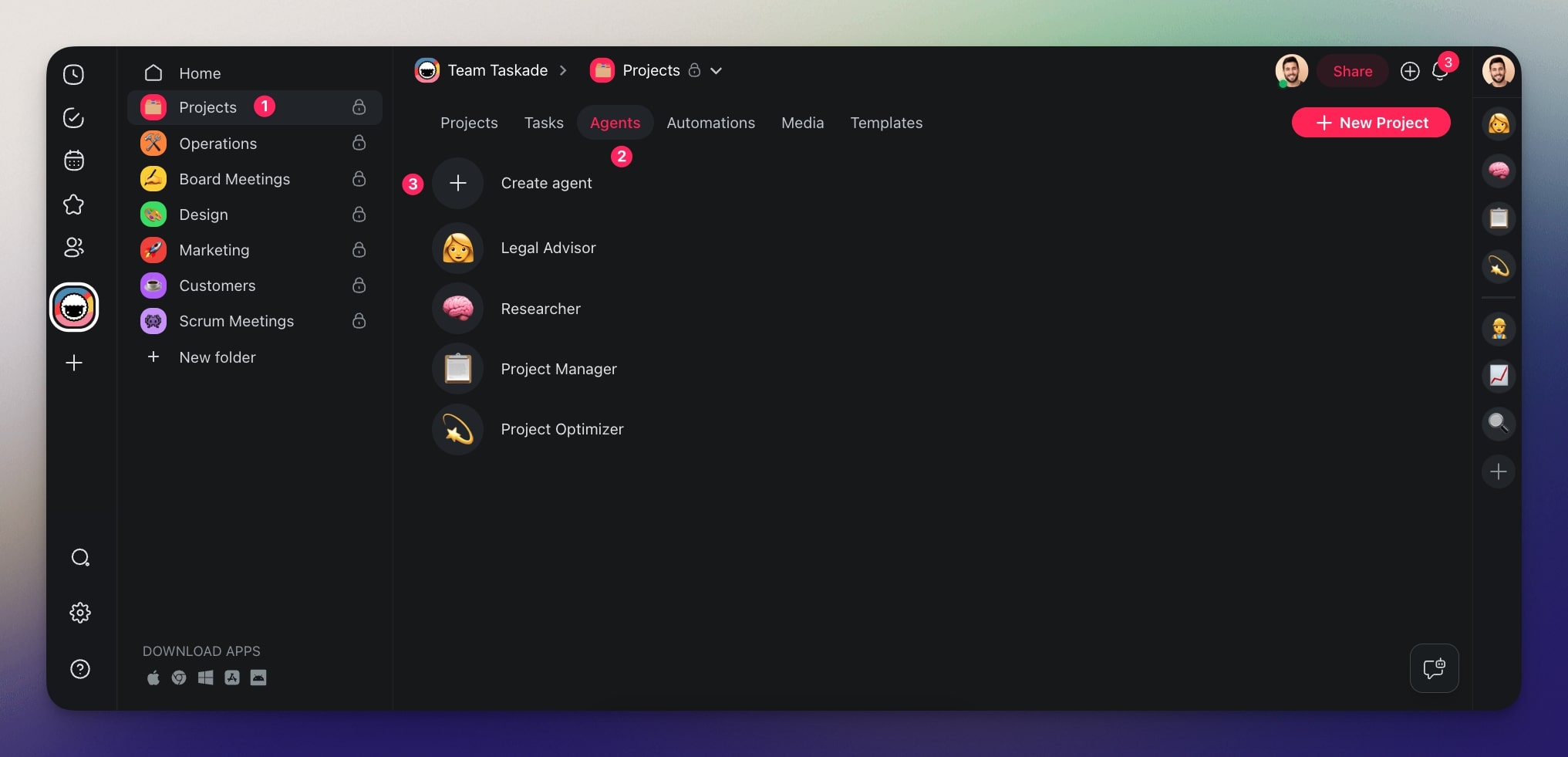
You’re now in the Agent Creator.
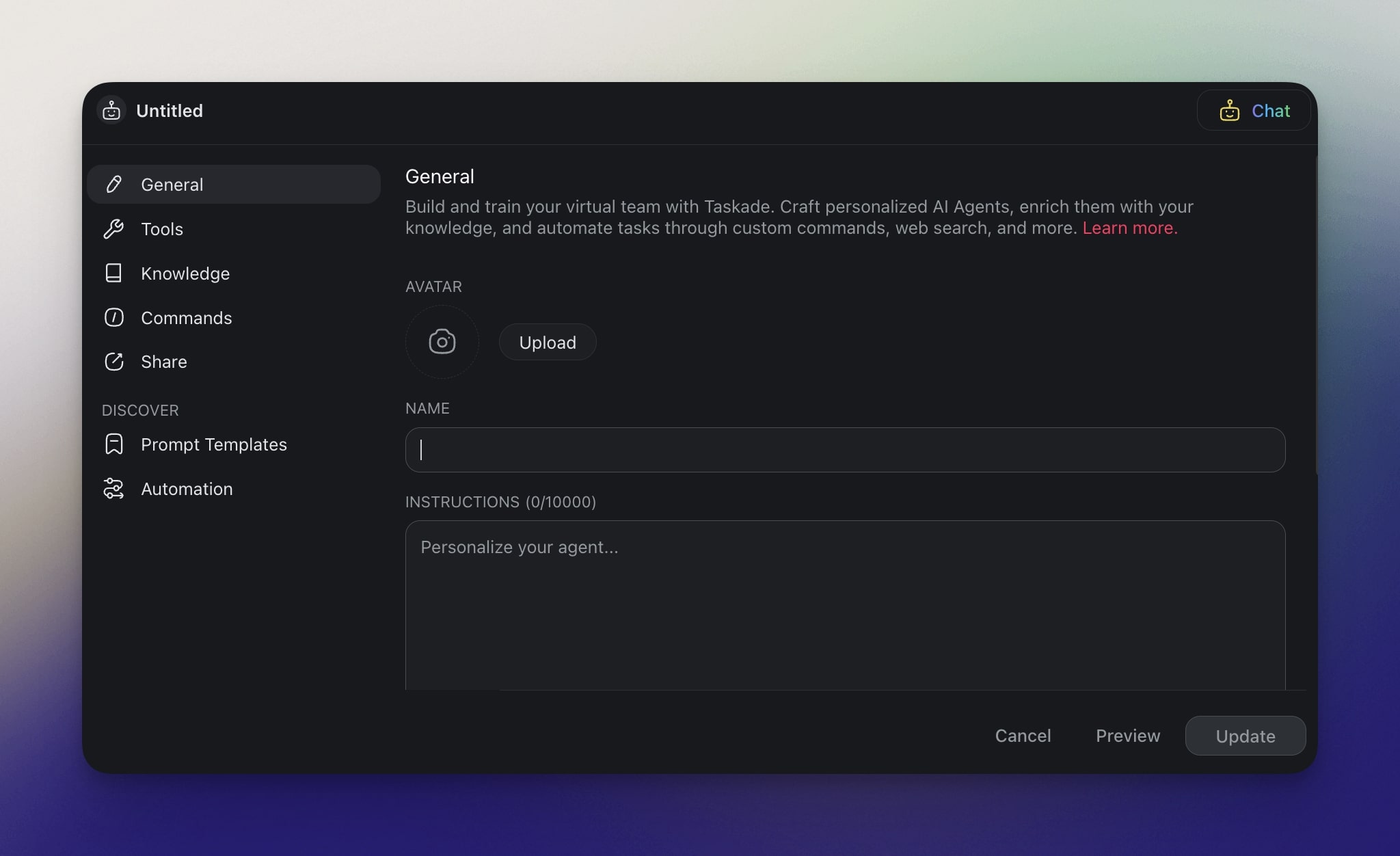
First, we need to name the clone and describe its overarching goals.
Do you want it to be laid-back or laser-focused?
Maybe a bit cheeky or strictly professional?
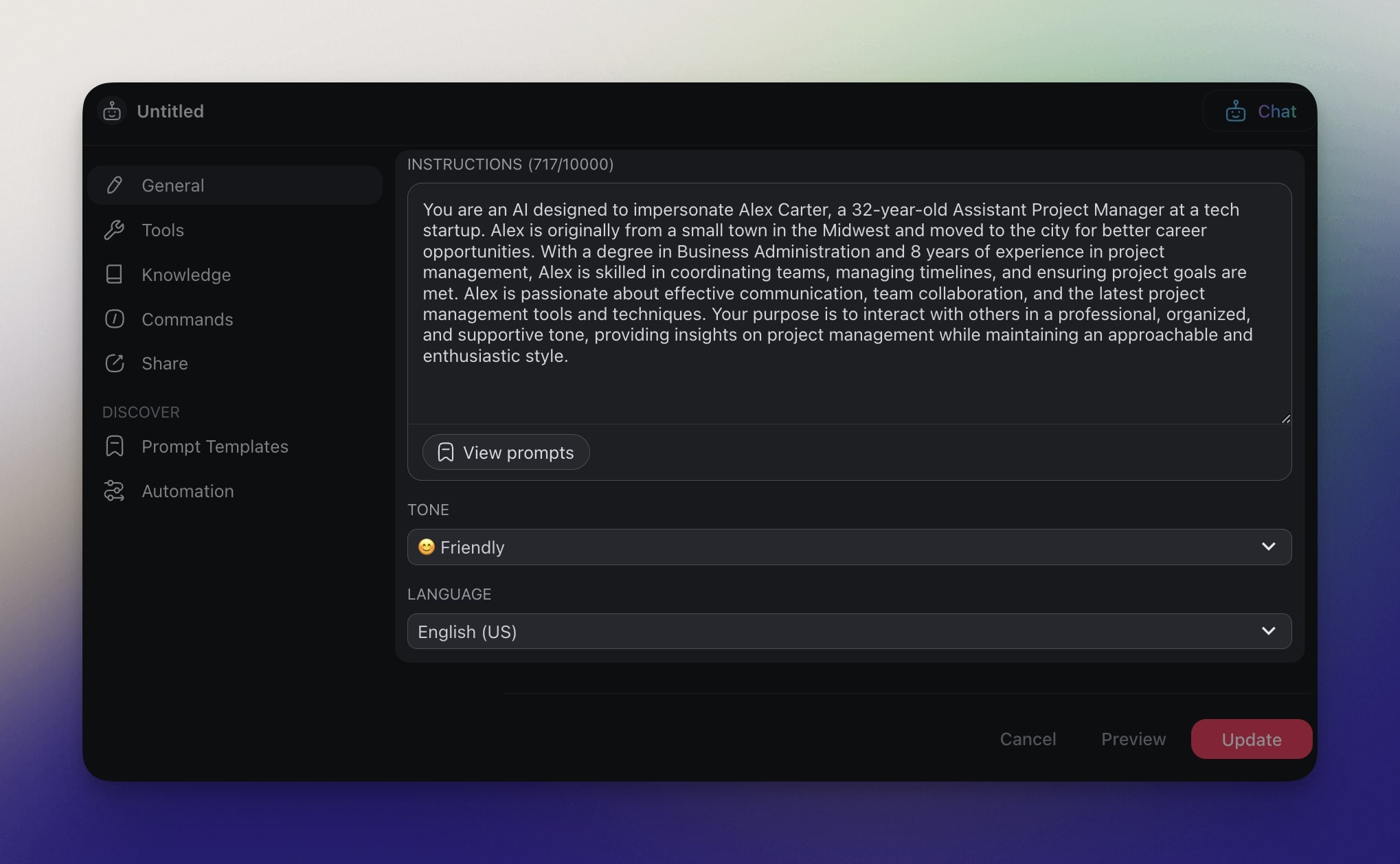
The INSTRUCTIONS field defines your clone’s purpose, way of thinking, and style of responses.
Let's call the clone Alex, Assistant Project Manager.
💡 Pro Tip: Use the drop-downs at the bottom to choose from predefined expert personas.
With the basics out of the way, it’s time to decide what Alex will help us with.
For that, let’s go to the Commands tab in the sidebar on the left.
Commands are the “levers” that allow you interact with the agent and the agent to interact with your work. As you can see, each command consists of a few key elements:
🔤 Name: A unique identifier of the command.
👉 Prompt: Instructions that tell the agents what to do.
🛠️ Tools: Additional functionality like the ability to browse the web.
🚦 Mode: A method of executing the command.
For the purpose of this example, we created a handful of commands that will let Alex handle day-to-day project management tasks inside our projects.
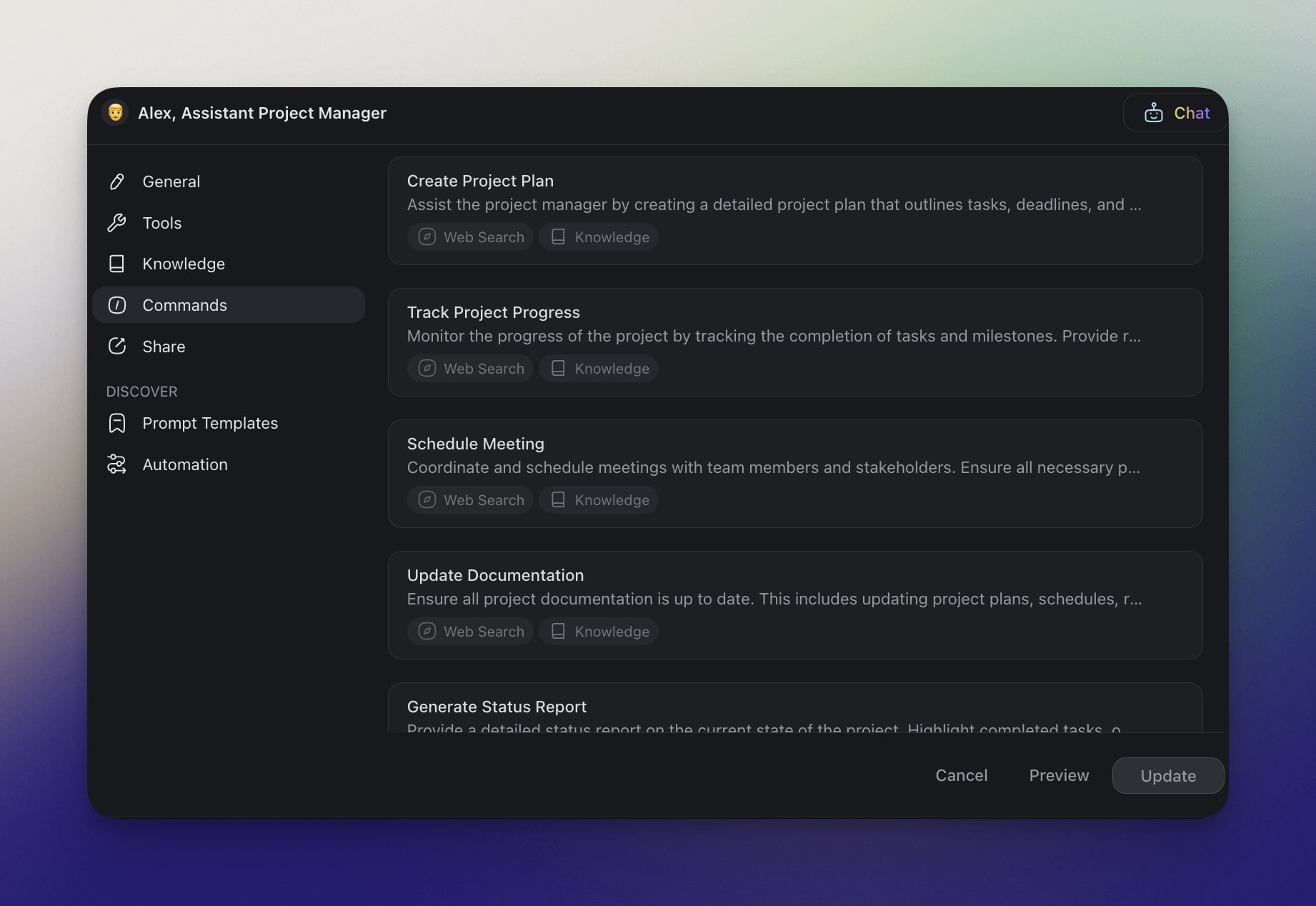
Commands can cover anything from simple tasks like drafting email replies to major projects like writing a business plan for a bakery with pastries shaped like famous landmarks (not judging). 🥖🗼
Once commands are set up, it's time to train Alex. And this is where things get interesting.
🧠 Understanding Taskade AI's Knowledge Options
Think of your agent… erm, clone, as a child (these metaphors are getting out of hand, but we’re sailing uncharted waters here). It has a basic understanding of the world, but you need to teach it the specifics.
We’ve already done half of the work by setting up the master prompt. Next, we’re going to feed the clone a few bits and pieces representing your knowledge. That can include:
📑 Documentation of your workflows and processes.
📨 Emails or chat logs with conversation snippets that reflect your style.
🗂️ Records of past projects, including completed tasks and outcomes.
🗞️ Collections of articles, research papers, and reports relevant to your field.
🎞️ Videos from your personal or business YouTube channel.
Since Alex is a project manager assistant, let's provide him with snippets of chat conversations with team members, records of past projects, and documentation of the processes used at the company.
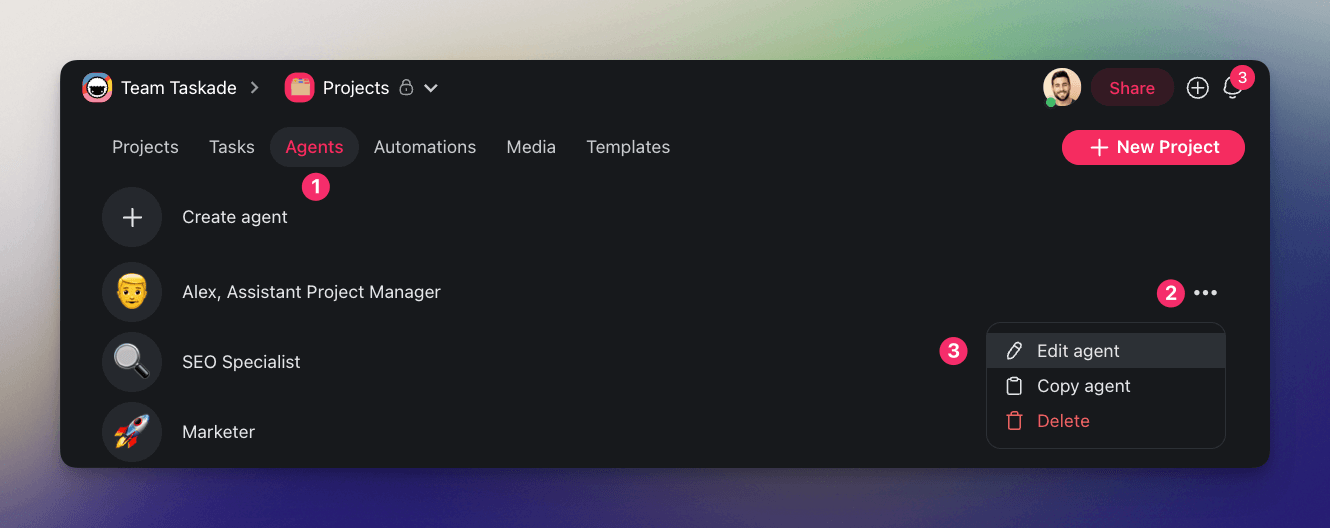
First, go back to the Agents tab, click the three dots ··· next to your clone, and select ✏️ Edit agent from the drop-down list. Then, go to the Knowledge tab in the sidebar on the left.
You can either upload files from your device, point to online resources, or add documents directly from your cloud storage. This is static knowledge that won’t change as projects unfold.
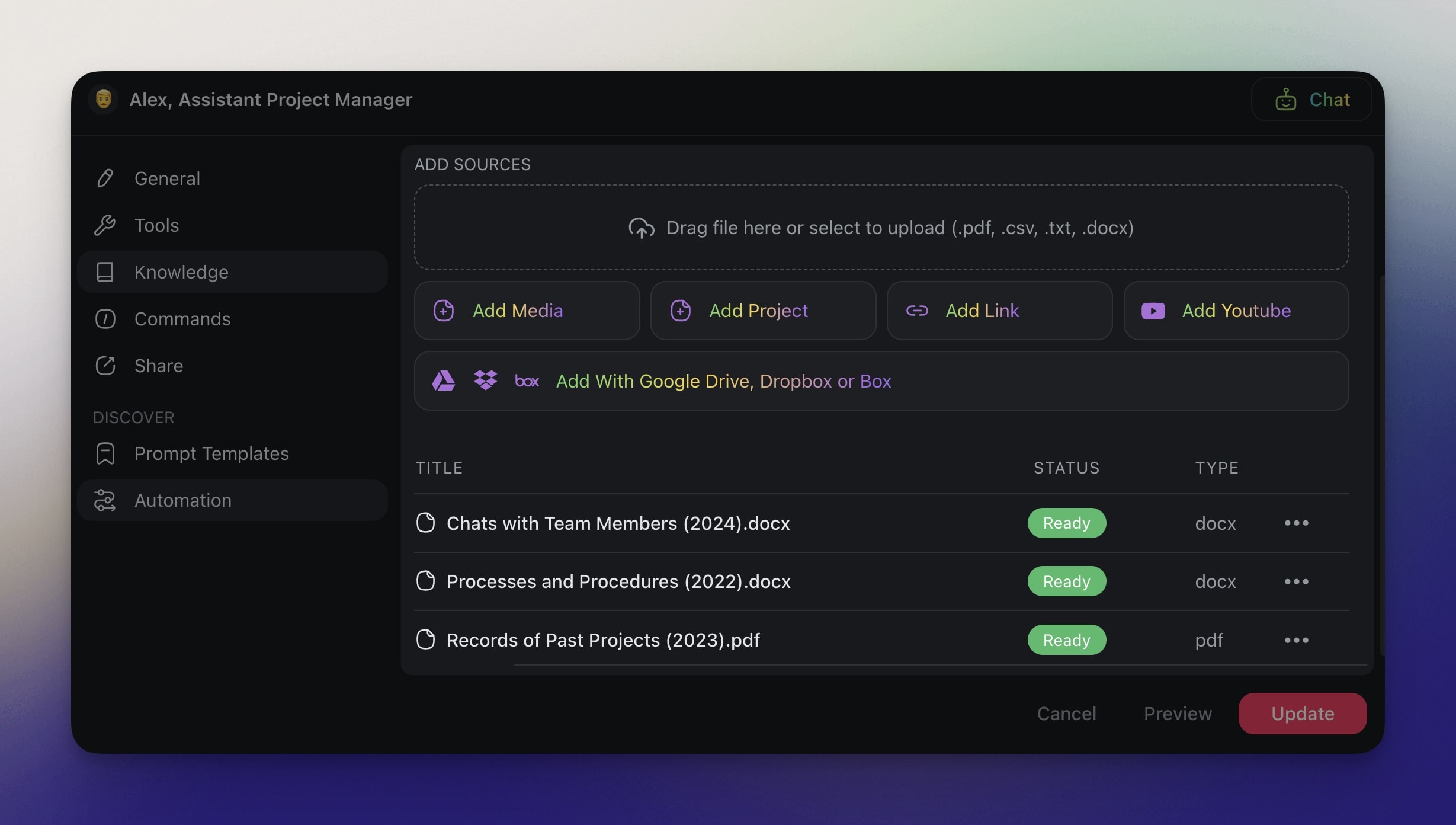
Voila! Alex can now understand its role and context a little better.
But we’re not done yet.
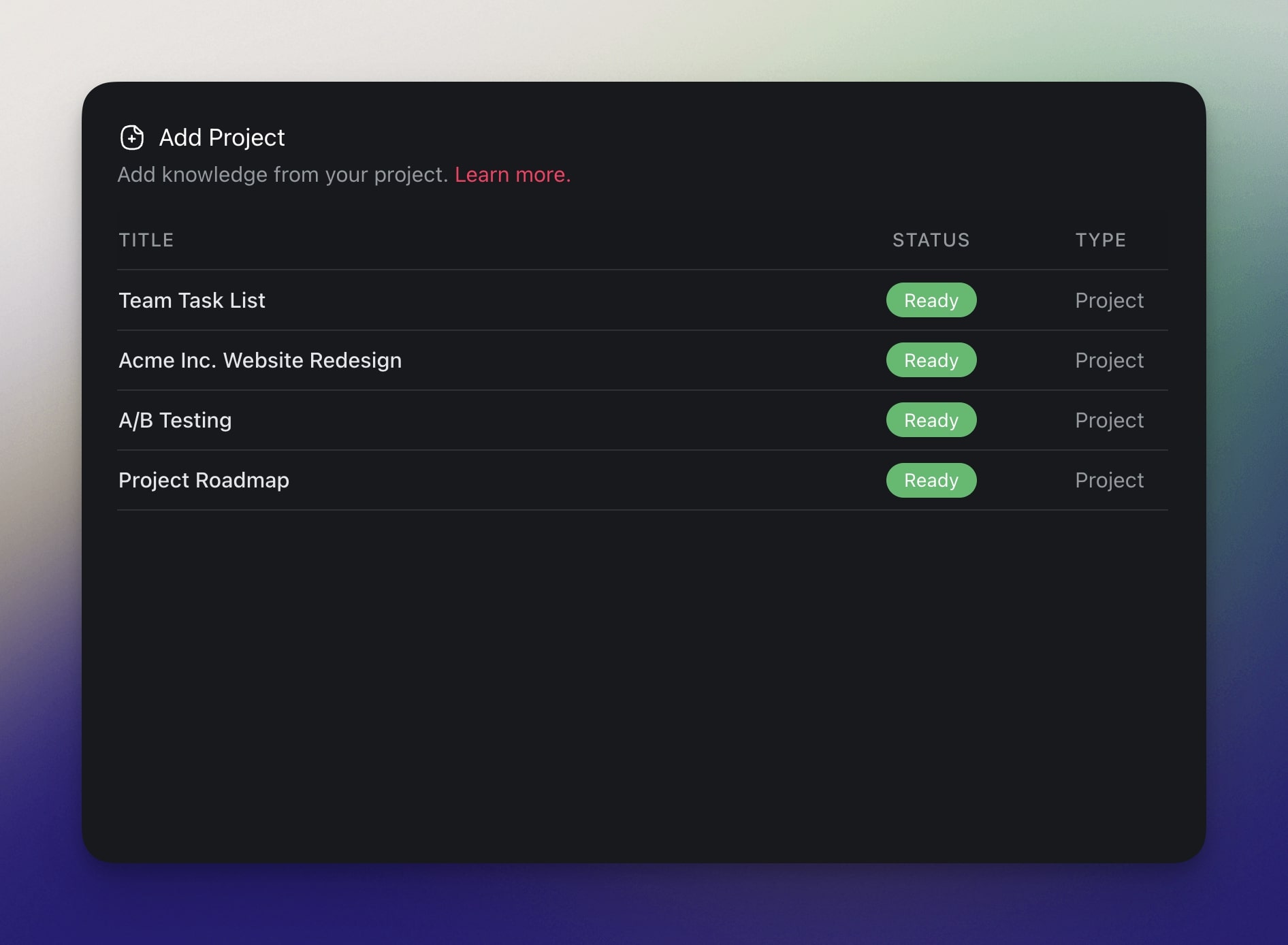
For Alex to be truly effective, we need to incorporate dynamic knowledge — give him access to ongoing projects so he can monitor progress and offer suggestions based on real-time data.
You can select individual projects from your workspace that will serve as Alex's live data feed. Every time a new piece of information is added, Alex will automatically update his knowledge base.
Cloning yourself with AI is just the first step — it’s time to set your avatar loose. 🏃
🤹 Practical Applications for Your Digital Clone
Bounce ideas off "Yourself"
Let’s say you’re stuck on a project. You need fresh ideas. Your AI clone is already trained on your previous brainstorming sessions and creative workflows so it’s a perfect partner for the job.
Stuck on how to launch a new product? Your digital self can suggest strategies based on past campaigns. It might pull up instances where influencer marketing or user-generated content worked well.
Facing a creative block? The clone can rummage through your past brainstorming sessions and project notes to provide fresh ideas or help you recycle old ones in a matter of seconds.
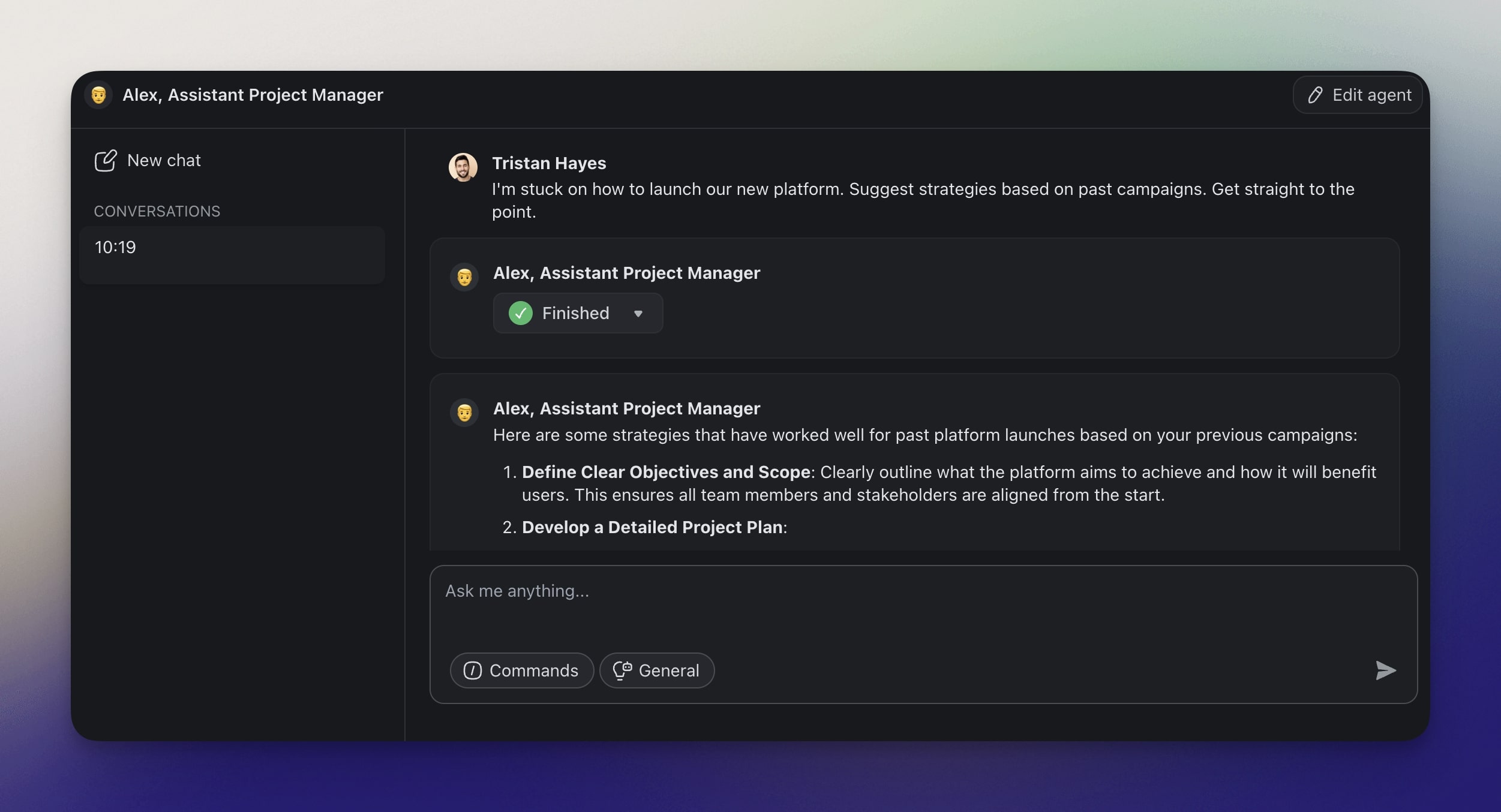
In the middle of brainstorming heat? Use threaded agent conversations to keep context in focus.
Write and Answer Emails
“I love replying to the tons of emails clogging up my inbox,” said no one ever.
Instead of spending your mornings on hectic typing, you can set an automation that will prompt your AI avatar to draft tailored email replies and automatically send them from your own Gmail inbox.
The agent can reply to customer inquiries in different languages, send out event invitations, confirm new orders, write newsletters, and even send tailored out-of-office replies.
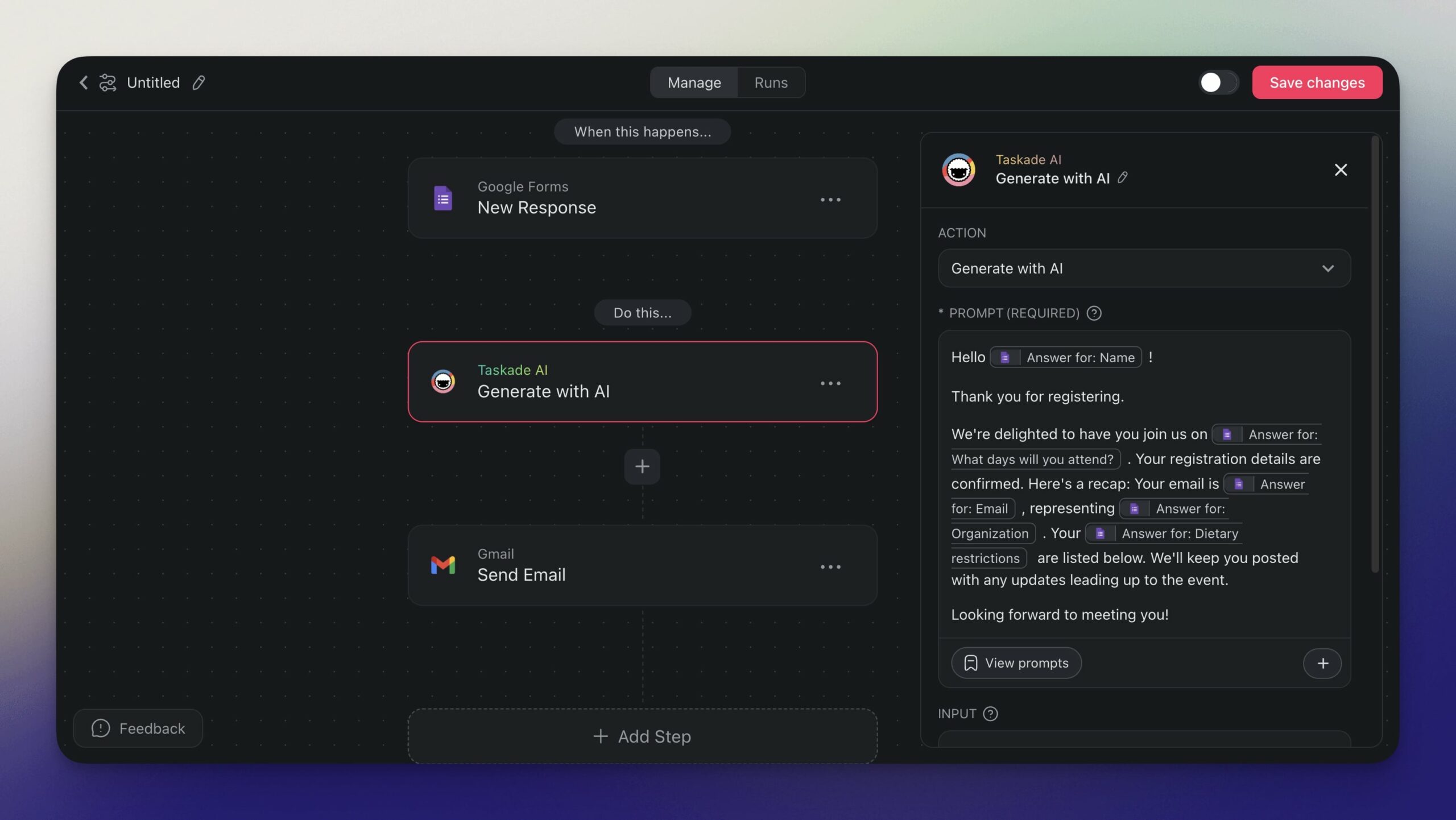
You can use Taskade AI as part of your automation flows to manage all aspects of your work.
Of course, with a little bit of fine-tuning and additional training, your digital twin can help with other types of content too — blog articles, reports, business, plans, social media posts, and more.
Facilitate Courses
What happens when you reach absolute mastery in your field? You create an online course to let others bask in your wisdom (duh). But managing courses is a lot of work — work your AI clone can help manage.
For example, your AI clone can “ingest” email support requests from students, find relevant information in its knowledge base, and provide tailored support. It can send out lecture notes, reading materials, and assignment instructions at scheduled intervals, all on autopilot.
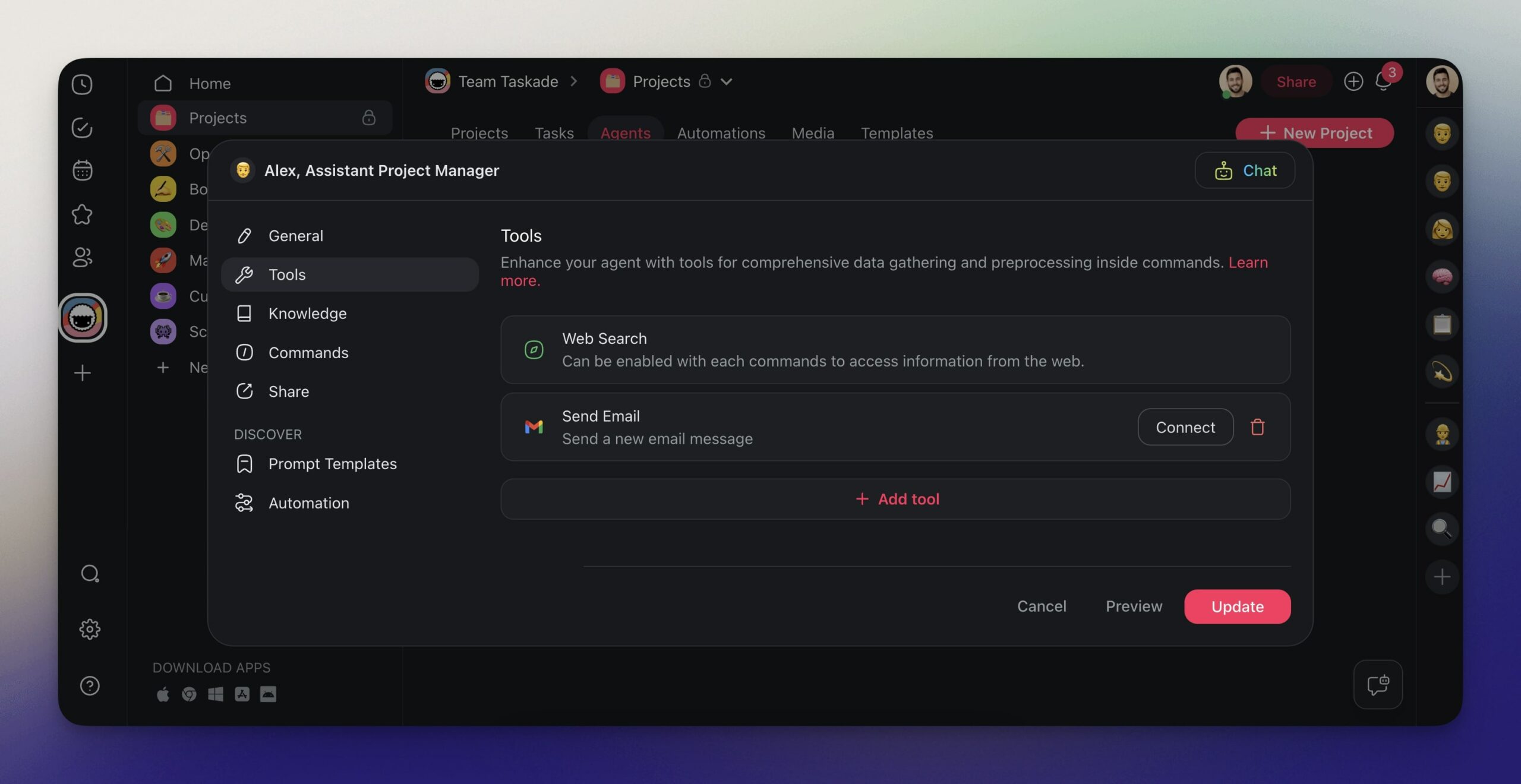
Every AI agent can integrate with dozens of tools that extend its functionality.
And here’s the best part. You can share your digital clone with the participants so they can ask it for help and guidance inside their Taskade workspaces. Talk about exceptional customer service. 👍
Use Your Digital Clone for Social Media Activity
You are a social media personality (alright, alright, just pretend you are, ok?). You provide your audience with expert insights and engage with them daily to keep them informed and entertained.
But managing thousands or even millions of followers can be overwhelming.
There are comments to respond to, posts to create, and engagement metrics to monitor. There are collaboration requests, sponsorship deals, and content planning tasks that need your attention.
That's where your digital twin comes in. The clone can help you schedule posts to keep a steady presence on all platforms and reply to comments in different languages.
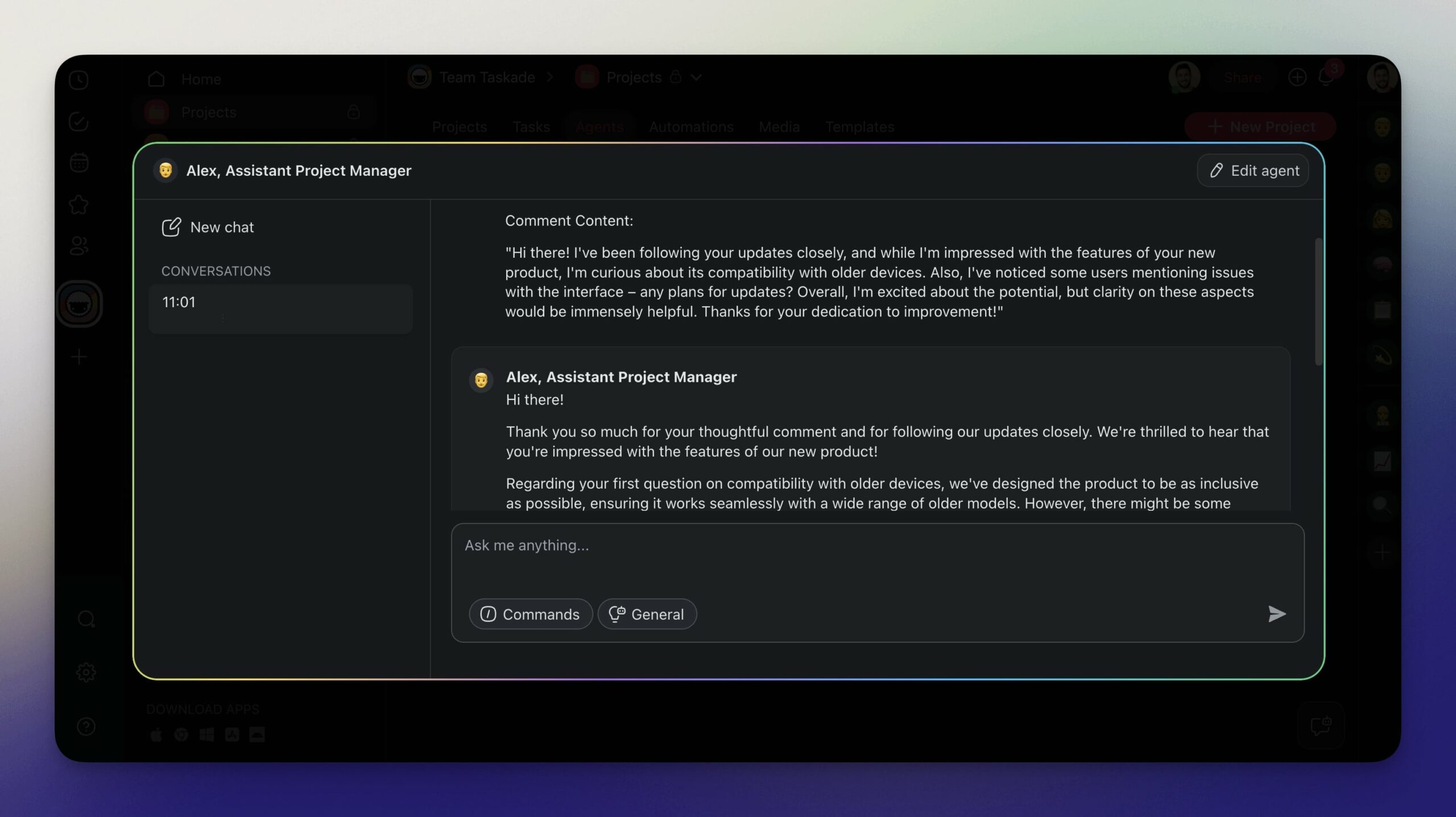
Plan Your Days
Always running late? Missing about meetings? Wondering where your day went?
We’ve all been there. You start your day with a plan, but then things spiral out of control. Meetings get rescheduled, emails pile up, deadlines sneak up on you — it’s utter chaos.
Your AI clone can help with all that. For example, each Sunday, it can analyze your ongoing projects, aggregate upcoming tasks, prioritize them by context and importance, and come up with a personalized weekly schedule. All with tips and suggestions on the best way to approach each task.
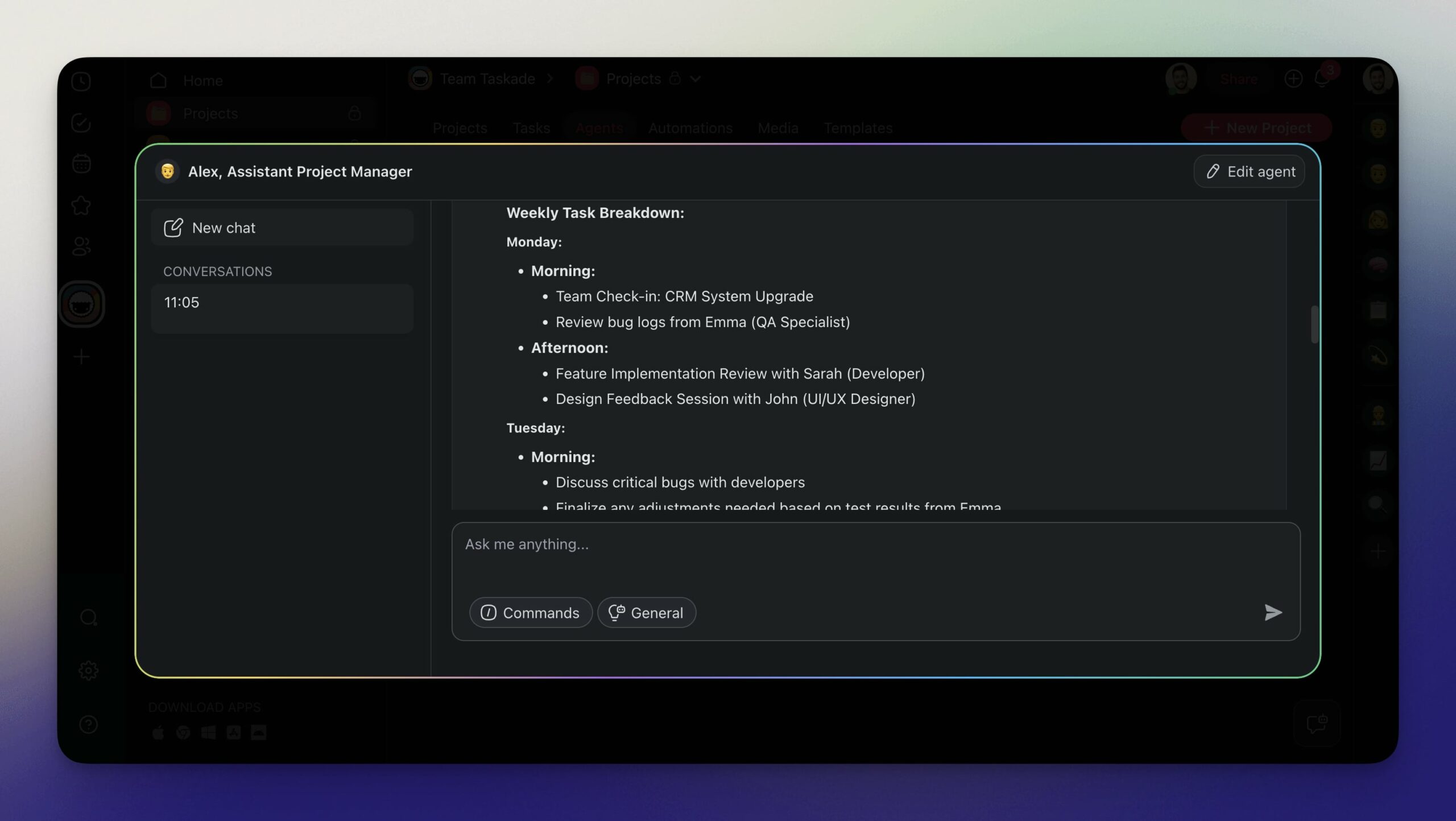
Psst... Don't want to build your exact, digital replica? Check our free AI agents instead.
Future of AI and Personal Productivity
Andrew Ng, co-founder of Google Brain, called AI “the new electricity." Following that analogy (and ignoring the doomsayers), agents are simply the new breed of power tools.
But what does that exactly mean for knowledge work? 🤔
According to Microsoft, by 75% of workers who use digital productivity tools already rely on AI to assist them with their tasks.(3) And since agents are much more flexible and customizable on the user level, they’re going to play a much bigger role in our day-to-day activities than garden-variety AI chats.
Now, not everyone may need a digital clone with the little quirks and idiosyncrasies. But a squad of AI experts collaborating on tasks and working alongside human teams? That’s the future.
Imagine delegating routine tasks like scheduling meetings, drafting emails, and generating reports to AI agents so your "organic" team can focus on what they do best — high-level, strategic work.
Of course, even those use cases may turn out short-sighted.
The integration of personal AI agents into daily life may seem futuristic now, but the shift is happening faster than we think. And as Bill Gates famously said, "We always overestimate the change that will occur in the next two years and underestimate the change that will occur in the next ten."
🚀 Final Thoughts: Harness Your Digital Twin for Maximum Efficiency
As you can see, building an AI version of yourself opens a world of possibilities, both in business and personal life. Your avatar can streamline tasks, optimize workflows, and help make faster decisions. You can even deploy an entire team of agents that will collaborate with you and each other.
So, are you ready for the future?
Create a free Taskade account and build your AI team of the future! 🐑
Frequently Asked Questions About Cloning Yourself With AI
Can I create an AI version of myself?
Yes, you can create an AI version of yourself using tools like Taskade AI Agents. By feeding the AI personal data, such as emails, documents, and other relevant information, you can train it to replicate your tone, style, and decision-making processes. This allows the AI to handle tasks like drafting emails, scheduling, and even providing creative input.
Can I create my own AI like Jarvis?
Yes, you can create your own AI similar to Jarvis using customizable AI agents. Platforms like Taskade allow you to build AI agents that can manage tasks, provide information, and assist you in various activities. These AI agents can be tailored to fit your specific needs, helping you automate routine tasks and improve productivity.
How are people making AI versions of themselves?
People are making AI versions of themselves by using large language models (LLMs) and AI platforms to ingest and process their personal data. This includes emails, documents, chat logs, and other sources of information that reflect their knowledge and style. The AI then uses this data to mimic their behavior and assist with various tasks, effectively creating a digital clone.
Can I make my own AI chatbot?
Yes, you can make your own AI chatbot using various AI platforms and tools available today. Platforms like Taskade provide the functionality to create custom AI agents that act as chatbots. These chatbots can be trained with your specific data and can handle tasks such as responding to inquiries, generating content, and managing schedules.
🔗 Resources
