

TL;DR: Dify is the open-source LLM app platform developers self-host, with a free Community Edition and Professional at $59 a month billed annually. Taskade Genesis turns a prompt into a deployed application with AI agents, automations, and 100+ integrations, hosting managed and nothing to run. Free Forever to start, Pro $10/mo billed annually. Try Taskade Genesis free →
See the alternative working
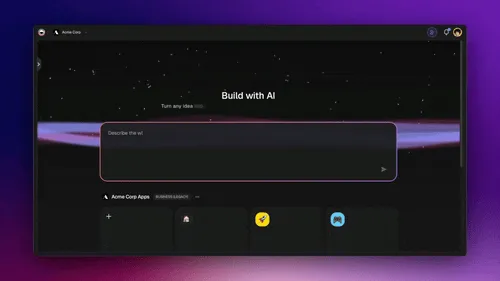
No signup, no credit card. Live Shopify-style storefront →
Overall winner: ✅ Taskade Genesis, for any team whose goal is shipping a deployed app with agents and automations without running servers. Dify remains the stronger choice when self-hosting, deep RAG control, and full data ownership are the headline requirements.
Table of Contents
- Quick Comparison Table
- What is Taskade Genesis?
- What is Dify?
- Key differences
- Choose Dify if...
- Why teams choose Taskade
- Pricing and total cost of ownership
- Frequently asked questions
- Without permission
What is Taskade Genesis?
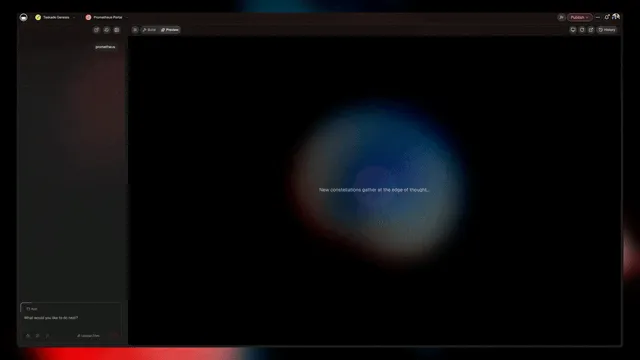
Taskade Genesis is the AI app builder inside the Taskade workspace. You describe what you want in plain language, and Taskade Genesis returns a deployed, working application with AI agents, real-time data, automation workflows, and team collaboration already connected. Your workspace is the backend. Your projects are the database. Your agents are the runtime. There is no code to write and no servers to run.
Taskade Genesis is built on Workspace DNA: Memory (Projects), Intelligence (AI Agents), and Execution (Automations), a self-reinforcing loop where what your team does becomes the substrate the agents reason over. Founded by John Xie, Dionis Loire, and Stan Chang in 2017, Taskade is a Y Combinator-backed platform with over a million users and a public Community Gallery of apps anyone can clone.
A single prompt to Taskade Genesis can produce a customer support portal, an ops dashboard, a CRM, a knowledge base, a form-driven intake system, or an internal tool. Each ships with built-in AI agents, automations, custom domains (Business and above), password protection (Pro and above), and the option to let your app's users sign in by email with GenesisAuth on every plan, including Free. No DevOps. No Docker. No vector database to provision. Taskade Genesis is for everyone: founders, marketers, ops, product managers, customer success, and engineers who want to skip the plumbing and focus on the idea.
What is Dify?
Dify (dify.ai) is an open-source platform for building and operating LLM applications, developed by LangGenius, Inc. It combines a visual workflow builder, a prompt IDE, a retrieval-augmented generation (RAG) pipeline, an agent framework, model management, and observability into a single package you can run on cloud, in a VPC, or self-hosted on your own infrastructure. It has earned a strong reputation with developers who want low-level control over how their AI apps are built.
Dify at a glance (July 2026): developed by LangGenius, Inc. (founders Luyu Zhang and John Wang). Raised a $30M Series Pre-A at a reported $180M valuation in March 2026, led by HSG. One of the most-starred open-source AI projects on GitHub (100,000+ stars) with over a million applications built. Community Edition is free and self-hostable under a modified Apache 2.0 license.
What Dify does well is real. Its RAG pipeline is widely considered one of the best in the category: you load documents into a knowledge base and control chunking, embedding models, hybrid dense and sparse search, reranking, and parent-document retrieval. Its 2026 agent work added better tool-call handling, parallel tool execution, native Model Context Protocol (MCP) support, and a supervisor mode that coordinates multiple sub-agents. It supports a wide range of model providers, including OpenAI, Anthropic, Google, Azure OpenAI, Hugging Face, Replicate, and local open-weight models.
The trade-off is what surrounds all of that. Dify gives you the building blocks and expects you to assemble, deploy, and operate the result. On the free Community Edition that means running Docker, provisioning a vector database, supplying model keys, and handling upgrades and monitoring. On Dify Cloud it means working within monthly message-credit caps and seat limits. The question for a team choosing between Dify and Taskade Genesis is not "is Dify powerful," it is "do you want to build and run the platform, or ship the finished app?"
Key differences
Building blocks you assemble vs an app you get
Dify is a platform of parts. You wire a workflow graph, attach a knowledge base, choose models, connect tools, then deploy the app and keep it running. That control is the point, and for developers it is a feature.
Taskade Genesis collapses that into one step. You write a prompt and get a deployed app with the same kinds of building blocks (knowledge and memory, agents, tools, automations) already connected and managed for you. Less to configure, far less to operate.
Self-hosting and data control vs fully managed
This is Dify's genuine home-field advantage. You can run the Community Edition on your own servers, in a VPC, or fully on-premises, which matters for regulated industries, air-gapped environments, and teams with strict data-residency rules. You own the deployment end to end.
Taskade Genesis is a managed cloud service. You do not run the infrastructure, which is the whole appeal for teams that would rather not, but it is not the tool to reach for when on-premises or air-gapped hosting is a hard requirement.
RAG control vs Workspace DNA
Dify's configurable RAG pipeline lets you tune retrieval to a fine degree. If your core need is a precisely controlled knowledge base over your own documents, Dify gives you the dials.
Taskade takes the Workspace DNA approach instead. Your projects, documents, and files become shared workspace memory that every agent, app, and automation reads and writes. You get retrieval over your own data without assembling a pipeline, at the cost of the low-level tuning Dify exposes.
A focused AI-app builder vs a full team workspace
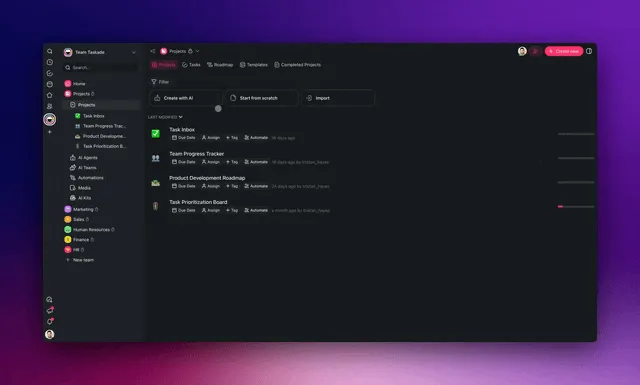
Dify is centered on building LLM apps. Around the app, Taskade adds an entire workspace: multiple project views (List, Board, Calendar, Table, Mind Map, Gantt, Org Chart), real-time multiplayer editing, comments, chat, video, and granular role-based access. The app you build in Taskade lives next to the projects, tasks, and team that use it.
Workflow tools vs bidirectional business automations
Dify connects tools and models inside a workflow, and its native MCP support is genuinely useful. Taskade adds durable Automations across 100+ bidirectional integrations: triggers pull external events in (Slack messages, Gmail, Sheets rows, Calendly events, webhooks) and actions push data out (Stripe checkouts, Shopify orders, Notion syncs, Salesforce updates, GitHub pull requests). That is a workspace-wide automation engine across everyday business apps, not only tool calls inside a single AI workflow.
Choose Dify if...
Honest comparison content beats hatchet jobs. Dify is a strong platform, and there are clear cases where it is the better fit:
- You need to self-host or run on-premises. Data residency, air-gapped environments, and full ownership of the deployment are Dify's core strength. Its Community Edition runs on your own infrastructure with no license fee, and cloud or VPC options exist when you want them.
- Your headline requirement is deep, configurable RAG. If retrieval quality over your own documents is the whole point, Dify's control over chunking, embedding models, hybrid search, reranking, and parent-document retrieval is best-in-class in this category.
- You are a developer team that wants low-level control. Bring almost any model including local open-weight ones, build custom workflow graphs, connect tools through code and MCP, and inspect everything with built-in observability. The open, forkable codebase is a real asset for engineering-led teams.
Taskade's edge is everywhere else: deployed apps from a prompt, no infrastructure to run, AI agents as teammates with tools and memory, automations across 100+ integrations, a full team workspace, and flat, predictable pricing with hosting included.
Why teams choose Taskade
Taskade Genesis gives everyone the outcome Dify gives developers, without the setup or the servers. You type a prompt and get a deployed app, and hosting, agents, automations, and team collaboration come included at a flat price. Dify hands you the building blocks and the operational surface that comes with them. Taskade manages that surface for you, so a five-person team can ship a working app the same afternoon.
| Capability | Dify | Taskade Genesis |
|---|---|---|
| Pricing (entry paid) | Professional $59/mo billed annually, 3 seats | $0 Free · $10/mo Pro billed annually (10 seats) |
| Time to a usable app | Build and (self-host) deploy it yourself | ✅ Prompt to deployed app in minutes |
| Hosting and upgrades | Your job (self-host) or capped cloud | ✅ Fully managed |
| Built-in AI agents | Agent framework, multi-agent, MCP | ✅ Agents v2, shared workspace memory, public embedding |
| Automation engine | Tool and MCP nodes in a workflow | ✅ 100+ bidirectional business-app integrations |
| Team workspace | Focused LLM-app builder | ✅ multiple project views, real-time collaboration |
| Workspace DNA loop | ❌ | ✅ ▲ Memory · ■ Intelligence · ● Execution |
Pricing and total cost of ownership
Taskade Genesis and Dify price very differently, and the gap is widest once you account for who runs the software.
| Plan | Taskade Genesis | Dify |
|---|---|---|
| Free | Free Forever, full app builder, limited AI credits | Sandbox: 200 message credits/mo, 1 member, 5 apps, 50 documents |
| Entry | Pro $10 / month billed annually, 10 seats, unlimited apps | Professional $59/mo billed annually ($590/yr), 5,000 credits/mo, 3 members, 50 apps |
| Mid | Business $25 / month billed annually, unlimited seats | Team $159/mo billed annually ($1,590/yr), 10,000 credits/mo, up to 50 members, 200 apps |
| High end | Max $100 / month billed annually, maximum AI capacity | Community Edition: free self-hosted, no usage cap (you pay infrastructure + model API costs) |
| Enterprise | $250 / month billed annually, custom SLA | Enterprise: custom pricing, SSO, on-prem, dedicated support |
The headline math: Taskade Pro is $10 per month billed annually for 10 seats, with hosting, agents, and automations included. Dify Professional is about $59 per month billed annually for a single workspace with 3 members and a 5,000 message-credit monthly cap; Team is about $159 per month for up to 50 members. Dify's Community Edition is free of license fees, but "free" self-hosting moves the cost to servers, a vector database, model API bills, and the engineering time to run and upgrade the stack. For a small team that wants a deployed app without staffing any of that, Taskade is the lower total cost. For a team that already has the infrastructure and specifically wants to own it, Dify's self-host path is compelling.
Frequently asked questions
Is Dify really open source?
Dify's Community Edition is free and self-hostable on GitHub under a modified Apache 2.0 license, with two conditions: you cannot resell it as a multi-tenant hosted service without a commercial license from LangGenius, and you cannot remove the Dify logo. Because of those carve-outs, some people describe it as source-available rather than strictly open source. For most self-hosting teams the practical effect is small, and the code is genuinely yours to run and modify.
Does Taskade Genesis do RAG over my documents like Dify?
Yes, through Workspace DNA. Your projects, documents, and files become shared workspace memory that agents read from and act on, so agents answer from your own data. Dify gives you a RAG pipeline you configure and tune yourself, which offers more low-level control. Taskade manages the equivalent for you, which means far less setup.
How much does Dify cost in practice?
Dify Cloud Professional is about $59 per month billed annually with a 5,000 message-credit monthly cap, and Team is about $159 per month. The self-hosted Community Edition has no usage cap, but you pay for infrastructure and model API usage instead. Taskade Genesis Pro is a flat $10 per month billed annually for 10 seats, with hosting included.
Does Dify require developer setup?
To get the uncapped, free version you self-host Dify, which means running it in Docker, provisioning a vector database, adding model keys, and handling upgrades yourself. The cloud tiers remove the hosting work but add message-credit and seat caps. Taskade Genesis needs no setup: a prompt returns a deployed app at a shareable URL.
Does Taskade Genesis include AI agents and automations?
Yes. Taskade ships AI Agents v2 with persistent memory, a large built-in toolset, custom tools, and public embedding, plus Automations across 100+ bidirectional integrations. Dify has an agent framework and native MCP support inside its workflows, but it is an AI-app development platform rather than a workspace-wide automation engine across your business apps.
Which AI models does Taskade Genesis use?
Taskade includes access to 15+ frontier models from OpenAI, Anthropic, and open-weight providers. Dify supports many providers too, including local open-weight models, and lets you wire the choice yourself.
Can I self-host Taskade Genesis like Dify?
No. Taskade Genesis is a managed cloud service, which is the point for teams that would rather not run infrastructure. If on-premises or air-gapped hosting is a hard requirement, Dify's self-host path is the better fit.
Can I use Dify and Taskade Genesis together?
Yes. Some teams self-host Dify for a data-sensitive RAG service that must run on their own infrastructure and use Taskade Genesis to ship the internal tools, dashboards, and customer-facing apps the wider team needs without standing up servers.
Build without permission
Dify gives developers a powerful, self-hostable platform for building LLM apps with deep RAG control. Taskade Genesis gives everyone, engineers and non-engineers alike, a workshop where the apps come out finished, hosted, and ready for users.
- Build with Taskade Genesis → One prompt, one deployed app
- Browse the Community Gallery Clone apps shipped by other Taskade Genesis builders
- See how Workspace DNA works How Memory, Intelligence, and Execution work together
Explore Taskade Genesis
- AI App Builder Build complete apps from one prompt
- Vibe Coding Natural-language app creation
- AI Agent Platform Digital teammates that work around the clock
- AI Website Builder Sites in seconds
- Workflow Automation AI-powered business automation
Learn the Taskade Genesis architecture
Your living workspace includes:
- Your first Taskade Genesis app A 5-minute tutorial
- Custom AI Agents The Intelligence pillar
- Projects and databases The Memory pillar
- Automations and workflows The Execution pillar
Build without code
- AI App Generator Full apps from prompts
- AI Dashboard Generator Business dashboards
- AI Website Generator Sites in seconds
- AI Form Generator Smart intake forms
- Community Apps Clone and customize
Related reading
- The Build Without Permission article - Our manifesto
- Best no-code builders in 2026 Category overview
- AI agent builders explained How prompt-to-app tools work
- What is retrieval-augmented generation? RAG explained
- Fine-tuning vs RAG vs prompting How to customize an LLM
- The open-source LLM landscape in 2026 The model landscape
- Best knowledge base software Where your data lives
- How Workspace DNA works The architecture
- The origin of living software The future of apps
- Introducing TSK-1 The Taskade System Kernel