






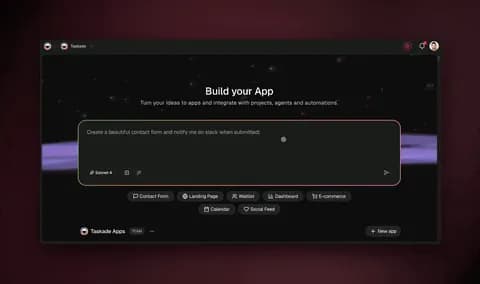
import IFrame from '@/components/ui/IFrame';
TL;DR: Taskade Genesis ranks first among 2026 no-code builders because it combines natural language app generation with embedded AI agents, native automations, and full deployment, no visual canvas required. Bubble, Webflow, Glide, Retool, and Softr require drag-and-drop work plus integration wiring. Live cloneable demo below. Try Taskade free →
▲ ■ ● This is live. Click "Use this app" inside the iframe to clone this no-code app into your free workspace in seconds.
What Makes a No-Code Builder "Best" in 2026?
The no-code category split into two generations in 2026. The first generation, Bubble, Webflow, Glide, Adalo, is the drag-and-drop canvas era. You build apps by placing components on a visual canvas, wiring data sources, and configuring workflows. The output is a deployed app, but building it takes days to months of canvas work.
The second generation, led by Taskade Genesis, is the AI-native prompt era. You describe what you want; the platform generates Projects, agents, automations, and App UI in parallel. The canvas is bypassed. The output is a deployed app in minutes.
Both generations co-exist for good reasons. For pixel-perfect marketing sites, Webflow's canvas remains the right tool. For spreadsheet-backed mobile apps, Glide's canvas is approachable. For complex visual workflows, Bubble's canvas offers maximum control. But for the broad case of "ship a working business app fast", prompt-based generation is structurally faster than canvas-based building.
The ranking weighs seven dimensions: time from idea to deployed app, learning curve, AI capabilities, database and auth included, integration depth, pricing at team scale, and the existence of a usable free tier.
┌─────────────────────────────────────────────────────────────────┐
│              No-Code Generation Split                           │
├─────────────────────────────────────────────────────────────────┤
│                                                                 │
│  CANVAS GENERATION             AI-NATIVE GENERATION             │
│  ──────────────────            ──────────────────               │
│  Drag-and-drop                 Natural language prompt          │
│  Days to weeks to ship         Minutes to ship                  │
│  Wire data sources             Database auto-generated          │
│  Configure each component      AI agents embedded               │
│  External integrations         100+ native integrations         │
│                                                                 │
│  Bubble · Webflow              Taskade Genesis                  │
│  Glide · Retool · Softr        (sole AI-native entry)           │
│  Adalo · Airtable              (Genesis + 34 tools)            │
│                                                                 │
└─────────────────────────────────────────────────────────────────┘
The 10 No-Code Builders Ranked
1. Taskade Genesis: Best AI-Native No-Code
Verdict: The only AI-native entry. Prompt-to-deployed-app in 3-7 minutes with embedded agents and automations. Top pick for non-technical founders and any team that wants to ship fast.
Taskade Genesis generates complete deployed apps from a single prompt. Type a description; the Genesis meta-agent (EVE, Entity of Vision and Execution) generates Projects (database), Agents (logic), Automations (workflows), and App UI (frontend) in parallel. Genesis Auth (OIDC/SSO) is built in. Custom domains supported. The app runs at taskade.com/share/apps/{id} or your domain.
The AI-native distinction matters. Bubble, Webflow, Glide ask you to build the UI first and then think about AI integration. Genesis generates the AI layer as part of the app, every Genesis app ships with embedded AI agents that have persistent memory, built-in tools, and the workspace as their working context. Customer-facing agents handle inquiries; internal agents process data; automation agents trigger workflows on events.
Pricing: Free $0 · Pro $10/mo (10 seats, billed annually) · Business $25/mo (unlimited) · Max $100/mo · Enterprise $250/mo.
Where it wins: Natural language generation, embedded AI agents, 100+ native integrations, Genesis Auth, real free tier, no canvas.
Where it has ceilings: Pixel-perfect frontend control is more limited than Webflow's canvas. For most business apps, the trade-off is worth it.
2. Bubble: Best Visual Full-Stack No-Code
Verdict: Most powerful traditional no-code builder. Steep learning curve. Top pick if you have weeks to invest and want maximum visual control.
Bubble is the OG no-code app builder, full-stack, visual, with a database, workflows, and a plugin marketplace. The capability ceiling is genuinely high, entire SaaS companies have shipped on Bubble. The learning curve is also genuinely high, "Bubble engineering" is a real skill that takes weeks to develop.
The 2024-2025 AI features (Bubble AI) added prompt-to-app generation as a starting point. The generated app still requires significant manual editing on the canvas. AI is added rather than native.
Pricing: Free (50K WU) · Starter $29/mo · Growth $119/mo · Team $349/mo · Enterprise custom. Workload Unit consumption scales with traffic.
Where it wins: Maximum visual control, mature plugin marketplace, full-stack capability.
Where it has ceilings: Steep learning curve, AI is bolted on, complex pricing with workload units.
3. Webflow: Best for Marketing Sites
Verdict: Best-in-class for visual marketing sites and content-heavy designs. Limited for full apps with auth and complex workflows.
Webflow is the gold standard for no-code marketing websites. The visual canvas, the CMS, the design control, and the Webflow Designer skill are unmatched. For a marketing site, a brand site, or a content-heavy publication, Webflow is the right tool.
Webflow Logic (added 2022) and Webflow Apps add basic workflow and integration capabilities, but the platform is fundamentally a site builder, not an app builder. For SaaS apps with auth, database, and AI, you would build the marketing site in Webflow and the app itself in Taskade or Bubble.
Pricing: Free (2 pages) · Basic $14/mo · CMS $23/mo · Business $39/mo · Enterprise custom.
Where it wins: Visual design control, CMS quality, marketing site fit.
Where it has ceilings: Not a full app builder, limited backend logic, no AI agents.
4. Glide: Best Spreadsheet-Backed Mobile Apps
Verdict: Long-standing leader for spreadsheet-to-mobile-app workflow. Approachable for non-developers. Limited beyond the spreadsheet abstraction.
Glide builds no-code mobile apps from Google Sheets. The spreadsheet is the database; the canvas is the UI. For internal directories, simple field-service apps, and small-team mobile tools, Glide is genuinely easy.
The 2024-2025 AI features (Glide AI) add prompt-to-app generation similar to Bubble AI. The generated app inherits the spreadsheet abstraction's limits, once you need joins across tables, complex computed fields, or a non-tabular data model, Glide gets awkward.
Pricing: Free (limited rows) · Starter $25/mo · Business $99/mo · Enterprise custom.
Where it wins: Spreadsheet workflow, mobile-first, approachable.
Where it has ceilings: Spreadsheet data model limits, AI bolted on, scaling concerns.
5. Retool: Best Internal Tool Builder
Verdict: Specialist in internal tools (admin panels, ops dashboards). Strong if you can write SQL and JavaScript. Expensive at scale.
Retool is the dominant low-code platform for internal tools. The visual builder accelerates UI work; SQL editor and JavaScript hooks handle the logic. For ops teams, customer support teams, and engineering teams building internal admin panels, Retool is industry standard.
Retool AI (added 2024) helps generate queries, build forms, and write JavaScript. It is augmentation, not generation. The platform expects developer fluency for non-trivial functionality.
The pricing model, per-user with end-user fees on Business, gets expensive at team scale. For internal tools at 50+ users, costs climb past $30K/year quickly.
Pricing: Free (5 users) · Team $10/user/mo · Business $50/user/mo · Enterprise custom.
Where it wins: Internal tool focus, SQL/JS fluency, enterprise depth.
Where it has ceilings: Low-code not no-code, per-user pricing punishes scale, customer-facing apps not the fit.
6. Softr: Best Airtable-Powered Customer Apps
Verdict: Strong no-code builder on top of Airtable. Approachable for client portals and member sites. Limited beyond Airtable's data model.
Softr converts an Airtable base into a customer-facing app, member portals, marketplaces, directories, internal tools. The premise is appealing: if you already use Airtable, Softr unlocks public-facing apps on top of that data.
The integration is genuinely tight, Softr reflects Airtable schema, supports Airtable formulas, and respects Airtable permissions. The ceiling is Airtable's ceiling: once you need data beyond what Airtable handles well (high write volume, complex joins, large file storage), you've outgrown the stack.
Pricing: Free · Basic $59/mo · Professional $167/mo · Business $323/mo.
Where it wins: Airtable integration, member portal templates, fast for content sites.
Where it has ceilings: Airtable-coupled, limited backend logic, no AI agents.
7. Adalo: Best Visual Mobile App Builder
Verdict: Drag-and-drop builder with native iOS/Android publishing. Approachable visual canvas. Limited backend.
Adalo focuses on native mobile app generation with a friendly visual canvas. For non-developers building consumer mobile apps, the path from idea to App Store listing is shorter than React Native or Flutter.
The trade-off is depth. The data model is limited; integrations are limited; AI features are basic. For a simple mobile app, Adalo works; for a complex mobile experience with sophisticated backend, you outgrow it.
Pricing: Free (limited) · Starter $36/mo · Professional $52/mo · Team $160/mo.
Where it wins: Native iOS/Android publishing, visual canvas, mobile-first.
Where it has ceilings: Limited data model, dated integrations, no AI agents.
8. Airtable: Best Spreadsheet-Database Hybrid
Verdict: Excellent spreadsheet-database hybrid. Limited as a full app builder; works best paired with Softr or Stacker.
Airtable is the structured-data platform that powers many no-code apps as the backend. The grid is a spreadsheet; the columns have types; the views (grid, kanban, calendar, gallery, gantt) make it usable as a project tracker.
For app building, Airtable on its own is more of a database than a builder. You pair it with Softr, Stacker, or a custom front-end. Airtable Interfaces (the built-in UI builder) is improving but lags Softr in depth.
Pricing: Free · Team $20/user/mo · Business $45/user/mo · Enterprise custom.
Where it wins: Structured data model, view variety, ecosystem.
Where it has ceilings: Per-user pricing, UI builder is shallow, no AI agents native.
9. Wix Studio: Best Wix Ecosystem Extension
Verdict: Wix's professional designer tool. Good for agencies. Limited for app-style functionality.
Wix Studio is Wix's pro-designer tool, more control than the consumer Wix Editor, less control than Webflow, but with the Wix ecosystem and ads. For agencies building client sites at scale, Wix Studio is positioned between consumer ease and Webflow depth.
For app-style functionality (auth, complex backend, AI), Wix Studio is not the right tool. It is a site builder, not an app builder.
Pricing: Free · Light $17/mo · Core $29/mo · Business $36/mo · Business Elite $159/mo.
Where it wins: Wix ecosystem, agency workflow, e-commerce.
Where it has ceilings: Site builder not app builder, limited backend logic.
10. FlutterFlow: Best for Native App Output
Verdict: Visual builder that outputs real Flutter code. Strong if you want native mobile + code export. Steep curve.
FlutterFlow generates Flutter (Dart) code from a visual canvas, the output is a real Flutter project you can export, customize in code, and deploy to iOS, Android, and web. For teams that want no-code speed plus code-level escape hatch, FlutterFlow is unique.
The trade-off is curve. Understanding the canvas, the data flow, and the Flutter export model takes time. Not approachable for non-technical founders the way Genesis or Glide are.
Pricing: Free (limited) · Standard $30/mo · Pro $70/mo · Teams custom.
Where it wins: Code export, native cross-platform, Flutter ecosystem.
Where it has ceilings: Steep curve, Flutter lock-in, no native AI agents.
Pricing Wedge: Real Cost for a 10-Person Team
| Tool | Builder cost | Required add-ons | All-in / 10 users / year |
|---|---|---|---|
| Taskade Genesis Pro | $10/mo flat for 10 seats | None (DB + auth + integrations included) | $120/year |
| Bubble Growth | $119/mo (1 dev seat) + paid seats | Plugins, custom domain | ~$2,500+/year |
| Webflow Business + CMS | $39/mo + $23/mo = $62/mo | Marketing site only | $744/year (no app) |
| Glide Business | $99/mo (limited users) | Add-on seats | $1,200+/year |
| Retool Business | $50/user × 10 + end-user fees | None | $6,000+/year |
| Softr Professional | $167/mo | Airtable Pro | $2,800+/year |
| Adalo Team | $160/mo (10 users) | App Store fees | $1,920+/year |
| Airtable Business | $45/user × 10 | UI builder (Softr/Stacker) | $5,400+/year |
| Wix Studio Business | $36/mo per site | Multiple sites = stack | $432+/year (1 site) |
| FlutterFlow Pro | $70/mo (1 user) + Teams seats | App Store + hosting | $1,200+/year |
Taskade Genesis Pro at $10/month flat for 10 seats is dramatically cheaper than per-user no-code platforms at team scale, and uniquely bundles AI agents and 100+ integrations into the base price.
When to Pick Which: Decision Matrix
| Your situation | Best pick | Why |
|---|---|---|
| Non-technical founder, ship SaaS fast | Taskade Genesis | Natural language to deployed app |
| Marketing site for company | Webflow | Visual canvas, CMS |
| Internal admin panel for ops | Retool | Internal tool focus, SQL/JS |
| Spreadsheet-backed mobile app | Glide | Spreadsheet workflow |
| Customer portal on Airtable data | Softr | Airtable native |
| Native iOS/Android consumer app | FlutterFlow or Adalo | Native publishing |
| Maximum visual control, weeks to learn | Bubble | Most powerful canvas |
| AI agents and automations built in | Taskade Genesis | Only option with native AI layer |
| Pixel-perfect designer-led site | Webflow | Designer-friendly |
| Client portal with auth + chat | Taskade Genesis | Genesis Auth + agents |
The AI-Native Difference: Why Generation Beats Canvas
The canvas approach is six steps. Each step has its own learning curve. Each step is where projects stall. The AI-native approach is three steps; the platform handles steps 2-4 of the canvas approach in parallel.
For most business apps, the canvas approach's "more control" benefit is illusory. You ship slower for control you do not exercise. Genesis trades fine-grained canvas control for speed-to-deployed-app, which is the actually-useful axis for non-technical founders.
What the GIFs Show
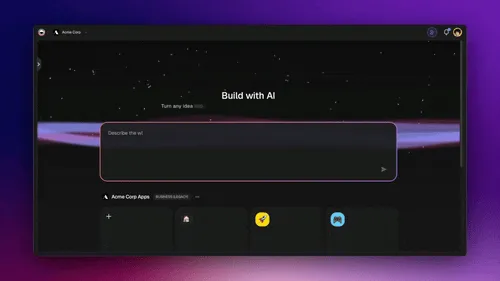
The Genesis preview above shows what "natural language to deployed app" looks like, type a prompt, watch the four layers (Projects, Agents, Automations, App UI) generate in real-time, share the live URL. The canvas-based builders cannot do this because they do not have an AI generation layer integrated with the deployment runtime.
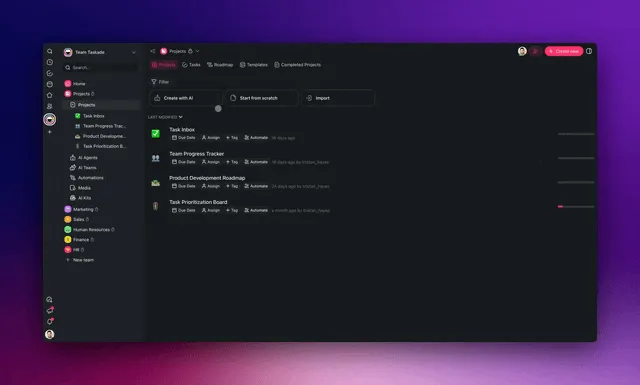
The agentic workflow generation above shows how AI agents inside the generated app handle ongoing work, not just initial generation but ongoing automation. This is the loop that no canvas builder provides.
FAQ
What is the best free no-code builder?
Taskade Free, 11,000 credits with basic project views, unlimited Genesis app cloning, persistent agent memory, and access to the Community Gallery. Bubble Free is limited to 50K workload units; Webflow Free is 2 pages; Glide Free is 500 rows. Taskade is the only one with a free tier that includes AI agents.
Can I build a real SaaS with no-code?
Yes, with several options. Taskade Genesis ships SaaS apps with embedded agents, payments via Stripe checkout integration, Genesis Auth, and custom domain support. Bubble can ship SaaS but requires weeks of canvas work. Webflow is for marketing sites, not the SaaS app itself.
Is no-code production-ready in 2026?
Yes. Taskade Genesis apps run on production infrastructure with 3-replica deployments and durable execution. Bubble has scaled SaaS companies. Retool runs at large enterprises. The "no-code is for prototypes" narrative is outdated, modern no-code platforms run production workloads.
What is the difference between no-code and low-code?
No-code means no programming required for any functionality. Low-code allows or expects code for advanced features. Retool is low-code (SQL + JavaScript for complex logic). Taskade Genesis, Bubble, Webflow, Glide are no-code. The line blurs as platforms add code escape hatches.
Can no-code apps use AI?
Most no-code platforms add AI via integrations (call OpenAI API through plugins or Zapier). Only Taskade Genesis treats AI as a substrate with embedded agents, persistent memory, and frontier model auto-routing. The difference is "AI as feature" vs "AI as architecture".
Which no-code builder has the easiest learning curve?
Taskade Genesis, natural language replaces canvas learning. Glide and Softr are next easiest if you accept spreadsheet-backed constraints. Bubble has the steepest curve in the category.
Can I export my no-code app to code?
FlutterFlow exports real Flutter code. Bubble does not export. Webflow exports HTML/CSS. Taskade Genesis exports content via the new Markdown export feature (v6.150); the runtime stays on Taskade infrastructure.
What about no-code app marketplaces?
Bubble has the Bubble Marketplace for plugins and templates. Webflow has the Webflow Marketplace for templates. Taskade has the Community Gallery with 150,000+ cloneable Genesis apps. The cloneability is unique, every app is a fully functional system you can adapt.
How does no-code handle custom domains?
Most major no-code platforms (Taskade Genesis, Bubble, Webflow, Softr, Glide on paid tiers) support custom domains. Taskade Genesis adds Genesis Auth (OIDC/SSO) at no extra cost, a meaningful differentiator for customer-facing apps.
Can no-code apps connect to other apps?
Taskade has 100+ native bidirectional integrations. Bubble has a plugin marketplace. Webflow has limited native integrations. Glide has Stripe and others. Retool has many database and API connectors. Native > Zapier bridge for reliability, cost, and latency.
Is no-code more expensive than coding?
At small scale and team-of-10 scale, no-code is dramatically cheaper than hiring engineering. At very large scale with custom requirements, hand-coded systems can be cheaper. The crossover point for most business apps is far beyond what no-code platforms hit.
Which no-code builder has the best AI?
Taskade, AI agents v2 are first-class, not bolted on. Persistent memory, built-in tools, multi-agent collaboration, frontier model auto-routing. Competing builders add AI through external API calls or basic prompt-to-component generation.
Ship your no-code app in minutes, not months. Try Taskade Genesis free →, 11,000 credits, AI agents, 100+ integrations. Custom domains on Business and up. No credit card required.
▲ ■ ● Memory · Intelligence · Execution.