






A team spends six weeks and a GPU budget fine-tuning a model so it "knows" their product catalog. Two weeks later the catalog changes, and the fine-tuned knowledge is wrong. They rebuild. The catalog changes again. They've discovered the most expensive lesson in applied AI the hard way: fine-tuning was the wrong tool. What they needed was retrieval.
Customizing an LLM comes down to three levers, the prompt, the retrieved context, and the weights, and choosing the wrong one wastes weeks and dollars. This guide gives you the decision framework, the real cost math, and the one rule that prevents that six-week mistake.
TL;DR: There are three ways to customize an LLM: prompting (change the input), RAG (retrieve facts into the context), and fine-tuning (change the weights). The rule: prompt first, retrieve for knowledge, fine-tune for behavior. Fine-tuning teaches how a model answers, not what it knows. The production default is hybrid, fine-tune for form, RAG for facts. Taskade gives you the prompt-plus-retrieval-plus-tools path with no GPUs or pipelines to manage.
What "Customizing an LLM" Actually Means
Customizing an LLM means changing one of three things: the prompt you send, the context you retrieve into it, or the weights of the model itself. Each is a different lever with a different cost, speed, and effect, and most confusion in this space comes from treating them as interchangeable when they're not.
- Prompting changes the input, the system prompt, instructions, and examples you provide at query time. No training, no infrastructure, effect in minutes.
- RAG changes the context. It fetches relevant facts from your data and inserts them into the prompt so the model answers from your knowledge. Updates instantly when your data changes.
- Fine-tuning changes the weights. It trains the model on examples so it internalizes a behavior, format, or skill. Slow, costlier, and permanent until you retrain.
THE ONE DISTINCTION THAT DECIDES EVERYTHING  WRONG / OUTDATED FACTS?    →  a KNOWLEDGE gap   →  use RAG
  WRONG TONE / FORMAT?       →  a BEHAVIOR gap    →  fine-tune
  DOESN'T FOLLOW THE BRIEF?  →  a PROMPT gap      →  fix the prompt
  Fine-tuning changes HOW it answers. RAG changes WHAT it knows.
  Reaching for fine-tuning to add facts is the #1 expensive mistake.
Hold that distinction, behavior vs. knowledge, because it resolves 80% of "should I fine-tune?" debates on its own.
| Method | What it changes | Best for | Updates knowledge? | Typical effort |
|---|---|---|---|---|
| Prompting | the input | baseline behavior + facts via context | yes, via context | minutes |
| RAG | the retrieved context | fresh, private facts | yes, instantly | days |
| Fine-tuning | the weights | format, tone, task skill | no, not reliably | days–weeks |
Prompting: The No-Infra Baseline Most Teams Should Exhaust First
Prompting is the cheapest, fastest customization lever, and it's the one teams skip too quickly. A well-built system prompt with a few good examples (few-shot), clear instructions, and solid context engineering gets you remarkably far with zero training and zero new infrastructure. The cost is just tokens.
OpenAI's own model-optimization guidance is blunt about this: it frames the workflow as a flywheel, build evals, write effective prompts, then fine-tune only if needed, and states that "the prompt engineering process may be all you need to get great results for your use case." Fine-tuning is supplementary to prompting, not a replacement for it.
Prompting got even cheaper with prompt caching. When you reuse a large chunk of context (a long system prompt, a knowledge base), caching stores it so repeat requests are billed at a steep discount, cache reads cost roughly 10% of normal input tokens, a 90% discount, with cache writes a small premium. For any workload that reuses the same context, this shifts the cost math heavily toward "just prompt it." Master prompt engineering and prompt chaining before you spend a dollar on GPUs.
RAG: Inject Fresh, Private Knowledge at Query Time
RAG (retrieval-augmented generation) gives a model facts it didn't train on by fetching the relevant pieces at query time and adding them to the prompt. It was introduced by Lewis et al. (2020) at Facebook AI Research, combining a model's built-in "parametric" memory with a "non-parametric" memory, a searchable vector index, to set state of the art on open-domain QA.
The mechanics are simple: store document chunks, create an embedding for each, find the most similar chunks to the query via nearest-neighbor search, and send the top matches plus the question to the model. RAG's superpower is freshness, change your data and the next answer reflects it, no retraining. It runs on the vector search layer and is the foundation of agent memory. (Full deep-dive: what is retrieval-augmented generation.)
Fine-Tuning: Teach New Behavior by Changing the Weights
Fine-tuning trains a model on your examples so it internalizes a behavior, a consistent output format, a brand tone, a specialized task skill. It changes the weights, which is powerful for how the model responds and weak for what it knows. OpenAI documents fine-tuning as good for consistent formatting, handling novel inputs, and making a smaller, cheaper model excel at a narrow task. I.e., behavior and form, not fresh knowledge.
Parameter-efficient methods made fine-tuning far more accessible:
| Method | Trainable params | GPU memory | Inference latency penalty |
|---|---|---|---|
| Full fine-tune | 100% | highest | none |
| LoRA | ~10,000x fewer | 3x less than full | none (adapters merge in) |
| QLoRA | 4-bit base + adapters | lowest (65B on one 48GB GPU) | minimal |
LoRA (Hu et al., 2021) trains small adapter matrices instead of all weights, cutting trainable parameters by about 10,000x and GPU memory by 3x versus full fine-tuning of GPT-3 175B, with no added inference latency and on-par-or-better quality. QLoRA (Dettmers et al., 2023) quantizes the base model to 4-bit so you can fine-tune a 65-billion-parameter model on a single 48GB GPU; its Guanaco model hit 99.3% of ChatGPT's level on the Vicuna benchmark after just 24 hours on one GPU.
But Microsoft's guidance names the real costs that aren't about GPUs: fine-tuning needs a large, high-quality dataset, risks overfitting on small data, requires ongoing maintenance as your domain changes, and risks model drift, getting worse at general tasks as it specializes.
The Core Mental Model: Behavior vs. Knowledge
Almost every customization decision collapses to one question: is the problem how the model answers, or what it knows? Get that right and the method picks itself.
| Symptom | Likely cause | Wrong fix teams reach for | Right fix |
|---|---|---|---|
| Wrong / outdated facts | missing knowledge | fine-tuning | RAG |
| Inconsistent format / tone | behavior | more prompt hacks | fine-tune (after prompting) |
| Doesn't follow instructions | prompt design | fine-tune | better prompt + few-shot |
| Slow to update with new data | static knowledge | retrain | RAG |
The Decision Flowchart
Here's the whole decision in one diagram. Notice it's a flow, not a ladder. You don't "graduate" from prompting to fine-tuning; you add each lever only when the previous one hits a real wall.
Cost-Per-Answer Math
The cost comparison isn't fine-tuning vs. RAG in the abstract. It's the total cost of each path, including the parts vendors don't put on the slide. Here's the honest breakdown.
| Approach | One-time setup | Per-answer cost | Infra / maintenance | Break-even note |
|---|---|---|---|---|
| Prompt-only | ~none | input + output tokens | none | cheapest to start |
| Prompt + caching | ~none | cache reads ≈ 10% input | none | best for repeated context |
| RAG | embed corpus | retrieval + tokens | vector store ops | scales with data, stays fresh |
| LoRA / QLoRA fine-tune | ~$0.80–$3 / 1M training tokens | normal inference | dataset + retrain on drift | wins for narrow, stable tasks |
| Full fine-tune | highest | normal inference | heaviest | rarely worth it now |
The non-obvious winner is often prompt caching: for workloads that reuse a big context, cache reads at ~10% of input can make a prompting-plus-context approach cheaper than maintaining a fine-tuned model, with none of the dataset or drift overhead. Always run this math before committing to GPUs.
Latency, Effort, and Freshness: The Tradeoffs Vendor Blogs Gloss Over
Each method wins on different axes, and "best" depends entirely on which axis you're optimizing. This is the matrix that should drive your choice.
The pattern is clear: prompting wins setup and iteration speed, RAG wins knowledge freshness, fine-tuning wins behavior control. No method wins everything, which is exactly why production systems combine them.
Why Hybrid Is the Production Default
Mature systems usually run all three: fine-tune for form, retrieve for facts, prompt to orchestrate. Microsoft's guidance maps it cleanly, RAG for dynamic content, wide coverage, and limited training resources; fine-tuning for task-specific performance, proprietary data unlike pretraining, and stable content. The two aren't rivals; they cover each other's blind spots.
But "hybrid is the production default" is a destination, not a starting point. Most teams should:
- Prompt until behavior is good enough (and cache repeated context).
- Add RAG when knowledge, freshness, privacy, coverage, is the bottleneck.
- Fine-tune only if behavior is still inconsistent at scale after prompting.
Common mistakes to avoid: fine-tuning to add knowledge (use RAG), skipping evals so you can't tell if anything improved, reaching for GPUs before exhausting prompting, and ignoring prompt caching in the cost math.
The No-Infra Path: Prompting + Retrieval + Tools Before You Touch GPUs
Here's where the theory becomes practical. The industry-standard sequence, prompt for behavior, retrieve for knowledge, add tools for action, is exactly how Taskade agents work, with none of the infrastructure. Taskade implements the standard; it doesn't reinvent it.
- Behavior comes from each agent's system prompt, shape tone, format, and task focus in plain language, no training run.
- Knowledge comes from connected project knowledge and persistent memory, point an AI agent at your projects and it retrieves and reasons over them, no vector pipeline to build.
- Action comes from built-in tools plus 100+ integrations, web search, code, and your connected apps.
- The model is handled by Auto routing across 15+ frontier models, so each task gets an appropriate model without you choosing.
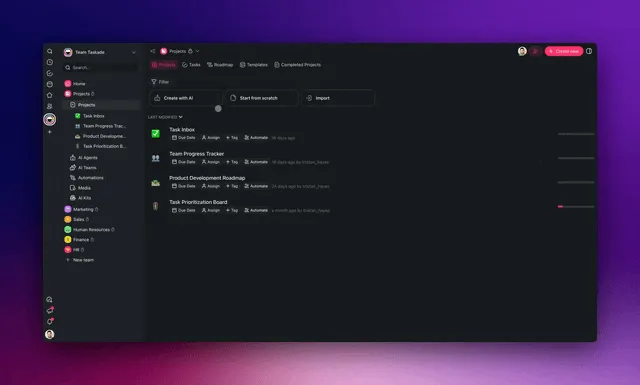
To be precise about what Taskade is and isn't: it does not fine-tune or train custom models for you. It gives you the other two levers, prompt-shaped behavior and connected-knowledge facts, plus tools and auto-routing, which is exactly the path most teams should exhaust before ever reaching for a training pipeline. It's the fastest way to validate the "prompting + retrieval + tools" hypothesis before spending on the heavyweight option. That's the same philosophy behind Taskade Genesis: describe the goal, and the standard stack gets assembled for you.
Frequently Asked Questions
What is the difference between fine-tuning, RAG, and prompting?
They're the three customization levers. Prompting changes the input (instructions and examples at query time). RAG changes the context by retrieving relevant facts from your data. Fine-tuning changes the weights by training on examples. The rule: prompt first, retrieve for knowledge, fine-tune for behavior.
When should I use fine-tuning instead of RAG?
Use fine-tuning to change behavior, consistent format, tone, or a specialized skill, when prompting hasn't achieved it at scale. Use RAG for fresh, private, or changing facts. Microsoft's guidance: RAG for dynamic content and wide coverage, fine-tuning for task-specific performance and stable content. Fine-tuning doesn't reliably add knowledge.
Is RAG cheaper than fine-tuning?
Usually to start, yes. RAG has no training cost and updates instantly, but adds retrieval and token costs plus system ops. Fine-tuning has upfront training cost (~$0.80–$3 per million training tokens with modern methods) but can make a smaller model excel at a narrow task. The cheapest path overall is usually prompting plus prompt caching.
Can fine-tuning add new knowledge to an LLM?
Not reliably. It teaches behavior, format, and skill, but is a poor, expensive way to inject facts, and the knowledge goes stale when your data changes. Use RAG to supply fresh or private facts at query time. Fine-tuning to add knowledge is the most common costly mistake.
Do I need both RAG and fine-tuning, or just one?
Many production systems use both: fine-tune for form, RAG for facts. That hybrid is the mature default. But most teams shouldn't start there. Exhaust prompting, add RAG when knowledge is the bottleneck, and fine-tune only if behavior is still inconsistent at scale.
What is the cheapest way to customize an LLM?
Prompting, especially with caching. A good system prompt with examples has no training cost or retrieval infra, and cache reads cost ~10% of normal input (a 90% discount). OpenAI says prompt engineering may be all you need. Start there before spending on RAG or GPUs.
How much does it cost to fine-tune a model in 2026?
Training runs on the order of $0.80–$3 per million training tokens for modern hosted fine-tuning, plus separate inference. LoRA/QLoRA can fine-tune large models on a single GPU. But the real costs are building a high-quality dataset, ongoing maintenance, and model-drift risk, not the compute bill.
What is the difference between LoRA and QLoRA?
Both avoid retraining all weights. LoRA (2021) trains small adapters, cutting trainable parameters ~10,000x and GPU memory 3x versus full fine-tuning, with no added latency. QLoRA (2023) quantizes the base model to 4-bit, enabling fine-tuning of a 65B model on a single 48GB GPU while preserving full 16-bit performance.
Does fine-tuning add inference latency?
LoRA adds none, adapters merge into the base model. Full fine-tuning doesn't either; you're just running a modified model. The latency people worry about usually comes from RAG's retrieval step or reasoning models' thinking tokens, not fine-tuning. Fine-tuning's costs are upfront and ongoing, not per-request latency.
Should I fine-tune before trying prompt engineering?
No. OpenAI's guidance is a flywheel: build evals, write effective prompts, fine-tune only if needed, noting prompt engineering may be all you need. Fine-tuning supplements good prompting. Jumping straight to it wastes money and often underperforms a well-crafted prompt.
How does prompt caching change the cost comparison?
A lot, for repeated context. Caching stores a chunk of your prompt so repeat requests reuse it cheaply, reads at ~10% of normal input, a 90% discount. For workloads reusing the same large context, caching can make prompting-plus-context cheaper than a fine-tuned model, shifting break-even toward prompting.
What is the production default for customizing an LLM?
For mature systems, hybrid: fine-tune for form, retrieve for facts, prompt to orchestrate. For most teams starting out, the default should be prompting plus retrieval plus tools before touching GPUs. Platforms like Taskade implement that no-infra path: system prompts for behavior, connected knowledge and memory for facts, and built-in tools for action.
The expensive mistakes in AI customization almost all come from one confusion: trying to make a model know something by changing how it thinks. Keep behavior and knowledge separate, exhaust the cheap levers first, and reach for GPUs only when a real wall demands it. Most teams never need to.
That's the customization stack in miniature: Memory (retrieval) supplies facts, Intelligence (the model + prompt) supplies behavior, Execution (tools) takes action, on a loop. ▲ ■ ●
Want the prompt-plus-retrieval-plus-tools path without the plumbing? Build it free in Taskade Genesis, shape an agent with knowledge and a system prompt, and wire in automations.