







Mind mapping is a visual tool that helps you organize your thoughts and ideas in an easy-to-read, graphic format. It’s a great way to brainstorm, plan projects, and organize.
TL;DR: Mind mapping organizes ideas visually using nodes and branches radiating from a central concept. Modern AI tools like Taskade can auto-generate mind map branches, switch between multiple project views, and support real-time team collaboration. Try AI-powered mind mapping free -->
A mind map can be any type of diagram: pictorial, graphical, or even textual. The key characteristic of a mind map is its structure. Mind maps are made up of nodes (or “branches”) linked by lines called “connectors”. Nodes represent concepts, while connectors show relationships among them. You can create as many branches as needed to visualize your topic.
💡 Before you start... Want to learn more about the fascinating world of mind mapping? Check other similar articles on the blog when you're done reading.
👁️ Visual Collaboration 101: Mind Maps, Kanban Boards, Outlines, and Org Charts
👩💻 Here’s Why Your Team Needs Collaborative Mind Mapping Software
🧠 How Do I Make a Good Mind Map?
There are several popular mind mapping techniques. One of the best ways is to start with a blank piece of paper and draw your first note in the center. Continue adding more nodes to the left and right until you have covered all the main points of your topic.
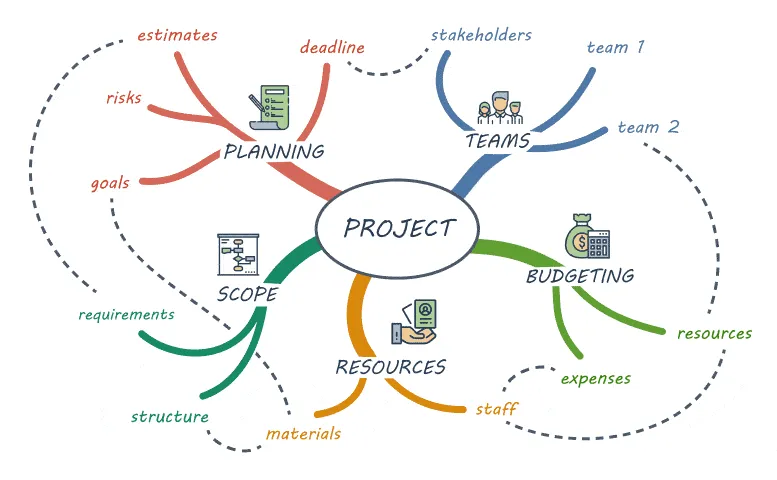
A mind mapping workflow. Image source: Northeastern University(1)
When adding new nodes, try to keep them close together so they don't look scattered. Use arrows to connect different parts of the same concept. If you want to link two unrelated topics, put one on top of the other. You can also use icons, arrows, and other elements for clarity.
🤩 What Are the Benefits of Mind Maps?
Mind mapping is an effective way to organize your thoughts and ideas. It helps you visualize complex concepts, ideas, and problems more easily. The humble mind map can be used for brainstorming ideas, planning projects, taking notes, and even outlining.
For example, if you're trying to learn about search engine optimization, you might start by adding a large circle with "SEO" in the middle. Next, draw smaller circles with related concepts like “click-through rate (CTR)” or “domain authority” and connect them to the core concept.
This way, you can easily break any topic into atomic, easily digestible bits. Each node can have its own “children” nodes, so you can add complexity as needed. The more granular you get, the more insightful and interconnected your mind map becomes.
But that's not all. Here are a few more benefits of mind mapping you should keep in mind:
Enhanced creativity and creative thinking: Mind mapping stimulates creative thinking and allows you to visually explore ideas. Whether you're a student, marketer, or writer, mind maps will help you unlock your creativity and think outside the box.
Improved memory retention: The use of visual elements and associations in mind maps aids in memory encoding and retrieval, which makes learning more effective. This is an excellent tool for students who prefer a more visual approach to acquiring knowledge.
Visual structure: Mind mapping provides a simple but powerful structured framework for organizing thoughts and ideas around a central topic. This, in turn, makes it much easier to break down a central topic into atomic nodes than using running text or even lists.
Going beyond text: No two mind maps are the same. You can customize your diagrams with images, icons, and other elements to give them a unique flavor. This is gets even easier when you're using an online mind mapping tool (wink, wink Taskade).
Even if you don't like more traditional note-taking methods, there are many mind mapping tools that make the process more dynamic. That's as long as you have a clear use case in mind. 🤔
🛠️ What You Can Use Mind Maps For
You can use mind maps for all kinds of projects, not only those that require a creative approach. Here are some of our favorite projects you can visualize with a mind map:
🏖️ Planning a vacation: Planning a trip is stressful, but using a mind map can make it fun and engaging. Put your destination in the center and map out the places you will visit, the gear you need to pack, and the events you want to attend.
📚 Writing a book: Many writers use mind mapping techniques for planning and outlining their books. By creating a large network of places, events, and characters, they can easily see how those elements interact with each other.
✅ Organizing life: Whether you're trying to figure out what to pack for a business trip or just need help getting things done, mind mapping is the tool for you. List everything you need to accomplish, break it down into steps, and draw a mind map to prioritize.
🧠 Brainstorming ideas - Brainstorming is a process used to generate ideas or solutions to problems as quickly as possible. Using mind maps will help you get into a creative flow and come up with unique, evergreen ideas in no time.
👁️ Creating presentations: Did you know you can use mind mapping to present information in a fun and engaging way? This technique works exceptionally well for covering complex subjects with many interconnected sub-topics.
💭 Clearing your mind: Sometimes you just need to get your head on straight. Mind mapping can be a great way to calm down and organize your thoughts.
🧱 What Are the Three Elements of a Mind Map?
Every mind map consists of three core components:
🟢 Nodes: The building blocks of a mind map. A node can include text, images, videos, or any other type of content. Every node can have an unlimited number of child nodes.
🟠 Root (node): The central theme of your mind map. A root has no parent node, but it can have many child nodes, usually spread vertically to the left and right.
🟤 Branches: Links connecting nodes together. One branch can have multiple nodes attached. Branches help visualize hierarchical relationships between nodes.
Every mind map is unique. You can use visual elements like icons, arrows, and shapes to make your mind maps more readable. Some mind mappers also use colors to separate nodes by topic or category. Others color things up for pure aesthetic value.
⏩ 3 Popular Mind Mapping Techniques
There are three basic mind mapping techniques you should know:
🤹 Freeform
This method doesn't require that you follow a specific format. However, there are a few rules you should keep in mind. Try to avoid planning or making an outline before creating your mind map. Instead, draw the first node in the center and let creativity guide you. Try to limit the context to 3–5 words per node so you don't get bogged down by details.
👑 Concept Mapping
In concept mapping, connections between ideas are clearly represented with arrows. Each sub-topic connected to the root can have many dependencies, each with its own sub-topics, and so on. You can use icons, colors, and symbols to improve clarity and make the relationships between nodes transparent.
📑 Outlining
This type of mind mapping follows a strict organization pattern. All nodes are arranged according to their importance. The parent node is always placed above the child node. When you add new nodes, make sure to put them below existing nodes. This way, you can easily see the position of each element in the hierarchy.
🤖 AI-Powered Mind Mapping
AI-powered mind mapping is a new technique that has been gaining popularity thanks to the growing adoption of large language models (LLMs). To create a mind map using artificial intelligence, you need an AI mind map generator (wink, wink Taskade) and a prompt written in natural language, e.g. "Generate a mind map on the topic of... artificial intelligence."
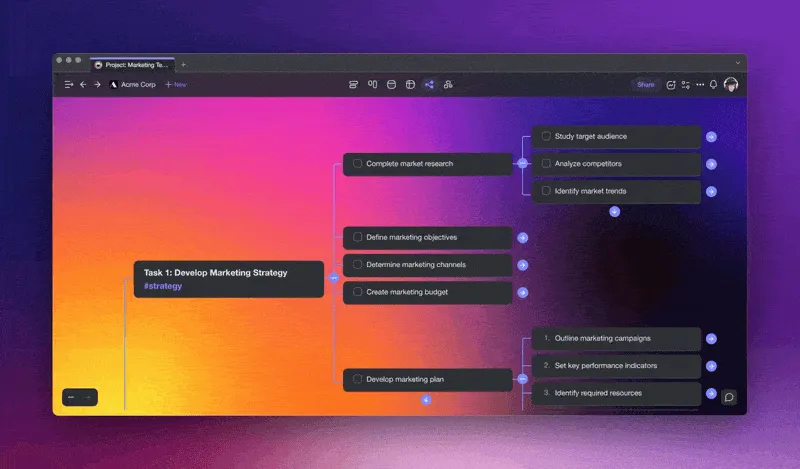
Taskade AI allows you to generate spanning mind maps using natural-language prompts
🌟 What Are Some Examples of Mind Mapping?
💡 1. Brainstorming
Mind maps help organize thoughts and understand complex concepts. They highlight connections between seemingly unrelated topics and provide a framework for developing ideas. If you are looking for a way to brainstorm ideas, this is one of the best ways to get started.
👉 Grab this free brainstorming template to get started.
🧩 2. Mapping out Issues
A problem-solving approach can help you identify the root cause of any issue or challenge. It also helps you develop solutions to address them. For example, if you have a business with multiple locations, you might want to map out all the challenges associated with each location. Then, you can come up with strategies to overcome those challenges.
👉 Grab this free issue trees map template to get started.
🚦 3. First Principles Mindmap
The best way to break down complex problems is to start with first principles thinking. This means starting with what you know about the problem and then building up from there. If you don't understand something, ask questions until you do. Once you've understood the problem, you'll be able to build a solution that works.
👉 Grab this free first principles template to get started.
🚀 4. Product Release Strategy
A product release meeting is an excellent opportunity to set the stage for a product release. Create a mind map with launch milestones, involved team members and their roles, critical tasks, and other things you need to keep in scope during launch. All that’s left is to present the mind map to your team during the meeting and show how all elements fit together.
👉 Grab this free product release strategy to get started.
⚡ How to Choose the Best Mind Mapping Software?
The main challenge of mind mapping is learning how to effectively use this method. While you can stick to pen and paper, you’ll quickly realize that it has too many limitations. An alternative is to choose from one of the hundreds of mind mapping tools available today.
Here are a few pointers you should keep in mind:
Does the tool allow you to export mind maps to other formats (e.g., PDF, jpg)?
Is the user interface intuitive and easy to use?
How many users can access the same file at once?
Can you synchronize and edit your mind maps across platforms?
How easy is it to use? What kind of support does it offer?
Do you need to pay extra for essential features?
Are there templates included? How many?
This is where Taskade comes into play. Taskade is a collaborative mind mapping and task management tool that has everything you need to get started. See for yourself!
Any mind mapping software worth its salt should feature a handful of free mind map templates. Taskade packs over 300 templates across 26 categories that’ll help you kickstart projects. And the best part? They’re all free and you can customize each template in any way you want.
Found the right template for your project? Great! It’s time to roll up the sleeves and start adding nodes to your mind map. All you have to do is type in the text into a node and press Enter to create another node on the same branch. Press ⌨️ Shift + Enter to add a child element.
And that’s it! 🥳
Workspace DNA: From Visual Thinking to Automated Execution
Mind maps capture how you think. But the real productivity gain comes when those visual ideas flow seamlessly into tasks, deadlines, and deliverables. Taskade's Workspace DNA framework — Memory, Intelligence, and Execution — makes that transition automatic.
Memory preserves every mind map, outline, and brainstorming session in a shared workspace. Switch between multiple project views — including Mind Map, Board, Gantt, and Timeline — so the same data serves different thinking modes without duplication. Intelligence supercharges your maps through AI agents with built-in tools and frontier models from OpenAI, Anthropic, and Google. Ask an agent to expand a branch, generate subtasks from a high-level node, or identify blind spots in your thinking — all within the context of your existing projects.
Execution converts visual ideas into real outcomes. Automations with 100+ integrations and durable execution can turn mind map branches into assigned tasks, trigger reminders when deadlines approach, and sync updates to the tools your team already uses. The loop reinforces itself: maps feed agents, agents trigger automations, and automations generate new project data.
Build your own mind mapping workflow with Taskade Genesis — describe the tool you need in natural language and get a live app in seconds. Over 150,000 apps have been built this way. Check the community for shared mind mapping tools, with plans from Free to Business at $25/mo.
👋 Parting Words
Mind mapping is a simple but powerful tool for visualizing concepts, problems, and ideas using tree diagrams. It helps users to better understand complex concepts and processes as well as absorb new information. Plus, it doesn’t take much learning to get started.
Now that you know what mind maps are and how they work, you can start using them to improve your productivity and get things done. So, what are you waiting for?
Boost your mind mapping powers with Taskade AI! 🤖
🤖 Custom AI Agents: Design and deploy AI agents to automate and enhance the process of mind mapping, powered by frontier AI models from OpenAI, Anthropic, and Google.
🪄 AI Generator: Generate mind maps and flowcharts based on natural-language descriptions or from seed documents.
✏️ AI Assistant: Use the AI Assistant to add, rearrange, and refine ideas within your mind maps right inside the project editor.
🗂️ AI Prompt Templates Library: Access an expansive catalog of AI prompts to speed up mind mapping or kick-start any project.
💬 AI Chat: Discuss and expand your mind mapping ideas with Taskade AI using a natural, conversational interface in the project chat.
📄 Media Q&A: Upload your documents and spreadsheets to extract valuable insights for all your mind-mapping projects.
And much more...

Mind Mapping Techniques Compared
| Technique | Best For | Complexity | AI-Assisted? |
|---|---|---|---|
| Freeform | Creative brainstorming | Low | Yes -- AI suggests branches |
| Concept Mapping | Showing relationships | Medium | Yes -- AI identifies connections |
| Outlining | Hierarchical organization | Low | Yes -- AI generates structure |
| AI-Powered | Rapid idea generation | Low | Yes -- fully automated |
| Spider Diagrams | Simple topic breakdown | Low | Partially |
| Flowcharts | Process visualization | High | Yes -- via automations |
Explore AI-powered mind mapping templates or build custom workflows with Taskade Genesis. Join the Taskade community to discover shared mind maps and collaboration tools.
💬 Frequently Asked Questions About Mind Mapping
Is mind mapping effective?
Mind mapping is a highly effective technique for organizing information, brainstorming ideas, and enhancing creativity. By visually representing concepts and relationships, mind maps help individuals better understand and retain information, making it an invaluable tool for learning, problem-solving, and project management.
Who created mind mapping?
Mind mapping was popularized and developed by Tony Buzan, an author, educational consultant, and renowned expert in memory and learning techniques. Buzan introduced the concept of mind mapping in the 1970s, revolutionizing the way people structure and visualize their thoughts.
How can I turn an outline into a mind map?
To transform an outline into a mind map effortlessly, consider using Taskade, a versatile online productivity platform. Taskade offers a user-friendly interface and powerful mind mapping features, allowing you to easily convert linear outlines into interactive and visually appealing mind maps. Simply import your outline and use Taskade's intuitive tools to create branches, add icons, colors, and attachments, resulting in a dynamic and engaging mind map.
What is the best mind mapping tool?
While the choice of a mind mapping tool depends on individual preferences and specific requirements, Taskade stands out as a top contender. With its intuitive interface, cross-platform compatibility, collaborative features, and extensive customization options, Taskade offers a comprehensive solution for creating and sharing mind maps. Explore its wide range of features and unleash your creativity.
What are the major benefits of mind mapping?
Mind mapping offers a wide array of benefits that can enhance various aspects of thinking, learning, and productivity. It stimulates creativity and idea generation by visually representing concepts and their connections, allowing for innovative and out-of-the-box thinking. Mind maps also improve information retention and comprehension as the visual nature of the maps aids in assimilating knowledge.
What are the disadvantages of mind mapping?
While mind mapping offers numerous advantages, it is essential to acknowledge its potential limitations. Mind mapping may not be suitable for complex projects since it can be challenging to maintain a clear overview of all the moving parts. As the map grows in size and complexity, it can become overwhelming, and it may require additional effort to manage and navigate through the extensive details.