






You can automate the repetitive 80% of your Google Workspace in 2026 — Drive filing, Sheets updates and reports, Gmail triage and drafts, and Docs generation — by connecting Google events to AI agents that read them and act. The shift is simple: stop clicking through Drive, Sheets, and Gmail yourself, and instead describe the outcome you want so an AI agent does the filing, the data entry, the inbox sorting, and the report writing for you. Teams that move this work onto AI agents typically save 8-12 hours per person each week, and the biggest single win — inbox triage — usually drops by half in the first week. You keep the 1% that needs judgment: the final send, the sensitive share, the strategic call.
TL;DR: Google Workspace automation in 2026 means wiring Drive, Sheets, Gmail, and Docs to AI agents that act on each event instead of you clicking through menus. Teams save 8-12 hours a week per person. The fastest path is to describe the outcome and let Taskade Genesis build the agents, automations, and a live app. Clone the working Google Workspace app below →
This is not a guide to automating one Google tool. If you only need spreadsheets, read our focused Google Sheets automation guide — that one covers a single app. This guide is broader. It shows you how to wire your entire Google Workspace — Drive, Sheets, Gmail, Calendar, and Docs — into one connected app where AI agents move data between them automatically. By the end you will know exactly what to automate first, which agents to build, and how to connect them into one living workspace.
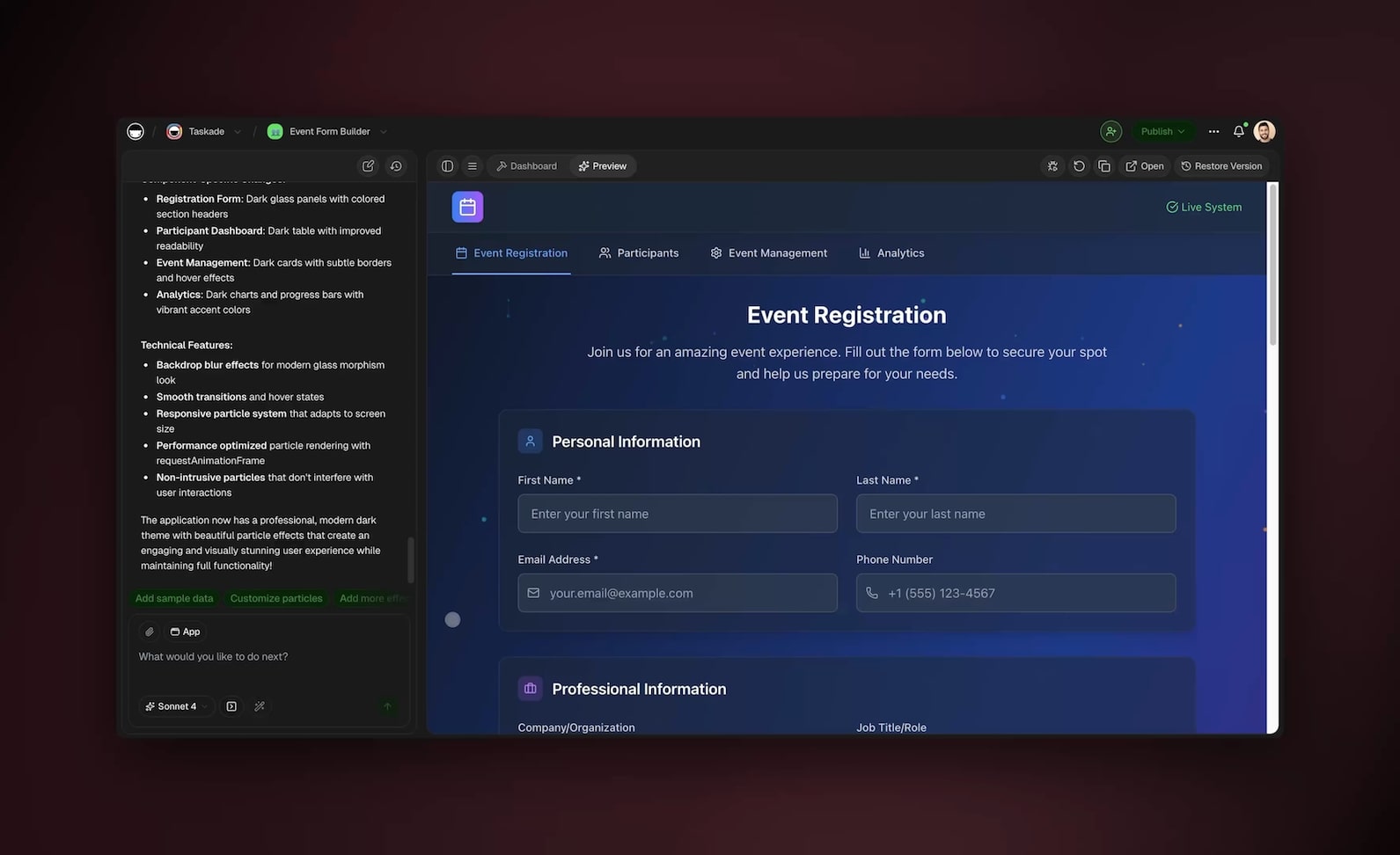
See it live — clone a working Google Workspace app
You do not have to imagine this. The app below was built from a single prompt and runs in your browser right now. Clone it in about 30 seconds and it lands in your own workspace, ready to connect to your Google account.
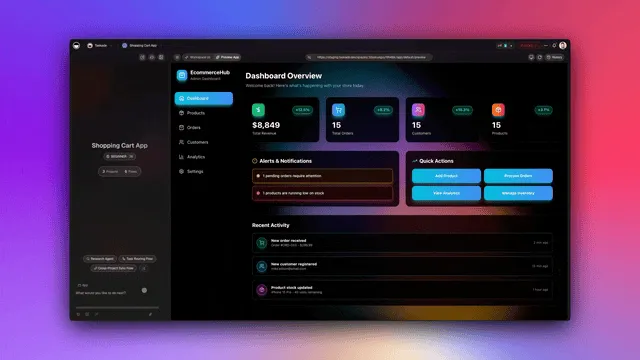
That is the whole point of automating Google Workspace with AI: the output is not a flowchart you have to wire, it is software that works. You describe the Google jobs you do every day, and you get a real app with a database, AI agents, and automations connected to Drive, Sheets, and Gmail — no canvas to build, no script to host. Browse more cloneable automation apps or start your own from a prompt.
What does it mean to automate Google Workspace with AI?
Automating Google Workspace with AI means connecting each Google product — Drive, Sheets, Gmail, Calendar, Docs — to AI agents that reason about events instead of you doing the clicking. A typical knowledge worker spends 8-12 hours a week on Google busywork: filing documents, copying data between sheets, sorting email, and assembling reports. An AI agent watches for the same events you watch for — a new file, a new row, a new email — and takes the action you would take, automatically.
The difference from old automation is judgment. A fixed rule says "if subject contains invoice, apply label." An AI agent reads the actual email, understands it is an invoice even when the word never appears, extracts the amount and due date, logs it to a Sheet, and drafts the acknowledgment. Old automation fires a pre-wired trigger. An agent decides what to do next.
Here is the difference in one picture. Manual Google work is a person clicking through five tabs. AI Google automation is a loop where agents read events and act.
The four product families below cover almost everything people do in Google Workspace. Each one maps to an agent you can build today.
| Google product | What you do manually | What an AI agent does | Hours saved/week |
|---|---|---|---|
| Drive | File, rename, set permissions | Auto-files by type, applies sharing rules, logs to a sheet | 2-3 |
| Sheets | Copy data, update rows, build reports | Enriches rows, validates data, writes scheduled reports | 2-4 |
| Gmail | Sort, label, draft replies | Triages by intent, labels, drafts replies in your voice | 3-5 |
| Docs | Write briefs, summaries, reports | Generates Docs from data, summarizes, keeps them updated | 1-2 |
That is the model. The rest of this guide builds each agent and then connects them so a single Google event can ripple across all five tools. Want the conceptual background first? Read what AI agents are and how they differ from rule-based workflow automation.
How do you automate Google Drive filing and permissions?
You automate Google Drive by connecting it to an AI agent that watches for new and updated files, then files, renames, and sets permissions on each one according to rules you describe in plain English. Filing and permissions are pure rule-following with no judgment, so this is the single easiest win in Google Workspace — most teams drop the human time for it to near zero. A Drive agent runs the moment a file lands, every time, without you opening Drive.
The reliable pattern is a three-step agent: detect, classify, act. The agent detects a new file, classifies it by type and content (contract, invoice, design, raw data), and then takes the matching action — move it to the right folder, rename it to your convention, apply the correct sharing permissions, and log a row to a tracking Sheet.
Here is the decision tree the agent follows. You describe these rules once in plain English; the agent enforces them on every file forever.
┌─────────────────────────────────────────────┐
│         NEW FILE LANDS IN GOOGLE DRIVE        │
└───────────────────────┬───────────────────────┘
                        ▼
              ┌──────────────────┐
              │ Classify by type │
              └────────┬─────────┘
          ┌────────────┼────────────┬─────────────┐
          ▼            ▼            ▼             ▼
     ┌─────────┐ ┌──────────┐ ┌──────────┐ ┌──────────┐
     │ Contract│ │ Invoice  │ │ Design   │ │ Raw data │
     └────┬────┘ └────┬─────┘ └────┬─────┘ └────┬─────┘
          ▼           ▼            ▼            ▼
   /Legal+sign   /Finance+log  /Assets+team  /Inbox+
    (private)    (to Sheet)    (view-only)   enrich
          └───────────┴────────────┴────────────┘
                        ▼
              ┌──────────────────┐
              │ Log row to Sheet │
              │ + notify if human│
              │   review needed  │
              └──────────────────┘
To build this, you do not script anything. You describe it to Taskade Genesis: "Watch my Drive. When a new contract arrives, move it to Legal, keep it private, and notify me. When an invoice arrives, move it to Finance, log the vendor and amount to my tracking sheet." Genesis connects Google Drive through its 100+ bidirectional integrations and builds the agent. For a step-by-step walkthrough of connecting Google tools, see the Learn Taskade connectors guide and the broader automation triggers reference.
How do you automate Google Sheets data updates and reports?
You automate Google Sheets by connecting it as both a trigger and an action, so a new or changed row can launch an AI agent, and an agent can write data and reports back into the sheet. Because the integration is bidirectional, your sheet stays the single source of truth while agents read from it and write to it. Teams that automate Sheets reporting recover 2-4 hours a week that previously went to manual copy-paste and end-of-week report assembly.
There are two distinct Sheets jobs, and you build a separate agent for each:
| Sheets job | Trigger | Agent action | Output |
|---|---|---|---|
| Data enrichment | New row added | Look up, validate, fill missing fields | Completed row |
| Scheduled reporting | Time-based (daily/weekly) | Read sheet, summarize in plain English | Doc or email report |
| Cross-sheet sync | Row updated | Mirror change to related sheets | Sheets in sync |
| Anomaly flagging | New row added | Compare to thresholds, flag outliers | Slack/email alert |
The enrichment agent is the workhorse. Say a lead fills a form and a row appears in your sheet with just a name and email. The enrichment agent reads the row, researches the company using its built-in web search tool, fills in the industry, size, and a one-line summary, scores the lead, and writes it all back to the same row — before you have even seen it.
The reporting agent is the time-saver. Instead of building a weekly report by hand, you tell an agent to run every Friday at 4 PM, read the week's rows, summarize the numbers in plain English, and write the report to a Google Doc and email it to your team. What used to take an afternoon now runs in the background. This is the same scheduled-trigger pattern covered in depth in our automate reporting guide — point it at any Sheet and it produces a written summary on a cadence you choose.
The enrichment agent is, at its core, automated data entry: it reads a sparse row and fills the rest. If most of your Google busywork is typing data into cells — copying from emails, pasting from forms, looking up missing fields — start with our automate data entry guide, then bring that agent into this connected Google Workspace so the data it enters flows on to your Docs and Gmail agents.
Here is what a single Sheets enrichment run looks like end to end. One thin row goes in, a complete scored row comes out — no copy-paste, no tab-switching.
   ROW IN (from a form/import)        ROW OUT (after the agent runs)
 ┌──────────────────────────────┐   ┌────────────────────────────────────┐
 │ Name   : Dana Okoro          │   │ Name     : Dana Okoro              │
 │ Email  : dana@acme.io        │ → │ Email    : dana@acme.io            │
 │ Company: (blank)             │   │ Company  : Acme Robotics           │
 │ Size   : (blank)             │   │ Size     : 120 employees           │
 │ Score  : (blank)             │   │ Industry : Industrial automation   │
 │ Notes  : (blank)             │   │ Score    : 84 / 100  ★ hot lead    │
 └──────────────────────────────┘   │ Notes    : Series B, hiring ops    │
        agent reads ───────────────▶ └────────────────────────────────────┘
        web search + validate + write back to the SAME row
Each agent in Taskade ships with built-in tools — web search, file analysis, code execution, and more — so a Sheets agent can research, calculate, and fact-check while it works, not just move cells. To go deeper on the spreadsheet-only side, our dedicated Google Sheets automation guide covers formulas, scripts, and single-sheet workflows; this guide is about connecting Sheets to the rest of your Google Workspace.
How do you automate Gmail triage and drafts?
You automate Gmail by connecting your inbox to an AI triage agent that reads every new message, classifies it by intent, applies labels, and drafts replies in your voice. Inbox triage is the single largest time sink in Google Workspace and the biggest automation win — most people cut their inbox time by about half in the first week. The agent does the sorting and first-draft work; you do the approving and sending.
A Gmail agent runs a five-step loop on every message: read, classify, label, decide, draft. The classify step is where AI beats fixed rules — it understands that "quick question before our call" is a meeting request even though no rule keyword matches.
The drafting step uses persistent memory. The agent remembers how you have written replies before — your greeting, your tone, your sign-off — and drafts new replies that sound like you. It saves them to Gmail drafts instead of sending, so you always keep the final yes. Over time the drafts need fewer edits because the agent learns your voice.
Here is what a triage agent classifies and how it routes each type:
| Email type | Agent label | Agent action | Human step |
|---|---|---|---|
| Needs reply | Reply | Draft response in your voice | Approve and send |
| Action item | Task | Create task in your project | Confirm priority |
| Invoice/receipt | Finance | Extract amount, log to Sheet | None |
| Newsletter/FYI | Read-later | Archive, summarize weekly | None |
| Urgent/VIP | Priority | Flag and notify immediately | Respond |
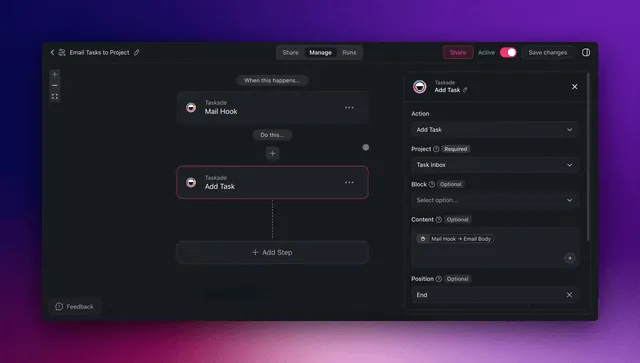
You build this the same way: describe it to Taskade Genesis. "Read my Gmail. Draft replies to anything that needs one in my voice and save to drafts. Turn action requests into tasks. Log invoices to my finance sheet. Flag anything from my top clients." For the connection walkthrough, see Learn Taskade on Gmail automation and the broader AI agents overview.
How do you automate Google Docs generation?
You automate Google Docs by giving an AI agent a source — a prompt, a Sheet, or a Drive event — and having it generate, summarize, or update a full document. Docs generation closes the loop: data that agents collect in Sheets and Drive becomes written briefs, reports, and summaries without you opening a blank page. This is the smallest time saving per task (1-2 hours a week) but the highest leverage, because it turns raw data into decisions.
There are four Docs jobs an agent handles well:
- Generate from data — turn a Sheet of numbers into a written weekly report
- Generate from a brief — turn a one-line prompt into a full project brief or proposal
- Summarize — condense a 20-page document into a one-page brief
- Keep updated — refresh a living Doc whenever the underlying Sheet changes
The most useful pattern chains all of your Google agents together. A Drive event kicks off a Sheets enrichment, the enriched data feeds a Docs report, and the report gets emailed through Gmail — one continuous run from a single trigger. This is what "a living app" means: your Google products stop being separate tabs and start being one system.
Because every agent carries web search and file analysis among its built-in tools, a Docs agent can research and cite real facts while it writes — not just rephrase what is already in the Sheet. To see related building blocks, browse the AI app builder overview and how to build AI agents.
How does Taskade do it differently?
Taskade Genesis is different because competitors make you wire nodes while Taskade ships a living app from one prompt. n8n, Zapier, Make, and Lindy are genuinely good at connecting one trigger to one action — and to be fair, n8n's open-source flexibility and Zapier's catalog of 6,000+ app connections are real strengths if you want to hand-build and own every step of a single pipeline. But each of those tools leaves you with a canvas to maintain: you place nodes, map fields, debug branches, and you own the upkeep forever.
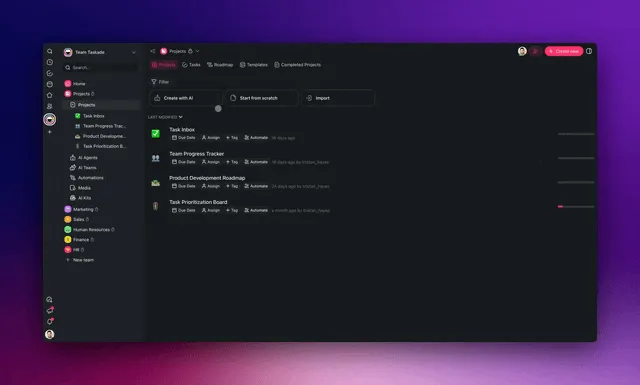
Taskade flips the model. You describe the Google Workspace outcome you want, and Genesis builds the whole thing — agents, automations, a database, and the integrations already wired. The reason it can do this is Workspace DNA: Memory, Intelligence, and Execution in one self-reinforcing loop.
- ▲ Memory (Projects) — your Google data lives in a real database across multiple project views (List, Board, Calendar, Table, Mind Map, Gantt, Org Chart). Agents remember context across runs.
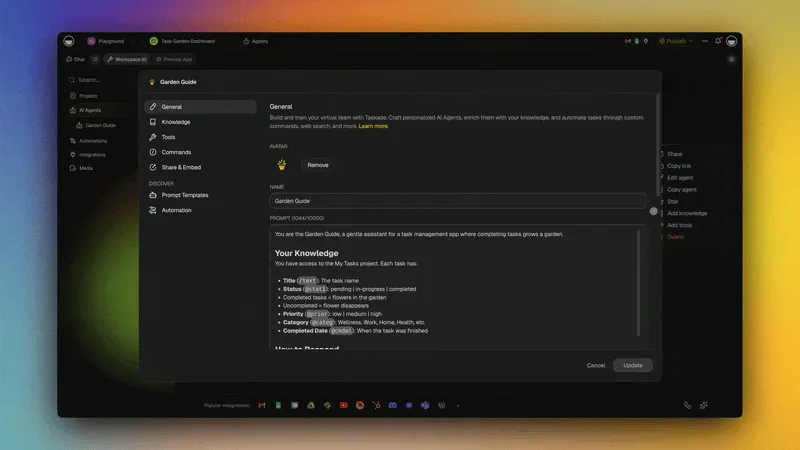
- ■ Intelligence (AI agents) — agents reason about each Google event using frontier models from top AI labs and built-in tools. A multi-agent team can divide the work: one files, one reports, one drafts.
- ● Execution (Automations) — reliable workflows fire on Google events and act across Drive, Sheets, Gmail, and Docs through 100+ bidirectional integrations.
The table below makes the wedge concrete. This is not an attack — it is a different category of product.
| Capability | Node-wiring tools | Taskade Genesis |
|---|---|---|
| How you build | Drag nodes, map fields | Describe the outcome in plain English |
| What you get | A workflow you maintain | A living app with database + agents |
| Reasoning | Fixed rules per node | Agents read context and adapt |
| Google reach | One trigger to one action | Drive + Sheets + Gmail + Docs in one app |
| After launch | You own the upkeep | Agents learn and improve from memory |
| Sharing | Export a template file | Clone a live app in 30 seconds |
That last row is the moat. Every Taskade Google Workspace app is a live, cloneable /share/apps link — not a static template export. Someone clones your filing app, connects their own Google account, and it runs. Compare the categories in depth in our AI app builders guide and the Zapier alternative comparison.
Taskade Genesis vs the alternatives for Google Workspace
The five tools most people compare for Google Workspace automation in 2026 are Zapier, Make, Google Workspace Studio (Google's own Gemini-powered automation layer, launched at the end of 2025), Google Apps Script, and n8n. Each is good at a specific job. The table below pits Taskade Genesis against all five so you can pick honestly — the wedge is that Genesis ships a living app from one prompt instead of a flow you wire and maintain.
| What it's best at | Build model | Google reach | Reasoning | |
|---|---|---|---|---|
| Taskade Genesis | Whole connected Google app from one prompt | Describe outcome → live app + agents + database | Drive + Sheets + Gmail + Docs + Calendar in one app | AI agents read context and adapt |
| Zapier | Largest connector catalog (6,000+ apps) | Wire trigger → action on a canvas | One Google trigger → one action per Zap | Fixed rules per step (AI add-on optional) |
| Make | Visual multi-step scenarios, 1,000+ apps | Drag modules on a canvas you maintain | Strong per-step Google modules | Fixed branches; AI modules bolt on |
| Google Workspace Studio | Native, no API keys, free on Business/Enterprise | Describe simple automations in plain English | Native Gmail/Sheets/Drive/Docs/Calendar | Gemini handles execution logic |
| Google Apps Script | Deep, free customization inside Google | Write JavaScript and host it yourself | Deepest single-product control | None — you code every rule |
| n8n | Open-source, self-hostable, you own every step | Hand-build nodes; self-host or cloud | Per-node Google integrations | Fixed logic; AI nodes optional |
Where the competitors genuinely win. Be fair to each: Zapier has the deepest connector catalog on the planet, so if you need a one-off bridge to an obscure SaaS tool, it probably has it. Make gives you precise visual control over complex multi-branch scenarios. Google Workspace Studio is free and native if you already pay for Workspace Business or Enterprise and only need simple single-trigger automations that stay inside Google. Apps Script is unbeatable for deep, free customization inside one Google product if you can write JavaScript. n8n is the right call when you want open-source ownership and self-hosting above all else.
Where Taskade Genesis wins. Every one of those tools leaves you with something to wire and maintain — a canvas of nodes, a script to host, or a single-trigger automation that can't reason across tools. Genesis is the only option in the table that turns one plain-English prompt into a living app spanning Drive, Sheets, Gmail, and Docs at once, where the agents reason about each event, remember context between runs, and improve from persistent memory. And the output is a cloneable live app anyone can run in 30 seconds — not a template export. For a head-to-head on the most common comparison, see our Zapier alternative breakdown, and for the broader category, the AI app builders guide.
What can Taskade Genesis do for your Google Workspace?
Taskade Genesis is a full platform, not a single automation. When you point it at Google Workspace, you get a connected app with a real database, a team of AI agents, and reliable automations — all from one prompt. Here is the whole toolkit and how each piece maps to a Google job you do today.
▲ Memory — your Google data in a real database. Everything an agent files, enriches, or reports lands in a database you can see across multiple project views: List, Board, Calendar, Table, Mind Map, Gantt, and Org Chart. The same set of leads an agent enriched from Sheets shows up as a Table for editing, a Board for pipeline stages, and a Calendar for follow-ups — one source of truth, many ways to look at it. Agents remember context across runs, so a Gmail agent recalls how you replied last week and a filing agent remembers your folder conventions.
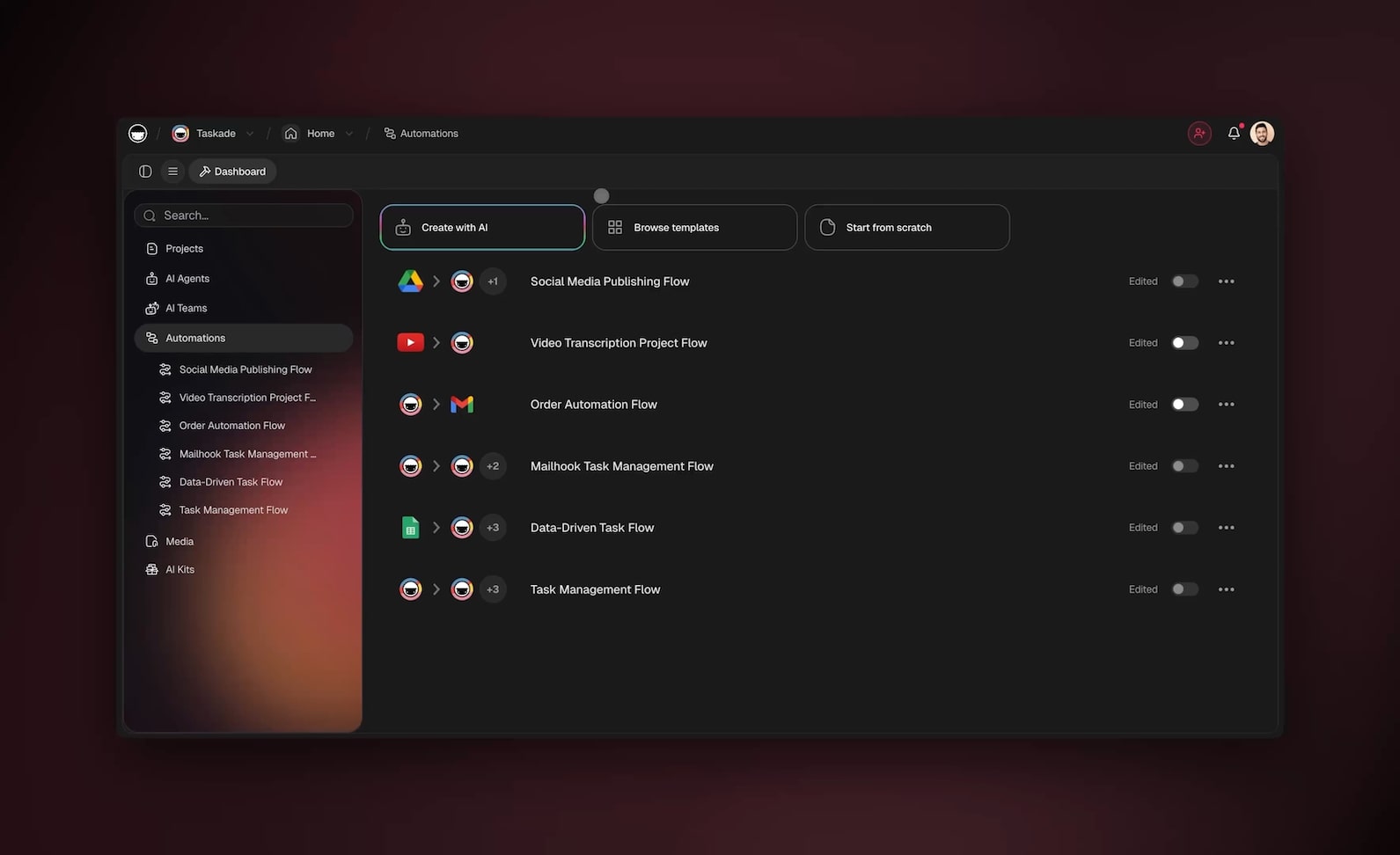
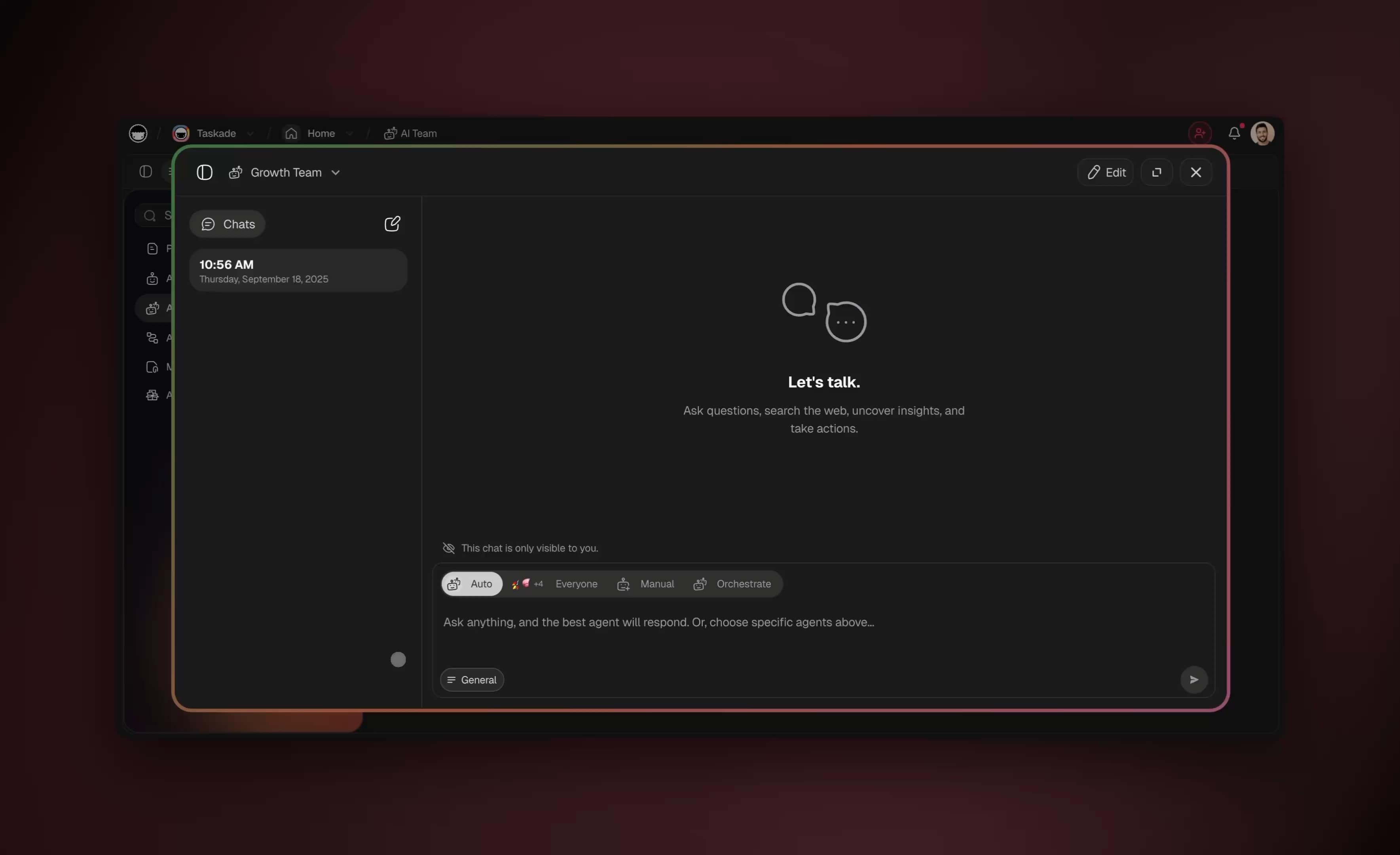
■ Intelligence — a team of AI agents, not one bot. Each agent carries built-in tools — web search, file analysis, code execution, and more — and runs on frontier models from top AI labs. You are not limited to one assistant: a multi-agent team divides Google work the way a real team would. One agent files Drive, a second enriches Sheets, a third triages Gmail, and a fourth drafts Docs — and they hand work to each other.
● Execution — automations that act on Google events. Reliable workflows fire on a new file, a new row, a new email, or a schedule, and act across your tools through 100+ bidirectional integrations. Bidirectional matters: triggers pull Google events in (a new Drive file, a changed Sheet row) and actions push data out (write a row, send a Gmail draft, update a Calendar event). You can run them on a schedule too — a Friday 4 PM reporting agent needs no one to press start.
Here is each platform capability tied directly to a Google Workspace use case so nothing stays abstract:
| Taskade Genesis capability | What it is | Your Google Workspace use case |
|---|---|---|
| Workspace DNA loop | Memory + Intelligence + Execution, self-reinforcing | Every filed file and enriched row makes the next agent run smarter |
| Multiple project views | List, Board, Calendar, Table, Mind Map, Gantt, Org Chart | See enriched Sheets leads as a pipeline Board or follow-up Calendar |
| built-in agent tools | Web search, file analysis, code execution, and more | A Docs agent researches and fact-checks while it writes a report |
| Multi-agent teams | Several agents that hand work to each other | One files, one enriches, one triages, one drafts — in parallel |
| 100+ bidirectional integrations | Triggers pull events in, actions push data out | Read a Drive file and write back a Gmail draft and a Sheet row |
| Frontier models | Models from top AI labs | Pick the best model per agent — fast for triage, deep for reports |
| Custom domains + app publishing | Ship your Google app as a real product | Publish an intake app on your own domain that files to Drive |
Because you can pick the right model for each job, a high-volume Gmail triage agent can run a fast model while a once-a-week reporting agent uses a deeper one — you tune cost and quality per agent, not per account.
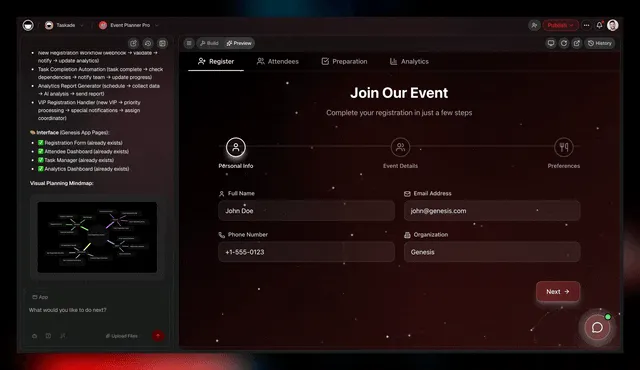
And when your internal Google app is good enough to share, custom domains and Genesis app publishing let you ship it as a real product. A client-intake app that files uploads to your Drive and logs them to a Sheet can live on your own domain — the same engine that automates your inbox can run a customer-facing front door. See the full platform on the automation overview and AI agents overview.
Where this is heading
The direction is clear: every team will eventually run on a single self-reinforcing loop where Memory feeds Intelligence, Intelligence triggers Execution, and Execution creates new Memory. Your Google Workspace stops being a stack of separate tabs you babysit and becomes one living system that gets smarter every week. One prompt becomes a living app, and that app keeps improving as its agents accumulate memory of your folders, your tone, your thresholds, and your reports. The Drive filing you describe today becomes the foundation the next agent builds on tomorrow — until the busywork in Google quietly runs itself and you spend your hours on the 1% that needs a human. That is the future Taskade is building toward, and you can start the loop with a single prompt right now on Taskade Genesis.
What should you automate first in Google Workspace?
Start with the highest-frequency, lowest-judgment task you do in Google — for most people that is Drive filing or Gmail triage. Build one agent, measure the hours it saves over a single week, then add the next. The compounding order is filing, then triage, then Sheets reporting, then Docs generation. Within two weeks you have a connected Google Workspace where each new agent reinforces the last and a single event ripples across all five tools.
Use this prioritization to pick your first agent. Rank your Google tasks by frequency and judgment, and automate the top-right quadrant first.
            LOW JUDGMENT                HIGH JUDGMENT
          ┌────────────────────────┬────────────────────────┐
   HIGH   │  AUTOMATE FIRST        │  AUGMENT (human-in-loop)│
   FREQ   │  • Drive filing        │  • Gmail replies        │
          │  • Permission setting  │  • Client-facing Docs   │
          │  • Sheet logging       │  • Priority routing     │
          ├────────────────────────┼────────────────────────┤
   LOW    │  AUTOMATE WHEN READY   │  KEEP MANUAL (the 1%)   │
   FREQ   │  • Weekly reports      │  • Strategy decisions   │
          │  • Archive cleanup     │  • Sensitive shares     │
          └────────────────────────┴────────────────────────┘
Here is a concrete two-week rollout. Each step is one agent, built by describing it to Genesis.
| Week | Day | Agent to build | Hours saved/week |
|---|---|---|---|
| 1 | Mon | Drive filing + permissions | 2-3 |
| 1 | Wed | Gmail triage + labels | 3-5 |
| 1 | Fri | Gmail draft replies | (in triage) |
| 2 | Mon | Sheets enrichment | 2-4 |
| 2 | Wed | Weekly Sheets report to Docs | 1-2 |
| 2 | Fri | Chain all four into one flow | compounds |
By the end of week two you are saving 8-12 hours a week and your Google products work as one system. The fastest way to start is to clone the live app at the top of this guide, connect your Google account, and tweak the agents to match your folders and labels. Then build your own from a prompt when you are ready to expand.
How the hours add up
The savings are not a marketing round number — they compound agent by agent. Here is the per-person weekly math behind the 8-12 hour figure, broken down by the task each agent removes:
| Agent | Manual time/week | Time after agent | Hours recovered |
|---|---|---|---|
| Gmail triage + drafts | 6-8 hrs | 3-4 hrs | 3-5 |
| Drive filing + permissions | 2-3 hrs | ~0 hrs | 2-3 |
| Sheets enrichment | 2-4 hrs | <1 hr | 2-4 |
| Weekly Sheets → Docs report | 1-2 hrs | ~0 hrs | 1-2 |
| Total | 11-17 hrs | 3-5 hrs | 8-12 |
The chart below shows why you build agents in this order: the savings curve is steepest at the start because the first two agents (triage and filing) attack the highest-frequency, lowest-judgment work. Each later agent adds less raw time but compounds — its output feeds the agent before it.
A scheduled trigger is what makes the reporting and cleanup agents run with zero human time — set the cadence once and the agent shows up every Friday on its own.
Frequently asked questions
How do you automate Google Workspace with AI in 2026? You connect Drive, Sheets, Gmail, Calendar, and Docs to AI agents that read events and act on them automatically, instead of clicking through each tool yourself. In Taskade Genesis you describe the outcome in plain English and it builds the agents, automations, and a live app across all of Google Workspace. Teams save 8-12 hours per person each week.
Can you automate Google Drive without code? Yes. You connect Drive through a no-code integration and an AI agent files, renames, sets permissions, and logs each new file. Nothing to script or host.
How do I automate Google Sheets reports? Connect Sheets as a trigger and action. A reporting agent runs on a schedule, reads your rows, summarizes them in plain English, and writes the report to a Doc or email. See the focused Google Sheets automation guide for spreadsheet-only workflows.
Can AI triage my Gmail and draft replies? Yes. A triage agent classifies each message by intent, labels it, and drafts replies in your voice using persistent memory, saving them to drafts for your approval. Most people halve their inbox time in week one.
How is this different from Apps Script or Zapier? Apps Script needs JavaScript and works inside one Google product. Zapier and Make wire one trigger to one action on a canvas you maintain. Taskade Genesis ships a whole living app with agents, a database, and 100+ integrations already wired — and the agents reason rather than firing fixed rules.
How does it compare to Google Workspace Studio? Google Workspace Studio is Google's native Gemini-powered automation and it is great for simple single-trigger jobs inside Google. Taskade Genesis is a broader platform: you describe a whole outcome and get a living app with a database, a multi-agent team, and 100+ bidirectional integrations that reason across Drive, Sheets, Gmail, and Docs at once — and the result is a cloneable live app, not a flow locked inside one suite.
Can several agents work together? Yes. A multi-agent team divides the work — one files Drive, one enriches Sheets, one triages Gmail, one drafts Docs — and hands tasks to each other, so one Google event ripples across every tool.
What can AI agents do with Google Docs? Generate Docs from a prompt, a Sheet, or a Drive event, summarize long documents, and keep living Docs updated as data changes — using built-in tools including web search.
Is it safe to give AI agents Google access? Yes, when you keep a human on the high-stakes 1 percent. Agents authenticate securely, and you choose which actions run automatically versus pause for approval. Taskade uses role-based access from Owner to Viewer.
How much does it cost? Taskade Genesis is free to start. On annual billing, Pro is $10/mo (the most popular), Business is $25/mo, Max is $100/mo, and Enterprise is $250/mo. One app replaces several point tools.
Start automating your Google Workspace today
You can build a connected Google Workspace where Drive files itself, Sheets report themselves, and Gmail triages itself — all from agents you describe in plain English. Start by cloning the live app above and connecting your Google account, then build your own from a prompt. Browse more cloneable apps in the community, explore what AI agents can do, and see the full automation platform.
The 99% that is filing, sorting, copying, and reporting belongs to your agents. The 1% that needs you — the strategy, the sensitive share, the final send — stays yours. That is the trade worth making in 2026.
Built with Taskade — where Memory feeds Intelligence, Intelligence triggers Execution, and Execution creates Memory. Your workspace is the backend, your agents are the team, your automations are the engine.
▲ ■ ● Workspace DNA: Memory · Intelligence · Execution