






Ready to try the best of the list? Paste any YouTube URL into the Taskade YouTube video to notes converter and get a structured project in under two minutes, or start building a full video research workspace with AI agents that search across everything you capture.
What Is the Best YouTube to Notes AI Converter in 2026?
Taskade is the best YouTube to notes AI converter in 2026 because the notes become a workspace you own, not a summary trapped in someone else's dashboard. Paste a video URL and Taskade returns a live project with transcript, summary, action items, and clickable timestamps across multiple project views, plus an AI agent that answers questions across every video note you capture. Paid plans start at 10 dollars per month billed annually, and the free tier covers dozens of conversions.
See It Work: Clone This Live Notes App in One Click
Every other tool hands you a summary you can read once. Taskade Genesis hands you a runnable notes workspace you can clone and keep. Click the app below to open a real, live Taskade Genesis app, then hit Clone to make it yours. Drop in a YouTube URL and watch structured notes render across List, Board, Mind Map, and four more views.

This is the difference Taskade's first self-serve Enterprise customer described after shipping a production dashboard on Genesis: "What I was able to accomplish in a few weeks would have taken a team of 40-plus people 18 months in the Fortune 500 space." You do not need a team of 40. You clone one app, paste your video, and you have a notes system running this afternoon.
Why Convert YouTube to Notes?
YouTube is the world's second-largest search engine and the largest informal university on the planet. The problem is that video is a terrible format for knowledge work. You cannot skim it, you cannot grep it, and you cannot cite a moment at minute 42 without rewatching. Converting videos into structured notes fixes all three problems at once and turns passive watching into searchable, linkable, reusable knowledge. Here are the five highest-leverage reasons to do it.
Lectures and Courses
University lectures, MOOC videos, and conference talks are dense. A single 60-minute lecture can contain 30 distinct concepts, 10 equations, and a dozen references that would take hours to capture by hand. An AI converter pulls the full transcript in under a minute, compresses it into a one-page outline, flags the definitions and equations, and preserves timestamps so you can jump back to the exact moment a concept was introduced. Students use this to build revision guides for finals. Researchers use it to triage talks from conferences they could not attend in person. Either way, the payoff is a permanent, searchable record that replaces the messy half-page of handwritten notes you would have lost by next semester.
Tutorials and How-To Videos
Developer tutorials and product how-tos are the second biggest use case. A 15-minute React tutorial often contains 40 discrete commands, three config files, and a handful of gotchas the narrator mentions in passing. Pulling that into a structured checklist, with timestamps for each step, means you can follow along without pausing every six seconds. AI notes also let you ask follow-up questions against the transcript, so if the narrator glossed over a step you can query the AI agent to expand on it rather than scrubbing the video again. Engineers report saving 30 to 45 minutes per tutorial by converting first and watching second.
Podcasts and Interviews
Long-form podcasts are where transcription-first tools shine. A three-hour Lex Fridman or Huberman episode is the equivalent of a dense academic paper. AI notes compress that into a one-page brief, surface the five best quotes, and let you jump straight to the 12-minute segment where the guest actually answered the question the host asked 40 minutes earlier. For journalists and researchers, this cuts review time from hours to minutes. For casual listeners, it means you can decide whether a three-hour conversation is worth your time before committing.
Interviews and User Research
Product teams running customer interviews on Zoom, Loom, or Google Meet upload recordings to the same tools. AI notes extract verbatim quotes, tag them by theme, and build an affinity diagram automatically. This replaces the manual tagging work that used to take a researcher half a day per interview. Combined with a project view like Mind Map or Board, a week of user interviews turns into a single synthesis document that the whole team can query, filter, and cite.
Product Demos and Webinars
Sales teams and founders sit through dozens of demos and webinars every quarter. Converting them into notes with action items means the meaningful insights survive the week. AI extracts competitor positioning, pricing hints, feature announcements, and Q&A highlights. When combined with a searchable workspace, this becomes institutional memory: the kind of asset that compounds across a year and gives a team a meaningful edge over competitors who still rely on scattered Google Docs.
The 5 Types of Video-to-Notes Tools
Not every tool in this category is built for the same job. Before you pick one, understand the spectrum. The eleven tools in this list span five distinct philosophies, each optimized for a different part of the watch-to-know workflow.
TRANSCRIPTION          SUMMARY             SYNTHESIS           PROJECT              MEETING
FIRST                  FIRST               FIRST               FIRST                FIRST
|                      |                   |                   |                    |
|-- Otter              |-- Eightify        |-- NotebookLM      |-- Taskade          |-- Fathom
|-- Tactiq             |-- Summarize.tech  |                   |                    |-- Otter
|                      |-- Glasp           |                   |                    |
|                      |-- YT Summary      |                   |                    |
|                      |    w/ ChatGPT     |                   |                    |
|                      |                   |                   |                    |
raw text,              60-second           cross-source        full workspace       live call
timestamps,            skims, quick        research,           with agents,         capture,
speaker labels         verdicts            multi-video briefs  multiple views, RBAC        action items
Transcription-first tools give you raw text as fast as possible. They are the best choice when you need verbatim quotes or plan to process the text with another tool downstream. Summary-first tools collapse a video into a bullet list in under a minute. Great for skimming, weak for deep work. Synthesis-first tools like NotebookLM are built to combine multiple videos into a single research brief. Project-first tools like Taskade treat each video as the starting point of a living workspace that grows as you add more sources. Meeting-first tools are optimized for Zoom, Meet, and Teams recordings and include speaker diarization, action item extraction, and CRM sync.
The trick to picking the right tool is to ask yourself what you want to do after the notes exist. If the answer is "nothing, I just want to know what was in the video," pick a summary-first tool. If the answer is "build a knowledge base I can query for months," pick a project-first tool.
How We Tested
We used a single test video as a control across all 11 tools: a 20-minute talk by Andrej Karpathy on the state of large language models, chosen because it has clean single-speaker audio, technical jargon, on-screen code, and a mix of conceptual and concrete content. We ran each tool on the same URL and graded the output against seven criteria.
| Criterion | Weight | What We Measured |
|---|---|---|
| Transcription accuracy | 20% | Word error rate against a hand-corrected transcript |
| Summary quality | 20% | Coverage of the five key claims Karpathy made |
| Timestamp fidelity | 15% | Presence and clickability of timestamps |
| Action item extraction | 10% | Whether follow-up actions were surfaced |
| Search and reuse | 15% | Could we query the notes a week later |
| Free tier generosity | 10% | What you can do without paying |
| Output formats | 10% | Markdown, PDF, Notion, project views |
                    TEST PIPELINE
                    -------------  [20-min Karpathy talk URL]
|
v
+-----------------+
|  Same URL into  |
|  all 11 tools   |
+-----------------+
|
v
+-----------------+     +----------------+
|  Grade output   | --> |  Seven-axis    |
|  blind          |     |  rubric        |
+-----------------+     +----------------+
|
v
+-----------------+
|  Re-query one   |
|  week later     |
+-----------------+
|
v
FINAL RANK
Blind grading and a one-week re-query step matter because the first impression of a notes tool is almost always misleading. A summary that looks great in the moment is worthless if you cannot find it again a week later.
The testing pipeline itself is worth visualizing because it mirrors the workflow anyone should run before committing to a notes tool long-term. A one-minute first impression is cheap. The real cost is the hundreds of hours you will pour into a tool over a year, only to discover its export story is broken or its search collapses past 20 sources.
One lesson from running this test across dozens of tools over the past two years: the project-first tools almost always win the one-week retest, because they treat notes as a living object instead of a throwaway summary. Summary-first tools feel faster on day one and look worse on day seven. Transcription-first tools are the opposite: ugly on day one, still useful on day thirty.
From Video to a Notes App You Ship
The outcome that matters is not the summary. It is what the summary becomes. Most tools stop at step two. Taskade Genesis carries the same input all the way to a living workspace you can clone and ship to your team.
Steps one and two are where ScreenApp, NoteGPT, and Eightify end. Steps three through seven are the part you own only in Taskade. The clone step is the one that turns a private summary into a system your whole team can run.
The 11 Best Tools
1. Taskade
Taskade is the project-first winner of this round and our top pick overall. You paste a YouTube URL into the YouTube video to notes converter, and Taskade returns a full project: transcript with speaker labels, summary, key quotes, action items, and clickable timestamps that deep link back into the video. Every element lives across the project views (List, Board, Calendar, Table, Mind Map, Gantt, Org Chart, with Timeline built into the Gantt view), which means the same video notes can serve a researcher working in Mind Map, a product manager working in Board, and a course creator scheduling on the Gantt timeline, all from the same underlying data.
What separates Taskade from every other tool on this list is what happens after the notes exist. Every video project is searchable with multi-layer search (full-text plus semantic plus file content OCR), which means you can ask natural language questions across every video you have ever converted and get cited answers. Add an AI agent to the workspace and you get a teammate that can pull from every transcript, summarize across videos, build a cross-video study plan, or draft a blog post that cites 12 different sources you watched last month. The same AI Agents v2 platform supports custom tools, slash commands, built-in tools, persistent memory, and public embedding, all powered by frontier models from top AI labs.
Collaboration uses the RBAC (Owner to Viewer), so you can share a raw transcript with one teammate and a finished brief with a client without building two versions. Taskade also connects to 100+ bidirectional integrations across communication, storage, and productivity tools. Triggers pull events in and actions push data out, so your video notes can drive reliable automation workflows: drop a new video into a folder, and Taskade auto-generates the notes project, pings the team in Slack, and opens a review task.
Pricing on annual billing is Free, Pro at 10 dollars per month (10 users included, the Popular pick), Business at 25 dollars per month, Max at 100 dollars per month, and Enterprise at 250 dollars per month. Free starts with no AI credits: earn credits or buy a credit pack to convert videos, and paid plans include a monthly credit allowance. Community Gallery templates mean you can start from a proven workflow, or clone the live notes app above, rather than building your own.
Strengths: multiple project views, AI agent Q&A across all video notes, multi-layer search, clickable timestamps, a free plan, 100+ bidirectional integrations, cloneable live apps, public templates. Weaknesses: Not a dedicated transcription service, so if verbatim word-for-word is your only need, a transcription-first tool may be faster. Verdict: The only tool that turns video notes into a living workspace.
2. NotebookLM
Google's NotebookLM is the research-synthesis champion. Drop in up to 50 sources, including YouTube URLs, PDFs, and web pages, and ask the notebook questions that pull from every source at once. The summaries are grounded in the source material with inline citations, which is rare in this category. The audio overview feature, which generates a two-host podcast discussion of your sources, is still the novelty hit of the category and genuinely useful for commuting through dense material.
Strengths: Multi-source synthesis, inline citations, audio overviews, free with a Google account. Weaknesses: Limited export formats, no project views, no action item extraction, no automation. Pricing: Free, with NotebookLM Plus available on Google AI subscriptions. Verdict: Pair it with Taskade. Use NotebookLM for synthesis, then copy the output into a Taskade project for ongoing work.
3. Eightify
Eightify is the 60-second skim tool. Install the Chrome extension, open a YouTube video, click the button, and you get a short bullet-point summary plus the five best quotes with timestamps. It is purpose-built for the "should I watch this" decision and excels at it.
Strengths: Speed, clean Chrome extension UX, good at extracting best-of quotes, decent timestamp preservation. Weaknesses: Shallow output, no workspace, no cross-video search, free tier capped at a handful of videos per month. Pricing: Free limited, Pro at around 5 dollars per month. Verdict: Great as a triage layer before you commit a long video to a deeper tool like Taskade or NotebookLM.
4. Notta
Notta is a transcription platform that expanded into YouTube. It handles long videos well, supports over 50 languages, and exports transcripts and summaries to TXT, DOCX, SRT, and PDF. The web app is polished and the mobile apps are genuinely useful for on-the-go capture.
Strengths: Multi-language support, long video handling, solid exports, mobile apps. Weaknesses: Summaries are generic, no project views, no agent layer, free tier is tight. Pricing: Free limited, Pro at 9 dollars per month. Verdict: A safe pick if your main need is accurate multi-language transcription and you want a simple export.
5. Summarize.tech
Summarize.tech is the simplest tool on this list. Paste a URL, get a chapter-level summary, done. No account required for basic use. The output is a plain list of timestamped chapters with a one-sentence description of each. For very long videos, this is sometimes all you need.
Strengths: Zero friction, free for most videos, excellent at chapter-level breakdowns, handles long videos. Weaknesses: No deep summarization, no transcript, no export, no account history. Pricing: Free, Pro at 10 dollars per month for heavy use. Verdict: Use it when you want to decide whether to watch a three-hour podcast in under ten seconds.
6. Glasp YouTube Summarizer
Glasp started as a highlight-sharing tool for the web and grew a solid YouTube summarizer. The Chrome extension generates transcripts and summaries and lets you copy them directly into ChatGPT, Claude, or any other chat tool you prefer. The social layer, where you can follow other Glasp users and see their highlights, is a nice bonus.
Strengths: Free, clean export into LLM chat tools, social highlight layer, timestamps preserved. Weaknesses: No workspace, no agent layer, summary quality depends on the downstream LLM. Pricing: Free. Verdict: A great bridge tool if your actual notes workflow lives inside Claude or ChatGPT.
7. YouTube Summary with ChatGPT (Chrome Extension)
This is the original free Chrome extension that everyone tried first. It extracts the transcript and pipes it into a ChatGPT prompt with a single click. The output is as good as the prompt and the underlying model. Millions of installs, still works, still free.
Strengths: Free, no account, works with any ChatGPT tier, millions of users means it stays maintained. Weaknesses: Depends entirely on ChatGPT, no persistent workspace, no export beyond copy-paste. Pricing: Free, ChatGPT subscription optional. Verdict: The zero-cost baseline. If you already pay for ChatGPT, this is a cheap way to cover occasional videos.
8. Mem
Mem is an AI-first note-taking app with a YouTube ingest feature. It is designed around automatic linking between notes, so a video you capture today surfaces when you are working on a related note next week. That automatic backlinking is the core value.
Strengths: Automatic backlinks, fast capture, clean mobile app, good for personal knowledge management. Weaknesses: Opinionated workflow, limited export, no project views, no automation layer. Pricing: Free limited, Mem X at 10 dollars per month. Verdict: Pick Mem if you want a personal second brain and pick Taskade if you want a collaborative workspace.
9. Fathom
Fathom built its reputation on Zoom meetings and now supports YouTube imports. The strengths carry over: speaker diarization, action item extraction, and CRM sync. The weakness is that the UX is still meeting-shaped, so the notes feel like meeting minutes even when the source is a lecture.
Strengths: Excellent action item extraction, speaker labels, CRM integrations, generous free tier. Weaknesses: Meeting-shaped UX for non-meeting sources, limited project views, no cross-video search beyond simple tagging. Pricing: Free, Premium at 24 dollars per user per month. Verdict: Choose Fathom if most of your video content is actual meetings and YouTube is an occasional add-on.
10. Otter.ai
Otter is the veteran transcription brand and still one of the most accurate tools in the category for single-speaker English. YouTube import works well for podcasts and long talks, and the OtterPilot AI assistant can answer questions against a transcript. The free tier is generous enough for light use.
Strengths: High transcription accuracy, solid speaker diarization, good free tier, mature mobile apps. Weaknesses: Summaries are functional but not inspired, workspace is flat, no project views. Pricing: Free, Pro at 17 dollars per month, Business at 30 dollars per user per month. Verdict: The safe pick for anyone whose top priority is raw transcription quality.
11. Tactiq
Tactiq is a real-time transcription tool that also handles YouTube imports. The differentiator is the clean markdown export and the pre-built prompt library that lets you generate specific outputs (action items, blog outline, email summary) from the same transcript.
Strengths: Clean markdown exports, good prompt library, Chrome-native workflow, fair free tier. Weaknesses: No persistent workspace, no agent layer, no cross-video search. Pricing: Free limited, Pro at 12 dollars per month. Verdict: A solid second pick for power users who live in Chrome and want markdown output.
Mega Comparison Matrix
| Tool | Price | Free tier | Max video length | Transcription | Summary | Timestamps | Best for |
|---|---|---|---|---|---|---|---|
| Taskade | Free / 10 / 25 | Earn or buy credits | Unlimited | Yes | Yes | Clickable | Video-to-project workflows |
| NotebookLM | Free / Plus | Generous | Unlimited | Yes | Yes | Yes | Research synthesis |
| Eightify | Free / 5 | 5 videos/mo | 2 hours | No | Yes | Yes | 60-second skims |
| Notta | Free / 9 | 120 min/mo | 5 hours | Yes | Yes | Yes | Multi-language transcription |
| Summarize.tech | Free / 10 | Most videos | 4+ hours | No | Chapters | Chapter-level | Pre-watch triage |
| Glasp | Free | Unlimited | Unlimited | Yes | Via LLM | Yes | Piping to Claude or GPT |
| YT Summary w/ ChatGPT | Free | Unlimited | 1 hour | Yes | Via ChatGPT | Yes | Free baseline |
| Mem | Free / 10 | Limited | 3 hours | Yes | Yes | Partial | Personal second brain |
| Fathom | Free / 24 | Generous | 5 hours | Yes | Yes | Yes | Meetings with YouTube add-on |
| Otter | Free / 17 / 30 | 300 min/mo | 4 hours | Yes | Yes | Yes | Verbatim transcription |
| Tactiq | Free / 12 | 10 transcripts | Unlimited | Yes | Yes | Yes | Markdown power users |
YouTube to Notes vs the Alternatives (2026)
The dedicated YouTube-to-notes apps people compare most are ScreenApp, NoteGPT, Knowt, and Mapify. They are fast and polished, but every one of them traps the finished notes inside their own dashboard. Taskade Genesis is the only option that hands you a workspace you own and can clone, edit, automate, and share. This is the deciding axis, so it gets its own table.
| Capability | Taskade Genesis | ScreenApp | NoteGPT | Knowt | Mapify |
|---|---|---|---|---|---|
| Free tier | Earn or buy credits, keep the live app | Limited minutes | 15 notes/mo | Free with caps | Free with caps |
| Starting price (annual) | 10 dollars/mo | ~13 dollars/mo | ~8 dollars/mo | ~9 dollars/mo | ~12 dollars/mo |
| AI models | Frontier models | Single model | Single model | Single model | Single model |
| Editable output | Yes, full project | Read-only summary | Read-only summary | Flashcards/notes | Mind map |
| Project views | List to Org Chart | None | None | None | Mind map only |
| Agent Q&A across all notes | Yes, EVE agent | No | Per-note only | No | No |
| Multi-source (video + PDF + audio) | One connected workspace | One at a time | One at a time | One at a time | One at a time |
| Integrations | 100+ bidirectional | Few | Few | Few | Export only |
| Clone the app and own it | Yes, live /share/apps |
No | No | No | No |
The honest read: ScreenApp leads on transcription speed and language coverage, NoteGPT has the broadest single-app surface (flashcards, quizzes, PPT), Knowt is strong for student flashcards, and Mapify is the cleanest pure mind-map view. Pick those if you want a one-shot summary and nothing after. Pick Taskade Genesis if you want the notes to become a system you run for months.
The Taskade Video Workflow
Here is the end-to-end flow when you drop a YouTube URL into Taskade. Every step is live: you can stop at any point and still have a usable artifact.
The key moment is the cross-video query. Once you have five or ten video projects in a workspace, the AI agent becomes a research teammate that can compare claims across sources, surface contradictions, and build briefs that no single video could answer. This is the part that no other tool on the list replicates, because most of them stop at the single-video boundary.
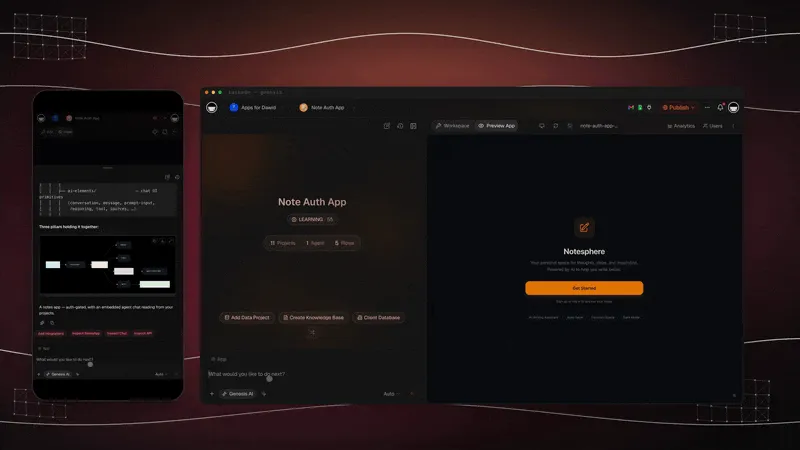
You drive the agent with plain commands and mentions, the same way you would ask a teammate. Type a slash command or mention the agent, and it pulls the answer straight from your notes with a deep link back to the source.
By Use Case: Which Tool Wins?
The right tool depends on the video type and what you plan to do next. Use this decision tree.
| Use case | Winner | Runner-up | Why |
|---|---|---|---|
| Educational lecture | Taskade | NotebookLM | Project views plus agent Q&A |
| Podcast | Otter | Tactiq | Speaker diarization accuracy |
| Product demo | Fathom | Eightify | Action item extraction |
| Team meeting | Otter | Fathom | Mature meeting UX |
| Research interview | NotebookLM | Taskade | Multi-source synthesis |
| Long-form 3h+ | Taskade | NotebookLM | Handles full transcript |
Free Tier Comparison
Relative free tier generosity, scored out of 10 based on how much real work you can finish before you hit a paywall.
Taskade and NotebookLM top the free tier charts because both let you do meaningful work without ever paying. Glasp and Summarize.tech are free forever but shallow. Otter and Fathom give real free tiers but cap minutes. Tactiq and Eightify are the tightest.
5 Copy-Paste Prompts for Video Notes
These five prompts work in Taskade, Claude, ChatGPT, and any other LLM chat tool you pipe a transcript into. Paste the transcript first, then the prompt.
Prompt 1: Extract key insights.
Read the transcript above and extract the 7 most important insights.
For each, give: the claim in one sentence, the supporting evidence from
the video, and the timestamp. Format as a bulleted list.
Prompt 2: Build action items.
Based on the transcript above, generate a list of concrete action items
I can take this week. Each action should be specific, measurable, and
have a suggested owner role (me, my team, or my manager).
Prompt 3: Compare to another video.
I am going to paste a second transcript. Compare the two videos on:
thesis, key claims, areas of agreement, areas of disagreement, and
which source is more credible. Format as a comparison table.
Prompt 4: Summarize in bullets.
Summarize the transcript above in exactly 10 bullets. Each bullet must
be self-contained and under 20 words. Do not include any filler or
hedging language. Prioritize specific numbers, names, and facts.
Prompt 5: Timestamp key moments.
Identify the 5 most quotable moments in the transcript above. For each,
give the exact quote, the speaker if identifiable, the timestamp, and a
one-sentence explanation of why it matters.
The Timestamp Problem
Most tools in this category lose timestamp context somewhere between transcription and summarization. You get a perfect transcript with timestamps, a perfect summary without them, and no way to link the summary back to the source. That is fine if you watched the video once and will never need it again. It is a disaster if you are building a reference you plan to reuse.
Taskade, NotebookLM, Otter, and Tactiq preserve timestamps through the full pipeline. Taskade renders them as clickable links in every project view, NotebookLM uses them for inline citations, Otter keeps them in the transcript view, and Tactiq exposes them in markdown. Everything else either strips timestamps at summary time or only offers chapter-level links.
If your workflow involves citing video moments in writing, presenting clips to a team, or building a knowledge base others will query, prioritize timestamp-preserving tools. The cost of losing timestamps is not obvious until you try to find the 43-second moment that changed your mind about a topic and realize your notes point to nothing.
Accuracy Limits
AI video notes are shockingly good in ideal conditions and embarrassingly bad in edge cases. Here are the three places every tool breaks.
Heavy Accents and Non-Standard Speech
Modern transcription models are trained on American and British English first. Strong regional accents, non-native speakers, and non-standard speech patterns drop accuracy from 97 percent to 80 percent or lower. If you are transcribing a lecture by a Nobel laureate who learned English as a fourth language, expect to hand-correct names, technical terms, and unfamiliar phrases. NotebookLM and Otter handle accents best; most of the summary-first tools struggle.
Multiple Speakers and Overlap
Speaker diarization is hard. Two people talking over each other in a podcast can break a transcription pipeline entirely. Otter and Fathom are the best on this because they were built for meetings. Everyone else struggles. If a video has four speakers on a panel, plan to hand-label who said what, because even the best tools mix up speakers during overlaps.
Technical Jargon and Non-English Content
Domain-specific jargon (biology, law, machine learning, surgery) and non-English videos cause the biggest accuracy drops. Notta is the strongest non-English option because it was built with multi-language support from day one. For jargon-heavy English content, the fix is to paste the transcript into Taskade or Claude with a glossary and ask the model to correct the terms against the glossary. This two-pass workflow recovers most of the accuracy you lose in the first pass.
Hub of Related Converters
YouTube notes are one slice of a bigger workflow. Taskade converts nearly any source into a structured project, and all of these converters feed the same workspace and the same AI agents.
- YouTube video to notes, the primary converter this article is about
- YouTube video to mind map, same input, Mind Map output
- Video to notes, upload any video file, not just YouTube
- PDF to notes, turn research papers and ebooks into projects
- All converters, the full hub of AI conversion tools
Related Reading
This guide is part of an April 2026 sprint of AI tool reviews. Read these next to fill out your stack.
- 11 Best PDF to Notes AI Tools in 2026, the direct sibling for document notes
- 11 Best AI Tools for Teachers in 2026, classroom-focused companion
- 11 Best AI Flowchart Makers in 2026, visual thinking complement
- 11 Best AI Translation Tools in 2026, pair with non-English videos
- 11 Best AI Agent Builders in 2026, build the agents that query your video notes
- 11 Best AI Dashboard Builders in 2026, visualize research across videos
- 11 Best Zapier Alternatives in 2026, automate the video-to-notes pipeline
- Community Gallery SEO Playbook, publish your video research as templates
- Best Free AI App Builders, turn your notes into live apps
- Start building, launch a Taskade workspace
- AI Agents overview, what the agents can do across your notes
- Community Gallery, explore live apps built on Taskade
Three Real Workflows That Compound
The tools are only half the story. Here are three workflows people actually run in Taskade that turn individual video notes into compounding knowledge assets.
The Weekly Research Digest
Every Friday afternoon, set aside 30 minutes and convert every YouTube video you bookmarked during the week. Drop each URL into the Taskade YouTube to notes converter and let the AI agent generate the notes in the background. When they finish, open a single Mind Map view that spans all the videos and ask the agent to produce a one-page weekly brief with the three most important claims, the two biggest surprises, and the one thing you should change about your work next week. By the end of a quarter you have 12 weekly briefs, each cited back to its source videos, and an agent that can query across all of them. This is a free alternative to paying a research analyst and it compounds every week you run it.
The Course Playlist to Study Plan
Pick any YouTube course playlist, from a 40-video React tutorial to a 60-video MIT OpenCourseWare series. Convert each video into its own Taskade project, then ask the AI agent to build a study plan across the entire playlist. The agent will produce a sequenced learning path with milestones, checkpoints, quizzes pulled from the transcripts, and linked timestamps back to the exact moments where each concept is introduced. Switch to the Gantt view to schedule the plan across the weeks you have, and switch to the Board view to track which videos you have actually finished. The whole setup takes under an hour and replaces the manual work of a private tutor building a syllabus.
The Competitive Intelligence Feed
Follow 10 competitor channels on YouTube. Every time they drop a new video, convert it into a Taskade project with an automation trigger so the notes are waiting for you in Slack the next morning. Add an AI agent that reads each new video notes project and updates a single running competitive intelligence document with anything new about pricing, positioning, features, or hiring. Over six months, that document becomes the sharpest view of the competitive landscape your team has, and it took zero manual note-taking to build. Use the RBAC to share the feed with your leadership team at the Viewer tier and keep the editing surface locked down to two or three people.
Verdict
Pick Taskade if you want your YouTube notes to become a workspace you will still use in six months. It is the only tool on this list that treats the video as the start of a project rather than the end of a workflow, and the AI agent layer means the notes get more useful the more you add. Pick NotebookLM if you need research synthesis across multiple sources inside a single notebook. Pick Eightify or Summarize.tech when you only need to decide whether a video is worth watching in the first place. Everything else on the list is a solid second or third pick for a narrower job. The difference between a good notes tool and a great one is not the first transcript you generate. It is what you can do with the tenth.
This is the Workspace DNA loop in one workflow: your notes become Memory (▲), the agent turns them into Intelligence (■), and automations carry them into Execution (●), every video you add makes the system smarter.
Turn your next video into a notes system you can run today. Clone the live notes app and paste a YouTube URL, or start a fresh video research workspace with an AI agent that answers across everything you capture. No team of 40 required, just one app, one URL, and an afternoon.
FAQ
What is the best YouTube to notes AI converter?
Taskade is the best YouTube to notes AI converter for people who actually use their notes again. It turns any video URL into a structured project with transcript, summary, action items, and clickable timestamps, then lets you query those notes with an AI agent across multiple project views. You can also clone a ready-made notes workspace in one click. NotebookLM wins for pure research synthesis, and Eightify wins for 60-second skims.
Is there a free YouTube summarizer?
Yes. Taskade offers a free plan. Free starts with no AI credits: earn credits or buy a credit pack to run YouTube video conversions. NotebookLM is free with a Google account. Summarize.tech, Glasp, and the YouTube Summary with ChatGPT Chrome extension are all free for basic use. Eightify and Notta offer limited free tiers that cap monthly videos or duration.
Can AI take notes from a 3-hour YouTube video?
Yes, but only a few tools handle that length reliably. Taskade, NotebookLM, and Otter can ingest multi-hour videos in full. Summary-first tools like Eightify and Glasp often truncate long videos or sample the transcript. For very long content, paste the full YouTube transcript into Claude or Taskade and ask for sectioned notes with timestamps.
How accurate are AI video notes?
Modern tools reach 90 to 97 percent transcription accuracy on clean single-speaker English. Accuracy drops with heavy accents, overlapping speakers, domain jargon, and non-English audio. Summary quality depends on the underlying model. Always spot-check numbers, names, and quotes against the original video before publishing or citing anything generated from AI video notes.
Can I search across all my video notes?
Yes, in Taskade. Every video you convert becomes a project that is indexed by multi-layer search combining full-text, semantic, and file content OCR. You can ask an AI agent a question and get answers that pull from every video note in your workspace. NotebookLM offers similar cross-source search but only within a single notebook.
What is the fastest way to extract action items from a video?
Paste the YouTube URL into Taskade, pick the notes template, and ask the AI agent to extract action items into the List or Board view. The whole flow takes under two minutes for a 30-minute video. Fathom and Otter also auto-extract action items from meeting recordings but are optimized for live calls rather than public YouTube content.
Can AI notes include timestamps?
Yes. Taskade, NotebookLM, Otter, Tactiq, and Glasp all preserve timestamps and render them as clickable links back to the original video. Summary-first tools like Eightify and Summarize.tech often strip timestamps or show them only at the chapter level. If deep linking matters for your workflow, prioritize tools that keep timestamps inline.
Does Taskade work with private YouTube videos?
Taskade can convert unlisted YouTube videos that anyone with the link can view. Fully private videos that require sign-in cannot be fetched by any third-party tool. For private content, export the transcript from YouTube Studio or record the playback and upload the file directly into Taskade, where the same notes workflow applies.
Which tool is best for podcast notes?
Otter and Tactiq lead for podcast notes because they were built around speaker diarization and long-form audio. Taskade is the better choice if you want the resulting notes to live inside a searchable project alongside your other research. NotebookLM shines when you want to synthesize multiple podcast episodes into a single themed brief.
Can AI turn a YouTube playlist into a study plan?
Yes. In Taskade, convert each video in the playlist into a notes project, then ask the AI agent to build a study plan across all of them. The result lands in the Board or Mind Map view with milestones, checkpoints, and linked timestamps. This is the fastest way to turn a long course playlist into a structured learning path.
Can I clone a ready-made YouTube notes app?
Yes. Taskade Genesis ships live cloneable notes apps in the Community Gallery. Open the shared app, click Clone, and you own a runnable notes workspace in seconds with no setup. Drop in your YouTube URL and the notes render across multiple project views. This clone-and-own model is what separates Taskade from tools that trap the summary inside their own dashboard.
How is Taskade different from NoteGPT and ScreenApp?
NoteGPT and ScreenApp generate a summary that lives inside their dashboard, locked and read-only. Taskade Genesis turns the same video into a project you own and can edit, automate, share, and clone across multiple project views. You also get an AI agent that answers questions across every note, plus 100+ bidirectional integrations to push action items into your calendar or Slack.
Which AI models power Taskade video notes?
Taskade runs on frontier models from top AI labs. You can switch models per agent, so you can use one model for fast summaries and another for precise long-transcript analysis. Pricing on annual billing is Free, Pro at 10 dollars, Business at 25 dollars, Max at 100 dollars, and Enterprise at 250 dollars per month.
Can an AI agent answer questions across all my video notes?
Yes. Taskade gives every workspace an EVE-powered AI agent with built-in tools and persistent memory. It reads across every video note, PDF, and audio file you have converted, then returns cited answers with deep links back to the source timestamp. No other tool on this list connects multiple sources into one agent that you own.
Can I convert YouTube, PDF, and audio in the same workspace?
Yes. Taskade is the only tool here that runs YouTube, video files, PDFs, audio, and images through the same notes flow into one connected workspace. Each source becomes a project, and the AI agent answers across all of them at once. NoteGPT and ScreenApp summarize one source at a time and keep the output inside their own app.