

See the alternative working — clone in 60 seconds
No signup, no credit card. Live content agent chatbot
| Capability | Google Gemini | Taskade Genesis |
|---|---|---|
| Pricing (starting) | Free, Google AI Plus $4.99/mo, Google AI Pro $19.99/mo, Google AI Ultra from $99.99/mo | $0 Free · $10/mo Pro billed annually (10 seats) |
| Cloneable live demo | ❌ | ✅ |
| Built-in AI agents | Chat assistant only | ✅ built-in tools |
| Automation engine | No native automation | ✅ Durable runtime, 100+ integrations |
| Workspace DNA loop | ❌ | ✅ ▲ Memory · ■ Intelligence · ● Execution |
Overall winner: ✅ Taskade Genesis — for any team whose goal is shipping deployed apps with AI agents and automations. Gemini stays the better pick for personal research, drafting inside Google Workspace, and high-end media generation.
Table of Contents
- Quick Comparison Table
- The fundamental difference
- What is Taskade Genesis?
- What is Google Gemini?
- Feature-by-feature deep dive
- The Workspace DNA advantage
- Pricing and total cost of ownership
- Where Gemini has the edge
- What teams say
- When to choose each
- Frequently asked questions
- Without permission
TL;DR: Google Gemini is a best-in-class chat assistant: Deep Research, Gemini Notebook, video generation, and first-party help inside Gmail and Docs. Taskade Genesis is the workspace runtime that turns one prompt into a deployed app with AI agents, durable automations, and 100+ integrations (Google Workspace included). Use Gemini to think. Try Taskade Genesis free →
The fundamental difference
Google Gemini is one of the strongest AI assistants on the market — long context, deep research, multimodal media generation, and native integration into Gmail, Docs, Sheets, and Slides. It is, fundamentally, a chat surface that helps you answer questions and draft content.
Taskade Genesis is a different shape entirely. You describe what you want and Taskade Genesis returns a deployed, working application with AI agents, real-time data, automation workflows, and team collaboration already wired in. Your workspace is the backend. Your projects are the database. Your agents are the runtime.
Gemini answers questions and drafts content. Taskade Genesis builds living workspace apps.
Both can coexist. Many teams use Gemini for research and personal Workspace assistance, then use Taskade Genesis to turn that work into the apps, agents, and automations the rest of the team and customers actually use.
What is Taskade Genesis?
Taskade Genesis is the AI app builder inside the Taskade workspace. It is built on Workspace DNA — Memory (Projects), Intelligence (AI Agents), and Execution (Automations) — a self-reinforcing loop where what your team does becomes the substrate the agents reason over. Founded by John Xie, Dionis Loire, and Stan Chang in 2017, Taskade is a Y Combinator-backed platform with over a million users and a public Community Gallery of apps anyone can clone.
A single prompt to Taskade Genesis can produce a customer support portal, an ops dashboard, a CRM, a knowledge base, a form-driven intake system, or an internal tool — all with built-in AI agents, automations, custom domains, password protection, and the option to embed publicly with GenesisAuth. No DevOps. No CI/CD. No infrastructure to maintain.
Taskade Genesis is for everyone — founders, marketers, ops, product managers, customer success, and engineers who want to skip plumbing and focus on the idea.
What is Google Gemini?
"Google Gemini" covers a family of products built on the same underlying model line:
- gemini.google.com — the consumer chat app with Gems (custom system prompts), Deep Research, Canvas, image generation, and video generation from the Google AI Plus tier up.
- Google AI Plus, Pro, and Ultra — paid consumer subscriptions ($4.99/mo, $19.99/mo, and from $99.99/mo as of October 2026) that raise usage limits on the flagship Gemini models, add video generation, Daily Brief, Google Flow credits, Jules and Antigravity coding limits, and 400 GB to 20 TB+ of storage. Ultra adds Project Genie and YouTube Premium.
- Gemini in Workspace — first-party sidebars inside Gmail, Docs, Sheets, and Slides that let Gemini summarize, draft, and reference your Google content directly.
- Gemini Code Assist, Gemini CLI, Jules, and Google Antigravity — developer surfaces: Code Assist for in-editor help (Standard and Enterprise editions for business), Jules as an asynchronous coding agent, and Antigravity as an agentic development platform.
- NotebookLM and Gemini Notebook — the research surface that grounds answers in user-supplied sources and produces "Audio Overview" podcast-style summaries — best-in-class for personal knowledge work.
Gemini at a glance (October 2026): Google's flagship consumer AI surface, with multi-step Deep Research, image and video generation, Google Flow for cinematic scenes, and first-party Google Workspace integration. For businesses, Gemini Enterprise starts at $21 per seat per month (Business edition, up to 300 seats).
Gemini is, on its own terms, excellent. The question for teams choosing between Gemini and Taskade Genesis is not "which AI is smarter" — it is "which surface ships the thing we are trying to build."
Feature-by-feature deep dive
App generation and deployment
- Taskade Genesis turns a single prompt into a deployed application with UI, data model, AI agents, and automations connected. The app runs immediately at a shareable URL, with custom domain, password protection, and email-and-password app sign-in available.
- Gemini generates code through Code Assist or chat, produces drafts in Canvas, and can render small interactive previews. The user is still responsible for taking that output and turning it into a real, deployed application.
Custom AI assistants
- Taskade ships AI Agents v2 — persistent memory across sessions, built-in tools (web search, file analysis, project management, image generation, code execution, and more), custom tools you define, a hosted MCP server that Claude Desktop and Cursor connect into, and the ability to be embedded publicly inside Taskade Genesis Apps for end-users.
- Gemini Gems are static system prompts attached to a chat. They have no tools, no persistent memory across sessions, no public embedding, and cannot take autonomous action. They are useful for "always start the chat as my interview prep coach" — they are not digital teammates.
Workflow automations and integrations
- Taskade includes production-grade durable Automations with branching, looping, and filtering across 100+ bidirectional integrations. Triggers pull external events in (Slack messages, Gmail, Sheets rows, Calendly events, webhooks). Actions push data out (Stripe checkouts, Shopify orders, Notion syncs, Salesforce updates, GitHub PRs).
- Gemini has first-party integration into the Google ecosystem and a small number of partners. There is no native, durable, branching workflow engine and no equivalent to Taskade's bidirectional integration library.
Long-document research
- Gemini Deep Research and NotebookLM are best-in-class. Long-context research and Audio Overviews produce genuinely impressive multi-source reports.
- Taskade Agents v2 include built-in web search and file analysis with workspace-grounded memory. For "produce a 30-page cited report from these 50 PDFs," Gemini still wins. For "use that research inside an app the team can act on," Taskade wins.
Multimodal media generation
- Gemini generates video from the Google AI Plus tier up, adds Google Flow credits for cinematic scenes on paid tiers, and generates images on every tier. Taskade generates images through Taskade EVE during a build and has no native video generation.
- Taskade Genesis is the better fit when the goal is shipping an app that uses generated media as part of a deployed workflow, not generating standalone clips.
Team collaboration
- Taskade is workspace-native: real-time multiplayer editing, comments, chat, video calls, and granular role-based access (Owner to Viewer).
- Gemini Canvas supports sharing and basic collaboration, but the underlying experience is still chat-first and individual.
Workspace memory and context
- Taskade's Workspace DNA gives every agent persistent context across projects, files, integrations, and the live state of your business.
- Gemini has session-level context plus per-account preferences, with deeper context inside Google Workspace if your data lives there.
The Workspace DNA advantage
Gemini's mental model is "the AI lives inside Google's apps and helps you do work there." Taskade Genesis's mental model is Workspace DNA: a self-reinforcing loop between three pillars.
- Memory (Projects) — Your team's docs, tasks, files, and structured data become the substrate every agent reasons over. The longer you work, the smarter the workspace gets.
- Intelligence (Agents) — Custom AI Agents with persistent memory, built-in tools, and custom tools you define, plus a hosted MCP server that Claude Desktop, Cursor, and VS Code connect into, while automations carry the work into the 100+ apps you already use. Agents are first-class teammates that live in the workspace, not floating chat sessions.
- Execution (Automations) — Durable workflows triggered by external events (Slack, Gmail, Stripe, GitHub, Calendly, webhooks, schedules) that read from Memory and act through Intelligence — then write the results back into Memory. The loop closes.
Gemini is brilliant at one slice of the loop — the AI assistant that helps the human reason and draft. Taskade Genesis runs the entire loop continuously, so the longer you use it, the more your workspace itself becomes the thing that builds the next app.
Use-case fit: which surface for which job
| Job to be done | Best surface | Why |
|---|---|---|
| Draft an email or one-off doc inside Gmail/Docs | Gemini in Workspace | First-party sidebar, lives next to the data |
| Produce a 30-page cited research report | Gemini Deep Research / NotebookLM | Best-in-class long-context synthesis |
| Generate an original video clip | Gemini (Google AI Plus and up) | Native video generation; Taskade has none |
| Build a customer support portal with a knowledge agent | Taskade Genesis | Deployed app + agent + auth in one prompt |
| Run a Slack-triggered, branching workflow that updates HubSpot | Taskade Genesis Automations | Durable runtime across 100+ integrations |
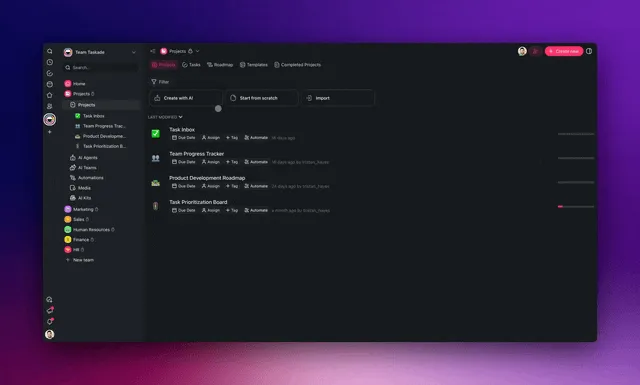
| Ship an internal CRM your sales team can actually use | Taskade Genesis | Multiple project views, role-based access, real-time multiplayer |
| Embed an AI assistant inside a customer-facing web app | Taskade Agents v2 | Public embedding; Gems cannot be embedded |
| Ask a one-off question grounded in Google Search | Gemini chat | Native search grounding |
Pricing and total cost of ownership
| Plan | Taskade | Google AI |
|---|---|---|
| Free | Free Forever — free AI credits that you earn as you go; full app builder access (3 Taskade Genesis apps) | Free — Flash-Lite model, Gems, Deep Research, 15 GB |
| Entry paid | Pro $10 / month billed annually — unlimited apps, 10 seats | Google AI Plus $4.99 / month — 2x Free limits, video generation, 400 GB |
| Mid | Business $25 / month billed annually — unlimited seats, higher AI capacity | Google AI Pro $19.99 / month — 4x Free limits, Flow credits, 5 TB |
| High end | Max $100 / month billed annually — maximum AI generation capacity | Google AI Ultra $99.99 or $199.99 / month — 5x or 20x Pro limits, 20 TB+, YouTube Premium |
| Enterprise | $250 / month billed annually with custom SLA | Gemini Enterprise from $21 / seat / month (Business edition), $30 / seat for Standard and Plus |
Per-seat pricing notes: Google AI Pro and Ultra are individual subscriptions. Taskade's Pro plan covers up to 10 seats; Business and Max are unlimited seats. For a team of 5 building deployed apps, Taskade Pro at $10/month total ≈ a tenth of the cost of 5 Google AI Pro seats at $19.99/month each.
Where Gemini has the edge
Honest comparison content beats hatchet jobs. Three places where Gemini is genuinely the better tool:
- Deep Research and NotebookLM. If your job is producing source-grounded research reports or audio summaries from large document corpora, Gemini wins. Taskade's web-search agent is good — Gemini's is best-in-class.
- Native video generation. Gemini generates video from the $4.99 Google AI Plus tier up, and Google Flow adds a creative studio for cinematic scenes. Taskade does not generate video, so if original clips are the work, Gemini is the right subscription.
- Living inside Gmail, Docs, and Sheets. The first-party sidebar is genuinely convenient if your work happens in Google Workspace all day. Taskade integrates with Gmail, Calendar, and Sheets — but Google's native Gemini access is closer to the data.
Taskade's edge is everywhere else: building deployed apps, running AI agents as teammates with tools and memory, automating workflows across 100+ apps, and giving non-engineers a way to ship.
What teams say
Recurring themes from r/Bard, r/GeminiAI, and Hacker News:
- "Gems are just prompts." Top complaint about the current Gems product — no tool use, no persistent memory across sessions, no autonomous action. Users want what Taskade Agents v2 already are.
- "Deep Research is genuinely impressive." Even critical reviewers concede Deep Research is a category leader.
- "Refusals and over-cautious safety" are a recurring frustration on long, complex tasks.
- "Workspace integration is shallower than the demos suggest." Context across Docs and Sheets is sometimes inconsistent.
Taskade Genesis users come at the problem from a different angle. They are not trying to win a chat-with-the-best-model bake-off. They are trying to ship a portal, a dashboard, a CRM, an internal tool, or a customer-facing app that uses AI as a feature, not as the whole product. Browse the Community Gallery to see what people have shipped.
When to choose each
Choose Google Gemini if:
- Your job is research, drafting, and personal Workspace assistance inside Gmail, Docs, Sheets, and Slides.
- You need best-in-class Deep Research with audio overviews from NotebookLM.
- You want native video generation inside your AI assistant (Google AI Plus and up).
- You are a developer using Gemini Code Assist or Gemini CLI for individual code suggestions.
- You don't need the AI to ship a deployed app, host agents for customers, or run workflow automations.
Choose Taskade Genesis if:
- You want to ship a working app, not draft content for someone else to ship.
- You need AI Agents that persist, have tools, and can be embedded for customers.
- You need workflow automations across Slack, Gmail, Stripe, Salesforce, Notion, and 100+ other integrations.
- Your team includes non-engineers who need to build alongside engineers.
- You want one flat subscription that includes hosting, agents, automations, and team collaboration.
Use both if: Many teams keep Gemini for personal Deep Research and Workspace drafting, and use Taskade Genesis to ship the apps, agents, and automations that the team and customers actually use.
Frequently asked questions
How does Gemini compare to ChatGPT and Claude?
Gemini is one of the three frontier consumer assistants, alongside ChatGPT and Claude. Each has strengths: Gemini for long-context research, native video, and Workspace integration; ChatGPT for plug-ins/GPTs and broad ecosystem; Claude for writing quality and Constitutional AI safety. Taskade Genesis is in a different category — it is the workspace surface that ships deployed apps using all three model families under the hood.
Are Gemini Gems the same as Taskade Agents?
No. Gems are static system prompts. Agents v2 are first-class digital teammates with persistent memory, built-in tools, custom tools, a hosted MCP server that Claude Desktop and Cursor connect into, and public embedding inside Taskade Genesis Apps.
What does Google AI Pro and Google AI Ultra cost?
Google AI Pro is $19.99/month, and Google AI Ultra starts at $99.99/month (5x Pro limits) or $199.99/month (20x), as of October 2026. Google AI Plus is $4.99/month. Verify on gemini.google/subscriptions/ before purchasing — Google has adjusted these.
Does Taskade work with Google products?
Yes. Taskade integrates with Gmail (triggers + actions), Google Calendar (including listEvents and getFreeBusy), Google Sheets, and Google Drive. The Taskade Genesis App itself runs at a shareable URL with email-and-password app sign-in via GenesisAuth.
Which AI models does Taskade Genesis use?
Taskade Genesis runs frontier models from top AI labs, with TSK-Auto as the default. Paid plans pick OpenAI GPT, xAI Grok and open-weight models built in, with no key, and on Pro and up you can bring your own OpenAI, Anthropic or Google Vertex AI key (BYOK).
Build without permission
Gemini is the AI that helps a person draft and research. Taskade Genesis is the workspace where the apps come out finished — built by anyone, hosted, and ready for users.
- Build with Taskade Genesis → — One prompt, one deployed app
- Browse the Community Gallery — Clone apps shipped by other Taskade Genesis builders
- Read the Workspace DNA explainer — How Memory, Intelligence, and Execution work together
Explore Taskade Genesis
- AI App Builder — Build complete apps from one prompt
- Vibe Coding — Natural-language app creation
- AI Agent Platform — Digital teammates that work 24/7
- AI Website Builder — Sites in seconds
- Workflow Automation — AI-powered business automation
Learn the Taskade Genesis architecture
Your living workspace includes:
- First-app guide — 5-minute tutorial
- Custom AI Agents — The Intelligence pillar
- Projects & Databases — The Memory pillar
- Automations & Workflows — The Execution pillar
Build without code
- AI App Generator — Full apps from prompts
- AI Dashboard Generator — Business dashboards
- AI Website Generator — Sites in seconds
- AI Form Generator — Smart intake forms
- Browse Community Apps — Clone and customize
Related reading
- The Build Without Permission article — Our manifesto
- What is Google Gemini? History, DeepMind, Bard, AI — Deep history of Google's AI
- What is Anthropic? History, Claude, Opus, Sonnet, Haiku — Deep history of Claude
- What is OpenAI? History and how ChatGPT changed the world — Deep history of OpenAI
- How Workspace DNA Works — The architecture
- Origin of Living Software — The future of apps
- Taskade Genesis vs ChatGPT Custom GPTs — Custom assistants compared
- Stop Worshipping Prompts, Start Building Workflows — Build workflows instead