






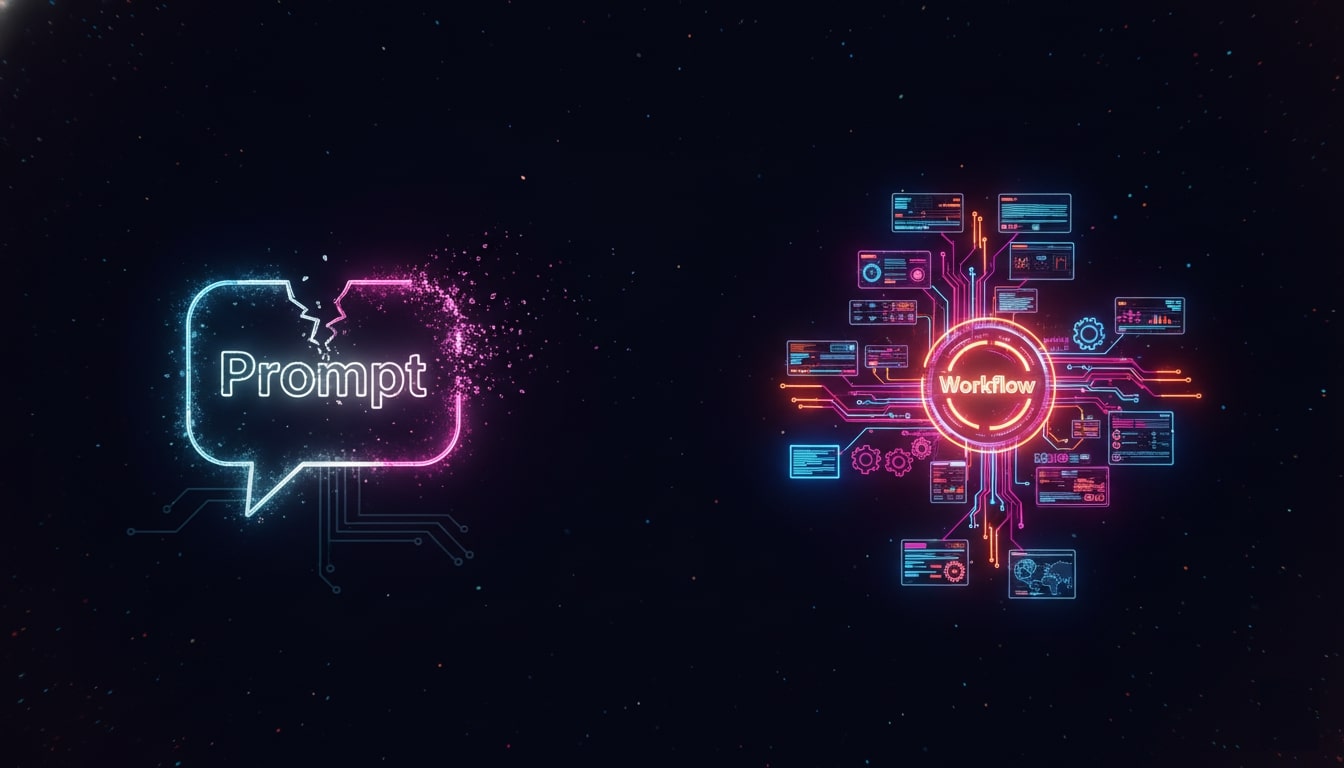
TL;DR: Prompts are static. Workflows are alive. Clever prompts screenshot well but collapse the moment you try to run a business. The 2026 winners build persistent workflows — agents + automations + memory — not prompt libraries. Taskade Genesis ships all three together. Companion reads: Workflow-First Playbook, BYOA, AI Org Chart, The 2026 Productivity Playbook.
▲ ■ ● Memory. Intelligence. Execution. Looped.
The Prompt Mirage
AI’s hype machine always finds its shiny distraction. Right now it’s prompt engineering.
Everywhere you look:
- “Top 500 prompts to grow your startup.”
- “Secret prompt formulas.”
- “Ultimate prompt bundles—$499.”
But here’s the uncomfortable truth: prompts are static. Workflows are alive.
Prompts impress in demos. They screenshot well. But they collapse the moment you try to run a business.
Real work doesn’t die in the idea. It dies in the execution.
Why Prompts Collapse
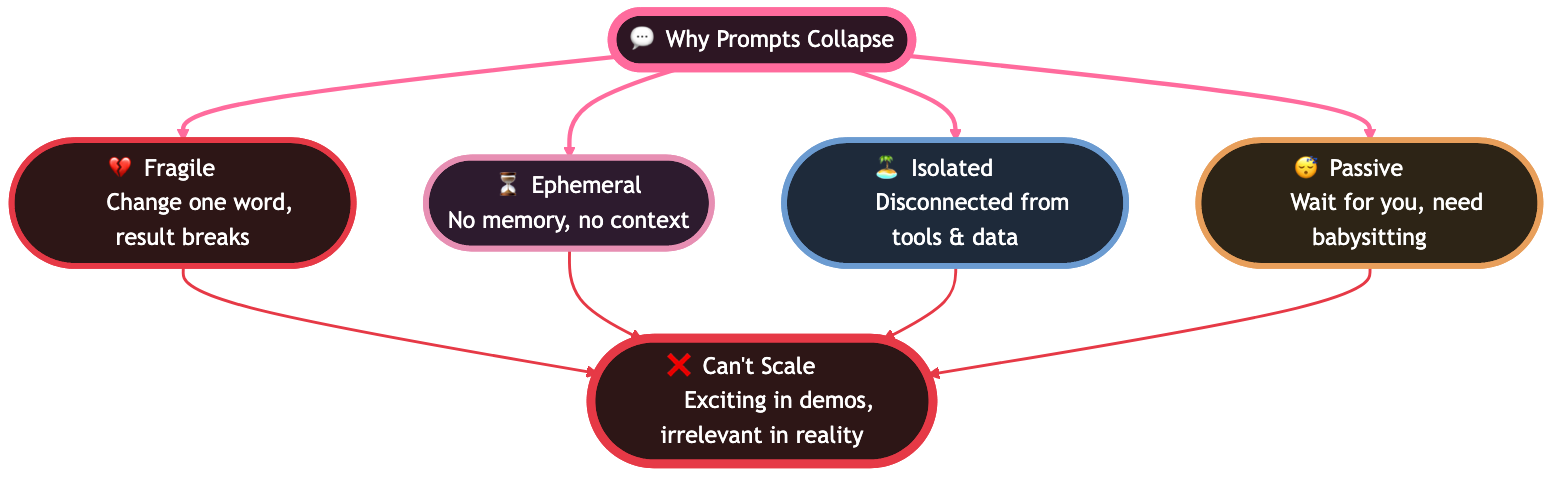
Prompts can’t carry your company:
- Fragile → Change one word, and the whole result breaks.
- Ephemeral → Prompts don’t remember your history, your goals, or yesterday’s context.
- Isolated → They live in chat windows, disconnected from your tools and data.
- Passive → They wait for you. They don’t execute unless you babysit them.
That’s why every “prompt hack” feels exciting at first—and irrelevant the moment you need to scale.
Prompt Loop vs Workflow Loop
The structural difference between prompt engineering and workflow design is not incremental — it is architectural. A prompt loop requires a human in every cycle. A workflow loop runs autonomously, compounds results, and scales without linear effort:
Prompt Engineering vs Workflow Design
| Dimension | Prompt Engineering | Workflow Design |
|---|---|---|
| Human involvement | Every interaction | Setup once, monitor |
| Scalability | Linear (1 prompt = 1 output) | Exponential (1 workflow = N outputs) |
| Compounding | None (each prompt starts fresh) | Yes (outputs feed inputs) |
| Team leverage | 1 person per prompt | 1 person per N agents |
| Persistence | Session-scoped | Workspace-scoped (memory) |
| Best tool | ChatGPT, Claude chat | Taskade (agents + automations) |
The bottom line: prompt engineering optimizes a single interaction. Workflow design optimizes a system that runs continuously. With Taskade Genesis, you define the workflow once — objectives, agent roles, evaluation metrics — and the Workspace DNA (Memory + Intelligence + Execution) keeps it running, learning, and compounding. Start building workflows →
From Prompts to Workflows
The next era of AI isn’t about better prompts. It’s about agentic workflows: living systems that persist, adapt, and execute across time, tools, and teams.
- They remember: persistent context, not one-off chats.
- They adapt: agents that evolve with your data.
- They scale: add workflows, not headcount.
- They execute: not advice, but outcomes.
In The Nvidia Way, Tae Kim documents how Jensen Huang refuses to run on slide decks: "We don't do a periodic planning system... There's no five-year plan. We just plan continuously." For Huang, strategy is not a document the CEO recites — it is the work the organization actually does. The same truth governs AI: a prompt is a plan you recite, a workflow is the plan running. Strategy lives in execution, not in clever words.
That mirror — strategy as continuous action rather than a static artifact — is the same shift this post is about, and it scales beyond one company. You can see it in how Jensen Huang runs NVIDIA and in the broader execution-layer thesis for building with AI: the advantage belongs to teams whose intent is wired into systems that keep moving, not to whoever wrote the best instructions.
The same input — "follow up with this lead" — produces three very different shapes depending on whether you hand it to a one-shot prompt, a multi-step workflow, or an agent that decides for itself. A prompt stops at a draft. A workflow runs the fixed steps. An agent observes results and loops until the job is done:
For a deeper breakdown of how these autonomous loops are assembled, see agentic workflows explained and the five-layer AI agent stack that production systems rely on.
The distinction maps to a deeper insight from neural science. In 1982, physicist John Hopfield proved that memories in neural networks are not stored at fixed addresses like computer RAM — they are stable states of the entire system. Feed the network a fragment and it auto-completes to the full memory. Computer memory has a place; neural network memory has a time — a dynamic trajectory toward an attractor. This is why prompts fail: they are addresses (static, one-shot). Workflows are attractors (dynamic, self-correcting). A prompt is a point in time. A workflow is a pattern the system converges on, getting closer with every execution cycle. Hopfield won the 2024 Nobel Prize in Physics for this insight.
Klarna CEO Sebastian Siemiatkowski demonstrated this shift when he built "company in a box" over a weekend — open-source accounting + CRM + a Claude agent on top. Instead of prompting for individual answers, he created a persistent workflow where you say "bookkeep this invoice" or "check my P&L" and the system executes against real data. No prompt library. No chat history. Just a living system that works while you move on. Klarna has since dropped Salesforce and 1,200 other SaaS services, shrinking from 7,000 to below 3,000 employees — proof that workflows, not prompts, scale.
If you still need a solid starting point, browse our curated prompt library — but treat prompts as seeds, not endpoints.
And with Taskade Genesis, workflows don’t just run in the background. They materialize as websites, dashboards, and apps that live and breathe with your business. See how builders are putting this into practice in real-world Genesis reviews.
Genesis: The Execution Layer
Genesis is the soil layer where human creativity and agent intelligence converge:
- Knowledge DNA (Projects) → the compost of everything your team knows.
- Intelligence DNA (Agents) → specialized minds seeded in that knowledge.
- Action DNA (Automations) → the roots and vines that connect workflows to the real world.
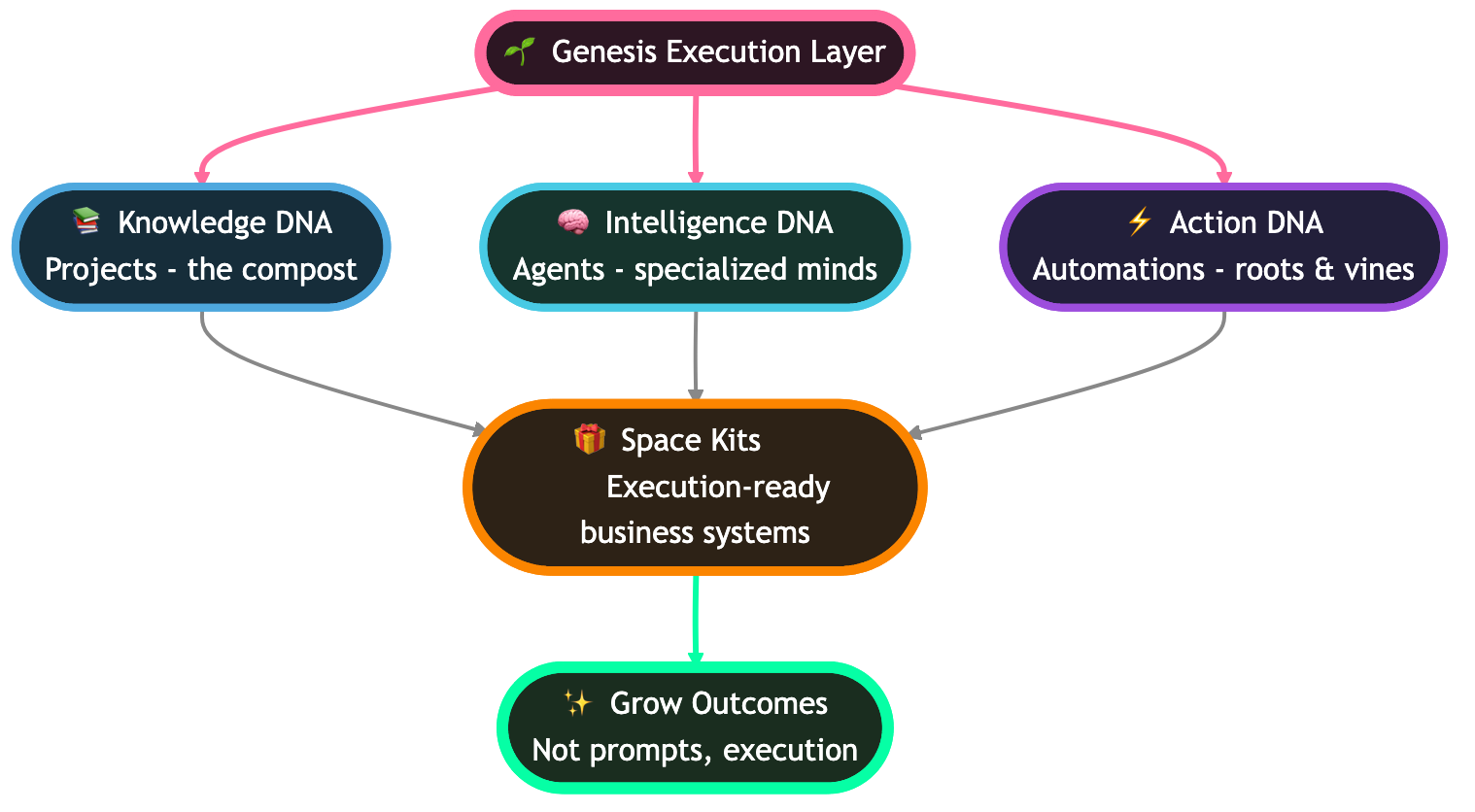

Together, they grow into Space Kits: pre-built, execution-ready business systems for fundraising, sales, marketing, HR, and ops. You don’t hack prompts. You plant Kits. You grow outcomes.
Websites That Work While You Sleep
Traditional websites are brochures.
Genesis websites are execution systems: alive, adaptive, and directly tied into your workflows.
Here are four ways startups are already using Genesis websites to replace busywork:
1. SaaS Product Site → Customers on Autopilot
Before: Founders hack together a static landing page and manually onboard customers.
With Genesis:
- Auto-generates a SaaS website with product features, trial signup, and pricing calculator.
- Deploys an onboarding workflow that emails new users, sets up their account, and collects feedback.
- AI agents continuously update FAQ, changelogs, and support docs as you ship.
Impact: Customers onboard themselves while you focus on building.
2. Consultancy Portal → From Lead to Contract
Before: Consultants chase leads in email threads and manually schedule calls.
With Genesis:
- Generates a consultancy site that qualifies leads with an AI intake form.
- Automatically schedules calls through calendar integration.
- Drafts contracts and proposals from templates tied to your project database.
- Automates invoice generation and payment reminders.
Impact: Clients move from inquiry to signed contract without manual intervention.
3. Investor Portal → Fundraising That Updates Itself
Before: Founders spend hours maintaining pitch decks, updating spreadsheets, and emailing investors.
With Genesis:
- Builds a secure investor portal that auto-updates with live KPIs from your workspace.
- Syncs new versions of your pitch deck automatically.
- Deploys workflows to generate and distribute investor updates every month.
- Agents research and refresh target investor lists from Crunchbase/LinkedIn.
Impact: Professional fundraising infrastructure on autopilot, with less founder bandwidth.
4. Agency Website → Campaigns That Run Themselves
Before: Agencies manually track projects, client feedback, and campaign performance.
With Genesis:
- Generates a portfolio site showcasing live case studies pulled from workspace projects.
- Automates client onboarding with contracts, kick-off forms, and Slack integrations.
- Connects dashboards to show clients real-time campaign metrics.
- Agents monitor performance, optimize campaigns, and push results into client reports.
Impact: Happier clients, smoother operations, and more scalable growth.
The Autoresearch Pattern: Workflows That Improve While You Sleep
The difference between a prompt and a workflow is that a workflow runs without you. But the next evolution is a workflow that improves without you.
Andrej Karpathy's autoresearch demonstrated this pattern in March 2026: give an AI agent one file to optimize, one metric to chase, and a time-boxed loop. The agent runs experiments autonomously — approximately 100 overnight — keeping what works and discarding what does not. On an ML training benchmark, the agent achieved a 56% improvement while the researcher slept.
But autoresearch is not limited to machine learning. The pattern applies to any workflow with a measurable outcome:
- A marketing automation that tests 100 email subject lines overnight, measuring open rates, keeping winners
- A content workflow that generates headline variants, tracks click-through rates, and converges on the highest-performing copy
- A customer support system that adjusts response templates based on resolution time and satisfaction scores
- A sales pipeline that experiments with outreach timing and follow-up sequences, scoring by conversion rate
This is where Workspace DNA reaches its full potential. Memory stores the results of every experiment. Intelligence (your AI agents) designs and runs the next iteration. Execution (your automations) triggers the loop on schedule. The workspace compounds — each cycle makes the system smarter because every experiment result becomes context for the next hypothesis.
The old model: a marketer runs 30 A/B tests per year. The autoresearch model: the workspace runs 36,000 — roughly 100 per day — with no human in the loop until review time.
Prompts are instructions. Workflows are systems. Autoresearch loops are systems that evolve. And with Taskade Genesis, you can build them from a single prompt — no training scripts, no GPUs, no terminal required.
Agent Memory: Why Workflows Get Smarter Over Time
A workflow without memory repeats the same process every time. A workflow with memory compounds.
The human brain solves this with a two-stage memory system. During waking hours, the hippocampus records experiences and tags important moments with bursts of neural activity called sharp wave ripples. During sleep, those tagged memories get replayed at high speed and consolidated into long-term storage. Not everything gets remembered — only the patterns that won the competition for neural resources.
AI agent memory works the same way. Google's 2025 white paper on agent memory identifies three types:
- Episodic — what happened in past sessions (your project history in Taskade)
- Semantic — facts and preferences that persist (your agent knowledge bases)
- Procedural — learned workflows and routines (your automation templates)
Those three memory types feed a compounding loop. Each execution writes new context back into memory, which sharpens the next decision — the cycle that lets a workflow get smarter instead of just repeating:
The critical design choice: what is worth remembering? A memory system that stores everything becomes noisy. A system that stores nothing starts fresh every session. Effective agent memory requires the same kind of selective consolidation the brain performs — keeping the patterns that matter, discarding the noise.
In Taskade's Workspace DNA, this is structural rather than conversational. Projects store structured context. Agent knowledge bases persist curated facts. Automations encode workflows. Every run adds data. Every data point refines the next decision. The workspace does not just execute — it learns.
The goal-setting discipline matters too. The most effective agent configurations follow a three-step framework borrowed from behavioral science: define the true target (not "grow revenue" but "increase email open rate from 22% to 30% by April 15"), map obstacles to actions (if the agent encounters a bounce rate above 5%, switch to the backup template), and anchor the workflow to existing triggers (run the optimization loop every time a new campaign launches). Vague goals produce vague agent behavior. Precise targets with specific deadlines, obstacle-response pairs, and trigger anchors produce agents that actually deliver results.
This is why prompts fail at scale. A prompt has no memory. A workflow has no learning. An agentic workspace has both — and it compounds over time. Build yours →
Demo vs Execution
Prompt World:
You ask: “Help me plan our Series A.”
It replies: “Build a deck, track investors, send follow-ups…”
That’s advice. Static text.
Genesis World:
- Spins up a fundraising site with live metrics and pitch deck access.
- Builds a CRM dashboard seeded with Crunchbase investors.
- Deploys automated outreach with personalized sequences.
- Generates monthly investor updates automatically.
That's not a prompt. That's execution.
The Proof: How AI Systems Actually Evolved
This isn't speculation. We studied 120+ leaked system prompts from every major AI company — OpenAI, Anthropic, Google, xAI, and others — and tracked how their architectures changed over time. The trajectory proves the point.
Stage 1: The Single Prompt (2022)
OpenAI's original ChatGPT system prompt was roughly 74 words. One paragraph establishing its identity, knowledge cutoff, and basic rules. That was the entire operating system. And it was impressive — for a demo.
You are ChatGPT, a large language model trained by OpenAI.
Knowledge cutoff: 2021-09. Current date: 2022-12-01.
Stage 2: The System Prompt (2023-2024)
Companies realized single prompts couldn't handle real-world complexity. System prompts ballooned to hundreds of lines — adding persona definitions, behavioral rules, safety constraints, and formatting instructions. Claude's prompt grew to include emotional intelligence guidelines, nuanced refusal patterns, and response formatting rules.
This was better. But it was still static text — instructions that couldn't act on the world.
Stage 3: The Agent Loop (2024-2025)
Autonomous AI agents like Manus, Cursor, Windsurf, and Gemini CLI broke through the text barrier. Their system prompts now include tool schemas, execution loops, and autonomous chaining logic. The AI doesn't just answer questions — it plans, acts, observes results, and iterates. Autonomously.
LOOP:
  1. Analyze events → 2. Select tools → 3. Execute
  → 4. Observe results → 5. Iterate or complete
Stage 4: The Living System (2025-2026 → Genesis)
This is where Genesis lives. Not a prompt. Not a system prompt. Not even an agent loop. A complete execution layer — websites, dashboards, databases, automations, and agents that work together as one living system, built from a single description.
| Era | Input | Output | Persistence |
|---|---|---|---|
| Single Prompt | "Help me plan a launch" | Text advice | None — dies in chat |
| System Prompt | Persona + rules + constraints | Better text advice | Session only |
| Agent Loop | Tools + execution logic | Actions (browse, code, file edits) | Task duration |
| Genesis | "Build my launch system" | Website + CRM + automations + agents | Permanent — lives in your workspace |
| Self-Improving System (2026+) | Agent runs experiments autonomously, keeps improvements, discards failures. Human sets the metric, reviews results. | Autoresearch loop running 100 experiments overnight on any measurable workflow | Permanent + compounding — each cycle improves the next |
The trajectory is clear. Every year, AI systems move further from prompts and closer to execution. Genesis is where that trajectory arrives.
The Future of Work Is Alive
By 2030, nobody will remember “prompt engineering.”
Just like nobody today hand-codes static HTML pages for their business.
Instead, we’ll remember the gardens of agents—the workflows, dashboards, and websites that executed work continuously, like ecosystems. The winners won’t be prompt whisperers.
They’ll be workflow architects.
The investment confirms this trajectory. Big tech’s combined AI capital expenditure approached half a trillion dollars in 2025, with over $2 trillion in AI-related assets planned across the next four years. This is not speculative — the money is committed, the infrastructure is being built, and the organizations that learn to aim these systems toward clear intent will capture disproportionate value.
Start building → taskade.com/genesis
Karpathy's Auto Research: The Ultimate "Workflows Beat Prompts" Example
In March 2026, Andrej Karpathy built something that proves the thesis of this entire article. He called it "auto research" — an autonomous ML research system described entirely in a markdown file called program.md. That file defines everything: research objectives, evaluation metrics, agent roles, iteration loops, and stopping criteria. No prompting. No human in the loop. Just a document that tells agents what to do, and agents that execute it.
The key insight is what Karpathy said about removing yourself as the bottleneck: "to get the most out of the tools you have to remove yourself as the bottleneck. You can't be there to prompt the next thing." And further: "you have to arrange things such that they're completely autonomous." This is not a prompt engineer talking. This is a workflow architect.
The results speak for themselves. Karpathy described the leverage this creates: "the name of the game now is to increase your leverage. I put in just very few tokens just once in a while and a huge amount of stuff happens on my behalf." He was explicit about why staying in the loop is counterproductive: "I don't want to be the researcher in the loop looking at results...I'm holding the system back."
This is exactly the pattern this article advocates. Define the system once — objectives, roles, metrics, iteration strategy — and let agents execute forever. A program.md file is a workflow specification. It is organizational design expressed as a document. The parallel to Taskade is direct: workspaces store context (Memory), AI agents design and run iterations (Intelligence), and automations trigger the loop on schedule (Execution). Together they form a program.md for any team — not just ML researchers, but marketers, operators, and founders. The workspace compounds with every cycle, exactly as Karpathy's auto research does.
Stop writing prompts. Start writing programs. Build autonomous workflows with Taskade and explore what others have built in the Community Gallery.
Read more:
- What Is Agentic Engineering? Complete History — From Turing to Karpathy's autoresearch
- How to Build AI Agents Without Code — The complete 2026 guide with templates
- Vibe Coding for Non-Developers — Build AI apps without writing a line of code
- The Secret DNA of AI Systems: What 120+ Leaked Prompts Taught Us — The research behind this article
- Types of Prompt Engineering — 12 techniques from zero-shot to self-consistency
- What Is Prompt Chaining? — From manual chains to autonomous agent loops
- Agentic Workflows Explained — How autonomous loops are designed and run
- The AI Agent Stack — The five layers behind production agents
- AI Reasoning Models Explained — Chain-of-thought and test-time compute
- AI Prompting Guide 2026 — Write effective prompts for GPT-4, Claude & LLMs
- How to Train AI Agents on Your Own Living Knowledge | Chatbots Are Demos. Agents Are Execution.
Explore Taskade AI:
- AI App Builder — Build complete apps from one prompt
- AI Dashboard Builder — Generate dashboards instantly
- AI Workflow Automation — Automate any business process
Build with Genesis:
- Browse All Generator Templates — Apps, dashboards, websites, and more
- Browse Agent Templates — AI agents for every use case
- Explore Community Apps — Clone and customize

Frequently Asked Questions
What is the difference between prompt engineering and workflow automation?
Prompt engineering optimizes a single AI interaction — you craft input to get better output in one conversation. Workflow automation chains multiple steps into a persistent system that executes repeatedly without manual prompting. A prompt dies when the chat window closes. A workflow runs while you sleep. The gap between the two is the gap between a demo and a business.
Why are prompts insufficient for running a business with AI?
Prompts are stateless, single-use, and manual. Every business process that matters — lead follow-up, content publishing, customer onboarding, inventory management — requires persistence (remembering state), automation (triggering without human input), and integration (connecting to other systems). Prompts can generate a draft; workflows can publish it, distribute it, and track its performance automatically.
What is vibe coding and how does it relate to workflow building?
Vibe coding means describing what you want in natural language and letting AI build it. When applied to workflows, you describe a business process ('when a new lead fills out the form, score them, send a personalized email, and create a follow-up task') and the system generates a complete automation. It's prompt engineering evolved — instead of optimizing one response, you're building a system that executes continuously.
How do AI workflows differ from traditional automation tools like Zapier?
Traditional automation tools connect triggers to actions with rigid logic (if X then Y). AI workflows add intelligence: they can classify inputs, make decisions based on context, generate custom content for each trigger, and adapt their behavior based on outcomes. The automation is not just mechanical — it reasons about what to do, not just when to do it.
What is an autoresearch loop and how does it improve workflows?
An autoresearch loop is a pattern where an AI agent continuously optimizes a measurable outcome by running experiments autonomously. The agent modifies one variable, measures results against a clear metric, keeps improvements, and discards regressions — approximately 100 experiments overnight. Applied to workflows, this means marketing automations that test subject lines while you sleep, support systems that optimize response templates by resolution time, and sales pipelines that refine outreach timing by conversion rate. Taskade Genesis enables this through Workspace DNA where Memory stores results, Intelligence runs iterations, and Execution triggers the loop.
How does agent memory make workflows smarter over time?
Agent memory enables workflows to compound by persisting context across sessions. Three memory types drive this: episodic memory (project history and past interactions), semantic memory (persistent knowledge bases and preferences), and procedural memory (automation templates and learned routines). In Taskade, projects store structured context, agent knowledge bases persist curated facts, and automations encode workflows. Each execution cycle adds data that refines the next decision, creating systems that learn rather than just repeat.
How do Hopfield networks explain why workflows beat prompts?
Physicist John Hopfield proved in 1982 (2024 Nobel Prize in Physics) that memories in neural networks are stable states of the entire system, not data at fixed addresses. Feed a corrupted pattern and the network auto-completes to the stored memory. Prompts are like computer memory addresses: static, one-shot, requiring exact input. Workflows are like Hopfield attractors: dynamic, self-correcting, converging on the right answer from partial input. This is why a prompt dies when the chat closes but a workflow gets stronger with every execution cycle.
What is Klarna CEO's company in a box and what does it prove about workflows?
Klarna CEO Sebastian Siemiatkowski built a prototype he calls company in a box over a weekend: open-source accounting software, a CRM, and a Claude AI agent on top. Instead of prompting for individual answers, users say bookkeep this invoice or check my P&L and the system executes against real data. Klarna has since dropped Salesforce and 1,200 other SaaS services, shrinking from 7,000 to below 3,000 employees. This demonstrates that persistent agentic workflows — not prompt libraries — are how AI scales in production.
What is better than prompt engineering for AI productivity?
Workflow design is more effective than prompt engineering for sustained AI productivity. Instead of crafting individual prompts, you define complete workflows with objectives, roles, and iteration loops. Andrej Karpathy demonstrated this with auto research, where a program.md file describes an entire research organization that agents execute autonomously without human prompting.
What is program.md in AI workflow design?
Program.md is a concept introduced by Andrej Karpathy where an entire research organization is described in a markdown document. It defines agent roles, research objectives, evaluation metrics, and iteration strategies. Agents execute the program autonomously, iterating and improving without human intervention. This approach treats AI workflow design as organizational design rather than prompt crafting.