







Choosing between Taskade Genesis and ChatGPT Custom GPTs comes down to what you need: a conversational chatbot or a workspace-connected application with agents, automations, and integrations.
Both tools let you build AI-powered assistants from natural language prompts. But they target different use cases, ship different capabilities, and charge different prices.
This comparison covers every angle: features, pricing, integrations, real use cases, and the architectural trade-offs that matter for teams in 2026.
TL;DR: Taskade Genesis builds full workspace apps with multi-agent collaboration, persistent memory, 100+ integrations, and custom domains. ChatGPT Custom GPTs create single-agent conversational assistants inside the ChatGPT ecosystem. Different tools for genuinely different jobs.
Ready to build your first AI workspace app? Try Taskade Genesis free or explore AI agent builders for a broader comparison.
The Short Answer
Taskade Genesis is the better choice for teams that need workspace-connected AI applications with multi-agent support, 100+ built-in integrations, multiple project views, and reliable automation workflows. It starts free and scales to $10/month for Pro teams.
ChatGPT Custom GPTs are the better choice for individuals who want simple conversational assistants with access to OpenAI frontier models inside the ChatGPT interface. They require ChatGPT Plus at $20/month.
The fundamental difference: Custom GPTs are chatbots. Genesis apps are living workspace software with agents, automations, databases, and publishing capabilities built in.
Quick Comparison Table
| Feature | Taskade Genesis | ChatGPT Custom GPTs |
|---|---|---|
| Launch date | 2025 | November 2023 |
| What you build | Full workspace apps | Conversational assistants |
| AI models | 15+ from OpenAI, Anthropic, Google | OpenAI models only |
| Multi-agent support | Yes (shared memory, handoffs) | No (single agent per GPT) |
| Built-in tools | 33 plus Custom Agent Tools | Code Interpreter, DALL-E, Browsing |
| Integrations | 100+ native (Slack, Gmail, GitHub, Stripe) | Actions API (manual REST setup) |
| Project views | 8 (List, Board, Mind Map, Gantt, etc.) | Chat-only interface |
| Memory | Workspace-persistent across sessions | Session-scoped, limited persistence |
| Custom domains | Yes | No |
| Password protection | Yes | No |
| Publishing | Community Gallery (130K+ apps) | GPT Store (3M+ GPTs) |
| Automations | Reliable automation workflows with triggers | No native automation |
| RBAC | Role-based access (Owner to Viewer) | Share link only |
| Offline support | Yes (desktop and mobile) | No |
| Free tier | Yes (11,000 credits) | No (requires Plus $20/mo) |
| Pro pricing | $10/month (annual) | $20/month (Plus required) |
What Are ChatGPT Custom GPTs?
Custom GPTs are OpenAI's framework for creating specialized conversational AI assistants within the ChatGPT interface. Launched in November 2023, they let anyone configure a GPT with custom instructions, uploaded knowledge files, and optional external tool connections.
The Origin Story (November 2023)
OpenAI announced Custom GPTs at DevDay 2023. The pitch was simple: anyone can create a specialized ChatGPT for a specific purpose without writing code. You provide instructions, upload reference documents, enable built-in tools (Code Interpreter, DALL-E, web browsing), and share a link.
The announcement positioned Custom GPTs as OpenAI's answer to the "app store" concept for AI. Instead of building traditional apps, creators would build conversational agents within the ChatGPT ecosystem.
The GPT Store (January 2024, 3M+ GPTs)
OpenAI launched the GPT Store in January 2024, creating a marketplace for Custom GPTs. By 2026, the store hosts over 3 million GPTs across categories including productivity, research, creative writing, education, and programming.
The store introduced search, category browsing, and a review system. However, discoverability remains a challenge. Most GPTs receive minimal usage, and the top 1% account for the vast majority of traffic. There is no equivalent of App Store Optimization (ASO) for GPTs, which limits creator reach.
The Creator Economy
OpenAI introduced a revenue-sharing program for top GPT Store creators in 2024. Payments are based on user engagement, though OpenAI has not published exact CPM rates. The creator program is invitation-only and limited to high-usage GPTs.
For most creators, Custom GPTs serve as lead generation tools, portfolio pieces, or personal productivity helpers rather than direct revenue sources. The economics favor creators who already have distribution (large social followings, existing platforms) over those building audience from scratch.
The Actions API
Custom GPTs connect to external services through the Actions API, which requires developers to define OpenAPI schemas for each endpoint. This means every integration is manual: you write the API specification, configure authentication (OAuth, API keys), and handle error states.
For technical users, this provides flexibility. For non-technical users, it creates a significant barrier. Connecting a Custom GPT to Slack, Google Sheets, or a CRM requires API documentation knowledge and often custom middleware.
+----------------------------------------------------------+
|              CUSTOM GPT ARCHITECTURE                     |
|                                                          |
|   +-------------+    +------------------+                |
|   | Instructions |    | Knowledge Files  |               |
|   | (System      |    | (Up to 20 files, |               |
|   |  Prompt)     |    |  512 MB each)    |               |
|   +------+------+    +--------+---------+                |
|          |                    |                           |
|          v                    v                           |
|   +------+--------------------+---------+                |
|   |        GPT CONFIGURATION            |                |
|   |  - Name, description, avatar        |                |
|   |  - Conversation starters            |                |
|   |  - Tool toggles (3 built-in)        |                |
|   +------+--------------------+---------+                |
|          |                    |                           |
|          v                    v                           |
|   +------+------+    +-------+----------+                |
|   | Built-in    |    | Actions API      |                |
|   | Tools (3):  |    | (Manual REST     |                |
|   | - Code Int. |    |  + OpenAPI spec   |                |
|   | - DALL-E    |    |  per endpoint)   |                |
|   | - Browsing  |    +------------------+                |
|   +-------------+                                        |
+----------------------------------------------------------+
What Is Taskade Genesis?
Taskade Genesis is a prompt-to-app platform that builds fully deployed workspace applications with embedded AI agents, automations, and 100+ integrations. Launched in 2025, Genesis has powered 150,000+ apps and serves as the foundation of Taskade's Workspace DNA architecture.
Launched 2025, 150K+ Apps Built
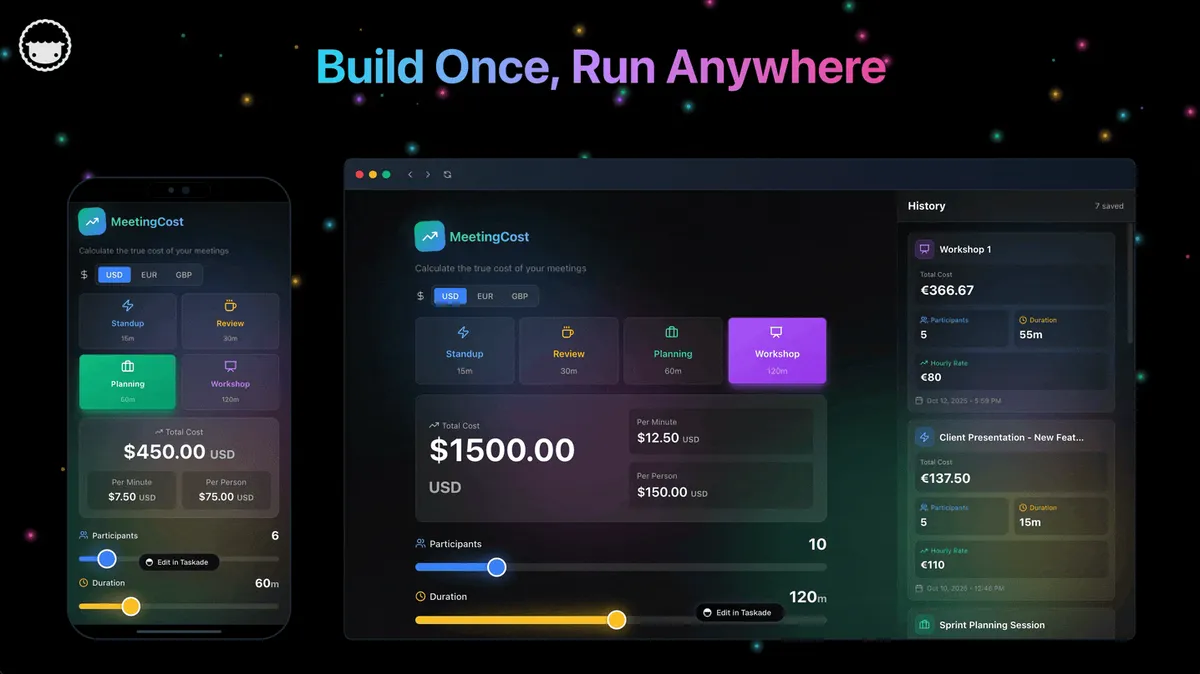
Genesis went live in 2025 as an evolution of Taskade's AI workspace platform. Instead of building features one by one, users describe what they want in natural language and Genesis builds the complete application: project structure, agent configuration, automation triggers, and integration connections.
As of April 2026, Genesis has powered over 150,000 apps. The Community Gallery hosts 130,000+ public apps that any user can fork, clone, and customize. The gallery sees 630+ clones per week, creating a flywheel of reusable app templates.
Workspace DNA: Memory + Intelligence + Execution
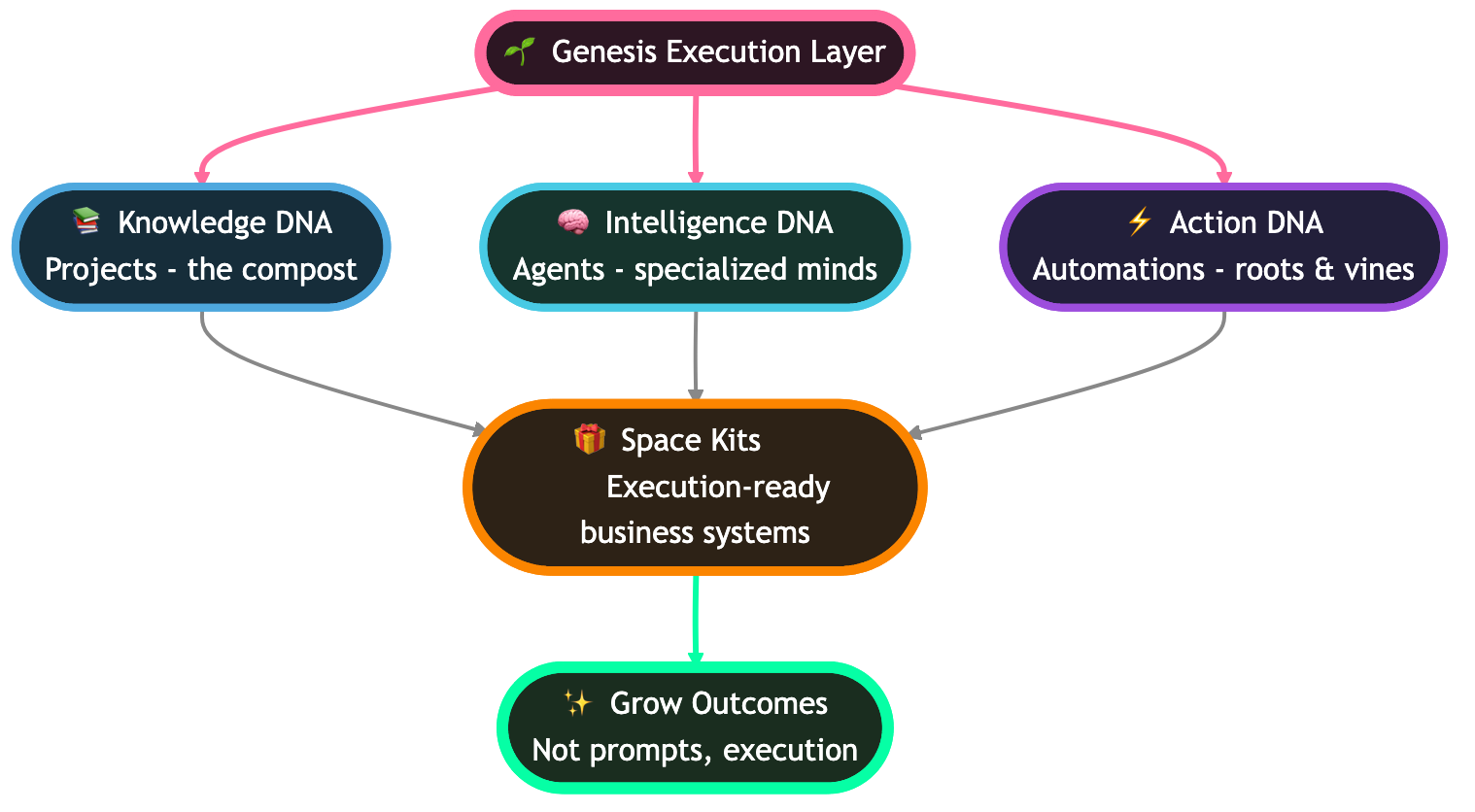
Every Genesis app runs on Taskade's Workspace DNA architecture, a self-reinforcing loop of three layers:
- Memory (Projects): All data lives in structured projects with multiple views (List, Board, Calendar, Table, Mind Map, Gantt, Org Chart). Agents and automations read from and write to this shared memory layer.
- Intelligence (Agents): 500,000+ AI agents with built-in tools, Custom Agent Tools, persistent memory, and multi-model support. Agents draw context from the Memory layer and trigger actions in the Execution layer.
- Execution (Automations): Reliable automation workflows with branching, looping, filtering, and 100+ integration triggers. Automations create new Memory, which feeds back into Intelligence.
This loop means your app gets smarter over time. A Custom GPT, by contrast, resets context with each session and has no persistent execution layer.
Multi-Model, Multi-Agent, Multi-View
Genesis supports 15+ frontier models from OpenAI, Anthropic, and Google. You can assign different models to different agents within the same workspace, picking the best model for each task.
Multi-agent collaboration lets you create manager-worker patterns, parallel agent teams, and explicit handoffs between specialized agents. Every agent shares workspace memory, so context flows naturally across the team.
The project views mean the same data renders as a Kanban board for sprints, a Gantt chart for timelines, a Mind Map for brainstorming, or a Table for data analysis. Custom GPTs offer only a chat interface.
Publishing, Domains, and Distribution
Genesis apps support three publishing channels. The Community Gallery makes your app public and discoverable across 130,000+ apps. Custom domains let you point your own URL (e.g., app.yourcompany.com) to a Genesis app with automatic SSL. Password protection lets you share apps privately with specific users or clients.
Custom GPTs publish only to the GPT Store with a share link. There is no custom domain support, no password protection, and no fork-and-clone distribution mechanics.
+----------------------------------------------------------+
|              TASKADE GENESIS ARCHITECTURE                |
|                                                          |
|   +-------------+    +------------------+                |
|   | Natural     |    | Workspace DNA    |                |
|   | Language    |    | (Memory +        |                |
|   | Prompt      |    |  Intelligence +  |                |
|   +------+------+    |  Execution)      |                |
|          |           +--------+---------+                |
|          v                    |                           |
|   +------+--------------------+---------+                |
|   |       GENESIS BUILD ENGINE          |                |
|   |  - Multi-model (15+ models)         |                |
|   |  - Multi-agent (shared memory)      |                |
|   |  - 7 project views                  |                |
|   |  - RBAC (Owner to Viewer)           |                |
|   +------+--------------------+---------+                |
|          |                    |                           |
|          v                    v                           |
|   +------+------+    +-------+----------+                |
|   | 33 Built-in |    | 100+ Native      |               |
|   | Tools +     |    | Integrations     |                |
|   | Custom      |    | (Slack, Gmail,   |                |
|   | Agent Tools |    |  GitHub, Stripe) |                |
|   +------+------+    +-------+----------+                |
|          |                    |                           |
|          v                    v                           |
|   +------+--------------------+---------+                |
|   |       PUBLISHING & DISTRIBUTION     |                |
|   |  - Community Gallery (130K+ apps)   |                |
|   |  - Custom domains + SSL             |                |
|   |  - Password protection              |                |
|   |  - Fork and clone support           |                |
|   +-------------------------------------+                |
+----------------------------------------------------------+
The 8 Key Differences
1. Build Experience: Prompt-to-GPT vs Prompt-to-App
ChatGPT Custom GPTs use a form-based builder. You fill in a name, description, instructions (system prompt), upload knowledge files (up to 20 files, 512 MB each), toggle three built-in tools, and optionally configure Actions. The result is a conversational chatbot accessible via a share link.
Taskade Genesis uses a natural language prompt-to-app pipeline. You describe what you want ("Build me a customer onboarding workflow with automated follow-ups and a Kanban view for tracking progress"), and Genesis builds a complete workspace application. The result includes project structures, configured agents, automation triggers, integration connections, and publishable endpoints.
The key difference is output format. Custom GPTs produce chat interfaces. Genesis produces structured workspace apps with multiple project views, databases, forms, dashboards, and embedded agents.
For a "build me a FAQ bot," both tools deliver similar value. For "build me a sales pipeline with automated lead scoring, Slack notifications, Gmail follow-ups, and a Gantt chart for deal timelines," Genesis is the only option.
2. Memory and Context
Custom GPTs rely on session-based context windows. OpenAI added basic memory features in 2024, allowing GPTs to remember facts across conversations. But this memory is limited to user-level preferences and facts, not workspace-level data. Each conversation starts with the same instruction set and knowledge files, with no awareness of what other GPTs or users have done.
Taskade Genesis uses workspace-persistent memory. Every agent operates within a shared project context that persists across sessions, users, and agents. When Agent A updates a project board, Agent B sees the change immediately. When a user adds a note on Monday, the agent has full context on Friday.
This architectural difference becomes critical at team scale. A Custom GPT answering customer questions has no awareness of the support tickets your team resolved yesterday, the product roadmap in your project board, or the automation that already handled a related issue. A Genesis agent in the same workspace has all of that context.
3. Tool Capabilities
Custom GPTs ship with three built-in tools: Code Interpreter (Python execution), DALL-E (image generation), and web browsing. Beyond these, every tool connection requires a custom Actions API implementation with OpenAPI schemas. There is no native Slack tool, no Google Drive tool, no CRM tool. Each must be built from scratch.
Taskade Genesis includes built-in tools covering project management, document creation, research, data analysis, and communication. Beyond built-in tools, Custom Agent Tools let you extend agent capabilities with custom tool definitions, giving agents the ability to interact with proprietary systems and workflows.
The practical difference: a Custom GPT that needs to create a Jira ticket, send a Slack message, and update a Google Sheet requires three separate Actions API configurations. A Genesis agent does all three with built-in integrations and no API schema writing.
4. Model Support
Custom GPTs run exclusively on OpenAI models. You get whatever model tier your subscription includes. There is no option to use Anthropic Claude, Google Gemini, or any other provider. If OpenAI's models underperform on a specific task, you have no alternative within the platform.
Taskade Genesis supports 15+ frontier models from OpenAI, Anthropic, and Google. You can assign different models to different agents: use OpenAI frontier models for creative writing, Anthropic for careful analysis, and Google for fast iteration. Model switching happens per agent, per task, with no configuration changes.
Multi-model support matters for two reasons. First, no single model excels at every task. Second, pricing varies by model, so teams can optimize cost by routing simple tasks to cheaper models and complex tasks to premium ones.
5. Integrations
Custom GPTs connect to external services through the Actions API. Each integration requires:
- An OpenAPI specification (JSON or YAML)
- Authentication configuration (OAuth 2.0 or API key)
- Error handling and rate limiting
- Endpoint testing and validation
This is powerful for developers but impractical for business users. Connecting a Custom GPT to Salesforce means writing or finding an OpenAPI spec for every Salesforce endpoint you need.
Taskade Genesis ships with 100+ native integrations across 10 categories: Communication (Slack, Microsoft Teams, Discord), Email/CRM (Gmail, Outlook, HubSpot), Payments (Stripe, PayPal), Development (GitHub, GitLab, Jira), Productivity (Google Workspace, Notion, Trello), Content (WordPress, Medium), Data (Google Analytics, Mixpanel), Storage (Google Drive, Dropbox, OneDrive), Calendar (Google Calendar, Outlook Calendar), and E-commerce (Shopify).
Native means zero configuration. Select the integration, authorize access, and it works. No API specs, no middleware, no error handling code.
6. Publishing and Distribution
Custom GPTs publish to the GPT Store, which hosts 3M+ GPTs. Distribution happens through the store's search, category browsing, and direct share links. GPTs are accessible only to ChatGPT users (Plus, Team, or Enterprise subscribers).
Taskade Genesis apps publish to the Community Gallery, which hosts 130,000+ public apps. But Genesis goes further: apps support custom domains (bring your own URL with automatic SSL), password protection, embeddable widgets, and fork/clone functionality. Your Genesis app can live at app.yourcompany.com with your branding, not behind a ChatGPT login wall.
The Community Gallery sees 630+ clones per week, creating a network effect where popular apps inspire variations. The GPT Store has a larger catalog but lower engagement density per listing.
7. Multi-Agent Support
Custom GPTs are single-agent systems. Each GPT operates independently. There is no way to have two GPTs collaborate on a task, share context, or hand off work. If you want a "research GPT" to feed findings to a "writing GPT," you must manually copy-paste between conversations.
Taskade Genesis supports native multi-agent collaboration. You can create teams of specialized agents that share workspace memory, pass tasks through manager-worker patterns, and execute parallel workflows. An agent team might include:
- A Research Agent that monitors industry news and updates a shared project
- An Analysis Agent that processes the research data and generates reports
- A Communication Agent that drafts and sends summaries via Slack and email
All three agents share the same workspace memory, see each other's outputs, and can trigger each other through automations. This is architecturally impossible with Custom GPTs.
8. Pricing
ChatGPT Custom GPTs require a ChatGPT Plus subscription at $20/month. There is no free tier for creating or using Custom GPTs. ChatGPT Team costs $25/user/month, and Enterprise pricing is custom. Every team member who needs to use a Custom GPT must have their own subscription.
Taskade offers a free tier with 11,000 credits to start. Paid plans scale from Pro at $10/month (includes 10 team members), through Business at $25/month (which adds custom domains), and custom Enterprise pricing. The Pro plan includes everything: 15+ models, 100+ integrations, multi-agent support, multiple project views, and role-based access (Owner to Viewer).
For a team of 10, ChatGPT Team costs $250/month. Taskade Pro costs $10/month total (10 users included). That is a 25x cost difference for a more capable platform.
The Build Experience: Side by Side
How Custom GPTs Are Built
The Custom GPT build flow is form-based. You fill in fields, upload files, and toggle switches. Actions API connections require leaving the builder to write OpenAPI specifications. The output is always a chat interface.
How Genesis Apps Are Built
The Genesis build flow is conversation-based. You describe what you want, Genesis builds the full application, and you refine iteratively. The output is a workspace app with views, agents, automations, and publishing options.
Real Use Cases: Both Tools Compared
Customer Support Assistant
With Custom GPTs: You create a "Support Bot" GPT with your FAQ document uploaded as a knowledge file. The bot answers questions based on the document. If a customer asks something outside the FAQ, the bot guesses or says "I don't know." There is no ticket creation, no escalation workflow, no CRM integration without custom Actions API work.
With Taskade Genesis: You describe "Build a customer support workspace with FAQ lookup, ticket tracking in Kanban view, Slack escalation for unresolved issues, and Gmail auto-responses." Genesis creates the full system: a knowledge base agent that answers questions, a Board view for tracking ticket status, Slack notifications for high-priority issues, and Gmail integration for automated follow-ups. The agent learns from resolved tickets (workspace memory) and gets smarter over time.
Verdict: Custom GPTs work for simple FAQ bots. Genesis wins for anything involving ticket tracking, escalation, or integration with team communication tools.
Research Workspace
With Custom GPTs: You create a "Research Assistant" GPT with browsing enabled. The bot searches the web, summarizes findings, and generates reports in the chat window. You copy-paste results into your actual research documents manually. There is no structured data storage, no collaboration with teammates, and no way to track research progress over time.
With Taskade Genesis: You describe "Build a competitive research workspace with weekly industry monitoring, a Table view for competitor tracking, Mind Map for market analysis, and automated Slack digests every Monday." Genesis creates a structured research hub with agents that monitor specified topics, store findings in a searchable project, render data across multiple views, and push weekly summaries to your team via Slack.
Verdict: Custom GPTs handle one-off research queries. Genesis handles ongoing, structured research programs with team collaboration.
Sales Lead Qualifier
With Custom GPTs: You create a "Lead Qualifier" GPT with your ideal customer profile in the instructions. When you paste a lead's information into the chat, the bot evaluates fit and suggests next steps. Each evaluation is independent. The bot does not remember previous leads, track conversion rates, or integrate with your CRM.
With Taskade Genesis: You describe "Build a lead qualification pipeline with scoring criteria, Board view for pipeline stages, HubSpot sync for CRM data, Gmail for automated outreach, and a Gantt chart for deal timelines." Genesis creates the full pipeline: an agent that scores leads against your criteria, a Kanban board tracking each deal through stages, CRM integration for data sync, email automation for follow-ups, and timeline views for forecasting.
Verdict: Custom GPTs can evaluate individual leads in isolation. Genesis builds the operational sales pipeline that qualifies, tracks, and nurtures leads across your entire team.
Marketing Content Team
With Custom GPTs: You create separate GPTs for different content types: a "Blog Writer" GPT, a "Social Media" GPT, and an "Email Campaign" GPT. Each operates independently. There is no shared brand voice, no content calendar, no approval workflow, and no way for the social media GPT to reference what the blog writer produced.
With Taskade Genesis: You describe "Build a content operations workspace with a Calendar view for publishing schedule, agents for blog drafting, social media adaptation, and email campaigns, shared brand guidelines in workspace memory, and Slack notifications for approval workflows." Genesis creates an integrated content hub where all agents share brand voice guidelines, reference each other's outputs, and follow a unified publishing calendar.
Verdict: Custom GPTs create content in silos. Genesis creates integrated content operations with shared context and collaborative workflows.
Personal Dashboard
With Custom GPTs: You create a "Daily Briefing" GPT that summarizes your schedule and to-do list when you open a conversation. The bot cannot access your actual calendar, task manager, or email without custom Actions API integrations. Each session requires you to provide context about what changed since last time.
With Taskade Genesis: You describe "Build a personal command center with Calendar view synced to Google Calendar, daily task list in List view, email digest from Gmail, and a Mind Map for weekly planning." Genesis creates a dashboard that shows your actual schedule, real email summaries, and task progress, all updated automatically through native integrations. The workspace persists, so you open it each morning and see current data.
Verdict: Custom GPTs can narrate your day if you provide the data. Genesis builds a live dashboard that pulls real data from your actual tools.
Decision Flowchart: Which Tool Is Right for You?
The flowchart illustrates a clear pattern: Custom GPTs serve the narrow use case of simple conversational assistants. Every additional requirement (team collaboration, integrations, multi-agent, custom domains, budget constraints) points toward Taskade Genesis.
Pricing Face-Off
| Plan | Taskade | ChatGPT |
|---|---|---|
| Free | Yes (11,000 credits, full workspace) | Free tier (no Custom GPT creation) |
| Entry paid | Pro: $10/month (annual) | Plus: $20/month |
| Team | Pro: $10/month (10 users included) | Team: $25/user/month |
| Business | Business: $25/month | Enterprise: Custom |
| Enterprise | Custom pricing | Custom pricing |
| Custom GPT/app creation | All plans (free tier included) | Plus or higher required |
| AI models included | 15+ from 3 providers | OpenAI models only |
| Integrations included | 100+ native | Actions API (DIY) |
| Project views | Multiple views | Chat only |
| Multi-agent | Yes (all paid plans) | No |
| Custom domains | Yes (Business and above) | No |
| RBAC | Role-based access (Owner to Viewer) | Share link only |
| Offline mode | Yes | No |
Cost Comparison for a Team of 10
| Scenario | Taskade Genesis | ChatGPT Custom GPTs |
|---|---|---|
| Monthly cost | $10 (Pro, 10 users included) | $250 (Team, $25 x 10) |
| Annual cost | $120 | $3,000 |
| Annual savings with Taskade | -- | $2,880 |
| Features included | Full platform | Chat + Custom GPTs |
A team of 10 saves $2,880 per year by choosing Taskade Genesis Pro over ChatGPT Team. And Taskade includes 100+ integrations, multiple project views, and multi-agent support at that price, with custom domains on Business ($25/month).
Integration Depth: Native vs DIY
The biggest operational difference between the two platforms is integration architecture. Here is how they compare across the 10 integration categories Taskade supports natively:
| Integration Category | Taskade Genesis | ChatGPT Custom GPTs |
|---|---|---|
| Communication (Slack, Teams, Discord) | Native, zero-config | Actions API (write OpenAPI spec) |
| Email/CRM (Gmail, Outlook, HubSpot) | Native, zero-config | Actions API (write OpenAPI spec) |
| Payments (Stripe, PayPal) | Native, zero-config | Actions API (write OpenAPI spec) |
| Development (GitHub, GitLab, Jira) | Native, zero-config | Actions API (write OpenAPI spec) |
| Productivity (Google Workspace, Notion) | Native, zero-config | Actions API (write OpenAPI spec) |
| Content (WordPress, Medium) | Native, zero-config | Actions API (write OpenAPI spec) |
| Data/Analytics (Google Analytics, Mixpanel) | Native, zero-config | Actions API (write OpenAPI spec) |
| Storage (Google Drive, Dropbox, OneDrive) | Native, zero-config | Actions API (write OpenAPI spec) |
| Calendar (Google Calendar, Outlook) | Native, zero-config | Actions API (write OpenAPI spec) |
| E-commerce (Shopify) | Native, zero-config | Actions API (write OpenAPI spec) |
The pattern is consistent across every category. Taskade Genesis treats integrations as a first-class platform feature. ChatGPT Custom GPTs treat integrations as a developer exercise.
What "Actions API (Write OpenAPI Spec)" Actually Means
For each Custom GPT integration, you need to:
- Find or write an OpenAPI 3.0 specification for the target service
- Configure authentication (OAuth 2.0 flow or API key injection)
- Map GPT function calls to API endpoints
- Handle error responses and rate limiting
- Test each endpoint individually
- Maintain the spec as the external API changes
For a single integration, this might take 2-4 hours of developer time. For 10 integrations, you are looking at a full week of API plumbing work. For 100+ integrations, you are looking at months. Taskade eliminates this entirely with native, zero-configuration connections.
Integration Setup Time Comparison
| Integrations needed | Taskade Genesis | ChatGPT Custom GPTs |
|---|---|---|
| 1 integration | ~2 minutes (authorize) | 2-4 hours (write spec) |
| 5 integrations | ~10 minutes | 10-20 hours |
| 10 integrations | ~20 minutes | 20-40 hours |
| 50+ integrations | ~2 hours | 100-200+ hours |
Integration Breadth by Category
The bar chart above shows Taskade Genesis native integration density per category. ChatGPT Custom GPTs have zero native integrations across all 10 categories (represented by the flat line at zero). Every Custom GPT integration requires manual Actions API configuration.
Can You Use Both Together?
Yes, and Many Teams Do
The honest answer: Taskade Genesis and ChatGPT Custom GPTs serve different enough purposes that using both makes sense for some teams. Custom GPTs excel at quick, one-off conversational tasks inside the ChatGPT ecosystem. Genesis excels at structured workspace applications with team collaboration.
A practical dual-tool setup might look like this: individual team members use Custom GPTs for personal research, brainstorming, and writing assistance. The team uses Taskade Genesis for shared project management, client-facing apps, and automated workflows.
Where Custom GPTs Still Shine
Custom GPTs have a genuine edge in three areas:
- Speed of creation for simple bots. If all you need is a FAQ bot with a personality, Custom GPTs take 5 minutes. Genesis is faster for complex apps but comparable for trivial ones.
- OpenAI ecosystem lock-in. If your entire team lives in ChatGPT for daily AI interactions, keeping Custom GPTs in the same interface reduces context switching.
- GPT Store distribution. 3M+ GPTs means a large marketplace. If you want maximum discoverability within the AI chatbot ecosystem specifically, the GPT Store has more traffic than any alternative.
Where Genesis Replaces Custom GPTs Entirely
For teams that adopt Taskade as their workspace platform, Genesis typically replaces Custom GPTs within weeks. The reasons:
- Workspace memory eliminates context re-entry. No more explaining your project context at the start of every conversation.
- Multi-agent replaces multi-GPT. Instead of switching between 5 Custom GPTs, you have 5 agents collaborating in one workspace.
- Native integrations eliminate Actions API maintenance. The 100+ integrations just work without developer intervention.
- Multiple project views replace chat-only output. Your data renders as boards, timelines, mind maps, and tables, not just chat messages.
Where Each Tool Is Going (2027 Forecast)
ChatGPT Custom GPTs: Deeper OpenAI Integration
OpenAI is investing in making Custom GPTs more capable within their ecosystem. Expected developments include richer memory (cross-session, cross-GPT), improved Actions API tooling, better GPT Store discovery, and tighter integration with OpenAI's enterprise offerings.
The strategic direction is clear: OpenAI wants Custom GPTs to be the application layer for their models. The challenge is that this application layer is confined to the chat interface. Adding project management, multi-view rendering, and native integrations would require OpenAI to build a full workspace platform, which is not their core competency.
Custom GPTs will likely get better at what they already do well (conversational AI within OpenAI's ecosystem) rather than expanding into workspace territory.
Taskade Genesis: Full Workspace Operating System
Taskade Genesis is evolving toward a complete workspace operating system where AI agents, automations, and human collaboration converge in a single platform. The trajectory includes deeper agent autonomy (agents that proactively identify and execute tasks), expanded Custom Agent Tools, broader integration coverage, and enhanced multi-agent orchestration patterns.
The strategic advantage: Genesis already has the workspace foundation (multiple views, RBAC, 100+ integrations, reliable automation workflows). Each improvement makes the entire platform more capable, not just the AI layer.
By 2027, the gap between "AI chatbot" (Custom GPTs) and "AI workspace" (Genesis) will widen further. Teams that choose Genesis now build on a platform that compounds in capability. Teams locked into Custom GPTs will increasingly feel the constraints of chat-only output.
Migration Playbook: Custom GPTs to Taskade Genesis
If you are currently using Custom GPTs and want to migrate to Taskade Genesis, here is the five-step process:
Step 1: Export Your GPT Configuration
Open your Custom GPT in the GPT Builder. Copy the following:
- Instructions (system prompt): This becomes your Genesis agent prompt
- Knowledge files: Download all uploaded documents
- Conversation starters: These become Genesis project templates
- Actions API specs: Note which external services you connected
Step 2: Rebuild in Genesis
Go to Taskade Genesis and describe your app in natural language. Use your GPT instructions as the starting point but expand the description to include workspace features: "Build me a [GPT purpose] workspace with [relevant views], [team collaboration features], and [automation triggers]."
Genesis will create a richer application than your original GPT because it includes project structure, views, and agent configurations automatically.
Step 3: Add Agent Tools
Review the built-in tools and enable the ones your GPT needed. If your Custom GPT used Actions API for specific functions, check if Taskade has a native equivalent (it usually does). For unique tools, use Custom Agent Tools to extend your agent's capabilities.
Step 4: Wire Integrations
Replace Actions API configurations with native Taskade integrations. For each Actions API endpoint in your GPT, find the corresponding native integration in Taskade (Slack, Gmail, GitHub, etc.) and authorize it. No OpenAPI specs, no OAuth configuration, no error handling code.
Step 5: Publish and Share
Choose your publishing option:
- Community Gallery: Make your app public for the 130,000+ app ecosystem
- Custom domain: Point your own URL to the app for branded access
- Password protection: Share privately with specific users or clients
- Team workspace: Keep it internal for your organization
Most teams complete the migration in under an hour per Custom GPT. The resulting Genesis app is immediately more capable than the original GPT because it inherits Taskade's full workspace infrastructure.
Feature Capability Matrix
| Capability | Taskade Genesis | ChatGPT Custom GPTs |
|---|---|---|
| Natural language build | Yes | Yes |
| Form-based builder | Optional | Primary method |
| Knowledge file upload | Yes (workspace docs) | Yes (20 files, 512 MB each) |
| Custom instructions | Yes (agent prompts) | Yes (system prompt) |
| Code execution | Yes (via agent tools) | Yes (Code Interpreter) |
| Image generation | Yes (via multi-model) | Yes (DALL-E) |
| Web browsing | Yes (via agent tools) | Yes (built-in) |
| Multi-model support | 15+ models (OpenAI, Anthropic, Google) | OpenAI only |
| Multi-agent | Yes (shared memory, handoffs) | No |
| Project views | 8 (List, Board, Calendar, Table, Mind Map, Gantt, Org Chart) | Chat only |
| Native integrations | 100+ across 10 categories | 0 (Actions API for each) |
| Custom domains | Yes | No |
| Password protection | Yes | No |
| RBAC | Role-based access (Owner to Viewer) | Share link only |
| Offline mode | Yes (desktop, mobile) | No |
| Automation workflows | Yes (triggers, branching, looping) | No |
| API access | Yes | Limited (Assistants API) |
| Mobile apps | iOS + Android | ChatGPT mobile app |
| Real-time collaboration | Yes (multiplayer editing) | No |
| Version history | Yes | No |
Community and Ecosystem Scale
| Metric | Taskade Genesis | ChatGPT Custom GPTs |
|---|---|---|
| Total apps/GPTs | 150,000+ (Genesis apps built) | 3,000,000+ (GPT Store) |
| Public gallery | 130,000+ (Community Gallery) | 3,000,000+ (GPT Store) |
| Weekly engagement | 630+ clones/week | Not publicly disclosed |
| Active agents | 500,000+ | Not publicly disclosed |
| Fork/clone support | Yes (one-click fork) | No (must recreate) |
| Creator monetization | Custom domains, password protection | Revenue sharing (invitation-only) |
| Discoverability | Category browsing, search, featured | Category browsing, search, featured |
The GPT Store has the larger catalog. The Taskade Community Gallery has deeper engagement through fork-and-clone mechanics that let users build on each other's work rather than starting from scratch.
Architecture Deep Dive: The Fundamental Gap
The surface comparison (features, pricing, integrations) tells one story. The architectural comparison tells a deeper one. Custom GPTs and Taskade Genesis are not the same kind of thing with different feature checklists — they occupy different architectural categories entirely.
Custom GPT Architecture: The Prompt Layer
A Custom GPT is a configuration wrapper around a chat completion endpoint. Strip away the branding and the builder UI, and you have four things: a system prompt, a vector store for uploaded files, a list of allowed built-in tools, and (optionally) a set of HTTP endpoints declared via OpenAPI. Every conversation is a fresh API call that hydrates this configuration, streams a response, and forgets almost everything when the session ends.
That diagram is the whole thing. There is no persistent state outside the user's per-account memory. There is no structured data model. There is no concept of "other agents" or "other users within the same app." Every GPT is an island.
Genesis Architecture: The Workspace Layer
Taskade Genesis is built on a different assumption: that an AI application is not a conversation, it is a living workspace. The prompt is the entry point, but the output is a persistent structure — projects, agents, automations, and integrations — all sharing a single memory graph.
The dotted arrows (memory, intelligence, execution) represent Workspace DNA — the self-reinforcing loop at the heart of every Genesis app. See The Living App Movement for the full manifesto on why this loop matters.
Feature Coverage Venn (What Each Covers)
The shared column is narrow. The Genesis-only column is long. That asymmetry is the answer to "which should I pick?" for any team-scale workload.
Model Choice: Lock-In vs Picker
Model diversity is not an abstract preference — it is operational resilience. When OpenAI has an incident, every Custom GPT on the planet degrades or fails. Genesis agents can automatically fall back across providers.
Multi-Agent Collaboration: Team vs Solo
Try to replicate this with Custom GPTs. You would need three separate GPTs, manual copy-paste between chat windows, and no shared state. A Genesis agent team runs it as a single workflow. For a broader view of where multi-agent patterns fit, see the AI Agents Taxonomy.
Memory Model: Session vs Workspace
Memory is the single biggest architectural gap. Everything else downstream — multi-agent, automations, dashboards — depends on having a persistent, queryable store. Custom GPTs do not have one; Genesis is built around one.
Publishing and Distribution Channels
The GPT Store has a bigger catalog, but the catalog is trapped behind ChatGPT login. Genesis distribution is public-web-native: your apps live at your own URL, index in Google, and can be embedded in any webpage. See Community Gallery SEO for why public-web distribution is the bigger strategic lever in 2026.
Migration: Custom GPT → Genesis Sequence
Most teams finish migrating their Custom GPT library in one afternoon. The resulting Genesis apps are strictly more capable than the originals — they inherit workspace structure, integrations, and RBAC for free.
Cost Curve: Per-Seat vs Flat Team Pricing
The bars show ChatGPT Team at $25/user/month. The line shows Taskade pricing: $10 Pro flat for solo through 10 users, $25 Business for larger teams. At 10 seats the gap is 25x. At 50 seats the gap is 50x — and the Genesis side still includes 100+ integrations, multi-agent support, and custom domains (Business and above) that Custom GPTs cannot match at any price.
The Workspace DNA Loop
This loop is the thing Custom GPTs structurally cannot replicate without becoming a different product. OpenAI would need to add projects, persistent structured data, automation orchestration, and native integration infrastructure — at which point it would no longer be "Custom GPTs," it would be a workspace platform.
Decision Tree: Genesis, Custom GPTs, or Both?
In practice, almost every real team workflow hits one of the "yes" branches within two questions. Custom GPTs remain the right answer for a narrow slice of personal, single-user, chat-only utilities.
Side-by-Side ASCII Feature Comparison
+------------------------------------+--------------------+--------------------+
| Capability                         | Taskade Genesis    | ChatGPT Custom GPTs|
+------------------------------------+--------------------+--------------------+
| Build method                       | Natural language   | Form + toggles      |
| Output format                      | Workspace app      | Chat interface      |
| Project views                      | 8                  | 0 (chat only)       |
| Multi-agent teams                  | Yes                | No                  |
| Shared agent memory                | Yes (workspace)    | No                  |
| Model providers                    | 3 (OpenAI/Anth/Goog)| 1 (OpenAI)         |
| Native integrations                | 100+               | 0 (Actions DIY)     |
| Custom Agent Tools                 | Yes (v6.99+)       | No                  |
| Custom domains + SSL               | Yes                | No                  |
| Password protection                | Yes                | No                  |
| Role-based access                  | Owner to Viewer    | 1 (share link)      |
| Automation workflows               | Reliable, branching| None                |
| Offline mode                       | Yes                | No                  |
| Real-time collaboration            | Yes                | No                  |
| Free tier                          | Yes (11,000 credits)| No                  |
+------------------------------------+--------------------+--------------------+
Build Pipeline Visualization
   CUSTOM GPT BUILD                       GENESIS BUILD
   ----------------                       -------------
   [Open builder form]                    [Describe your app]
           |                                      |
           v                                      v
   [Fill name, desc, icon]                [Genesis parses intent]
           |                                      |
           v                                      v
   [Write system prompt]                  [Projects materialize]
           |                                      |
           v                                      v
   [Upload 1-20 files]                    [Agents configured]
           |                                      |
           v                                      v
   [Toggle 3 built-in tools]              [built-in tools enabled]
           |                                      |
           v                                      v
   [Optional: OpenAPI schema]             [100+ integrations wired]
           |                                      |
           v                                      v
   [Optional: OAuth setup]                [Automations scheduled]
           |                                      |
           v                                      v
   [Click Save → share link]              [multiple views rendered]
           |                                      |
           v                                      v
   [Static chatbot shipped]               [Living app published]
Cost-of-Ownership ASCII Chart
  Team of 10, annual cost (USD)
  =============================  Custom GPTs (ChatGPT Team)
#################################### $3,000/yr
  Taskade Genesis Pro (10 users incl.)
$120/yr
  Savings with Genesis: $2,880/yr (96%)
Bonus: 100+ integrations + multi-agent (custom domains on Business)
Platform Lock-In Risk Matrix
                      | LOW RISK         | MEDIUM RISK      | HIGH RISK
  --------------------+------------------+------------------+------------------
  Data portability    | Genesis (export) |                  | Custom GPTs
  Model provider      | Genesis (3)      |                  | Custom GPTs (1)
  Distribution        | Genesis (web+    |                  | Custom GPTs
                      | custom domain)   |                  | (Store only)
  Integration surface | Genesis (100+    | Custom GPTs      |
                      | native)          | (Actions DIY)    |
  Team scaling        | Genesis (flat)   |                  | Custom GPTs
                      |                  |                  | (per-seat)
  Ecosystem longevity | Genesis          | Custom GPTs      |
                      | (multi-provider) | (OpenAI-linked)  |
Genesis Deep Dive: What You Actually Get
This section is for readers evaluating Taskade Genesis specifically. If you are only here to compare, skip to Related Reading. Otherwise, here is the full picture of Genesis capability as of April 2026.
Workspace DNA: The Three-Layer Foundation
Every Genesis app runs on Workspace DNA — the architectural loop that links Memory, Intelligence, and Execution. Memory lives in Projects (structured data with multiple views). Intelligence lives in Agents (AI teammates with tools, memory, and multi-model support). Execution lives in Automations (reliable workflows with triggers, branching, and integrations). Each layer feeds the next, and the loop compounds capability over time.
The Project Views
Genesis apps render the same data across multiple views, each optimized for a different workflow:
| View | Best For | Example Use |
|---|---|---|
| List | Linear task tracking | Daily to-do, research queue |
| Board | Kanban pipelines | Sprint boards, sales stages |
| Calendar | Time-based scheduling | Content calendar, event planning |
| Table | Structured data | CRM, inventory, research logs |
| Mind Map | Ideation and hierarchy | Brainstorming, product planning |
| Gantt | Dependencies and timelines | Project plans, roadmaps |
| Org Chart | Hierarchical relationships | Team structure, product trees |
| Timeline | Scrolling chronology inside Gantt | Launch sequences, history views |
Custom GPTs render one view: chat. That single constraint eliminates most operational use cases.
Role-Based Access: The Permission Layer Custom GPTs Lack
Taskade Genesis ships with role-based access from Owner to Viewer. Each role has specific rights around reading, editing, sharing, and administering a workspace. This is table stakes for business workflows — client access, contractor scoping, audit trails — and Custom GPTs have none of it. A Custom GPT has exactly one permission model: "anyone with the link can chat."
15+ Frontier Models, Per-Agent
Genesis supports frontier models from OpenAI, Anthropic, and Google. You can assign different models to different agents within the same workspace. Research agents might use Anthropic for careful reasoning. Creative agents might use OpenAI for brainstorming. Fast-turn agents might use Google for latency-sensitive tasks. The model picker is per agent, per task — no lock-in, no single-vendor risk.
Built-In Tools and Custom Agent Tools
Every Genesis agent has access to built-in tools covering web search, code execution, document creation, data analysis, image generation, calendar operations, email, task management, and more. Beyond the built-ins, Custom Agent Tools (shipped in v6.99, February 3 2026) let you define your own tools from an OpenAPI spec. Separately, every paid plan runs a hosted MCP server, so external clients like Claude Desktop and Cursor can connect into the workspace; for context on MCP as an ecosystem, see Best MCP Servers.
100+ Integrations via the Integrations Directory
The Integrations Directory (v6.97, February 2 2026) hosts 100+ native connectors across 10 categories: Communication, Email/CRM, Payments, Development, Productivity, Content, Data/Analytics, Storage, Calendar, and E-commerce. Every integration is zero-config — authorize once, use anywhere. Custom GPTs require an Actions API schema per endpoint.
Custom Domains, SSL, and Password Protection
Genesis apps can be published at your own domain (app.yourcompany.com) with automatic SSL. You can password-protect apps for private client access, embed them as widgets on any webpage, or list them publicly in the Community Gallery. Custom GPTs publish only to the GPT Store with a share link.
The Community Gallery: 130K+ Apps, 24 Verticals
The Community Gallery hosts 130,000+ public Genesis apps organized across 24 verticals (marketing, sales, education, healthcare, real estate, legal, and more). Apps are forkable with one click, so users can start from a working template and customize. The gallery sees 630+ clones per week. The GPT Store has more raw entries but lower fork-and-build density.
Scale Metrics
- 150,000+ Genesis apps built since launch in 2025
- 500,000+ AI agents deployed across the platform
- 130,000+ public apps in the Community Gallery
- 630+ clones per week on Gallery apps
- 100+ integrations native across 10 categories
- 15+ frontier models from three providers
- built-in agent tools plus Custom Agent Tools
- Multiple project views across every project
- RBAC for granular permissions
- 11,000 free credits on the Free plan
Pricing Recap
| Plan | Monthly (annual billing) | Users | Genesis apps |
|---|---|---|---|
| Free | $0 | 1 | Yes (11,000 credits) |
| Pro | $10 | Up to 10 | Yes |
| Business | $25 | Flexible | Yes |
| Enterprise | Custom | Custom | Yes |
At $10/month for a team of 10, Taskade Pro is 25x cheaper than ChatGPT Team at the same seat count — and includes infrastructure (views, integrations, RBAC, automations) that Custom GPTs do not offer at any price. The Free plan is the honest on-ramp: 11,000 credits is enough to build a complete first app, publish it, share it with teammates, and validate the workflow before upgrading. There is no trial clock and no credit card required, and a free app publishes as a fully working app rather than a locked preview — it simply carries a small "Powered by Taskade" badge that any paid plan removes. That matters because most AI platforms gate the good parts of their product behind paywalls that make evaluation impossible. Genesis is the opposite — the same feature set that enterprise customers pay for is available on day one for teams testing the waters.
Why This Matters: The Living App Thesis
Genesis is the execution engine behind what we call the Living App Movement — the idea that software should be generative, continuously improving, and workspace-native by default. Custom GPTs are a valuable step toward that world, but they stop at the chat window. Genesis crosses into the workspace, where data, agents, and automations live together and compound.
For a broader category view, see AI Agent Builders — the complete listicle of the agent-builder landscape. For the taxonomy of what "agent" even means across vendors, see AI Agents Taxonomy.
Related Reading
Explore more comparisons and guides across the Taskade blog:
- AI Agent Builders: The Complete Guide -- Overview of the AI agent builder landscape in 2026
- AI Agents Taxonomy: Types, Patterns, and Use Cases -- Understanding agent architectures and when to use each type
- The Living App Movement -- Why workspace-native apps are replacing static software
- AI Prompt Generators: Tools and Techniques -- Getting better results from any AI platform
- Best AI Dashboard Builders in 2026 -- Building data dashboards with AI
- Community Gallery SEO: Distribution for AI Apps -- How to make your Genesis apps discoverable
- Best MCP Servers for AI Development -- Model Context Protocol servers for extending agent capabilities
- Taskade Genesis vs Bolt.new: Complete Comparison -- How Genesis compares to code-generation tools
- Taskade Genesis vs Cursor AI: 2026 Comparison -- Genesis versus AI code editors
- Free AI App Builders in 2026 -- Building apps without code or cost
- Build AI apps with Taskade Genesis -- Start building your first workspace app
- Taskade AI Agents -- Explore 500,000+ AI agents
- Community Gallery -- Browse and fork 130,000+ public apps
- AI Prompt Templates -- Ready-to-use prompt templates for any use case
The Execution-Layer Lens
Zooming out from features, the deeper question is not "which builder ships a better chatbot?" — it is "which product lives at the execution layer of the AI stack, and which lives at the chat layer?"
Every frontier lab — OpenAI, Anthropic, Google, Meta — now ships a near-identical chat UI at the bottom of the stack. That is the signal that chat has commoditized. Custom GPTs sit at that commoditized layer. Taskade Genesis sits one tier up, at the layer where persistent workspace state, agent orchestration, and durable automations actually generate and capture value. This is the same structural pattern that led surplus from hardware → operating systems in the 80s, from operating systems → browsers in the 90s, and from mobile OS → apps in the 2010s. The 2026 equivalent is chat → execution layer.
For teams still deciding on the right tool, the practical read is simple. If your use case ends when the conversation ends, a Custom GPT is fine. If your use case starts when the conversation ends — because now the work needs to run, remember, integrate, and ship — you need an execution-layer workspace. Read The Execution Layer: Why the Chatbot Era Is Already Over for the full architectural argument.
Verdict
Taskade Genesis and ChatGPT Custom GPTs solve different problems at different scales.
Choose ChatGPT Custom GPTs if:
- You need a simple conversational assistant for personal use
- You already pay for ChatGPT Plus and want to stay in the OpenAI ecosystem
- Your use case is purely Q&A with uploaded documents
- You do not need team collaboration, integrations, or automation
Choose Taskade Genesis if:
- You need workspace-connected apps with structured data and multiple views
- You want multi-agent collaboration with shared memory
- You need 100+ native integrations without writing API specifications
- You want to publish apps on custom domains with password protection
- You need reliable automation workflows with triggers and branching
- You want multi-model support (OpenAI, Anthropic, Google)
- You need role-based access for team management
- You want a free tier to start (11,000 credits) and Pro pricing under $20/month
For most teams and professionals in 2026, Taskade Genesis delivers more capability at lower cost. Custom GPTs remain valuable for quick, simple, single-user conversational assistants. The tools complement each other, but for anything involving team collaboration, integrations, or structured workflows, Genesis is the clear winner.
Start building with Taskade Genesis for free
FAQ
Taskade Genesis vs ChatGPT Custom GPTs -- which is better?
Taskade Genesis is better for teams needing workspace-connected apps with multi-agent collaboration, persistent memory, 100+ integrations, and custom domains. ChatGPT Custom GPTs are better for simple conversational assistants inside the ChatGPT ecosystem. Both have merit for different use cases. The right choice depends on whether you need a chatbot or a workspace application.
Can I use both Taskade Genesis and Custom GPTs?
Yes. Many teams use Custom GPTs for quick conversational assistants and Taskade Genesis for workspace-connected agents and apps. Taskade supports OpenAI frontier models so the same prompts work in both environments. The tools address different needs, so using both is a practical approach for teams with diverse AI requirements.
Is Taskade Genesis cheaper than ChatGPT Plus?
Yes. Taskade Pro starts at $10 per month with a free tier included (11,000 credits). ChatGPT Plus costs $20 per month with no free agent-building tier. Taskade also includes multiple project views, 100+ integrations, multi-agent support, and role-based access at that price. For teams, the savings are even larger: Taskade Pro includes 10 users versus ChatGPT Team at $25 per user per month.
Can Custom GPTs replace Taskade Genesis?
For simple Q&A use cases, yes. For anything requiring persistent memory across sessions, 100+ tool integrations, multi-agent collaboration, or app publishing with custom domains, Taskade Genesis is significantly more capable. Custom GPTs lack project views, native integrations, automation workflows, and team-level access controls that Genesis provides.
Can I publish my Taskade Genesis apps like Custom GPTs?
Yes. Taskade Community Gallery hosts 130,000+ public Genesis apps with fork and clone support at 630 clones per week. Beyond the gallery, Genesis apps support custom domains with automatic SSL, password protection, and embeddable widgets. Custom GPTs are limited to the OpenAI GPT Store ecosystem and share links.
Which has more integrations -- Genesis or Custom GPTs?
Taskade Genesis has 100+ built-in integrations including Slack, Gmail, Google Drive, Notion, GitHub, and Stripe across 10 categories. Custom GPTs use the OpenAI Actions API, which requires manual REST endpoint configuration and OpenAPI specification writing for each integration. Genesis integrations are native and zero-configuration.
Can Taskade Genesis use GPT models?
Yes. Taskade Genesis supports 15+ frontier models from OpenAI, Anthropic, and Google. You can pick the best model per agent or task, including OpenAI frontier models alongside Claude and Gemini. This multi-model approach means you are never locked into a single provider's strengths and weaknesses.
Do Custom GPTs have memory?
ChatGPT added basic memory in 2024, but it is session-scoped and limited to user-level facts and preferences. Taskade Genesis has workspace-persistent memory tied to projects, meaning agents remember context across sessions, across users, and share memory with other agents. The memory persists as structured project data, not just conversation snippets.
Which supports multi-agent workflows?
Taskade Genesis supports multi-agent collaboration with shared workspace memory, manager-worker patterns, and explicit handoffs between specialized agents. Custom GPTs are single-agent only with no native multi-agent orchestration. To achieve multi-agent workflows with Custom GPTs, you must manually copy context between separate GPT conversations.
Can I monetize my Custom GPT or Genesis app?
Both platforms support creator monetization through different mechanisms. OpenAI pays top GPT Store creators based on usage through an invitation-only revenue-sharing program. Taskade supports custom domains, password protection, and Community Gallery publishing for direct or indirect monetization paths. Genesis apps can also serve as client deliverables, internal tools, or lead generation assets.