






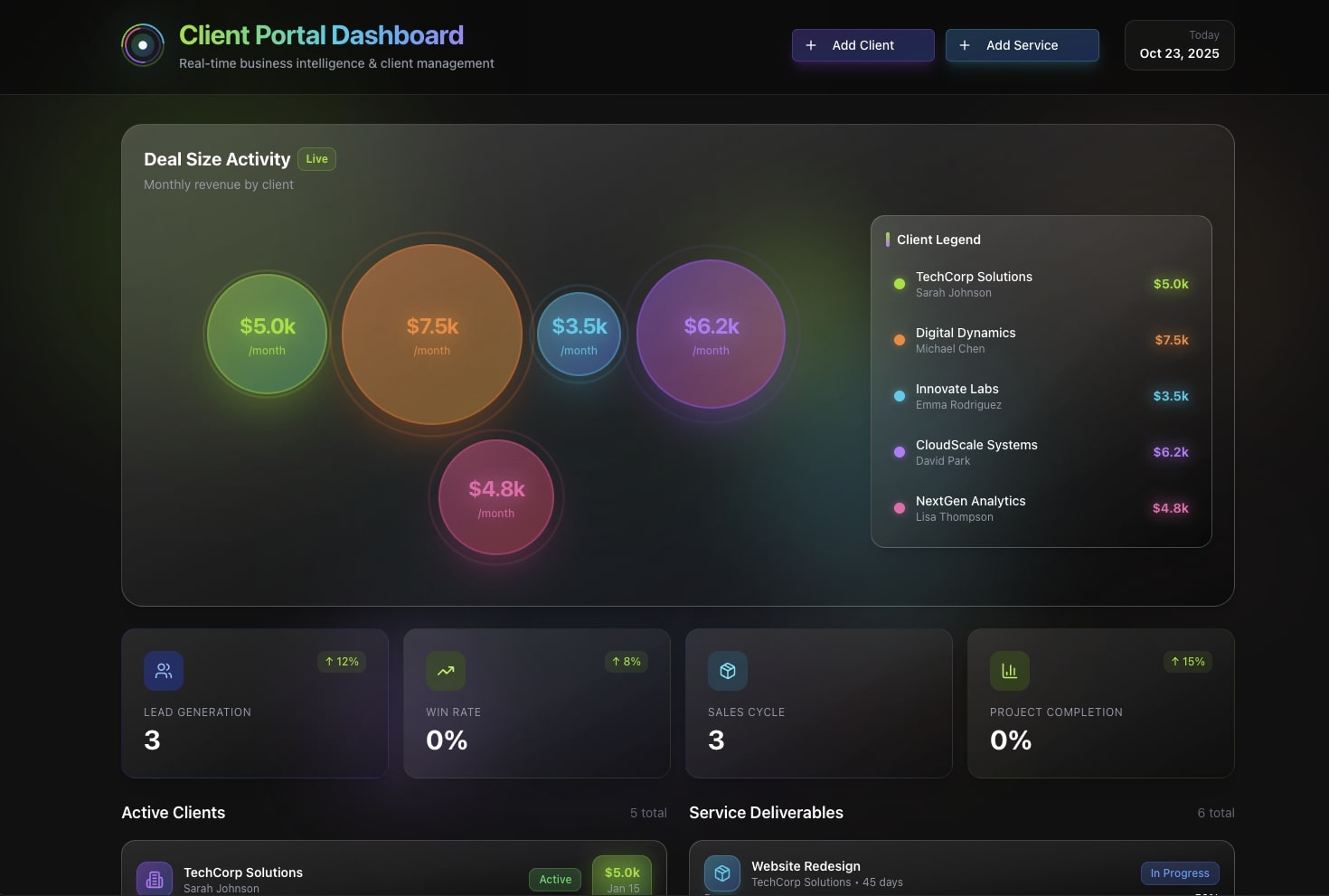
You do not need to be an engineer to ship software anymore. In 2026, the fastest way to get a working business app, a client portal, a service dashboard, a simple CRM, is to describe what you want in plain English and let AI build it. No IDE. No terminal. No hosting. No engineering ticket sitting in a backlog for a quarter.
TL;DR: Taskade Genesis turns one plain-English prompt into a living business app, database, screens, AI agents, and automations. That you can publish to your own domain the same day. Over 150,000 apps have been built this way, starting free. The shift is from picking a tool and wiring screens together to describing the outcome and getting a finished app. Build your first app free →
This guide is written for the person who has a business problem, not a computer science degree, the kind of operator who can stand up a real working tool on their own in a few weeks, without an engineering team or a long IT backlog. You will learn what you can actually build, the four-step path from sentence to live app, and how to make it feel like your own software.
What can you build without code (and have live today)?
You can build the everyday operational apps that businesses actually run on, and have them live the same day. The most common builds for non-technical operators are client portals, service and operations dashboards, simple CRMs, booking systems, inventory trackers, and internal request tools.
The difference between 2026 and the old no-code era is what you start with. Older tools hand you a blank canvas and a palette of components to drag around. Taskade Genesis hands you a finished, working app from a sentence. Then lets you adjust it.
| You want to… | The app you get | What runs inside it |
|---|---|---|
| Give clients a place to track their projects | Client portal | Status views, an AI agent that answers questions, email automations |
| See your whole operation at a glance | Service / ops dashboard | Multiple project views, KPI rollups, alerts when something needs attention |
| Track deals and follow-ups | Simple CRM | Pipeline board, an agent that drafts follow-ups, reminders |
| Take bookings or requests | Booking / intake app | A form, a calendar, automations that confirm and route |
| Keep the team aligned | Internal knowledge base | Searchable docs, an agent trained on your content |
Want to see real ones first? Browse the Community Gallery, every app there is live and cloneable. A few strong starting points: the AI Insight Matrix dashboard, the Simple Store Manager, and the Investor Dashboard.
Not sure where to start? Follow the problem you have right now:
WHAT'S THE PROBLEM YOU HAVE TODAY?
│
├─ "Clients keep emailing me for updates"      ──▶  Client portal
├─ "I can't see how the business is doing"     ──▶  Operations dashboard
├─ "Deals fall through the cracks"             ──▶  Simple CRM
├─ "People book / request things by email"     ──▶  Booking or intake app
└─ "The team keeps asking the same questions"  ──▶  Internal knowledge base
                                                     │
                                                     ▼
                              Describe it to Genesis → clone the closest
                              gallery app → make it yours → publish today
Five common business apps, step by step (and what to type)
The fastest way to understand "describe the outcome" is to see the exact sentence that produces each app. Below are five of the most-built business apps, the prompt that gets you started, and what lands inside the app on the first generation. Every one of these is also available pre-built in the Community Gallery, so you can clone first and edit second.
1. Client portal
A client portal is the single most-requested build for service businesses and agencies, because it kills the "any update?" email loop. Type something like "a client portal where each customer sees their project status, can message us, and gets notified when a milestone ships."
What you get: a project per client (or a filtered view of one shared board), a status timeline, a messaging surface, and an AI agent primed to answer common questions from your FAQ. Add automations that email the client when a status changes. For a ready-made starting point, see the agency client portal templates and the broader CRM, invoice generator, and client portal bundle.
2. Simple CRM
A CRM does not need to be Salesforce. Type "a simple CRM with a pipeline of deals, contact records, and an agent that drafts follow-up emails when a deal stalls."
What you get: a Board view for the pipeline, a Table view for contacts, and an agent watching for stalled deals. Pair it with automations that log every inbound email and remind you before a follow-up slips. Deeper walkthroughs live in our roundup of AI CRM builders and the AI sales CRM and dashboards guide.
3. Operations / KPI dashboard
When you cannot see how the business is doing, a dashboard fixes it. Type "an operations dashboard that rolls up our weekly numbers, flags anything off-target, and summarizes the week every Friday."
What you get: a Table and Board for the underlying records, KPI rollups, and an agent that writes the Friday summary. See AI dashboard builders and the lean-team playbook in AI ops dashboards for lean teams for patterns that scale.
4. Booking / intake app
Replace the back-and-forth of scheduling by email. Type "a booking app with an intake form, a calendar of availability, and automations that confirm the booking and route it to the right person."
What you get: a form, a Calendar view, and automations that confirm, route, and remind. Three working examples you can clone today are in 3 booking apps you can clone today.
5. Internal knowledge base
Stop answering the same question twice. Type "an internal knowledge base where the team searches our docs and an agent answers questions from them."
What you get: searchable docs, an agent trained on your content, and a place for the team to add to it. This pairs naturally with the agent-memory pattern described in agent memory, connect tools, automate.
Each of these starts as one sentence and ends as a live app. The table below maps the prompt to the views and moving parts you get on the first pass:
| App | Starter prompt (paraphrased) | Views you get | Agent does | Automation does |
|---|---|---|---|---|
| Client portal | "Clients see status + message us" | Board, Calendar, Table | Answers FAQ questions | Emails on status change |
| Simple CRM | "Pipeline + contacts + follow-ups" | Board, Table | Drafts follow-ups | Logs email, reminds |
| Ops dashboard | "Weekly numbers + flags + summary" | Table, Board, Gantt | Writes weekly summary | Alerts on off-target |
| Booking app | "Intake + availability + routing" | Calendar, Table | Triages requests | Confirms, routes, reminds |
| Knowledge base | "Searchable docs + answer bot" | List, Mind Map | Answers from your docs | Notifies on new doc |
The old way vs. the new way: clicking tools or describing outcomes
The old no-code path asks you to assemble software. The new path asks you to describe it. That single change is why a non-technical operator can now ship in a day what used to take a stitched-together stack and weeks of setup.
Most ranking guides, like Zapier's no-code roundup, Microsoft Power Apps, and Glide, are excellent at one thing: helping you compare tools. They are genuinely useful for choosing a database or a front-end builder. What they rarely show is the whole journey from a plain-English need to a finished, living app. That gap is the point of this guide.
The honest summary of the old approach is "Database tool + front-end builder + automation tool + AI add-on, glued together." The new approach is one workspace, one prompt, one subscription.
No-code app builders compared: which one fits which need
The no-code field in 2026 is healthy and crowded, and every tool on it is good at something specific. The useful question is not "which is best" in the abstract. It is "which fits the app I am trying to ship and the person who is shipping it." Here is an honest, capability-first map of where the popular builders shine, drawn from their own published positioning.
| Builder | Sweet spot | How you build | Brings its own AI agents + automations? |
|---|---|---|---|
| Taskade Genesis | Living business apps that run the work | Describe the outcome; refine in plain English | Yes — tool-equipped AI agents + durable automations in the same app |
| Bubble | Complex, consumer-facing web apps with custom logic | Visual programming canvas; deep control | AI scaffolds a starting point; automations via workflows |
| Glide | Polished apps from spreadsheets and tables | Connect data, then design screens | AI features for data tasks; automation add-ons |
| Softr | Portals and internal tools over Airtable/Notion | AI co-builder + drag-and-drop blocks | Built-in workflows; AI co-builder for layout |
| Adalo | Native mobile B2C apps | Visual canvas, point-and-click | Visual logic; integrations via marketplace |
| Airtable | Database-first apps and interfaces | Build the base, then add Interfaces | AI fields and automations on records |
| Google AppSheet | Apps from Google Sheets / Excel data | Point at a sheet, AppSheet sketches the app | Rules-based automation; AI from data |
| Retool | Developer-built internal tools | Drag components, write JS/SQL | Code-driven logic; integrations via queries |
A few honest takeaways from that table. If you live inside spreadsheets, Glide and Google AppSheet turn those rows into screens fast. If you have developers and want pixel-and-query control over an internal tool, Retool is purpose-built for that. If you want a consumer-grade web app with bespoke logic, Bubble gives you the deepest canvas. Softr is a strong choice for portals layered over an existing Airtable or Notion base.
Where Taskade Genesis is different is the starting point and what comes pre-wired. The visual builders hand you a canvas and a palette; you assemble the app, then bolt on AI and automation as separate steps. Genesis generates the database, the screens, the AI agents, and the automations together from one description. So the thing you get back is already a living app, not a scaffold waiting to be wired. We go deeper on this distinction in AI app builder vs. website builder vs. agent builder.
Use this decision tree to pick a path quickly:
The point is not that one builder wins every contest. It is that if your goal is a business app that does the work, describing the outcome and getting agents and automations in the box is a meaningfully shorter path than assembling four layers by hand.
When a "living app" beats a static no-code tool
Most no-code tools produce a static app: screens that store and display data and wait for a human to act. That is genuinely useful. But it is a digital filing cabinet with a nice front door. A living app does the next thing on its own. This is the gap the tool-comparison roundups rarely close, because they evaluate screens, not work done.
A living app earns its keep in three situations:
- Repetitive judgment, answering the same client questions, triaging incoming requests, drafting the same kind of reply. An AI agent with persistent memory handles these the way a junior teammate would, except it never forgets and never sleeps.
- Event-driven work, something happens (a form is submitted, an invoice is paid, a deadline passes) and three things should follow. Automations fire on the trigger and run the chain across 100+ integrations.
- Cross-tool sync, keeping a sheet, a Slack channel, and a CRM in agreement without a human copying data between them.
Here is the difference, side by side:
| Static no-code app | Living app (Taskade Genesis) | |
|---|---|---|
| Stores your data | Yes | Yes |
| Shows it in good-looking screens | Yes | Yes (multiple project views) |
| Answers questions on its own | No | Yes — AI agents with built-in tools + memory |
| Acts when something happens | Only if you wire a separate tool | Yes — durable automations on triggers |
| Keeps other tools in sync | Manual or extra add-on | Yes — 100+ bidirectional integrations |
| Improves as it runs | No | Yes — Memory feeds Intelligence feeds Execution |
The living-app advantage compounds over time. A static app is exactly as useful on day 200 as on day 1. A living app gets more useful: its agent memory deepens, your automations cover more cases, and the work it removes from your plate grows. We unpack the broader shift toward this model in The Vibe-Coded Business and agentic engineering without code.
From one sentence to a working app: the 4-step path
You go from idea to live app in four steps, and you only ever type in plain English. Here is the path every Genesis build follows.
- Describe it. Write what you need, "a client portal where customers see their project status and can message us." Be as plain as you like.
- Genesis builds it. It generates the database, the screens, and a starting set of AI agents, a real app, not a mockup.
- Add the work. Point an agent at a job ("answer billing questions from our FAQ") and add automations that run on triggers.
- Go live. Publish to a custom domain, set who can see what, and share it.
| Step | What you do | What you get | Time |
|---|---|---|---|
| 1. Describe | Type a sentence | A clear build spec | Seconds |
| 2. Build | Review and refine | Working app with data + views | Minutes |
| 3. Add work | Assign agents + automations | An app that does the work | Minutes |
| 4. Go live | Publish + set permissions | A shareable app on your domain | Same day |
And unlike traditional software, the app is never "finished" in a way that locks you out. You change it the same way you built it, by describing what's different:
This is the same arc behind ready-made builds like the AI investor CRM and fundraising tracker and the SaaS metrics dashboard templates, each one a living app you can clone and make yours.
What actually happens when you press build
You never see the plumbing, but it helps to know it is there. When you describe an app, EVE, the public name for the Taskade Genesis meta-agent, reads your description, plans the data model, generates the screens across the project views, drafts a starting set of agents, and stands up the automations. You review, refine in plain English, and publish. Here is the pipeline end to end:
The important property of this pipeline is the dotted line back from "publish" to "living app." Traditional software locks once it ships; you file a ticket and wait. A Genesis app stays editable by description forever. You change it the same way you built it, and republish in seconds. That is why the work of building never really stops feeling like writing a sentence.
What "living app" really means: agents and automations that do the work
A living app does not just store your work. It runs it. This is the single biggest gap in the tool-comparison guides: they show you screens, but the apps still wait for a human to do everything. A Taskade Genesis app has two things working inside it around the clock.
- AI agents, teammates with built-in tools and persistent memory. An agent can answer a client's question, draft a reply, summarize a week of activity, or update a record. Learn the fundamentals in What Are AI Agents?.
- Automations, reliable workflows that trigger on events and run across 100+ integrations. New form submission? Create the record, notify the team, and email the client, automatically.
Think of it as the difference between a spreadsheet and a colleague. A spreadsheet holds your numbers and waits. A colleague reads what came in, decides what to do, does it, and tells you when it is done. A living app behaves like the colleague, and it does so consistently, around the clock, without onboarding or turnover. That is the capability gap that no amount of prettier screens closes, and it is the single biggest reason a 2026 app outperforms a 2021 no-code build doing the same job.
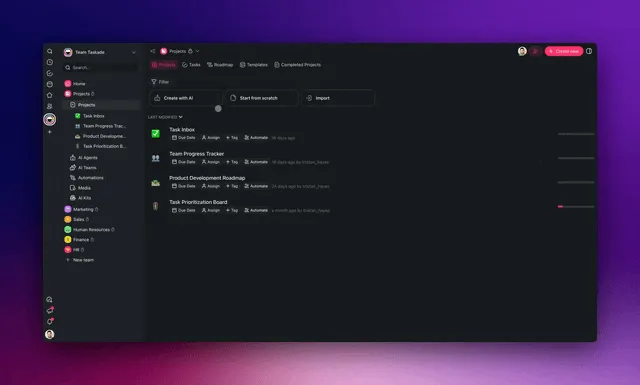
Here is how a real request flows through a living client portal, end to end, with no human touching most of it:
This is the Workspace DNA loop in practice: Memory (your projects and data) feeds Intelligence (your agents), Intelligence triggers Execution (your automations), and Execution writes back to Memory. The app gets more useful the more it runs.
The two layers do different kinds of work, and it helps to be precise about which is which when you are building. Agents are the judgment layer. They read context, decide, and write back. Automations are the reliability layer. They fire deterministically on a trigger and never miss. You want agents where a decision is required and automations where a guaranteed step is required. A good living app uses both: the agent decides what the reply should say, the automation guarantees the reply gets sent and the record gets updated.
| Layer | What it is | Best for | In your app |
|---|---|---|---|
| AI agents | Teammates with built-in tools + persistent memory | Judgment, drafting, summarizing, answering | "Draft a reply from our FAQ" |
| Automations | Durable workflows on triggers | Guaranteed steps, sync, notifications | "On new request → notify + log" |
| Multi-agent | Several agents collaborating | Bigger jobs split into roles | Research → draft → review |
If you want the mechanics of the intelligence layer, What Are AI Agents? covers it from first principles, agents vs. copilots draws the line between "does the work" and "helps you work," and multi-agent workspace patterns shows how several agents split a larger job.
Three real apps you can clone and use in 10 minutes
The fastest way to learn is to start from a working app, not a blank page. Every app in the Community Gallery is live. You can open it, use it, and clone it into your own workspace in one click, then change the parts that do not fit.
| App | Good starting point for | Clone from |
|---|---|---|
| AI Insight Matrix | An operations or analytics dashboard | Open it |
| Simple Store Manager | Inventory, orders, and product ops | Open it |
| Investor Dashboard | Fundraising and stakeholder updates | Open it |
Cloning is also the highest-signal way people end up building their own thing. You start from something that already works, then make it yours. The four-move workflow is the same every time:
- Open the closest gallery app and click through it as a user would.
- Clone it into your workspace in one click. You now own a private copy with its data model, views, agents, and automations intact.
- Make it yours by describing the changes ("rename the stages to ours," "add a field for renewal date," "point the agent at our FAQ instead").
- Publish to your domain, set roles, and share.
If you would rather compare the broader field first, see our roundup of free AI app builders and the wider map in AI app builders. For category-specific starting points, AI CRM builders, AI dashboard builders, AI form builders, and AI real estate apps each go deep on one kind of build.
Connecting the tools you already use (both directions)
Your app should fit into your business, not replace it. Taskade's 100+ integrations are bidirectional, which is the part that makes a living app actually useful: triggers pull events in, and actions push data out.
| Direction | Example trigger or action | What it enables |
|---|---|---|
| Pull in (trigger) | New Stripe payment, new form entry, new calendar event | The app reacts the moment something happens |
| Push out (action) | Update a Google Sheet, send a Slack message, create a CRM record | The app keeps your other tools in sync |
Because the same workspace holds your data, your agents, and your automations, you are not paying for, or maintaining, four separate tools that have to be glued together. That is the practical reason a single workspace beats a stitched stack, a point we make in detail in The Vibe-Coded Business.
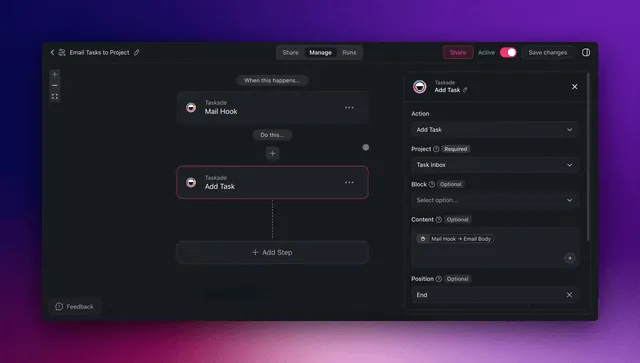
The bidirectional point matters more than it sounds. A one-way integration that only pushes data out leaves your app blind to what happens elsewhere; a one-way integration that only pulls data in leaves your other tools stale. Because Taskade's integrations work in both directions, your app can both react to outside events and update outside systems, which is what makes it a hub rather than a silo. Here is the round trip a single event takes:
A short, representative slice of what you can wire on each side:
| Pull events IN (triggers) | Push data OUT (actions) |
|---|---|
| New Stripe payment | Update a Google Sheet row |
| New form submission | Post to a Slack channel |
| New / updated calendar event | Create or update a CRM record |
| Inbound email matched | Send a templated email |
| Scheduled time reached | Create a task or notify an owner |
For practical builds wired this way, see memory, workflows, and payments and the Taskade Genesis app integrations walkthrough. If you want the small-business angle specifically, AI automation for small business is the cleanest starting point.
Custom domain, permissions, and sharing: making it feel like your software
A business app should look and behave like your own product. Taskade Genesis apps publish to a custom domain on Business and above, so clients see your brand, not a generic preview link. Access is controlled through role-based permissions, from Owner down to Viewer, plus password protection and OIDC/SSO for teams.
This is where the tool-comparison guides go quiet: they rarely cover what happens after you build, the domain, the permissions, who maintains it when the business changes. With Genesis, you adjust the app the same way you built it, by describing the change.
The permission model is worth understanding before you share anything outside the team. It runs from Owner at the top, through Editor and Checker in the middle, down to Viewer at the bottom. So a contractor can be a Checker who can leave notes but not edit, and your team can be Editors. Clients sit outside that ladder: they sign in to the published app, and you match each client's records to their login so they open their own portal. For teams that need single sign-on, OIDC/SSO (GenesisAuth) and custom domains are available on Business and above.
| Who | Suggested role | What they can do |
|---|---|---|
| You / founder | Owner | Everything, including billing and publishing |
| Operations lead | Editor | Manage structure and members |
| Team member | Editor | Create and change records |
| Outside contractor | Checker | Comment, not edit |
| Client | Viewer | See their portal, read-only |
Scaling from prototype to production (without a rebuild)
The quiet failure mode of most no-code builds is the rebuild. You prototype on a free spreadsheet-backed tool, it works, the team adopts it, and then you hit a wall (record limits, no real permissions, no SSO) and have to rebuild on a heavier platform. The migration is where weeks disappear.
Taskade Genesis is designed so the prototype is the production app. The same app you describe on the Free plan grows by turning capabilities on, not by moving platforms:
What changes at each step is capacity and control, never the underlying app:
| Stage | What you add | Plan signal |
|---|---|---|
| Prototype | First app, first agent, publish | Free |
| Small team | More members, more AI runs | Pro |
| Real product | Custom domain, OIDC/SSO, roles | Business |
| Org-wide | Heavy AI capacity, advanced controls | Max / Enterprise |
Because the data, the agents, and the automations all live in the same workspace, "scaling up" is a settings change, add seats, raise AI capacity, point a custom domain at it. There is no export, no re-platforming, no second build. Operators routinely take an app from a Friday-afternoon prototype to a client-facing product in a few weeks, on the same workspace they started in. For longer-form examples of teams running this way, see agentic workflows for startup automation and 5 Genesis apps in 10 minutes.
What it costs (and why one subscription beats four tools)
One subscription replaces the typical no-code stack. The usual "no-code" path means paying for a database tool, a front-end builder, an automation tool, and a separate AI add-on. Then paying again in the time it takes to wire them together. Taskade folds all of that into one workspace.
| Plan | Price (annual) | Best for |
|---|---|---|
| Free | $0 | Trying it, first apps |
| Pro | $10/month (Popular) | Solo operators and small builds |
| Business | $25/month | Teams, custom domains, SSO |
| Max | $100/month | Heavy AI usage |
| Enterprise | Custom | Larger orgs and advanced controls |
The stitched-stack math is the part most guides skip. A typical "no-code" build assembles a database tool, a front-end/portal builder, an automation tool, and a separate AI add-on, four subscriptions, four logins, four billing cycles, and the glue work to keep them in sync. Folding them into one workspace removes both the recurring cost and the maintenance tax of the glue.
| Job to be done | Stitched stack (separate tools) | One Taskade workspace |
|---|---|---|
| Store structured data | Database/spreadsheet tool | Included (multiple project views) |
| Build the screens | Front-end / portal builder | Included (generated from prompt) |
| Run the workflows | Automation tool | Included (durable automations) |
| Add intelligence | Separate AI add-on | Included (tool-equipped AI agents) |
| Connect other tools | Per-tool connectors | Included (100+ bidirectional) |
| Billing & logins | 4 subscriptions, 4 logins | 1 subscription, 1 login |
The Free Forever plan is enough to build and publish your first real app. You move up when you need a custom domain, more team members, or more AI capacity, not before. A note on plans: Pro carries the Popular pill, Business is where custom domains and SSO unlock, and Max is the plan to reach for when AI usage is heavy. Compare the full feature breakdown on the pricing page.
Five mistakes that keep no-code apps from shipping
Most stalled no-code projects do not fail on capability. They fail on approach. These are the patterns that slow non-technical builders down, and the simpler move in each case.
- Trying to design the database first. The instinct from old tools is to model your schema before you build. With Taskade Genesis, describe the outcome and let the data model generate; adjust it after you can see it working. Designing tables on a whiteboard is wasted motion.
- Building from a blank page. Starting from nothing is the slowest path. Clone the closest app from the Community Gallery, then change what does not fit. You learn more from editing a working app than from assembling an empty one.
- Treating the app as static. Shipping screens and stopping there leaves the work on your plate. Add at least one agent and one automation on the first pass, even a simple one. That is what turns a filing cabinet into a living app.
- Stitching tools too early. Reaching for a separate database, builder, automation app, and AI tool recreates the exact maintenance tax you were trying to escape. Keep data, agents, and automations in one workspace until you have a concrete reason not to.
- Waiting for "done" before sharing. A Genesis app is editable by description forever, so there is no risk in publishing early. Share a Viewer-level link, gather reactions, and refine live. The app improves faster in front of real users than in a draft.
If you want a gentle on-ramp before your first real build, AI app ideas and beginner AI app examples are good idea fuel, and AI app builders maps the wider landscape.
Who this is for (and who it is not)
Be honest about fit. Taskade Genesis is the strongest choice when the person building is an operator with a business problem, a founder, an agency owner, an ops lead, a freelancer, who wants a finished app that does work, fast, without managing infrastructure. It is also a fit for technical people who simply do not want to hand-assemble a stack for an internal tool.
It is a less obvious fit if you need pixel-perfect bespoke UI for a consumer product (a visual canvas like Bubble gives more control there), or if you have a developer who wants to write SQL and JavaScript against components directly (Retool is built for that). Naming those edges honestly is the point, the right tool is the one that matches your goal and your builder. For most everyday business apps, the shortest path is to describe the outcome and let the app build itself.
| If you are… | Want… | Best path |
|---|---|---|
| A non-technical operator | A working app that runs the work | Taskade Genesis |
| A founder shipping an MVP | Fast, editable, agent-powered | Taskade Genesis |
| A team needing an internal tool | Roles, domain, automations | Taskade Genesis (Business) |
| A developer building custom UI | SQL/JS-level control | A developer tool builder |
| A studio building a consumer app | Deep bespoke design control | A visual app canvas |
Build your first business app today
The barrier to building software is no longer technical skill. It is just describing what you want clearly. Start from a real app in the Community Gallery, clone the one closest to your need, and change it in plain English. Or start from scratch and describe your app to Genesis. Either way, you will have something live today.
If you want to go deeper on the pieces, read What Are AI Agents? for the intelligence layer, browse AI App templates for more starting points, and see how operators are running entire companies this way in The Vibe-Coded Business. For more pre-built business apps, the customer onboarding templates are a clean place to start.
You bring the business problem. Genesis brings the app. That is the whole deal, Memory remembers, Intelligence decides, Execution ships.
▲ ■ ● Memory · Intelligence · Execution, build your first app free →
Frequently Asked Questions
Can I really build a business app without coding?
Yes. With Taskade Genesis you describe the app you want in plain English and it builds a working app, database, screens, AI agents, and automations, that you can publish the same day. Over 150,000 apps have been built on the platform. You never touch code, a terminal, or hosting. Start free, then upgrade to Pro at $10/month (annual) when you need more.
Do I need a developer or an IT team to build an internal tool?
No. Taskade Genesis is built for non-technical operators, the kind of person who can build a production service dashboard solo in a few weeks. You describe the outcome you want and Genesis assembles the projects, views, agents, and automations. No developer, no engineering ticket, no IT backlog.
How fast can I launch a business app?
Most people get a working first version in minutes and a polished, shareable app the same day. Because Taskade Genesis generates the database, interface, AI agents, and automations from one prompt, there is no setup, deployment, or hosting step between you and a live app on your own custom domain.
What kinds of business apps can I build without code?
Common builds include client portals, service and operations dashboards, simple CRMs, inventory trackers, booking systems, internal request tools, and team knowledge bases. Each one ships as a living app with multiple project views (List, Board, Calendar, Table, Mind Map, Gantt, Org Chart), AI agents, and automations.
Can the app make decisions or do work on its own?
Yes, this is the difference between a no-code app and a living app. Taskade Genesis apps include AI agents with built-in tools and persistent memory, plus automations that trigger on events. An agent can answer client questions, draft replies, or update a record, and an automation can run that work automatically across 100+ integrations.
Can I connect the tools my business already uses?
Yes. Taskade offers 100+ bidirectional integrations, triggers pull events in (a new form submission, a paid invoice, a calendar event) and actions push data out (update a sheet, send a Slack message, create a record). Your app fits into the tools you already run on instead of replacing them.
Can I use my own domain and control who sees the app?
Yes. Genesis apps publish to a custom domain on Business and above, with role-based access from Owner to Viewer, plus password protection and OIDC/SSO for teams. Your app looks and behaves like your own software.
How much does it cost to build a business app on Taskade?
Taskade is Free Forever to start. Paid plans run from Pro ($10/month) through Business ($25/month) on annual billing, with Max and Enterprise for heavier needs. One subscription replaces the typical no-code stack of a database tool, a front-end builder, an automation tool, and a separate AI add-on.
Is a no-code business app powerful enough for real work?
Yes. Genesis apps run on real databases, multiple project views, AI agents, and durable automations, and they scale from a solo operator to an enterprise team. Operators routinely build in a few weeks what once required a dedicated engineering team and many months of lead time.
What is the best no-code AI app builder in 2026?
Taskade Genesis leads for non-technical builders who want a finished, living app rather than a pile of screens to wire together. Unlike tool-first builders, it turns one prompt into a deployed app with AI agents, automations, databases, and 100+ integrations, and you can clone real working apps from the Community Gallery to start.
How is Taskade Genesis different from Bubble, Glide, or Softr?
Bubble, Glide, and Softr are excellent visual builders, you arrange screens, bind data, and configure logic by hand. Taskade Genesis starts one step earlier: you describe the outcome in plain English and it generates the database, the screens, the AI agents, and the automations together as one running app. The other tools hand you a canvas to assemble; Genesis hands you a finished, living app you then refine by describing changes.
Do I need a database or spreadsheet before I start?
No. Many no-code tools (Glide, Softr, Google AppSheet) expect you to bring a spreadsheet or wire up a database first. With Taskade Genesis the data model is generated for you from your description, then surfaced through multiple project views (List, Board, Calendar, Table, Mind Map, Gantt, Org Chart). You can import existing data later, but you never have to design a schema to get started.
Can a no-code app scale from a prototype to production?
Yes. A Taskade Genesis app is production-grade from day one, real database, durable automations, role-based access from Owner to Viewer, and a custom domain on Business and above. You scale by adding members, AI capacity, and integrations on the same app, not by rebuilding on a different platform. Over 150,000 apps have been built this way, from solo tools to enterprise systems.