







The AI builder landscape is confusing.
"AI app builder" sounds like Retool. "AI website builder" sounds like Webflow. "AI agent builder" sounds like something else entirely. These categories exist because traditional platforms specialize in one thing. But the real question is not which builder to choose — it is why you need three separate tools in the first place.
Taskade Genesis is all three — app builder, website builder, and agent builder — unified through Workspace DNA. Here is what each builder type does, how they differ, where dedicated tools fall short, and why a unified platform changes the equation.
TL;DR: Most platforms specialize in one builder type. Taskade Genesis unifies all three through Workspace DNA — Memory (Projects), Intelligence (AI Agents with built-in tools), and Execution (Automations with 100+ integrations). Your apps, websites, and agents share the same data and intelligence. Try it free →

Quick Comparison: Three Builder Categories
| Dimension | AI App Builder | AI Website Builder | AI Agent Builder | Genesis (All Three) |
|---|---|---|---|---|
| What it creates | Functional applications | Visual web pages | Conversational AI | Living systems |
| Data layer | Yes (databases) | No (static/CMS) | Limited (chat history) | Yes (Projects) |
| AI intelligence | Limited | None | Yes (conversational) | Yes (built-in tools) |
| Automation | Some | None | Limited | Yes (100+ integrations) |
| Visual design | Basic | Strong | Minimal | Full (custom domains) |
| Collaboration | Limited | None | None | Permissions |
| Examples | Retool, Bubble | Webflow, Squarespace | Botpress, Voiceflow | Taskade Genesis |
| Typical price | $10-50/user/mo | $15-40/mo | $20-100/mo | Free / $10/mo (billed annually) |
What Is an AI App Builder?
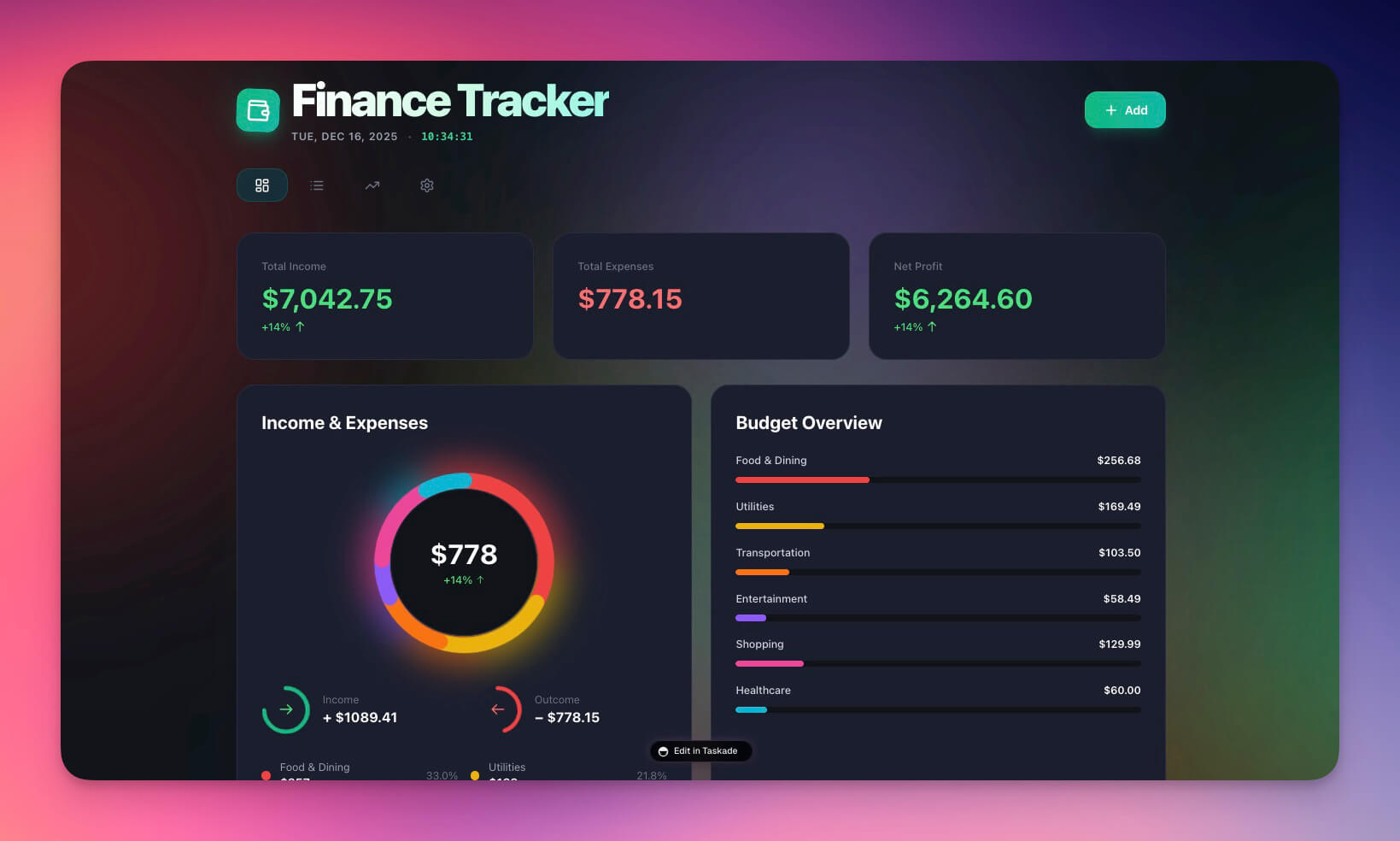
An AI app builder creates functional applications from natural language descriptions. You describe what you need — "Build a CRM with deal tracking and automated follow-ups" — and the builder generates a working application with databases, forms, views, and logic.
Key characteristics:
- Creates data-driven applications with CRUD operations (Create, Read, Update, Delete)
- Includes a database or storage layer for persistent data
- Supports business logic, workflows, and conditional actions
- Often includes user authentication and permissions
Popular AI app builders in 2026:
| Platform | Strength | Limitation | Price |
|---|---|---|---|
| Retool | Internal tools, database queries | No AI agents, no public sites | $10/user/mo |
| Bubble | Visual app design, marketplace | Slow performance, complex learning | $29/mo |
| Glide | Mobile-first apps from sheets | Limited customization, no agents | $25/mo |
| Taskade Genesis | Full stack + AI + automation | — | Free / $10/mo (billed annually) |
App examples you can clone:
- Finance Tracker Dashboard — Tracks expenses, revenue, cash flow
- Neon CRM Dashboard — Manages leads and deals
Genesis creates apps through Workspace DNA — Projects (Memory), Agents (Intelligence), and Automations (Execution).
What Is an AI Website Builder?
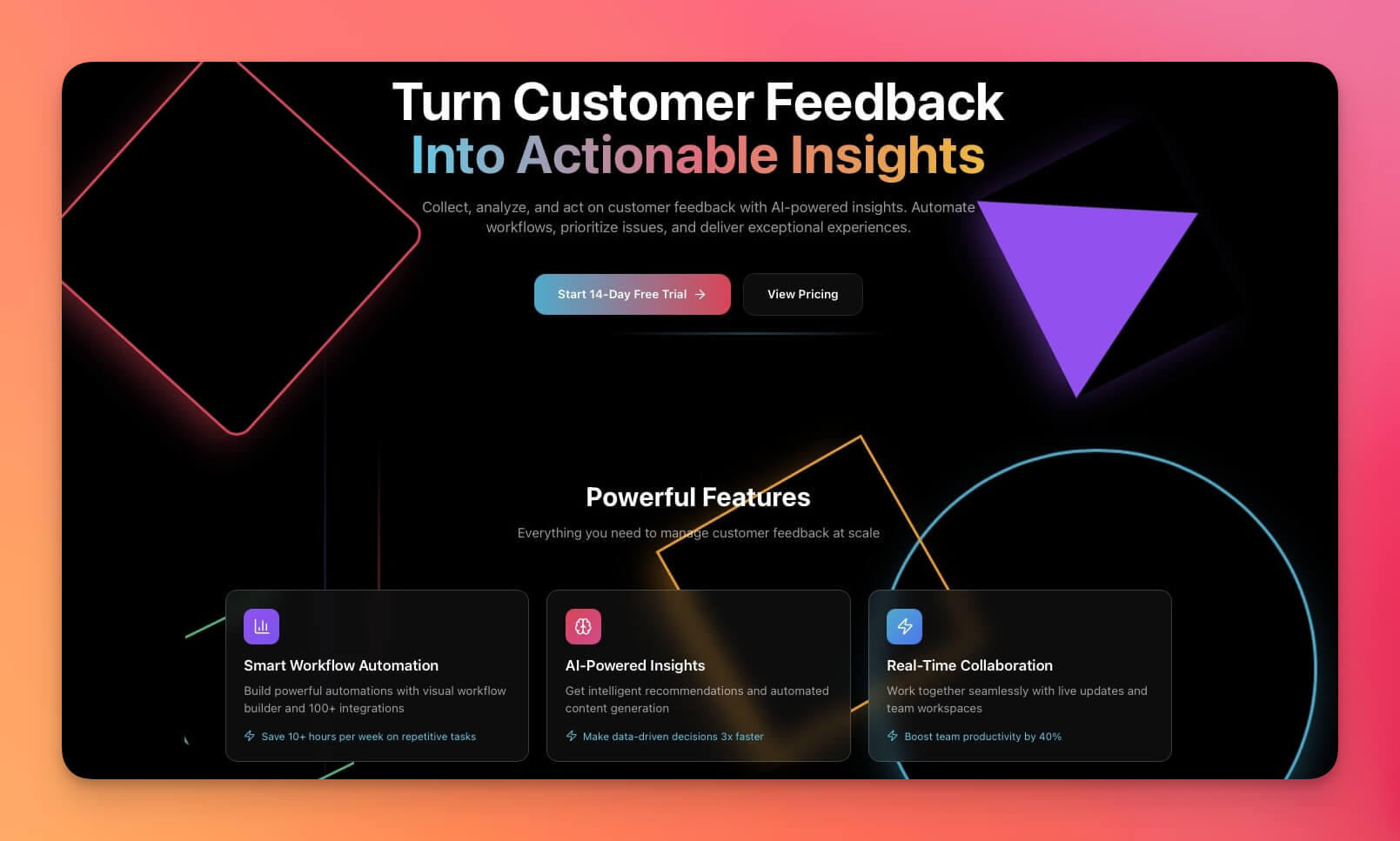
An AI website builder creates visual web pages from descriptions. You describe the site — "Build a SaaS landing page with pricing section and signup form" — and the builder generates a responsive website with styling, layout, and basic interactions.
Key characteristics:
- Creates visual, public-facing pages optimized for design
- Focuses on presentation, layout, and responsive design
- Generates static or CMS-driven content
- Often includes hosting and deployment
Popular AI website builders in 2026:
| Platform | Strength | Limitation | Price |
|---|---|---|---|
| Webflow | Visual design, CMS, SEO | No data apps, no AI agents | $18/mo |
| Squarespace | Templates, e-commerce | Static, no interactivity | $16/mo |
| Framer | Design-to-code, animations | No backend, no agents | $15/mo |
| Taskade Genesis | Live data + AI + automation | — | Free / $10/mo (billed annually) |
Website examples you can clone:
- SaaS Landing Page — Modern startup landing page
- Nonprofit Org Website — Professional nonprofit site
Genesis websites are not static — they connect to your workspace data and AI agents. A pricing page can pull live data from your database. A contact form can trigger an automation that qualifies the lead, assigns a team member, and schedules a call. Learn more at AI Website Builder.
What Is an AI Agent Builder?
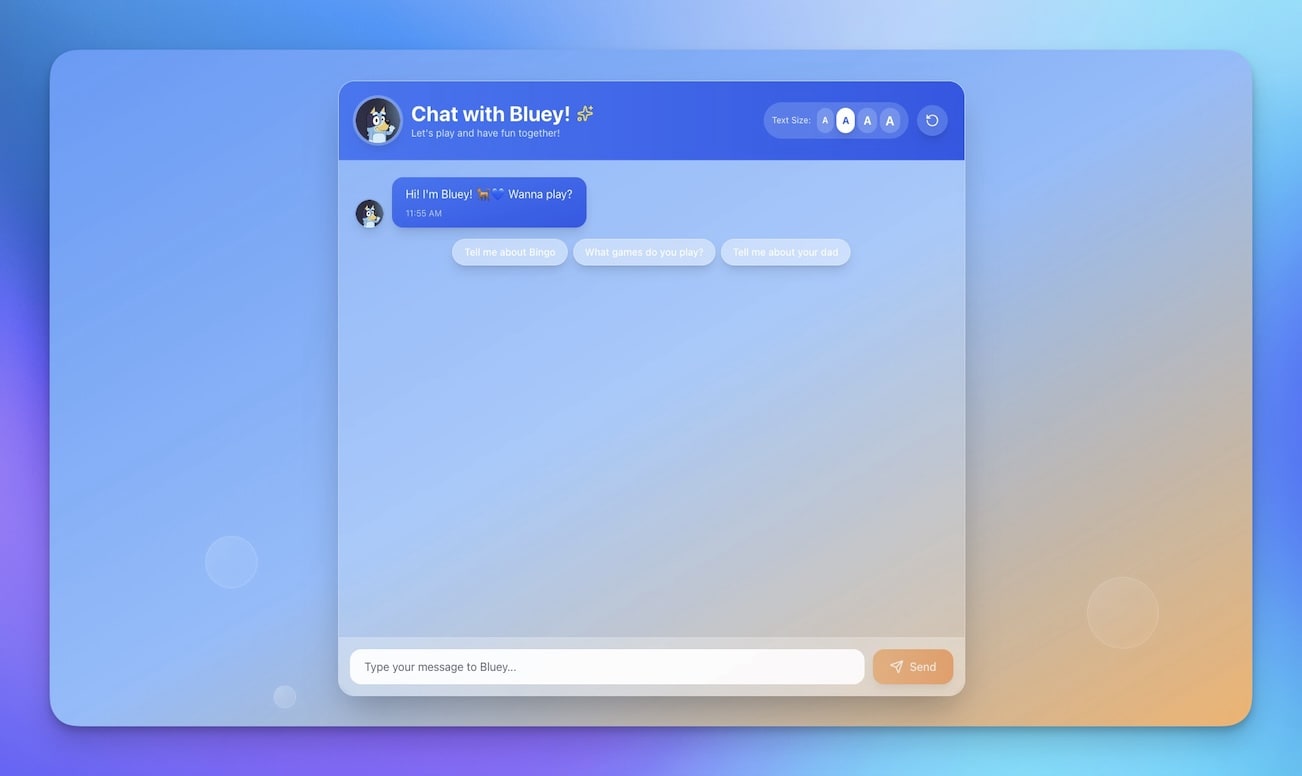
An AI agent builder creates intelligent assistants trained on your data. You describe the agent — "Build a customer support agent that knows our product docs and can answer common questions" — and the builder creates an AI assistant with specific knowledge, personality, and capabilities.
Key characteristics:
- Creates conversational AI interfaces with natural language understanding
- Trains on custom knowledge bases and documentation
- Can take actions beyond answering questions (tool use)
- Integrates with external workflows and automations
Popular AI agent builders in 2026:
| Platform | Strength | Limitation | Price |
|---|---|---|---|
| Botpress | Conversation design, NLU | No app layer, no data storage | $39/mo |
| Voiceflow | Visual agent design, voice | Limited actions, no database | $50/mo |
| Relevance AI | API-first agents, chains | Developer-focused, no UI builder | $19/mo |
| Taskade Genesis | built-in tools + memory + apps | — | Free / $10/mo (billed annually) |
Agent examples you can clone:
- Bluey Chatbot — Character-based interactive agent
- Support Rating Dashboard — Agent-powered support tracking
Genesis agents are the Intelligence pillar of Workspace DNA. They run on frontier models from top AI labs. Each agent has access to built-in tools, persistent memory stored as Taskade Projects, and the ability to trigger automations across 100+ integrations.
The Problem With Separate Builders
Most teams end up with a stack of disconnected tools:
| Tool | Purpose | Monthly Cost |
|---|---|---|
| Retool or Bubble | Internal app | $10-50 |
| Webflow or Squarespace | Marketing site | $15-40 |
| Botpress or Voiceflow | Support chatbot | $20-100 |
| Zapier or Make | Connecting the above | $20-50 |
| Total | 4 tools, 4 logins, 4 bills | $65-240/mo |
Using separate tools creates three critical problems:
Data fragmentation — Your website does not know about your app data. Your agent cannot read your database. Your app cannot display on your website. Every tool has its own data silo.
Integration overhead — You need Zapier or Make to connect tools together. Every connection is another point of failure. Data flows through multiple systems with latency and transformation errors.
Context loss — When a visitor fills out a form on your website, that context is lost by the time it reaches your app or agent. Each tool starts from zero.
Genesis: All Three Builders Unified Through Workspace DNA
Taskade Genesis eliminates the fragmentation problem by unifying all three builder types under Workspace DNA — three interconnected pillars that share the same data, intelligence, and execution layer.
Every Genesis creation has three pillars:
Memory (Projects and Databases)
Your data layer. Structure, store, and connect information across multiple project views: List, Board, Calendar, Table, Mind Map, Gantt, and Org Chart. Projects persist data so your apps, websites, and agents always work with current information.
Learn more: Projects and Databases →
Intelligence (AI Agents)
Your thinking layer. Agents that reason, decide, and execute using frontier models from top AI labs. Each agent has built-in tools, persistent memory, and the ability to collaborate with other agents.
Learn more: Custom AI Agents →
Execution (Automations)
Your action layer. Workflows that connect, trigger, and respond via 100+ integrations across 10 categories. Automations support branching, looping, and filtering logic for complex multi-step processes.
Learn more: Automations and Workflows →
This means:
- A website can display live data from your project databases
- An app can include AI agents that answer user questions
- An agent can trigger automations and update project data
- Everything works together as one living system — no middleware, no data sync, no integration glue
Practical Example: Client Portal
Say you need a client portal. Here is what each builder type gives you alone versus what Genesis creates when all three work together:
| Capability | Website Builder Only | App Builder Only | Agent Builder Only | Genesis (All Three) |
|---|---|---|---|---|
| Visual design | Professional page | Basic UI | Chat widget | Professional + custom domain |
| Client database | None | Yes | None | Yes (Projects) |
| Status tracking | Static text | Dashboard | None | Live dashboard with history |
| AI assistance | None | None | Chat answers | Agent answers + takes action |
| Notifications | None | Manual | None | Automated via triggers |
| Permissions | Public only | Basic | None | RBAC |
| Result | Brochure | Internal tool | Chatbot | Living portal |
With Genesis, the portal is a website that displays live project data, includes an AI agent that answers client questions about their project status, and triggers automated notifications when milestones complete. One system, one data source, one login.
Practical Example: Internal Dashboard
Another common use case: your operations team needs an internal dashboard. Here is how each builder type handles it:
| Requirement | Website Builder | App Builder | Agent Builder | Genesis |
|---|---|---|---|---|
| Data tables with sorting | Manual HTML tables | Yes (built-in) | None | Yes + multiple views |
| Real-time updates | Requires CMS rebuild | Yes | None | Yes (live Projects) |
| AI-powered insights | None | Limited | Chat-only | Full agent with built-in tools |
| Scheduled reports | None | Manual triggers | None | Automated weekly/monthly |
| Team permissions | None | Basic | None | Role-based access (Owner to Viewer) |
| Mobile access | Responsive design | Depends on platform | Chat widget | Full responsive + app |
| Best result | Static report page | Functional tool | Q&A interface | Living dashboard |
The Genesis dashboard lets your team view metrics in Table view for detail, Board view for status groupings, and Calendar view for time-based analysis — all from the same underlying data. The AI agent answers questions like "Which department has the highest spend this quarter?" without anyone writing a query or formula.
Practical Example: E-Commerce Storefront
For an online store, the gap between separate tools and a unified platform is even wider:
| Capability | Website Builder (Shopify) | App Builder (Retool) | Agent Builder (Drift) | Genesis |
|---|---|---|---|---|
| Product catalog | Yes (core feature) | Possible but clunky | None | Yes (Projects as catalog) |
| Shopping cart | Yes (built-in) | No | No | Yes (with Stripe automation) |
| Customer support chat | No (needs add-on) | No | Yes (core feature) | Yes (AI agent with product knowledge) |
| Inventory management | Yes (built-in) | Yes (custom build) | No | Yes (agent checks stock in real time) |
| Order notifications | Yes (email) | Manual setup | No | Yes (automated across 100+ integrations) |
| Monthly cost | $39+ | $50+ | $50+ | Free / $10 (billed annually) |
Genesis combines the storefront, inventory intelligence, and customer support into a single living system where the AI agent knows your stock levels, product details, and order status because it reads from the same Projects database that powers the storefront.
Learn more about building stores: Build a Simple Store.
Clone an example: Class Booking Portal →
When to Use Each Builder Type
Even within a unified platform, different use cases lean toward different builder strengths. Here is when to emphasize each:
| Use Case | Primary Builder | Genesis Enhancement | Example |
|---|---|---|---|
| Marketing site | Website | + Agent for live chat, + automation for lead capture | SaaS Landing Page |
| Internal tool | App | + Agents for data analysis, + automation for alerts | Finance Tracker |
| Customer support | Agent | + App for ticket database, + automation for routing | Support Dashboard |
| Client portal | All three | Full Workspace DNA — data + AI + automation | Booking Portal |
| E-commerce | Website + App | + Agent for product questions, + automation for orders | Simple Store |
Genesis lets you start simple and add capabilities as you need them. Build a website today. Add an AI agent next week. Connect automations next month. The platform grows with your needs.
The Cost Equation
Replacing separate tools with a unified platform saves both money and complexity:
| Approach | Tools Needed | Monthly Cost | Data Silos |
|---|---|---|---|
| Separate stack | 4+ tools | $65-240/mo | 4+ silos |
| Taskade Genesis (Free) | 1 platform | Free | Zero |
| Taskade Genesis (Pro) | 1 platform | $10/mo billed annually (10 users) | Zero |
| Taskade Genesis (Business) | 1 platform | $25/mo billed annually (unlimited) | Zero |
Beyond cost savings, the unified approach eliminates:
- Integration maintenance (no Zapier workflows to debug)
- Data synchronization delays (everything reads from the same source)
- Context switching between tools (one dashboard, one login)
- Vendor lock-in across multiple platforms
Five Real-World Scenarios: Separate Tools vs. Genesis
Scenario 1: Freelance Consultant
Separate tools approach:
- Squarespace for portfolio website ($16/mo)
- Calendly for appointment booking ($10/mo)
- Intercom for client chat ($39/mo)
- Zapier to connect them ($20/mo)
- Total: $85/mo, 4 dashboards, fragmented data
Genesis approach:
- One app: portfolio website with booking, AI chat agent, and automated follow-ups
- Total: Free to start, then $10/mo billed annually, one dashboard, unified data
Scenario 2: SaaS Startup
Separate tools approach:
- Webflow for landing page ($18/mo)
- Retool for internal dashboard ($10/user/mo × 5 = $50/mo)
- Drift for sales chatbot ($50/mo)
- Make for integrations ($20/mo)
- Total: $138/mo, 4 systems to maintain
Genesis approach:
- Landing page connected to internal dashboard with AI sales agent and automated lead routing
- Total: $10/mo billed annually (Pro), one system for the whole team
Scenario 3: Service Agency
Separate tools approach:
- WordPress for website ($20/mo with hosting)
- Dubsado for client portals ($40/mo)
- Chatfuel for intake chatbot ($15/mo)
- Zapier for workflow automation ($30/mo)
- Total: $105/mo, clients confused by multiple login systems
Genesis approach:
- Client portal with embedded website, AI intake agent, and automated workflows
- Total: $10/mo billed annually (Pro), clients see one unified portal
Scenario 4: E-commerce Micro-Brand
Separate tools approach:
- Shopify for storefront ($39/mo)
- Tidio for customer support chat ($29/mo)
- Google Sheets for inventory tracking (free but manual)
- Total: $68/mo, inventory data disconnected from support
Genesis approach:
- Product showcase with AI support agent that checks live inventory data
- Total: Free to start, then $10/mo billed annually (Pro), support agent knows stock levels instantly
Scenario 5: Community Organizer
Separate tools approach:
- Eventbrite for event registration ($0 + fees per ticket)
- Slack for community communication (free tier)
- Notion for knowledge base ($10/mo)
- Mailchimp for newsletters ($13/mo)
- Total: $23/mo + ticket fees, 4 disconnected platforms
Genesis approach:
- Event registration portal with community AI agent, knowledge base, and automated email sequences
- Total: Free to start, then $10/mo billed annually, all data in one workspace
The Builder Evolution: Where the Market Is Heading
The AI builder market is converging. In 2024, tools were siloed: app builders built apps, website builders built sites, agent builders built chatbots. In 2026, the lines are blurring as users demand connected experiences.
| Era | Approach | User Experience |
|---|---|---|
| 2020-2023 | Specialized tools per category | Buy 4-6 tools, glue them together |
| 2024-2025 | AI-assisted versions of each | Same silos, faster to build |
| 2026+ | Unified platforms with Workspace DNA | One prompt, one system, everything connected |
The trend is clear: builders that unify data, intelligence, and automation will replace the fragmented tool stacks that dominate today. Taskade Genesis is built for this unified future — where an app, a website, and an agent are not three separate projects but three views of the same living system.
According to Gartner, the low-code and no-code market will exceed $187 billion by 2030. Taskade Genesis addresses this market with workspace-native generation — the only platform combining AI agents, automations, and databases in a single prompt-to-deploy pipeline.
Build Your First Genesis Creation
Create an app, website, or agent — or all three — in minutes:
- Open Taskade Genesis and describe what you need
- Use "Enhance Prompt" to add AI agents, automations, or website features
- Genesis creates the complete system with Projects, Agents, and Automations
- View your creation across multiple project views (List, Board, Calendar, Table, Mind Map, Gantt, Org Chart)
- Set permissions with the system (Owner to Viewer)
- Publish with a custom domain or share a public link
Learn more in Create Your First App.
Start Building
Ready to build?
Resources:
- Explore Community Apps — Clone apps, websites, and agents
- Create Your First App — Step-by-step tutorial
- Workspace DNA Guide — Understand the architecture
- Custom AI Agents — Build intelligent assistants
- Automations Guide — Connect 100+ integrations
Explore builders:
- AI App Builder — Build complete applications
- AI Website Builder — Generate professional sites
- AI Agent Builder — Create intelligent assistants
Read more:
- What Is an Agent Hosting Platform?
- How Workspace DNA Works
- From AI Productivity to AI Infrastructure
- Build Self-Updating Client Portals
- Anatomy of a Genesis App
- Migrate From Spreadsheets to AI Dashboards
Build with Taskade Genesis:
- Browse All Generator Templates — Apps, dashboards, websites, and more
- Browse Agent Templates — AI agents for every use case
- Explore Community Apps — Clone and customize

Frequently Asked Questions
What is the difference between an AI app builder, website builder, and agent builder?
An AI app builder creates functional applications with data, logic, and interactivity (like Retool or Taskade Genesis). A website builder creates visual pages for marketing and content (like Webflow or Squarespace). An agent builder creates AI chatbots and assistants that can answer questions and take actions. Most platforms specialize in one type, while Taskade Genesis unifies all three through Workspace DNA.
Can one platform replace all three builder types?
Yes. Taskade Genesis combines app building, website creation, and agent building in one platform through Workspace DNA. Three interconnected layers: Memory (Projects and databases), Intelligence (AI Agents with built-in tools), and Execution (Automations with 100+ integrations). A website can display live data, an app can include AI agents, and an agent can trigger automations, all working together.
What is Workspace DNA in Taskade Genesis?
Workspace DNA is the architecture that powers every Genesis creation with three pillars: Memory (Projects and databases for structured data), Intelligence (AI Agents that reason, decide, and execute using frontier models from top AI labs), and Execution (Automations and workflows that connect, trigger, and respond via 100+ integrations). These three layers work together so apps, websites, and agents share the same data and intelligence.
When should I use a website builder vs an app builder?
Use a website builder when you need a marketing site, portfolio, blog, or content-driven experience where visitors primarily view information. Use an app builder when you need interactive functionality with user data, business logic, workflows, and real-time collaboration. If you need both, a unified platform like Taskade Genesis combines them with shared data and AI.
What are the limitations of using separate builder tools?
Using separate tools creates fragmentation. Your website does not know about your app data. Your agent cannot take actions in your systems. Your app cannot display as a website. You end up managing multiple subscriptions, multiple dashboards, and multiple data silos. A unified platform eliminates these gaps by connecting data, intelligence, and automation in one system.
How does Taskade Genesis compare to Retool for app building?
Retool creates internal tools with database connections and UI components. Taskade Genesis creates complete applications from natural language prompts with built-in AI agents, automations, and multiple project views (List, Board, Calendar, Table, Mind Map, Gantt, Org Chart). Genesis also includes website and agent capabilities that Retool does not offer. Taskade Genesis is free to start, with Pro from $10 per month billed annually, versus Retool at $10 per user per month.
How does Taskade Genesis compare to Webflow for website building?
Webflow excels at visual design and CMS-driven content sites. Taskade Genesis builds websites that connect to live databases, include AI agents for visitor interaction, and trigger automations on user actions. Webflow sites are static or CMS-driven. Genesis sites are living systems backed by Workspace DNA with real-time data, intelligent agents, and automated workflows.
What types of AI agents can I build with Taskade Genesis?
You can build customer support agents, sales qualification bots, onboarding assistants, data analysis agents, content creation helpers, and more. Each agent has access to built-in tools, persistent memory stored as Taskade Projects, and the ability to trigger automations. Agents run on frontier models from top AI labs with multi-agent collaboration support.
Can I publish Genesis creations with custom domains?
Yes. Taskade Genesis apps, websites, and agent interfaces can be published with custom domains, password protection, and built-in authentication. You can also embed them in external websites, share public links, or control access with the permission system (Owner to Viewer).
How much does Taskade Genesis cost compared to separate builder tools?
Taskade offers a free tier, with Pro at $10 per month for up to 10 users, billed annually. A typical separate tool stack costs $10-50 per month for an app builder (Retool), $15-40 per month for a website builder (Webflow), and $20-100 per month for an agent platform. Taskade Genesis replaces all three at a fraction of the combined cost.