






Hey builder! 👋
Welcome to Taskade Genesis App Highlights — your weekly showcase of complete, working apps built by the community.
Booking systems are the invisible infrastructure of modern business. Whether you're running fitness classes, consulting sessions, or community events, the workflow is always the same: someone needs to book time, you need to confirm it, they need a reminder so they show up, and you need an admin view to manage it all. But building this from scratch means wrestling with form builders, email automation tools, calendar APIs, and database management — weeks of integration work just to accept a simple booking.
This week's theme is Booking Systems 📅 — the operational backbone of service-based businesses. We're featuring three powerful solutions that handle class registration, appointment scheduling, and event RSVPs. Each one is a complete business-in-a-box solution that includes UI, data structure, AI agents, and automations ready to use.
These aren't static templates — they're living, intelligent systems that think, learn, and execute. Clone any app in one click, customize it to your workflow, and deploy it instantly. No code required.
At a glance — what's inside each app:
| App | Use Case | Key Automation | Clone Link |
|---|---|---|---|
| 📚 Class Booking Portal | Group classes, workshops, training sessions | Confirmations + capacity alerts | Clone → |
| 🗓️ Appointment Booking System | 1-on-1 scheduling, consultations, demos | Calendar invites + smart reminders | Clone → |
| 🎟️ Event Portal | Meetups, conferences, community events | RSVP tracking + follow-up sequences | Clone → |
📚 Class Booking Portal
Running classes, workshops, or training sessions creates a unique challenge: you need a public-facing page where people can see what's available, a form where they can sign up, and a backend workspace where you can manage participants and track attendance. Generic booking tools like Calendly work for 1-on-1 appointments but fall apart for group sessions with capacity limits, pricing tiers, and participant rosters across multiple dates.
Overview
The Class Booking Portal is a complete class registration and management system designed to help instructors, trainers, and workshop facilitators run group sessions without manual spreadsheet tracking or scattered booking tools. If you've ever lost track of who signed up for a class or spent hours managing registration emails, this app solves it.

What's Inside
┌─────────────────────────────────────────────────────┐
│              CLASS BOOKING PORTAL                    │
├─────────────────────────────────────────────────────┤
│                                                     │
│  📚 Class Listings    ──►  Public schedule with     │
│     & Schedules            pricing + availability   │
│          │                                          │
│          ▼                                          │
│  ✅ Instant Booking   ──►  Signup form → auto       │
│     & Signups              confirmation email       │
│          │                                          │
│          ▼                                          │
│  🗂️ Admin Workspace   ──►  Rosters, attendance,     │
│                            capacity tracking        │
│          │                                          │
│          ▼                                          │
│  📧 Reminders         ──►  24hr + 1hr before class  │
│          │                                          │
│          ▼                                          │
│  ⚡ Automations        ──►  Waitlist promotion,      │
│                            weekly reports           │
└─────────────────────────────────────────────────────┘
📚 Class Listings & Schedules
Display your full class catalog with descriptions, schedules, pricing, and real-time availability. Each class shows the date, time, duration, instructor, capacity, and how many spots remain. Clients see everything they need to make a booking decision in one place.
✅ Instant Booking & Signups
Clients fill out a structured signup form (name, email, phone, special requests) and receive immediate confirmation. When capacity is reached, the system automatically closes registration or adds people to a waitlist.
🗂️ Admin Workspace
A centralized dashboard shows all your classes with participant rosters, attendance tracking, and communication tools. See at a glance which classes are full, which have low registration, and who's confirmed vs. pending.
📧 Automated Confirmations & Reminders
When someone books a class, they receive an instant confirmation with session details and meeting link. Automated reminders fire 24 hours and 1 hour before class starts to reduce no-shows.
⚡ Automation Workflows
| Trigger | Action | Timing |
|---|---|---|
| New signup | Send confirmation email | Immediately |
| Class approaching | Trigger reminder | 24 hours before |
| New signup | Add to class roster | Immediately |
| Class at 80% capacity | Notify instructor | Immediately |
| Cancellation received | Promote from waitlist | Immediately |
| End of week | Generate roster report | Weekly |
Who It's For
Fitness instructors running yoga, pilates, or training classes with capacity limits.
Workshop facilitators managing cohort-based learning programs and bootcamps.
Corporate trainers scheduling employee training sessions and certifications.
Community organizers running classes, meetups, or skill-sharing events.
Key Benefits
✅ Public booking page — Clients see schedule and book directly without emailing
✅ Instant confirmations — Automated emails sent immediately upon signup
✅ Centralized roster management — See all participants, track attendance in one place
✅ Capacity management — Automatically close registration when classes fill up
🗓️ Appointment Booking System
Appointment scheduling still runs on email tennis for most businesses: "What times work for you?" → "How about Tuesday at 2pm?" → "Actually Wednesday would be better." That's 4-5 messages and 2-3 days to schedule a 30-minute meeting. Tools like Calendly solve half the problem but lock you into their platform at $10-15/month per user with limited customization. You can't train an AI agent to suggest optimal time slots, can't extend the system to handle deposits or cancellation policies, and can't integrate booking data directly into your operational workspace.
Overview
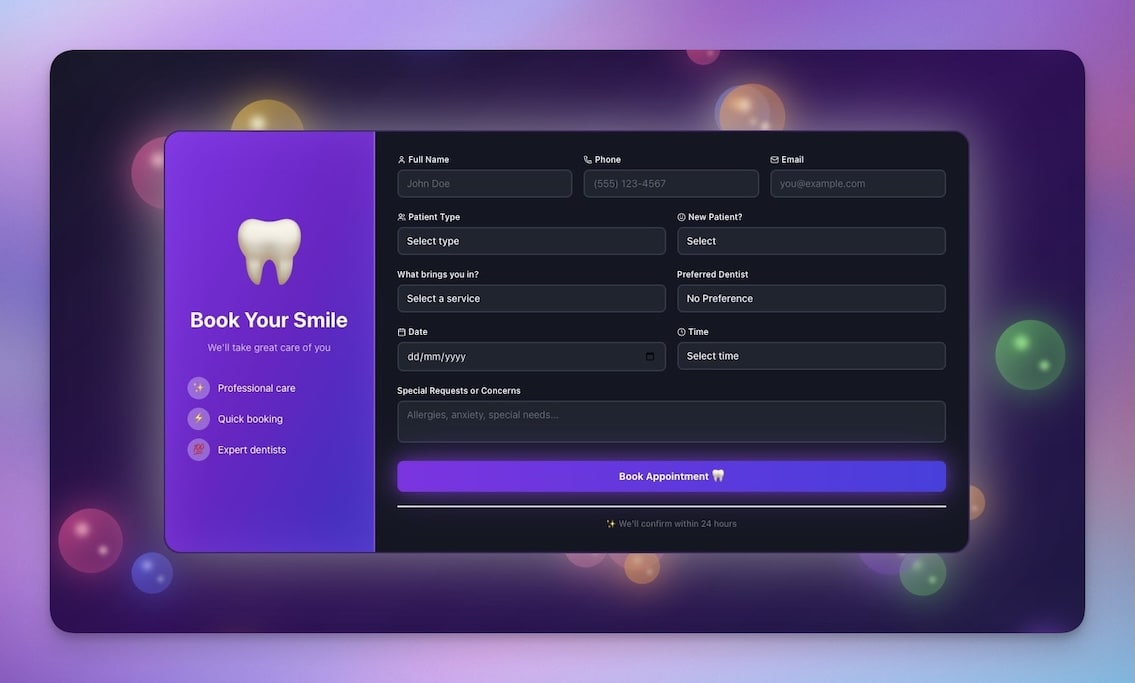
The Appointment Booking System is a beautiful, animated scheduling application designed to help consultants, coaches, service providers, and client-facing teams manage 1-on-1 appointments without email coordination or expensive scheduling software. If your booking workflow involves calendar back-and-forth or paying per-user fees for Calendly, this app replaces it.
What's Inside
How a booking flows through the system:
  Client visits page     Selects time slot     Fills intake form
        │                      │                      │
        ▼                      ▼                      ▼
  ┌──────────┐          ┌──────────┐          ┌──────────┐
  │ Calendar │  ──────► │  Slot    │  ──────► │  Form    │
  │   View   │          │  Picker  │          │  Submit  │
  └──────────┘          └──────────┘          └──────────┘
                                                    │
                              ┌──────────────────────┤
                              ▼                      ▼
                        ┌──────────┐          ┌──────────┐
                        │  Auto    │          │ Calendar │
                        │ Confirm  │          │  Invite  │
                        └──────────┘          └──────────┘
                              │
                    ┌─────────┼─────────┐
                    ▼         ▼         ▼
              ┌─────────┐ ┌───────┐ ┌───────┐
              │ 24hr    │ │ 1hr   │ │ Day-of│
              │ Remind  │ │Remind │ │Confirm│
              └─────────┘ └───────┘ └───────┘
🗓️ Time Slot Booking Interface
Clients see your real-time availability displayed in an elegant, animated calendar interface. They select a date, choose from available time slots, and book instantly. The interface shows timezone-adjusted times automatically, preventing scheduling confusion across regions.
📧 Auto-Confirmations & Calendar Invites
When someone books, they receive immediate confirmation with meeting details, video link (if virtual), and a calendar invite (ICS file) for Google Calendar, Outlook, or Apple Calendar. You receive a notification with client details and intake answers.
🔔 Smart Reminder System
Automated reminders reduce no-shows dramatically. The system sends reminders 24 hours before, 1 hour before, and can trigger same-day confirmations ("Are we still on for 2pm today?"). Reminders include meeting links and one-click reschedule options.
📊 Booking Dashboard
An admin view shows all upcoming appointments, past sessions, client history, and booking analytics. See which time slots get booked most frequently, track no-show rates, and identify clients who need follow-up.
🎨 Beautiful Animated UI
The booking interface features smooth animations, elegant transitions, and a modern design that makes scheduling feel effortless. Fully customizable to match your brand colors and style.
⚡ Automation Workflows
| Trigger | Action | Timing |
|---|---|---|
| New booking | Send confirmation + calendar invite | Immediately |
| Appointment approaching | Send reminder notification | 24hr + 1hr before |
| New booking | Create preparation checklist | Immediately |
| Team member needed | Notify relevant team members | Immediately |
| No-show risk detected | Flag for manual outreach | Day before |
| End of week | Generate appointment summary | Weekly |
Genesis Appointment System vs. Traditional Scheduling Tools
| Feature | Calendly | Google Calendar | Genesis App |
|---|---|---|---|
| Self-service booking | ✅ | ❌ | ✅ |
| Custom intake questions | Limited | ❌ | ✅ Unlimited |
| AI agent assistance | ❌ | ❌ | ✅ Built-in |
| Automated reminders | ✅ | Basic | ✅ Multi-stage |
| Brand customization | Limited | ❌ | ✅ Full control |
| Workflow automations | Via Zapier ($) | ❌ | ✅ Native |
| Per-user pricing | $10-15/mo | Free | ✅ No per-user fee |
| Data ownership | Vendor-locked | ✅ You own it |
Who It's For
Consultants and coaches scheduling client sessions and discovery calls.
Healthcare providers managing patient appointments and telehealth visits.
Service professionals booking client meetings (legal, financial, real estate).
Sales teams scheduling demos, onboarding calls, and customer check-ins.
Key Benefits
✅ Beautiful booking experience — Elegant UI increases completion rates vs. basic forms
✅ Instant confirmations with calendar invites — Clients add to calendar immediately
✅ Smart reminders reduce no-shows — Automated nudges keep commitments top of mind
✅ Own your scheduling data — No per-user fees, full customization, complete control
🎟️ Event Portal
Event management is a coordination problem at scale: promote the event, collect registrations, track who's confirmed vs. pending, send reminders, manage attendee lists, and follow up afterward. Small events (10-20 people) survive on email invites and spreadsheet tracking. Once you're organizing events with 50+ attendees, multiple ticket types, and waitlists, manual coordination breaks down completely — and you end up duct-taping Google Forms, Mailchimp, Eventbrite, and Airtable into a fragile stack where data gets lost between every transition.
Overview
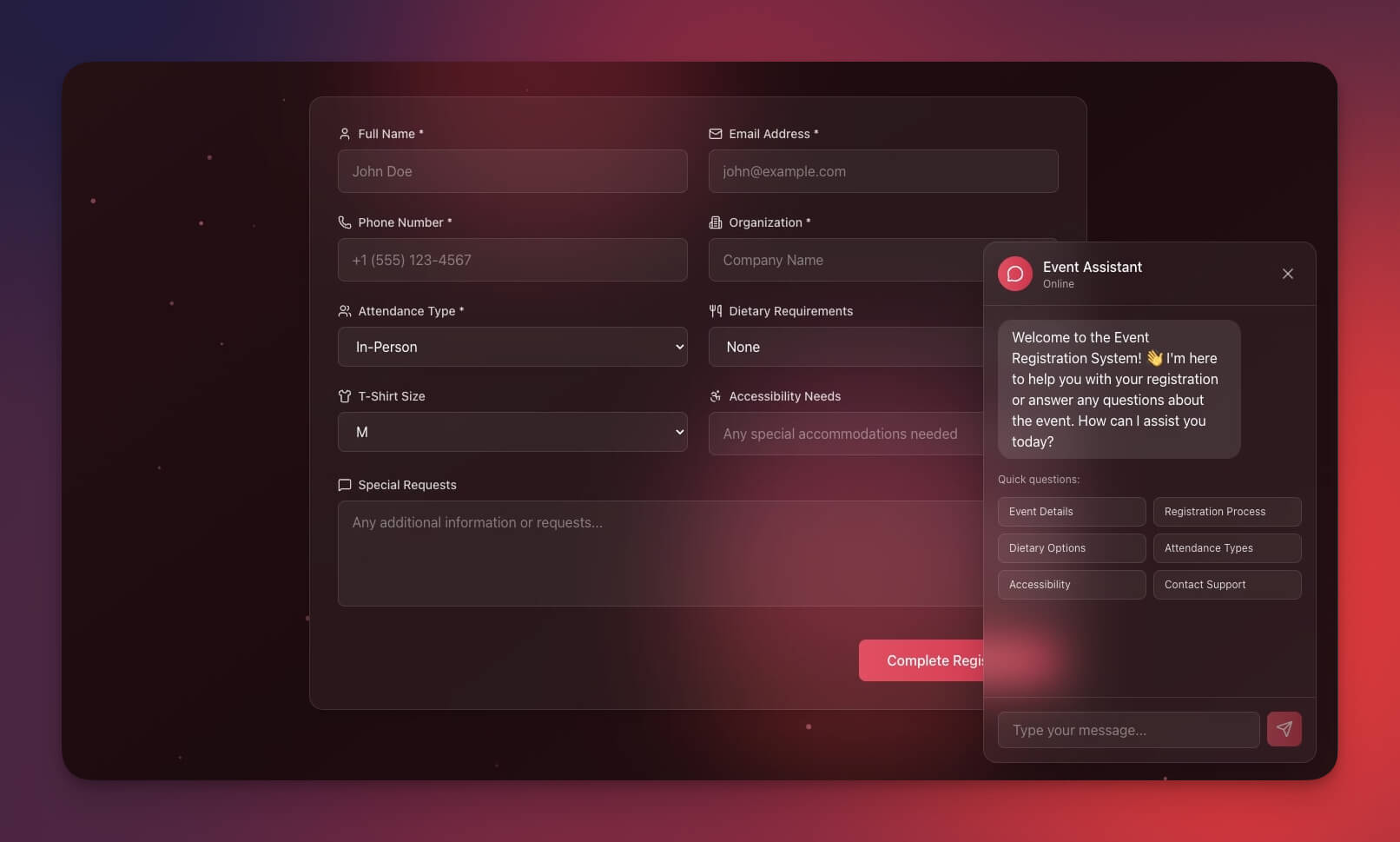
The Event Portal is a complete event registration and attendee management system designed to help event organizers, community managers, and corporate event teams run gatherings of any size without manual spreadsheet tracking or expensive event platforms. If you've ever lost track of RSVPs or spent hours sending reminder emails, this app solves it.
What's Inside
Attendee lifecycle — from registration to post-event follow-up:
  Registration          Confirmation         Event Day
  ───────────           ────────────         ─────────  ┌─────────┐    ✉️     ┌─────────┐    📅    ┌─────────┐
│  RSVP   │ ──────►  │Confirmed│ ──────►  │Check-In │
│  Form   │          │ + Invite│          │  List   │
└─────────┘          └─────────┘          └─────────┘
│                     │                    │
▼                     ▼                    ▼
┌─────────┐          ┌─────────┐          ┌─────────┐
│Waitlist │          │Reminders│          │Attended │
│ Queue   │          │ 7d/3d/1d│          │  / No   │
└─────────┘          └─────────┘          │  Show   │
│                                    └─────────┘
│    ┌─── spot opens ───┐                 │
└───►│ Auto-promote     │                 ▼
└──────────────────┘           ┌─────────┐
│Thank You│
│+ Survey │
└─────────┘
🎟️ Event Registration Forms
Public-facing registration pages collect all attendee information in structured fields: name, email, company, dietary restrictions, +1 guests, custom questions. Each event gets its own form with unique fields. Mobile-responsive, embeddable, or shareable as a standalone link.
📊 RSVP Tracking Dashboard
A centralized view shows registration status for all attendees:
| Status | Description | Visual Indicator |
|---|---|---|
| Confirmed | Paid or committed | 🟢 Green |
| Pending | Registered, not confirmed | 🟡 Yellow |
| Declined | Opted out | 🔴 Red |
| Waitlist | Capacity full, queued | 🟠 Orange |
| Attended | Checked in at event | ✅ Check |
Filter and segment attendees by status, registration date, or custom tags. Visual indicators show registration trends and total confirmed count vs. capacity.
💬 Automated Follow-Up Sequences
Never manually send event communications again. Pre-built automation sequences handle every touchpoint:
- Instant confirmation upon registration with calendar invite
- Reminder emails at 7 days, 3 days, and 1 day before event
- Day-of reminder with directions, parking info, and check-in instructions
- Post-event thank-you email with feedback survey
- Follow-up sequence promoting future events to past attendees
👥 Attendee Management Tools
Check in attendees at the door with a mobile-friendly list. Mark no-shows automatically. Export attendee lists to CSV for name badges or meal counts. Send targeted messages to specific segments (VIPs, first-time attendees, waitlist). Track attendance history across multiple events.
📈 Event Analytics
Post-event reports show registration conversion rates (invites → confirmed), attendance rates (confirmed → showed up), peak registration times, and demographic breakdowns. Optimize future event marketing based on data, not guesses.
Who It's For
Community organizers running meetups, networking events, and member gatherings.
Corporate event teams managing conferences, training sessions, and team offsites.
Non-profits organizing fundraisers, volunteer events, and awareness campaigns.
Venue managers tracking event RSVPs and managing multiple concurrent events.
Key Benefits
✅ Complete registration system — From signup form to post-event follow-up in one place
✅ Automated communications — Confirmations, reminders, and thank-yous send automatically
✅ Real-time attendance tracking — Know exactly who's confirmed, pending, or on waitlist
✅ Own your attendee data — Build lasting relationships, not rented lists on Eventbrite
🚀 Why Genesis Apps Are Different
These aren't just templates you fill in manually. They're complete, working systems built with Taskade's Workspace DNA:
🧠 Memory (Projects)
Every app includes a structured database that stores your data — bookings, appointments, RSVPs, attendee details. Data persists, searchable, and accessible across your entire workspace.
🤖 Intelligence (AI Agents)
Pre-configured AI agents provide smart assistance:
- Answer questions about your booking data
- Suggest optimal time slots based on patterns
- Draft confirmation and reminder messages
- Analyze attendance trends and no-show rates
⚡ Execution (Automations)
Built-in workflow automation keeps things moving:
- Trigger actions when bookings are made
- Send notifications at the right time
- Create confirmations and reminders automatically
- Generate reports on schedule
No code required. No complicated setup. Just clone, customize, and deploy.
🎯 Get Started
Each app is ready to use in under 5 minutes:
- Clone the app — Click any clone link above to copy it to your workspace
- Customize the structure — Adjust fields, views, and workflows to match your needs
- Train the AI agents — Add your own instructions and booking policies
- Enable automations — Turn on the workflows you want to use
- Share with your clients — Publish your booking page and start accepting signups
✨ Want to be featured next week?
Publish your app to the community and send us your link. We're always looking for innovative solutions built by the Taskade community.
▶ Explore More Apps | Start Building →
Related Reading
- Genesis App Highlights: Dashboards — CRM, team capacity & project portal apps
- 3 Finance Apps You Can Clone Today — Invoice, meeting costs & license manager
- Ultimate Guide to Taskade Genesis 2026 — Complete Genesis feature reference
- 10 AI Booking Systems You Can Clone — More booking app examples
- What Are AI Agents? — AI agents explained with use cases
- Best AI App Builders 2026 — App builder tools ranked
Frequently Asked Questions
What are the three booking apps in this article?
Class Booking Portal (class schedules, instant signups, admin workspace), Appointment Booking System (time slot scheduling, auto-confirmations, smart reminders), and Event Portal (RSVP tracking, attendee management, automated follow-ups). All three are complete Genesis apps ready to clone and customize.
How is a Genesis booking app different from Calendly or Eventbrite?
Genesis apps give you complete ownership of your data and booking flow. Unlike Calendly ($10-15/month per user) or Eventbrite (per-ticket fees), Genesis apps have no per-user pricing, include AI agents for smart scheduling suggestions, and let you customize every field, automation, and confirmation message. You own the system instead of renting it.
Can I customize these booking apps after cloning?
Yes. Clone any app, then modify the booking flow, add custom fields, adjust confirmation emails, train AI agents with your data, and publish your customized version back to the community.
How does the Class Booking Portal handle signups and capacity?
The Class Booking Portal displays class schedules with pricing and availability, collects signup information through forms, sends instant confirmations, and automatically closes registration or adds people to a waitlist when capacity is reached. An admin workspace lets you manage participants and track attendance.
What automation workflows are included in the Appointment Booking System?
The Appointment Booking System includes six pre-configured automations: send confirmation email with calendar invite immediately after booking, trigger reminder notifications 24 hours and 1 hour before the appointment, create preparation checklists, notify team members, flag at-risk no-shows, and generate weekly appointment summaries.
How does the Event Portal track RSVPs and attendees?
The Event Portal collects registration details through forms, tracks RSVP status across five stages (Confirmed, Pending, Declined, Waitlist, Attended), manages attendee lists, and sends automated follow-ups including reminders 7 days, 3 days, and 1 day before the event plus post-event thank-you messages.
Can I integrate these booking apps with Google Calendar or Outlook?
Yes. The Appointment Booking System generates ICS calendar invites automatically. All three apps are fully customizable, so you can add calendar integration fields and sync bookings with Google Calendar, Outlook, or Apple Calendar using Taskade automations.
How do I clone a Genesis app?
Click the clone link on any app, and it will be copied to your Taskade workspace. From there, you can modify the structure, adjust fields, train AI agents with your data, and make it your own in minutes.
What is Workspace DNA and how does it apply to booking apps?
Workspace DNA is Taskade's three-pillar architecture: Memory (structured data that persists and is searchable), Intelligence (AI agents that answer questions and suggest actions), and Execution (automations that trigger confirmations, reminders, and reports). Every Genesis booking app includes all three pillars working together.
Do I need coding skills to use these booking apps?
No. All Genesis apps are no-code solutions. Clone, customize through the visual interface, train AI agents with natural language, and deploy without writing any code.
See you next week 👋
Stay connected: Reddit | FB Group | Tutorials | YouTube | Taskade Blog
— John Xie, Taskade
One prompt. One app. One living workspace.
Projects remember. Agents learn. Work flows.