







TL;DR: The time-blocking app market is projected to reach $4.24 billion by 2033 (from $1.64B in 2024), driven by AI auto-scheduling that builds your day from tasks and priorities. Research shows time blocking increases productivity by 47-50% and reduces stress by 42%. The 13 best apps range from free (Google Calendar, Clockwise, Taskade) to $49/seat (Motion). For teams that want AI-powered time blocking with project management, Taskade Genesis is free to start, then $10/month billed annually. Try it free →
What Are the Best Time Blocking Apps in 2026?
The best time blocking apps in 2026 combine AI auto-scheduling with calendar management to build your day from tasks and priorities — not just display static time slots. Motion ($19/seat/month annual for 3+ users) dynamically reschedules your entire day as things change. Reclaim.ai (free tier, 320,000+ users, acquired by Dropbox) protects focus time and habits with AI scheduling. And Taskade Genesis (free to start, then $10/month billed annually) builds complete time management systems with AI agents that prioritize, schedule, and track your work.
The 2026 shift: AI doesn't just block time — it manages your entire day. Motion's auto-scheduler moves tasks around meetings dynamically. Reclaim.ai defends focus blocks from meeting creep. Google Calendar's Gemini suggests meeting times from email context. Clockwise rearranges flexible meetings to create uninterrupted focus periods. The era of manually dragging calendar blocks is giving way to AI that builds and rebuilds your schedule in real time.
The science backs this up: Microsoft's internal research found engineers who protected at least one 2-hour focus block daily completed complex tasks 47% faster with 38% fewer bugs. The University of Southern California found a 50% overall productivity increase from structured time blocking. And context switching costs 20-80% of productive time depending on task complexity.
Quick Comparison: Time Blocking App Pricing & Features
| App | Starting Price | AI Scheduling | Best For |
|---|---|---|---|
| 🥇 Taskade Genesis | Free / $10/mo | AI Agents for scheduling + project mgmt | Workspace-native time blocking |
| 🥈 Motion | $19/seat (annual 3+) | Full AI auto-scheduling | Automated daily planning |
| 🥉 Reclaim.ai | Free | AI focus time + habits | Protecting focus blocks |
| 4. Clockwise | Free | AI meeting rearrangement | Team calendar optimization |
| 5. Sunsama | $16/mo (annual) | Guided daily planning | Mindful daily planning ritual |
| 6. Google Calendar | Free | Gemini AI scheduling | Simple free time blocking |
| 7. Fantastical | $6.99/mo | Natural language input | Apple + Windows calendar |
| 8. Akiflow | $15/mo | AI-assisted planning | Unified inbox + calendar |
| 9. TickTick | Free / $36/yr | Basic AI | Task + calendar + Pomodoro |
| 10. Todoist | Free / $5/mo | AI categorization | Task-first time blocking |
| 11. Structured | Free / $30/yr | None (visual timeline) | Visual day planning |
| 12. Notion Calendar | Free | AI blocks | Notion workspace users |
| 13. Apple Calendar | Free | Apple Intelligence (coming) | Apple ecosystem users |
⏳ What Is Time Blocking?
Time blocking is a productivity method where you divide your day into specific blocks of time, each dedicated to a particular task or activity. Instead of working from an open-ended to-do list and switching between tasks reactively, you assign each task a fixed time slot on your calendar — creating a concrete plan for your day before it begins.
The concept predates modern productivity culture by centuries. Benjamin Franklin used a daily schedule with 5 AM-10 PM time blocks, each assigned to specific activities. Cal Newport, author of Deep Work, popularized time blocking for knowledge workers, arguing it's "the single most important productivity technique" for producing high-quality creative work. Elon Musk famously schedules his day in 5-minute blocks.
The Science Behind Time Blocking
| Finding | Source | Impact |
|---|---|---|
| Engineers with 2-hour focus blocks complete tasks 47% faster | Microsoft Research | 38% fewer bugs |
| 50% overall productivity increase with structured blocking | University of Southern California | Across professional roles |
| 30% increase in task completion rates | UC Berkeley | Daily implementation |
| 73% better work-life balance | Frontiers in Education | 42% stress reduction |
| 53% more tasks accomplished | Lifehack Method | vs. open to-do lists |
| 20-80% productivity loss from context switching | University of California | Simple to complex tasks |
| 40% less decision fatigue | Columbia University | Structured routines |
Only 5% of professionals formally practice time blocking, yet 23% schedule everything in their calendar — many are time blocking without knowing the term. The biggest barrier is setup effort, which is exactly why AI scheduling tools are transforming the practice.
📈 How to Time Block Your Schedule (2026 Method)
Step 1: Capture Everything
Start by listing every task, meeting, and commitment for your day. Use a tool like Taskade to brain-dump all obligations, then let AI agents categorize and prioritize them.
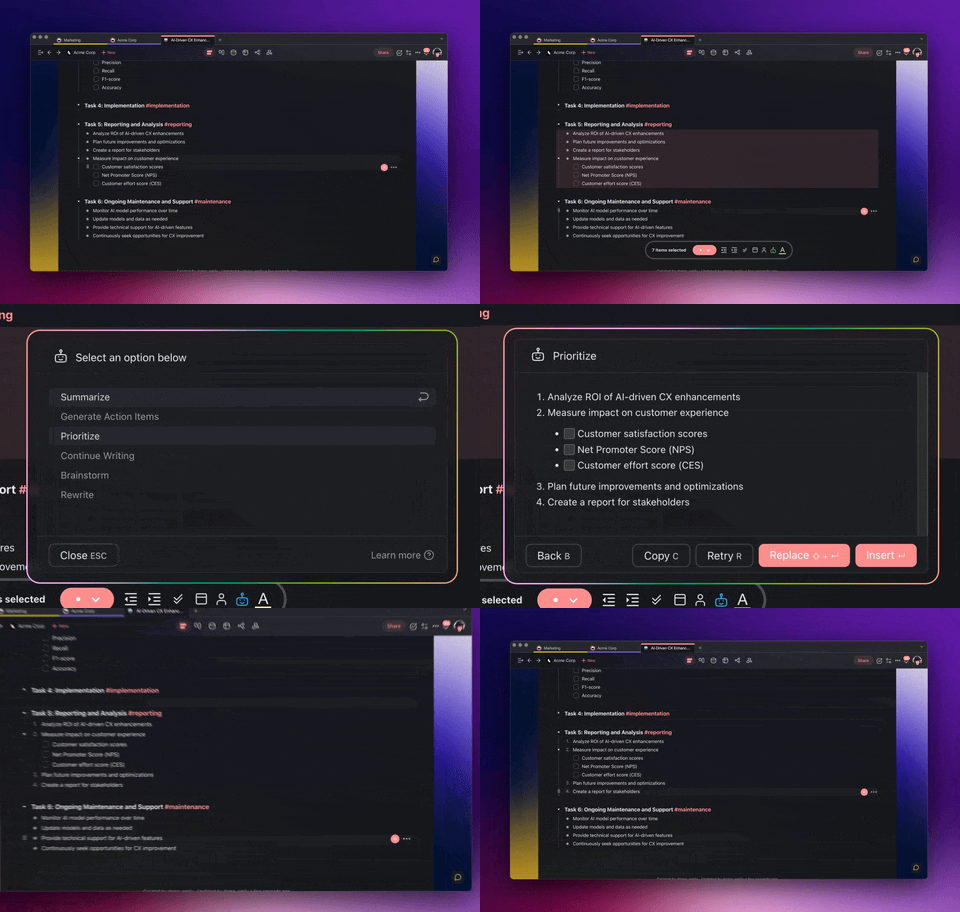
Step 2: Estimate Durations (Add 20% Buffer)
For each task, estimate how long it will take — then add 20%. Research shows we consistently underestimate task duration (planning fallacy). AI tools like Motion learn your actual completion patterns and adjust estimates over time.
Step 3: Identify Peak Energy Hours
Block your most cognitively demanding work during peak energy — typically 9-11 AM for most people. Schedule routine tasks (email, admin, calls) during energy dips (early afternoon). Taskade's Calendar view lets you visualize this across multiple project views.
Step 4: Create Time Blocks
Assign each task to a specific time slot. Group similar tasks into batches (all emails in one 30-minute block, all calls in another). Leave 15-30 minute buffers between deep work blocks for transitions.
Step 5: Protect Focus Time
This is where AI tools shine. Clockwise and Reclaim.ai automatically defend your focus blocks from meeting invitations. Motion reschedules tasks dynamically when meetings shift. Manual time blocking breaks down when calendars fill with meetings — AI keeps your focus blocks intact.
Step 6: Review and Adjust Weekly
At the end of each week, review what worked. Did you overestimate or underestimate task durations? Were your energy peaks where you expected? Adjust next week's blocks accordingly. Taskade's AI agents can analyze your patterns and suggest optimizations.
🏆 The 13 Best Time Blocking Apps
🥇 1. Taskade Genesis — Workspace-Native Time Blocking With AI Agents
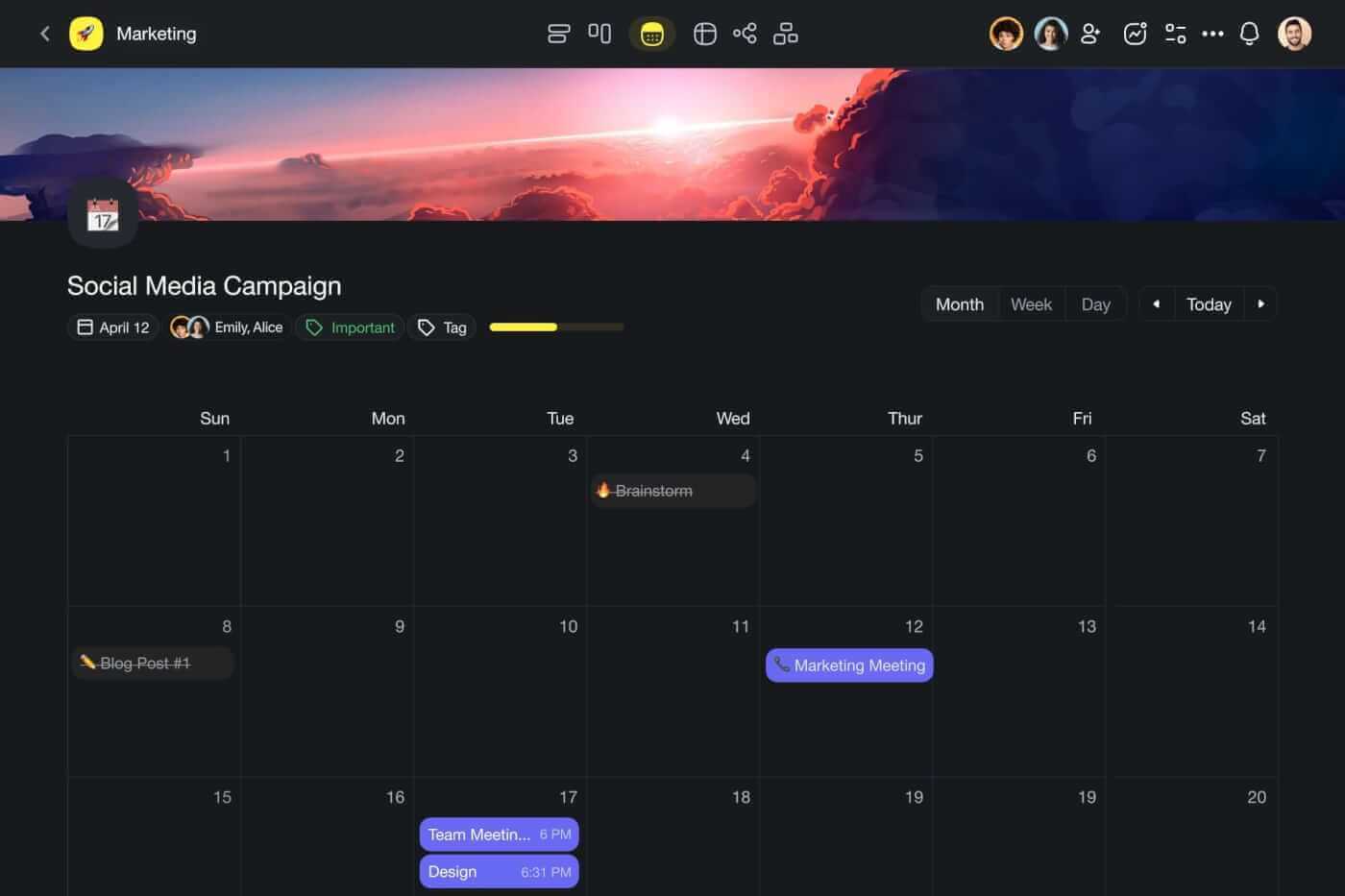
Taskade Genesis approaches time blocking differently from dedicated calendar tools. Instead of optimizing a single calendar, Genesis builds complete time management systems — task boards, prioritized schedules, Pomodoro timers, habit trackers, and analytics dashboards — all inside a workspace where AI agents handle prioritization and scheduling while you focus on executing.
This is vibe coding for time management. Need a weekly planner that auto-prioritizes by deadline and energy level? A Pomodoro system that tracks focus sessions and suggests break patterns? A team schedule that coordinates across time zones? Describe it, and Taskade Genesis builds it.
Key Features for Time Blocking
| Feature | Description |
|---|---|
| 📅 Global Calendar | Unified calendar with two-way Google Calendar sync, drag-and-drop time blocks |
| 🤖 AI Scheduling Agents | Generate prioritized schedules, estimate durations, create time blocks automatically |
| 🎯 Multiple Project Views | List, Board, Calendar, Table, Mind Map, Gantt, Org Chart |
| ⏱️ Built-in Pomodoro | Focus timer integrated directly with your task list |
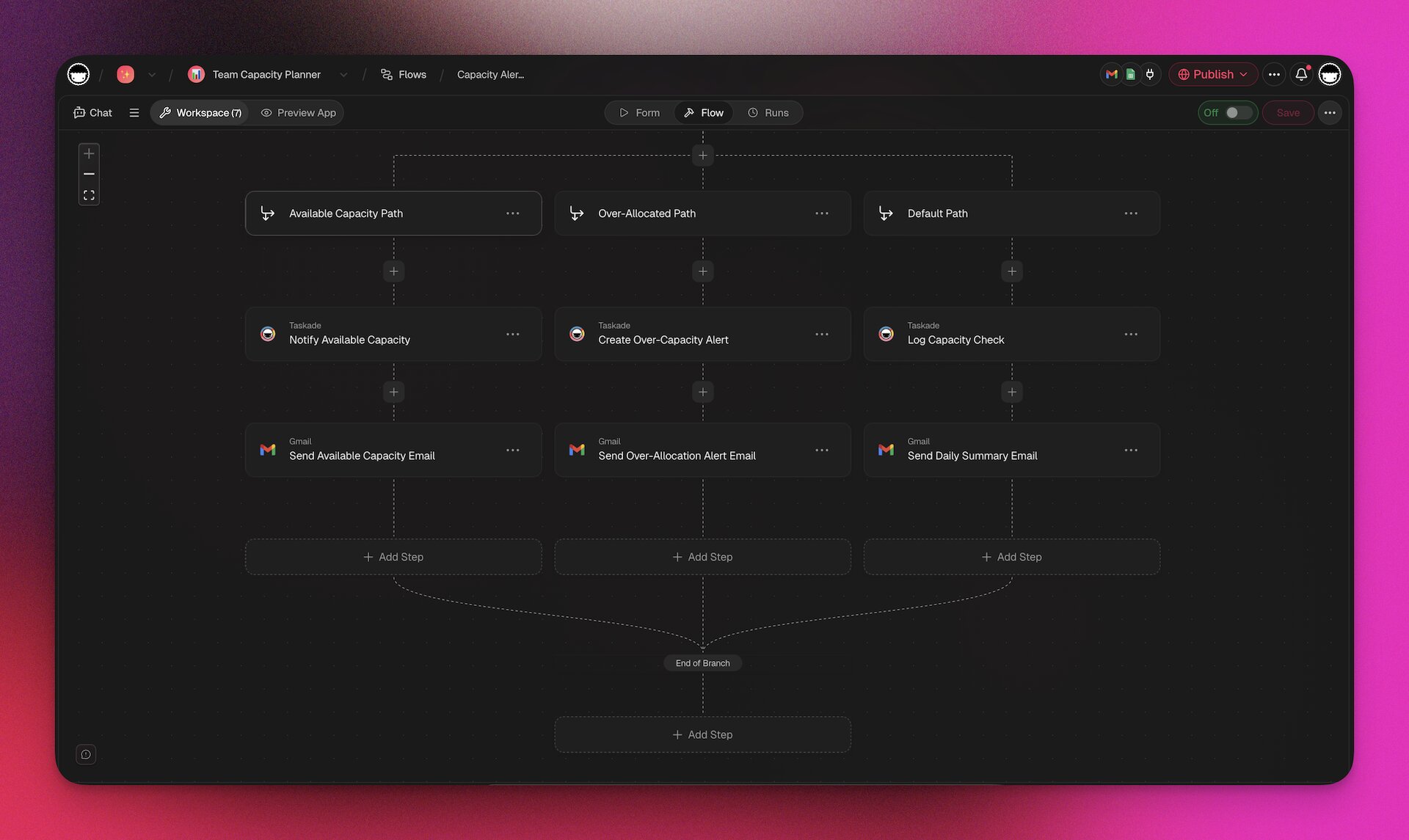
| ⚡ Automated Workflows | Trigger reminders, status updates, and follow-ups with 100+ integrations |
| 📱 Cross-Platform Sync | Desktop, mobile, and web — all in real time |
| 👥 Team Collaboration | Real-time editing with RBAC permissions |
| 📊 My Tasks Dashboard | Aggregate all tasks across projects into a unified daily view |
Taskade Pricing
| Plan | Price | Time Blocking Capabilities |
|---|---|---|
| 🟢 Free | $0 | AI agents, calendar views, basic projects |
| 🟣 Pro | $10/month (10 users) | Full AI agents, 100+ integrations, Genesis apps |
| 🟡 Business | $25/month | Team workspaces, admin controls, priority support |
Why Taskade Genesis wins for time blocking: Most time blocking apps manage one calendar. Taskade manages your entire workflow — tasks, projects, documents, and schedules — in one workspace where AI agents handle prioritization and automations handle reminders. A 10-person team costs $10/month. Compare to Motion Team at $120/month (10 users) or Sunsama at $160/month (10 users).
👉 Build your time blocking system → | Explore AI agents →
🥈 2. Motion — AI Auto-Scheduling ($19-49/seat)
Motion is the most aggressive AI auto-scheduler. You add tasks with deadlines and priorities, and Motion builds your entire daily schedule — moving tasks around meetings, adjusting when deadlines shift, and rescheduling dynamically as your day changes. It's the closest thing to having an AI executive assistant manage your calendar.
AI Scheduling Features
- Auto-scheduling engine: Assigns every task to a specific time slot based on priority, deadline, duration, and energy patterns
- Dynamic rescheduling: When a meeting runs over or a new task arrives, Motion rebuilds your remaining schedule automatically
- Meeting optimization: Finds optimal meeting times across team calendars, batching meetings to protect focus blocks
- Priority-based allocation: High-priority tasks get your best hours; low-priority tasks fill remaining gaps
- Project timeline management: Multi-week projects automatically split into daily work blocks
Motion Pricing (2026)
| Plan | Monthly | Annual | 3+ Users Annual |
|---|---|---|---|
| 🔵 Pro AI | $49/seat | $29/seat | $19/seat |
| 🟣 Business AI | $69/seat | $49/seat | $29/seat |
| 🟡 Team | $20/user | $12/user | — |
| ⚙️ AI Workplace | — | $29/mo (1 seat) | — |
7-day free trial. No free plan. 25% discount for students and nonprofits.
The Catch
Motion has no free plan — the 7-day trial is your only test drive. At $49/seat/month (monthly billing), it's one of the most expensive productivity tools available. The AI auto-scheduling requires trusting the algorithm with your entire day, which can feel disorienting if you prefer manual control. Some users find the rigid auto-scheduling too aggressive, with tasks being moved to times that don't match their energy patterns. For teams wanting AI scheduling with more manual control and project management, Taskade Genesis offers both at $10/month for 10 users.
Best for: Individuals and teams who want their calendar fully managed by AI with minimal manual intervention.
🥉 3. Reclaim.ai (Dropbox) — AI Focus Time Protection (320K+ Users)
Reclaim.ai was acquired by Dropbox in August 2024 and has grown to 320,000+ users across 43,000 companies. Unlike Motion's aggressive auto-scheduling, Reclaim takes a lighter approach: it protects focus time, habits, and personal tasks on your work calendar using AI scheduling that defends blocks from meeting creep.
AI Features
- Smart Focus Time: AI automatically blocks focus periods on your calendar, defending them from meeting invitations
- Habits: Schedule recurring activities (exercise, reading, lunch) that auto-move when conflicts arise
- Task scheduling: Import tasks from Todoist, Asana, Jira, or ClickUp and auto-block time for them
- Smart Meetings: AI finds optimal meeting times across multiple participants' calendars
- Buffer Time: Automatically adds travel or transition buffers between meetings
- Calendar Sync: Sync personal and work calendars without exposing private details
- Pomodoro timer: Built-in focus timer integrated with scheduled blocks
Reclaim.ai Pricing (2026)
| Plan | Price | Key Features |
|---|---|---|
| 🟢 Free | $0 | Basic AI scheduling, 1 calendar |
| 🔵 Starter | $8/user/month | Task integration, smart meetings |
| 🟣 Business | $12/user/month | Team analytics, advanced scheduling |
| 🟡 Enterprise | $18/user/month | SSO, admin controls, API |
Reclaim launched full Microsoft Outlook support in August 2025, expanding beyond Google Calendar-only users.
The Catch
Reclaim's lighter-touch approach means it doesn't fully manage your day like Motion — it protects blocks and schedules tasks, but you still need to decide priorities. The free plan is limited to 1 calendar and basic features. As part of Dropbox, future pricing changes are possible. The task integration requires connecting to external tools (Todoist, Asana, etc.) rather than managing tasks natively. For teams wanting task management and time blocking in one platform with AI agents, Taskade combines both capabilities.
Best for: Knowledge workers who want AI to protect their focus time while keeping control of their schedule.
4. Clockwise — AI Calendar Optimization (Free Unlimited Users)
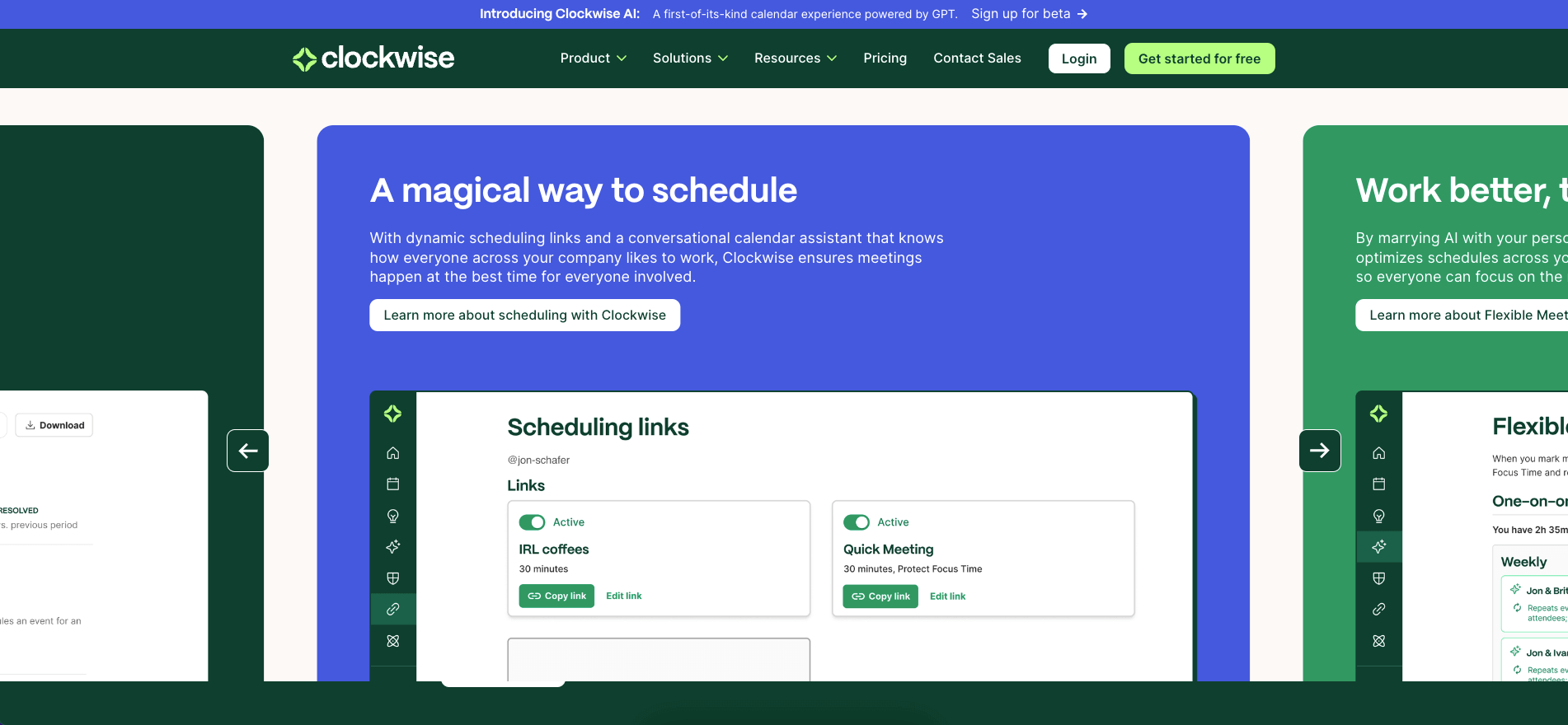
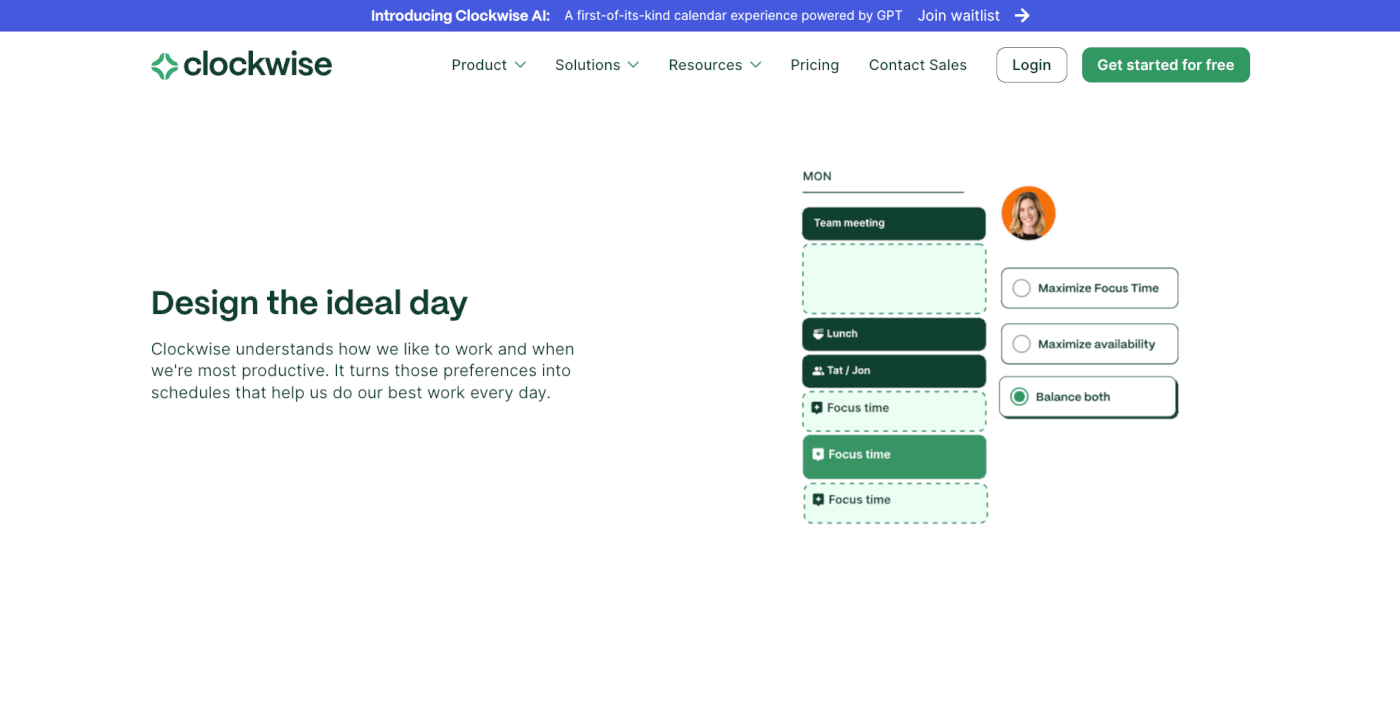
Clockwise uses AI to optimize team calendars — automatically rearranging flexible meetings to create larger blocks of uninterrupted focus time. The Prism AI interface (launched 2024) enables conversational scheduling: ask "Find 30 minutes for me and the design team early next week" and Prism analyzes all calendars to present optimal options.
AI Features
- Focus Time creation: AI rearranges flexible meetings to create uninterrupted focus blocks
- Prism AI (conversational): Schedule and reschedule through natural language commands
- Lunch holds: Automatically protects lunch time on your calendar
- Meeting breaks: Ensures buffers between back-to-back meetings
- Personal calendar sync: See personal events without sharing details with colleagues
- Team analytics: Understand how your team spends time across meeting vs. focus categories
Clockwise Pricing (2026)
| Plan | Price | Key Features |
|---|---|---|
| 🟢 Free | $0 (unlimited users) | Lunch holds, meeting breaks, personal sync |
| 🔵 Teams | $6.75/user/month | Focus Time, Prism AI, team analytics |
| 🟣 Business | Custom | Advanced analytics, admin controls |
| 🟡 Enterprise | Custom | SSO, compliance, dedicated support |
The Catch
Clockwise focuses on meeting optimization rather than task-based time blocking. It rearranges meetings to create focus time, but it doesn't schedule your tasks into those blocks. You still need a separate task manager. The free plan is generous but doesn't include Focus Time creation (the core feature) or Prism AI. For teams wanting meeting optimization plus task scheduling with AI agents, Taskade Genesis handles both in one workspace.
Best for: Teams with meeting-heavy calendars who need AI to carve out focus time.
5. Sunsama — Guided Daily Planning Ritual ($16/month)
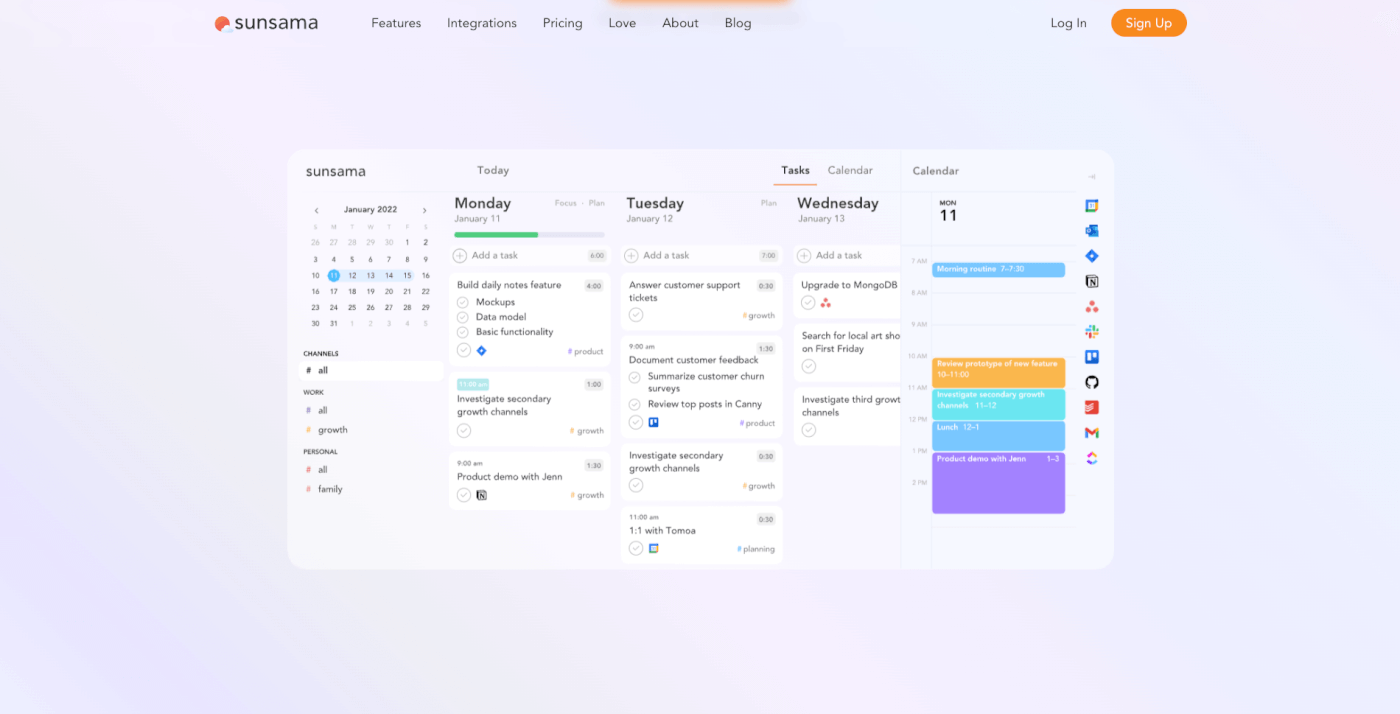
Sunsama takes a mindful approach to daily planning. Each morning, a guided ritual walks you through reviewing your calendar, pulling in tasks from connected tools, estimating durations, and creating your daily plan. It's less about AI automation and more about intentional, human-driven daily planning with time blocking at its core.
Key Features
- Guided daily planning: Morning ritual walks you through creating your day's schedule
- Task import: Pull tasks from Todoist, Asana, Trello, Jira, Linear, GitHub, Gmail, Slack
- Timeboxing: Drag tasks onto your calendar to create time blocks with estimated durations
- Daily shutdown: End-of-day review to move unfinished tasks and reflect on productivity
- Weekly review: Assess time allocation across work categories
- Focus mode: Distraction-free view showing only your current task
- Calendar integration: Two-way sync with Google Calendar and Outlook
Sunsama Pricing (2026)
| Plan | Monthly | Annual |
|---|---|---|
| 🔵 Individual | $20/month | $16/month |
| 🟣 Team | $22/user/month | $18/user/month |
14-day free trial. No free plan.
The Catch
Sunsama has minimal AI — it relies on human intentionality rather than algorithmic scheduling. At $16-20/month for a single user, it's expensive for what's essentially a guided daily planner. No free plan. Limited to daily planning (not great for multi-week project scheduling). The ritual-based approach adds overhead that some users find slows them down rather than speeding up. For teams wanting guided planning with AI agents that actively schedule and prioritize, Taskade offers more capability starting free, with Pro from $10/month billed annually.
Best for: Individuals who value mindful, intentional daily planning over AI-driven automation.
6. Google Calendar — Free AI Scheduling With Gemini
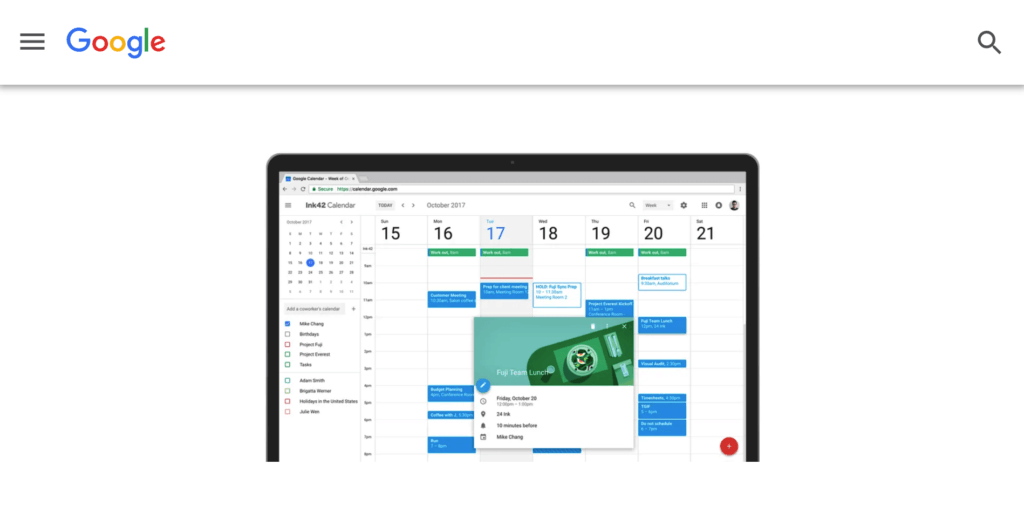
Google Calendar remains the most widely used digital calendar, and recent Gemini AI integrations are turning it into a genuine time blocking tool. The "Help me schedule" feature (launched October 2025) uses AI to suggest meeting times based on your availability and email context.
AI Features (2025-2026)
- Gemini "Help me schedule": AI detects scheduling intent in emails and suggests available time slots
- Multi-calendar awareness (2026): Gemini now sees work, personal, and shared calendars — not just your default
- Smart suggestions: AI recommends meeting durations and times based on participant preferences
- Color-coded time blocks: Assign colors to categories (focus work, meetings, personal) for visual time blocking
- Drag-and-drop scheduling: Quickly move blocks as your day shifts
- Google Tasks integration: Turn tasks into time blocks on your calendar
Google Calendar Pricing
| Plan | Price | AI Features |
|---|---|---|
| 🟢 Free (Personal) | $0 | Basic scheduling, limited Gemini |
| 🔵 Google Workspace | $7-18/user/month | Full Gemini AI scheduling, collaboration |
The Catch
Google Calendar's time blocking is still manual — you create the blocks yourself. Gemini AI helps with meeting scheduling but doesn't auto-schedule tasks or protect focus time like Reclaim.ai or Clockwise. No task management, no project views, no team collaboration beyond calendar sharing. For teams wanting Google Calendar integration with AI-powered time blocking and project management, Taskade's two-way Google Calendar sync bridges the gap while adding AI agents and multiple project views.
Best for: Anyone wanting free, simple time blocking with growing AI capabilities.
7. Fantastical — Smart Calendar With Natural Language (Apple + Windows)
Fantastical by Flexibits is the premium calendar app known for natural language event creation — type "Meeting with Sarah tomorrow at 3pm for 30 minutes at the coffee shop" and it parses every detail automatically. The bootstrapped company (9 employees, no funding) launched Windows support in October 2024, expanding beyond its Apple-native roots.
Key Features
- Natural language input: Create events and time blocks by typing in plain English
- Calendar sets: Switch between different calendar combinations instantly (work, personal, projects)
- Scheduling proposals: Send availability to external contacts without sharing your full calendar
- Tasks integration: View and schedule tasks alongside calendar events
- Weather integration: See weather forecasts inline with outdoor activities
- Widgets and complications: Apple Watch, iPad, iPhone, and Mac widgets for quick access
- Multi-platform: macOS, iOS, iPadOS, watchOS, and now Windows
Fantastical Pricing (2026)
| Plan | Price |
|---|---|
| 🟢 Free | $0 (limited features) |
| 🔵 Premium | $6.99/month or $56.99/year |
| 🟣 Family | $9.99/month (up to 5 members) |
The Catch
Fantastical has no AI auto-scheduling — it's a beautifully designed calendar, not an AI scheduling assistant. The premium subscription is required for core features like calendar sets and scheduling proposals. No team collaboration beyond calendar sharing. No task management or project views. For users wanting Fantastical's elegance with AI scheduling and project management, pairing it with Taskade covers both needs.
Best for: Apple and Windows users wanting a premium calendar experience with natural language input.
8. Akiflow — Unified Inbox + Calendar ($15/month)
Akiflow (Y Combinator-backed, founded in Padua, Italy) unifies tasks from multiple tools into a single inbox, then lets you drag them onto your calendar for time blocking. It's designed for power users who work across many apps and need one place to manage everything.
Key Features
- Universal inbox: Import tasks from Gmail, Slack, Todoist, Asana, Notion, Jira, and 20+ tools
- Drag-to-calendar: Pull tasks from your inbox directly onto time blocks
- Keyboard-driven: Power user shortcuts for rapid scheduling
- Two-way calendar sync: Google Calendar and Outlook integration
- Command bar: Quick-add tasks and events from anywhere (global shortcut)
- Daily planning view: Focused view combining tasks and calendar for today
Akiflow Pricing (2026)
| Plan | Price |
|---|---|
| 🔵 Pro | $15/month ($150/year) |
7-day free trial. No free plan.
The Catch
Akiflow is a small startup (~23 employees, $1.93M funding) with a limited user base. The single pricing tier offers no team features or collaboration. No AI auto-scheduling — time blocking is fully manual (drag tasks to calendar). The lack of a free plan limits adoption. For users wanting Akiflow's unified inbox concept with AI scheduling and team collaboration, Taskade's integrations pull in tasks from 100+ tools while AI agents handle scheduling.
Best for: Power users juggling tasks across many apps who want keyboard-driven manual time blocking.
9. TickTick — Task + Calendar + Pomodoro Combined
TickTick combines task management, calendar scheduling, habit tracking, and Pomodoro timers in one app. The calendar view integrates tasks and events seamlessly, making it a practical all-in-one time blocking solution for individuals.
Key Features
- Calendar view: Unified calendar showing tasks and events together
- Pomodoro timer: Built-in focus timer with customizable intervals and break patterns
- Habit tracker: Track recurring activities with streaks and statistics
- Duration estimates: Set expected duration for each task, visible in calendar view
- Smart date parsing: Natural language input for task creation ("meeting tomorrow at 3pm")
- Eisenhower Matrix: Priority matrix view for task categorization
- Cross-platform: iOS, Android, macOS, Windows, web, browser extensions
TickTick Pricing (2026)
| Plan | Price |
|---|---|
| 🟢 Free | $0 (limited features) |
| 🔵 Premium | $35.99/year ($3/month) |
The Catch
TickTick has basic AI features — no auto-scheduling, no focus time protection, no dynamic rescheduling. The free plan lacks calendar view and some features. More focused on personal productivity than team collaboration. For teams wanting TickTick's combined approach with AI agents and collaboration, Taskade offers task management, calendar views, Pomodoro timers, and AI agents in one workspace.
Best for: Individuals wanting task management, habit tracking, and Pomodoro timers in one app.
10. Todoist — Task-First Time Blocking (44M+ Users)
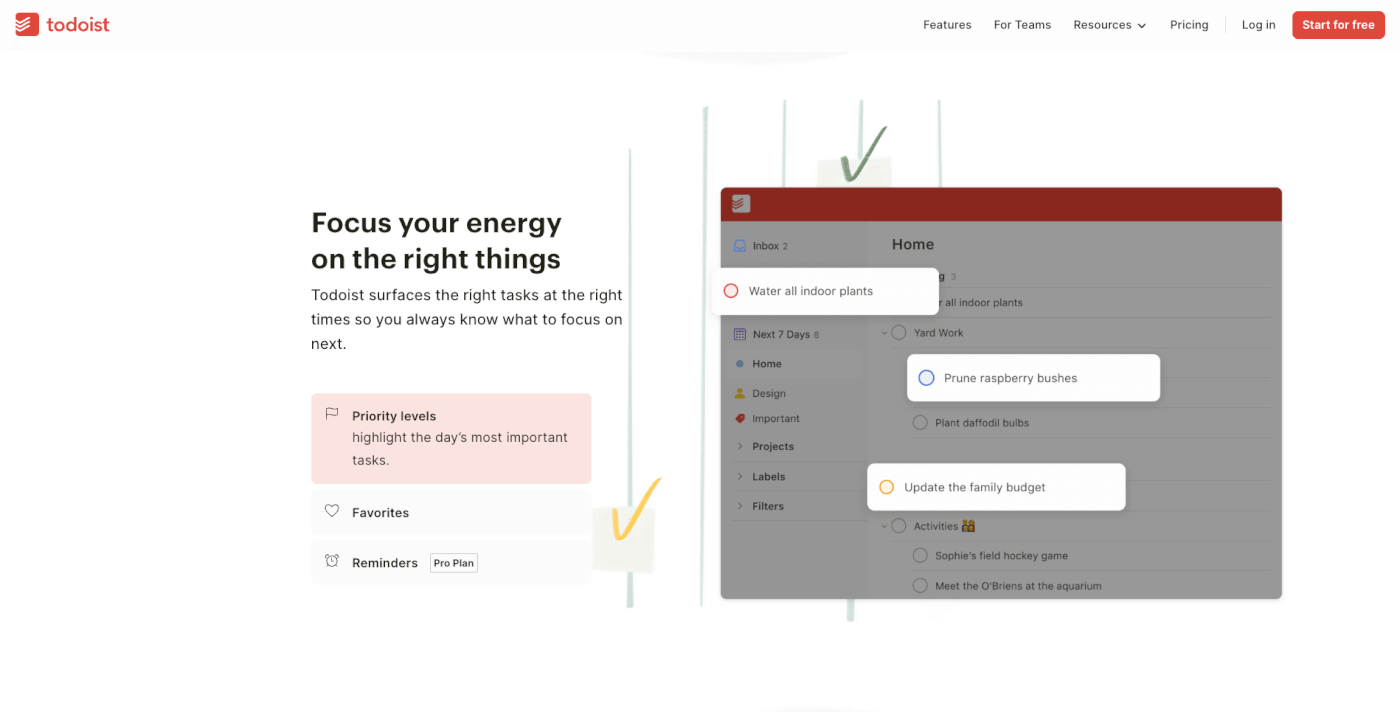
Todoist is one of the most popular task managers with 44 million+ users, and recent updates have made it a more capable time blocking tool. Calendar integrations with Google Calendar, Outlook, and Apple Calendar allow you to schedule tasks as time blocks, while Todoist's AI features help categorize and prioritize.
Key Features
- Task management: Natural language task creation with due dates, priorities, and labels
- Calendar integrations: Two-way sync with Google Calendar, Outlook (tasks appear as events)
- Boards view: Kanban-style project visualization
- AI categorization: Auto-suggest projects, labels, and priorities for new tasks
- Filters and views: Custom filtered views for different contexts (work, personal, urgent)
- Templates: Pre-built project templates for recurring workflows
- Collaborations: Shared projects with task delegation and comments
Todoist Pricing (2026)
| Plan | Price |
|---|---|
| 🟢 Free | $0 (5 projects, 5 collaborators) |
| 🔵 Pro | $5/month ($48/year) |
| 🟣 Business | $8/user/month ($72/user/year) |
The Catch
Todoist doesn't have a built-in calendar view — you need to rely on third-party calendar integrations for time blocking. No AI auto-scheduling (tasks don't automatically find calendar slots). The free plan limits you to 5 active projects. For users wanting Todoist's task management with native calendar views and AI scheduling, Taskade offers both plus AI agents, free to start, then $10/month billed annually.
Best for: Task-focused professionals who want to integrate their to-do list with external calendar time blocking.
11. Structured — Visual Day Planner (1M+ Monthly Users)
Structured is the #1 most downloaded day planner in the Apple App Store with 1 million+ monthly planners and 1.9 million total downloads. The app combines a visual timeline with tasks, habits, and calendar events in a single view.
Key Features
- Visual timeline: Color-coded timeline showing your entire day at a glance
- Calendar integration: Import events from Apple Calendar, Google Calendar, Outlook
- Habit tracker: Recurring tasks with visual progress tracking
- Subtasks: Break larger tasks into manageable steps
- Templates: Reusable day templates for recurring schedules
- Web app: Launched August 2024 alongside native iOS and Android apps
- Widgets: Home screen and lock screen widgets for quick viewing
Structured Pricing (2026)
| Plan | Price |
|---|---|
| 🟢 Free | $0 (core features) |
| 🔵 Pro | $29.99/year or $2.99/month |
The Catch
Structured has no AI features — time blocking is entirely manual. No team collaboration, no project management, no integrations beyond calendar sync. Limited to individual daily planning. For users wanting Structured's visual approach with AI scheduling and team features, Taskade's Calendar view offers visual time blocking plus AI agents and collaboration.
Best for: Individuals wanting a clean, visual daily planner with timeline view.
12. Notion Calendar — Workspace-Connected Scheduling
Notion Calendar (formerly Cron, acquired by Notion in 2022) integrates directly with Notion's workspace — linking calendar events to Notion databases, projects, and documents. For teams already in the Notion ecosystem, it provides contextual time blocking.
Key Features
- Notion database linking: Connect calendar events to Notion projects and databases
- Multi-calendar view: Overlay personal and work calendars
- Scheduling links: Share availability with external contacts
- Command menu: Quick event creation and navigation
- Sidebar integration: Access Notion docs directly from calendar events
- Time zone support: Multi-timezone awareness for global teams
Notion Calendar Pricing
Included free with all Notion plans (Free, Plus $10/month, Business $18/month, Enterprise custom). See our Notion Review 2026 for full details.
The Catch
Notion Calendar has basic AI features but no AI auto-scheduling or focus time protection. It's most useful for teams already using Notion — limited value as a standalone tool. Taskade offers similar workspace + calendar integration with stronger AI agents and multiple project views at comparable pricing.
Best for: Teams already using Notion who want their calendar connected to their workspace.
13. Apple Calendar — Apple Intelligence Coming
Apple Calendar is pre-installed on every Apple device and integrates deeply with the ecosystem. While it's traditionally been a basic calendar, Apple Intelligence features are coming that will transform it into a smarter scheduling tool.
Current and Coming AI Features
- Screenshot-to-calendar (iOS 26): Apple Intelligence reads event details from screenshots and offers one-tap calendar creation
- Siri scheduling: Voice-based event creation and time block management
- Mayday Labs acquisition (April 2024): Apple acquired the AI calendar app Mayday, whose "Ideal Time Scheduling Engine" suggests optimal times for focus work based on working style analysis
- Cross-device sync: iCloud calendar sync across Mac, iPhone, iPad, Apple Watch
Apple Calendar Pricing
Free with all Apple devices. iCloud+ ($0.99-$12.99/month) for expanded storage.
The Catch
Apple Calendar's AI features are still rolling out — the Mayday acquisition hasn't fully materialized into shipping features yet. No task management, no project views, limited to Apple ecosystem (plus basic iCloud web access). For Apple users wanting AI scheduling now with project management, Taskade syncs with Apple Calendar while adding AI agents and multiple project views.
Best for: Apple ecosystem users who want a simple, free calendar with upcoming AI features.
The AI Scheduling Revolution
From Manual Blocking to AI-Managed Days
The biggest shift in time blocking for 2026 isn't better calendar UIs — it's AI that builds and manages your entire schedule.
| Manual Time Blocking (2020-2024) | AI Time Blocking (2025-2026) |
|---|---|
| Drag tasks onto calendar manually | AI assigns tasks to optimal time slots |
| Fixed blocks that break when meetings move | Dynamic rescheduling when schedule changes |
| No protection for focus time | AI defends focus blocks from meeting creep |
| Guess at task durations | AI learns your actual completion patterns |
| Ignore energy patterns | AI schedules hard work during peak hours |
| Manual weekly review | AI surfaces optimization insights proactively |
Time Management Market Growth
The market for time management and scheduling software is growing rapidly:
| Segment | 2024-2025 | Projection | CAGR |
|---|---|---|---|
| Time-blocking calendar apps | $1.64B | $4.24B (2033) | 9.4% |
| Time tracking software | $6.1B | $11.43B (2030) | 13.38% |
| AI scheduling tools | Growing 25%/year | — | ~25% |
| Calendar app market | $2.5B | $5.4B (2033) | 9.4% |
80% of businesses report productivity increases after implementing AI scheduling tools, with 60% noting a reduction in meeting scheduling time by at least 30 minutes per day.
How to Choose the Right Time Blocking App
By Scheduling Style
| If You Want... | Best Choice | Monthly Cost |
|---|---|---|
| Full AI auto-scheduling | Motion | $19-49/seat |
| AI focus time protection | Reclaim.ai | Free-$18/user |
| AI team calendar optimization | Clockwise | Free-$6.75/user |
| AI agents + project management | Taskade Genesis | Free-$10 |
| Guided daily planning | Sunsama | $16-20 |
| Free with AI | Google Calendar | Free |
| Visual day timeline | Structured | Free-$2.99 |
| Task-first blocking | Todoist | Free-$5 |
Cost Comparison: 5-Person Team
| App | Plan | Monthly Cost |
|---|---|---|
| Taskade Pro | Pro (10 users) | $10 |
| Clockwise | Teams (5 users) | $34 |
| Reclaim.ai | Business (5 users) | $60 |
| Sunsama | Team (5 users) | $90 |
| Motion | Team (5 users) | $60-100 |
| Todoist | Business (5 users) | $40 |
The Bottom Line
Time blocking transforms vague to-do lists into concrete daily plans — and AI makes it automatic. The right tool depends on whether you want full AI automation (Motion), gentle focus protection (Reclaim.ai), team optimization (Clockwise), or workspace-native scheduling with AI agents (Taskade Genesis).
Our recommendation:
| Scenario | Verdict |
|---|---|
| ⚡ AI agents + project management | Taskade Genesis — workspace-native time blocking |
| 🤖 Full AI auto-scheduling | Motion — AI builds your entire day |
| 🛡️ Focus time protection | Reclaim.ai — AI defends your deep work |
| 👥 Team calendar optimization | Clockwise — AI creates focus blocks for teams |
| 🧘 Mindful daily planning | Sunsama — guided morning ritual |
| 💰 Best free option | Google Calendar — Gemini AI + simple blocks |
The key insight: Time blocking works — 47-50% productivity increases and 42% stress reduction are well-documented. The barrier is setup effort, which AI scheduling tools now eliminate. Platforms like Taskade Genesis go further — combining time blocking with AI agents that prioritize tasks, automations that handle reminders, and multiple project views that visualize your schedule. Workspace DNA for time management: Memory (your task history and patterns) feeds Intelligence (AI agents that learn your productivity rhythms), Intelligence triggers Execution (automated scheduling and reminders), and Execution creates new Memory.
Ready to master your schedule?
👉 Build your time blocking system →
👉 Explore AI scheduling agents →
👉 Browse productivity templates →
🐑 Stop losing hours to meeting creep and context switching. Taskade Genesis builds complete time blocking systems from prompts — with AI agents that prioritize your tasks, automations that send reminders, and multiple project views that visualize your schedule. Research shows time blocking increases productivity by 47-50%. All for $10/month (10 users included).
💬 Frequently Asked Questions About Time Blocking Apps
What is time blocking?
Time blocking is a productivity method where you divide your day into specific blocks of time, each dedicated to a particular task or activity. Instead of working from an open-ended to-do list, you assign each task a fixed time slot. Microsoft's research showed engineers who protected 2-hour focus blocks completed tasks 47% faster with 38% fewer bugs. Cal Newport calls it the single most important productivity technique for knowledge workers.
Does time blocking actually work?
Yes. Multiple research studies confirm measurable benefits: 50% productivity increase (USC), 47% faster task completion with protected focus blocks (Microsoft), 30% higher task completion rates (UC Berkeley), 73% better work-life balance, and 42% stress reduction. Context switching costs 20-80% of productive time. Capital One's Focus Time program showed 13% faster project completion with 26% higher satisfaction.
What is the best free time blocking app?
Google Calendar offers the best free time blocking experience — unlimited calendars, color-coded events, drag-and-drop, and Gemini AI scheduling (October 2025). Clockwise provides free AI-powered lunch holds, meeting breaks, and calendar sync for unlimited users. Reclaim.ai offers a free tier with basic AI scheduling. Taskade Free includes AI agents for task prioritization plus calendar views. Structured offers a free visual timeline planner.
How do Motion and Reclaim.ai compare?
Motion ($19-49/seat annual) fully auto-schedules your day — assigning every task to specific time slots and dynamically rescheduling when things change. Reclaim.ai (free tier, 320,000+ users, Dropbox-owned) takes a lighter approach — protecting focus time, habits, and personal tasks with AI while keeping you in control. Motion is more aggressive and hands-off. Reclaim is gentler and preserves manual control. Both integrate with Google Calendar; Reclaim added full Outlook support in August 2025.
Can AI schedule my day automatically?
Yes. Motion fully auto-schedules your day from tasks and priorities. Reclaim.ai auto-blocks focus time and habits around meetings. Clockwise rearranges meetings to create focus blocks. Google Calendar's Gemini suggests meeting times from email context. Taskade's AI agents generate prioritized schedules. 80% of businesses report productivity increases from AI scheduling, with 60% saving 30+ minutes daily on scheduling.
How much do time blocking apps cost?
Free: Google Calendar, Clockwise, Reclaim.ai (basic), Taskade, Structured. Budget ($3-8): TickTick ($3/month), Todoist Pro ($5), Fantastical ($6.99). Mid-range ($12-20): Akiflow ($15), Sunsama ($16-20), Reclaim Business ($12/user), Taskade Pro ($10 for 10 users). Premium ($19-49+): Motion ($19-49/seat). Annual billing saves 20-40% on most platforms.
What is focus time and why does it matter?
Focus time is uninterrupted, distraction-free work dedicated to cognitively demanding tasks. It matters because context switching costs 20-80% of productive time (UC research). Microsoft found engineers with protected 2-hour focus blocks completed tasks 47% faster. Tools like Clockwise, Reclaim.ai, and Motion automatically protect focus time by moving flexible meetings and blocking calendar space. Cal Newport terms this "deep work" — the ability to focus without distraction on a cognitively demanding task.
How do I start time blocking?
Start with 5 steps: (1) List all tasks and estimate durations (add 20% buffer). (2) Identify peak energy hours and block deep work there (typically 9-11 AM). (3) Group similar tasks into batches. (4) Add 15-30 minute buffers between blocks. (5) Schedule breaks every 90 minutes. Use AI tools like Motion or Reclaim.ai to auto-schedule, or Taskade to combine time blocking with project management. Review and adjust weekly — Taskade's AI agents can suggest optimizations.
📚 Related Resources
Productivity Comparisons:
- Best AI Productivity Tools for Teams — Complete team tool comparison
- Best AI Content Creation Tools — Writing, image, video, voice
- AI Brainstorming Tools for Teams — Ideation and collaboration
- Notion Review 2026 — Workspace productivity analysis
Productivity Methods:
- Eat the Frog Method — Tackle hardest tasks first
- Method of Loci — Memory and focus techniques
- What Are SOPs? — Standard operating procedures for teams
- Building a Second Brain — Knowledge management
Explore Taskade:
- AI App Builder → — Create time management systems from prompts
- AI Agents → — Autonomous scheduling agents
- Workflow Automation → — 100+ integrations
- Community Templates → — Clone and customize
