






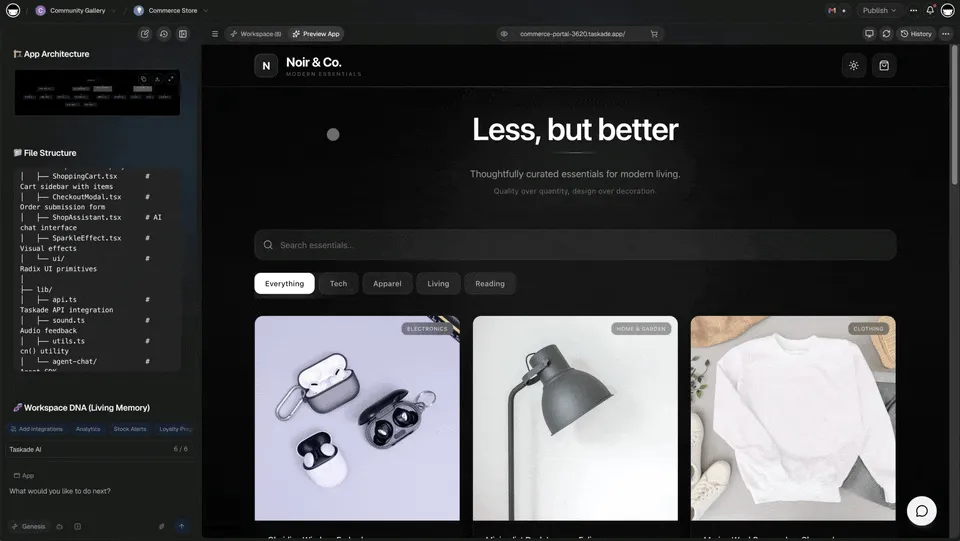
Hey there 👋
Your workspace isn't just storage. It's alive.
Every app you build with Taskade Genesis is powered by your Workspace DNA — Projects that remember, AI Agents that think, and Automations that move.
TL;DR: Workspace DNA is the living foundation behind every Taskade Genesis app — Projects (Memory), AI Agents (Intelligence), and Automations (Execution) working together across 100+ integrations. Your apps get smarter with every use. Try it free →
Together, they form a living system that gets smarter with every use.
🧬 What is Workspace DNA?
Workspace DNA is the interconnected intelligence that powers every Taskade Genesis app. It's the combination of three living layers working together:
- Projects — Your data and memory (the foundation)
- AI Agents — Intelligence that learns and reasons (the brain)
- Automations — Workflows that keep everything connected (the execution)
Unlike other app builders, Taskade Genesis doesn't give you an empty shell. Every app is born from your workspace's intelligence, automatically understanding your data, workflows, and patterns. For a deep dive into the architecture, see how Workspace DNA works.
🌟 Example: Build a CRM dashboard → It automatically connects to your existing customer projects → AI Agents understand your sales process → Automations sync data in real-time → Everything works together seamlessly.
👉 How it works: Create projects → Add AI Agents → Build automations → Build apps → Everything connects automatically
🧠 Projects: Your Living Memory
Projects aren't just databases. They're your workspace's memory—storing data, learning patterns, and evolving with your team. Learn how to use projects as databases.
What Projects Remember:
- Data Structure — Your custom fields, organization, and relationships
- Work Patterns — How your team organizes and processes information
- Business Logic — Your workflows, processes, and rules
- Historical Context — Past decisions, outcomes, and learnings
🌟 Example: A Finance Tracker Dashboard automatically understands your expense categories, budget rules, and reporting preferences—because it's built from your existing finance projects.
Featured Apps Built on Projects:
- Neon CRM Dashboard — Connects to your customer projects
- Team Capacity Planner — Uses your team project data
- Maintenance Tracker Dashboard — Built from equipment projects
👉 How to use: Create projects with your data → Build apps → Apps automatically understand your structure
🤖 AI Agents: Your Intelligent Brain
AI Agents learn from your workspace, understand context, and make intelligent decisions. They're not just chatbots—they're your workspace's intelligence layer with built-in tools.
What AI Agents Do:
- Learn from Projects — Understand your data and patterns
- Reason and Decide — Make intelligent choices based on context
- Adapt Over Time — Get smarter with every interaction
- Work Together — Multiple agents collaborate on complex tasks
🌟 Example: An AI Agent learns from your sales projects → Understands your customer journey → Suggests next steps → Automatically updates your CRM dashboard → Everything stays in sync.
Agent Capabilities:
- Project Management — Set due dates, assign tasks, organize projects
- Data Analysis — Analyze trends, identify patterns, generate insights
- Content Generation — Create content based on your workspace knowledge
- Workflow Automation — Trigger automations based on intelligent decisions
👉 How to use: Create AI Agents → Connect to projects → Agents learn your patterns → Use in apps → Intelligent automation
⚡ Automations: Your Execution Layer
Automations connect everything together. They're the execution layer that keeps your workspace alive—moving data, triggering actions, and keeping systems in sync. Set up triggers to start any workflow.
What Automations Connect:
- Projects ↔ Apps — Data flows automatically between storage and apps
- Apps ↔ External Services — Connect to 100+ integrations
- Agents ↔ Workflows — AI triggers automations based on intelligence
- Everything ↔ Everything — Complete system integration
🌟 Example: New customer form submission → Automation creates project → AI Agent analyzes lead → Automation updates CRM dashboard → Slack notification sent → Everything happens automatically.
Featured Automation Workflows:
- Form → Project → Dashboard — Complete data flow
- External Event → Automation → App Update — Real-time sync
- AI Decision → Automation → Action — Intelligent workflows
👉 How to use: Create automations → Connect projects, agents, and apps → Watch everything work together
🔄 How It All Works Together
Complete Workflow Example:
- Project — Customer data stored in projects
- AI Agent — Analyzes customer patterns and suggests actions
- Automation — Syncs data to external CRM, sends notifications
- App — Dashboard displays everything in real-time
Result: A living system where data flows, intelligence guides decisions, and everything stays connected.
🌟 Example: Build a Client Portal Dashboard → Projects store client data → AI Agents handle inquiries → Automations sync updates → Portal displays everything in real-time → Complete living system.
👉 How to use: Build projects → Add agents → Create automations → Build apps → Everything connects automatically
📈 Your Workspace Gets Smarter
Workspace DNA isn't static. It evolves and gets smarter with every use.
How Intelligence Grows:
- Pattern Recognition — System learns your workflows
- Adaptive Suggestions — AI suggests improvements based on patterns
- Automatic Optimization — Workflows improve over time
- Contextual Understanding — System understands your business better
🌟 Example: After using Taskade for months → Your workspace understands your processes → New apps automatically follow your patterns → AI Agents suggest proven workflows → Automations optimize themselves → Everything gets smarter.
👉 How to use: Just use Taskade → Workspace learns your patterns → Intelligence grows automatically
🎯 Why This Matters
Other app builders give you:
- Empty shells
- Manual connections
- Static data
- Isolated features
Taskade Genesis gives you:
- Living systems
- Automatic connections
- Dynamic intelligence
- Integrated features
Your workspace is the system behind every app.
🎬 Watch: How Taskade Genesis Works: Workspace DNA Explained
🧩 Other Improvements
-
- New: Living Memory — Projects remember and learn
- New: Intelligent Agents — AI that understands your workspace
- New: Connected Automations — Workflows that keep everything in sync
- New: Automatic Integration — Apps connect to workspace automatically
- Better pattern recognition
- Improved contextual understanding
Taskade Genesis App Enhancements:
- New: Workspace DNA Integration — Apps powered by your workspace
- New: Automatic Data Connection — Apps connect to projects automatically
- New: AI Agent Integration — Agents work inside apps
- New: Automation Integration — Workflows power app features
- Better intelligence sharing
- Improved system integration
-
- New: Workspace Learning — Agents learn from your projects
- New: Pattern Recognition — AI identifies workflow patterns
- New: Contextual Understanding — Agents understand your business
- Better intelligence sharing between agents
- Improved decision-making
-
- New: Workspace Integration — Automations connect everything
- New: Intelligent Triggers — AI-powered automation triggers
- New: Pattern-Based Optimization — Workflows improve automatically
- Better system connectivity
- Improved workflow intelligence
Improved security, stability, and overall speed
Various bug fixes and optimizations
Check all updates on the Changelog.
🚀 Join the Community
Great things are built together. Your ideas, feedback, and creations shape the future of Taskade Genesis. Connect, learn, and build with us:
Feedback | Reddit | Facebook Group | Updates | Tutorials | Docs | Community
Your Workspace, Fully Alive
Before: Build apps. Connect manually. Hope it works.
Now: Build apps. Everything connects automatically. Your workspace powers everything.
Projects remember. Agents think. Automations execute. Download Taskade on any device.
Your workspace is alive.
Start building and exploring now
This is the origin of living software 🌱
— John Xie, Co-founder & CEO, Taskade
Frequently Asked Questions
What is Workspace DNA in Taskade Genesis?
Workspace DNA is the interconnected intelligence that powers every Taskade Genesis app. It consists of three living layers working together: Projects (your data and memory), AI Agents (intelligence that learns and reasons), and Automations (workflows that keep everything connected). Together they form a living system that gets smarter with every use.
How does Workspace DNA make apps intelligent?
Unlike traditional app builders that give you an empty shell, every Genesis app is born from your workspace intelligence. Apps automatically connect to existing projects and data, AI agents understand your processes, and automations sync everything in real-time. The result is apps that adapt and evolve with your business.
What are the three pillars of Workspace DNA?
The three pillars are: (1) Projects — your living memory that stores data, tracks patterns, and maintains business context. (2) AI Agents — intelligence trained on your knowledge that can reason, respond, and make decisions. (3) Automations — execution workflows that connect triggers to actions across 100+ integrations.
How is Workspace DNA different from traditional app builders?
Traditional app builders create static interfaces disconnected from your data. Workspace DNA creates living systems where every app inherits your workspace context — your data structure, work patterns, business logic, and historical context. Apps built on Workspace DNA evolve as your workspace grows.