







Looking for Monday.com alternatives with lower costs, simpler UX, or better AI features? This comparison reveals the top project management platforms in 2026, from AI-powered workspaces to specialized kanban boards.
Quick Winner: Taskade offers the best value at $10/month with a generous monthly AI credit allowance and video calls—save $270/month vs Monday Pro for a 10-person team. Monday.com excels at visual customization for larger teams willing to pay $12-28/user. Choose based on team size, budget, and complexity needs.
Quick Comparison Table
| Platform | Pricing | Best Feature | Best For |
|---|---|---|---|
| Taskade | $10/mo flat | Generous AI credit allowance + video calls | Startups, budget teams |
| Monday.com | $12-28/user/mo | Visual Work OS | Mid-large teams |
| Asana | $11-25/user/mo | Enterprise PM | Large organizations |
| ClickUp | $7-19/user/mo | All-in-one features | Feature maximalists |
| Trello | $6-12.50/user/mo | Simple kanban | Visual simplicity |
| Wrike | $10-25/user/mo | Resource management | Complex projects |
| Smartsheet | $9-32/user/mo | Spreadsheet-based | Excel users |
1. Taskade - Best Budget Alternative with AI
Why It's #1
Taskade delivers a generous monthly AI credit allowance and video calls at $10/month—less than Monday Standard's cost and less than a third of Monday Pro's price.
Key Advantages Over Monday.com
✅ Lower Cost: $10/mo flat vs Monday's $12-28/user
✅ A generous monthly AI credit allowance: frontier models from OpenAI GPT, Anthropic Claude, and Google Gemini included (Monday charges extra)
✅ Video Calls Built-In: Eliminate Zoom costs (Monday has no video)
✅ Simpler UX: Less overwhelming than Monday's customization
✅ Unlimited Automations: No 250/month limit like Monday Standard
Pricing Comparison (10-Person Team)
Monday Standard:
- 10 × $17 = $170/month
- 250 automations/month limit
- No video (Zoom needed: ~$150/mo)
- Total: $320/month
Taskade Pro:
- Flat rate (up to 10 seats) = $10/month
- Unlimited automations
- Video calls included
- Total: $10/month
Savings: $310/month = $3,720/year
When to Choose Taskade Over Monday
- Budget-conscious: Save 94-97% on team costs
- AI-first workflows: AI credits included in the plan, not an add-on
- Remote teams: Video calls eliminate Zoom subscription
- Startups: Fast, simple, and affordable at scale
Use Case Example
Startup (8 people, Reddit): "Monday cost $200+/month. Switched to Taskade at $10/month. AI task breakdown + video calls = everything we need. Saved $2,280/year."
→ Build your team workspace free
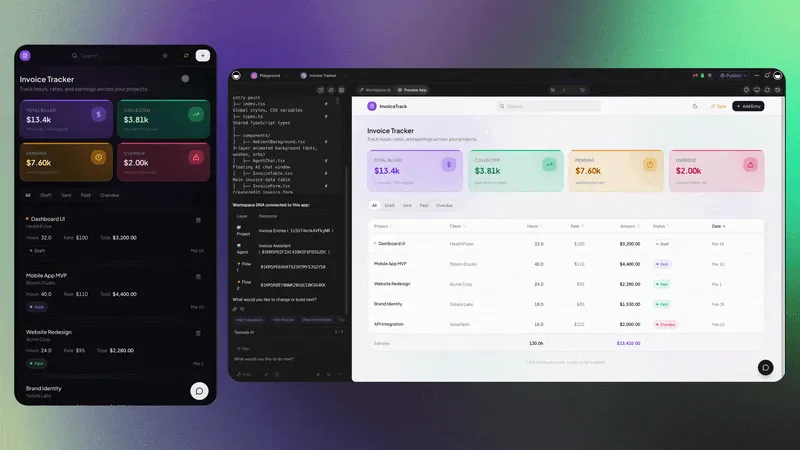
Workspace DNA: Why Taskade Is Architecturally Different
Monday gives you customizable boards. Taskade gives you a workspace where data, intelligence, automation, and communication form one system:
- Projects (Memory) — Structured tasks with custom fields, visible across list, board, calendar, mind map, Gantt, org chart, and table views. Not just colorful columns — real project data that carries context when you switch perspectives.
- Agents (Intelligence) — Monday's AI suggests automations. Taskade's AI agents do the work. An agent can read your sprint board, write the weekly standup summary, flag blocked tasks, and propose a revised timeline — using your actual project data.
- Automations (Execution) — Unlimited on Pro, no 250/month cap. When a task moves to "Done," an automation updates the client on Slack, logs completion in Google Sheets, and assigns the next deliverable. One trigger, three actions, no Zapier tax.
- Communication (Connection) — Video calls, screen sharing, and real-time chat live inside the workspace. Monday requires Zoom for a quick sync and Slack for follow-ups. Taskade keeps conversation next to the work it's about.
Monday customizes how work looks. Taskade unifies how work gets done.
2. Monday.com - Original Visual Work OS
What It Does Well
- Visual Customization: 10+ view types, colorful boards
- Automation: Visual automation builder (25,000 actions/month on Pro)
- Integrations: 50+ native integrations
- Templates: 200+ pre-built workflows
Pricing
- Free: 2 users, 3 boards
- Basic: $12/user/month (min 3 seats)
- Standard: $17/user/month (250 automations/month)
- Pro: $28/user/month (private boards, time tracking)
- Enterprise: Custom pricing
Bucket Pricing: Requires min 3 seats, then increments of 5 (3, 8, 13, 18...)
Monday's AI Pivot
Monday.com is not standing still. In a 2026 interview on 20VC, CEO Eran Zinman revealed that Monday replaced its entire 100-person SDR team with AI agents — dropping lead response times from 24 hours to 3 minutes. All developers at Monday now use Claude Code and Cursor. Zinman called it "the biggest pivot moment for us in the history of the company," describing a future where boards move to the background and agents move to the forefront. However, Google's AI Mode has already caused a roughly 10% hit to Monday's new ARR acquisition, particularly in transactional SMB deals. Teams evaluating Monday should consider whether the platform's AI transformation will close the gap with natively AI-first alternatives like Taskade.
Limitations
- High Cost: $12-28/user adds up fast for teams
- No Video Calls: Requires Zoom/Meet separately
- AI Costs Extra: Not included in base plans
- Bucket Pricing: Pay for 8 users even if you have 6
Best For: Mid-large teams (25-100+) with budget for visual customization
→ Read Full Taskade vs Monday.com Comparison
3. Asana - Enterprise Project Management Alternative
Why Teams Choose It
Asana offers enterprise-grade project management with advanced portfolios and workload management.
Key Features
- Portfolios: Cross-project tracking and reporting
- Timeline View: Gantt charts with dependencies
- Workload Management: Capacity planning across teams
- Advanced Permissions: Enterprise security and governance
Pricing
- Personal (Free): Up to 2 users
- Starter: $10.99/user/month (min 2 seats)
- Advanced: $24.99/user/month (includes AI, min 3 seats)
- Enterprise: Custom pricing
Asana vs Monday.com
| Feature | Asana | Monday.com |
|---|---|---|
| Starting Price | $10.99/user | $12/user |
| Visual Boards | ⚠️ Good | ✅ Best |
| Portfolios | ✅ Advanced | ⚠️ Basic |
| Simplicity | ✅ Simpler | ⚠️ Complex |
Best For: Enterprises (100+ people) needing advanced portfolios and governance
→ Compare Taskade vs Asana
→ Compare Taskade vs Asana →
4. ClickUp - "Everything App" Alternative
The Feature Maximalist Choice
ClickUp tries to replace every tool with one platform—project management, docs, wikis, time tracking, goals, and more.
Key Features
- Unlimited Everything: Tasks, storage, integrations (even on free plan)
- 15+ Views: List, board, timeline, Gantt, calendar, workload, etc.
- Built-In Docs: Wiki and documentation
- Time Tracking: Native time tracking and reporting
Pricing
- Free: Unlimited tasks, 100MB storage
- Unlimited: $7/user/month - Unlimited storage, integrations
- Business: $12/user/month - Advanced features, goals
- Enterprise: $19/user/month - White labeling, SSO
ClickUp vs Monday.com
| Feature | ClickUp | Monday.com |
|---|---|---|
| Price | $7-19/user | $12-28/user |
| Features | ✅ Maximum | ⚠️ Moderate |
| Simplicity | ❌ Overwhelming | ⚠️ Complex |
| Polish | ⚠️ Good | ✅ Excellent |
Trade-Off: More features at lower cost, but steeper learning curve and less polished UX
Best For: Teams wanting "everything in one app" and willing to learn complex tool
5. Trello - Simple Kanban Alternative
The Simplicity Champion
Trello focuses exclusively on kanban boards—no complexity, just visual simplicity.
Key Features
- Drag-and-Drop Boards: Classic kanban cards and lists
- Power-Ups: 200+ extensions (1 free, unlimited paid)
- Butler Automation: Visual automation builder
- Templates: Extensive template gallery
Pricing
- Free: Unlimited cards, 10 boards/workspace, 1 Power-Up/board
- Standard: $6/user/month - Unlimited boards, advanced checklists
- Premium: $12.50/user/month - Timeline, Calendar, unlimited automation
- Enterprise: $17.50/user/month - Unlimited workspaces, SSO
Trello vs Monday.com
| Feature | Trello | Monday.com |
|---|---|---|
| Price | $6-12.50/user | $12-28/user |
| Simplicity | ✅ Simplest | ⚠️ Complex |
| Views | ⚠️ Limited | ✅ 10+ views |
| Customization | ⚠️ Basic | ✅ Extensive |
Best For: Teams wanting only kanban boards, visual simplicity, lower cost
→ Compare Taskade vs Trello
→ Compare Taskade vs Trello →
6. Wrike - Resource Management Alternative
The Project Complexity Specialist
Wrike excels at complex project and resource management with advanced features for agencies and enterprises.
Key Features
- Resource Management: Advanced workload and capacity planning
- Custom Workflows: Build complex approval processes
- Gantt Charts: Advanced timeline and dependency management
- Request Forms: Intake management for agencies
Pricing
- Free: 2 users, limited features
- Team: $10/user/month - Unlimited users, 2GB storage
- Business: $25/user/month - Advanced features, 5GB storage
- Enterprise: Custom pricing
Wrike vs Monday.com
| Feature | Wrike | Monday.com |
|---|---|---|
| Resource Mgmt | ✅ Advanced | ⚠️ Good |
| Complexity | ✅ Handles well | ⚠️ Good |
| Visual UX | ⚠️ Functional | ✅ Beautiful |
| Price | $10-25/user | $12-28/user |
Best For: Agencies, professional services, complex resource management
7. Smartsheet - Spreadsheet-Based Alternative
The Excel User's Choice
Smartsheet combines spreadsheet familiarity with project management features—perfect for Excel power users.
Key Features
- Grid View: Spreadsheet-like interface
- Formulas: Excel-like calculations
- Gantt & Calendar: Project views built on sheet data
- Automation: Workflow automation from spreadsheet logic
Pricing
- Free: 1 user, 2 sheets
- Pro: $9/user/month - Unlimited sheets, 10GB storage
- Business: $32/user/month - Advanced features, 1TB storage
- Enterprise: Custom pricing
Smartsheet vs Monday.com
| Feature | Smartsheet | Monday.com |
|---|---|---|
| Spreadsheet Familiarity | ✅ Yes | ❌ No |
| Visual Boards | ⚠️ Basic | ✅ Advanced |
| Formulas | ✅ Excel-like | ⚠️ Limited |
| Price | $9-32/user | $12-28/user |
Best For: Excel power users, teams wanting spreadsheet + PM hybrid
Detailed Pricing Comparison
Monthly Cost (10-Person Team)
| Platform | Cost | Annual Cost | Savings vs Monday Pro |
|---|---|---|---|
| Taskade | $10/mo | $120/yr | $3,240 (96%) |
| ClickUp | $70-120 | $840-1,440 | $1,920-2,520 |
| Trello | $60-125 | $720-1,500 | $1,860-2,640 |
| Smartsheet | $90 | $1,080 | $2,280 |
| Wrike | $100-250 | $1,200-3,000 | $1,080-2,160 |
| Asana | $110-250 | $1,320-3,000 | $1,044-2,040 |
| Monday Standard | $170 | $2,040 | $1,320 |
| Monday Pro | $280 | $3,360 | $0 |
Biggest Savings: Taskade saves $3,240/year vs Monday Pro
Feature Comparison Matrix
AI Capabilities
| Platform | AI Features | Cost |
|---|---|---|
| Taskade | Unlimited (frontier models from OpenAI GPT, Anthropic Claude, and Google Gemini) | Included ($10/mo unlimited) |
| Monday | AI features available | Add-on (extra cost) |
| Asana | AI Studio | Advanced plan ($25/mo) |
| ClickUp | AI writing, summaries | Add-on ($5/user/mo) |
| Others | Limited or none | N/A |
Winner: Taskade for unlimited multi-model AI included
Automation Limits
| Platform | Automations | Monthly Limit |
|---|---|---|
| Taskade | Unlimited | No limit |
| ClickUp | Unlimited | No limit |
| Monday Standard | 250/month | ⚠️ Limited |
| Monday Pro | 25,000/month | ✅ High |
| Trello Free | 1/board | ⚠️ Very limited |
| Asana | Depends on plan | Varies |
Winner: Taskade and ClickUp for unlimited automations at lower cost
Communication
| Platform | Video Calls | Chat | Comments |
|---|---|---|---|
| Taskade | ✅ Built-in | ✅ Yes | ✅ Yes |
| Monday | ❌ No | ⚠️ Limited | ✅ Yes |
| Asana | ❌ No | ⚠️ Limited | ✅ Yes |
| ClickUp | ❌ No | ✅ Yes | ✅ Yes |
| Trello | ❌ No | ❌ No | ✅ Yes |
Winner: Taskade for built-in video calls
Use Case Recommendations
Best for Startups (< 20 people): Taskade or ClickUp
Taskade if: You want AI + video calls + simplicity ($10/mo)
ClickUp if: You want maximum features at low cost ($7/user)
Best for Mid-Size Teams (20-100): Monday.com or Asana
Monday if: You want visual customization and don't mind cost ($17-28/user)
Asana if: You need enterprise portfolios and governance ($11-25/user)
Best for Agencies: Wrike or ClickUp
Wrike if: You need advanced resource management ($10-25/user)
ClickUp if: You want client portals and customization ($7-19/user)
Best for Simple Kanban: Trello
Why: Cheapest ($6/user), simplest UX, perfect for teams wanting only visual boards
Best for Excel Users: Smartsheet
Why: Spreadsheet interface with PM features, familiar to Excel power users
Best for Remote Teams: Taskade
Why: Built-in video calls eliminate Zoom, AI speeds up planning, lower cost
Migration Guide: Monday.com → Alternatives
Migrating to Taskade
- Export Monday boards as CSV/Excel
- Import to Taskade or recreate workflows
- Use AI to rebuild automation and task structures
- Savings: $270/month for 10 users ($3,240/year)
- What You Gain: An included AI credit allowance, video calls, lower cost
- What You Lose: Visual customization depth, some view types
Migrating to ClickUp
- Use ClickUp's Monday importer (built-in)
- Map custom fields and automation
- Train team on ClickUp's interface
- Savings: $100-160/month for 10 users
- What You Gain: More features, lower cost
- What You Lose: Visual polish, simpler UX
Migrating to Asana
- Export Monday boards as CSV
- Import to Asana projects
- Rebuild automation with Asana Rules
- Cost: Similar pricing ($11-25 vs $12-28)
- What You Gain: Better portfolios, simpler UX
- What You Lose: Visual customization, some view types
Frequently Asked Questions
Which Monday.com alternative is cheapest?
Trello Standard at $6/user is cheapest for simple kanban boards. For full PM features, ClickUp Unlimited ($7/user) and Taskade Pro ($10/mo unlimited) are cheapest. Taskade includes a generous monthly AI credit allowance and video calls; ClickUp offers more features.
Do any alternatives have Monday's bucket pricing?
No. Monday requires minimum 3 seats then increments of 5 (you pay for 8 even with 6 users). Taskade, ClickUp, Asana, Trello all charge per actual user. This can save 10-30% on real costs.
Which has better automation than Monday?
Monday Pro (25,000 actions/month) has the highest limit. Taskade and ClickUp offer unlimited automations. Monday's visual Builder is more polished, but Taskade/ClickUp's unlimited usage is better for automation-heavy teams.
Can I get Monday's visual boards in alternatives?
Asana, ClickUp, Trello, and Taskade all have board (kanban) views. Monday's visual customization (colors, columns, widgets) is more extensive. For pure visual beauty, Monday wins. For board functionality, all alternatives work well.
Which alternative has built-in video calls?
Only Taskade has built-in video calls and screen sharing. All others (Monday, Asana, ClickUp, Trello, Wrike) require Zoom/Meet integrations. This saves $15-20/user/month on Zoom costs.
Is ClickUp really cheaper than Monday?
Yes. ClickUp Unlimited ($7/user) vs Monday Standard ($17/user) saves $10/user/month. ClickUp Business ($12/user) vs Monday Pro ($28/user) saves $16/user/month. But ClickUp has steeper learning curve due to more features.
Which alternative is easiest to learn?
Trello is simplest (just boards and cards). Taskade is simpler than Monday (less overwhelming, AI-guided). Asana is moderately simple. ClickUp has steepest learning curve (tons of features). For easiest migration, choose Trello or Taskade.
Do any alternatives include AI like Taskade?
Taskade $10/month. Monday charges extra for AI. Asana includes AI in Advanced plan ($25/month). ClickUp charges $5/user/month for AI add-on. For best AI value, choose Taskade.
Which alternative is best for large teams (100+ people)?
Asana Enterprise or Monday Enterprise are best for 100+ teams with advanced governance, SSO, and dedicated support. Wrike is strong for agencies at scale. Taskade and ClickUp work well up to 50-100 but lack some enterprise features beyond that.
Can I use free alternatives instead of Monday?
Monday Free (2 users, 3 boards) is very limited. Trello Free (10 boards/workspace, unlimited cards) is better for small teams. ClickUp Free (unlimited tasks) is most generous. For serious teams, paid plans needed. Taskade Free (2 workspace members, up to 6,000 lifetime AI credits) works for small teams.
Final Verdict
Choose Taskade If...
✅ You're a startup or small team (< 50 people)
✅ You want AI credits included in the plan price ($10/mo flat)
✅ You need built-in video calls (save on Zoom)
✅ You prioritize budget savings ($3,240/year vs Monday Pro)
✅ You prefer simplicity over visual customization
Best For: Startups, remote teams, budget-conscious, AI-first workflows
Choose Monday.com If...
✅ You're a mid-large team (25-200 people)
✅ You want extensive visual customization
✅ You need 10+ view types and colorful boards
✅ You can afford $12-28/user/month
✅ You value polish and aesthetics
Best For: Established companies, visual thinkers, teams with budget
Choose Asana If...
✅ You're an enterprise (100+ people)
✅ You need advanced portfolios and governance
✅ You want simpler UX than Monday
✅ You can afford $11-25/user/month
Best For: Large organizations, complex operations, enterprise teams
Choose ClickUp If...
✅ You want everything in one app (PM + docs + wiki + time tracking)
✅ You want maximum features at low cost ($7-19/user)
✅ You're willing to invest in learning (steeper curve)
✅ You need 15+ views and unlimited everything
Best For: Feature maximalists, all-in-one tool seekers, power users
Choose Trello If...
✅ You only need kanban boards
✅ You want simplest UX (easiest to learn)
✅ You're budget-conscious ($6/user)
✅ You prefer focused simplicity over feature bloat
Best For: Visual simplicity, kanban purists, small teams, freelancers
Choose Wrike If...
✅ You're an agency or professional services
✅ You need advanced resource management
✅ You handle complex projects with dependencies
✅ You can afford $10-25/user/month
Best For: Agencies, consultants, complex resource management
Choose Smartsheet If...
✅ You're Excel power users
✅ You want spreadsheet + PM hybrid
✅ You need Excel-like formulas in PM tool
✅ You can afford $9-32/user/month
Best For: Excel lovers, spreadsheet-centric teams, data-heavy workflows
Next Steps
Try Taskade Free
Test AI-powered project management with video calls:
👉 Start free with video calls built in →
Upgrade to Pro for $10/Month
Get an included AI credit allowance, video calls, and save vs Monday.com:
The broader industry context matters here. Monday.com CEO Eran Zinman publicly stated that seat-based pricing is transitioning to consumption-based models: "Eventually it's going to be more consumption and then entirely consumption going forward." For teams choosing alternatives today, this signals that per-seat pricing across the entire PM category is likely to shift. Platforms like Taskade that already offer flat-rate plans may be ahead of this curve.
Bottom Line: Monday.com excels at visual customization for mid-large teams at $12-28/user. Taskade delivers a generous monthly AI credit allowance and video calls at $10/month—save $3,240/year vs Monday Pro for a 10-person team. ClickUp packs maximum features at $7-19/user but has steeper learning curve. Trello offers simple kanban at $6/user. Asana suits enterprises at $11-25/user. Choose based on team size, budget, and feature needs.
Related Comparisons
Head-to-Head Productivity Matchups:
- Taskade vs Monday.com - Detailed 1v1 comparison
- Taskade vs Asana - Startups vs enterprises
- Taskade vs Notion - Action-first vs documentation-heavy
- Taskade vs Trello - Multi-view vs kanban-only
- Taskade vs Airtable - Project management vs databases
Compare Pages:
- Compare Taskade vs Asana → — Side-by-side feature comparison
- Compare Taskade vs Trello → — Side-by-side feature comparison
- Compare Taskade vs ClickUp → — Side-by-side feature comparison
No-Code Platform Comparisons:
- Taskade Genesis vs Retool - Full apps vs internal tool builder
- Taskade Genesis vs Glide - Real database vs spreadsheet apps
Alternative Guides:
- Best Notion Alternatives 2026 - Workspace alternatives compared
- Best Vibe Coding Tools 2026 - AI coding market overview
Sources:
- Monday.com Pricing 2026
- Taskade Features
- Asana Pricing
- ClickUp Pricing
- Trello Pricing
- Wrike Pricing
- Smartsheet Pricing