






Hey there 👋
Intelligence without execution is just noise.
I didn't build Taskade Genesis to create chatbots. I built it to create teammates—AI agents trained on YOUR data, YOUR processes, YOUR context.
Train once. Update automatically. Embed in apps. Intelligence that evolves.
TL;DR: Taskade Genesis lets you train AI agents on 5 knowledge source types — files, projects, web links, YouTube videos, and plain text — then keep them current via automated workflows. Agents embed directly in Genesis apps and evolve through the Workspace DNA loop of Memory, Intelligence, and Execution. Start training →
🎯 Why This Matters
Perfect for: Builders, operators, businesses building intelligent systems
When I was running servers at Bronx Science, I learned something that stuck with me: intelligence without execution is just noise. That principle is the foundation of agentic engineering — designing systems where AI agents don't just think, they act.
You can have the smartest AI in the world.
But if it doesn't know YOUR data, YOUR processes, YOUR context—
it's just a clever demo.
That's why we built agent training the way we did.
🌟 Example: Most AI tools give you a prompt window and call it a day. We built training that matters — upload your PDFs, connect your projects, crawl your documentation. Your agents learn from YOUR world, not some generic training set. Explore what others have built in the Community Gallery.
👉 The Difference: Generic chatbots vs. teammates trained on your data
🧠 Train Agents with Your Own Data
What You Can Train Agents With:
- Files — Upload PDFs, documents, spreadsheets (Max 5 MB per file)
- Your Projects — Connect Taskade projects as knowledge bases
- Web Links — Crawl and train from any webpage URL
- YouTube Videos — Train using video transcriptions automatically
- Plain Text — Add custom text knowledge directly
The Execution Layer:
Most AI tools give you a prompt window and call it a day.
We built something different:
Training that matters.
Upload your PDFs. Connect your projects. Crawl your documentation. Add YouTube videos.
Your agents learn from YOUR world, not some generic training set.
Then — and this is the part that matters — automation keeps them updated.
New blog post? Automation adds it.
Project updated? Automation syncs it.
Documentation changed? Automation trains on it.
Your agents don't just learn once.
They evolve. This continuous learning loop is how Workspace DNA works — Memory feeds Intelligence, Intelligence triggers Execution, Execution creates new Memory.
🌟 Example: Build customer support agent → Upload support docs → Add FAQ project → Crawl help articles → Train with YouTube tutorials → Agent knows everything about your product → Automation updates knowledge weekly → Agent stays current automatically.

👉 How to use: Create agent → Open Knowledge panel → Upload files / Add projects / Add web links → Agent trains automatically
🤖 Training via Automation: The Living System
Train agents automatically with automation workflows. Keep agents updated with new knowledge without manual work.
The Loop:
Here's what happens when you train agents properly:
Memory (your projects) feeds Intelligence (your agents).
Intelligence drives Action (your automations).
Action creates new Memory.
That's the loop.
That's what makes Genesis alive.
Automation Workflow Examples:
1. Scheduled Knowledge Updates
- Trigger — Daily/weekly schedule
- Action — Add new blog posts to agent knowledge
- Result — Agent stays updated with latest content automatically
2. Project-Based Training
- Trigger — New project created
- Action — Add project to agent knowledge
- Result — Agent automatically learns from new projects
3. File Upload Training
- Trigger — New file uploaded to workspace
- Action — Add file to agent knowledge
- Result — Agent trains on new documents automatically
🌟 Example: Schedule automation → Runs daily → Crawls updated blog → Adds new posts to agent → Agent knowledge updates automatically → Always current → Complete living system.

👉 How to use: Create automation → Add "Add Knowledge to Agent" action → Select knowledge type → Configure → Agent trains automatically
💬 Embed in Genesis Apps: The Complete System
Every Genesis app can include intelligent AI agents. Embed agents directly in your apps for contextual assistance.
Agent Chat SDK:
- Pre-Built SDK — Simple SDK for building chat interfaces
- React Hooks —
useAgentChathook for easy integration - Real-Time Streaming — SSE-based streaming for instant responses
- Multiple Conversations — Support for multiple chat sessions
How to Embed Agents:
Step 1: Create Agent
- Create agent with
manage_agenttool - Configure system prompt for app context
- Connect to app's project data
Step 2: Enable Public Visibility
- Set agent visibility to "public"
- Required for chat interface in apps
- Private agents cannot have public conversations
Step 3: Build Chat Interface
- Use Agent Chat SDK (
@/lib/agent-chat) - Create conversation manually
- Connect stream when conversation ready
- Display messages and handle user input
🌟 Example: Build CRM dashboard Genesis app → Create support agent → Connect to CRM project → Embed chat interface → Users get help directly in app → Complete system.
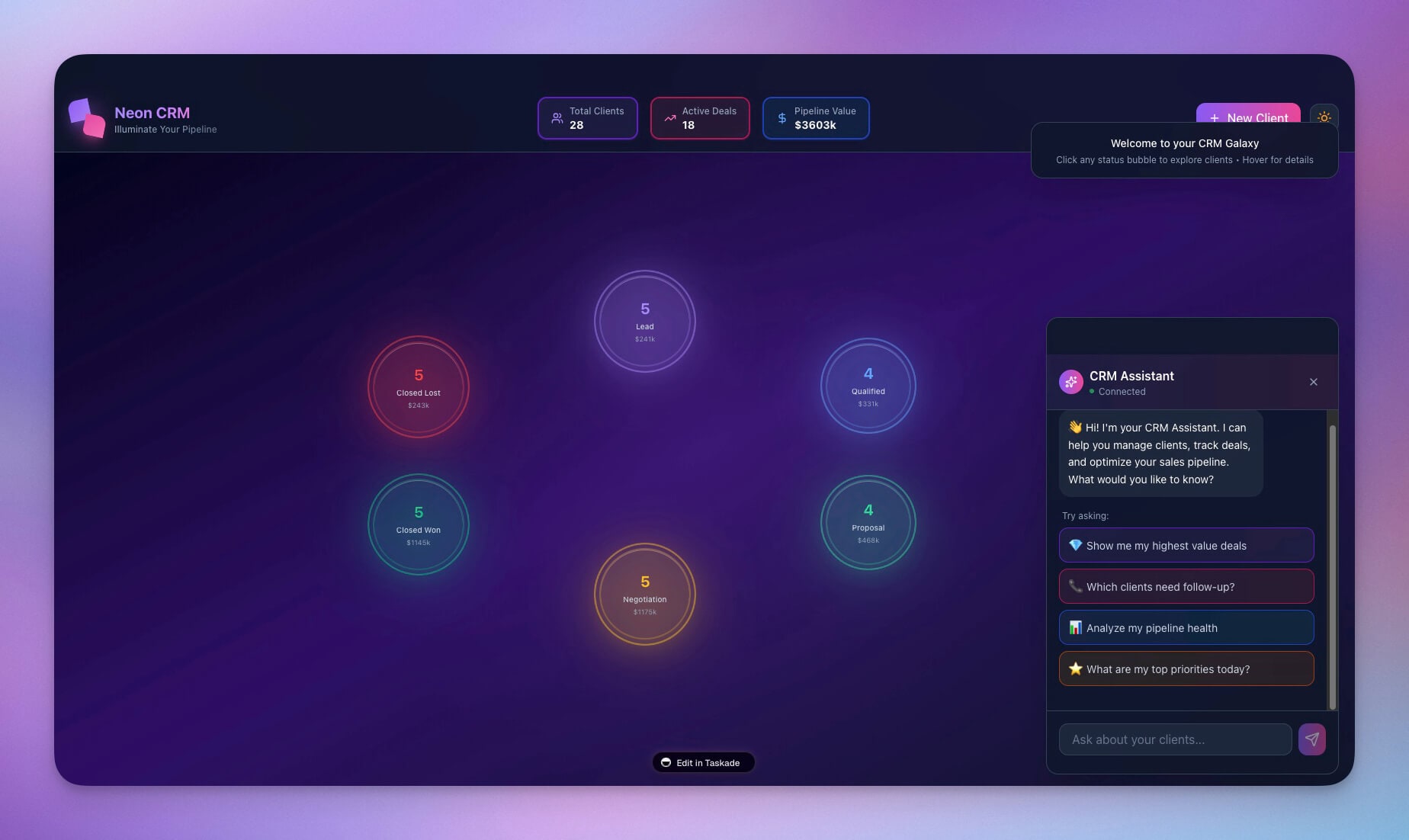
👉 How to use: Build Genesis app → Create agent → Enable public visibility → Use Agent Chat SDK → Embed chat interface → Users chat with agent in app
🔗 Complete Training Workflow
Complete Example: Customer Support Agent
Step 1: Initial Training
- Upload support documentation (PDFs)
- Add FAQ project as knowledge
- Crawl help center website
- Add YouTube tutorial videos
Step 2: Automation Setup
- Create automation: "Update Support Agent Knowledge"
- Trigger: Weekly schedule
- Action: Crawl updated help articles
- Action: Add new articles to agent
Step 3: Embed in Genesis App
- Build support portal Genesis app
- Create support agent
- Connect to support project
- Embed chat interface in app
Step 4: Continuous Learning
- Automation updates knowledge weekly
- New content added automatically
- Agent stays current with latest information
- Users get accurate, up-to-date support
🌟 Result: Support agent trained on docs, FAQs, help articles, and videos → Updated automatically via automation → Embedded in support portal app → Provides intelligent assistance 24/7 → Complete living system.
👉 Complete Workflow: Train → Automate → Embed → Evolve
📈 Why We Built It This Way
The Bronx Science Way:
At Bronx Science, I learned that systems can always be hacked.
Not in the malicious sense.
In the "find the pattern, build the system, ship it" sense.
That's what agent training is.
You're not just uploading files.
You're building a system that thinks.
You're not just connecting projects.
You're creating memory that evolves.
You're not just setting up automation.
You're building execution that never stops.
Real Intelligence:
I've seen too many "AI assistants" that collapse under real-world complexity.
They can write a nice email.
But they don't know your customers.
They don't understand your processes.
They can't answer questions about YOUR business.
That's not intelligence.
That's a party trick.
Real intelligence comes from context.
When you train an agent on your support docs, your FAQ project, your help articles —
suddenly it's not just answering questions.
It's answering YOUR questions, about YOUR product, using YOUR knowledge.
That's the difference between a chatbot and a teammate.
🧩 Other Improvements
Knowledge Features:
- Multiple Knowledge Sources — Files, projects, web links, YouTube, text
- Automatic Processing — Content processed and embedded automatically
- Semantic Search — Agents retrieve relevant information intelligently
- Real-Time Updates — Knowledge available immediately after processing
Automation Integration:
- Scheduled Training — Update agents on schedule
- Event-Based Training — Train agents when content changes
- Bulk Operations — Add multiple knowledge sources at once
- Workflow Integration — Training integrated into automation workflows
Genesis App Integration:
Agent Chat SDK — Pre-built SDK for chat interfaces
Public Agents — Agents accessible in public apps
Context Awareness — Agents understand app data
Tool Access — Agents can use automation and project tools
Improved security, stability, and overall speed
Various bug fixes and optimizations
Check all updates on the Changelog.
🚀 Join the Community
Great things are built together. Your ideas, feedback, and creations shape the future of Taskade Genesis. Connect, learn, and build with us:
Feedback | Reddit | Facebook Group | Updates | Tutorials | Docs | Community | Templates | Integrations
Intelligence That Evolves
Before: Generic chatbots. Static knowledge. Manual updates.
Now: Custom-trained agents. Your data. Automated learning.
Train once. Update automatically. Embed in apps.
Your agents evolve.
Because that's what living software does.
It doesn't just work.
It learns.
It adapts.
It grows.
That's Taskade Genesis.
That's the execution layer.
Start training and building now
This is the origin of living software 🌱
— John Xie, Co-founder & CEO, Taskade
Frequently Asked Questions
What is the Execution Layer in Taskade?
The Execution Layer is the third pillar of Taskade's Workspace DNA. It powers automations that carry out tasks autonomously — from sending emails and updating databases to running multi-step workflows. Combined with Memory (projects) and Intelligence (AI agents), the Execution Layer turns your workspace into a system that acts, not just stores information.
How do you train AI agents in Taskade?
Train Taskade AI agents by connecting them to your knowledge sources: upload documents, link websites, paste YouTube URLs, or connect to your workspace projects. Agents learn from this context and can be trained on unlimited sources. Training updates automatically when source data changes, ensuring your agents always have current knowledge.
What can trained AI agents do in Taskade?
Trained AI agents can answer questions using your specific data, generate content in your brand voice, research topics using web search, create and update tasks, run automations, interact with users through embedded apps, and collaborate with other agents in multi-agent teams. They function as intelligent teammates with deep knowledge of your business.
Can AI agents be embedded in external apps?
Yes. Taskade allows you to embed trained AI agents in external websites and applications. Your agents maintain their training and knowledge while interacting with users outside the Taskade platform. This is ideal for customer support bots, knowledge base assistants, and interactive tools on your website.