






Hey there 👋
Your apps are getting smarter.
Automatic screenshots. Version history. Self-healing AI. Better controls.
Everything you need to build, manage, and maintain professional apps—now built into Taskade Genesis.
TL;DR: Taskade Genesis ships 6 new features: automatic app screenshots, full version history with 1-click restore, AI-powered error fixing, an enable/disable automation toggle, mermaid diagram lightbox, and Taskade AI project management — giving you a complete app management dashboard without any extra tools. Try it free →
🖼️ Automatic App Screenshots
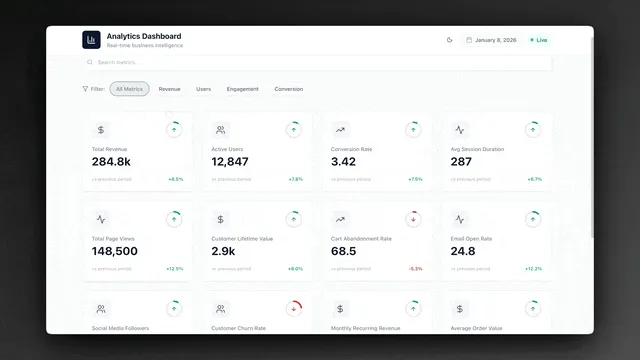
Every Taskade Genesis app now gets automatic screenshots when published. Perfect for showcasing your apps, sharing previews, and tracking app evolution.
What you get:
- Automatic screenshot generation on publish
- Updates when you make changes
- Perfect for community gallery sharing
- Professional app previews
- No manual work required
🌟 Example: A Project Dashboard that automatically generates beautiful screenshots for the community gallery, making it easy to showcase your work.
👉 How to use: Publish any app → Screenshots generate automatically → View in app settings
⏮️ Version History & Restore
Experiment freely with your apps. Every change is tracked in version history. View all previous versions, see what changed, and restore any version with one click.
What you can do:
- View complete version timeline
- See what changed in each version
- Restore any previous version instantly
- Compare versions side-by-side
- Never lose your work
🌟 Example: A Client Portal where you can experiment with new features, knowing you can always restore a previous version if needed.
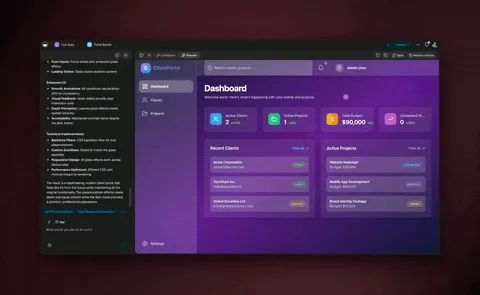
👉 How to use: Open any app → Click Version History → Browse timeline → Click Restore on any version
🤖 AI-Powered Error Fixing
When your app encounters an error, AI can now analyze and fix it automatically. Click "Ask AI to fix" and watch as errors are resolved intelligently.
What AI can fix:
- Runtime errors and exceptions
- Broken API connections
- Missing dependencies
- Configuration issues
- Logic errors
🌟 Example: A Booking System that automatically fixes connection errors, ensuring your app stays reliable without manual debugging.
👉 How to use: When an error appears → Click Ask AI to fix → AI analyzes and resolves the issue
🎛️ Enable/Disable Automation Toggle
Pause automations with one click. No need to delete or reconfigure. Perfect for testing, troubleshooting, or pausing workflows when they're not needed.
What you can do:
- Toggle automations on/off instantly
- Test workflows safely
- Pause without losing configuration
- Quick troubleshooting
- Save resources when not needed
🌟 Example: A Marketing Automation workflow that you can pause during testing, then re-enable when ready—all without losing your setup.
👉 How to use: Open any Automation → Toggle Active switch in Flow header → Pause or resume instantly
🎨 Mermaid Diagram Lightbox
Mermaid diagrams now open in a beautiful full-screen lightbox with pan, zoom, and download capabilities. Perfect for viewing complex flowcharts and architecture diagrams.
What you get:
- Full-screen immersive viewing
- Pan and zoom navigation
- Download diagrams as images
- Keyboard navigation support
- Mobile-optimized controls
🌟 Example: A System Architecture diagram that opens in full-screen, making it easy to explore complex system designs.
👉 How to use: Click any Mermaid diagram → Opens in full-screen lightbox → Pan, zoom, download
🤖 Taskade AI Project Management
Taskade AI can now manage entire projects, not just individual tasks. Set project due dates, assign projects to team members, add project tags, and control project settings—all through natural conversation.
What AI can manage:
- Project due dates and deadlines
- Project assignments to team members
- Project tags and organization
- Project settings (star, pin, cover images)
- Holistic project understanding
🌟 Example: Chat with Taskade AI: "Set this project due date to next Friday" or "Assign this project to John" — and watch it happen instantly.
👉 How to use: Chat with Taskade AI in any project → Ask: "Set project due date to..." → AI manages the project
🧩 Other Improvements
-
- New: Automatic Screenshots — Apps generate screenshots automatically on publish
- New: Version History — Complete version timeline with one-click restore
- New: AI Error Fixing — Self-healing apps with intelligent error resolution
- New: App Navigation Tracking — Real-time route tracking in preview mode
- Improved app reliability and error handling
- Better preview experience with smoother loading
- Enhanced app debugging tools
-
- New: Project Management — Taskade AI can manage entire projects, not just tasks
- Better project context understanding
- Improved project-level operations
- More reliable AI responses
-
- New: Enable/Disable Toggle — Pause workflows with one click
- Better automation controls and state management
- Improved error handling and recovery
- Clearer status indicators
-
- New: Mermaid Diagram Lightbox — Full-screen diagram viewing
- Better diagram rendering and interaction
- Improved document viewing experience
-
- Better version management across workspaces
- Improved error handling and recovery
- Enhanced collaboration tools
Improved security, stability, and overall speed
Various bug fixes and optimizations
Check all updates on the Changelog.
🚀 Join the Community
Great things are built together. Your ideas, feedback, and creations shape the future of Taskade Genesis. Connect, learn, and build with us:
Feedback | Reddit | Facebook Group | Updates | Tutorials | Docs | Community
Your Apps, Self-Managing
Before: Build apps. Debug manually. Hope nothing breaks.
Now: Build apps. AI fixes errors. Track versions. Restore instantly.
Your apps just became self-healing, version-controlled, and easier to manage.
This is professional app development, simplified.
Start building and exploring now
This is the origin of living software 🌱
— John Xie, Co-founder & CEO, Taskade
Frequently Asked Questions
Does Taskade Genesis have version history for apps?
Yes. Taskade Genesis maintains version history for your apps, allowing you to review previous versions and revert changes if needed. Combined with automatic screenshots of each version, you can visually track how your app evolves over time and restore any earlier state with confidence.
What is self-healing AI in Taskade Genesis?
Self-healing AI automatically detects and fixes issues in your Genesis apps. When the system identifies broken layouts, data inconsistencies, or configuration problems, it suggests or applies corrections automatically. This reduces maintenance overhead and ensures your apps remain functional without constant manual monitoring.
How do I manage multiple Genesis apps?
Taskade provides an app management dashboard where you can view all your Genesis apps, see automatic screenshots of each, track usage analytics, manage versions, and organize apps by workspace. The dashboard gives you a centralized view of your entire app portfolio with quick access to editing, publishing, and sharing controls.
Does Taskade Genesis have app analytics?
Yes. Genesis apps include built-in analytics that track user visits, interactions, form submissions, and engagement metrics. The analytics dashboard helps you understand how your apps are being used, identify popular features, and make data-driven improvements to optimize the user experience.