






“What is the best productivity system for my remote team?” Well, it depends on how much friction and how steep of a learning curve you can handle. If the answer is “as little as possible,” then Zen to Done (ZTD) is what you’re looking for.
If you’ve ever tried David Allen’s Getting Things Done (GTD)—or any productivity framework for that matter—you know that implementing it takes time and dedication.
That’s why many fail to stick with it long enough to see results.
If you want to boost your remote team’s productivity, you need something simpler. You need a set of good work habits. And that’s what we dig into in today’s article:
📚 The following article is based on Leo Babauta’s Zen to Done: The Ultimate Simple Productivity System. Jump here to give the book some love!
⚡️ Zen to Done (ZTD) vs. Getting Things Done (GTD)
What is Getting Things Done?
With 20 years under its belt—and that’s an eternity in internet years—David Allen’s Getting Things Done is one of the most recognizable productivity frameworks around.
Advertised as “stress-free productivity,” GTD is a catch-all net for projects, tasks, ideas, emails, documents, and more. It’s the closest thing to a productivity A to Z you can get.
“GTD enables greater performance, capacity, and innovation. It alleviates the feeling of overwhelm—instilling focus, clarity, and confidence.”
David Allen at Getting Things Done(1)
Allen argues that modern knowledge workers are overwhelmed with the daily influx of information and commitments. Cognitively, it’s more than anybody can chew.
“A paradox has emerged in this new millennium: people have enhanced quality of life, but at the same time they are adding to their stress levels by taking on more than they have resources to handle.”
But Gettings Things Done has much more to offer in terms of collecting, identifying, and systematizing personal and work commitments.
How Does Getting Things Done Work?
GTD is designed to help you identify and quickly process all kinds of commitments coming your way. That includes tasks, emails, projects, documents, and more.
In a nutshell, every item captured into the system is processed and assigned a specific outcome depending on its actionability, complexity, and context.
Here’s our GTD cheat sheet for reference. 👇
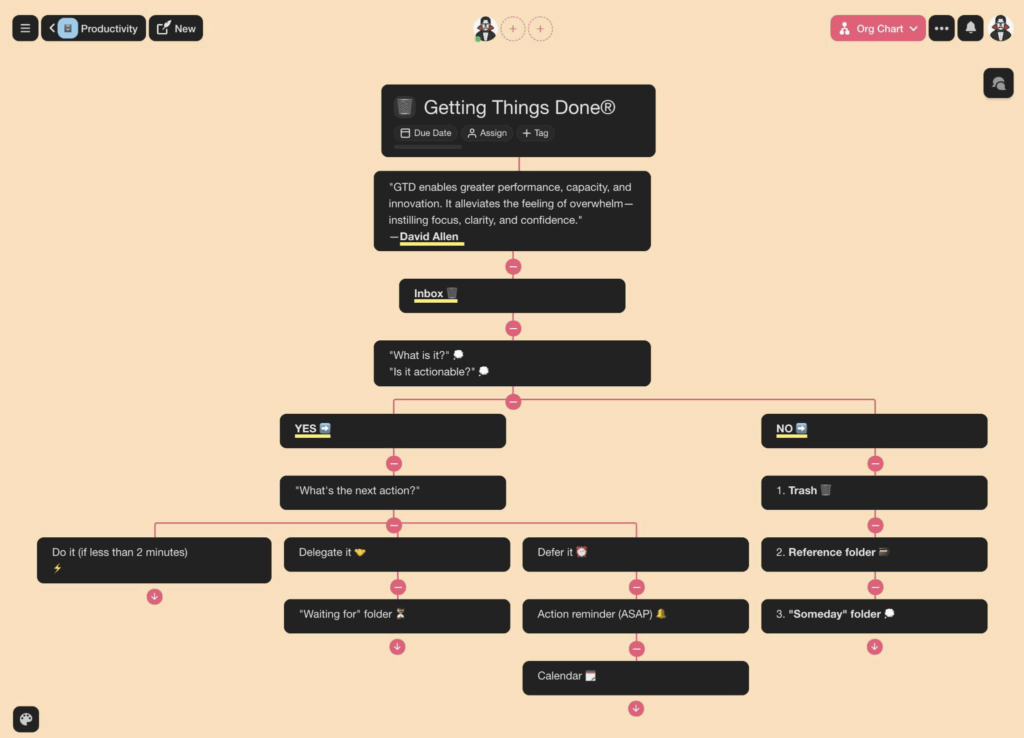
Getting Things Done (GTD) cheat sheet in Taskade Mindmap view
The goal here is to get every bit of information out of your head and feed it into the system. Just so you always know what to do—and why you should do it —next.
Of course, that’s just the tip of the iceberg. If you want to learn the nuts and bolts of GTD, be sure to check our article Why Distributed Teams Need GTD Workflows.
What is Zen to Done?
Despite the name, Zen to Done isn’t really an alternative to David Allen’s method. Like GTD, it takes a bottom-up approach to productivity, but it does so with a twist.
According to the method’s creator Leo Babauta, Zen to Done is a holistic, minimalist approach to productivity that addresses fundamental habit-forming mechanisms.
“If you’ve been having trouble with GTD, as great as it is, ZTD might be just for you. It focuses on the habit changes necessary for GTD, in a more practical way, and it focuses on doing, on simplifying, and on adding a simple structure.”
Leo Babauta at Zen Habits(2)
Babauta’s argument is that most productivity systems are too much to chew in one bite. They’re complex, intimidating, and lack the focus on doing.
“[...] It’s almost like dieting or exercise — if you don’t adopt successful habit change methods, you will keep failing and eventually get discouraged and quit.”(3)
Zen to Done is a fine blend of David Allen’s Getting Things Done and Stephen Covey’s 7 Habits of Successful People served in an easily digestible format.
How Does Zen to Done Work?
Babauta’s system consists of 10 steps or habits that’ll help you optimize your workflow and take back control over your work/personal commitments.
Some of the habits are built on top of GTD’s principles. Others serve as no-nonsense improvements that make getting things done (pun intended) easier.
Take a look at the following ZTD cheat sheet. 👇
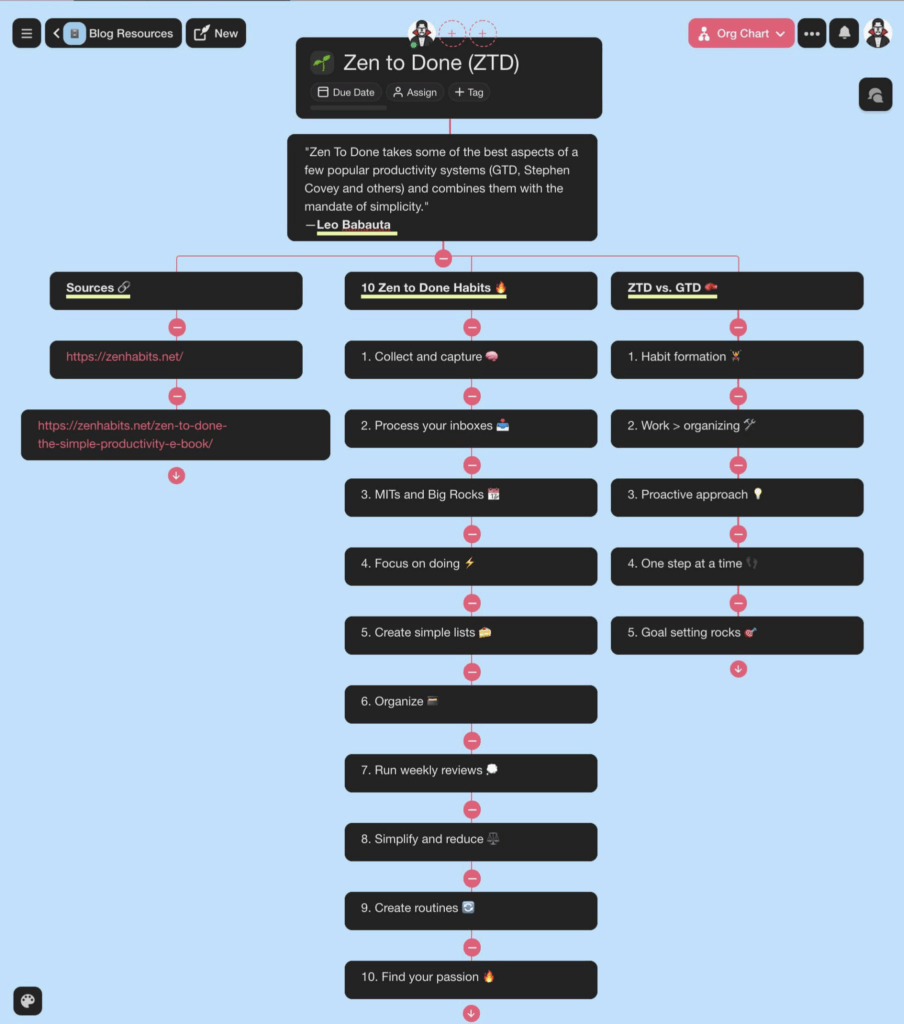
Zen to Done (ZTD) cheat sheet in Taskade Mindmap view
As it is the case with other habit-based protocols, Babauta recommends implementing each habit gradually. Ideally, you shouldn’t take more than 2-3 habits over 30 days.
ZTD habits are reinforced by several productivity techniques like weekly/monthly reviews, a Pomodoro timer, and progress tracking. But more on that later on.

🤔 How Is Zen to Done Different From GTD?
1. ZTD Promotes Incremental Habit Formation
Adopting a new tool or productivity framework can be challenging. Not only do you have to break bad work habits but also replace them with new “healthy” routines.
Attempting all of the above in one go will create friction. It’s like starting a new diet, getting into meditation, and buying a gym membership on New Year’s Day.
Unlike GTD, Zen to Done encourages gradual habit formation. You can cherry-pick any of the 10 steps and implement it when it feels right. The results will still be there.
2. It Gets the Work Done
Much of the allure of GTD lies in pristine organization. You need to assess every commitment and gently placed where it belongs, over and over again.
While processing tasks, emails, and ideas is satisfying, it’s not the kind of productivity that gets you anywhere. In fact, it’s productivity porn at its finest.
“At its core, productivity porn is a form of procrastination. When we don’t feel like working, planning and reading act as illusionary substitutes: they give us the illusion of productivity.”
Anne-Laure Le Cunff at Ness Labs(4)
Instead of spending time assembling the perfect toolkit, constantly (re)organizing, and hunting for life hacks, ZTD brings real work to the front row.
3. It’s Proactive vs. Reactive
Getting Things Done makes you bold, fierce, and unstoppable. You can handle any task, meeting, or emergency that comes your way. The question is, should you?
Here’s the thing. Bumping a to-do list (or a GTD inbox) to 100+ items is easy. But checking them off promptly so they don’t sit there collecting dust? Not so much.
Zen to Done is all about selectivity. Not only does it reduce the streams of personal/work commitments, but it also helps you decide which tasks really matter.
🐑 Implementing Team Zen to Done With Taskade
The best part about Zen to Done is flexibility. You can either replace your team’s existing workflow entirely or use the ZTD principles to improve its select aspects.
In this section, we’ll show you how you can use Taskade and ZTD to optimize the way your team communicates, collaborates, and coordinates.
And now for the fun part.
1. Create a Place for Stuff
Chances are that each member of your team has their own way of doing things. They use different note-taking apps, calendars, to-do lists... It’s a nightmare.
Your team needs ONE unified workflow that brings tasks, notes, documents, and meetings under one roof. The good news is Taskade does all that, so you’re good to go!
Here’s what you should do first. 👇
🗂 Create a set of shared Taskade Workspaces/Projects. Each will act as a separate inbox for commitments, projects, documents, and team activities.
🔡 Stick to a simple and unambiguous naming convention. A handful of lists like @documents, @projects, and @meetings are all you need. The fewer the better.
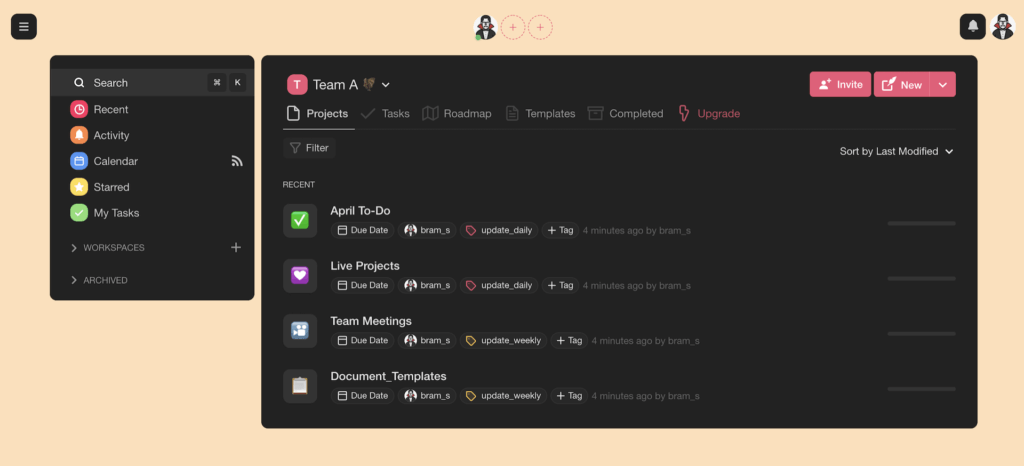
A simple Zen to Done workflow created in Taskade
And now, let’s take a look at our first team habit.
2. Collect EVERYTHING!
The goal here is to encourage your team to collect every relevant bit of information—to-do lists, ideas, documents—into one of the lists we just created.
Building this one (reasonable) hoarding habit will ensure your team always has plenty of material to work with. It’ll also put everything in one, easily accessible location.
🧠Brainstorm, discuss, and record. Run @brainstorming sessions inside Taskade Projects. Take notes, add comments, and archive for reference.*
📎 Upload images, videos, and documents. Digitize paper documents, stickies, and other physical assets. Record and save training sessions and video tutorials.
✂️ Capture web content with Web Clipper. Use Taskade’s web browser extension to grab articles, highlights, bookmarks, and more.
❎ Create one to-do list. Merge all to-do lists into one. Collect all team commitments in one place. Let your team self-maintenance.
🧘♂️ ZTD Tip #1: Give your team 30 days to get comfortable and consistent with the collection habit before proceeding. Keep things neat but don’t overorganize (yet).
3. Put Things Where They Belong*
No productivity system can work on autopilot. Both Getting Things Done and Zen to Done need maintenance, although the latter puts way less emphasis on that aspect.
The golden rule is to process all documents, commitments, and projects as soon as they’re captured. Anything that needs attention should get it ASAP.
Here’s a complete breakdown of this habit:
✅ Update to-do lists, check finished tasks off, and delete overdue items.
📝 Edit and share meeting notes immediately after a meeting.
📑 File relevant documentation on day one of every project.
❌ Delete anything that doesn’t bring value to active/future projects.
🗑 Clean up your email inbox on a daily basis.
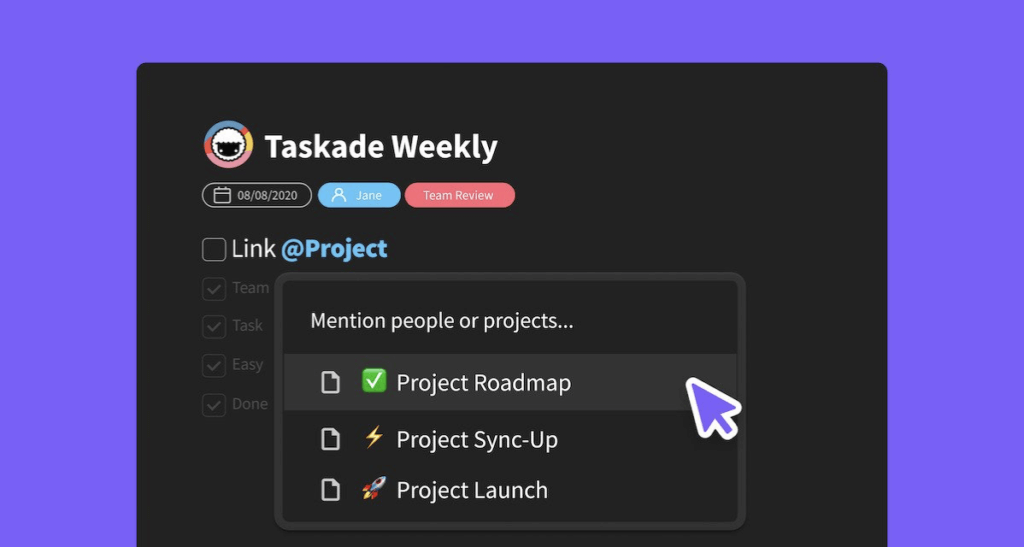
Taskade lets you easily cross-link and navigate team assets
🧘♂️ ZTD Tip #2: Every team inbox/list—be it @documents or @projects—should be processed every day. This will reinforce the habit and prevent backlogs.
4. Set Your MITs/Big Rocks and Go After It
One of the key strengths of ZTD is direction. You want your team to adopt a proactive rather than GTD’s reactive stance to productivity.
To achieve the above, your team needs to:
A) Set clear long-term and short-term objectives.
B) Structure daily/weekly schedule to accommodate them.
B) Only capture items that align with those objectives.
Babauta suggests setting Big Rocks, your key weekly objectives, and MITs, the most important tasks for the day. Both will let your team slip into intentional productivity.
⏰ Every Monday. Gather the team for a quick video conference. Decide on the Big Rocks for the week (4-6) and add them to a shared calendar.
⏰ Each Morning. Discuss the most important tasks for the day. They can overlap with Big Rocks. Schedule 1-3 MITs and add them to the team calendar.
Weekly/daily scheduling will help your team focus on the work that really matters. Everything else should fill the rest of the available time, not the other way around.
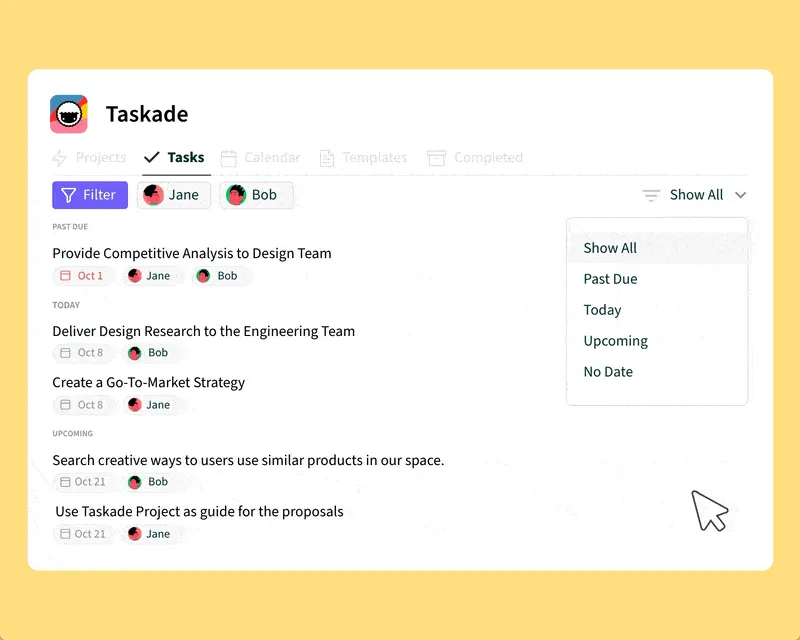
My Tasks (Master Agenda) section keeps your team in the know
🧘♂️ ZTD Tip #3: Unlike GTD, Zen to Done is focused on “doing.” Make sure your team doesn’t spend too much time planning and organizing. Don’t overthink!
You can fortify this habit by following these tips:
🤹 Don’t multitask and focus on one item at a time.
🤫 Schedule 1-2 hours of deep, distraction-free work.
🍅 Use the Pomodoro technique (coming to Taskade soon!).
🏃 Silence your inner critic and just do the work.
5. Review, Reflect, and Simplify
Goals fade, to-do lists overgrow, documents get misplaced. It’s the natural order of things. That’s why your team needs to grease the wheels every once in a while.
Similarly to GTD, Babauta recommends running a “Simplified Weekly Review” to realign priorities, optimize the workflow, and refocus on long-term/short-term goals.
💬 Talk things over. Schedule a recurring meetup to review your team’s long-term and short-term goals. Spend 5 minutes each week to realign.
📑 Pinpoint loose ends. Look for inbox items that were not filed into the system the previous week. Put them where they belong or delete.
📅 Check calendar entries. Find out what your team accomplished last week. Review upcoming calendar entries. Trim down as much as possible.
❌ Clean up to-dos. Check all existing to-do lists and review them for overdue tasks. If needed, send reminders to task owners. Delete completed items.
⭐ Reflect on essentials. Look for items that constantly land in the team inbox but are never completed. Eliminate them from information streams.
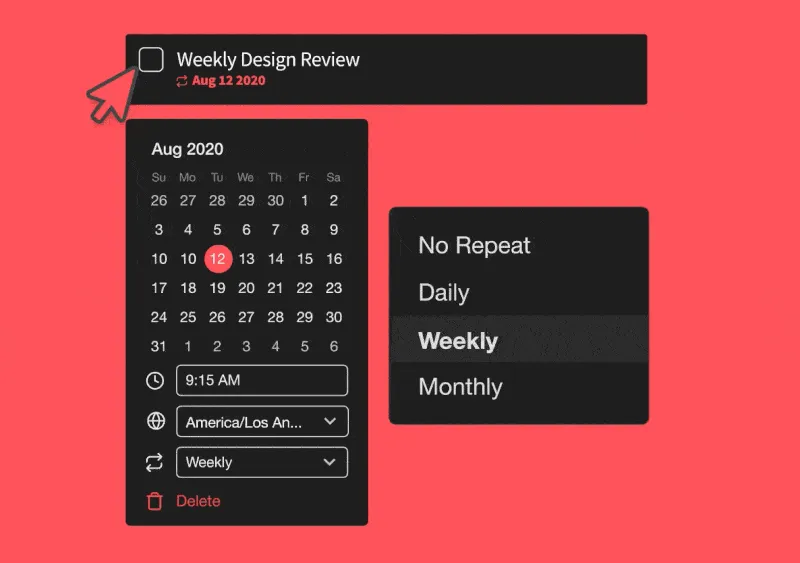
Set Recurring Tasks to fortify team habits
🧘♂️ ZTD Tip #4: Weekly, monthly, and yearly reviews are key components of ZTD. Investing a little bit of time once in a while means saving lots of it in the future.
6. Trust the Process and Stick to It
The final habit on our list is the key to productivity heaven. The truth is, productivity systems are only as good as the consistency you’re using them with.
ZTD is no different. You need to learn the ropes and get over teething trouble before you see results. While ZTD is forgiving, it does command due diligence.
“[...] once you find a good set of routines that work for you, if you can stick with them for 30 days, it will become a habit. And you will find yourself feeling much calmer and in control of your life.”
Leo Babauta at Zen Habits(3)
So, how to make things easier for your team?
🚧 Identify obstacles. Ask your team what is preventing them from adopting a habit. Brainstorm solutions during the weekly review and put them to the test.
🔄 Automate. Use Taskade templates to automate and streamlines repetitive tasks. Create checklists to guide you through regular activities.
📅 Stick to the plan. Avoid shuffling or cherry-picking Big Rocks and MITs. Focus on the first objective on the list and go after it.
⛅ Create routines. Encourage your team to implement ZTD habits into their morning/evening routines. Create synergy with existing personal habits.
🎨 Customize. Spice things up by customizing the workflow. Let your team discover their own, unique way of getting things done.
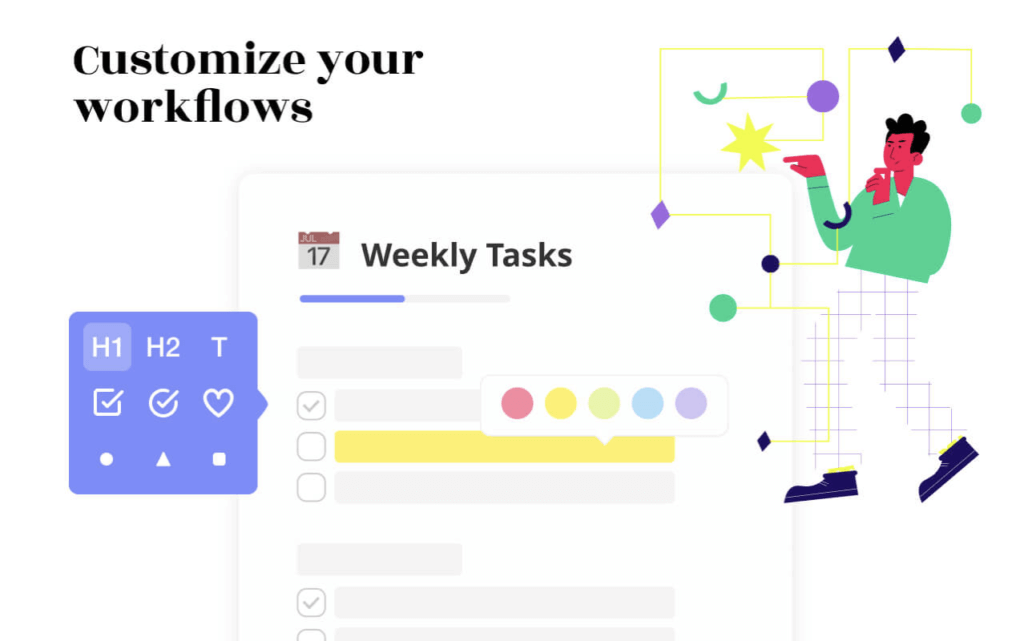
Apply different formatting style to personalize the ZTD workflow
🧘♂️ ZTD Tip #5: Your team doesn’t have to adopt all steps of Zen to Done. Choose what works best for your unique work style and stick to it.
👋 Parting Words
Implementing Zen to Done—even if it’s just one habit out of 10—will help you selectively improve team performance without causing too much chaos.
The team productivity formula isn’t any different from building personal habits. Take it slow, one step at a time, and stick with it long enough to see results.
So, are you ready for getting things done the zen way?
🌟 Create a place for stuff.
📥 Collect EVERYTHING!
🗑️ Put things where they belong.
🎯 Set your MITs, Big Rocks, and get after it.
🧩 Review, reflect, and simplify.
✊ Trust the process and stick to it.
Need some extra motivation? Be sure to read other similar articles on the blog. Learn how to simplify your team’s workflow and cut down unnecessary friction.
Tills next time!
Keep distractions at bay with Taskade AI! 🤖
🤖 Custom AI Agents: Deploy a team of specialized AI agents to support all kinds of productivity methodologies in your workspace.
🪄 AI Generator: Use AI to generate personalized systems and task lists tailored to your requirements, powered by OpenAI GPT (frontier models).
✏️ AI Assistant: Employ the AI Assistant for real-time task management and writing support, ensuring you stay focused and effective.
🗂️ AI Prompt Templates Library: Access hundreds of AI prompts to plan, manage, and execute projects in a sustainable way.
💬 AI Chat: Consult the AI Chat to find your optimal productivity method and receive personalized advice on your projects and tasks.
📄 Media Q&A: Take a deep dive into your documents to discover hidden insights and patterns, all using a simple chat interface.
And much more...
Frequently Asked Questions About Zen To Done
What is the Zen to done method?
The Zen to Done (ZTD) method is a productivity system created by Leo Babauta. It simplifies the Getting Things Done (GTD) methodology with a focus on forming habits, reducing complexity, and maintaining simplicity.
What is the meaning of Zen to done?
Zen to Done emphasizes simplicity and mindfulness in productivity. It integrates essential habits such as collecting tasks, processing them, planning, and focusing on doing one task at a time.
What is the difference between Zen to done and GTD?
Zen to Done (ZTD) simplifies the GTD system by emphasizing habit formation and reducing complexity. While GTD involves a detailed system for capturing and processing tasks, ZTD focuses on essential habits and simplicity.
What is the difference between GTD and Kanban?
GTD (Getting Things Done) is a task management methodology focusing on capturing and processing tasks. In contrast, Kanban is a visual workflow management tool that uses a board with columns to track the progress of tasks through different stages.
🧬 Zen Productivity Tools Built with Genesis
Embrace simplicity with these minimalist Genesis apps designed for ZTD-style productivity:
| App | What It Does | Clone |
|---|---|---|
| Minimalistic ToDo App | Clean, distraction-free task management | Clone → |
| Note Tiles | Simple note capture and organization | Clone → |
| Study/Work Timer + Music | Focused work sessions with calm sounds | Clone → |
| Breathe Circle | Mindful breaks between work blocks | Clone → |
🔍 Explore All Community Apps →
Build your own zen productivity system with Taskade Genesis — describe what you need, and watch it come to life.
Your living workspace includes:
- 🤖 Custom AI Agents — The intelligence layer
- 🧠 Projects & Memory — The database layer
- ⚡️ 100+ Integrations — The automation layer
Get started:
- Create Your First App → — Step-by-step tutorial
- Learn Workspace DNA → — Understand the architecture
