







TL;DR: AI for agencies means running client work through one app instead of a stack of disconnected tools. You get client portals, project tracking, a lead pipeline, and AI content drafting in a single place — built from a plain-English prompt with Taskade Genesis, where agents do the busywork and automations handle every handoff. 150,000+ apps have been built this way since launch, and most operators ship their first one the same afternoon.
David is not an agency owner. He runs an IT program office. But when his services group needed to manage a dozen partner engagements — intake, delivery, status reports, the works — he did not buy four more SaaS seats or wait on engineering. He described the operation he wanted in plain English and shipped a working client hub that same afternoon. No code, no admin training, no per-seat bill. If a program manager can do it, so can a two-person agency or a solo freelancer.
This guide shows how agencies, freelancers, and sales teams can run their whole client operation from one app: portals clients log into, projects you deliver, leads you close, and content you ship — all no-code, with AI agents and automations doing the repetitive work between clients.
What does AI for agencies actually mean?
AI for agencies means the software does the busywork between clients so you can spend your time on the work clients pay for. Instead of copy-pasting between a CRM, a project tool, a portal app, and a content doc, you run one app where AI agents draft and research, and automations onboard clients, send deliverables, and chase approvals. The result is fewer tools, fewer handoffs, and fewer things falling through the cracks.
The old way is a stack of apps that do not talk to each other. The new way is one app you describe in plain English and own outright.
The wedge is that everything shares one memory — Workspace DNA. A closed deal flows straight into onboarding. A finished deliverable updates the client portal on its own. Nothing gets re-typed because nothing lives in a separate silo. See it on the AI client portal builder and the automation hub.

The one app that runs four jobs
A service business really only needs four things to run: a way to win clients, a way to start them, a way to deliver, and a way to keep them informed. Here is what each looks like when AI handles the busywork, and the part of Taskade Genesis that does it.
| The job | What the agent or automation does | Powered by |
|---|---|---|
| Win clients (sales) | Agent enriches and scores each new lead; automation moves the deal and sends the first follow-up | Lead pipeline |
| Start clients (onboarding) | Automation creates the project, assigns kickoff tasks, sends a welcome email when a deal is won | Reliable workflows |
| Deliver work (projects) | Agents draft content and research; you track everything across multiple project views | AI agents |
| Keep clients informed (portal) | Agent writes the weekly status update; automation posts deliverables to a branded portal | Client portals |
Below is what the delivery surface looks like — a real Taskade Genesis client hub, with the agent panel open on the right.
┌─────────────────────────────────────────────────────────────────────┐
│  ⬡ Acme Agency · Client Operations            ▲ ■ ●   David ▾  ◷ Live │
├───────────────┬─────────────────────────────────────┬───────────────┤
│  CLIENTS      │  BOARD · Northwind Co.              │  EVE · AGENT  │
│               │                                     │               │
│  ▸ Northwind  │  ┌─ Intake ──┐ ┌─ In Progress ─┐    │  ▸ Draft this │
│  ▸ Globex     │  │ Brand audit│ │ Q3 blog x4   │    │    week's     │
│  ▸ Initech    │  │ ● new lead │ │ ▸ agent: 70% │    │    status     │
│  ▸ Umbrella   │  └────────────┘ └──────────────┘    │    email      │
│               │  ┌─ Review ───┐ ┌─ Delivered ──┐    │               │
│  + Add client │  │ Landing copy│ │ Logo pack ✓  │    │  ⚙ Tools: on  │
│               │  │ ⧗ client OK │ │ → portal ✓   │    │  ◍ Memory: on │
│  VIEWS        │  └─────────────┘ └──────────────┘    │ ⌥ Models: Auto│
│  ▦ Board      │                                     │               │
│  ☰ List       │  Automations live ··············· 4 │  [ Run agent ]│
│  ▤ Table      │  Next: send deliverable → Globex    │  [ Add tool  ]│
│  ◷ Calendar   │  Lead scored: Initech (hot) ↑       │               │
└───────────────┴─────────────────────────────────────┴───────────────┘
The board is your delivery work, the left rail is your client list, and the right rail is Taskade EVE — the AI agent drafting your next client update while automations quietly move deliverables to the portal. One screen, four jobs.
How a won deal becomes a delivered project — automatically
The whole point of one app is that the handoffs disappear. Here is the path a single client takes, with the agents and automations marked.
No one re-typed the client's name. No one remembered to send the welcome email. The pipeline, the project, and the portal are the same app, so the data just flows.
How agents do the client busywork
AI agents are the part that replaces hours of repetitive client work. In Taskade Genesis, an agent is a teammate you set up once in plain English — it has built-in tools (web search, file analysis, persistent memory, and more) and routes across frontier models from top AI labs, so you never pick a model by hand.
For a service business, three agents carry most of the load:
- A content agent drafts blog posts, captions, campaign briefs, and proposals from your notes — the bread-and-butter deliverables of a marketing agency.
- A research agent gathers competitor data, audience insights, and source material before the content agent writes a word.
- A client-update agent turns raw task changes into a clean weekly status email, so clients always know where things stand.
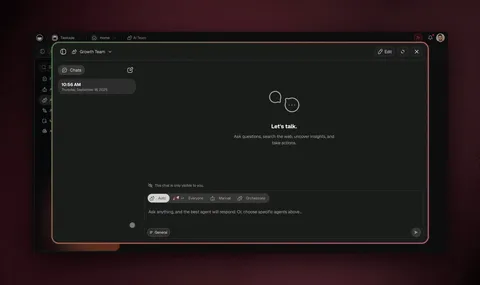
The real unlock is that agents collaborate as a team. In orchestration mode, one agent researches, hands off to one that drafts, then to one that reviews — before anything reaches a client. You assign the goal; the team divides the work.
| Agent role | What it produces for clients | When it runs |
|---|---|---|
| Content agent | Blog drafts, captions, briefs, proposals | On request or on a schedule |
| Research agent | Competitor scans, audience notes, citations | Before the content agent drafts |
| Lead-scoring agent | A fit score on every new lead | The moment a lead lands |
| Client-update agent | Weekly status email per client | Every Friday, automatically |
This is the same agent layer that powers a full AI sales pipeline — the sibling build where scoring and follow-up agents work your deals end to end. Browse ready-made agents in the agents gallery to start from a finished teammate.
See it live, then clone it
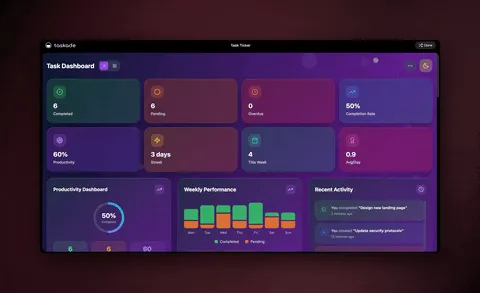
Below is a real, working Client Portal built entirely in Taskade Genesis — 3 projects, 1 AI agent, and 4 automations, made for service businesses, agencies, and consultants. It has an intake section, a per-client profile, and a delivery dashboard. This is not a screenshot or a mockup; it is the live app.
Click around, then clone it into your own workspace in about 30 seconds. Rename the sections, swap in your client list, point the automations at your tools, and you have a branded client hub of your own — without building from a blank page.
Note: if the embed shows a loading state in a local preview, that is expected —
/share/apps/*apps run live in production. Open the Community Gallery to browse and clone the full set.
How automations remove the handoffs
Automations are the reliable, durable workflows that run client work while you sleep. They watch for a change — a new lead, a won deal, a finished deliverable — and act on it the same way every time. Because they are durable, they branch, loop, filter, wait minutes or days, and resume from the exact step that failed, so a client approval request never silently disappears.
Here are the three that change an agency's day most, drawn straight from how real teams set them up:
- Client onboarding — a won deal (or a booking event) creates the project, assigns kickoff tasks, and sends a welcome email automatically.
- Deliverable handoff — when work is marked ready, it posts to the client portal and notifies the account lead, with no one chasing a link.
- The weekly status loop — every Friday, the client-update agent drafts a status email per client and an automation sends it, so reporting stops eating your afternoons.
These connect outward through 100+ bidirectional integrations — triggers pull events in, actions push data out — including native Shopify and Stripe, so a paid invoice can mark a project paid on its own. Explore the automation library to start from a working flow.

What you actually get versus a tool stack
Most agencies cobble together four subscriptions that do not share data. Taskade Genesis is one app you own, reshape with a prompt, and keep. Here is the full picture in one place.
| Capability | What it means for your client work |
|---|---|
| One-prompt apps | Describe your client operation; get a live app with portals, pipeline, and projects |
| AI agents (built-in tools) | Agents that draft content, research, score leads, and write status updates |
| Multi-agent collaboration | Research → draft → review handoffs before anything reaches a client |
| Frontier models | Top AI labs, routed for you automatically |
| 100+ bidirectional integrations | Triggers pull events in; actions push data out — native Shopify and Stripe |
| Reliable automations | Onboard, deliver, and report on autopilot; resume from the failed step |
| Multiple project views | List, Board, Calendar, Table, Mind Map, Gantt, Org Chart for every client |
| Client-facing portals | Custom domains, built-in sign-in, Community Gallery, app kits |
| Persistent memory | Workspace DNA — won deals flow into delivery with nothing re-typed |
The difference is altitude. A tool stack automates individual tasks across four apps. Taskade Genesis automates the whole operation — and gives you the portal, the agents, and the shared memory around it. Compare it head to head with the best agency management software roundup, or start from a finished example in the Community Gallery.
How to start this week
You do not need a plan, a developer, or a migration project. Pick the path that matches how you like to start.
How do you want to begin?
│
├─ Start from a finished example
│     └─► Clone the Client Portal from /apps ── rename, done
│
├─ Describe your own operation
│     └─► Tell Taskade Genesis what you run ── it builds the app
│
└─ Grow into client-facing
      ├─ Solo / freelancer ............... Free or Pro $10
      └─ Going branded for clients ....... Business $25 (custom domains + sign-in)
Whichever path you pick, you can be working with a real client by the end of the day. Build it free, refine it with a prompt, and add custom domains when you are ready to put your name on it.
Frequently asked questions
What is AI for agencies?
AI for agencies means running client work through software that does the busywork between clients. Instead of four disconnected tools, you build one app where AI agents draft and research and automations onboard, deliver, and report. With Taskade Genesis you build it from a prompt — 150,000+ apps built since launch.
Can a freelancer build a client portal without code?
Yes. Describe the portal to Taskade Genesis and it builds a live app with intake, a per-client dashboard, project tracking, and a delivery area. Built-in sign-in works on every plan; add a custom domain on Business and above for a branded space. Most freelancers ship one the same afternoon.
How do AI agents help a service business?
Agents take repetitive work off your plate — drafting content, researching, scoring leads, and writing client updates. Taskade AI agents ship with built-in tools and can collaborate in orchestration mode, so one researches, one drafts, and one reviews before anything reaches a client.
How is this different from a separate CRM, PM tool, and content app?
Those four tools rarely share data, so you re-type everything between them. Taskade Genesis combines lead pipelines, project tracking with multiple views, client portals, and AI content drafting in one app with a shared memory, so a won deal flows straight into onboarding.
Does it connect to the tools my agency already uses?
Yes. Taskade has 100+ bidirectional integrations — triggers pull events in, actions push data out — including native Shopify and Stripe. A form can create a lead, a deliverable can sync to client storage, and a paid invoice can mark a project paid. See the automation hub.
Which plan does my agency need?
You can build and test for free. On annual billing it is Free, Pro $10 (10 users, Popular), Business $25, Max $100, and Enterprise $250. Built-in sign-in for client portals works on every plan, and custom domains are on Business and above. See the pricing page for the full breakdown.
Ready to run your client work from one app? Start free with Taskade Genesis — describe your operation, and watch it build the portals, the pipeline, the projects, and the agents that keep it all moving.
Explore the agents gallery, browse cloneable client apps, or set up your first automation to remove the next handoff.
▲ ■ ● Memory, Intelligence, Execution — your client work remembers itself, your agents do the drafting and research, and your automations handle every handoff. That's the difference between a stack of tools and one app that runs your whole operation.