







TL;DR: You can build an AI real estate app in an afternoon, no code. Taskade Genesis turns one prompt into a live app with a listing tracker, a lead pipeline, and an AI agent that gathers and summarizes market news for you. More than 150,000+ apps have been built this way. Clone a working one free and swap in your own listings.
Most real estate agents run their business across four tabs: a spreadsheet of listings, a CRM half-set-up, an inbox of leads, and a dozen news sites they "should" be reading. The information is everywhere and connected to nothing.
This guide shows the other way. You describe the real estate app you want in plain English, and Taskade Genesis builds it: a listing tracker, a lead-capture pipeline, and an AI agent that reads the market for you and writes the summary into your app. No engineers, no per-seat CRM bill, no copy-paste.
The example below is the same kind of app a non-technical operator can ship in a day. Picture David, an IT program manager who has never written production code, launching a working dashboard for his side real estate business by the end of an afternoon. That is the bar.
┌──────────────────────────────────────────────────────────────┐
│  Listings  ›  Table view                          [ + Add ]  │
├──────────────────────────────────────────────────────────────┤
│  Address          Price     Status        Beds   Days Listed │
│  ───────────────  ────────  ────────────  ─────  ─────────── │
│  12 Maple Ave     $540,000  Active          3       9        │
│  88 River Rd      $725,000  Under Contract  4      21        │
│  4 Hilltop Ln     $399,000  Active          2       3        │
│  201 Oak Court    $1.2M     Pending         5      14        │
├──────────────────────────────────────────────────────────────┤
│  AI agent: enrich each listing with comps + a market note    │
└──────────────────────────────────────────────────────────────┘
What is an AI real estate app?
An AI real estate app is a single live app that tracks your listings, captures your leads, and runs an AI agent that gathers and summarizes market news for you. With Taskade Genesis you build it from one prompt, and you own it. It replaces the spreadsheet-plus-CRM-plus-inbox sprawl with one workspace where every listing, lead, and market note connects.
The difference from a template is that it actually runs. A template is a static layout you fill in by hand. A Taskade Genesis app has a live database (your listings and leads), AI agents that do work (enrich a listing, summarize an article), and reliable automation workflows that act on their own (route a lead, send a reminder). It is software, not a document.

The three parts of a real estate app
Every working real estate app has the same three parts, and Taskade Genesis builds all three from your description.
| Part | What it does | Taskade view used |
|---|---|---|
| Listing tracker | Every property, price, status, days on market | Table + Calendar |
| Lead capture | New inquiries land as cards you can move and assign | Board + intake form |
| Market-news agent | Reads news feeds, pulls out the facts, writes a brief | Agent + Table |
You do not build these one by one in a node editor. You describe the result, and Taskade Genesis assembles the views, the agent, and the automations together. Taskade is a no-code app builder at heart, so the only skill required is being able to describe what you want.
How to build the listing tracker
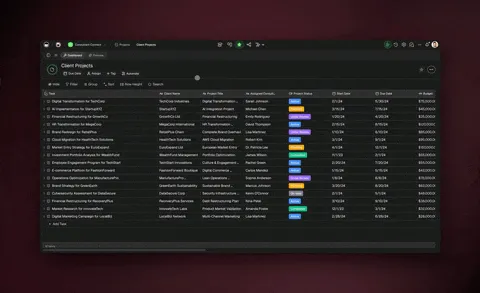
Start with the data, because everything else hangs off it. Tell Taskade Genesis: build a real estate app with a listing tracker showing address, price, status, beds, baths, and days on market. You get a Table view of every property and a Calendar view of showings and lease or closing dates, all in the same app, with multiple project views on the same data.
Taskade gives you multiple project views on the exact same data, so the listing you add in the Table also appears on the Board, Calendar, and a Gantt timeline of your transactions:
| View | Best for in real estate |
|---|---|
| Table | Master list of all active and pending listings |
| Board | Pipeline stages (new, showing, offer, under contract) |
| Calendar | Showings, open houses, closing dates |
| List | Daily task checklist per listing |
| Mind Map | Plan a marketing campaign for a property |
| Gantt | Transaction timeline from offer to close (Timeline lives inside Gantt) |
| Org Chart | Team and referral relationships |
Then add an AI agent to do the busywork. Drop an agent on the Table and ask it to enrich each new listing with comparable sales and a one-line market note. That is the same idea as the property workflow Taskade documents in Learn Taskade, where you describe the document or checklist you need and the AI generates it for you instead of building from a blank page.
How to set up lead capture
Lead capture is a form plus a Board plus one automation. Publish a short intake form, and every submission lands as a new card on your lead Board with the contact, budget, and area attached. A reliable automation workflow then routes the lead, sends a first-touch reply, and sets a follow-up reminder, all without you watching it.
┌──────────────────────────────────────────────────────────────┐
│  Leads  ›  Board view                                        │
├──────────────────────────────────────────────────────────────┤
│  New (5)          Contacted (3)      Showing (2)   Won (1)    │
│  • Acme buyer     • R. Patel         • J. Cole     • Khan     │
│  • Web inquiry    • M. Ortiz         • L. Diaz                │
│  • Zillow lead    • T. Nguyen                                 │
│  • Referral                                                   │
│  • Open house                                                 │
├──────────────────────────────────────────────────────────────┤
│  Automation: new lead → reply + assign agent + 24h reminder  │
└──────────────────────────────────────────────────────────────┘
The automation is bidirectional. The trigger pulls the new lead in from your form or a connected source, and the actions push the reply, the assignment, and the calendar reminder back out across 100+ bidirectional integrations. Here is the flow a single new lead runs through:
For the lead-handling agents themselves, you do not start from scratch. Browse ready-made sales agents and CRM agents and drop one into your app to qualify inquiries and keep follow-ups moving.
How the market-news agent works
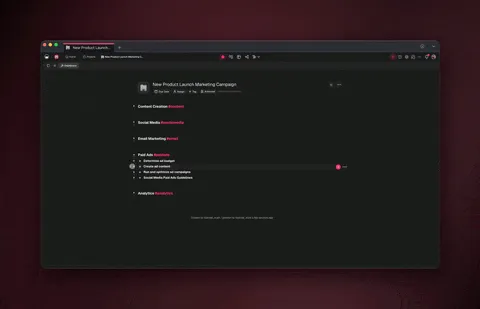
The market-news agent is the part that feels like magic and takes about five minutes to set up. You create an agent and tell it its job: read each new real estate article and pull out the location, price signal, and market trend into a short summary. Then a workflow feeds it fresh articles and files the summaries into your app automatically.
This is the exact pattern Taskade documents for real estate news gathering: a feed trigger detects a new article, an agent action breaks it down into structured fields, and a final action writes a clean row into your tracker. You read a tidy brief instead of forty browser tabs.
The agent is not a single chatbot. It comes with built-in tools, including web search, so it can verify a figure or pull context before it writes. And because Taskade routes across 15+ frontier models from OpenAI, Anthropic, Google, and open-weight providers, you can use a fast model for quick scans and a stronger one for the weekly market roundup. Learn the full agent setup in the AI agents hub or the research agents category for deeper market analysis.
See it live, then clone it
The fastest way to understand a real estate app is to open one that already runs. The Community Gallery has live, cloneable apps you can try in the browser, then copy into your own workspace and fill with your own listings and lead sources.
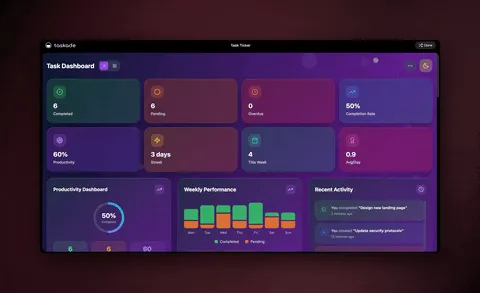
Cloning beats configuring from scratch. You get a working pipeline, a wired-up agent, and the automations already in place. You swap in your area, your listings, and your news feed, and you are running the same day. Clone a starter app from the Community Gallery and make it yours.
Build versus buy: a real estate app you own
A dedicated real estate CRM is built for large brokerages with deep transaction accounting, and that is a genuine strength when you need it. But most solo agents and small teams are paying per seat for capacity they do not use, and they still cannot change how the tool works.
| AI real estate app (Taskade Genesis) | Traditional real estate CRM | |
|---|---|---|
| Setup | One prompt or clone, minutes | Onboarding, often weeks |
| Listings + leads + news | One app, connected | Separate tools, copy-paste |
| AI agents | Built in, built-in tools | Add-on or none |
| Custom domain + portal | Business and above | Often top-tier only |
| You own / can change it | Yes, fully | No, vendor-controlled |
| Starting price (annual) | Free, then $10/mo | Per seat, often $25+/mo |
The deeper reason a Taskade app keeps getting smarter is Workspace DNA: your Projects are Memory, your agents are Intelligence, and your automations are Execution, in a loop that feeds itself.
Every showing you log and every lead you close becomes Memory the agents draw on next time. The app you ship in June is smarter in December because it has been learning your market the whole time. To go deeper on the dashboard side of this, the AI dashboard builder guide shows how to surface listing and pipeline metrics as live charts.
What you can ship in a day
Here is the realistic end state for a non-technical agent who spends one afternoon on this.
| Outcome | How |
|---|---|
| Every listing in one tracker | Table + Calendar views, AI enriches new entries |
| Leads captured automatically | Intake form to Board, auto-reply and reminder |
| A daily market brief | News agent reads the feed and writes summaries |
| A client portal | Publish with a custom domain and built-in sign-in |
| A team pipeline | Shared Board with role-based access from Owner to Viewer |
You also get native Shopify and Stripe actions if you sell services or collect deposits, plus the ability to branch, loop, filter, wait minutes to days, and resume from failure in your automations, so a flaky news feed never breaks the rest of your app.
Frequently Asked Questions
Can I build a real estate app with no coding experience?
Yes. The whole point of Taskade Genesis is that you describe the app in plain English and it builds the listing tracker, lead pipeline, and agent for you. The only skill required is being able to say what you want. Start at Taskade Genesis or clone a working app from the Community Gallery.
How long does it take to get a working app?
Minutes to an afternoon. Cloning a community app is the fastest path because the views, agent, and automations are already wired. Building from a prompt takes a few minutes more while Taskade Genesis assembles everything. Either way you have a running app the same day.
Can the AI agent really gather market news on its own?
Yes. You create an agent, give it its job, and connect it to a real estate news feed. From then on it reads each new article, extracts the location, price signal, and trend, and writes a clean summary into your app. The agent has built-in tools, including web search, and runs on a schedule.
How do leads get into the app?
Through a short intake form you publish. Every submission lands as a new card on your lead Board with the contact, budget, and area attached. An automation can reply, assign an agent, and set a follow-up reminder automatically. See the Learn Taskade guide on triggers for the setup.
Do I still need a separate CRM?
Not to start. A Taskade Genesis app gives you a pipeline, contact records, and follow-up automations for free, which covers most solo agents and small teams. Large brokerages with deep transaction accounting may keep a dedicated platform, but you can own a lead-to-close system here without a per-seat bill.
Can clients log in and see only the listings I match to them?
Yes. Publish your app with built-in sign-in, and use role-based access from Owner to Viewer to control exactly what each person sees. Clients see their listings and saved searches, your team sees the full pipeline. Built-in sign-in works on every plan, including Free. Custom domains are on Business and above, at $25 per month billed annually. For the closing side of that portal, see a closing checklist your buyers and sellers can watch in real time.
Which AI models does the agent use?
Your agent routes across 15 or more frontier models from OpenAI, Anthropic, Google, and open-weight providers. You can pick a fast model for quick lead replies and a stronger one for detailed market summaries, and you can change the choice per agent and per task. You are never locked to a single vendor.
Is my listing and client data secure?
Yes. Your app runs in your own workspace with role-based access from Owner to Viewer, so each person sees only what you allow. Client contacts, commissions, and listing notes stay under your control, and your data is yours to export at any time. Business and above add a custom domain so the portal carries your brand.
Can I connect it to my other tools?
Yes. Taskade has 100+ bidirectional integrations, triggers pull events in, actions push data out, with native Shopify and Stripe support. A new lead can flow in from a form or portal, and a reply, a calendar event, or a payment record can flow back out automatically.
How much does it cost?
You can start free. Paid plans on annual billing are Pro at $10/mo (the Popular pick), Business at $25/mo, Max at $100/mo, and Enterprise at $250/mo. Custom domains and a branded client portal are on Business and above. See the pricing page for the current plan details.
Build your real estate app today
You do not need engineers, a multi-week rollout, or a per-seat CRM to run a modern real estate business. You need one app that tracks listings, captures leads, and reads the market for you, and you can build it from a single sentence.
Start by cloning a live app from the Community Gallery, or describe your own at Taskade Genesis. Wire in sales and research agents, set up your news feed with a reliable automation workflow, and publish a branded portal when you are ready.
▲ ■ ● Memory, Intelligence, Execution. Your listings remember, your agents reason over the market, and your automations run the follow-ups. That loop is what turns a real estate app from a static spreadsheet into living software you own.