







New to the category? Start with our companion post on the best AI agent builders of 2026 and then browse the live Taskade Agents v2 catalog to see each tier in action.
The Short Answer (60 Seconds)
A chatbot answers questions in a chat window. A copilot suggests the next action inline inside a workflow. An agent plans and executes multi-step tasks using tools, with the human only checking in at milestones. A digital employee is a persistent, role-scoped agent that owns an ongoing job function such as SDR or tier-1 support. All four run on the same frontier LLMs; the difference is autonomy, tool access, memory, and scope.
Why the Terms Got Muddled
Three years of breathless launches left the category with overlapping vocabulary. Every vendor calls its product an "AI agent" regardless of what it actually does, and the press has mostly gone along with it. Here is how we ended up here.
The 2023 Chatbot Boom Poisoned the Well
When ChatGPT launched in late 2022, every LLM experience was called a "chatbot." By 2023, vendors wanting to differentiate started calling the same products "agents" even when nothing about them was agentic. The word became a marketing label instead of a technical category.
The 2024 Copilot Explosion Blurred Inline vs Autonomous
Microsoft launched Copilot for Windows, Microsoft 365, GitHub, Edge, and Security all in the same year. Because Microsoft positioned "copilot" as the umbrella brand, press coverage started using copilot and agent interchangeably, even though a copilot specifically keeps the human in the loop at every step.
The 2025 Agent Hype Cycle Created a Vocabulary Crisis
By mid-2025, OpenAI had shipped Operator, Anthropic had shipped Computer Use, and a wave of startups launched "digital workers" that were actually chatbots with system prompts. Analysts began demanding a cleaner taxonomy. This guide uses the four-level ladder that emerged from that debate.
Definitions
Each tier builds on the one below it. A copilot is a chatbot with inline placement. An agent is a copilot with autonomy and tools. A digital employee is an agent with persistence and a job title.
Chatbot (Level 1: Answers Questions)
A chatbot is an LLM wrapped in a chat UI. It answers questions, summarizes documents you paste in, and maintains short-term conversation memory. It cannot open your browser, edit your files, or take action outside the chat window unless you give it tools — at which point it stops being a pure chatbot. Examples: ChatGPT (default), Claude chat, Gemini chat, Intercom Fin, Poe.
Copilot (Level 2: Suggests Inline)
A copilot is an LLM embedded inline inside an existing workflow. It suggests the next line of code, the next slide, the next paragraph, or the next query. Humans accept or reject every suggestion with Tab, Enter, or a click. Copilots never act without confirmation. Examples: GitHub Copilot, Cursor Chat, Notion AI, Microsoft 365 Copilot, Codeium.
Agent (Level 3: Takes Autonomous Action)
An agent is an LLM plus tools plus a planning loop. Given a goal it decomposes the work into steps, selects tools, executes them, observes the results, and iterates until the goal is met. Humans only check in at milestones, not every keystroke. Examples: Taskade Agents v2, Devin, Manus, OpenAI Operator, LangChain, CrewAI.
Digital Employee (Level 4: Persistent Role-Scoped)
A digital employee is an agent with a persistent identity, a long-term memory store, a job title, and KPIs. It owns an ongoing work function such as SDR outreach, tier-1 support, or candidate sourcing. It clocks in, handles its queue, and hands off edge cases. Examples: Artisan, 11x, Suna, Decagon, Sierra, and persistent public Taskade Genesis agents.
The Autonomy Ladder
The cleanest way to see the category is as a literal ladder where each rung adds capability to the rung below. Read this diagram bottom-up.
┌───────────────────────────────────────────────┐
│   LEVEL 4 — DIGITAL EMPLOYEE                  │
│   Persistent role, memory, KPIs, work inbox   │
│   Examples: Artisan, 11x, Decagon, Sierra     │
├───────────────────────────────────────────────┤
│   LEVEL 3 — AGENT                             │
│   Plans + tools + iteration, milestone checks │
│   Examples: Taskade Agents v2, Devin, Manus   │
├───────────────────────────────────────────────┤
│   LEVEL 2 — COPILOT                           │
│   Inline suggestions, human-in-the-loop       │
│   Examples: GitHub Copilot, Notion AI, Cursor │
├───────────────────────────────────────────────┤
│   LEVEL 1 — CHATBOT                           │
│   Answers questions inside a chat window      │
│   Examples: ChatGPT, Claude, Gemini, Fin      │
└───────────────────────────────────────────────┘
          ▲
          │  INCREASING AUTONOMY
          │  INCREASING TOOL ACCESS
          │  INCREASING MEMORY
          │  INCREASING SCOPE OF RESPONSIBILITY
Climbing from Level 1 to 2. The single jump from chatbot to copilot is placement. A chatbot lives in its own window; a copilot lives inside your editor, your doc, your spreadsheet. That shift makes the model dramatically more useful because it sees context automatically.
Climbing from Level 2 to 3. The jump from copilot to agent is autonomy plus tools. Instead of proposing the next token for a human to accept, the model now runs its own plan against external systems. This is where most vendors conflate categories because the underlying LLM is identical.
Climbing from Level 3 to 4. The jump from agent to digital employee is persistence. An agent runs a single task; a digital employee holds a role for weeks or months with accumulated memory, metrics, and a queue. Most "AI employees" on the market in 2026 are actually single-task agents rebranded — so check for persistent memory before believing the label.
Above Level 4. The speculative Level 5 is a multi-agent organization with internal management, where digital employees hire, fire, and delegate to each other. We cover that in the "What Comes Next" section below.
Side-by-Side Comparison
The clearest test of any tool is which row of this table actually describes it.
| Criteria | Chatbot | Copilot | Agent | Digital Employee |
|---|---|---|---|---|
| Autonomy | None | Assistive | Task-level | Role-level |
| Tools | Few or none | Read-only context | Read and write | Read, write, schedule |
| Memory | Session only | Session plus workspace | Per-task, sometimes persistent | Long-term persistent |
| Multi-step planning | No | No | Yes | Yes |
| Example products | ChatGPT, Claude, Gemini | GitHub Copilot, Notion AI | Taskade Agents v2, Devin | Artisan, 11x, Sierra |
| Price range | $0 to $20 per user per month | $10 to $30 per user per month | $20 to $200 per user per month | $500 to $5,000 per seat per month |
| Where they run | Browser or app chat UI | Inside an editor or doc | Cloud runtime with tool access | Dedicated workspace plus integrations |
| Who operates them | End user | End user | Ops or product team | People operations or RevOps |
| Human-in-the-loop | Every turn | Every suggestion | Milestones only | Exceptions only |
| Tool-calling | Rare | Limited | Core feature | Core feature |
| Long-running tasks | No | No | Minutes to hours | Days to weeks |
| Custom personas | Prompts only | Prompts only | Yes | Yes, with identity |
Capability Matrix
This matrix is the fastest way to label a new product you encounter.
| Capability | Chatbot | Copilot | Agent | Digital Employee |
|---|---|---|---|---|
| Natural language chat | Yes | Yes | Yes | Yes |
| Inline doc or code placement | No | Yes | Partial | Partial |
| Tool calling | Partial | Partial | Yes | Yes |
| Web browsing | Partial | No | Yes | Yes |
| File I/O | No | Partial | Yes | Yes |
| Multi-step planning | No | No | Yes | Yes |
| Persistent memory | No | Partial | Partial | Yes |
| Scheduled runs | No | No | Yes | Yes |
| Triggered runs | No | Partial | Yes | Yes |
| Multi-agent collaboration | No | No | Partial | Yes |
| Identity and persona | Partial | No | Yes | Yes |
| KPIs and reporting | No | No | Partial | Yes |
| Work queue or inbox | No | No | Partial | Yes |
| Integrations | Few | Partial | Many | Many |
| Public embedding | Partial | No | Yes | Yes |
Real Examples of Each Category
Twenty tools to anchor the abstractions above. Pricing and capabilities reflect public information as of April 2026.
Chatbots (Level 1)
ChatGPT. The default free and Plus tiers of ChatGPT are pure chatbots. You ask questions, it answers. Enabling Operator upgrades ChatGPT to Level 3 for specific tasks, but the base experience is conversational. Great for drafting, research, and one-off questions. See openai.com.
Claude (chat). Anthropic's Claude chat at claude.ai is a conversational interface with optional file uploads and Projects for persistent context. Enabling Computer Use or Claude Code moves specific sessions up the ladder. See anthropic.com.
Gemini. Google's Gemini chat at gemini.google.com is a chatbot with optional extensions into Workspace apps. The extensions are copilot-level, not agent-level, because they still require explicit user confirmation. See gemini.google.com.
Intercom Fin. Fin is a purpose-built support chatbot trained on your help center. It answers customer questions inside Intercom Messenger but does not take actions in other systems without explicit handoff. See intercom.com/fin.
Poe. Quora's Poe aggregates multiple chatbots behind one UI, including GPT, Claude, and Llama variants. The aggregation itself is chatbot-level because Poe does not add tools or autonomy. See poe.com.
Copilots (Level 2)
GitHub Copilot. The canonical inline copilot. Suggests code completions as you type, and a chat panel for questions. Humans accept every suggestion with Tab. GitHub's "agent mode" is an upgrade path to Level 3. See github.com/features/copilot.
Cursor. Cursor's Tab model and Chat are copilot-level experiences embedded in a VS Code fork. Cursor Agents is a separate Level 3 feature. See cursor.com.
Notion AI. Notion AI surfaces inline writing and summarization inside Notion docs and databases. It does not take actions across your workspace without explicit triggers, which keeps it at Level 2. See notion.com.
Microsoft 365 Copilot. Inline assistance inside Word, Excel, PowerPoint, Outlook, and Teams. Microsoft's Copilot Studio lets you upgrade to Level 3 agents, but the base Copilot experience is inline suggestion. See microsoft.com/copilot.
Codeium. A free-tier alternative to GitHub Copilot with similar inline completions across major editors. Operates squarely at Level 2. See codeium.com.
Agents (Level 3)
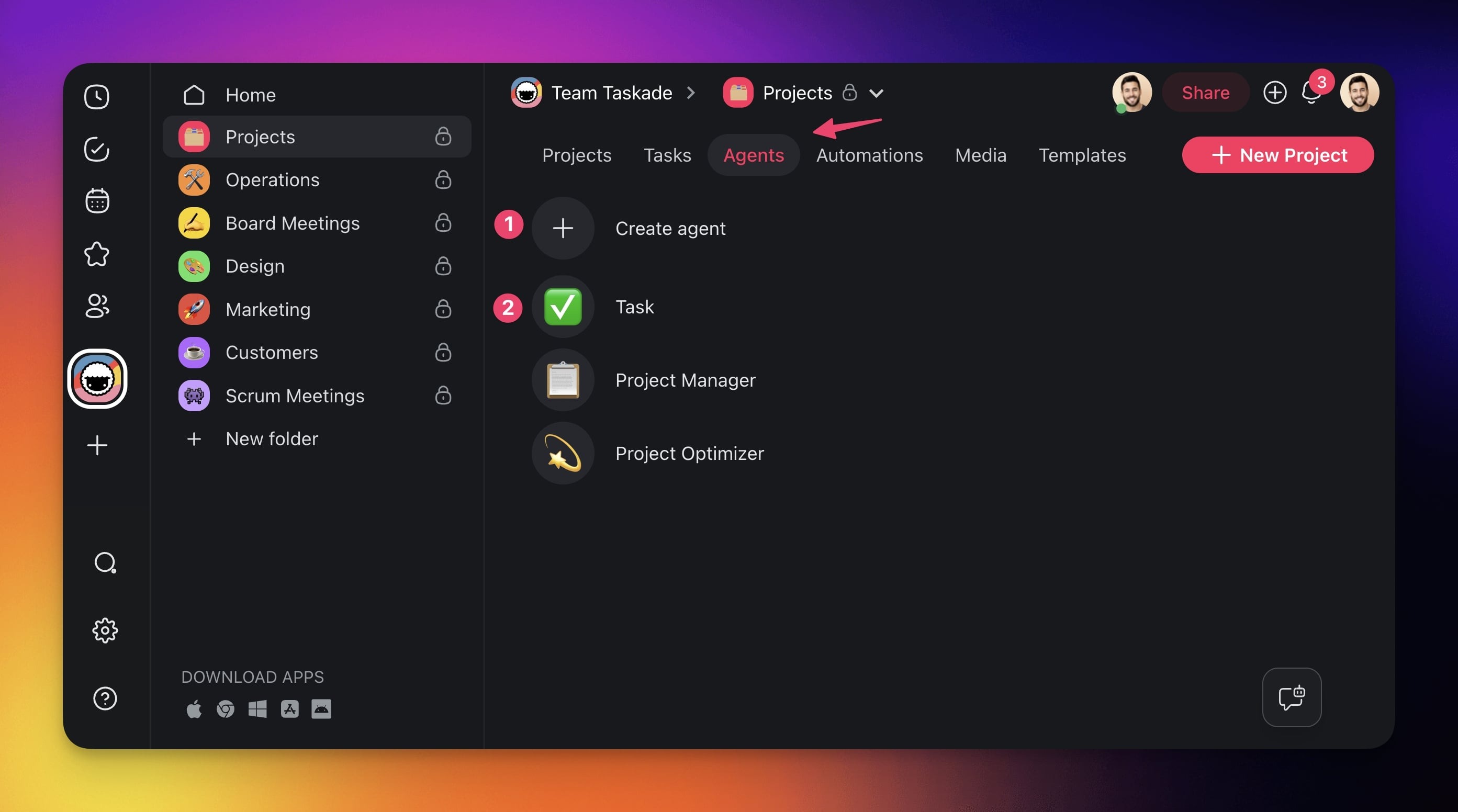
Taskade Agents v2. Custom agents with built-in tools, custom tool support as of v6.99, persistent memory, public embedding, multi-model routing across frontier models from top AI labs, and multi-agent collaboration. Live in the /agents catalog.
Devin. Cognition's autonomous software engineer. Devin opens repos, writes code, runs tests, and files PRs on its own. Level 3 by definition. See cognition.ai.
Manus. A general-purpose autonomous agent that browses, researches, and builds deliverables from a single prompt. Level 3, with some persistence features pushing toward Level 4. See manus.im.
OpenAI Operator. OpenAI's browsing agent that drives a real Chromium browser to complete web tasks on your behalf. Level 3 inside the ChatGPT product. See openai.com/index/introducing-operator.
LangChain. Not a product but a framework for building agents. Teams use it to wire LLMs to tools, memory, and planning loops. Output is a Level 3 agent. See langchain.com.
CrewAI. A framework specifically for multi-agent teams where specialist agents collaborate on a shared goal. Output is Level 3, pushing toward Level 4. See crewai.com.
Digital Employees (Level 4)
Artisan. Ava, Artisan's AI SDR, holds a persistent outbound sales role with prospecting, research, personalization, and sending. A job, not a task. See artisan.co.
11x. Alice and Jordan from 11x are persistent sales and RevOps digital employees with KPIs and a work inbox. See 11x.ai.
Suna. An open-source general-purpose digital employee with long-term memory and autonomous planning. See github.com/kortix-ai/suna.
Decagon. Persistent AI customer support agents for enterprises, with memory across customer histories and integrations with Zendesk and Salesforce. See decagon.ai.
Sierra. Founded by Bret Taylor, Sierra builds persistent AI customer-experience agents with brand voice, persistent memory, and ongoing KPIs. See sierra.ai.
When to Use Each
The decision depends on how much work you want the system to take off a human's plate.
Use a Chatbot When
You need answers, drafts, or research and the user is comfortable doing the work themselves afterward. Chatbots are the lowest-risk deployment because they cannot take unintended actions. Ship a chatbot for general Q&A, help-center deflection, and creative brainstorming.
Use a Copilot When
Users are already inside a workflow — writing code, drafting a doc, building a sheet — and you want to accelerate each step without taking control. Copilots shine when acceptance is fast (Tab-to-accept) and errors are cheap to undo.
Use an Agent When
The work is multi-step, repeatable, and valuable enough that waiting for the human to do it is wasteful. Agents are right when the output is measurable (tests passed, PR merged, report delivered) and errors can be caught before they compound.
Use a Digital Employee When
The work is a recurring job rather than a one-off task. If the same agent would run every weekday with the same scope, upgrade it to a digital employee with persistent memory and a real role. This is the right frame for SDR, tier-1 support, recruiting coordination, and weekly reporting.
The 60-Second Decision Flowchart
Walk this tree the next time you are scoping an AI feature.
How Taskade Genesis Spans All Four Levels
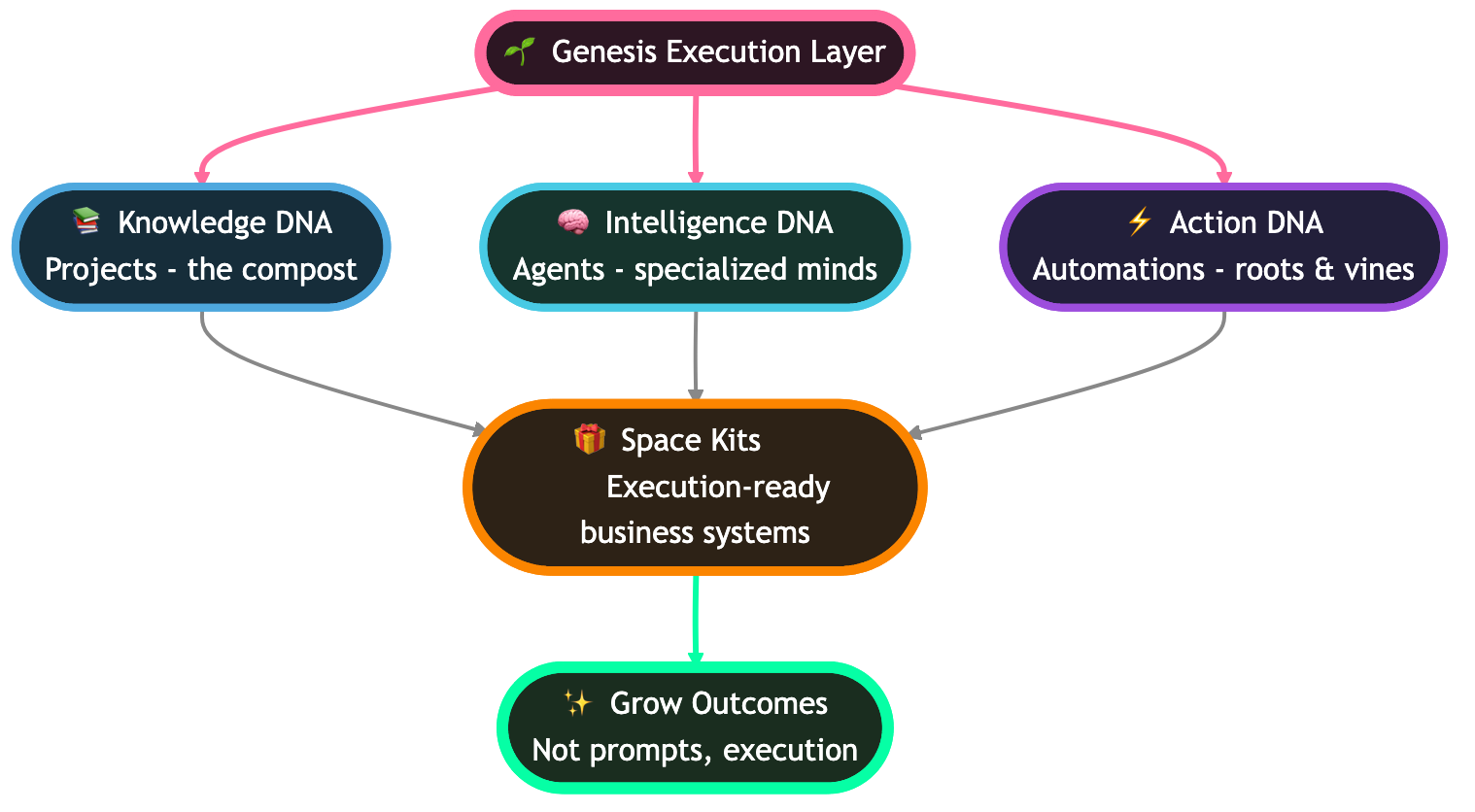
Most products sit on one rung. Taskade Genesis is the rare platform that spans all four because it is built on Workspace DNA — Memory (Projects), Intelligence (Agents), and Execution (Automations) — and every surface can be configured up or down the ladder.
Level 1: Basic Chat in Projects
Every Taskade project ships with a built-in chat panel where frontier models answer questions in context. Taskade runs frontier models from top AI labs, and on Enterprise, Claude runs on your own Anthropic key. This is a pure Level 1 chatbot experience and is available on the Free plan, where signup and the first build grant free credits.
Level 2: Slash-Command Copilot Inline
Inside any of the project views (List, Board, Calendar, Table, Mind Map, Gantt, Org Chart), users can type slash commands to invoke inline AI — rewriting a task, generating a subtree, summarizing a section. This is copilot-level because the human accepts every output before it lands.
Level 3: Custom Agents with Built-in Tools
Taskade Agents v2 ships with built-in tools, custom tool support as of v6.99 (Feb 3, 2026), 100 plus integrations, multi-model routing, and multi-agent collaboration. Drop an agent into a project and it plans, calls tools, edits documents, runs automations, and reports back. This is Level 3 with over 500,000 agents deployed.
Level 4: Persistent Public Agents with Memory
Publish an agent with persistent memory to the Community Gallery (130,000 plus community apps, 150,000 plus Genesis apps) and it becomes a digital employee — public endpoint, custom domain optional, persistent conversation history, and role-scoped tools. Paired with reliable automation workflows, the same Genesis instance becomes a tier-4 digital employee without migrating platforms.
Pricing spans the entire ladder too: Free for Level 1 and 2 experimentation, Pro at $10 per month billed annually with 10 users included, Business at $25 per month, Enterprise custom. The RBAC model (Owner to Viewer) governs who can configure each tier.
Where This Taxonomy Breaks Down
No taxonomy survives contact with marketing pages. Here are the honest edges.
Hybrid Tools Sit on Two Rungs at Once
Cursor, GitHub Copilot, and Microsoft 365 Copilot all have a Level 2 base experience and a Level 3 agent mode. Labeling the product is impossible; label the feature instead. A single user can spend 90 percent of their session in Level 2 and briefly invoke Level 3 for heavy tasks.
Definitions Evolve Every Six Months
The word "agent" in 2023 meant a chatbot with a system prompt. In 2026 it means a planning LLM with tools. By 2027 it may mean a multi-agent swarm with persistent identity. Anchor your internal docs to capabilities, not labels.
Marketing vs Reality
A large share of products marketed as "AI agents" or "digital workers" are in fact Level 1 chatbots with elaborate system prompts. The test is always the capability matrix: does it actually call tools, plan multi-step work, or persist memory? If not, the marketing label is aspirational.
Edge Cases We Intentionally Excluded
This taxonomy covers user-facing AI assistants. It does not cover backend LLM pipelines, RAG services, embedding stores, or evaluation harnesses. Those are infrastructure, not products in the chatbot-to-digital-employee ladder. We also exclude pure voice assistants (Alexa, Siri) because the interaction model is speech-first and the skill-graph design is closer to a command router than an LLM loop. Finally, we exclude robotic process automation (RPA) tools because they predate LLMs and do not plan in natural language.
Where Each Tier Overlaps in Practice
To visualize the overlap, think of the four tiers as intersecting capability sets rather than clean boxes. A single product can sit in the intersection of two or three tiers, and the best products deliberately do so.
The dashed feedback arrow is the point: a Level 4 digital employee with persistent memory enriches every lower tier in the same workspace. When the same Taskade workspace hosts a chatbot, a copilot, an agent, and a digital employee, each lower tier benefits from the memory the higher tiers accumulate.
The 4 Species of AI Agents (Deeper Dive)
A useful sub-taxonomy, popularized across 2026 industry analysis, splits Level 3 agents into four species based on how they organize work.
Reactive Agents. These agents respond to triggers: a webhook fires, a file lands in a folder, an email arrives, and the agent runs a fixed playbook. Reactive agents are the simplest species and the most reliable in production. Most support-routing and intake automations fall here. Taskade Automations pairs nicely with reactive agents because the Execution layer of Workspace DNA handles triggering without custom infrastructure.
Planning Agents. Given a high-level goal, a planning agent decomposes work into a task graph, selects tools per step, and executes the plan with retries. Devin, Manus, and standard Taskade Agents v2 sessions are planning agents. This species delivers the "one prompt, many steps" magic that defined the 2025 hype cycle.
Collaborative Agents. Multi-agent teams where specialists hand off work — a researcher passes findings to a writer, who passes a draft to an editor, who passes final copy to a publisher. CrewAI and Taskade's multi-agent collaboration feature are collaborative species. The key ingredient is a shared workspace (Memory) so the agents can read each other's outputs.
Persistent Digital Employees. The same four species logic sometimes includes a fourth category: persistent agents that combine reactive triggering, planning, and collaboration with long-term memory and a role. This is functionally equivalent to our Level 4 and is where the digital-employee market (Artisan, 11x, Decagon, Sierra) is concentrated.
Most real products combine two or three species. A Taskade Genesis workspace can be reactive (triggered by a form submission), planning (the agent decomposes the response), and collaborative (multiple specialist agents handle research, drafting, and posting) in a single run.
The Gartner 40% Failure Prediction
In 2025 Gartner predicted that 40 percent of agentic AI projects will be canceled by 2027, citing cost overruns, unclear ROI, and inadequate risk controls. The prediction became a rallying cry for skeptics and a source of genuine caution for platform teams. Here is how to read it.
Why Agentic Projects Fail
Three root causes show up again and again. The first is scope creep: teams buy an "agent platform" and try to replace four human roles in one quarter. The second is missing evaluation: there is no benchmark, no golden dataset, and no way to tell whether the agent is getting better or worse. The third is cost: autonomous agents rack up LLM bills when given broad tool access.
How to Avoid Cancellation
Ship narrow before broad. Pick one repeatable task, build the measurement harness first, then wrap an agent around it. Use tiered routing to send cheap questions to cheap models and reserve frontier models for hard steps. Cap tool budgets per run. These are the patterns that separate the 60 percent that ship from the 40 percent that cancel.
Why Platforms Matter More Than Frameworks
A platform like Taskade Genesis comes with memory, RBAC, integrations, and a UI for non-engineers, which compresses the build-vs-buy decision. Framework-first approaches (LangChain, CrewAI) are more flexible but require dedicated engineering. Teams that fail at agentic projects usually over-indexed on framework flexibility and under-invested in the operational surface.
What Comes Next — Level 5?
The working name for what lies beyond digital employees is "autonomous organization" — a multi-agent structure where digital employees hire, fire, delegate, and report to each other the way a human org chart does. Early experiments are running inside coding agent swarms and research assistants, and a handful of startups are productizing the idea around "AI-native companies."
The two bottlenecks are trust and memory. Trust, because a self-organizing agent swarm needs robust boundaries to avoid compounding errors. Memory, because long-horizon organizational behavior requires persistence measured in months, not hours.
Our bet is that Level 5 arrives as a feature of existing Level 4 platforms rather than a clean-sheet product category. A Taskade workspace with persistent Genesis agents, Workspace DNA Memory, multi-agent collaboration, and reliable automation workflows already has the building blocks. The missing piece is the internal economy — how agents negotiate priority, budget, and credit. That is what 2027 is for.
Signals to watch over the next twelve months. Multi-agent benchmarks that measure organizational outcomes rather than single-task accuracy. Pricing models that charge per role per month rather than per seat or per token. Shared memory stores that survive across multiple digital employees inside the same workspace. Governance tooling for agent-to-agent delegation and audit. And, crucially, the first breakout case study where a team operates a material business function with a Level 5 structure rather than a human org chart. The company that ships that case study will define the vocabulary for the next cycle the way ChatGPT defined it in 2022.
Lifecycle Diagrams: One Request, Four Architectures
The fastest way to internalize the ladder is to watch a single user request flow through each tier. Same model, same prompt, four totally different request lifecycles.
Chatbot Request Lifecycle
A chatbot is the simplest possible loop: user asks, model answers, conversation ends. There is no tool layer, no memory beyond the active session, and no notion of "doing work" outside the chat surface. Most "AI agents" sold in 2024 were actually this picture in disguise.
Copilot Request Lifecycle
A copilot adds inline placement and a tight human-in-the-loop accept gate, but it still does not act autonomously. Every suggestion is a draft a human accepts with Tab, Enter, or a click. The trust model is "one keystroke at a time."
Agent Request Lifecycle
An agent is the first tier with a real planning loop. The model reads the goal, drafts a plan, picks a tool, executes it, observes the result, and decides whether to continue or stop. The user only checks in at milestones — not on every keystroke.
Digital Employee Request Lifecycle
A digital employee never really stops. It owns a queue, holds a long-term memory store, runs on triggers and schedules, reports KPIs, and escalates exceptions. The interaction model flips from "user starts a session" to "the role keeps working."
ASCII: The Tool-to-Tier Mapping
Tools are the single biggest predictor of which tier a product actually belongs to. The pattern below maps the tool budget to the autonomy level — and exposes the lie behind most "AI agent" marketing.
                       TOOL ACCESS LADDER
  ┌────────────────────────────────────────────────────────────┐
  │ L4 DIGITAL EMPLOYEE  | read+write+schedule+integrate+CRUD   │
  │ L3 AGENT             | read+write+browse+execute            │
  │ L2 COPILOT           | read context  (write via human)      │
  │ L1 CHATBOT           | read prompt   (no external tools)    │
  └────────────────────────────────────────────────────────────┘
                    fewer tools  →  more tools
                    less trust   →  more trust
                    less risk    →  more value
ASCII: The Four Layers of Agent Context
Every Level 3 or Level 4 agent runs on top of four context layers. Drop any one of them and you fall back to a chatbot.
  ┌────────────────────────────────────────────┐
  │  LAYER 4 — GOAL CONTEXT                    │
  │  What the human wants delivered            │
  ├────────────────────────────────────────────┤
  │  LAYER 3 — TOOL CONTEXT                    │
  │  Which tools, with which schemas           │
  ├────────────────────────────────────────────┤
  │  LAYER 2 — MEMORY CONTEXT                  │
  │  Working + episodic + semantic recall      │
  ├────────────────────────────────────────────┤
  │  LAYER 1 — WORLD CONTEXT                   │
  │  Files, projects, people, integrations     │
  └────────────────────────────────────────────┘
ASCII: The Species-Capability Matrix
A compact reference card for the four agent species inside Level 3.
              Reactive   Planning   Collab   Persistent
  Triggers      YES        opt       opt       YES
  Plan loop      no        YES       YES       YES
  Multi-agent    no         no       YES       YES
  Memory        short     short     shared     LONG
  KPIs           no         no       opt       YES
  Risk         lowest      mid      higher    highest
  Example      Zapier+AI  Devin    CrewAI    Artisan
Agent Memory Types
Memory is the second-biggest predictor of tier (after tools). Most failed "agent" projects shipped with only working memory and called themselves Level 4. Here is the actual progression an agent has to climb to deserve the digital-employee label.
Working memory is the conversation buffer. Episodic memory remembers prior runs. Semantic memory stores extracted facts (customer preferences, product knowledge, brand voice). Procedural memory captures learned routines that the agent can replay without re-planning. A real digital employee runs on all four; a chatbot runs on the first one.
Tool-Calling Explosion: MCP in 18 Months
Tool calling went from a research curiosity to the dominant agent interface in less than two years. The Model Context Protocol (MCP) — the open standard for connecting agents to tools, files, and integrations — became the de facto wire format across the industry.
The slope is the story. When tool-calling becomes a commodity, the moat shifts from "does your agent have tools" to "does your agent have memory, integrations, and a workspace it actually lives in." That is exactly the bet behind Workspace DNA.
Agent Frameworks Landscape
There is no shortage of agent frameworks in 2026. The interesting question is where each one sits on two axes: how much code you write, and whether the framework is built for one agent or many.
| Framework | Build Mode | Single vs Multi-Agent | Best For |
|---|---|---|---|
| Taskade Genesis | Low-code | Multi-agent native | Teams wanting drag-and-drop multi-agent |
| LangChain | Code-first | Both (LangGraph for multi) | Custom pipelines, deep control |
| CrewAI | Code-first | Multi-agent native | Multi-agent prototyping |
| AutoGen (Microsoft) | Code-first | Multi-agent | Research labs |
| Lindy | Low-code | Single-agent | Workflow automation |
| Voiceflow | Low-code | Single-agent | Conversational agents |
Agent Platform Map
    multi-agent
        ▲
        │  ⭐ Taskade Genesis     CrewAI ●
        │      (low-code +              ● AutoGen
        │       multi-agent)
        │                               ● LangChain
        │
  ──────┼──────────────────────────────────────► code-first
        │
        │  Lindy ●
        │  Voiceflow ●
        │
        ▼
   single-agent
The top-left zone — multi-agent and low-code — is where most teams want to land but where almost no framework lives. Taskade Genesis sits there because the multi-agent collaboration feature ships with the same drag-and-drop surface as a single-agent project; you do not have to rewrite anything to add a second teammate.
Gartner Failure Curve Visualized
The Gartner 40 percent prediction is the most quoted stat in the agent category right now. Visualizing it clarifies what is actually being claimed: a roughly 20-point swing in success rate over a single year, driven mostly by cost overruns and missing evaluation harnesses.
The mitigations are well understood — narrow scope, evaluation first, capped tool budgets, tiered model routing — and they map cleanly onto the operational checklist earlier in this guide.
Gartner 40 Percent — Root Cause Analysis
| Failure Mode | Symptom | Fix |
|---|---|---|
| Scope creep | "Replace four roles in one quarter" | Ship one task at Level 3 first, climb later |
| No evaluation harness | Cannot tell if agent is getting better | Build the golden dataset before the agent |
| Uncapped tool budget | LLM bill 10x over plan | Per-run cost cap + tiered model routing |
| No escalation path | Silent failures pile up in queue | Required human handoff with SLA |
| Framework first, platform second | Six engineers maintaining glue code | Choose a platform with Memory + RBAC + UI built in |
The Definitive Agent Capability Matrix
A single matrix that compares the four species across twelve capabilities. Use this as a screening tool the next time a vendor calls a chatbot a "digital employee."
| Capability | Reactive | Planning | Collaborative | Persistent (DE) |
|---|---|---|---|---|
| Trigger-driven runs | Core | Optional | Optional | Core |
| Goal decomposition | None | Core | Core | Core |
| Tool calling | Fixed playbook | Dynamic | Dynamic per agent | Dynamic per role |
| Memory horizon | Run-only | Session | Shared workspace | Long-term persistent |
| Multi-agent handoff | None | None | Core | Core |
| Identity / persona | Generic | Generic | Per role | Branded role |
| KPI ownership | None | None | Optional | Core |
| Public embedding | Rare | Optional | Optional | Core |
| Recurring schedule | Optional | Rare | Rare | Core |
| Human escalation path | Triage queue | Milestone gate | Per-role gate | Exception queue |
| Cost envelope model | Per trigger | Per run | Per run | Per role per month |
| Best example | Zapier + AI step | Devin, Manus | CrewAI, Taskade multi-agent | Artisan, 11x, persistent Genesis |
Real-World Examples by Species
Five representative products per species, with links so you can audit each one against the matrix above.
| Species | Product 1 | Product 2 | Product 3 | Product 4 | Product 5 |
|---|---|---|---|---|---|
| Reactive | Zapier AI | Make.com | n8n | Taskade Automations | Pipedream |
| Planning | Devin | Manus | Taskade Agents v2 | OpenAI Operator | Claude Computer Use |
| Collaborative | CrewAI | AutoGen | Taskade Multi-Agent | LangGraph | MetaGPT |
| Persistent (DE) | Artisan | 11x | Decagon | Sierra | Persistent Taskade Genesis |
How Taskade Agents v2 Spans All Four Species
Most platforms ship one species and call it a day. Taskade Agents v2 ships all four inside the same workspace because Workspace DNA — Memory (Projects), Intelligence (Agents), Execution (Automations) — is the substrate for every tier.
Chatbot mode shows up as the slash-command Q&A panel in any project view. Type a question, get an answer streamed from any of the frontier models from top AI labs. No tools fire, no memory persists beyond the session, and the experience is squarely Level 1.
Copilot mode shows up as inline content suggestions across multiple project views (List, Board, Calendar, Table, Mind Map, Gantt, Org Chart). Slash commands rewrite tasks, generate subtrees, summarize sections, and translate content. Every output is a draft the human accepts before it lands. Pure Level 2.
Agent mode is where Taskade Agents v2 unlocks the planning loop. Every agent ships with built-in tools, plus Custom Agent Tools as of v6.99 (released Feb 3, 2026), plus 100 plus integrations across 10 categories. Drop an agent into a project, hand it a brief, and it plans, calls tools, edits documents, and reports back at milestones. Multi-agent collaboration lets specialist agents hand off work, researcher to writer to editor, inside the same shared workspace.
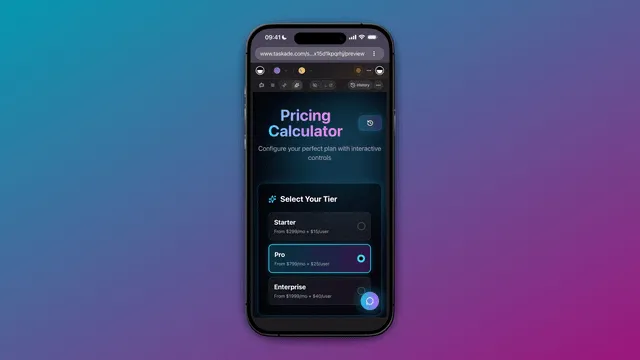
Digital employee mode is what unlocks Level 4. Publish an agent with persistent memory to the Community Gallery, wire it to scheduled triggers via reliable automation workflows, and the same agent becomes a role-scoped digital employee with public embedding, custom domains, and KPI tracking. Over 500,000 agents have been deployed across the platform, and 150,000 plus Genesis apps span every tier of the ladder.
The RBAC model (Owner to Viewer) governs who can configure each species. On the Free plan, signup and the first build grant free credits for Level 1 and Level 2 experimentation, Pro at $10 per month billed annually with 10 users included unlocks unlimited agents and AI Teams for multi-agent collaboration, Business at $25 per month billed annually unlocks persistent public agents and custom domains, and Enterprise at $250 per month billed annually adds SCIM provisioning, bring-your-own AI keys and a custom SLA. For the platform-by-platform shootout, see our companion post on the best AI agent builders of 2026.
Vendor Marketing Decoder Ring
A practical reference for translating vendor copy into actual tier placement. Use this whenever a deck claims "AI agent" or "digital worker."
| Vendor Phrase | What It Usually Means | Real Tier |
|---|---|---|
| "Conversational AI" | Chatbot with a system prompt | L1 |
| "AI assistant" | Chatbot or copilot, depends on placement | L1-L2 |
| "Inline AI" | Copilot embedded in an editor | L2 |
| "Agentic workflow" | Reactive trigger that calls an LLM step | L3 (reactive) |
| "Autonomous agent" | Planning loop with tools | L3 (planning) |
| "Multi-agent system" | Specialist agents with handoffs | L3 (collaborative) |
| "AI worker" / "AI employee" | Marketing for L2-L3, sometimes L4 | varies — check memory |
| "Digital teammate" | Persistent role-scoped agent (sometimes) | L3-L4 |
| "AI org" | Speculative L5, mostly aspirational | L5 |
The single fastest disambiguator is "show me the memory store." If the answer is "session only," it is at most Level 3. If the answer is "long-term, role-scoped, surviving restart," it is genuinely Level 4.
Trust Boundary Matrix
Each tier shifts the trust boundary further away from the human. Knowing where the boundary sits is the difference between a safe deployment and a runaway bill.
| Tier | Trust Boundary | Failure Blast Radius | Required Guardrail |
|---|---|---|---|
| Chatbot | Per-message | One bad answer | Content moderation |
| Copilot | Per-suggestion | One bad keystroke | Accept gate |
| Agent | Per-milestone | One bad task run | Per-run cost cap + eval harness |
| Digital Employee | Per-role per quarter | One bad job function | KPIs, escalation, audit log, RBAC |
Memory Store Comparison
Memory is the load-bearing capability that separates a Level 3 agent from a Level 4 digital employee. The four memory types from the diagram above each have a different store, lifetime, and failure mode.
| Memory Type | Store | Lifetime | Read Path | Failure Mode |
|---|---|---|---|---|
| Working | Context window | Single turn | Prompt prefix | Token overflow |
| Episodic | Vector DB or doc store | Run-scoped | Retrieval at plan time | Stale recall |
| Semantic | Knowledge graph or embedding index | Persistent | Hybrid search | Drift over time |
| Procedural | Workflow library | Persistent | Replay engine | Recipe rot |
A Taskade Genesis workspace handles all four natively: working memory via the active project context, episodic memory via run history, semantic memory via the multi-layer search (full-text + semantic HNSW + file content OCR), and procedural memory via reliable automation workflows that capture replayable routines.
Integration Surface by Tier
Integrations are how an agent reaches into the world. The integration surface scales roughly linearly with tier — and explains why platforms with deep integration catalogs have a structural advantage at Level 3 and Level 4.
| Tier | Typical Integration Surface | Example Platform |
|---|---|---|
| Chatbot | None or read-only data sources | ChatGPT default |
| Copilot | The host app only (editor, doc, sheet) | GitHub Copilot |
| Agent | 20-100 integrations across categories | Taskade Agents v2 (100+ integrations) |
| Digital Employee | 100+ integrations + scheduled triggers + webhooks | Persistent Genesis agents, Artisan |
Taskade Genesis ships 100 plus integrations across 10 categories — Communication, Email/CRM, Payments, Development, Productivity, Content, Data/Analytics, Storage, Calendar, and E-commerce — which is the minimum surface a real Level 4 deployment requires.
Buyer Decision Framework
Most teams end up regretting their first agent purchase because they bought the tier above their actual readiness. Here is the decision framework we recommend running before any RFP.
Step 1: Inventory the work. Write down the five tasks you most want AI to handle. For each task, mark whether it is one-off (agent territory) or recurring (digital employee territory), and whether the user is already in a workflow (copilot) or asking from cold start (chatbot).
Step 2: Score risk. For each task, rate the cost of an undetected error from 1 to 5. Tasks at 4 or 5 belong inside a copilot loop until you have an evaluation harness; do not start them as autonomous agents.
Step 3: Score frequency. For each task, rate how many times per week it runs. Anything above 20 times per week is a digital-employee candidate; anything below five is a one-off agent at most.
Step 4: Pick the platform that spans the tier above your starting point. The single biggest predictor of success is whether the platform you pick today can carry you to the tier you will need in twelve months. Stitching four vendors together is the failure pattern.
Step 5: Build the eval harness before the agent. The Gartner 40 percent failure rate is concentrated in projects that skipped the eval harness. Build the golden dataset, write the pass criterion, and stand up the dashboard before you ship a single autonomous run.
Glossary of Adjacent Terms
The agent vocabulary leaks into related categories. These are the adjacent terms readers ask about most often, with one-line definitions to keep the boundaries clean. For the wider vocabulary, from tokens and context windows to memory consolidation, see The Agentic AI Glossary.
Agentic workflow. A workflow that contains at least one LLM step capable of selecting a tool. Typically Level 3 reactive.
Autonomous agent. Any Level 3 system with a planning loop and tool access. The "autonomous" qualifier is marketing — every Level 3 agent is autonomous by definition.
Compound AI system. A pipeline of multiple LLM calls with optional tools. Compound systems can be any tier; the term describes the architecture, not the autonomy level.
Foundation model. The underlying LLM. Foundation models are tier-agnostic; the wiring around them determines the tier.
LLM application. A vague umbrella covering everything from L1 to L4. Avoid using it as a category.
Orchestrator. A planner-executor split where one model plans and other models execute. Always Level 3 or above.
Tool use. The ability to call external functions. Necessary but not sufficient for Level 3 — without a planning loop, tool use alone is still copilot territory.
Workflow automation. Pre-LLM RPA-style automation. Excluded from this taxonomy.
Field Notes from 2026 Deployments
A handful of recurring patterns from teams that successfully shipped Level 3 and Level 4 in the last twelve months. None of these are theoretical — they show up in nearly every postmortem we read.
The first agent should look boring. Teams that ship the most ambitious agent first almost always cancel it. The teams that ship a narrow reactive agent — a triage router, a meeting-notes summarizer, a recurring report generator — are the ones who climb the ladder. Boring is fast, and fast compounds.
Memory beats model selection. Once you are inside the frontier model tier, swapping providers buys at most 10 percent on most benchmarks. Adding episodic memory to an agent that previously had only working memory routinely buys 30-50 percent on real production tasks because the agent stops repeating its own mistakes.
The eval harness is the product. Teams that build the golden dataset, the regression suite, and the dashboard before the agent ship something useful within a quarter. Teams that skip it spend the quarter debating whether the agent is "good enough" without any way to answer the question.
Multi-agent is not a tier upgrade. Adding a second agent does not move you up the ladder; it changes the species inside Level 3. Many teams treat collaborative agents as a magic Level 4 unlock and are then surprised when handoff bugs cancel the project. If you are not already running a single agent reliably, do not add a second one.
Persistence requires governance. The leap from Level 3 to Level 4 is gated by RBAC, audit logs, and KPI dashboards more than by any technical capability. Most "we cannot ship persistent agents" complaints are governance complaints in disguise. Pick a platform with an RBAC model (Owner to Viewer) baked in and the technical lift drops to nothing.
Pricing follows autonomy, not tokens. The Level 4 vendors that win over the next year will price per role per month, not per token. Token pricing is a tax on memory — the longer the context, the higher the bill — and it directly punishes the teams investing in the memory layers that make digital employees actually work. Watch this signal carefully when picking a long-term platform — the vendor that prices per role rather than per token is signaling that they actually expect you to reach Level 4.
Related Reading
This post is the canonical hub for the 2026 agents sprint. Every linked post below fits somewhere on the ladder.
- AI Agent Builders: The Definitive 2026 Guide — sprint sibling comparing every platform in the Level 3 tier.
- Nemoclaw Review: Under the Hood of a New Agent Runtime — sprint sibling diving into a single Level 3 tool.
- Best AI Dashboard Builders of 2026 — sprint sibling on the Level 3 + 4 dashboard category.
- Community Gallery SEO: How Genesis Apps Rank — sprint sibling on Level 4 digital-employee distribution.
- Best OpenClaw Alternatives: AI Agents 2026 — Level 3 agent shootout.
- What Is Agentic Engineering? A Complete History — the engineering discipline behind Level 3.
- Best Agentic Engineering Platforms and Tools — platform-level comparison for Level 3 builds.
- Best Claude Code Alternatives: AI Coding Agents — focused shootout on coding agents.
- Free AI App Builders in 2026 — entry-level Level 2 and Level 3 tools.
- AI Automation for Small Business: 15 Workflows — reactive-agent patterns in production.
- Taskade Agents v2 catalog — the live Level 3 and 4 catalog.
- Create a Taskade Genesis workspace — start at Level 1 and climb to Level 4 in the same workspace.
- Taskade Community Gallery — browse 150,000 plus Genesis apps spanning all four tiers.
Pricing Ladder Across the Category
Pricing tracks autonomy almost perfectly. The more a system can do without a human in the loop, the more vendors charge — because the value accrues per completed job, not per message sent. Here is the rough map as of April 2026.
| Tier | Typical Price | Billing Unit | Example Products |
|---|---|---|---|
| Chatbot | Free to $20 per user per month | Seat | ChatGPT Free, ChatGPT Plus, Claude Pro, Gemini Advanced |
| Copilot | $10 to $30 per user per month | Seat | GitHub Copilot, Cursor Pro, Notion AI, M365 Copilot |
| Agent | $20 to $200 per user per month or per run | Seat or task | Taskade Pro $10, Devin enterprise, Manus credits |
| Digital Employee | $500 to $5,000 per seat per month | Role | Artisan Ava, 11x Alice, Sierra, Decagon |
The anomaly worth calling out is that Taskade Genesis prices Level 3 and Level 4 capabilities at Level 2 prices — Pro at $10 per month includes 10 users and every agent feature, and Business at $25 per month unlocks the persistent-agent and multi-agent workflows that competitors charge four-figure seat prices for. This is intentional: the Workspace DNA loop compounds when more teammates and more roles share the same memory store, and pricing that discourages adoption breaks the compounding.
Common Pitfalls When Labeling a Tool
Three mistakes show up constantly in vendor decks, RFPs, and blog posts. Avoid all three.
Mistake one: confusing inline placement with autonomy. A copilot that lives inside your editor feels advanced because it has workflow context, but it is still a copilot unless it can take autonomous multi-step action. Context is not autonomy.
Mistake one point five: confusing tool count with agentic capability. A system with 40 tools but no planning loop is still a chatbot. The planning loop is what makes an agent — tools are the hands, but the plan is the brain.
Mistake two: conflating persistence with memory. A product that remembers your last conversation is not yet a digital employee. Memory is necessary but not sufficient; a digital employee also has a persistent role, KPIs, and ownership over a recurring work queue. Memory without role is just a better chatbot.
Mistake three: treating multi-agent as a separate tier. Multi-agent collaboration is a pattern inside Level 3 and Level 4, not a new level. Two agents handing off to each other are still agents; they become digital employees only when each agent holds a persistent role across sessions.
Operational Checklist for Shipping Up the Ladder
When a team decides to climb from one tier to the next, the same four operational questions apply at every rung. Answer them before you write code.
Evaluation harness. What is the golden dataset and the pass criterion? A Level 3 agent that produces "mostly fine" output is a Level 3 agent you cannot improve. Build the harness before the agent.
Cost envelope. What is the maximum cost per run, and how is it enforced? Uncapped tool budgets are the single biggest driver of the Gartner 40 percent failure rate. Cap early.
Escalation path. What happens when the agent gets stuck? Every tier above Level 1 needs a clear handoff to a human — a label, an inbox, a Slack channel. Silent failure is the worst failure.
Telemetry. What do you log, and who reads it? Agents fail quietly, and without dashboards you will not notice for weeks. Treat Level 3 and Level 4 deployments the way you treat production services.
Taskade Genesis bakes all four into the platform: evaluation via the agent run history, cost envelopes via credit budgets, escalation via project assignment and the RBAC model (Owner to Viewer), and telemetry via workspace-level analytics. The goal is that climbing from Level 2 to Level 4 does not require rebuilding the operational surface each time.
Migration Patterns Between Tiers
Very few teams start at Level 4. The realistic path is staged upgrades across quarters, where each quarter ships a narrower scope at a higher tier. Here are the patterns we see most often.
Chatbot to copilot. The transition is almost always a placement change: take the chat experience and embed it inside the tool users already live in. A support chatbot becomes a support copilot when it lives inside the ticket view instead of a separate window. The LLM and prompts barely change; the UI and context injection do all the work.
Copilot to agent. The transition is a tool and planning loop. The LLM needs the ability to read and write beyond the current document, and it needs a plan-execute-observe loop. This is the hardest jump for most teams because it changes the trust model — users are no longer accepting every suggestion, so errors accumulate silently.
Agent to digital employee. The transition is persistence and role. The agent needs a long-term memory store, a job title, a queue, and KPIs. Most teams fail here by skipping the memory layer; without it, the agent resets every session and the "persistence" is cosmetic. Taskade Genesis handles this with Workspace DNA — Memory (Projects) automatically accumulates across sessions, so any agent assigned to a persistent workspace inherits long-term memory for free.
Verdict
The four-level ladder — chatbot, copilot, agent, digital employee — is the cleanest taxonomy we have for the 2026 AI assistant market. It matches how capabilities actually differ, it maps onto real products without forcing, and it gives buyers a decision framework that survives contact with vendor marketing. Most teams will deploy at Level 1 or 2 first and climb to Level 3 once they have evaluation and cost controls in place. A minority will reach Level 4 by the end of 2026, and those will be the teams that picked a platform that spanned the whole ladder from day one instead of stitching four vendors together.
Taskade Genesis is our answer to that problem: one workspace, one Workspace DNA, and one price ladder that starts at free and scales to Enterprise, with the same Memory-Intelligence-Execution loop powering every tier. Start at Level 1, climb at your own pace, and let the platform carry the tier transitions for you.
FAQ
What is the difference between an AI agent and a chatbot?
A chatbot answers questions inside a single chat window and has no ability to take actions outside that conversation. An AI agent plans multi-step tasks, calls tools, browses the web, edits files, and executes work in the real world. Chatbots talk about doing things; agents actually do them.
What is the difference between an AI copilot and an AI agent?
A copilot suggests. An agent acts. GitHub Copilot proposes code you accept with Tab; a coding agent like Taskade Agents v2 or Devin opens the repo, writes the code, runs tests, and files a pull request on its own. Copilots keep humans in the loop for every keystroke; agents only check in at milestones.
What is a digital employee?
A digital employee is a persistent, role-scoped AI agent that owns an ongoing job function such as SDR, support tier-1, or recruiting coordinator. It has memory, tools, KPIs, and a work inbox. Artisan, 11x, Decagon, Sierra, and persistent Taskade Genesis agents are digital employees rather than single-shot agents.
Are ChatGPT and Claude agents or chatbots?
Out of the box they are chatbots with optional tool use. When you enable ChatGPT Operator, Claude Computer Use, or custom tools, the same underlying model becomes an agent because it can now act on the world. The category depends on wiring, not the model itself.
Can one tool be a chatbot, copilot, and agent?
Yes, and the best platforms are. Taskade Genesis, Microsoft 365 Copilot, and Notion AI all span multiple tiers. You chat with them, they suggest inline inside documents, and they run autonomous multi-step jobs when you trigger an agent or workflow. Tiered platforms are the dominant 2026 design pattern.
Which should I build — a chatbot, copilot, or agent?
Build a chatbot when users only need answers, a copilot when they are already in a workflow and need suggestions, and an agent when you want work completed without supervision. If a job keeps recurring with the same scope, upgrade the agent to a digital employee with persistent memory and a permanent role.
What are the 4 species of AI agents?
A useful 2026 taxonomy splits agents into four species: reactive agents that respond to triggers, planning agents that decompose goals, collaborative agents that work in multi-agent teams, and persistent digital employees that hold long-running roles. Most real products combine two or more species inside one platform.
Do agents always need tools?
Yes. Without tools an agent is just a chatbot with extra prompts. Tools are what turn an LLM into an agent because they let the model read, write, browse, and execute. Taskade Agents v2 ships with built-in tools and custom tool support, which is the minimum bar for agentic behavior.
What is an AI agent builder?
An AI agent builder is a platform for configuring agents without writing glue code, including personas, tools, memory, triggers, and deployment surfaces. Taskade Genesis, CrewAI, LangChain, and Dify are examples. See our related guide to AI agent builders for a full comparison across pricing and capability tiers.