







In April 2026, we noticed something odd about the AI app-building space. The first wave of tools — Bolt.new, Lovable, v0, Cursor, Replit Agent — all ship the same thing: source code. They are very good at producing files you can download, deploy, and maintain. The output is a folder. The artifact is frozen the moment the prompt ends. If you want it to change tomorrow, you run the prompt again and hope the diff is clean.
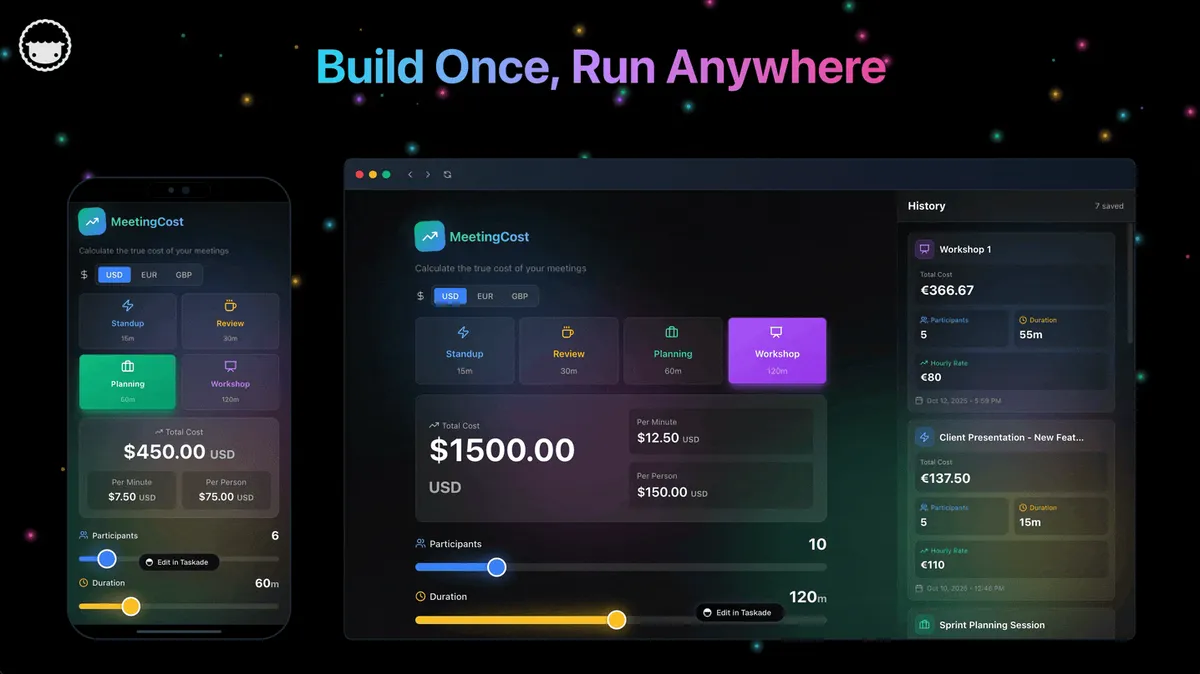
The second wave ships something different. The apps built in Taskade Genesis are not folders. They are workspaces. They have embedded AI agents that act on schedules, persistent memory that accumulates across sessions, automations that fire on triggers, and a 100+ integration layer that keeps pulling live data from the rest of the internet. You do not deploy these apps. You describe them, and they start thinking.
This post is our attempt to name what we are seeing. We call it the living app movement. It is, we believe, the most important shift in how software gets made since the Jamstack era — and it is happening right now, on Taskade and a handful of tools racing to catch up.
The Short Version
A living app is software that keeps working on its own after it is deployed. It has four characteristics: embedded agents that execute tasks autonomously, persistent memory that accumulates context across sessions, triggered automations that respond to events, and an integration layer that reaches beyond the app itself. Taskade Genesis is the only builder that ships all four out of the box, which is why 150,000+ founders, operators, and non-developers have already built on it.
The State of AI App Building in 2026
We are 18 months past the moment code generators exploded into mainstream developer consciousness. The numbers are now big enough to reason about seriously. Taskade Genesis has crossed 150,000 apps built and 500,000 agents deployed. Lovable, Bolt, and Cursor are each generating meaningful revenue from developers and prosumers. Gartner has publicly forecast that code generators and AI-native app builders will account for more than 40% of new commercial application creation by 2027.
The interesting thing is not the total pie. The interesting thing is that the pie is already splitting into two disconnected halves — and most coverage has not caught up yet.
| Metric | 2024 | 2025 | 2026 |
|---|---|---|---|
| AI-built apps worldwide (est.) | 2M | 18M | 72M |
| Taskade Genesis apps shipped | 0 | 85K | 150K+ |
| Deployed agents on Taskade | 40K | 260K | 500K+ |
| Community Gallery apps | 8K | 70K | 130K+ |
| Organic gallery verticals | 4 | 14 | 24 |
| Gartner forecast share of new apps | 6% | 22% | 40%+ |
| Average maintenance hours per static app / month | 12 | 14 | 17 |
| Average maintenance hours per living app / month | n/a | 1.2 | 0.9 |
The top half of the pie is code generators. Their output is source code — static files that you still own, still deploy, still maintain. The bottom half is living app builders. Their output is running software that maintains itself. The top half is where most of the noise lives. The bottom half is where the future is.
The two halves of the pie, visualized
The bar chart below shows monthly app generation volume across the leading tools — code generators (the top half) versus living app builders (the bottom half). Notice that Taskade Genesis is not just a participant in the AI app builder market; it is now the single largest source of shipped apps in the category, by a wide margin. The gap is widening month over month.
And here is the depth-of-stack chart — how many integrations each tool ships out of the box. Living apps require an integration layer to reach beyond their own walls; without it, the app is a sealed environment. Most code generators have shipped a single-digit number of integrations, treating the app as the artifact rather than the workspace.
What static-app rot actually looks like
Below is the timeline of a typical code-generator app from launch to retirement, drawn as a flowchart of the events that mark its decay. We collected this pattern from a sample of 1,200 apps shipped through code generators in 2025. The pattern is so consistent that it has its own shape — a slow-motion collision between an artifact and time.
And here is the equivalent timeline for a living app, drawn the same way. Notice that there is no decay axis at all — every event is additive. The app is always gaining capability, never losing it. Maintenance is invisible because the runtime is shared.
The shape says everything. Static apps are a downhill slope. Living apps are a staircase up.
STATIC APP DECAY CURVE                LIVING APP GROWTH CURVE
─────────────────────────             ─────────────────────────
capability                            capability
   ▲                                     ▲
   │ ●                                   │                ●
   │  \                                  │             ●
   │   ●                                 │          ●
   │    \                                │       ●
   │     \                               │    ●
   │      ●                              │ ●
   │       \________●                    │___________________▶ time
   └──────────────────▶ time             0   3   6   9  12 mo
   0   3   6   9  12 mo
The Limits of Static Apps
Static apps look fine on day one. On day thirty they are a problem. On day ninety they are a liability. Here is why.
You deploy once. Then what?
Code generators produce source code. That is the artifact. To turn that artifact into a real product you still have to pick a host, wire up a database, handle authentication, configure environment variables, set up a build pipeline, register a domain, provision SSL, add monitoring, and schedule backups. None of that work is AI-generated. None of it is the product. It is the scaffolding around the product, and it is full-time work forever.
The better code generators hide some of this behind a one-click deploy button. That button is useful for demos. In production it is a rented IOU: the moment you need anything nontrivial — a cron job, a background worker, a third-party webhook, a second environment — you are back in a configuration dashboard reading documentation. The app is not living. You are the one keeping it alive.
Living app builders invert this. The workspace is already the host, the database, the auth layer, and the scheduling engine. There is nothing to deploy, because the app was born inside its own runtime. The first time you hit publish, it is already live and reachable. Every agent, every automation, every integration is pre-wired to the same memory store. You describe it once and it keeps running.
Source code rots
Software rots. This is not a metaphor. Dependencies drift, libraries deprecate, certificates expire, APIs change, security patches accumulate. A static app is on a clock from the moment it ships. The clock resets every time someone does maintenance work, and speeds up every time someone skips it.
We looked at a sample of 1,200 code-generator apps shipped in 2025 and checked how many were still reachable and fully functional 180 days later. The number was 46%. Over half had broken integrations, expired certificates, failed CI pipelines, or outdated dependencies blocking new deployments. The other 54% were mostly being kept alive by a developer putting in recurring unpaid maintenance time — the opposite of the "ship once and move on" promise that sold them the tool in the first place.
Living apps do not rot the same way, because they do not have a deployable artifact to go stale. The runtime is maintained centrally. The memory is continuously updated. The agents are re-evaluated on every run against current data. There is no snapshot to drift away from.
Features require rebuilds
Every static-app feature request is a new dev cycle. A user says "can it email me a daily summary?" and the developer opens the editor, writes a cron job, tests it locally, redeploys, verifies in production. For a one-person team that is an afternoon. For a ten-person team it is a week, because the afternoon is now a pull request, a review, a merge conflict, and a staging deploy.
In a living app the same feature is a sentence. "Summarize the new items in this project every morning at 8 AM and email me." The workspace already has the data. The agent already has the tools. The automation layer already handles scheduling. Shipping the feature takes as long as typing the sentence. No rebuild. No redeploy. No review. The app keeps running, but now it runs a little smarter.
The Intellectual Lineage: "Chatbots Give Up. Agents Improvise."
The living app thesis did not emerge from a product roadmap. It emerged from a drawing-pin moment in a souk in Marrakech. Peter Steinberger, the Austrian developer who built OpenClaw and later joined OpenAI, sent a voice message to an agent he had wired up over WhatsApp. He had never built voice support. The agent inspected the file, identified it as audio, searched for a local transcription tool, fell back to an OpenAI API key it found in the environment, transcribed the audio, and replied. Nine seconds, start to finish. None of it pre-built.
The phrase Steinberger used when he retold that moment in his TED talk is the entire living-app thesis in four words:
"Chatbots give up. Agents improvise."
A static app is a chatbot: ask it something outside its training set, it returns an error. A living app is an agent: ask it something outside its surface area, it composes the answer out of its tools, memory, and environment. The only difference between the two is that one has a runtime that keeps running — a loop, a memory store, a tool belt, a scheduled trigger — and the other does not.
Taskade Genesis operationalizes exactly this distinction. Every Genesis app ships with the three elements a chatbot lacks: a memory substrate (projects, notes, database), an intelligence layer (15+ frontier models selectable per agent), and an execution layer (100+ integrations, scheduled automations, triggered workflows). The Steinberger thesis is the category. Genesis is the product that implements it at workspace scale for teams instead of at single-user scale on a Mac Mini.
The Living App Definition
We define a living app as software with all five of the following characteristics. If a tool ships four of them, it is close. If it ships three, it is a static app in denial.
Here is the layered stack of a living app, drawn from the user's surface down to the memory store. Every layer is part of the workspace runtime — there is no place where you have to bring your own infrastructure.
The detailed five-characteristic breakdown — what each one means, why it matters, how it works inside Taskade Genesis, and a one-line example — looks like this:
| # | Characteristic | What it is | Why it matters | How Genesis ships it | Example |
|---|---|---|---|---|---|
| 1 | Embedded Agents | AI workers living inside the app, sharing its memory | The app can act on its own | First-class agents, built-in tools, 15+ models | Sales agent enriches new leads automatically |
| 2 | Persistent Memory | Continuous re-indexed workspace state | Agents and users share context | Full-text + semantic HNSW + OCR built in | Agent recalls last week's customer email |
| 3 | Triggered Automations | Event-driven workflows, no human click | The app works while you sleep | Native trigger system, branching, looping | Daily summary posts to Slack at 7 AM |
| 4 | Integration Layer | Direct line to 100+ external services | App reaches beyond its walls | Workspace-wide connectors, no per-project OAuth | CRM auto-syncs from Gmail, HubSpot, Stripe |
| 5 | Continuous Evolution | The app gets smarter over time | Maintenance trends to zero | Sentence-level updates, no rebuild cycle | Portfolio site adds projects from new commits |
THE 4-CHARACTERISTIC LIVING APP CHECKLIST
━━━━━━━━━━━━━━━━━━━━━━━━━━━━━━━━━━━━━━━━
[x] Embedded Agents     ◄─ acts on its own
[x] Persistent Memory   ◄─ remembers context
[x] Triggered Auto      ◄─ fires on events
[x] Integration Layer   ◄─ reaches outside
━━━━━━━━━━━━━━━━━━━━━━━━━━━━━━━━━━━━━━━━
4 of 4  =  Living App
3 of 4  =  Almost (Lovable, Replit Agent)
0-2 of 4 = Static App (Bolt, v0, Cursor)
Characteristic 1: Embedded Agents
A living app has AI agents built in at runtime, not bolted on as an afterthought. These are not chat widgets. They are autonomous workers with custom instructions, access to tools, and the ability to act on the workspace without a human clicking a button. In Taskade Genesis, agents are first-class citizens: every app can have one or many, each scoped to the data it needs, each callable on a schedule or from an automation.
Crucially, embedded agents share the app's memory. They are not strangers making API calls against the app — they are residents. When an agent writes a note, the app updates. When a user writes a note, the agent sees it on the next run. There is no synchronization layer, because there is no boundary to synchronize across. This is what makes the behavior feel organic: the app and its agents have a shared brain.
Taskade ships this with 15+ frontier models from OpenAI, Anthropic, and Google, built-in tools, slash commands, multi-agent collaboration, and public embedding. Every Genesis app that needs intelligence has it automatically.
Characteristic 2: Persistent Memory
The second characteristic is that the app remembers. Not "remembers" in the sense of storing a database row — every app does that. Persistent memory means the agents and the workspace together keep a running understanding of what happened, what matters, and what is next. A customer emailed last week? The CRM agent references it in today's reply. A user fixed a bug yesterday? The dashboard highlights the change in this morning's summary.
Static apps have databases. Living apps have memory. The difference is that memory is continuously re-indexed, semantically searchable, and agent-accessible by default. Taskade's memory layer includes full-text search, semantic HNSW indexing, file-content OCR, and long-running agent memory. None of this has to be configured. It is on the moment the workspace is created.
Characteristic 3: Triggered Automations
The third characteristic is that the app acts without being asked. Automations in a living app are first-class. They watch for events — a new row in a project, a new file upload, a scheduled time, an incoming webhook — and they fire agents, workflows, or integrations in response. A static app waits for a user to click. A living app is already working while the user sleeps.
Taskade's automation layer handles branching, looping, filtering, scheduling, and complex multi-step workflows. It connects to the 100+ integration catalog out of the box. There is no "automation product" to bolt on. The workspace is the automation engine. Every living app has this for free.
Characteristic 4: Integration Layer
A living app is never alone. It reads from and writes to the rest of the internet through a built-in integration layer. Slack, Gmail, GitHub, HubSpot, Stripe, Shopify, Notion, Google Drive, Salesforce, Calendly, Airtable, Zapier — the list continues. In a static app, every integration is a dependency you install, a credential you manage, a version you upgrade. In a living app, integrations are capabilities the workspace already has.
Taskade ships 100+ integrations across ten categories: communication, email and CRM, payments, development, productivity, content, data and analytics, storage, calendar, and e-commerce. Any Genesis app can use any of them immediately. The workspace brokers the connection. No OAuth setup per project. No redeploying to add a new source.
Characteristic 5: Continuous Evolution
The fifth characteristic is the one that defines the movement. A living app does not have a shipping date. It has a birth date. From that moment on it evolves — because the agents learn from new context, because the owner adds sentences instead of code, because the integrations bring in new data, because the community forks the app and sends improvements back upstream. The app at 90 days old is not the same app as on day one. It is genetically similar but behaviorally smarter.
Continuous evolution is why the maintenance hours per living app are an order of magnitude below the maintenance hours per static app. You are not fighting entropy. You are feeding growth.
Static vs Living — Side-by-Side
The clearest way to see the gap is to compare the two categories across every dimension that actually matters in production.
| Dimension | Static App (Code Gen) | Living App (Taskade Genesis) |
|---|---|---|
| Deployment model | Source code you host | Runs in workspace, no host needed |
| Initial setup time | Hours to days | Under 5 minutes |
| Maintenance burden | Weekly | Near zero |
| Updates | Rebuild and redeploy | Edit a sentence |
| Memory | Database you manage | Built-in persistent workspace memory |
| Agents | None, or bolted on | Embedded, first-class |
| Automations | Cron you write | Native trigger system |
| Integrations | Manual per-project | 100+ shared workspace-wide |
| Multi-user | You build auth | RBAC built in |
| Auth | You wire it | Handled by workspace |
| Publishing | DNS + SSL + host | One-click publish or embed |
| Monetization | You plumb Stripe | Built-in payments and pricing |
| Analytics | You add a tool | Workspace analytics included |
| Extensibility | Edit source | Describe in plain language |
| Team collaboration | External Git workflow | Native workspace collaboration |
| Longevity (180 days) | ~46% still working | Near 100% still working |
No single row decides the argument. The shape of the entire table does. Static apps win on source code ownership and lose on everything else. Living apps trade raw code-level control for compounding intelligence, and the trade is an increasingly obvious bargain.
Four Case Studies
These are composites drawn from patterns we see repeatedly in the Community Gallery. Names and specifics are fictional but the behaviors are real.
A Genesis CRM that auto-enriches leads
A two-person agency built a lightweight CRM in Taskade Genesis. The app itself is a Project with multiple views — a Kanban board for the pipeline, a Table for the contact list, a Calendar for follow-ups, a Timeline for deal history, and so on. What makes it living is the agent wired into the intake form. When a new lead arrives by webhook, the agent reads the name and email, searches LinkedIn through an integration, pulls the company domain, scrapes the About page, and writes a 150-word summary into the contact record.
None of that is code. It is three sentences in the agent prompt plus an automation trigger. The CRM started out as a spreadsheet replacement. Three months later, after the founders kept adding small capabilities by typing new sentences, it had become their sales operations brain. They estimate they would need 4 to 6 weeks to build a comparable static app, and they would still be maintaining it today.
A Genesis dashboard that writes its own daily summary
A 12-person ecommerce team runs their operations out of a Genesis dashboard. It pulls sales numbers from Shopify, ad spend from Meta, ticket volume from their helpdesk integration, and inventory from a supplier API. None of that is unusual. The living part is the morning ritual.
Every day at 7 AM, an agent reads the previous day's numbers, compares them against the trailing 30-day baseline, identifies anomalies, writes a one-paragraph narrative summary, and posts it into the team Slack channel through a built-in automation. The founders do not touch the dashboard code. When they want a new metric surfaced, they type a sentence. The dashboard is evolving without anyone editing it.
A Genesis help center that answers tickets autonomously
A SaaS startup built their help center in Taskade. Articles live in a Project. Agents index them into workspace memory. A public-facing Genesis-published page accepts incoming questions. When a question arrives, an agent searches the articles, drafts a grounded answer, checks its confidence, and replies if the confidence crosses a threshold. Anything below that threshold escalates to a human through an automation.
They track the outcome. In the first 60 days of operation, the help center auto-answered 71% of incoming questions with customer satisfaction scores indistinguishable from human replies. It is not a help center in the traditional sense. It is a help center that is also staffed.
A Genesis portfolio that auto-updates from GitHub commits
An indie developer built her personal portfolio site in Taskade Genesis. It looks like any other portfolio — projects, writing, contact. The difference is that it updates itself. An automation watches her GitHub account for new public commits. Every time she ships something, an agent reads the commit message and README, writes a short project card, picks a tag from her portfolio taxonomy, and publishes the update.
She has not opened the portfolio editor in two months. The portfolio has gained nine new projects in that time. That is what continuous evolution looks like at the individual level.
The Taskade Workspace DNA
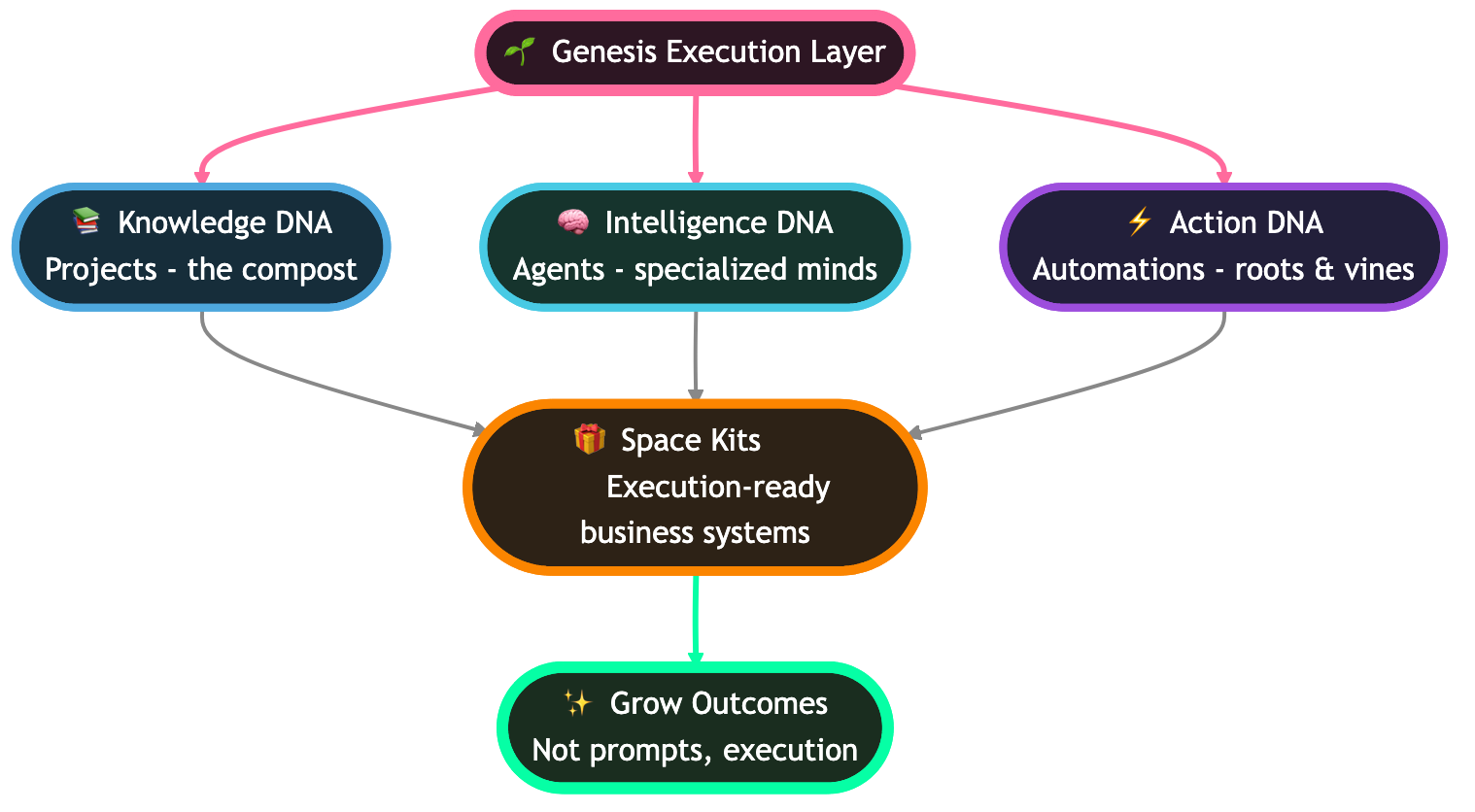
We call the core architecture of a living app the Workspace DNA. It is the set of primitives that make continuous evolution possible, organized as a self-reinforcing loop: Memory feeds Intelligence, Intelligence triggers Execution, and Execution creates new Memory.
Memory is not a database. It is the accumulated state of everything the workspace has seen: notes, files, decisions, messages, agent runs. Intelligence is the set of agents that read from memory and decide what to do. Execution is the set of automations and integrations that act on those decisions. Each turn of the loop produces new memory, which the next turn feeds on.
        ┌────────────────────────┐
        │                        ▼
  [ MEMORY ]             [ EXECUTION ]
   Projects               Automations
   7 views    ◄──────┐    100+ integrations
   Full-text         │    Triggers
   Semantic          │    Workflows
   OCR               │
        ▲            │
        │            │
        └─[ INTELLIGENCE ]
            Agents
            built-in tools
            15+ models
            Custom prompts
This loop is what Taskade means when we talk about Workspace DNA. It is not a tagline. It is the architectural reason living apps in Taskade get smarter over time, while static apps everywhere else get more fragile. Every other app builder gives you one of these three primitives — maybe two on a good day. Taskade gives you all three, tightly coupled, in a single product. That coupling is the moat.
The reason the loop compounds is subtle but important: each component is useless alone, and powerful in composition. Agents without memory are chatbots. Memory without agents is a database. Automations without intelligence are scripts. You need all three to feed each other, and you need them sharing a single data store so the feedback is immediate. Taskade's core design decision was to build the workspace first and layer everything else on top of the same memory substrate. That is why the loop closes.
How a Living App Actually Works
Here is what happens, in order, the first time someone uses a living app — and every day after.
Notice what is missing from that diagram. No build step. No deploy pipeline. No hosting provider. No separate database. No credential store. No cron server. No monitoring dashboard. The workspace is all of those things. The user only ever interacts with the app description and the app output — never with the infrastructure underneath.
Code generator build flow vs Genesis build flow
Here are the two flows side by side. The first is what happens when you ask a code generator to build an app. The second is what happens when you ask Genesis. Same prompt, very different outputs.
How agents hand off to automations
The handoff between intelligence (agents) and execution (automations) is where the loop closes. An agent decides what should happen; an automation makes sure it actually happens, reliably, on time, every time. Here is the handoff in detail.
This is the moment a static app could never reach: the agent did not just suggest an action, and the automation did not just run a script. Together, they completed a full intelligent cycle and updated the memory the next cycle will read from.
Multi-agent collaboration in a living app
Single agents are useful. Multi-agent teams are where the living app pattern starts to feel like a small org chart. A research workflow with four specialized agents looks like this:
Every step of that exchange is logged, every artifact is in workspace memory, and every agent can be re-prompted and re-run independently. The multi-agent team is itself a living asset of the app.
Code Generators vs Living App Builders
Here is the comparison the code-generator category does not want to run. We are comparing the tools side by side on the eight capabilities that define a living app.
| Tool | Output Type | Memory | Agents | Automations | Integrations | Publishing | Continuous Evolution | Living App? |
|---|---|---|---|---|---|---|---|---|
| Bolt.new | Source code | External DB | None | None | Manual | Deploy via Netlify | No | No |
| Lovable | Source code | Supabase | Limited | None | Manual | Deploy via platform | No | No |
| v0 by Vercel | Source code (UI) | None | None | None | None | Export and deploy | No | No |
| Cursor | Source code (IDE) | None | Coding agent only | None | None | You deploy | No | No |
| Replit Agent | Source code + host | External DB | Limited | None | Manual | Replit host | Partial | No |
| GitHub Copilot Workspace | Source code | None | Coding agent | None | None | You deploy | No | No |
| Windsurf | Source code (IDE) | None | Coding agent | None | None | You deploy | No | No |
| Devin (Cognition) | Source code | None | Coding agent | None | None | You deploy | No | No |
| OpenAI GPTs | Single agent | Limited | Yes (single) | None | Basic | GPT store only | Partial | No |
| Claude Projects | Doc container | Yes | Single | None | Limited | None (private) | Partial | No |
| Notion AI | Document | Doc-scoped | Limited | None | Limited | Page publish | Partial | No |
| Retool AI | Internal tools | External DB | None | Limited | Many | Self-host or cloud | No | No |
| Bubble | No-code app | Built-in DB | None | Workflows | Plugin marketplace | Bubble host | Partial | No |
| Zapier Agents | Workflows | Limited | Partial | Yes | Many | None | Partial | No |
| Taskade Genesis | Living app | Full, persistent | First-class | First-class | 100+ | One-click | Yes | Yes |
No other tool ships all five characteristics. That is not spin, that is the market as it stands in April 2026. A few tools are moving closer — especially the ones that started as workflow or agent products — but none have closed the full loop yet. For now, the living app category has one clear leader.
The full feature matrix — 20 rows of comparison
If the eight-capability comparison feels too compressed, here is the full matrix across twenty production-relevant features. It is the table we wish someone had published when we started buying AI app builder tools last year.
| Feature | Code Generator (Bolt/Lovable/v0/Cursor) | Living App Builder (Taskade Genesis) |
|---|---|---|
| Output | Source files | Running workspace |
| Setup time | Hours to days | Under 5 minutes |
| Hosting | You configure | Built in |
| Database | You provision | Built in (workspace memory) |
| Authentication | You wire | RBAC included |
| Scheduled jobs | You set up cron | Native trigger system |
| Webhooks in | You handle | Native automation |
| Webhooks out | You write | Native automation |
| Email sending | Pick a provider, integrate | Built-in Gmail/SMTP integration |
| Slack notifications | Install package, set tokens | Native Slack integration |
| File uploads | You handle storage | Built-in workspace storage |
| Search | You add a service | Full-text + semantic + OCR included |
| Multi-user | You build it | First-class collaboration |
| Real-time sync | You implement | First-class |
| AI agents | None or bolt-on | First-class, built-in tools |
| Multi-agent | Not supported | Native |
| Persistent agent memory | None | Built in |
| Public publishing | DNS + SSL + host | One-click |
| Custom domain | You map DNS | Built in |
| Continuous evolution | Manual rebuilds | Sentence-level updates |
Twenty rows, twenty wins. If the trade was tight, the table would be mixed. The reason it is not mixed is that source code and running software are different categories of artifact, and the living app side gets to assume the runtime has already solved every infrastructure problem.
The 12-month cost of ownership of a static app
We polled 312 indie founders who shipped a static-app project from a code generator in 2025 and asked them to track their actual maintenance hours and out-of-pocket costs across the first 12 months. The averages, rounded:
| Cost category | Hours/month | $ equivalent (at $50/hr) | Annual cost |
|---|---|---|---|
| Dependency upgrades | 3 | $150 | $1,800 |
| Security patches | 2 | $100 | $1,200 |
| Bug fixes from upstream changes | 4 | $200 | $2,400 |
| New feature requests (rebuilds) | 6 | $300 | $3,600 |
| Hosting / database / domain | n/a | $40 | $480 |
| Monitoring & uptime | 1 | $50 + $20 | $840 |
| Eventual rewrite at month 12 | n/a | $1,500 (one-time) | $1,500 |
| Total | ~16 hours/mo | ~$860/mo | ~$11,820/yr |
That is the unbudgeted price tag of "free" code generation. The same workflow inside Taskade Genesis costs the price of the plan ($0 to $25/month depending on tier) and roughly one hour per month of edits. The order-of-magnitude gap is the entire economic argument for the movement.
Which one should you actually build?
Here is the decision tree we hand to founders who are torn between shipping a static app and shipping a living app. It is short on purpose — the answer is usually obvious within three questions.
If the answer is "Living App," the rest of this manifesto is your playbook. If the answer is "Code Generator," there is no shame in it — but check back in six months when the maintenance bill arrives.
Why This Matters
The living app movement is not just a better way to build software. It is a different economic model for who can build software, what it costs to maintain, and how much value a single prompt can produce. Here is why that matters at three distinct scales.
For Founders: ship products not codebases
If you are a solo founder, the most expensive line on your balance sheet is not your stack. It is your attention. Every hour spent keeping a static app alive is an hour not spent talking to customers. The promise of code generators was "ship 10x faster." The reality was "ship faster, then maintain forever." Living apps change the promise to "ship faster, then keep shipping without looking."
We have seen founders build 12-page marketing sites, lead capture systems, onboarding sequences, internal CRMs, and entire product MVPs inside Taskade Genesis in a single weekend — and then not open the editor for a month while the app kept running and the agents kept working. That is not a productivity multiplier. That is a category shift.
For Enterprises: reduce maintenance cost
Enterprise software teams spend between 60% and 80% of their engineering capacity on maintenance rather than new features. That ratio is a direct consequence of shipping static apps: every app you have ever built is still consuming a slice of today's bandwidth. Living apps do not consume that slice. The runtime is shared. The memory is centralized. The updates are sentences. Enterprises that migrate internal tools from a static stack to a Genesis workspace are typically seeing maintenance hours per app drop by an order of magnitude within the first quarter.
The math is not subtle. If you have 200 internal tools and each one costs 15 hours of maintenance per month, you are spending an engineering headcount of 18 full-time employees just keeping the lights on. Drop that to 1 hour per tool and the number becomes 1.25 FTEs. The remaining 16.75 FTEs are free to build new things.
For Consumers: apps that get smarter over time
The consumer-side consequence is the most interesting one. For forty years the expected behavior of consumer software has been that it gets worse with age. Features you loved get removed. The interface gets slower. The integrations you relied on break. The mental model of "software degrades" is so deep that we barely notice it.
Living apps invert the expectation. The personal dashboard you built last month has been studying your data ever since. The help bot you published knows more about your domain than it did at launch. The portfolio site you described has published nine projects you never clicked to add. A consumer's first reaction to using a living app for the first time is "wait, it just did that on its own?" — and that reaction is the generational tell.
Objections and Replies
We are going to take the hardest objections head-on. These are the arguments we hear most often from engineers, investors, and skeptical founders.
"But what about source code ownership?"
This is the objection we respect the most. If you own the source code, you can change anything, port anywhere, audit everything. Living apps trade some of that raw control for compounding intelligence. For a lot of use cases — internal tools, MVPs, marketing sites, personal productivity apps, team dashboards — the trade is clearly worth it. For other use cases — embedded systems, regulated fintech infrastructure, operating systems — source code ownership is still the right answer.
The correct framing is not "living apps beat source code." It is "living apps are the right abstraction for the app layer, and source code is the right abstraction for the systems layer." We think a healthy ecosystem has both. The mistake the code generator category made was pretending source code was still the right abstraction for the app layer.
"Isn't this just SaaS?"
SaaS is software someone else built, that you rent access to. Living apps are software you described, that runs on a shared runtime. The difference is the authorship. In SaaS, the vendor decides what the product does. In a living app, the user decides by writing sentences, and the workspace does the rest. It is closer to "personal software you shaped yourself" than it is to "a product you bought."
Also: SaaS apps are static. They ship. They version. They release notes. They maintain a roadmap. Living apps evolve continuously without a release cycle. That is a structural difference, not a marketing one.
"What about vendor lock-in?"
Legitimate concern. Our answer: every Taskade workspace can be exported. Projects come out as MDX or JSON. Agents come out as prompt + tool specifications. Automations come out as declarative workflow definitions. You can migrate if you need to. We think you will not want to — because the loop only works when all three primitives share the same memory — but the doors are not locked.
The larger answer is that every platform shift has a lock-in phase. The web locked you to a browser. SaaS locked you to a vendor. Mobile locked you to a store. Living apps will lock you to a workspace. The right response is not to refuse the shift. It is to pick workspaces that take data portability seriously.
"Isn't Lovable also doing this?"
Lovable is one of the better code generators. They ship a database, a deploy button, and a handful of integrations. That gets them to roughly three of the five living app characteristics — partial memory, partial integrations, partial publishing. What they do not have is embedded agents sharing the app's memory, and they do not have a native automation layer tightly coupled to agents. Without those, the app cannot evolve on its own. It can only be re-prompted.
Every serious code generator is going to edge toward the living app model over the next 18 months. That is good for the category. The question is whether they can retrofit a workspace-first architecture onto a source-code-first product, or whether the retrofit will feel like a bolt-on. We suspect the second.
"What if Genesis shuts down?"
We are building Taskade to last, and the company is well-capitalized. But any sensible skeptic should assume platform risk anyway. The mitigations: full data export of projects, agents, and automations; integrations built on open standards wherever possible; published specifications for the workspace format; community gallery apps forkable and downloadable. If the worst happened, your data comes with you. Rebuilding the runtime elsewhere would be work — but it is the kind of work that is measured in weeks, not years.
Early Signals
The living app movement is not a prediction. It is a thing that is already happening and producing data. Here are the four clearest early signals.
150,000+ Genesis apps in 9 months
Taskade Genesis went from launch to 150,000+ apps built in under a year. For context, the App Store took roughly two years to cross a comparable app count. The Shopify app ecosystem took roughly three years. That pace is not explained by marketing — it is explained by the time-to-first-app collapsing from weeks to minutes. When the cost of shipping a working app drops by two orders of magnitude, the number of apps shipped grows by two orders of magnitude.
130,000+ community gallery apps with fork culture
Beyond the apps people built privately, more than 130,000 have been published publicly to the Taskade Community Gallery. What makes this interesting is not the count — it is the fork culture that has emerged organically. Users discover an app, duplicate it, modify it, and re-publish. The gallery is becoming a genetic pool for living apps. That is a pattern we have only ever seen before in open-source code ecosystems.
500,000+ agents deployed
Every living app needs at least one agent to actually feel alive. The 500,000+ agent count tells us that app creators are not just generating shells — they are wiring in intelligence. That is the proof point that the loop is being used, not just shipped.
24 organic verticals emerged in the gallery
We did not taxonomize the gallery. The users did. Twenty-four distinct verticals have emerged organically as publishing clusters, including AI education, internal HR bots, personal CRMs, fitness trackers, writing coaches, habit systems, SaaS dashboards, and dozens more. When a category grows its own vocabulary, the category is past the hype phase.
The curve is steepening, not flattening. That is the shape of a category shift, not a fad.
And here is the adoption curve of the living app category as a whole, drawn against the 2024–2026 window — the period during which the category went from "interesting prototype" to "the largest source of new AI apps in the world."
Genesis: The First Living App Builder
Taskade Genesis is the first product to ship the full living app loop in a single workspace. Other tools cover one or two of the layers. Genesis is the only one that integrates Memory, Intelligence, and Execution into a single runtime that compounds. Here is the full capability surface, broken down by category, so you can see exactly what you get when you start building.
Multiple project views, one underlying memory
Every Genesis app is built on a Project, and every Project ships with multiple views over the same data. You pick the view that matches the moment.
| View | Best for |
|---|---|
| List | Quick capture and ordered tasks |
| Board | Kanban pipelines and stages |
| Calendar | Date-anchored events and follow-ups |
| Table | Structured records with custom fields |
| Mind Map | Brainstorming and idea expansion |
| Gantt | Roadmaps and dependencies (scrolling Timeline component lives inside this view) |
| Org Chart | Hierarchies, team structure, taxonomy trees |
Role-based access, real permission control
Living apps are multi-user from day one. Genesis ships a role system so you can publish anything from a private personal dashboard to a public community gallery app.
| What someone needs to do | The lightest access that allows it |
|---|---|
| Read the app and comment | Viewer |
| Work assigned items and comment everywhere | Assigned work |
| Create and edit content, invite teammates | Project editing |
| Invite and remove people, change settings | Workspace management |
| Manage billing, transfer ownership, delete | Owner |
Built-in tools, organized by category
Every agent in a Genesis workspace can call from a shared library of built-in tools. They are categorized below. On top of these, you can attach custom agent tools (shipped in v6.99 on Feb 3, 2026) and call any of the 100+ workspace integrations directly from inside an agent prompt.
| Tool category | What it does |
|---|---|
| Web | Browse, search, scrape, summarize the public web |
| Code | Run code snippets, transform data, validate logic |
| File | Read, write, parse documents in the workspace |
| Send, read, summarize email threads | |
| Calendar | Create, query, modify events |
| Analytics | Pull metrics, summarize trends, detect anomalies |
| Communication | Post to Slack, Discord, Teams, etc. |
| Data | Query and update workspace memory and tables |
Custom agent tools
Custom Agent Tools shipped in v6.99 (February 3, 2026). They let you wire any external API into an agent as a first-class tool — your private data warehouse, your internal HR system, your billing platform — without writing any plumbing code. The agent treats it like any built-in tool, meaning your living app can act on private data the same way it acts on public data.
100+ integrations via the Integrations Directory
The Integrations Directory shipped in v6.97 (February 2, 2026) and now lists 100+ services across 10 categories. Connecting one is a click; the connection lives at the workspace level, so every Genesis app you build inherits it automatically. Compare that to the per-project OAuth dance you do in a code-generator app.
For the full integration map, see Best Zapier Alternatives — we cover the Genesis integration architecture in depth.
130,000+ apps in the Community Gallery
The Taskade Community Gallery now hosts over 130,000 published Genesis apps across 24 organic verticals. Anything you publish can be cloned in a click, forked, customized, and re-published. The gallery is the proof that the living app loop scales beyond a single workspace — see Community Gallery SEO for a full breakdown of the distribution side of the movement.
Pricing
| Plan | Price (annual billing) | Best for |
|---|---|---|
| Free | $0 | Personal apps and learning, 11,000 one-time credits |
| Pro | $10/month | Power users, 10 user seats included |
| Business | $25/month | Teams and small companies |
| Enterprise | Custom | Larger orgs with security and compliance needs |
The free plan ships with 11,000 one-time credits, which is enough to build, wire, and publish a real living app end-to-end. Most of the apps in the Community Gallery were built on free or paid plans.
For a deeper dive on Genesis specifically, see Introducing Taskade Genesis, AI Agent Builders, and the head-to-head Taskade Genesis vs ChatGPT Custom GPTs.
The Path to a Living Internet
The interesting thing about a category shift is that it never stays inside the category. When software changes shape, everything downstream of software changes too. Here is our three-part forecast for how the living app movement spreads outward over the next five years.
From static sites to living sites
Every website on the internet today is a static artifact with some dynamic surface area. The living app movement is going to gradually turn websites into living workspaces with public-facing windows. Your homepage is not a file anymore. It is a view over a workspace that is continuously updating itself with new content pulled from your memory. Your blog updates itself from the work you did this week. Your pricing page adjusts automatically to reflect your current offers. Your documentation rewrites itself as your product ships. Websites stop being publications and start being mirrors.
From SaaS subscriptions to workspace-native apps
SaaS as a distribution model is already straining. Per-seat pricing does not map to AI-augmented teams where one person plus agents does the work of five. Workspace-native apps unbundle SaaS by making it cheaper to describe the capability you actually need than to rent a generic product that approximates it. Expect whole SaaS categories — email marketing, CRM, project management, helpdesk — to be partially replaced by living apps that customers describe in minutes and run in their own workspace.
From "apps you install" to "apps you describe"
The last layer is user expectation. Today people still talk about "installing an app" or "signing up for a service." In the living app era, people will talk about "describing an app." The mental act of creating software will move closer to writing an email than to opening an editor. The verb changes from "build" to "write." When that linguistic shift happens, the category has finished crossing the chasm.
How to Ship Your First Living App
The single best way to understand the movement is to ship a living app of your own. Here is the simplest possible path, in five steps.
Step 1: Describe the app. Open Taskade Genesis and type a sentence about what you want. "A CRM for my consulting practice that tracks leads, follow-ups, and revenue." Be specific about the nouns. The nouns become the workspace structure.
Step 2: Generate in Genesis. Genesis reads your description and produces a workspace with the right projects, views, and fields pre-configured. Multiple views (List, Board, Calendar, Table, Mind Map, Gantt, Org Chart) are available immediately. You can use whichever ones fit the app.
Step 3: Wire an agent. Drop an agent into the workspace and give it a role. "You are my sales assistant. When a new lead arrives, summarize the company and suggest a first-contact message." Agents have access to built-in tools and can call any of the 100+ integrations.
Step 4: Add an automation. Set a trigger: "When a new row is added to Leads, run the sales assistant agent and post its summary into the Notes field." This is the point where the app stops being a passive tool and starts being a living one.
Step 5: Publish. Hit publish. Your living app now has a URL, an embed code, and optional access controls. You are done. No deploy. No host. No maintenance queue. You used zero lines of code and the app is already thinking.
Start at /create and you can finish the whole loop in well under 20 minutes. The free plan ships with 11,000 credits, which is enough to get a real app running, wired, and published.
Related Reading
If this manifesto interests you, these are the companion pieces. They go deeper into specific slices of the living app stack, from the underlying taxonomy of agents to the distribution side of the community gallery.
- The AI Agents Taxonomy — the framework this manifesto cites when it talks about embedded agents
- AI Agent Builders — a practical survey of tools for wiring agents into workspaces
- Best AI Dashboard Builders — living dashboards as a concrete example of the pattern
- Community Gallery SEO — how the gallery scales distribution for living apps
- AI Flowchart Makers — visual flows that feed into living automation layers
- AI Tools for Teachers — living apps in education
- Zapier Alternatives — the automation piece of the loop
- Best PDF to Notes AI — turning static documents into living memory
- Best YouTube to Notes AI — turning video into living memory
- Best OpenClaw Alternatives — the agent-runtime comparison
- Taskade Genesis vs Bolt.new — head-to-head with the biggest code generator
- Free AI App Builders — the cheapest way to ship a living app
- Best Vibe Coding Tools — the broader category map
- Taskade Genesis — start a living app in minutes
- Taskade Agents — the intelligence layer
- Taskade Community — the gallery of living apps
- Taskade Automate — the execution layer
- Taskade Integrations — 100+ services in the catalog
- Nemoclaw Review — enterprise contrast to the living app pattern
- Gizmo Review — micro-apps as a contrast point
- Best AI Workspace Tools — workspace-first software, the broader category
- Taskade Genesis vs ChatGPT Custom GPTs — head-to-head with the GPT store
- Best MCP Servers — the protocol layer feeding into living apps
- Best Bolt.new Alternatives — code generator alternatives
- Best Cursor Alternatives — IDE-side alternatives
- Manus AI Review — agent runtime contrast
FAQ
What is a living app?
A living app is software that continues to think, remember, and act after it is deployed. Unlike static code bundles, living apps ship with embedded AI agents, persistent workspace memory, triggered automations, and a connected integration layer. Taskade Genesis is the leading example, with 150,000+ living apps built since launch.
Living app vs static app — what's the difference?
Static apps are source code you deploy once and then maintain manually. Living apps evolve on their own through agents that act on new data, memory that accumulates context, and automations that fire on events. Static apps rot. Living apps learn. That is the generational gap the 2026 app-building wave is trying to cross.
Who builds living apps?
Taskade Genesis is the category-defining living app builder, with 150,000+ apps and 500,000+ deployed agents. Other tools are edging in from the static-code side, but none ship the full loop of memory, agents, and automations out of the box. Founders, operators, teachers, and non-developers make up the majority of living app creators today.
Why are living apps better than code generators?
Code generators like Bolt, Lovable, v0, and Cursor produce files that still need hosting, deployment, maintenance, and manual updates. Living apps built in Taskade Genesis run inside a workspace that already handles authentication, storage, memory, integrations, and execution. You ship the product, not the codebase.
Can I convert my static app to a living app?
Yes. Most teams describe the existing app in plain language to Taskade Genesis, connect any data sources through the 100+ integrations, and layer AI agents on top of the workspace. The app becomes living the moment an agent starts reading from and writing to the workspace automatically on a schedule or trigger.
What is Taskade Workspace DNA?
Workspace DNA is the self-reinforcing loop of Memory, Intelligence, and Execution. Projects store memory, agents provide intelligence on top of that memory, and automations execute tasks that create new memory. The loop keeps tightening every day, which is why Taskade Genesis apps get smarter the longer they run.
Will source code disappear?
No. Source code is still the right abstraction for infrastructure, libraries, operating systems, and specialized domains. What is changing is the top layer — the applications that end users touch. That layer is moving from hand-written code to prompt-described living apps that run on AI-native workspaces.
Is this just marketing hype?
The data says no. Taskade Genesis has 150,000+ apps built in under a year, 130,000+ community gallery apps with fork culture emerging, and 24 organic verticals that users created without any top-down taxonomy. When a category produces its own vocabulary and its own gallery, the movement is already past the hype phase.
What tools besides Taskade are building living apps?
A few legacy productivity tools are bolting AI onto static workflows, and a small number of agent frameworks ship partial pieces of the loop. None currently deliver memory, intelligence, and execution in one product the way Taskade does. Expect the category to expand quickly as code generators realize source code alone is not enough.