






Updated June 2026. SOP software should not hand you a document and walk away. Generate the procedure in Taskade Genesis, then run it as a live library, checklists, owners, and completion tracking your whole team and your agents work through. Scribe leads on screen-capture guides, Trainual on training and sign-off, Process Street on compliance checklists, and SweetProcess on version-controlled procedures. But only Taskade Genesis makes the SOP executable. Try Taskade Genesis free →
Try It Live: SOP Software You Can Actually Run
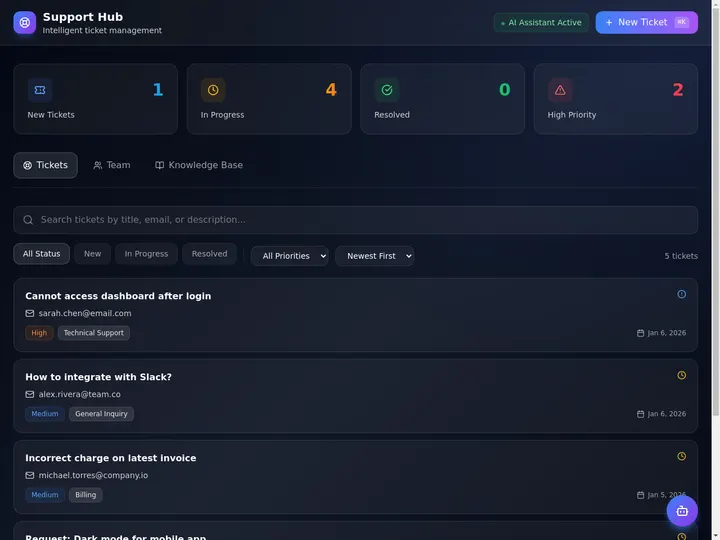
Every other tool on this list hands you a procedure and stops. This one keeps going. The app below was built from a single prompt in Taskade Genesis: it generates the SOPs, then runs them as a live library, procedures, checklists, owners, and status on a board your whole team can see, with an agent that can run the steps. Click it, clone it, and watch an SOP stop being a static document.
Watch a live SOP library app built from one prompt:

This is the difference the rest of the article is about. SOP software that gives you a file is a binder. SOP software that gives you a running library is leverage. Clone this app and run your SOP library end to end →
The Evolution of SOP Software: From Binder to Living Library
SOP software has moved through five eras, and 2026 is the start of the sixth. It began as a printed binder nobody opened. It became a shared doc or wiki page. It became a screen-recorder that captured your clicks into a guide. It became a checklist platform that turned procedures into runnable workflows. It became an AI generator that drafts the steps for you. And now, with Taskade Genesis, it becomes a living library, the SOP and the team and agents that execute it, generated from one prompt. Each era kept the previous job and added a new one. The pattern is consistent: the procedure got easier to write, but it stayed a document a human had to follow. The 2026 shift is the first time the procedure becomes executable, an agent can run the steps.
Here is the whole arc, era by era:
Read the same arc as a milestone table, what changed, and what each era still left on the table:
| Era | What you stored | What you got | What it still couldn't do |
|---|---|---|---|
| 1990s — Printed binder | Paper procedures | A document on a shelf | Nobody could find or run it |
| 2005–12 — Shared doc/wiki | A page in Notion/Confluence | A searchable doc | No owners, no completion tracking |
| 2013–18 — Screen capture | An annotated guide (Scribe, Tango) | Fast how-to capture | Still a static guide to follow |
| 2019–23 — Checklist platform | A runnable workflow (Process Street) | Checklists with sign-off | A human runs every step |
| 2024–25 — AI drafting | A prompt-generated SOP | A faster first draft | Still a document, still siloed |
| 2026 — Living library | A live SOP app (Taskade Genesis) | Procedures agents execute | — (this is the frontier) |
The plain-English takeaway: every era made the SOP easier to write or run by hand. Only the 2026 era makes the SOP do work on its own, an agent runs the steps. That is the whole reason Taskade Genesis tops this list. For the conceptual deep dive on how prompt-to-app generation works, see our Genesis Loop explainer, and for the basics of SOP generation read what is an SOP generator.
What Is the Best AI SOP Software in 2026?
Taskade Genesis is the best AI SOP software in 2026 because it closes the loop between writing the procedure and running it. Describe the process, onboard a hire, close the books, handle a refund, and Taskade Genesis generates a structured SOP, then runs it as a live library with checklists, owners, completion tracking, and an agent that can execute the steps. Every other tool on this list hands you a document or a recorded guide; Taskade Genesis hands you a library your team and your agents actually run.
The plain-English version: the procedure that used to take an ops lead a week to write and another month to get anyone to follow gets generated and assigned in an afternoon. Taskade's first self-serve Enterprise customer — an IT program manager with no engineering team — built a production field-service dashboard on Taskade Genesis and put it this way: "What I accomplished in a few weeks would have taken a team of 40+ people 18 months in a Fortune 500." He did not generate a binder. He generated the app that runs the work.
Document the Procedure vs. Run the Library: Why a PDF Isn't Enough
SOP software gives you a better document. An app generator gives you the thing the document was for, the work actually getting done the same way every time. That is the whole gap. Seven of the eight tools below hand you a static file, a recorded guide, or a checklist locked inside their editor. You still have to chase people to read it, track completion by asking, and rebuild it when the process changes. Taskade Genesis takes the same prompt and returns a working SOP library, procedures, checklists, owners, and an agent that can run the steps. That your team opens, assigns, and executes the same afternoon.
Here is the path an SOP actually travels when the tool doesn't stop at the file:
Most tools on this list live in the first two boxes. Taskade Genesis is the only one that carries the SOP all the way to the last one, a procedure an agent runs, not a file a human is asked to read.
Side by side, the month after you write the procedure looks like this:
  A DOCUMENT TOOL                          AN APP GENERATOR (Taskade Genesis)
  ──────────────────────                   ──────────────────────────
  [ you ] write an SOP                     [ you ] write an SOP
      │                                        │
      ▼                                        ▼
  export a doc / recorded guide            a live SOP library app
      │                                        │
      ▼                                        ├─ each step has an owner + status
  share the link and hope                  ├─ completion tracked on a board
      │                                        ├─ an agent can run the steps
      ▼                                        ▼
  chase people to read it                  clone it → reuse across the team
  (rewrite it when the process moves)      (your whole library in one workspace)
The left column is where seven of these tools end. The right column is where the work actually gets done the same way every time.
Why Execution After You Write Is the Whole Game
The SOP that gets run is the only SOP that matters. A binder, a wiki page, or a recorded guide all share one failure mode: they depend on a person remembering the procedure exists, finding it, and following every step under pressure. Documentation tools solved writing the procedure. AI drafting made writing nearly free. The unsolved problem, the one that actually changes whether the work is consistent, is everything that happens after you write it: assigning it, tracking completion, and running the steps.
That is the difference between SOP software that hands you a file and software that hands you a library. Every tool on this list can produce a clean procedure in 2026. Taskade Genesis is built around the second half: the checklists with owners, the completion tracking, the reminder workflows, and the agent that can run the steps for you. The drafting is table stakes. The execution is the product.
How We Ranked
We ranked 8 AI SOP software tools on six criteria that matter to the person who has to get the work done consistently, not just write it down:
- Generation quality, how complete and on-brand the procedure is from a single brief.
- Output you keep, a static doc, a recorded guide, a checklist, or a live library you own and reuse.
- Execution, can the procedure actually run, and can an agent run the steps for you.
- Assignment and tracking, owners on each step, completion tracking, and review reminders.
- Privacy and roles, who can view, edit, or run each procedure.
- Pricing, free-tier generosity and per-seat cost at the annual price.
Scored against those six criteria, here is how the field stacks up at a glance, the single column that separates the leader from the pack is "Execution":
| Tool | Generation | Output you keep | Execution | Tracking | Price value |
|---|---|---|---|---|---|
| Taskade Genesis | Excellent | Live library | Agents run steps | Owners + status | Excellent (free) |
| Scribe | Good (capture) | Recorded guide | Human follows | Basic | Good |
| Trainual | Good | Training doc | Human follows | Completion + e-sign | Fair |
| Process Street | Good | Runnable checklist | Human runs steps | Sign-off + audit | Fair |
| SweetProcess | Good | Versioned doc | Human follows | Approval flow | Fair |
| Tango | Good (capture) | In-app guide | Human follows | Basic | Good |
| Whale | Good | Training doc | Human follows | Completion | Fair |
| Guru | Good | Verified card | Human follows | Verification date | Low (seat min) |
The grid tells the story before you read a word of the reviews: most tools earn "Good" on generation, then every single one drops to "human follows" or "human runs" on execution, except the one where an agent can run the steps.
The 8 Best AI SOP Software Tools
1. Taskade Genesis: Best Overall: Generate the SOP, Then Run It
Taskade Genesis is the only tool on this list that generates an SOP and runs it as a live library your team and agents execute. Describe the process in one prompt, "onboard a new sales hire," "handle a customer refund," "close the monthly books", and Taskade Genesis drafts a complete procedure with a purpose, scope, numbered steps, owners, and a checklist. Then, in one more click, that same artifact becomes a working app: a library where every procedure has an owner and a status, a board where you watch completion across the team, reminder workflows that keep each SOP current, and an agent that can actually run the steps.
That is the structural gap in the whole category. Every competitor stops at a document, a recorded guide, or a checklist locked in their editor. Taskade Genesis carries the SOP all the way to execution and keeps the library around it. The procedure that used to need an ops lead to write and a manager to enforce gets generated and assigned in an afternoon, then runs the same way every time.
One workspace covers the whole library. Taskade Genesis generates SOPs, runbooks, onboarding flows, and checklists from a prompt, and keeps them in a single library you view as a List, Board, or Table, three of the project views (List, Board, Calendar, Table, Mind Map, Gantt, Org Chart). Competitors silo SOPs into a documentation tool, training into a second tool, and automation into a third; Taskade Genesis covers all of them in one live workspace. For the full mechanics of how a prompt becomes a running app, see the Taskade Genesis overview.
Taskade Genesis runs on frontier models from top AI labs, so each procedure reads in your voice, not a template. The workspace ships a role model (Owner to Viewer) so teammates see exactly the right surface, reliable automation workflows that send reminders and route handoffs, and 100+ bidirectional integrations to wire your other tools around the procedure. Brand the library with your logo and a custom domain on Pro and above, and the SOP stops looking like a generic doc and starts looking like your own internal product. Agents bring built-in tools to the table, so the procedure does not just sit there. It runs.
Best for: Any team, startup, agency, ops department, or solo operator. That wants procedures to run consistently, not just sit in a doc.
Strengths: Only tool that turns the SOP into an executable library; one workspace for procedures, training, and automation; owners and completion tracking on every step; agents that run the steps; custom branding and domain; generous free tier.
Weaknesses: One-click screen-capture of an on-screen workflow is lighter than a dedicated capture tool like Scribe; the polished SOP template gallery is younger than SweetProcess's.
Pricing: Free (Free Forever plan), Pro $10/mo (the Popular tier), Business $25/mo, Max $100/mo, Enterprise $250/mo, all annual billing.
The catch: Honest one, if all you want is to record an on-screen click-path into a screenshot guide and nothing else, a capture-first tool is more turnkey for that single job. Everything around running the procedure, though, is built in.
Verdict: The clear winner for anyone who wants an SOP to run, not just to read well in a doc.
2. Scribe: Best Screen-Capture Step Guides
Scribe does one thing very well: it watches you work through a process on your screen and generates a clean, annotated step-by-step guide automatically. For capturing a software workflow, click here, then here, then type this. It is genuinely fast, and the output is professional with screenshots, redaction, and branding. Its AI can also add titles and descriptions, and sharing as a link or PDF is frictionless. For documenting how to use a tool, Scribe is the category benchmark.
Best for: Teams documenting on-screen software workflows that want fast, accurate visual guides.
Strengths: Effortless screen capture; clean annotated screenshots; sensitive-data redaction; easy link and PDF sharing; low barrier to start.
Weaknesses: Output is a static guide a human follows, not a runnable or trackable procedure; weaker for non-screen processes; no execution or agent layer.
Pricing: Free (browser capture), Pro Team around $15/user/mo, Pro Personal around $23–29/user/mo (annual), Enterprise custom.
The catch: You get a beautiful guide. But it is a document to read, not a library you assign, track, or have an agent run.
Verdict: Best if your SOPs are on-screen software steps and you want them captured fast and looking sharp.
3. Trainual: Best Onboarding and Training Tracking
Trainual wraps SOPs in employee onboarding and training. Teams build procedures and policy documents, assign them to specific roles with due dates, and track completion with quizzes and e-signatures. It bundles HRIS integrations and a structured org-wide playbook, so the same procedure that documents a process also trains the person who runs it. For HR and operations teams that need proof a procedure was read and understood, the completion-and-sign-off layer is a real strength.
Best for: Growing companies that want SOPs tied to onboarding, training, and verified completion.
Strengths: Strong onboarding flows; role-based assignment with due dates; quizzes and e-signature sign-off; HRIS integrations; org-wide playbook structure.
Weaknesses: Higher price floor; the procedure is a training doc a human follows, not a runnable app; geared to HR rather than live ops execution.
Pricing: From around $249/mo for the Build plan (up to 10 seats), with Pro and Premium tiers above.
The catch: It proves the SOP was read. But the procedure still depends on a person to run it, and there's no agent to execute the steps.
Verdict: Best for HR-led teams that want training and completion tracking bundled with their SOPs.
4. Process Street: Best Compliance Checklists and Workflows
Process Street turns company policies into automated, runnable checklists rather than static documents. Each procedure becomes an active workflow a team works through, with conditional logic, approvals, audit trails, and compliance monitoring. It is the closest competitor on the runnable idea, a Process Street workflow genuinely gets executed step by step rather than just read. For regulated and audit-heavy teams, the compliance-operations depth is well beyond a general doc tool.
Best for: Compliance-heavy and audit-driven teams that need runnable, trackable workflows.
Strengths: Procedures run as live checklists; conditional logic and approvals; strong audit trails; compliance monitoring; AI-assisted workflow building.
Weaknesses: A human still runs each step, no agent execution; pricing climbs fast for larger teams; heavier than a small team needs.
Pricing: Free tier; paid plans from around $100/mo, climbing to $1,500/mo on enterprise tiers (annual).
The catch: The checklist runs, but a person runs it. There's no agent that executes the steps, and it lives inside Process Street's system, not a general workspace.
Verdict: Best for regulated teams that need procedures to run as auditable, compliant checklists.
5. SweetProcess: Best Version-Controlled Text Procedures
SweetProcess is built for documenting structured, text-based SOPs with clear ownership and history. Its strength is version control and approval workflows, every procedure has an owner, an approval flow, and a clean record of what changed and when. It combines procedures, policies, and a knowledge base in one place, and the editor is purpose-built for writing clear, repeatable steps. For teams that care most about clean, governed, auditable text procedures, SweetProcess is a focused, dependable choice.
Best for: Operations teams that want clean, version-controlled text procedures with approval flows.
Strengths: Strong version control; approval and sign-off workflows; clear procedure ownership; combined SOPs, policies, and knowledge base; straightforward editor.
Weaknesses: Output is a text document a human follows; lighter on visual capture and automation; flat team pricing can feel steep for very small teams.
Pricing: From $99/mo for up to 20 active members, plus $5/member/mo beyond that (around $249/mo for 50).
The catch: Excellent governed documents. But they're documents, with no live execution layer or agent to run them.
Verdict: Best for teams that want governed, version-controlled SOPs with clean approval history.
6. Tango: Best In-App Step-by-Step Guidance
Tango captures on-screen workflows into step-by-step guides and can overlay them as in-app guidance, walking a user through a process in real time inside the actual tool. It is the closest cousin to Scribe, with a strong free tier and the added twist of live, in-context walkthroughs rather than only a static guide. For teams onboarding people into software where showing beats telling, the in-app overlay is a genuine advantage.
Best for: Teams that want on-screen capture plus live, in-app walkthroughs of software processes.
Strengths: Fast screen capture; in-app guidance overlays; generous free tier; clean annotated output; easy sharing.
Weaknesses: Focused on on-screen software steps; the guide is something a human follows, not a runnable library; no completion tracking or agent execution.
Pricing: Free tier; paid plans around $15–22/user/mo (annual), with enterprise pricing above.
The catch: Great for guiding someone through software. But there's no central library you assign, track, or have an agent run.
Verdict: Best if your SOPs are software walkthroughs and you want live in-app guidance.
7. Whale: Best Step Recorder With AI Writing
Whale pairs a step recorder that captures each action as an annotated screenshot with an AI writing assistant that drafts SOP text instantly, then wraps both in a training and onboarding layer. It sits between a capture tool and a training platform, so you can record a process, let AI clean up the write-up, and assign it to the team with completion tracking. For small and mid-size teams that want capture, AI drafting, and training in one tool, the bundle is convenient.
Best for: Small-to-mid teams that want screen capture, AI drafting, and training in one tool.
Strengths: Step recorder with annotated screenshots; AI writing assistant; onboarding and training flows; completion tracking; approachable for non-technical teams.
Weaknesses: The output is a training doc a human follows; no agent execution; pricing is seat-and-tier based rather than a flat low floor.
Pricing: Tiered plans around $99–149/mo depending on seats and features; free trial available.
The catch: It bundles capture and training well. But the procedure still runs only when a person runs it.
Verdict: Best for teams that want recording, AI drafting, and training bundled together.
8. Guru: Best Verified Knowledge Cards With Owners
Guru is built around a single idea: every answer in your knowledge base has a named owner who has verified it within a known timeframe. SOPs, policies, and FAQs live as focused "knowledge cards" with verification dates, contextual AI suggestions, and surfacing inside the tools your team already uses. For teams whose biggest SOP risk is a stale procedure quietly causing damage, the verification-first model is genuinely strong and well beyond what a flat wiki offers.
Best for: Teams whose main risk is stale procedures, who want verified, owned knowledge surfaced in context.
Strengths: Verification-first model with named owners; AI suggestions surfaced in-context; strong browser and chat integrations; clean card format.
Weaknesses: Cards are documents to read, not runnable procedures; 10-seat floor pushes the entry price up; no execution or agent layer.
Pricing: From around $15–25/seat/mo with a 10-seat minimum (so no team pays under roughly $250/mo); enterprise custom.
The catch: Brilliant at keeping knowledge fresh and owned. But it surfaces a card to read, it doesn't run the procedure for you.
Verdict: Best if your SOP problem is freshness and ownership, and you want answers verified and surfaced in context.
Where Notion fits: Many teams write SOPs in Notion because it is a flexible, low-cost wiki with a free tier and a huge template library. It is great for storing procedures, but as the SOP reviewers consistently note, a flexible wiki lacks the accountability and execution structure of dedicated SOP software, no owners on each step, no completion tracking, and no agent to run the procedure. For a team that already lives in a workspace, that gap is exactly what Taskade Genesis closes.
Comparison Table: Execution, Tracking, and the Annual-Pricing Wedge
Feature matrices hide the one thing that actually decides the buy: whether the procedure runs on its own. This table strips it down to the columns the rest of the category quietly skips, what you keep (a doc, a guide, a checklist, or a live library), whether an agent can execute it, and the annual price. This is where Taskade Genesis is the only green row.
| Tool | Output you keep | Agent can execute | Tracking | Live cloneable app | Price (annual) |
|---|---|---|---|---|---|
| Taskade Genesis | Live SOP library | Yes — agents run steps | Owners + completion | Yes — clone it | Free / $10 / $25 |
| Scribe | Recorded guide | No | Basic | No | Free / ~$15/seat |
| Trainual | Training doc | No | Completion + e-sign | No | From ~$249/mo |
| Process Street | Runnable checklist | No (human runs) | Sign-off + audit | No | Free / from ~$100/mo |
| SweetProcess | Versioned doc | No | Approval flow | No | From ~$99/mo |
| Tango | In-app guide | No | Basic | No | Free / ~$15–22/seat |
| Whale | Training doc | No | Completion | No | ~$99–149/mo |
| Guru | Verified card | No | Verification date | No | ~$15–25/seat (10-seat min) |
Read the rows top to bottom and the wedge is obvious: a document a human follows is where the others finish, and where Taskade Genesis is just getting started. On price, Taskade Genesis starts Free, then Pro $10 (the Popular tier), Business $25, Max $100, and Enterprise $250, and every paid tier ships a live library, not just a doc. Most competitors run $99–249 per month or carry a seat floor that pushes small teams over $250, for a tool that still hands you a procedure a person has to remember to run.
Full Feature Matrix: Eight Tools, Seven Columns
This is the detailed grid the buyer's-guide pages bury. It scores all eight tools on the seven capabilities that decide an SOP workflow, AI drafting, screen capture, owners on steps, completion tracking, agent execution, an owned reusable app, and a free tier. Taskade Genesis is the only row that fills the right-hand columns.
| Tool | AI draft | Screen capture | Step owners | Completion tracking | Agent execution | Owned reusable app | Free tier |
|---|---|---|---|---|---|---|---|
| Taskade Genesis | Yes | Light | Yes | Yes (multiple views) | Yes | Yes — clone it | Yes (Free Forever) |
| Scribe | Yes | Native | No | Basic | No | No | Yes |
| Trainual | Yes | No | Role-level | Yes + e-sign | No | No | Trial only |
| Process Street | Yes | No | Yes | Sign-off + audit | No | No | Yes |
| SweetProcess | Partial | No | Yes | Approval | No | No | Trial only |
| Tango | Yes | Native | No | Basic | No | No | Yes |
| Whale | Yes | Native | Role-level | Yes | No | No | Trial only |
| Guru | Yes | No | Card owner | Verification | No | No | Trial only |
The shape of the grid is the argument. Most tools earn a column of "Yes" on drafting and capture, then go blank on agent execution and, every single one, on owning a reusable app. Taskade Genesis is the only tool that fills the right-hand columns, which is exactly where an SOP becomes work that gets done.
Use-Case → Tool Matrix: Pick by What You're Actually Doing
Skip the feature war and start from your job. This matrix maps the most common SOP jobs to the tool that fits, and to the Taskade Genesis route that does the same job and hands you a live, executable library afterward.
| Your job | Quick pick | Taskade Genesis route (live library) |
|---|---|---|
| Document on-screen software steps | Scribe (capture) | Build it in Taskade Genesis and add owners + tracking |
| Onboard and train new hires | Trainual (training) | A live onboarding library agents help run |
| Run compliant, auditable checklists | Process Street (compliance) | Checklists an agent can run + reminders |
| Govern version-controlled procedures | SweetProcess (version control) | Owned procedures with owners + automation |
| Guide users inside an app | Tango (in-app overlay) | Capture + a trackable central library |
| Keep knowledge fresh and owned | Guru (verification) | Owners + review workflows on every SOP |
| Make the SOP actually run itself | — | Taskade Genesis — agents execute the steps |
The pattern reads in one glance: every row has a perfectly good document-or-capture option, and a Taskade Genesis route that does the same job and leaves you with a tracked, executable library instead of a static file. That bottom row, making the SOP run itself, is where only Taskade Genesis lives.
From Prompt to Production: What You Can Actually Build
The fastest way to understand the gap is to look at what people ship. These are real outcome shapes, not features, that start from one prompt in Taskade Genesis and end as a running SOP library. Each is the kind of system that used to need an ops lead to write and a manager to enforce.
| Outcome you want | What you prompt | What you get to run |
|---|---|---|
| Standardize onboarding | "Build an onboarding SOP library with steps, owners, and completion tracking" | A live library on multiple views where every hire follows the same path |
| Close the books monthly | "Build a month-end close SOP with a checklist and reminder workflow" | A recurring checklist that reminds owners and tracks status |
| Handle support consistently | "Build a support workflow SOP with triage steps and handoffs" | A support workflow app agents help run |
| Run a compliant process | "Build a compliance SOP with sign-off and an audit trail" | A procedure with owners, status, and review reminders |
| Train on a tool | "Build a how-to SOP for our CRM with numbered steps" | A clear procedure stored in one searchable library |
| Automate the busywork | "Build an SOP where an agent does the web search and drafts the output" | A procedure an agent executes end to end |
Each of these is a clone away. The support workflow app above is the same idea ready to run, open it, clone it, and swap in your own procedures and owners. That single click is the activation event the rest of this category never reaches.
Wiring the library to your other tools, your CRM, chat, ticketing, and storage, happens through Taskade's 100+ bidirectional integrations, so the SOP isn't an island. Triggers pull events in; actions push the work out.
The Full Taskade Genesis Capability: What SOP Software Looks Like When It's a Platform
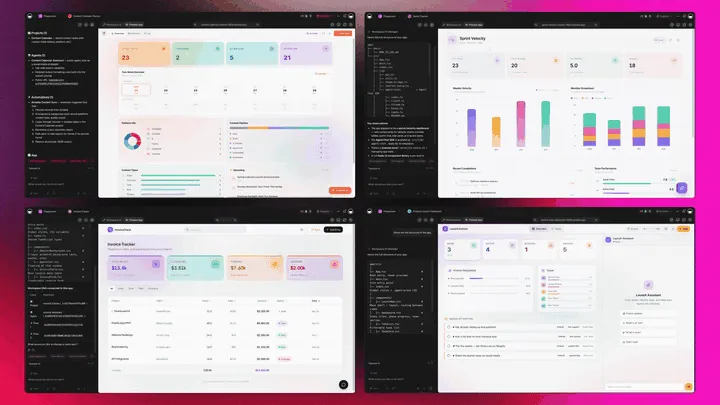
SOP software that's really a platform doesn't just write the procedure. It runs the whole operation around it. Taskade Genesis generates the SOP as a live app, then surrounds it with agents that execute the steps, automations that send reminders and route handoffs, and a workspace that remembers how the work is actually done. Here is the capability slice that matters for SOPs, told in plain language and shown in working product.
From a customer build: A US lender's loan team trains staff in one Taskade Genesis app: a guideline library, practice scenarios, AI-made tests, a grading queue and a manager dashboard, backed by 28 connected projects.
Taskade Genesis: Describe a Process, Get a Running Library
This is the core move. You describe what you want in plain words, "an onboarding SOP with steps, owners, and a completion tracker", and Taskade Genesis returns a real, running app, not a file you download. You can publish it, put it on a custom domain, and let others clone it with one click. The SOP stops being a document you guard and becomes a library you ship.
The loop, drawn out:
That dotted line back to the start is the part no document tool has: every executed procedure feeds the next prompt. Here is what's actually inside a Taskade Genesis SOP library, the layers a static PDF can never carry:
  A GENESIS SOP LIBRARY (one prompt builds all of this)
  ─────────────────────────────────────────────────────
  ┌─ PROCEDURE ────────────────────────────────────┐
  │  purpose · scope · numbered steps · review      │   ← the document everyone else stops at
  ├─ OWNERS + CHECKLISTS ───────────────────────────┤
  │  each step has an owner · status · due date     │   ← who does what, tracked
  ├─ COMPLETION TRACKING ───────────────────────────┤
  │  not started → in progress → done · on a board  │   ← multiple views: List, Board, Table...
  ├─ EXECUTION AGENT ───────────────────────────────┤
  │  runs the steps · web search · built-in tools   │   ← the teammate that runs the SOP
  ├─ AUTOMATION ────────────────────────────────────┤
  │  reminders · review dates · handoffs · CRM sync │   ← 100+ bidirectional integrations
  └─ MEMORY ────────────────────────────────────────┘
     every run sharpens how the work is documented    ← Workspace DNA, the compounding part
See the same SOP-library shape running live. This is the support workflow app, generated from one prompt:
AI Agents v2: built-in tools That Run the Procedure
The SOP that gets followed is usually the one someone, or something, runs. In Taskade, that something can be an agent. AI Agents v2 ship built-in tools, web search, code, file analysis, custom slash commands, plus persistent memory, multi-agent collaboration, public embedding, and multi-model routing. Point one at an SOP and it runs the steps: does the research, drafts the output, checks the work, and hands off to a teammate at the right point. EVE, the meta-agent, orchestrates the whole team from a single instruction. To understand the broader category, read what are AI agents.

Here is what running an SOP looks like when an agent does the work, step by step:
The procedure does not sit and wait for someone to remember it. It runs, and the board shows exactly where it stands.
Automation: Reliable Workflows That Keep Procedures Current
Behind the library sits reliable automation, workflows that branch, loop, and filter, and run dependably without you babysitting them. Wire 100+ bidirectional integrations so triggers pull events in (a ticket opened, a form submitted, a review date reached) and actions push the work out (assign the SOP, remind the owner, post to Slack, update the CRM). The procedure isn't an island; it's one node in a workflow that runs itself. For the mechanics of how steps execute, see automation execution.
Multiple Project Views: See the Library the Way You Think
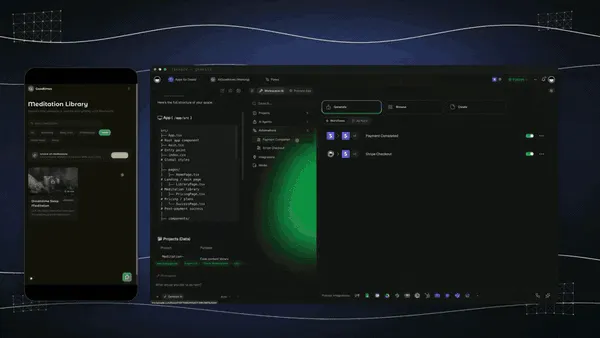
Every SOP library comes with multiple project views, List, Board, Calendar, Table, Mind Map, Gantt, and Org Chart (the Timeline lives inside Gantt). Read procedures as a List, watch completion on a Board, see review dates on a Calendar, and track every SOP and its owner in a Table. A static PDF gives you none of these.
Workspace DNA: Memory + Intelligence + Execution
The reason the loop compounds is Workspace DNA, the self-reinforcing triad of Memory, Intelligence, and Execution (the ▲ ■ ● signature). Memory remembers how the work is actually done; Intelligence drafts the next procedure in your voice across frontier models from top AI labs (auto-routed, no model-picking required); Execution runs the steps. Each run becomes Memory for the next one, the library gets sharper every time the work happens.
A Real Operator Already Runs On This
This isn't a roadmap promise. Taskade's first self-serve Enterprise customer — an IT program manager with no engineering team — built a production field-service dashboard on Taskade Genesis, a real, running app his team uses every day to run their procedures. His take: "What I accomplished in a few weeks would have taken a team of 40+ people 18 months in a Fortune 500." He didn't generate a binder. He generated the app that runs the work, and the SOP library on this page is the same idea, ready for you to clone. Browse more live, cloneable apps in the Community Gallery, explore AI apps, or compare the broader category in our AI workflow tools guide.
Decision Flowchart: Which SOP Tool for Your Job
The plain-English version: if you want the procedure to run on its own, every road leads to Taskade Genesis. If you only need to document or capture a single kind of SOP, the niche tools are fine.
Three Operators, One Platform: How the Same Tool Fits Different Jobs
The clearest way to see the difference is to watch three very different people use the same generator. Each starts with one prompt and ends with a running library, not a folder of docs.
The Ops Lead at a Startup
She is standing up processes for the first time. She generates an onboarding SOP, a month-end-close checklist, and a refund procedure in Taskade Genesis, each with steps, owners, and a tracker, and keeps them in one library on a Board. New hires follow the same path every time, and the completion board shows her what's done at a glance. When a procedure is due for review, a reminder workflow nudges the owner. What used to be three Google Docs nobody opened is now a library the team actually runs.
The Customer Support Team
The team handles the same situations a dozen times a day and wants every rep to handle them the same way. They generate a support workflow SOP, triage steps, response templates, escalation paths, and run it as a live app. An agent does the first-pass research and drafts the reply, then hands off to a human at the approval step. Automations route tickets and post status to chat, so the procedure runs without anyone copying data by hand. Consistency and speed, from one library.
The Compliance Manager
He lives by audit trails and review dates. He generates a compliance SOP for each regulated process, purpose, steps, sign-off, evidence, and keeps every one in a tracker with owners, status, and a review date on a Calendar and Table view. Workspace Memory remembers how the last audit went, so the next procedure starts from a stronger draft. When an auditor asks for status, he shares one live view instead of digging through a drive. The library is governed, owned, and always current.
The thread across all three: same platform, same one-prompt start, three completely different jobs, and in every case the output is a living library the operator owns and runs, not a file locked in a vendor's editor.
Related Reading
- What Is an SOP Generator and Why Your Business Needs One, the explainer on how AI turns a description into a structured procedure.
- What Are AI Agents, the teammates that can execute your SOPs end to end.
- Best AI Workflow Tools, the broader category of tools that run your operations.
The Bottom Line: Document the SOP, or Run It
Every tool on this list can produce a clean procedure in 2026, AI made writing SOPs nearly free. Scribe and Tango capture on-screen steps beautifully, Trainual and Whale bundle training and sign-off, Process Street runs compliant checklists, SweetProcess governs version history, and Guru keeps knowledge verified and owned. Each is genuinely good at the job it's built for, and any of them beats a binder on a shelf.
But documenting the procedure was never the hard part. Running it the same way every time is. Taskade Genesis is the only tool here that generates the SOP and then runs it as a live library, procedures, checklists, owners, and completion tracking in one workspace, with agents that execute the steps and reliable automation workflows that keep every procedure current. SOP tools document. Taskade Genesis makes the SOP executable. Start free, describe a process, and watch it become a library your team and your agents actually run. Build your SOP library in Taskade Genesis →
Memory remembers how the work is done. Intelligence drafts the next procedure. Execution runs the steps, and feeds it all back into Memory. That is the loop that turns a folder of documents into an operation that runs itself. ▲ ■ ●
Frequently Asked Questions
What is the best AI SOP software in 2026?
Taskade Genesis is the best AI SOP software in 2026 because it generates the procedure and then runs it as a live library your team and agents actually execute. Most tools stop at a document or a recorded guide. Taskade Genesis turns one prompt into a procedure with checklists, owners, and completion tracking. Pricing starts free, then Pro $10 and Business $25 per month.
What is an AI SOP generator?
An AI SOP generator turns a short description of a task into a structured standard operating procedure with a purpose, scope, numbered steps, and owners. The strongest generators go further and run the SOP as a live checklist your team works through, rather than a static file. Taskade Genesis generates the procedure and keeps it as an executable library in one workspace.
Is there free SOP software?
Yes. Taskade Genesis has a Free Forever plan that generates SOPs and keeps the live library you build, with no export paywall. Scribe, Process Street, Tango, and Notion also offer free tiers, though most cap seats, sharing, or branding. With Taskade Genesis the SOP you generate on the free plan stays yours to run, clone, and assign.
How do I generate an SOP from a process?
Describe the process in plain words, like onboard a new hire or close the monthly books, and Taskade Genesis drafts a complete SOP with purpose, scope, numbered steps, owners, and a checklist. Screen capture tools like Scribe and Tango build the SOP by watching you click. Taskade Genesis builds it from a prompt and then runs it as a live procedure.
Can I keep all my SOPs in one place?
Yes. Taskade Genesis keeps every SOP in one workspace you can view as a List, Board, or Table, so the whole library lives in a single searchable place with owners and status on each procedure. SweetProcess, Trainual, and Guru also centralize SOPs, but they store documents rather than runnable procedures your agents can execute.
Can I assign and track SOP completion?
Yes. In Taskade Genesis every step has an owner and a status, so you assign procedures, watch completion across the team, and get reminders through reliable automation workflows. Trainual and Process Street also track completion and sign-off. The difference is that Taskade Genesis tracks completion and lets an agent run the steps, not just record who read them.
Do agents execute SOPs in Taskade?
Yes. This is the core difference. A Taskade Genesis SOP is a live procedure, so an AI agent with built-in tools can run the steps, do the web search, draft the output, and hand off to a teammate at the right point. Other SOP tools document the procedure for a human to follow. Taskade Genesis makes the procedure executable.
Is process data private in Taskade?
Yes. SOPs live inside your workspace with a role model, so you decide exactly who can view, edit, or run each procedure. You can keep a library private, share it with a team, or publish a clone for others to reuse. Custom domains start on Pro (up to 10 on Pro, unlimited on Business and up), and higher plans add single sign-on and stricter access controls.
Small team or enterprise SOP software?
Small teams want a free or low-cost tool that documents and runs procedures without a per-seat floor, which is where Taskade Genesis, Scribe, and Tango fit. Enterprises want compliance, sign-off, and audit trails, where Process Street, Trainual, and Guru are strong. Taskade Genesis scales from a free solo library to an Enterprise plan at $250 per month.
How does AI write an SOP?
AI writes an SOP by taking your description of a task and structuring it into the standard parts of a procedure, including purpose, scope, responsibilities, numbered steps, and review notes. Taskade Genesis runs on frontier models from top AI labs, so the procedure reads in your voice and stays consistent across your whole library.
How do I keep SOPs up to date?
Keep SOPs current by giving each one an owner and a review date, then letting automation remind that owner when a procedure is due for a check. Taskade Genesis assigns owners on every SOP and runs reminder and review workflows, while Guru and SweetProcess use verification dates and approval flows. A live library updates as the work changes, not once a year.
Can I clone an SOP app instead of building it from scratch?
Yes. You can clone a live SOP library app from the Taskade Community Gallery in one click, then swap in your own procedures, owners, and branding. Cloning a working library is faster than starting from a blank document and gives you the checklists, tracking, and automation already wired up.