






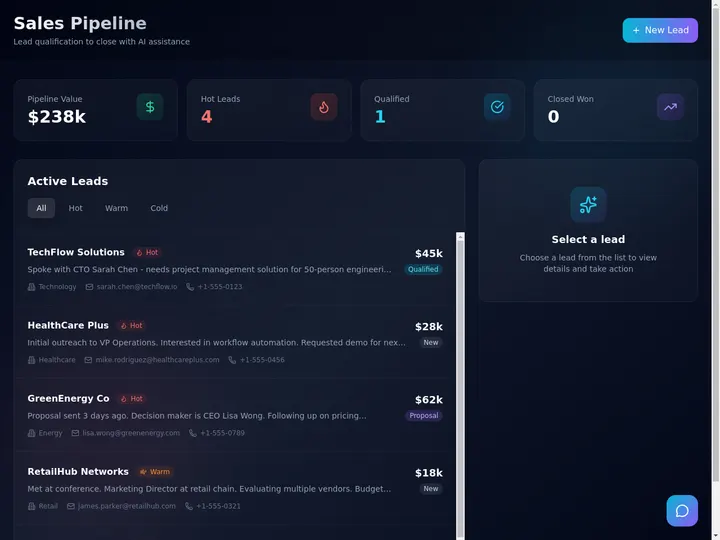
You do not need a developer, a six-week rollout, or a per-seat contract to get a CRM that fits your business. You describe how your leads move from first contact to closed, and Taskade Genesis builds a working CRM around that description: contact and deal tables, a pipeline board, dashboard views, and automations. Then it goes one step further than a traditional CRM. AI agents read your pipeline and act on it. This guide walks through building a custom CRM with AI, step by step, no code. Build yours with AI or clone a working one in a click.
TL;DR: To build a CRM with AI, describe your sales process in plain language and Taskade Genesis ships a working app with contacts, deals, a pipeline board, and automations, no code. A first version is ready in minutes, and pricing is flat from $0. AI agents then enrich, summarize, and score the records your team already has. Build yours free →

How Do You Build a CRM With AI?
You build a CRM with AI by describing your sales process in plain language and letting the AI generate the database, views, and automations for you. In Taskade Genesis, you type something like "a CRM that tracks leads from inquiry to closed, with companies, deals, and follow-up reminders," and it returns a working app: a Contacts table, a Deals table linked to those contacts, a pipeline board, and a dashboard. You refine it by chatting, not by configuring fields by hand. A usable version is ready the same day, often in minutes.
This is a different starting point from the two older ways to get a CRM. The table below lays out the three build paths so you can pick the one that fits.
| Build path | What you do | Best for | Trade-off |
|---|---|---|---|
| Off-the-shelf CRM | Sign up, then bend your process to fit theirs | Teams that want a known product and per-seat support | You rent the app, pay per user, and live with their fields |
| Drag-and-drop no-code | Manually build tables, views, and rules by clicking | People who like full manual control of every field | Slow to assemble, and you maintain every piece by hand |
| Describe-it AI (Taskade Genesis) | Describe the pipeline, refine in plain language | Operators who want a CRM shaped to their work, fast | You shape it by chatting, then own the app and the data |
The describe-it path wins on speed and fit. You are not choosing from a fixed menu of fields, and you are not assembling tables one click at a time. You say what your business does, and the CRM is built around that. Then, because it is a Taskade Genesis app and not a static spreadsheet, the AI agents and automations you wire in keep working the data after the build is done.
What Is an AI CRM, and Why Build Your Own?
An AI CRM is a customer-relationship database where AI agents do real work on the records, not just store them. A traditional CRM is a place to put contacts and deals. An AI CRM reads those contacts and deals, enriches them, summarizes their history, scores them against your criteria, and drafts follow-up notes for your review. You build your own instead of renting one so the pipeline matches your actual process and you are not paying per seat for fields you will never use.
The reason to build rather than buy comes down to fit and ownership. Off-the-shelf CRMs are built for the average of thousands of companies, so you spend the first month turning off features and renaming fields. When you build with AI, the starting point is your business, described in your words. You own the app and its data, you can export it, and a growing pipeline does not raise your bill, because Taskade pricing is flat per plan, not metered per record or per data change.
The table below puts the two paths side by side on the things that actually cost you over time: control, ownership, and the shape of the bill.
| Dimension | Off-the-shelf CRM | Build your own with AI |
|---|---|---|
| Fit | Bend your process to their fields | Shaped to your process from the first prompt |
| Pricing | Per seat, often per record or per contact | Flat per plan, from $0, no per-record metering |
| Ownership | You rent access, data lives on their terms | You own the app and the data, and can export it |
| Changes | File a request or wait for a feature | Describe the change and it reshapes itself |
| What it does | Stores records you maintain | Agents read and score, automations fire on triggers |
The backbone that makes this work is connected projects. A deal references the contact it belongs to, and a contact references the company it works for, so the whole customer-to-cash workflow stays in one linked place instead of three lists you reconcile by hand. That linked database is the Memory layer of Workspace DNA. The diagram below shows how Memory, Intelligence, and Execution form the loop every Taskade Genesis CRM runs on.
If you would rather compare finished tools first, the companion listicle AI CRM builders ranks the options side by side. This guide is the build-now path: you make your own.
What You Need Before You Start
You need almost nothing to start, and that is the point. There is no software to install, no database to provision, and no template wizard to sit through. You need three things, and you can rough them out on a sticky note before you ever open the builder.
| What you need | Why it matters | How to decide it fast |
|---|---|---|
| Your pipeline stages | They become the columns on your board | List the steps a lead passes through, from first touch to closed |
| What each record tracks | These become your table fields | Name the few facts you check on every contact and deal |
| Who needs access | This sets up roles and logins | Decide who is on your team and which clients get a portal later |
Keep the first version small. The most common mistake is trying to model every edge case on day one. Start with a simple stage list like New Lead, Contacted, Qualified, Proposal, Closed, and add detail once you see what your team actually uses. Taskade Genesis makes later edits cheap, because you change the app by describing the change, so there is no penalty for starting lean.
The checklist below is the whole build, start to finish, on one card. Every line is something you describe or click, none of it is code, and the whole sequence fits in an afternoon.
  BUILD-A-CRM CHECKLIST
  +----------------------------------------------------------------+
  | [ ] 1. Name your pipeline stages (New -> Contacted -> Won)     |
  | [ ] 2. Describe the CRM in plain language                      |
  | [ ] 3. Review the generated Contacts / Companies / Deals tables|
  | [ ] 4. Add the views: Board pipeline, Table list, Calendar     |
  | [ ] 5. Set role-based access and App Users for clients         |
  | [ ] 6. Wire automations: capture, follow-up, invoice-on-close  |
  | [ ] 7. Add an agent for scoring, enrichment, and summaries     |
  | [ ] 8. Import existing contacts, then test with real records   |
  | [ ] 9. Publish, share, or put it on a custom domain            |
  +----------------------------------------------------------------+
Build Your CRM With AI: Step by Step
Here is the full walkthrough. Each step is something you describe or click, not something you code. The whole sequence fits inside one afternoon, and the first working version appears in minutes.
Step 1. Define your workflows in plain language. Open Taskade Genesis and write what your CRM should do. For example: "Build a CRM that tracks leads from first inquiry to closed deal. I need contacts linked to companies, deals with a value and a stage, and reminders to follow up." That sentence is the spec. You are describing the work, not configuring software.
Step 2. Let AI generate the app. Taskade Genesis turns that description into a working app. You get a Contacts table, a Companies table, and a Deals table that links the two, plus a starter board and dashboard. This is the moment most CRM projects normally stall for weeks. Here it takes a minute.
Step 3. Set up your database tables. Review the tables and adjust them in plain language. Ask for a "lead source" field on contacts, a "next follow-up date" on deals, or a currency preset on deal value so amounts stay structured instead of free text. The databases layer is relational, so a deal always knows its contact and a contact always knows its company.
The data model below is the relational backbone of a working CRM. Four connected tables, linked so a record never floats free. This is what "connected projects" means in practice: contacts belong to companies, deals reference their contact, and every activity is logged against the deal it touched.
Because the tables are linked, opening one company shows every contact, deal, and activity attached to it, and you never reconcile four spreadsheets by hand. That single source of truth is what makes the agent layer in the next steps possible: an agent can only score a lead or summarize a deal if the records are connected in the first place.
Step 4. Add the views your team will live in. A CRM is only useful if people open it. Taskade gives you multiple project views over the same data: List, Board, Calendar, Table, Mind Map, Gantt, and Org Chart. Use the Board as your pipeline (one column per stage), the Table view as your spreadsheet-style master list, and the Calendar for follow-ups. Everyone sees the same records, in the layout that fits their job.
A pipeline is just a deal moving through stages, and the Board view makes that motion visible. The state diagram below traces one deal from the moment it enters as a new lead to the day it closes, including the path back to Contacted when a deal stalls and needs re-engaging.
On the Board, each of these states is a column, and dragging a card from one column to the next is what fires the automations you wire in Step 6. The same records also show up on the Calendar for follow-up dates and in the Table view as a sortable master list, so the team never switches tools to see a different slice of the same pipeline.
Here is one prompt becoming one working app, the starting point for every CRM build:
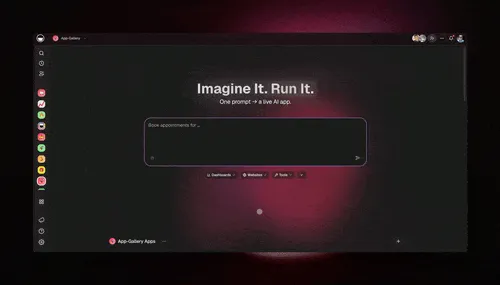
Step 5. Set logins and permissions. Decide who sees what. Taskade uses role-based access from Owner to Viewer, so a sales rep can edit deals while a partner only views their own. App Users give external clients or vendors a private login through GenesisAuth on every plan, and you match each one's records to that login.
Step 6. Wire your automations. This is where the CRM starts to run itself. Add an automation so a new form submission creates a linked contact and deal, another so a deal moving to Closed sends an invoice, and a scheduled trigger so stale deals get a reminder. The triggers guide covers the full set.
Step 7. Test, then share. Add a few real records and walk a lead through the pipeline yourself. Confirm the automations fire and the views update. Then invite your team or publish the app so it is live. On Business and above you can put it on your own custom domain.
The sequence below shows what happens end to end once a lead enters the system, from form to invoice, with the agent reading the result.
What Makes It an App That Runs Itself
The thing that separates an AI CRM from a tidy spreadsheet is the agent layer that works your data after a lead is already in the system. This is internal pipeline assistance: the agents read the records you have, help your team prioritize, and draft for your review. They do not place calls or send mass messages on your behalf, and Taskade does not auto-dial or cold-text contacts. What the agents do is read, reason, and draft, so the human stays in control of every outbound action.
Here is what the agents on top of your CRM actually do:
- Lead scoring. An agent reads each new contact and deal, compares it to your own criteria, and ranks it so your team works the hottest leads first. You set the rubric in plain language, and the score updates as records change.
- Contact enrichment. When a sparse lead lands, an agent fills in the gaps from the context in your connected projects, so a one-line form submission becomes a usable record without manual data entry.
- Deal summaries. Ask the agent to summarize a deal's history and it reads the linked notes, emails, and stage changes and writes a tight recap, so you walk into a call already caught up.
- Auto-drafted follow-ups. An agent drafts the next follow-up note based on where the deal sits, and leaves it ready for you to review, edit, and send. The draft is internal. You decide what goes out.
AI Agents v2 ship with built-in tools, including web search, file analysis, persistent memory, and custom slash commands, and run on 15+ frontier models from OpenAI, Anthropic, Google, and open-weight providers. The Auto setting routes each task to a sensible default, so the agent in your CRM reads your pipeline and acts on it without you choosing a model by hand. That is the Intelligence layer of Workspace DNA: the agents think on top of the database you built.
The sequence below shows the agent at work on a single new lead. It reads the sparse record, enriches it with web search, scores it against your rubric, and leaves a drafted internal reminder for the owner to review. Notice that the final step lands in your inbox for approval, the agent never sends anything on its own.
The table below maps what the agent layer adds on top of a plain database, against the manual work it replaces. Every row is internal pipeline assistance: the agent reads and drafts, the human decides.
| Plain database | What the AI agent layer adds | The tool behind it |
|---|---|---|
| Static contact fields | Enriches sparse leads from connected context | Web search, file analysis |
| You read every deal note | Summarizes a deal's full history on demand | Persistent memory, web search |
| You guess which lead is hot | Scores leads against your own rubric | Persistent memory |
| You write each follow-up cold | Drafts the next note for your review | Multi-model drafting |
| One agent, one task | Hands off across a team of agents | Multi-agent orchestration |
Pulling sparse leads into usable records is exactly the kind of work the agent layer handles, fed by your connected integrations:
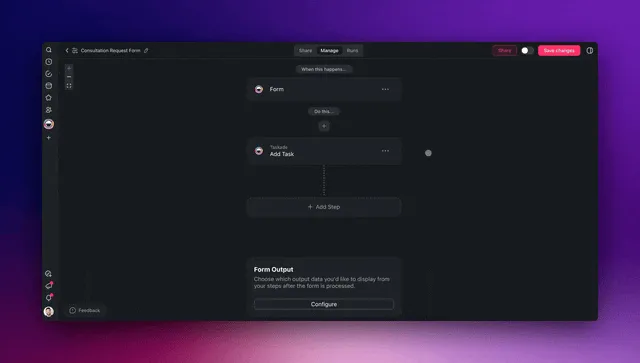
An AI CRM is not a faster spreadsheet. It is a database with a team attached. The records sit in connected projects, the agents read and reason over them, and the automations fire on triggers, so the pipeline keeps moving while you are out doing the work that fills it.
Automations and 100+ Integrations
A Taskade Genesis CRM connects to 100+ bidirectional integrations, which is what turns a database into a system that acts. Triggers pull events in from tools like Gmail, Slack, Stripe, and Calendar, and actions push data back out to the same set. A form trigger can capture a lead while you are on a job, the CRM logs a linked deal, and an action sends an invoice the moment that deal closes, all inside one connected app with no second tool to copy data into.
The table below shows the automations that do the most work in a small-team CRM, and the triggers and actions you wire them from.
| Automation | Trigger | What it does |
|---|---|---|
| Capture a lead | New form submission | Creates a linked contact and deal in the pipeline automatically |
| Invoice on close | Deal stage changes to Closed | Sends a branded invoice and marks the deal awaiting payment |
| Follow-up nudge | Scheduled (deal idle X days) | Reminds the owner to re-engage a stale deal |
| New-lead alert | New high-score lead | Posts to Slack or email so the team jumps on it fast |
| Stay in sync | New email from a known contact | Logs the message against the right deal in the CRM |
Because the automations run on a reliable workflow engine, they fire on schedule and on trigger without you babysitting them. For the patterns behind setting one and forgetting it, read set it once. To see the connected-CRM build assembled with invoicing and a client portal, read CRM, invoice generator, client portal.
Here is the automation layer drafting emails and moving work along on triggers, the part of the CRM that runs while you are out filling the pipeline:
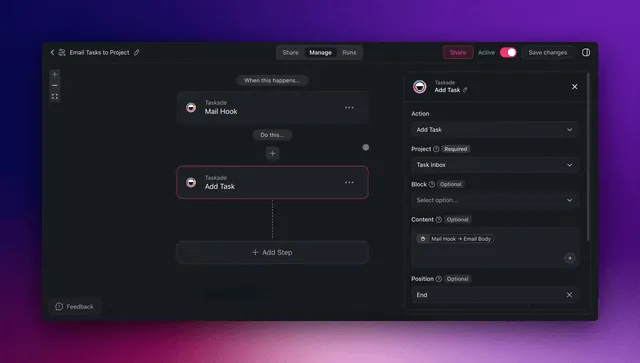
Laid out on the Board, the whole pipeline reads at a glance. Each column is a stage, each card is a deal, and the agent and automation layers work the cards in the background:
  TASKADE GENESIS CRM  ·  PIPELINE BOARD VIEW
  ===========================================================================
   NEW LEAD     CONTACTED    QUALIFIED    PROPOSAL     WON
   ---------    ---------    ---------    ---------    ---------
  [ Acme Co ]  [ Globex  ]  [ Initech ]  [ Soylent ]  [ Umbrella]
   $4,000       $12,000      $30,000      $18,000      $9,500
   score 62     score 88     score 91     score 74     CLOSED
   ---------    ---------    ---------    ---------    ---------
  [ Stark   ]  [ Wayne   ]               [ Hooli   ]
   $6,500       $22,000                   $40,000
   score 70     score 95                  score 83
  ===========================================================================
   ^ agent scores each lead     ^ automation nudges    ^ invoice fires on Won
See Real CRMs People Built
These are live apps, not screenshots of a template. Each one was built by describing the work, and each is cloneable in one click so you can point it at your own data and run it today.
The DealFlow CRM below is a clean sales pipeline that moves deals from new lead to closed, the way a small team actually tracks revenue. Clone it here and rename the stages to match your process.

The Neon CRM below is the way a solo operator runs an inbound book: contacts, deals, and follow-ups in one pipeline a single person can run end to end. Because it runs on connected projects, the contact, the deal, and the invoice are the same linked record, not three copies you reconcile by hand. It is free to clone.

The Sales Pipeline below is the dashboard-first version, every stage and every open deal on one screen so a manager sees the whole book at a glance. Clone it and add your own deals to make it real. Browse hundreds more in the Community Gallery.
How Do You Import Your Existing Customer Data?
You import existing customer data by bringing your current spreadsheet or CRM export in as a table, then mapping its columns to your new Contacts, Companies, and Deals. The single biggest reason migrations go wrong is dirty data, so the move is also your chance to clean house. Most teams find that 10 to 30 percent of their old records are duplicates or orphaned once they look closely, so a careful import beats a fast one.
Here is the safe way to bring your history across, in order:
- Audit before you import. Export your current contacts and deals to a spreadsheet and skim it. Delete obvious duplicates, fix blank required fields, and standardize messy stages like "in progress" and "In Progress" into one value. Importing unaudited data carries every old problem into the new app.
- Keep the relationships intact. A deal with no contact and a contact with no company become orphaned records that never show up in your pipeline. Map your columns so each deal lands linked to its contact, the way the databases layer expects.
- Bring consent and source fields across as structured fields. If you track how a contact opted in or where a lead came from, import those as their own columns, not buried in a notes field, so you can filter and honor them later.
- Run in parallel for a few days. Keep your old system readable while you work the new one, so nothing is lost if you spot a gap. Then let the agent layer enrich the sparse records the import left behind.
Once the data is in, the AI agents you wired earlier do the cleanup work a manual migration never finishes: enriching thin contacts, flagging likely duplicates for your review, and summarizing deal history so an imported record reads like one you built from scratch.
Is an AI CRM Private and GDPR-Friendly?
Yes. An AI CRM you build in Taskade Genesis runs on secure infrastructure with role-based access from Owner to Viewer, so each person sees only the records they should. You own the app and its data and can export it at any time, and pricing is flat per plan, so keeping more customer data never raises your bill. This matters because customer data carries real obligations, and a CRM that mishandles it creates exposure no feature list makes up for.
Three habits keep a self-built CRM on the right side of privacy rules like GDPR:
- Least-privilege access. Use the seven permission levels so a viewer cannot edit, a partner sees only the records you match to their App Users login, and only owners touch sensitive fields. The fewer people who can see a record, the smaller your risk surface.
- Structured consent, not free text. Store opt-in dates, lawful basis, and any opt-out flags as their own fields so you can find and act on them. A consent record buried in a note is a consent record you cannot honor.
- Export and delete on request. Because you own the data, you can export a contact's full record or delete it when someone asks, which is exactly what a right-to-access or right-to-erasure request needs. To compare how different builders handle ownership and data, the AI app builders for business guide weighs the options.
This is privacy hygiene for ordinary business customer data. Taskade does not sign BAAs and is not a fit for regulated health records, so keep protected health information out of any CRM you build here.
Publish and Share Your CRM
Once your CRM works, you decide how people reach it. Inside your team, you invite members and the role-based access controls who can edit and who can only view. For clients, vendors, or partners, you turn on App Users so each one gets a private login, then match their records to it. To make the CRM a branded front door on your own web address, you publish it to a custom domain. Client logins through GenesisAuth work on every plan, and custom domains unlock on Business and above.
| Sharing option | Who it is for | Plan |
|---|---|---|
| Invite team members | Your staff, with role-based views | Any plan |
| Share a live link | Anyone you send the URL to | Any plan |
| App Users (private logins) | Clients and partners, each matched to their own view | Every plan |
| Custom domain | A branded CRM on your own web address | Business and above |
Publishing is a button, not a deployment project. There is no server to set up and no SSL to configure, because that is handled for you. Clone a working CRM, edit it, hit publish, and it is live with authenticated logins and the same agents and automations you built it with. For the full clone-to-live walkthrough, see run your whole business in one app, and for the step-by-step on a CRM specifically, read Taskade as a CRM.
Common Mistakes to Avoid
Most CRM builds that stall fail for the same handful of reasons, and all of them are easy to dodge once you know them.
- Over-modeling on day one. Trying to capture every field and edge case before you have a single real lead. Start with five stages and the three facts you check most, then grow it. Edits are cheap because you make them in plain language.
- Free-text where you need structure. Typing deal values and stages as loose text means you can never sort, filter, or total them. Use a currency preset on deal value and a fixed stage list so your database stays queryable.
- Skipping the relationships. Keeping contacts, companies, and deals as separate unlinked lists recreates the four-spreadsheet problem the CRM was supposed to solve. Link them so a deal always knows its contact.
- No automations. A CRM no one updates dies. Wire at least the lead-capture and follow-up triggers so the pipeline updates itself instead of relying on memory.
- Treating the agents as decoration. The lead scoring and summaries are the point. Give the agents a clear scoring rubric and let them prioritize, so your team spends time selling, not sorting.
Clone a Working CRM Now
The fastest way to learn what a good CRM feels like is to clone one and use it. Every app on this page is live and cloneable in one click. Pick the one closest to your business, clone it, swap in your own deals and contacts, and you have a working CRM before lunch. Then describe the changes you want and watch it reshape itself.
Ready to build from scratch instead? Start in Taskade Genesis, describe your pipeline, and the same architecture is what you ship: connected projects for memory, AI agents for intelligence, and automations for execution, stitched into one running CRM. When you are weighing finished products, the AI CRM builders comparison ranks the alternatives, and run your whole business shows the CRM living next to an ops dashboard and a client portal.
Read Next
- AI CRM Builders →, the ranked comparison of CRM-building tools, for when you want to weigh finished products side by side.
- CRM, Invoice Generator, Client Portal →, the three client-to-cash apps assembled as one connected system.
- Run Your Whole Business in One App →, the ops dashboard, CRM, and portal pattern, built by describing it.
- Build an Ops Dashboard, No Code →, the same describe-it approach pointed at metrics instead of deals, so the dashboard reads from the CRM you just built.
- Real Estate Investor CRM →, the property-first version of this build for tracking deals from new lead to closed.
- AI App Builders for Business →, the operator's guide to picking a builder that ships apps which act, not just store data.
- Set It Once →, the automation patterns that keep your pipeline moving while you are out doing the work.
▲ ■ ● Memory · Intelligence · Execution
The three-layer architecture behind every Taskade Genesis CRM, connected projects remember your contacts and deals, agents read and score them, automations fire on every trigger. Build yours with AI or clone a working one and watch the loop close itself.
Frequently Asked Questions
How do I build a CRM with AI?
Describe your sales process in plain language and Taskade Genesis builds a working CRM around it: contact and deal tables, a pipeline board, dashboard views, and automations. You refine it by chatting, not by configuring fields by hand. A first usable version is ready the same day, often in minutes, and you can clone a working CRM in one click to start.
Can I build a CRM without coding?
Yes. A no-code AI CRM needs no programming. You describe the pipeline you want, Taskade Genesis generates the database tables, views, and automations, and you adjust everything through plain-language edits. The same approach builds custom fields, lead-capture forms, and follow-up reminders without touching a line of code.
How long does it take to build a CRM with AI?
Minutes to a first working version, and the same day to a CRM your team can use. Describing the pipeline and generating contacts, deals, and a board takes a few minutes. Wiring automations, connecting tools like Gmail or Stripe, and inviting your team usually fits inside one afternoon, far faster than the weeks a traditional CRM rollout takes.
How much does it cost to build a CRM with AI?
You can build and clone a CRM free on Taskade. Paid plans on annual billing are Pro at $10/month (the popular choice for up to 10 users) and Business at $25/month. Pricing is flat per plan, not per record or per data change, so a growing pipeline does not raise your bill.
Do I need programming skills to build a CRM?
No programming skills are required. If you can describe how a lead moves from first contact to closed, you can build the CRM. Taskade Genesis turns that description into tables, a pipeline board, and automations, and you keep editing in plain language. No SQL, no formulas, no setup wizard.
What is the hardest part of building a CRM with AI?
The hardest part is deciding your pipeline stages and what each record should track, not the building itself. Once you know the stages a deal passes through and the fields you care about, Taskade Genesis handles the structure. Start with a simple stage list and add detail as you learn what your team actually uses.
Can AI automate data entry and lead scoring in my CRM?
Yes. AI agents inside your CRM can enrich new contacts, summarize a deal's history, score leads against your own criteria, and draft follow-up notes for your review. This is internal pipeline assistance that works your data after a lead is already in the system, helping your team prioritize without manual data entry.
Is an AI CRM secure and GDPR-friendly?
Yes. Your CRM runs on secure infrastructure with role-based access across role-based access from Owner to Viewer, so each person sees only what they should. You own your app and its data and can export it. App Users give clients or partners a private login on every plan, and you match each one to the records you choose to share.
Can I connect my AI CRM to my other tools?
Yes. A Taskade Genesis CRM connects to 100+ bidirectional integrations. Triggers pull events in from tools like Gmail, Slack, Stripe, and Calendar, and actions push data back out. A form can capture a lead, the CRM logs the deal, and an automation can send an invoice the moment it closes, all in one connected app.
How do I import my existing customer data into a new CRM?
Bring your current spreadsheet or CRM export in as a table, then map its columns to your new Contacts, Companies, and Deals so each deal lands linked to its contact. Audit the data first, since 10 to 30 percent of old records are often duplicates or orphaned, and keep consent and lead-source fields as their own columns. Once imported, AI agents enrich sparse records and summarize deal history so old data reads like new.