






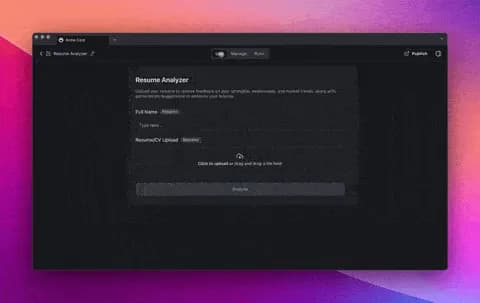
Hi Taskaders,
We're thrilled to launch AI Forms and share our latest AI-powered updates designed to supercharge your AI Agents! Watch our video summary...
TL;DR: Taskade launches AI Forms for dynamic data collection, a bulk Knowledge Manager for AI Agents, OneDrive integration, and multi-agent team chat in beta. Train agents with Markdown knowledge and connect with 100+ integrations. Try it free →
🤖 Introducing AI Forms for Taskade
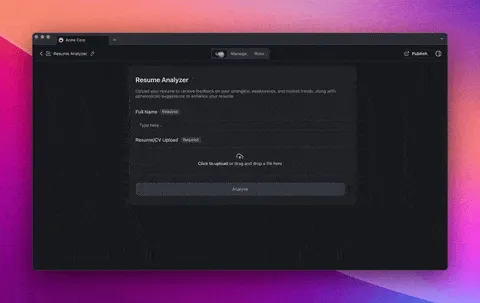
Introducing AI Forms — your new tool for creating dynamic forms powered by Taskade AI. Tailor forms with text, numbers, dropdowns, and file uploads to suit various use cases—from internal processes to customer interactions.
AI Forms can be shared internally, published externally, and even embedded on your websites and dashboards. Now you can collect data more efficiently and make smarter decisions. Start exploring AI Forms today! Learn more...
🧠 Bulk Upload and Knowledge Management for AI Agents
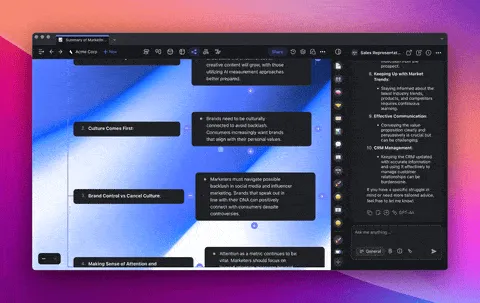
Enhance your AI Agents with more knowledge! You can now bulk upload files, update, and preview multiple knowledge sources simultaneously, keeping your AI Agents well-informed.
Easily add or remove multiple knowledge sources at once, and preview them directly from the same screen. Learn more...
✍️ Markdown Knowledge for AI Agents
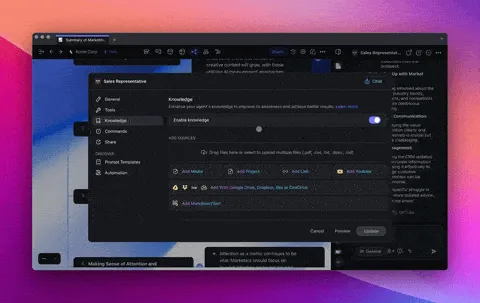
Introducing a new way to train and add knowledge to your AI Agents — simply paste content directly using Markdown, no file uploads needed!
This feature simplifies the way you manage and update agent knowledge. Learn more...
🔗 OneDrive Integration for Uploads
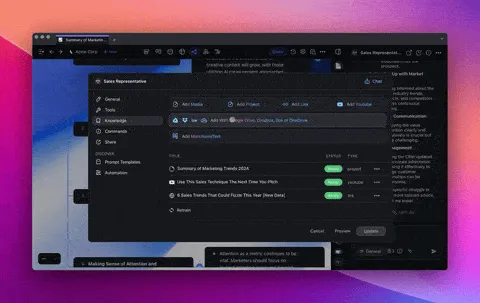
Connect your OneDrive with Taskade across the entire platform, and upload files from OneDrive directly to train your AI Agents Knowledge. You can also attach files into project tasks, chat, comments, and more. Learn more...
🕹️ Beta: Multi-Agent Chat for AI Teams
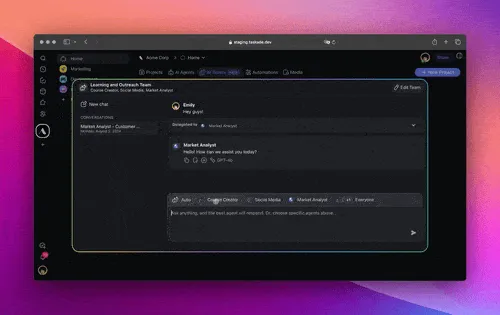
Get a sneak preview of Multi-Agent Chat for AI Teams, now in beta! Assemble your team of AI Agents for collaboration, intelligent responses, and dynamic interactions. They plan, execute, and manage tasks — all together!
Exclusive Early Access: Get a first look on FB, Linkedin, Twitter/X, and Reddit, reply to the posts with "AI Teams" to receive an invite!
⚡️ TLDR: Watch Video Summary
In a hurry? Check our latest video summary for a step-by-step guide to the new changes:
🤝 Join Our Community & Connect
✨ Other Improvements
New: Multi-Agent Chat for AI Teams Now in Beta! Get early access to deploy and coordinate multiple AI agents to execute complex tasks.
Exclusive Early Access: Get a first look on FB, Linkedin, Twitter/X, and Reddit, reply to the posts with "AI Teams" to receive an invite!
Multi-Agent Collaboration: Assemble a group of AI agents that work together seamlessly in an AI Team to leverage collective expertise and efficiency.
Intelligent Response Selection: AI Teams automatically determine the most qualified agent to respond to queries, ensuring the best possible answers.
Dynamic Conversations: Interact with your AI Team just like individual agents, but with the added benefit of cohesive, team-aware responses that build on each other’s knowledge.
Simplified AI Team Creation: Quickly set up your groups of AI Agents by selecting agents and assigning them to the AI Team.
AI Agent Enhancements:
Bulk Knowledge Upload: Upload multiple knowledge files at once to simplify your knowledge management.
Markdown Source: Create a new knowledge source by pasting content without needing to upload a file.
Source Preview: Preview your sources directly from the agent knowledge panel.
Model Selection: Choose which AI model to use for each agent for optimization and control.
AI Automation Enhancements:
Media Action: The all-new media action can take a file URL and automatically convert it in three ways: scrape web pages, extract contents from files, and transcribe YouTube videos. Learn more.
Looking for additional integrations? Let us know here.
Improved project creation workflows and fixed stability issues.
Various bug fixes and performance improvements.
We can’t wait for you to try the new update — dive in and let us know what you think! Remember, our Help Center and Feedback Forum are always here for your questions and suggestions.
Here's to making this year the most productive yet with Taskade! 🚀
— Team Taskade 🐑
P.S. If you're loving Taskade, share your experience on our testimonials page to get featured, or dive into our Affiliate Partnership program today!

Frequently Asked Questions
What are Taskade AI Forms?
AI Forms are dynamic forms powered by AI that support text fields, numbers, dropdowns, and file uploads. They can be shared internally, published externally, or embedded on websites and dashboards. Form submissions feed directly into automation workflows, letting you collect data, trigger actions, and process responses without manual intervention.
How does Taskade's AI Knowledge Manager work?
The Knowledge Manager lets you bulk upload files and manage multiple knowledge sources for AI Agents simultaneously. You can add, remove, and preview knowledge sources from a single screen. Agents also support Markdown-based knowledge — paste content directly without file uploads for quick updates to agent training data.
Does Taskade integrate with OneDrive?
Yes. Taskade's OneDrive integration lets you upload files directly from your OneDrive account into projects, AI Agent knowledge bases, and automation workflows. Combined with existing Google Drive, Dropbox, and Box integrations, you can access files from all major cloud storage providers within Taskade.
How do AI Agent Teams work together in Taskade?
AI Agent Teams group multiple specialized agents with unique tools, knowledge, and commands. When you assign a task or ask a question, the team coordinates internally — the best agent for the job responds automatically. Teams can be customized for any workflow: marketing, support, research, content creation, and more.