
Definition: An AI trigger is an automation that reads an item before it decides what to do. A normal trigger catches the event, an AI step reads what the item says, and the automation takes the path that fits. You define the categories and the paths, and the AI makes the call on each item.
A plain trigger answers "did the event happen?" An AI trigger answers "what does this event mean, and what should we do about it?" That second question is the work a person usually does by hand. AI triggers move it into the workflow, so the right action starts on its own.
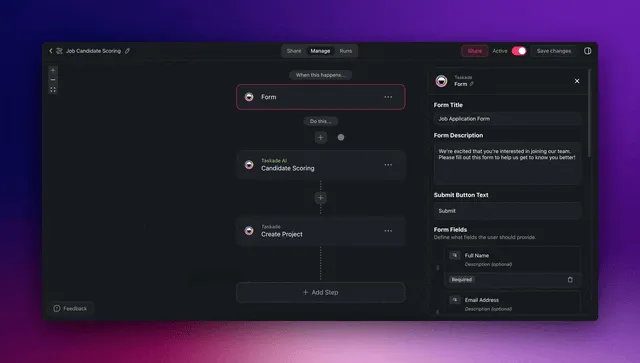
TL;DR: An AI trigger is a trigger plus an AI step that classifies each incoming item, plus a branch that routes it. In Taskade you build it from Categorize with AI (or Ask AI) and Choose a path, on every plan, across 100+ integrations. Build one free →
You are already doing a version of this in your head. A message comes in, you read it, you decide if it is urgent, who should handle it, and what happens next. AI triggers take that quiet judgment call and run it every time, without you in the loop.
What is an AI trigger?
An AI trigger is an automation that interprets an event instead of only detecting it. The trigger fires on a known signal, then an AI step reads the content, compares it with the categories you described, and returns a label. The next step routes on that label.
Standard triggers fire on a known signal: a form is submitted, a task is assigned, an email arrives. AI triggers add a layer of reading on top of that signal. They can sort a support message into "billing" or "bug," flag a deal as high-priority, or pull the date out of an email and route on it. One trigger, many outcomes.
Plain trigger vs AI trigger
The difference is judgment. A plain trigger runs the same action for every matching event. An AI trigger reads each event and picks the path that fits, so one workflow handles cases that used to need a person to sort them first.
| Plain trigger | AI trigger | |
|---|---|---|
| Fires on | A fixed event (form submit, status change) | The same event, plus what it means |
| Decision | None, always the same action | An AI step labels the item, a branch routes it |
| You define it with | Field conditions and exact matches | Categories described in plain language |
| Best for | Predictable, one-path steps | Messy inputs that need sorting first |
| Result | One action per event | The right action per event |
Use a plain trigger when the path never changes. Reach for an AI trigger when the same inbox holds five kinds of message and each needs to go somewhere different.
How an AI trigger decides
An AI trigger runs four steps in order: it catches the event, reads the content, labels it, then routes it to the matching path. Give the AI an "other" category for items it cannot place, and send that path to a person.
The model never picks an action you did not define. It returns a label from your list, and the branch you set up decides where each label goes, the same way you would brief a new team member.
What AI triggers do in Taskade
Taskade has no single "AI trigger" block. You assemble one from standard parts, and each part has its own plan rule.
| Part | Taskade label | Plan |
|---|---|---|
| Start | A trigger such as "When an email arrives", "When a task is assigned", a form, or a schedule | Every plan |
| Start from another app | "Webhook Received" | Pro and above |
| Read and label | Categorize with AI, or Ask AI with Structured Output | Every plan (uses credits) |
| Route | Choose a path (Control flow) | Every plan |
| Stop early | Only continue if (Control flow) | Every plan |
| Hand off to an agent | Ask an agent | Every plan |
| Act | Actions across 100+ integrations | Every plan. Premium connectors need a paid plan |
- Model choice. Each AI step has a model menu. TSK-Auto is the default and picks a model for the task.
- Run limits. Automation runs count per billing period. Free includes 10 runs, and paid plans include more.
- Run history. The Runs tab shows each run, so you can check which path an item took.
Once the branch picks a path, your actions take over and push data out: create a record, send a message, update a board, kick off the next step. Triggers pull events in. Actions push results out.
Where AI triggers fit in a workflow
An AI trigger sits at the front of an automation. It is the read-and-decide gate before the rest of the steps run. After it, you can chain branching, looping, and filtering for paths that need more than one move.
  EVENT IN                AI TRIGGER                 ACTIONS OUT
  ─────────               ───────────                ───────────
  New email      ┐                          ┌──►  Add to pipeline
  Form reply     ┼──►  read · label ────────┼──►  Notify owner
  New message    ┘     · choose a path      └──►  Draft a follow-up
                                                 └──►  Log to dashboard
Most teams start with one AI trigger on their busiest inbox, then add more once they trust the routing. Each new trigger is one more decision you no longer make by hand.
Getting started
Build the first one on your busiest inbox:
- Create an automation and add a trigger, such as "When an email arrives" or a form.
- Add Categorize with AI. Point Input at the item text and list your categories, plus "other".
- Add Choose a path. Make one path for each category.
- Add the actions for each path. Send "other" to a person.
- Run a few test items, then check each run in the Runs tab.
You can also ask Taskade EVE in Automations mode to build it from a sentence. For the step-by-step guide, see Categorize with AI and Branch in Learn Taskade.
How AI triggers connect to the rest of Taskade
AI triggers are one part of Workspace DNA: Memory holds your projects and history, Intelligence reads and decides with frontier models from top AI labs, and Execution runs the automations that act on those decisions. Write each result back to a project, and the next run starts from current data.
For deeper builds, pair AI triggers with AI agents, which bring built-in tools and knowledge from your projects, or with agentic workflows that string several decisions together. The trigger decides when to start. The agent or workflow decides what to do once it is running.
What you would build in Taskade
Picture a lead pipeline that sorts itself. Every inquiry, from a web form, a forwarded email, or a chat, lands in one place. An AI step reads each one the second it arrives: it tells a hot enterprise lead from a cold tire-kicker, tags the source, assigns the right rep, and drops the lead into the matching stage. Your team opens the pipeline in the morning and every deal is already where it belongs, with the next step queued.
You see clean columns moving left to right. New reps log in and follow the same logic without training. The routing runs on its own, day and night, using connected projects to keep contacts, deals, and tasks in sync.
That is one prompt away. Describe the pipeline you want, and Taskade Genesis builds the app, the automations, and their AI steps together. Start building free →