
Definition: Branch, loop, and filter are the three controls that let one automation handle real life instead of one happy path. Branch sends each record down the right route, loop repeats the work across a whole list, and filter narrows a list to only the rows that should move. Together they turn a single rule into a process that fits every customer, every order, and every exception, without you touching it.
TL;DR: Conditional automation means your workflow decides what to do per record instead of running the same step on everyone. Branch routes by a condition, loop repeats across a list, filter keeps only matching rows. All three are supported in Taskade's reliable automation workflows across 100+ integrations. Build one free →
You already know the shape of this. You're sorting it by hand right now: hot leads to one person and the rest to the queue, the overdue invoices flagged, the welcome email sent to each new signup one at a time. Branch, loop, and filter are those exact instincts, written down once so the work runs itself.
What Is Conditional Automation?
Conditional automation is a workflow that changes its behavior based on the data flowing through it. Instead of doing the same thing to every item, it asks a question about each one and acts on the answer. A high-value deal goes to a senior rep, a small one goes to the queue. A website lead gets a call, a cold lead gets a nurture sequence. The rule is fixed; the outcome fits the record.
Three controls cover almost every business case, and they stack:
Read it once and the order is obvious: filter cuts the list down, loop walks each survivor, branch decides each one's fate. Here is the same three in one place, in plain language.
What Branch, Loop, and Filter Each Do
Each control answers one question about your data, and you can use them alone or together. Branch asks "which way does this one go?" Loop asks "have I handled all of them yet?" Filter asks "does this one even belong here?" Most real workflows use at least two. The table maps each to a plain business example.
| Control | The question it asks | Plain example | What you'd do by hand today |
|---|---|---|---|
| Branch | Which path does this record take? | If a deal is over $10,000, assign a senior rep; otherwise route to the standard queue. | Glance at each deal and decide who handles it. |
| Loop | Have I done this for every item? | For each new signup, send a welcome email, create a task, and add them to a list. | Copy, paste, and send the same message one signup at a time. |
| Filter | Does this record belong in this run? | Process only leads where source = "website" and ignore the rest. | Scroll a spreadsheet and highlight the rows that matter. |
A few things worth knowing once. Branch can have more than two paths, so a single check can route high, medium, and low down three different routes. Filter runs best early, near the start of a workflow, so the steps after it only touch the records that matter. Loop is where volume disappears: 5 records or 5,000, the workflow runs the same and you wrote it once.
How Do You Combine Them in a Real Workflow?
You stack them in the order the work naturally flows: narrow first, repeat second, route third. Filter trims the incoming list so nothing wasteful runs. Loop walks each remaining record one at a time. Branch decides what happens to each based on its values. This sequence is the backbone of nearly every lead-routing, order-handling, or onboarding workflow.
Here is the lead-processing workflow from the diagram, laid out as a panel so you can see the columns line up:
INCOMING LEADS                                 50 raw leads
   │
   ├─ FILTER  source = "website" ───────────►  18 qualified
   │
   └─ LOOP  for each of the 18:
        ├─ score the lead
        └─ BRANCH on score:
             ├─ over 80   → senior rep + call task today
             ├─ 50 to 80  → standard rep + email in 24h
             └─ under 50  → nurture sequence
   │
   └─ every routed lead → CRM updated automatically
The same pattern fits far beyond sales. Filter orders by region, loop each one, branch on order size to pick a shipping method. Filter support tickets by priority, loop each, branch on category to route to the right team. Once you see filter then loop then branch, you start spotting it in every manual task you do twice.
What Happens When Something Goes Wrong?
Conditional automation handles edge cases on purpose, so the messy inputs are part of the design, not an afterthought. A branch with an unexpected value, a loop hitting a record that errors, a filter returning zero matches. Each control has a clean way to handle the moment, which is why these are called reliable automation workflows. The table shows what to set for each.
| Control | The edge case | What you set |
|---|---|---|
| Branch | A value matches none of your paths | A default path that catches everything else, plus an optional alert. |
| Loop | One record in the list fails | Continue past the bad record or stop the run, with a log of what failed. |
| Filter | Nothing matches the criteria | An empty result ends the run quietly, with an optional "nothing to do" note. |
The practical rules are short. Always give a branch a default path so no record falls through silently. In loops, prefer "continue on error" for big lists so one bad row doesn't halt the other 4,999. Filter as early as possible so every later step only touches the records that count. Test each branch path and each loop size, including the empty list and the single item, before you let a workflow run on live data.
Where Branch, Loop, and Filter Fit in Taskade
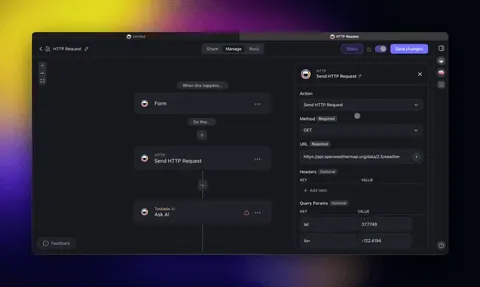
In Taskade these three are actions inside a workflow, sitting between a trigger that starts the run and the actions that do the work. A trigger pulls an event in (a new form entry, a row from a connected app, a scheduled time). Filter, loop, and branch shape the flow. Actions push the result out across 100+ bidirectional integrations. For deeper, multi-step logic you can hand a step to an AI agent or build agentic workflows that reason over each record.
Step-by-step setup for each control lives in Learn Taskade: the branch action for routing, the loop action for repeating, and filter data for narrowing a list. If you are new to building workflows at all, start with getting started with automation and the workflows overview, then layer in advanced triggers and actions and integration orchestration as your processes grow.
Build the Bridge: A System That Sorts Itself
Here is where conditional automation stops being a feature and becomes the engine under your business. Picture a lead bridge built in Taskade Genesis: every new inquiry lands in one place, whether it came from your website form, a connected ad platform, or a spreadsheet import. The moment it arrives, a filter drops the junk, a loop scores and tags each real lead, and a branch routes it to the right person with the right follow-up already scheduled. Your reps open Taskade to a clean queue of pre-sorted, pre-assigned leads. The sorting you used to do every morning now runs the instant a lead shows up, with the same logic every single time.
That bridge connects the form on your site to the people who close, and it never sleeps. Describe it in plain English, and Taskade Genesis builds the connected projects, the routing, and the reliable automation workflows that hold it together, orchestrated by Taskade EVE, the meta-agent behind Taskade Genesis, with its built-in tools. You write the rule once. It runs forever.
Build your lead-routing bridge free →
Related Wiki Pages: Workflows · Advanced Triggers & Actions · Agentic Workflows · Integration Orchestration · Getting Started with Automation