



Taskadetaskade
PricingLoginSign up for free →Sign up for free →
Loved by 1M+ users·Hosting 100K+ apps·Deploying 500K+ AI agents·Running 1M+ automations·Backed by Y Combinator
TaskadePricingFeaturesContact usIntegrationsMCP ServerDeveloper APIChangelogPressLearnAbout
GalleryProductivityKitsVideosReviewsFAQ
VibeVibe AppsVibe AgentsVibe CodingVibe WorkflowsVibe Marketing
Vibe DashboardsVibe CRMVibe AutomationVibe PaymentsVibe DesignVibe SEOVibe Tracking
Community
FeaturedQuick AppsToolsDashboardsWebsites
WorkflowsProjectsFormsCreators
DownloadsAndroidiOSMacWindows
ChromeFirefoxEdge
Compare
vs Cursorvs Boltvs Lovablevs V0vs Windsurf
vs Replitvs Emergentvs Devinvs Claude Codevs ChatGPTvs Claudevs Perplexityvs GitHub Copilotvs Figma AIvs Notionvs ClickUpvs Asanavs Mondayvs Trellovs Jiravs Linearvs Todoistvs Evernotevs Obsidianvs Airtablevs Basecampvs Mirovs Slackvs Bubblevs Retoolvs Webflowvs Framervs Softrvs Glidevs FlutterFlowvs Base44vs Adalovs Durablevs Gammavs Squarespacevs WordPressvs UI Bakeryvs Zapiervs Makevs n8nvs Jaspervs Copy.aivs Writervs Rytrvs Manusvs Crewvs Lindyvs Relevance AIvs Wrikevs Smartsheetvs Monday Magicvs Codavs TickTickvs Any.dovs Thingsvs OmniFocusvs MeisterTaskvs Teamworkvs Workfrontvs Bitrix24vs Process Streetvs Toggl Planvs Motionvs Momentumvs Habiticavs Zenkitvs Google Docsvs Google Keepvs Google Tasksvs Microsoft Teamsvs Dropbox Papervs Quipvs Roam Researchvs Logseqvs Memvs WorkFlowyvs Dynalistvs XMindvs Whimsicalvs Zoomvs Remember The Milkvs Wunderlist
Genesis AIVideo GuideApp BuilderVibe CodingAgent BuilderDashboard Builder
CRM BuilderWebsite BuilderForm BuilderWorkflow AutomationWorkflow BuilderBusiness-in-a-BoxAI for MarketingAI for Developers
AI Agents
FeaturedProject ManagementProductivityMarketingTranslator
ContentWorkflowResearchPersonalSalesSocial MediaTo-Do ListCRMTask AutomationCoachingCreativityTask ManagementBrandingFinanceLearning and DevelopmentBusinessCommunity ManagementMeetingsAnalyticsDigital AdvertisingContent CurationKnowledge ManagementProduct DevelopmentPublic RelationsProgrammingHuman ResourcesE-CommerceEducationLegalEmailSEODeveloperVideo ProductionDesignFlowchartDataPromptNonprofitAssistantsTeamsCustomer ServiceTrainingTravel PlanningUML DiagramER DiagramMath TutorLanguage LearningCode ReviewerLogo DesignerUI WireframeFitness CoachAI Lead EnrichmentFounder OSAI SDR AgentBookkeepingRecruitingWebsite MonitoringAll Categories
Automations
FeaturedBusiness-in-a-BoxInvestor OperationsEducation & LearningHealthcare & Clinics
Real EstateStripeSalesE-commerceContentMarketingEmailCustomer SupportHubSpotProject ManagementAgentic WorkflowsBooking & SchedulingCalendarReportsSlackWebsiteFormTaskWeb ScrapingWeb SearchChatGPTText to ActionYoutubeLinkedInTwitterGitHubDiscordMicrosoft TeamsWebflowRSS & Content FeedsGoogle WorkspaceManufacturing & OperationsAI Agent TeamsMulti-Agent AutomationNotion AutomationsAgentic AutomationProposalBookkeeping & ExpensesClient OnboardingAll Categories
Wiki
Taskade GenesisAI AgentsAutomation
ProjectsLiving DNAAutonomous Workspaces, Agents & AppsQuantum AI & Taskade Genesis QuantumPlatformIntegrationsProductivityMethodsProject ManagementAgileScrumAI ConceptsCommunityTerminologyFeatures
Templates
FeaturedChatGPTTablePersonalProject Management
SalesFlowchartTask ManagementEngineeringEducationDesignTo-Do ListMarketingMind MapGantt ChartOrganizationalPlanningMeetingsTeam ManagementStrategyGamingProductionProduct ManagementStartupRemote WorkY CombinatorRoadmapCustomer ServiceLegalEmailBudgetsContentConsultingE-CommerceStandard Operating Procedure (SOP)Human ResourcesProgrammingMaintenanceCoachingSocial MediaHow-TosResearchMusicTrip PlanningCRMClient OnboardingEmployee OnboardingSOPBug TrackerRecruitment TrackerFormSales PipelineContent CalendarMarketing PlanProduct RoadmapBusiness PlanSWOT Analysis30-60-90 Day PlanInterviewNotion AlternativeKPI TemplatesStrategic Plan TemplatesMeeting Agenda TemplatesInvoiceRisk RegisterIT Asset ManagementKanban BoardChange ManagementCommunication PlanRFPScope of WorkStatement of WorkHelpdeskKnowledge BaseCreative BriefGoal SettingExecutive SummaryGap AnalysisBooking SystemEvent ManagementPortfolio TrackerCustomer Onboarding PortalsClient PortalAgency OperationsFinance TrackingAll Categories
Generators
AI SoftwareNo-Code AI AppAI AppAI WebsiteAI Dashboard
AI FormAI AgentClient PortalAI WorkspaceAI ProductivityAI To-Do ListAI WorkflowsAI EducationAI Mind MapsAI FlowchartAI Scrum Project ManagementAI Agile Project ManagementAI MarketingAI Project ManagementAI Social Media ManagementAI BloggingAI Agency WorkflowsAI ContentAI Software DevelopmentAI MeetingAI PersonasAI OutlineAI SalesAI ProgrammingAI DesignAI FreelancingAI ResumeAI Human ResourceAI SOPAI E-CommerceAI EmailAI Public RelationsAI InfluencersAI Content CreatorsAI Customer ServiceAI BusinessAI PromptsAI Tool BuilderAI SEOAI Gantt ChartAI CalendarsAI BoardAI TableAI ResearchAI LegalAI ProposalAI Video ProductionAI Health and WellnessAI WritingAI PublishingAI NonprofitAI DataAI Event PlanningAI Game DevelopmentAI Project Management AgentAI Productivity AgentAI Marketing AgentAI Personal AgentAI Business and Work AgentAI Education and Learning AgentAI Task Management AgentAI Customer Relations AgentAI Programming AgentAI SchemaAI Business PlanAI Pitch DeckAI InvoiceAI Lesson PlanAI Social Media CalendarAI API DocumentationAI Database SchemaAI Marketing PlanAI Sales PipelineAI Course BuilderInternal ToolsBooking SystemReal Estate CRMInventory ManagementAll Categories
Converters
AI Featured ConvertersAI PDF ConvertersAI CSV ConvertersAI Markdown ConvertersAI Prompt to App Converters
AI Data to Dashboard ConvertersAI Workflow to App ConvertersAI Idea to App ConvertersAI Flowcharts ConvertersAI Mind Map ConvertersAI Text ConvertersAI Youtube ConvertersAI Knowledge ConvertersAI Spreadsheet ConvertersAI Email ConvertersAI Web Page ConvertersAI Video ConvertersAI Coding ConvertersAI Task ConvertersAI Kanban Board ConvertersAI Notes ConvertersAI Education ConvertersAI Language TranslatorsAI Business → Backend App ConvertersAI File → App ConvertersAI SOP → Workflow App ConvertersAI Portal → App ConvertersAI Form → App ConvertersAI Schedule → Booking App ConvertersAI Metrics → Dashboard ConvertersAI Game → Playable App ConvertersAI Catalog → Directory App ConvertersAI Creative → Studio App ConvertersAI Agent → Agent App ConvertersAI Audio ConvertersAI DOCX ConvertersAI EPUB ConvertersAI Image ConvertersAI Resume & Career ConvertersAI Presentation ConvertersAI PDF to Spreadsheet ConvertersAI PDF to Database ConvertersAI PDF to Quiz ConvertersAI Image to Notes ConvertersAI Audio to Notes ConvertersAI Email to Tasks ConvertersAI CSV to Dashboard ConvertersAI YouTube to Flashcards ConvertersURL to NotesVideo → SummaryAI Receipts to Expense Tracker ConvertersAI Docs to Knowledge Base ConvertersAI Form to Client Portal ConvertersSpreadsheet to CRMAll Categories
Prompts
Blog WritingBrandingPersonal Finance
Human ResourcesPublic RelationsTeam CollaborationProduct ManagementSupportAgencyReal EstateMarketingCodingResearchSalesAdvertisingSocial MediaCopywritingContentProject ManagementWebsite CreationDesignStrategyE-commerceEngineeringSEOEducationEmail MarketingUX/UIProductivityInfluencer MarketingAnalyticsEntrepreneurshipLegalVibe Coding PromptCRMCustomer SupportRecruitingAll Categories
Blog
What Are Claude Skills? 2026 Beginner GuideHow to Build a Team of AI Agents (No Code): A 2026 Step-by-Step PlaybookWhat Is an AI Agent Harness? 2026 Guide
AI Agents for Project Management in 2026: Build the PM Agent Team (Live Demo)9 Best AI Event Management Software in 2026What Is AI Slop? The Term Flooding Open Source, Search, and Trust (2026)9 Best AI Inventory Management Software in 2026Claude Fable 5 & Mythos 5 Explained: Benchmarks, Pricing & the Catch (2026)The Killer App Theory: What VisiCalc, Netscape, and ChatGPT Tell Us About the Next Rupture (2026)10 Best AI Recruiting Software in 2026 (ATS Compared)25 n8n Use Cases for 2026 — and the Faster Way to Ship Each OneDORA Metrics Explained (2026): The Four Keys, Benchmarks, and How to Build a Dashboard11 Best AI Schedule Generators 2026 (Work Shifts, Study Plans, Employee Rosters)OpenAI Codex Sites Explained: What It Is, Who Can Use It & the Open Alternative (2026)Best OpenAI Codex Alternatives in 2026 (For Coders AND Non-Coders)
AIAutomationProductivityProject ManagementRemote WorkStartupsKnowledge ManagementCollaborative WorkUpdates
Changelog
Guided Onboarding & Smoother Credit Top-Ups (Jun 9, 2026)Service CRM Starter & New Automation Actions (Jun 9, 2026)Private-by-Default Apps & Reliable CSV (Jun 5, 2026)
Table View Multi-Select & Bulk Delete (Jun 4, 2026)Currency Fields & a Sharper Taskade EVE (Jun 3, 2026)Stronger Sign-In & Simpler Custom Domains (Jun 2, 2026)Custom Domains, Secured Faster (May 29, 2026)
Wiki
Taskade GenesisAI AgentsAutomation
ProjectsLiving DNAAutonomous Workspaces, Agents & AppsQuantum AI & Taskade Genesis QuantumPlatformIntegrationsProductivityMethodsProject ManagementAgileScrumAI ConceptsCommunityTerminologyFeatures
Prompts
Blog WritingBrandingPersonal Finance
Human ResourcesPublic RelationsTeam CollaborationProduct ManagementSupportAgencyReal EstateMarketingCodingResearchSalesAdvertisingSocial MediaCopywritingContentProject ManagementWebsite CreationDesignStrategyE-commerceEngineeringSEOEducationEmail MarketingUX/UIProductivityInfluencer MarketingAnalyticsEntrepreneurshipLegalVibe Coding PromptCRMCustomer SupportRecruitingAll Categories
© 2026 Taskade.
PrivacyTermsSecurity
Made withTaskade AIforBuilders
BlogProduct UpdatesNew AI Agent Commands,…

New AI Agent Commands, Knowledge Sources, Project Insights, Automations!

Hi Taskaders! We're bringing another exciting update to boost your productivity. Discover new ways to interact with your AI Agents and take your projects to th...

🤖 New AI Agent Commands, Knowledge Sources, Project Insights, Automations!
March 15, 2024Updated December 29, 20254 min readJohn XieUpdates·#ai-agents#ai-knowledge
On this page (8)
⌨️ Activate AI Agents With /Slash Commands🧠 Upload Knowledge From Multiple Sources💬 Ask Projects With AI for New Insights🔄 Generate Projects With Language Selection✅ Automate Task Management🎨 Automate Project Creation From Templates⚡️ Other Improvements:Frequently Asked Questions

Hi Taskaders!

We're bringing another exciting update to boost your productivity. Discover new ways to interact with your AI Agents and take your projects to the next level!

TL;DR: Activate AI agents with /slash commands, upload agent knowledge from 3 sources—Google Drive, Dropbox, and Box—and ask projects for AI-powered insights. Generate workflows in multiple languages with the AI Project Studio and automate task management with new triggers. Try it free →

⌨️ Activate AI Agents With /Slash Commands
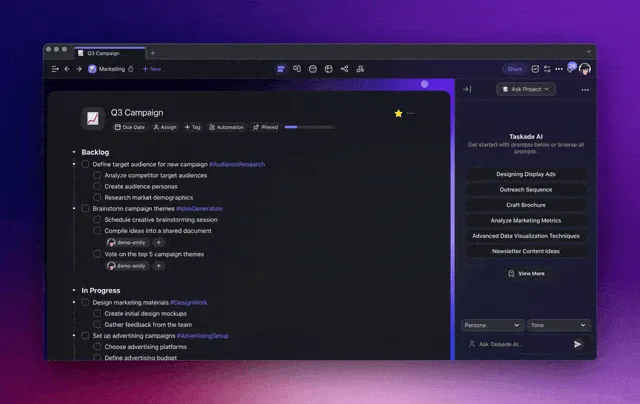
Taskade AI agent slash commands.

Use /slash commands in the AI Agent chat to integrate AI-driven analyses, research, and tasks seamlessly into your conversations.
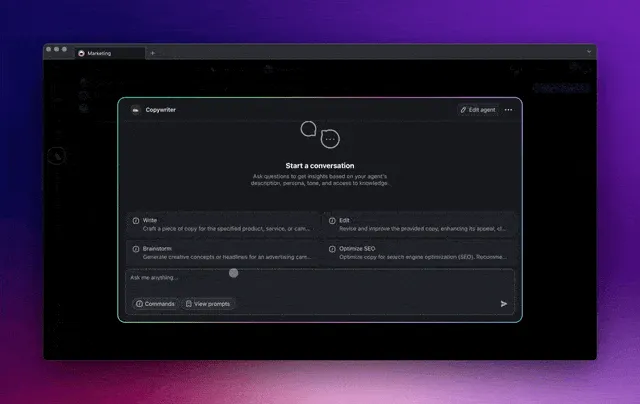
Slash commands in Taskade AI agent chat.

Create your own AI prompts for any task! Train them on your knowledge and let AI agents tackle tasks and streamline your workflow. Learn more...

🧠 Upload Knowledge From Multiple Sources
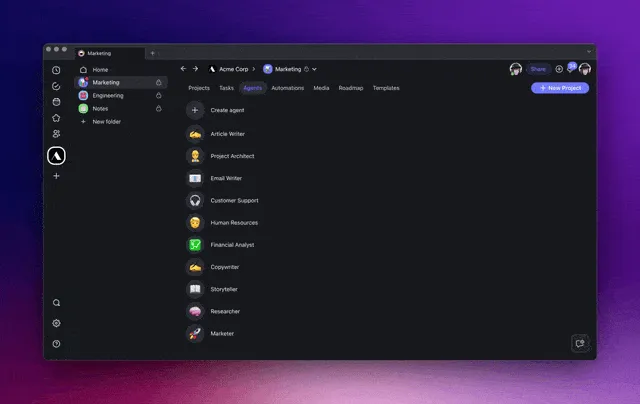
Upload Agent Knowledge to Taskade.

Train AI Agents with knowledge from multiple sources. Upload documents from Google Drive, Dropbox, and Box for more tailored responses! Learn more...

💬 Ask Projects With AI for New Insights
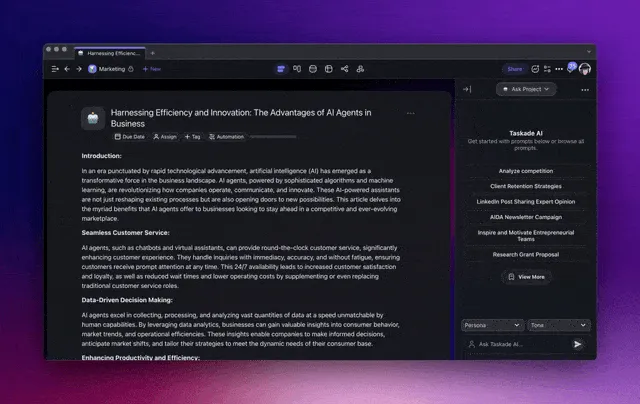
Ask Project feature in Taskade Projects.

Ask questions in the project chat, and Taskade AI will connect the dots to provide you with insights and actionable strategies. Learn more...

🔄 Generate Projects With Language Selection
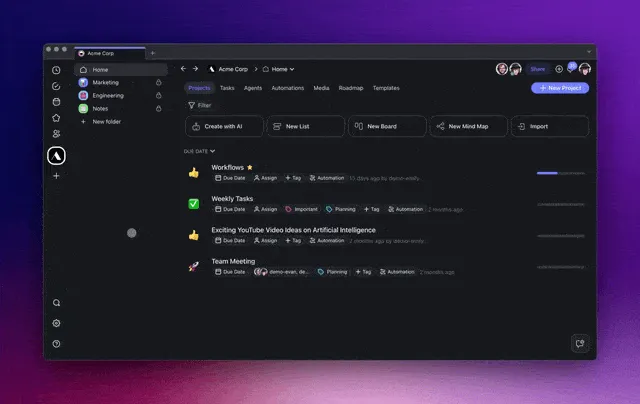
Taskade AI Project Studio Language Selector.

Try our new AI Project Studio equipped with a language picker and multi-source support. Generate lists of tasks, mind maps, flowcharts, and more in various languages, tailored to your team’s unique needs.

Create customized content and workflow templates that cater exactly to your work preferences to ensure global inclusivity. Learn more...

✅ Automate Task Management
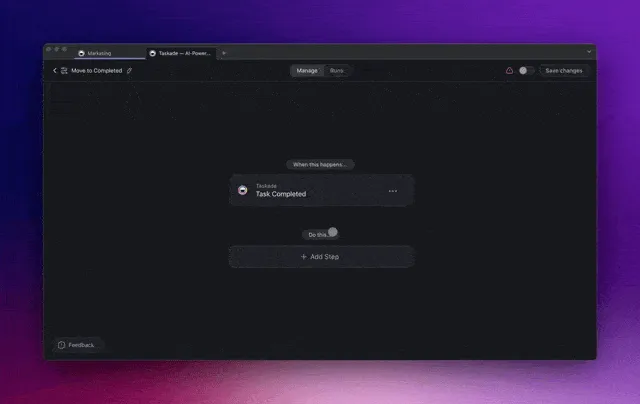
Task Automation Flow in Taskade AI Automation.

Take control of your project organization with a new addition to the automation feature: Move Task Action. Automate the flow of tasks between sections or projects, and keep your workflow flexible and adaptable. Learn more...

🎨 Automate Project Creation From Templates
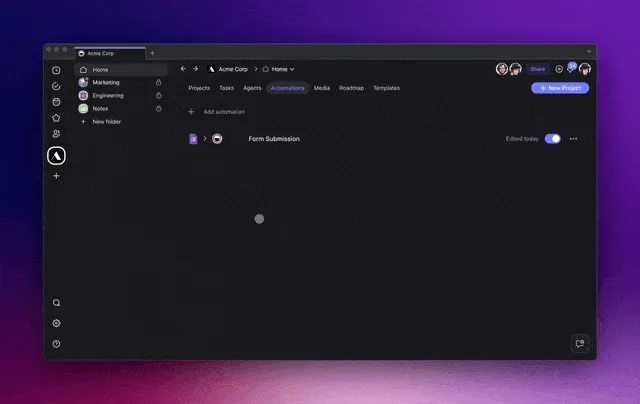
Project Automation Flow in Taskade AI Automation.

Create new projects from your custom templates! Initiate new projects faster and more efficiently, based on a trigger or schedule. Learn more...

⚡️ Other Improvements:

  • New: Gantt Chart View is now in Beta. Reply to our LinkedIn, Twitter, and Reddit posts with "AI Gantt" or contact us for exclusive beta access!

    • Introduced new Project and Version History dialogs to enhance project tracking and version management capabilities.

    • Version History provides a straightforward way to monitor all edits and modifications made to a project, offering the convenience of easily reverting to previous versions as needed.

    • Improved overall experience with UI enhancements.

  • New AI Agent Templates:

    • Workflow Agent for automating workflows.

    • Strategy Agent for strategic planning.

    • Viral Agent for social media marketing.

    • SOP Onboarding Agent for standard operating procedures.

    • Press Release Agent for media releases.

  • AI Automation Enhancements:

    • New AI Automation Templates Category for Gmail and Email Management, streamlining email-related tasks.

    • Enhanced scheduling and customization for automations, allowing for more precise control over automated workflows.

    • New Create Project from Templates action for streamlined workflows, simplifying the setup process for reusable projects.

    • New Move Task Action for easier organization and automatic management of tasks within projects.

    • New Task Assigned trigger in automation for immediate notifications upon task assignments, improving team coordination.

    • Added the option to retry failed automation runs.

  • AI Agents Enhancements:

    • Improved language settings for AI Agents to support multilingual interactions, enhancing the tool's usability for global teams.

    • Abort chat option in the agent chat for more control over AI interactions, providing the ability to stop conversations as needed.

    • Clear chat history feature in the agent chat for privacy.

    • Add insert prompt and tooltips to modal chat.

    • AI Conversation context-aware chat enhancements for more relevant interactions based on project specifics.

    • Knowledge upload integration with Google Drive, Dropbox, Box, and more for easier document uploads and AI Agent training.

    • New Slash command support in agent chats for more intuitive control over AI interactions and executions.

    • Clear chat history in the agent chat for privacy and organization.

    • Project-aware AI Agents to streamline the retrieval of project-related knowledge, enhancing the effectiveness of AI agents.

  • New AI prompt template categories for various sectors including agency, real estate, and customer support.

  • Updates to advertising and marketing prompts, providing richer and more specialized content generation options.

  • Improved recurring tasks and events handling within projects.

  • Improved unread messages and notifications.

  • Improved background processing of AI tasks in the project editor.

  • Optimized performance and user interface.

  • Fixed various bugs to ensure your Taskade experience is now smoother, faster, and more reliable than ever.

Remember, our Help Center and Feedback Forum are here for your questions and suggestions. Cheers to a transformative and AI-powered year! 🚀

— Team Taskade 🐑


P.S. Love Taskade? Join our Affiliate Partnership today, or share your story and experience by leaving a review on our testimonials page.


Taskade AI banner.

Frequently Asked Questions

What are slash commands for Taskade AI Agents?

Slash commands let you trigger specific AI Agent actions by typing / followed by a command name in the agent chat or project editor. You can create custom commands for any task — research, content generation, data analysis — and each command runs with the agent's trained knowledge and persona for consistent, repeatable results.

How do I upload knowledge to a Taskade AI Agent from cloud storage?

In the agent's Knowledge tab, click the upload button and select files from Google Drive, Dropbox, Box, or your local device. The agent indexes the uploaded documents and uses them as context for all future conversations, giving you tailored responses based on your proprietary content.

What does the Ask Project feature do in Taskade?

Ask Project lets you chat with Taskade AI directly in the project sidebar. The AI reads the project's tasks, notes, and structure to answer questions, surface hidden insights, and suggest actionable next steps — all without leaving the project you're working in.

Can Taskade AI generate projects in multiple languages?

Yes. The AI Project Studio includes a language picker that lets you generate task lists, mind maps, flowcharts, and workflows in dozens of languages. Combined with multi-source input — web links, YouTube, documents — you can create localized project content tailored to any team's language preferences.

0%

On this page

⌨️ Activate AI Agents With /Slash Commands🧠 Upload Knowledge From Multiple Sources💬 Ask Projects With AI for New Insights🔄 Generate Projects With Language Selection✅ Automate Task Management🎨 Automate Project Creation From Templates⚡️ Other Improvements:Frequently Asked Questions

Related Articles

A whole-business operations dashboard built with Taskade Genesis — every job, asset, and status on one screen, the way a real field-service crew runs the day
June 7, 2026Product Updates

Run Your Whole Business in One App with Taskade Genesis (June 2026)

A concrete crew, a solo realtor, a wellness clinic — each runs the whole business on one app they built by describing it...

Describe a job and Taskade Genesis generates the workflow, assembles an agent team, and runs it across 100+ integrations on autopilot
June 3, 2026Product Updates

Taskade Genesis: Generate Workflows, Deploy Agent Teams, Automate (June 2026)

Describe a job and Taskade Genesis builds the workflow, assembles an agent team, and runs it across 100+ integrations 24...

Taskade Genesis app kits arrive pre-wired to 100+ bidirectional integrations — the connector grid behind every Ops, Founder, Marketing, Sales, and Support kit
May 21, 2026Product Updates

Taskade Genesis: New App Kits, Agents, and Workflows (May 21 2026)

Five business stacks. Twenty-four app kits. Clone any one free — every kit ships with Workspace DNA: memory, agents, and...

Multi-Agent Workspace — Taskade Genesis three-layer architecture: Memory (Projects), Intelligence (Agents), Execution (Workflows)
May 16, 2026Product Updates

Multi-Agent Workspace: Memory, Agents, Workflows (May 16 2026)

Three layers, one workspace. Memory remembers. Intelligence thinks. Execution ships. The Multi-Agent Workspace is live —...

Taskade Genesis integrations grid — 100+ bidirectional connectors composing apps, agents, and automations (May 2026)
May 11, 2026Product Updates

Clone Apps. Add Login. Run Agents. Automate Flows. (May 2026)

Clone 8 production apps in 60 seconds, add Sign-In to any published app, run anything from one chat with / and @, ship n...

Taskade DNA knowledge graph at /memory — Workspace Memory, Agent Workflows, and Stripe-powered App Payments shipping in May 2026
May 3, 2026Product Updates

Workspace Memory, Agent Workflows, App Payments (May 2026)

DNA Knowledge Graph at /memory, agents wired to 34 built-in tools and 100+ integrations, Stripe checkout inside Taskade ...

View All Articles
New AI Agent Commands, Knowledge Sources, Project Insights, Automations! | Taskade Blog