

TL;DR: Taskade Genesis builds a field-service dashboard, client portal, and tracker you own, with 3 Taskade Genesis apps on Free. Jobber is a packaged trades suite from $29 to $149/month annual plus $29 per extra user. Taskade Pro is $10/mo billed annually for 10 seats. Try Taskade Genesis free →
See the alternative working — clone in 60 seconds
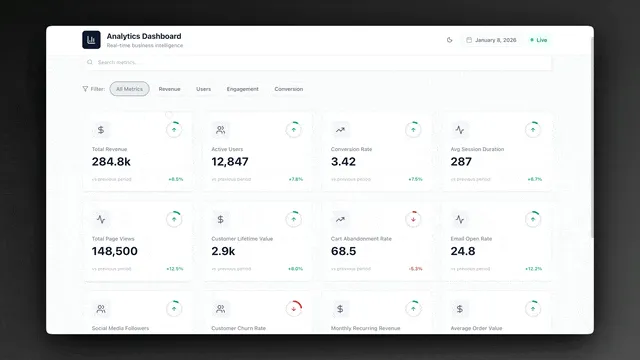
No signup, no credit card. Generate a field-service ops dashboard →
| Capability | Jobber | Taskade Genesis |
|---|---|---|
| Pricing (starting, annual) | ~$29-149/mo + $29/extra user | $0 Free · $10/mo Pro billed annually (10 seats) |
| Build your own app from a prompt | ❌ | ✅ |
| Built-in AI agents | Limited | ✅ built-in tools |
| Automation engine | Reminders + QuickBooks | ✅ 100+ bidirectional integrations |
| Own your data + custom domain | Hosted on Jobber | ✅ Custom domain + client portal |
| Workspace DNA loop | ❌ | ✅ ▲ Memory · ■ Intelligence · ● Execution |
Build your own field-service system instead of renting one
If you run a contracting or home-services business, you can build your own jobber-style field-service system on Taskade Genesis — a jobs dashboard, quote-to-invoice tracker, and branded client portal from one prompt — and own your data, your custom domain, your AI agents, and your automations, instead of paying per crew member for fixed software.
Jobber is a genuinely good packaged tool for trades. But every technician you add costs more, the screens are fixed to how Jobber thinks your business should run, and your customer data lives in Jobber's schema. Taskade Genesis flips that: you describe the system your business actually needs, and you own what gets built.
What is Taskade Genesis?
Taskade Genesis is the AI app builder inside the Taskade workspace. Founded by John Xie, Dionis Loire, and Stan Chang in 2017, Taskade is a Y Combinator-backed platform with over a million users.
Taskade Genesis takes a single prompt and ships a deployed app — UI, database (Table view), AI agents, workflow automations, custom domains, and built-in auth. For a contractor that means: type "build me a field-service ops dashboard with jobs, crews, quotes, invoices, and a customer portal," and you get a working system. Your workspace is the backend. Your projects are the database. Your agents draft the quotes and chase the invoices.
What is Jobber?
Jobber is a field-service management platform founded in 2011 in Edmonton, Canada, built specifically for home-service and trades businesses — landscaping, plumbing, HVAC, cleaning, electrical, and similar. It packages scheduling, quoting, invoicing, a customer CRM, a client hub, built-in payments, and a polished mobile app for technicians in the field.
Jobber at a glance: Founded 2011. Purpose-built for home-trades crews. Strong mobile app, built-in payments, GPS tracking and QuickBooks sync on higher tiers.
Jobber's strengths are real. It is a mature, well-supported tool, and for many crews the out-of-the-box workflow is exactly enough. The trade-offs that lead operators to evaluate building their own:
- Per-crew pricing grows with your team. On annual billing, Connect is roughly $99/month for up to 5 users, Grow is roughly $149/month for up to 10 users, and every additional technician is $29/month on top. Verify current pricing on Jobber's pricing page.
- Payment processing fees layer on top. Jobber charges about 2.9% + 30¢ on card payments and 1% on bank transfers, in addition to the subscription.
- Fixed screens, not your system. Jobber decides what fields and views exist. If your trade has a workflow Jobber doesn't model, you adapt to the tool.
- Your data lives in Jobber's schema. You operate inside their structure rather than owning a system and database you can shape and export.
Why operators build their own on Taskade Genesis
A system you own, not screens you rent
Jobber gives you a fixed field-service app. Taskade Genesis builds the exact system your business runs — jobs, crews, quotes, invoices, customers, follow-ups — with a database in Table view, dashboards for dispatch and revenue, AI agents, automations, a custom domain, and a client portal, all from one prompt.
- App generation: Describe your operation, get a working app in minutes
- AI agents that act on jobs: Draft quotes, triage new leads, chase overdue invoices, route urgent calls
- Workflow automations: Text customers, create invoices, sync accounting across 100+ tools
- Your data, your domain: Export anytime, publish on your own URL
Flat-rate pricing — no per-technician math
Jobber's seat-capped plans plus $29 per extra user make costs climb as you hire. A crew of eight on Connect runs about $99/month for five users plus $87 for three more — roughly $186/month before payment fees.
Taskade flat-rate (annual billing):
- Free Forever: Full app builder access (3 Taskade Genesis apps), free AI credits that you earn as you go
- Pro: $10/month total, up to 10 seats, unlimited apps, up to 10 custom domains
- Business: $25/month total, unlimited seats (GenesisAuth client sign-in is included on every plan)
- Max: $100/month — maximum AI generation capacity
- Enterprise: $250/month with custom SLA
Pro is flat-rate for up to 10 seats. Business gives unlimited seats — add every technician, office admin, and subcontractor without the per-user meter running.
AI agents that run the back office
Jobber sends reminders and offers AI assist on higher tiers. Taskade Agents v2 are first-class digital teammates with built-in tools, persistent memory, custom tools you define, and public embedding inside your Taskade Genesis app.
Example: a field-service ops app where an agent watches incoming leads in the Table view, drafts a quote from your price list, sends it to the customer for approval through the portal, texts a reminder when a job is scheduled, and flags any invoice that goes 7 days overdue to Slack — 24/7, no manual steps.
The Workspace DNA advantage
Every Taskade Genesis app runs on Workspace DNA — a self-reinforcing loop between three pillars.
- Memory (Projects): Jobs, crews, quotes, invoices, and customers in multiple views (List, Board, Table, Mind Map, Docs (Beta), Gantt Chart, Calendar, Actionsheet, Org Chart) become the substrate every agent reasons over.
- Intelligence (Agents): Custom AI agents with persistent memory, built-in tools, and custom tools you define, plus a hosted MCP server that Claude Desktop, Cursor, and VS Code connect into.
- Execution (Automations): Durable workflows on 100+ bidirectional integrations — triggers pull events in (new lead, completed job, overdue invoice, calendar booking), actions push data out (text the customer, create the invoice, sync your books, update the dashboard).
Jobber optimizes one slice — the field-service workflow Jobber ships. Taskade Genesis runs the full Memory → Intelligence → Execution loop on your own system, so the workspace itself becomes the substrate that builds the next app you need.
Real-world TCO comparison
10-person home-services crew running their operation for 12 months.
Jobber stack
- Jobber Grow (10 users, annual): ~$149/month × 12 = $1,788
- 2 extra seasonal techs: $29 × 2 × 12 = $696
- Payment processing (~$30K/month card volume): ~2.9% + 30¢ ≈ $900/month × 12 = $10,800
- Separate tools for a custom dashboard / portal: ~$50/month × 12 = $600
Total: ~$13,884 (the payment fees dominate)
Taskade Genesis
- Business plan (unlimited seats): $25/month × 12 = $300
- Database, AI agents, automations, hosting, custom domain, and client portal included
- Use your own payment processor at your negotiated rate
- Build time: a few hours from prompt to production
Total subscription: $300 — you keep control of payment processing and your data
(Payment processing is a real cost in any tool; the point is you choose and own the processor and rate rather than paying a platform markup on every job.)
Choose Taskade if...
- You want to own and shape your field-service system, not adapt to fixed screens
- You want flat-rate pricing instead of per-technician fees that grow as you hire
- You need AI agents that draft quotes and chase invoices 24/7
- You want a branded client portal on your own custom domain
- You need workflow automations across 100+ integrations, including your accounting tool
- You want your data exportable and under your control
Choose Jobber if...
- You want a ready-made trades app out of the box with zero setup
- Your crew needs Jobber's polished field mobile app and built-in payments today
- You're comfortable with per-crew pricing and bundled payment processing
- You don't need a custom-built system or 24/7 autonomous AI agents
Clone a living field-service system
Proof from operators who run jobs, customers, and invoices in one workspace (not a truck GPS suite).
- Housecall-style dispatch board
- Homebase-style crew scheduler
- Preventive maintenance schedule board
- Home services client portal
- Estimate to invoice pipeline
Get started with Taskade Genesis
Build a field-service ops dashboard, client portal, and quote-to-invoice tracker from one prompt. Database, agents, automations, and custom domain included.
Explore Taskade Genesis
- AI App Builder — Build complete apps from one prompt
- AI Agent Platform — Digital teammates that work 24/7
- AI Automation Platform — Workflow automation across 100+ tools
- Community Gallery — Clone and customize live apps
- Pricing — Flat-rate plans, no per-seat math
Learn the Taskade Genesis architecture
- First-app guide — 5-minute tutorial
- How Workspace DNA Works — The architecture explained
- Custom AI Agents — The Intelligence pillar
- Projects & Databases — The Memory pillar
- Automations & Workflows — The Execution pillar
Build without code
- AI App Generator — Full apps from prompts
- AI Dashboard Generator — Business and ops dashboards
- AI Form Generator — Smart intake and lead forms
- Browse Community Apps — Clone and customize
Frequently Asked Questions
What is the main difference between Taskade Genesis and Jobber?
Jobber is a packaged field-service management platform with fixed screens for scheduling, quoting, invoicing, and dispatch built for home-trades crews. Taskade Genesis is an AI workspace where one prompt builds your own field-service system — a jobs dashboard, a client portal, a quote-to-invoice tracker, AI agents that act on your data, and workflow automations across 100+ integrations. Jobber rents you a fixed app per crew. Taskade Genesis lets you build and own the exact system your business runs on.
How much does Jobber cost in 2026?
Jobber bills per plan with seat caps. On annual billing the Core plan is about 29 dollars per month for 1 user, Connect is about 99 dollars per month for up to 5 users, Grow is about 149 dollars per month for up to 10 users, and Plus is about 529 dollars per month for up to 15 users. Additional users are 29 dollars per month each. Jobber also charges payment processing fees of 2.9 percent plus 30 cents on card payments and 1 percent on bank transfers. Verify current numbers on Jobber's pricing page.
How does pricing compare for a small contracting crew?
A crew of six on Jobber Connect runs about 99 dollars per month for five users plus 29 dollars for the sixth, around 128 dollars per month before payment processing fees. Taskade Pro is 10 dollars per month total for up to 10 seats, and Business is 25 dollars per month for unlimited seats. Taskade Genesis includes AI credits, agents, automations, hosting, and a custom domain in the flat fee, with no per-technician add-on.
Can a contractor really build a field-service system on Taskade Genesis?
Yes. You describe what you run — jobs, crews, quotes, invoices, customers, follow-ups — and Taskade Genesis ships a working app with a database in Table view, dashboards for dispatch and revenue, a customer-facing portal, AI agents that draft quotes and chase overdue invoices, and automations that text customers or sync your accounting tool. No code, and you own the data and the app.
What are Jobber's strengths?
Jobber is a mature, purpose-built platform for home-service trades with strong scheduling, a clean mobile app for technicians in the field, built-in payments, GPS tracking on higher tiers, and QuickBooks sync. For an operator who wants a ready-made field-service app out of the box and is comfortable with per-crew pricing, it is a solid, well-supported choice. The trade-off is fixed screens, seat-based costs that grow with your crew, and payment processing fees layered on top.
Which AI models does Taskade Genesis use?
Taskade routes work across frontier models from top AI labs. Auto is the default, so you never wire up API keys, manage providers, or worry about rate limits while your agents draft quotes, triage incoming leads, or follow up with customers.
Does Taskade Genesis include a customer portal and custom domain?
Yes. Taskade Genesis apps include built-in GenesisAuth customer sign-in on every plan, including Free, and add custom domains on the Pro plan and up, so you can publish a branded client portal on your own URL where customers approve quotes, track job status, and pay. Office staff and field crews work in the workspace with role-based access from Owner to Viewer, and customers get their own sign-in to the published app.
Does Taskade Genesis include automations for follow-ups and invoicing?
Yes. Taskade includes durable workflow automations with 100+ bidirectional integrations across Gmail, Slack, Stripe, QuickBooks-style accounting tools, Google Sheets, Calendly, and more. Triggers pull events in — a new lead, a completed job, an overdue invoice — and actions push data out, like texting a customer, creating an invoice, or updating your books, running 24/7 without manual steps.
Related comparisons
- Free HoneyBook Alternative — Own your client-business system
- Free HubSpot Alternative — Build your own CRM
- Free Airtable Alternative — AI apps beyond bases
Related reading
- The Build Without Permission article — Our manifesto
- Construction Ops Dashboard article — A field-ops build
- Client Portal Without Code article — Client-facing apps
- How Workspace DNA Works — The architecture
- Vibe Coding for Non-Developers — Build apps without code