






Do you think you can juggle multiple tasks and not flop any of them? Well, let’s just say that the myth of multitasking was busted a long time ago. But don’t worry, you can still bet on *remote* cross-functional teams that are up for the task (or two). 🏋️
TL;DR: Multitasking reduces individual productivity by up to 40%, but cross-functional teams achieve effective parallel work by distributing tasks across specialized members. Taskade helps remote teams manage multiple projects across views with AI agents handling routine work. Try it free →
Regardless if you are a freelancer or work as part of a remote team, some tasks and projects are just too big for one person. Embracing the power of cross-functional collaboration will let you (and your team) be more productive, organized and always a step ahead of the curve.
🤹♀️ What Is Multitasking?
1. General: The ability of an individual to execute or complete multiple tasks simultaneously
2. Computers: The ability of a computer to run more than one program or process at one time by a single user
BusinessDictionary.com
The craving to cram more than one task or activity in the same time frame is nothing unusual. Chances are, you too are reading this article to some tasty riffs blasting from your headphones.
So, why do we do that?
For starters, your day has only 24 hours. And there are so many things to do, every single day. More pragmatic reasons are bloodthirsty deadlines, the illusion of being more productive and the good ol’ fear of missing out (FOMO).
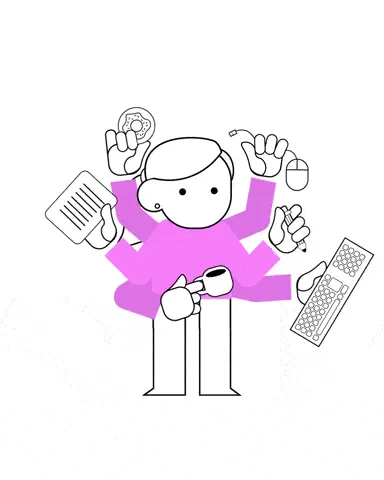
Are you still here? Good.
Now, before your attention span runs out, let’s have a look at some typical multitasking scenarios. We’re sure you’re familiar with at least some of them:
🔍➕🍿 Researching an article while watching your favorite movie
✏️➕👥 Taking notes (or doodling) during a video conference
📞➕📨 Talking on the phone while trying to reply to an email
⌨️➕💬 Editing a document while chatting over project details
🎙➕🗞 Listening to a podcast while reading an article online
📱➕💻 Replying to customer questions on multiple channels
At the onset, combining these activities may seem like a swell idea. Not only you can do more than you’d working sequentially but you also save plenty of time in the process.
Right?
The reality is a tad more complicated.
🤔 What Happens When You *Think* You’re Multitasking
Here’s the thing, the human brain is not really capable of multitasking. When you *attempt* (mind the emphasis) to perform multiple activities simultaneously, you merely shift focus from one task to another (1).
It’s a process called context switching.
Imagine you’re typing a report when an email notification pops up on your screen. You *stop* what you’re doing to digest the new information and get back to writing. A similar thing happens when you’re taking notes during a video conference—you process the information, write it down and resume focus on what’s being said.
But there’s a problem.
The rapid switching between tasks comes at a cost. The more taxing and complex the activities are, the longer it takes to regain focus after the switch. The cost you have to pay for trying to multitask is called the cognitive switching penalty.
According to Paul Atchley, associate professor of Cognitive Psychology at the University of Kansas:
“(...) we know that multitaskers do less and miss information. It takes time (an average of 15 minutes) to re-orient to a primary task after a distraction such as an email. Efficiency can drop by as much as 40%. Long-term memory suffers and creativity — a skill associated with keeping in mind multiple, less common, associations — is reduced.”(2)
Long story short, multitasking leads to:
⏳ Time and focus gaps between activities
📉 Decreased productivity (up to 40%)
❌ Increased risk of making mistakes
🤯 Increased chance of burnout
🧠 Impaired memory and creativity
“So, what does it all have to do with remote cross-functional teams?”
⚡ Cross-Functional Teams = Effective Multitasking
What Is a Cross-Functional Team?
Cross-functional teams are made up of employees with diverse functional expertise and skillsets. Although they stem from different parts of a company, like marketing and engineering, they work together toward a common goal as self-contained, autonomous units.
Sounds familiar?
The concept of cross-functional teams is deeply rooted in the Agile methodology. According to the Official Scrum Guide: “Cross-functional teams have all competencies needed to accomplish the work without depending on others not part of the team.”
Other examples of cross-functional teams include:
🎨 Marketing agencies. They combine programmers, graphic designers, copywriters, account managers, art directors and account managers
⚙️ Product development teams. Depending on the industry, they can group product designers, marketing specialists, developers and project managers
🤝 Customer support teams. Cross-functional customer support teams can include support agents, accounting officers and technical back office (developers) for a quicker and more complete customer experience
When you come to think of it, cross-functional teams achieve what individuals can’t. They multitask *effectively*. By combining a range of functional competencies, they close the skills gap and tackle projects without having to outsource or queue anything.
How Do Cross-Functional Teams Multitask?
In more traditional functional teams, employees are grouped based on their field of expertise. So, for example, you can have an entire team of designers or copywriters working together on a project. This approach makes collaboration and communication pretty much siloed.
Cross-functional teams, on the other hand, excel at distributing the workload internally, based on each team member’s unique skills and competencies. They’re mostly autonomous too so the feedback loop is much shorter and requires no external input.
💡 Teamwork Trivia: Did you know that the concept of cross-functional teams dates back to the 1950s? It was first used by a Wisconsin insurance company Northwestern Mutual Life. Thanks to the new interdisciplinary approach, the company was able to explore and adopt computerization ahead of the competition.
Inc.
All that enables cross-functional teams to tackle different slices of projects simultaneously, without bottlenecks. They can deliver a complete product, from conceptualization to marketing it to customers, without passing the baton to other teams and departments.
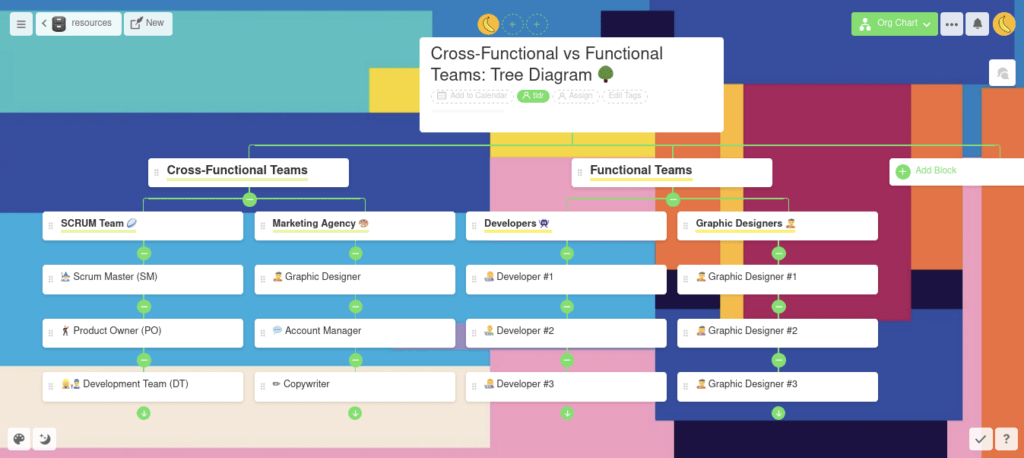
This kind of interdisciplinary multitasking isn’t only possible for teams. With the right set of collaboration and communication tools (wink wink, nudge nudge Taskade 🐑), work can be effectively shared across departments, divisions and branches, even remotely.
If you want to learn more about Agile and autonomous squads, be sure to follow up with our articles The Sound of Remote Collaboration and Remote Scrum 101.
Now, wait a minute. We’re not done yet.
What Are the Benefits of Cross-Functional Teams?
🤝 High alignment. Members of interdisciplinary teams may stem from different functional units, but they work together toward one goal. Although such teams are mostly autonomous, they understand both team-wide and company-wide mission and values
⚙️ Natural collaboration. When each team member has a different set of skills and unique expertise, collaboration happens organically. And with that comes cross-pollination of ideas and omnidirectional knowledge transfer
🔀 Non-linear approach. Set a group of designers to work on a problem and they’ll give you an elegant and aesthetic solution. Do that with engineers and you’ll get a practical but technically impressive workaround. When you combine these two approaches, you get out-of-the-box thinking at its finest
🧰 No skill gap. Teams that come packed with a wide spectrum of functional skills can handle most projects from beginning to end. They need little or no external guidance and seldom have to bring external talent on board
⏱ Reduced cycles. Thanks to internal decision-making and shorter feedback loops, production/development cycles are simple and efficient. Interdisciplinary teams can move from ideation to execution without wasting time on external vetting
💬 Frictionless communication. Unlike employees that communicate with each other on an ad-hoc, per-project basis, cross-functional teams collaborate continuously. They can cultivate team camaraderie built on trust, transparency and their track record
🐑 How to Multitask in *Remote* Cross-Functional Teams
1. Focus on the Right Goals
Your team won’t be able to score without having clear goals in view. With little oversight and interference from the “outside,” remote cross-functional teams need to learn how to effectively self-organize and prioritize work.
But don’t worry, Taskade includes handy templates that’ll help you do just that.
Here are our top picks of the day. 🏆
2. Distribute the Workload
So, with all that talent collaborating across time zones, how do you effectively distribute work? After all, the goal here isn’t only to assign tasks and call it a day. You have to make the process transparent so each team member knows what their peers are working on.
In Taskade, you can distribute the workload in two ways, either by using the Assign Task feature or mentioning a team member with @+username anywhere in the Project space.
Like this. 👇
You can read more about assigning tasks in our Taskade Help Center.
3. Share Resources
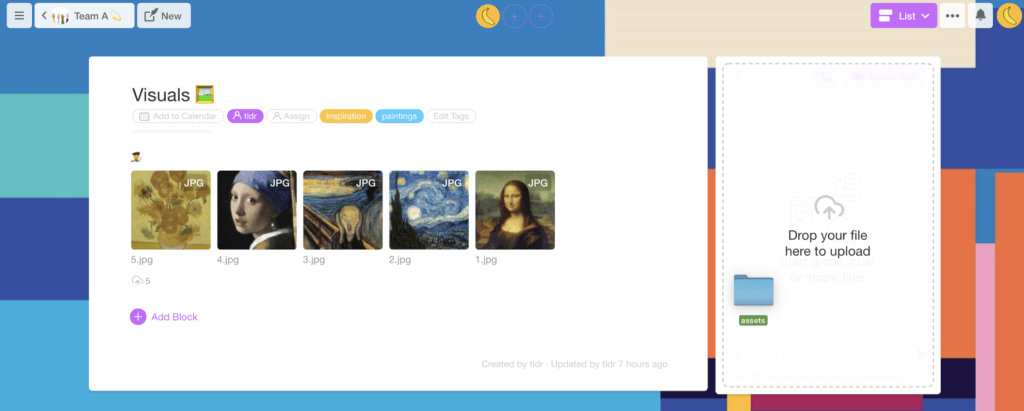
At some point, your team might want to exchange documents, videos, images and other project assets. And we have you covered. All you have to do is use the upload functionality or drag and drop your files to Taskade’s chat window.
It’s that simple. 🕺
4. Manage Multiple Projects
While you can’t do two things at the same time (science), you still need a way to maintain, manage and moderate everything your team does.
Work organization in Taskade breaks down into three key units:
🌳 Workspaces. A Workspace is where all your Projects live. It’s essentially a team-wide remote workspace that can be populated with your ideas (even the crazy ones)
🌿 Subspaces. A Subspace lets you carve out smaller collaborative spaces stacked under a Workspace. They improve the visibility of individual projects and make your remote workflows easier to navigate
🌱 Projects. A Project is the smallest organizational unit in Taskade. It’s a collaborative space that contains tasks, checklists and documents, just to name a few
5. Create a Roadmap
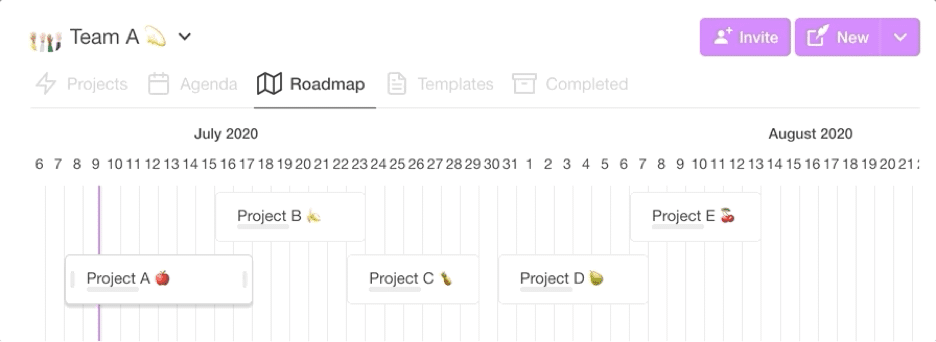
So, your team has clearly defined goals and a mission to accomplish. But where do you start? How do you make sure you’re all going in the same direction? And most importantly, how will your track progress and milestones along the way?
Thanks to Taskade’s Roadmap feature, you can visualize individual projects on a timeline. 👇
6. Communicate Without Friction
Want to know the secret ingredient that makes *some* distributed teams so effective?
Here it goes…
It’s frictionless communication that doesn’t get in the way. The goal here is to balance work and team communication in such a way that the two create a synergy rather than an obstruction.
So, what makes Taskade’s approach different? We combine a project management platform and a communication tool in *one* app. Just so you don’t have to shuffle windows, ever again. 👍
Cross-Functional Team Collaboration Tools Compared
| Feature | Taskade | Asana | Monday.com | Trello |
|---|---|---|---|---|
| Real-Time Collaboration | Yes | Limited | Limited | Limited |
| Project Views | Multiple (List, Board, Calendar, Table, Mind Map, Gantt, Org Chart) | 5 | 8+ | 3 |
| Built-In Video Chat | Yes | No | No | No |
| AI Agents | Yes (built-in tools, persistent memory) | Basic AI | Basic AI | No |
| Workflow Automations | Yes (100+ integrations) | Yes | Yes | Limited |
| Cross-Functional Templates | 500+ free templates | Templates | Templates | Templates |
| Mind Mapping | Built-in | No | No | No |
| Free Plan | Generous | Limited | Limited | Limited |
| Starting Price | Free | $10.99/user/month | $9/user/month | $5/user/month |
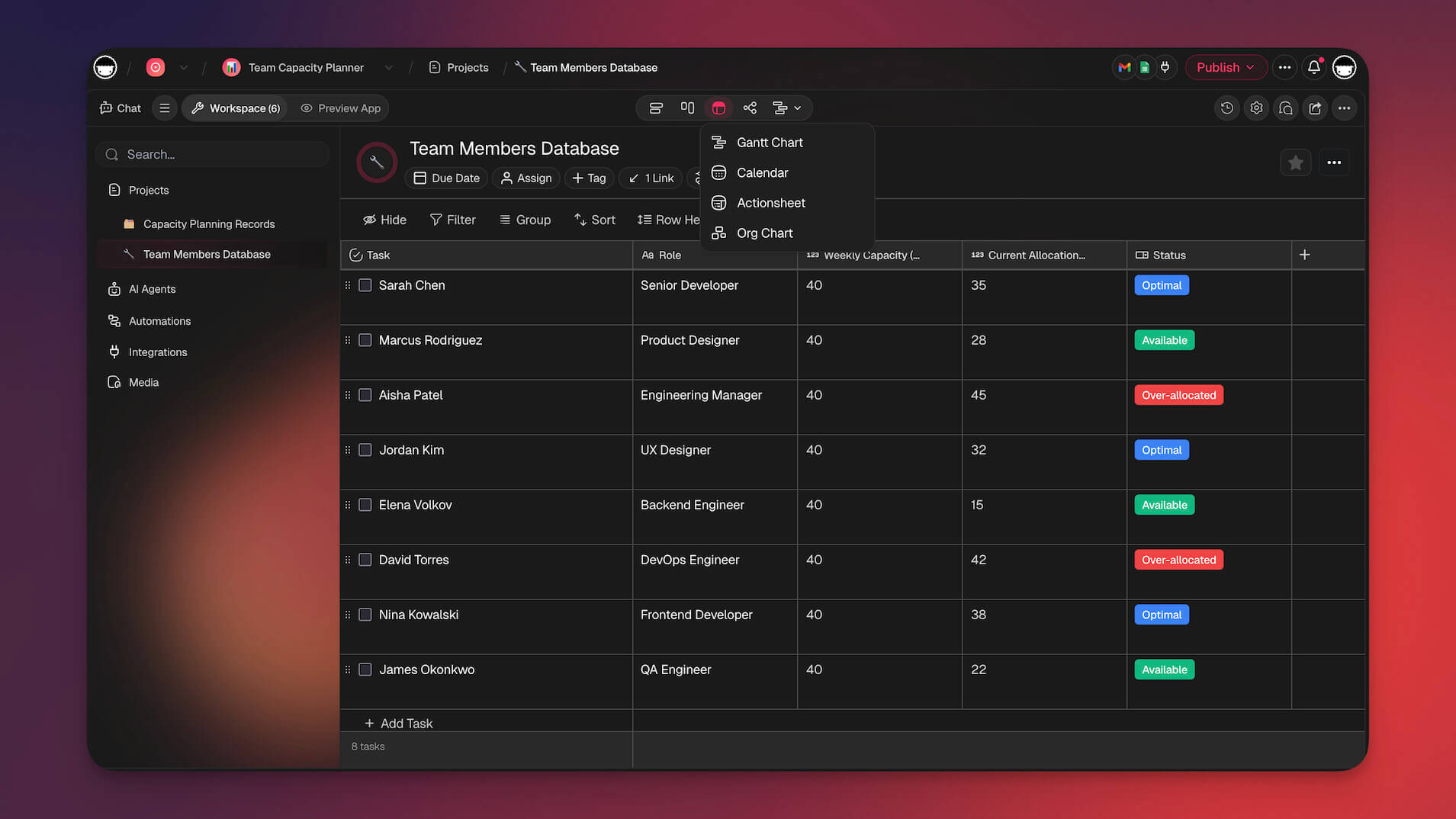
Workspace DNA: Memory, Intelligence, and Execution for Cross-Functional Teams
Taskade's Workspace DNA architecture is purpose-built for the way cross-functional teams operate:
- Memory — Every project, document, and conversation is stored as persistent, searchable data in Taskade projects. Cross-functional teams no longer lose context when moving between tasks or handing off deliverables.
- Intelligence — AI agents with built-in tools analyze workloads, suggest task assignments based on expertise, and surface bottlenecks before they stall progress. Powered by frontier models from top AI labs.
- Execution — Automations powered by a durable execution engine route tasks between team members, trigger notifications, and sync data across 100+ integrations. Over 3M+ automations have been executed on the platform.
The result: Memory feeds Intelligence (agents learn from project history), Intelligence triggers Execution (automations act on agent recommendations), and Execution creates new Memory (completed work feeds back into the knowledge base).
Agentic AI and Vibe Coding for Team Collaboration
Cross-functional teams traditionally spend hours configuring project boards, writing SOPs, and setting up workflows. Agentic AI and vibe coding eliminate that setup time entirely.
With Taskade Genesis, you describe what your team needs in plain language: "Build a cross-functional project dashboard with marketing, engineering, and design lanes, weekly standup templates, and automated status updates." Genesis builds and deploys the app immediately — no coding required. 150,000+ apps have been built this way.
AI agents equipped with custom tool schemas and a hosted MCP server for external AI clients go further:
- Automatically distribute tasks based on team member availability and skillset
- Generate cross-functional status reports by pulling data from multiple projects
- Trigger automations when deliverables move between functional teams
- Summarize multi-project progress for stakeholders and leadership
Explore cross-functional workflows in the Taskade Community or start building.
Cross-Functional Team Workflow Stages
| Stage | What Happens | Taskade Feature |
|---|---|---|
| Planning | Define goals, assign ownership | Mind Map + Board view |
| Task Distribution | Route work to specialists | @mention + AI agents |
| Parallel Execution | Multiple functions work simultaneously | project views for different workflows |
| Review and Feedback | Cross-functional quality checks | Real-time comments + video chat |
| Handoff | Pass deliverables between teams | Automations with 100+ integrations |
| Retrospective | Evaluate process and improve | Templates for sprint retros |
Frequently Asked Questions
Is multitasking effective for remote teams?
Traditional multitasking — doing two cognitively demanding tasks simultaneously — is largely a myth. Research shows it reduces productivity by up to 40% due to context-switching costs. However, strategic task-batching and using AI to handle routine work lets remote teams accomplish more by focusing deeply on one thing at a time while automating the rest.
How can cross-functional remote teams manage multiple projects?
Use a shared workspace with clear project views — boards for workflow tracking, lists for priorities, and calendars for deadlines. Assign clear ownership for each task, minimize meeting overhead, and use asynchronous updates. Platforms like Taskade let cross-functional teams see all projects across multiple views without switching tools.
What is context-switching and why is it harmful?
Context-switching is the mental cost of shifting attention between different tasks or projects. Each switch requires your brain to reload context, which takes time and depletes cognitive resources. For remote workers who juggle multiple tools and conversations, this switching tax can consume hours of productive time each day.
How can remote teams reduce context-switching?
Consolidate work into a single platform, batch similar tasks together, set designated focus hours free of meetings and notifications, and use AI agents to handle routine tasks. The fewer tools and interruptions your team deals with, the more time they spend in productive flow.
How does Taskade Genesis help cross-functional teams manage multiple projects?
Taskade Genesis lets you build custom project dashboards, team workflows, and collaboration hubs from a single natural-language prompt. Over 150,000 apps have been built with Genesis, each with embedded AI agents that coordinate tasks across team members. Cross-functional teams can describe their workflow and get a deployable system in seconds.
What is agentic AI and how does it improve cross-functional team productivity?
Agentic AI refers to autonomous AI systems that execute tasks independently rather than waiting for manual commands. In Taskade, AI agents with built-in tools can route tasks to the right team member, summarize project updates, and trigger automations across 100+ integrations — eliminating the coordination overhead that slows cross-functional teams.
How does Workspace DNA help remote teams work across functions?
Workspace DNA is Taskade's architecture of Memory plus Intelligence plus Execution. Projects store team knowledge as Memory, AI agents provide Intelligence by analyzing workloads and suggesting task distribution, and automations handle Execution by routing deliverables between team members. This loop keeps cross-functional work flowing without manual handoffs.
Can AI agents automate task distribution in cross-functional teams?
Yes. Taskade AI agents can automatically assign tasks based on team member skills, balance workloads across time zones, flag bottlenecks, and trigger follow-up actions when deliverables are completed. With durable execution and 100+ integrations, automations run reliably even across distributed teams.
💡 Conclusion
The science is unrelenting: Multitasking doesn’t make you more productive. When you *attempt* to juggle several tasks, you risk losing time, momentum and making a whole lot of mistakes in the process. The good news is, you don’t have to be a jack of all trades (and master of none).
Thanks to complementing skill sets, remote cross-functional teams can bite into several slices of any project simultaneously. And the best part? They can do so effectively and autonomously.
If you’re looking for a simple yet powerful tool for your cross-functional team, Taskade has your back. With Taskade Genesis, you can build custom project dashboards, team workflows, and collaboration systems from a single prompt. Deploy AI agents with persistent memory to handle routine coordination, or set up automations that route tasks between team members automatically.
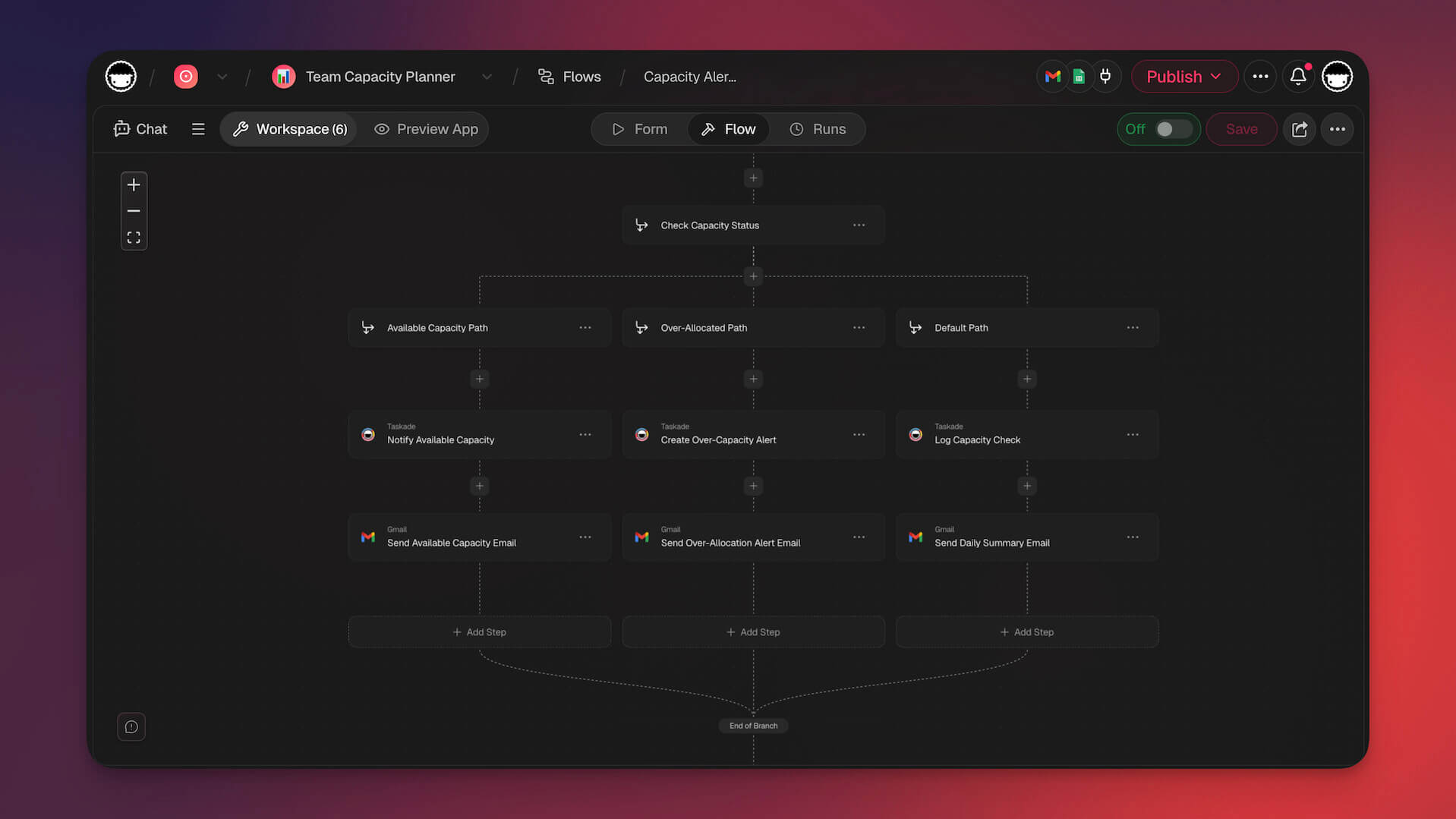
Taskade supports frontier AI models from top AI labs — so your cross-functional team can focus on high-value work while AI handles the rest. Taskade is free to start, with Pro from $10/month billed annually.
Start collaborating with your cross-functional team →
Browse ready-made workflows in the Taskade Community or explore templates to get started fast.
Before you go… here are a handful of similar Taskade articles you may enjoy. 👇
Till next time, Taskaders! 👋