






Over 60% of marketers say keeping up with social media content is a major challenge. If you are managing a brand or leading a social media team, your energy should go into strategy, not manually writing and scheduling posts across three platforms. That is why social media automation exists.
TL;DR: Taskade AI Kits automate social media content creation, scheduling, and posting for Twitter/X, LinkedIn, and Facebook. Each kit includes AI agents with 22+ tools, pre-built automations, and project templates. Unlike Buffer ($6/channel), Hootsuite ($99/month), or Later ($25/month), Taskade bundles everything in one workspace starting at $0/month. Get started →
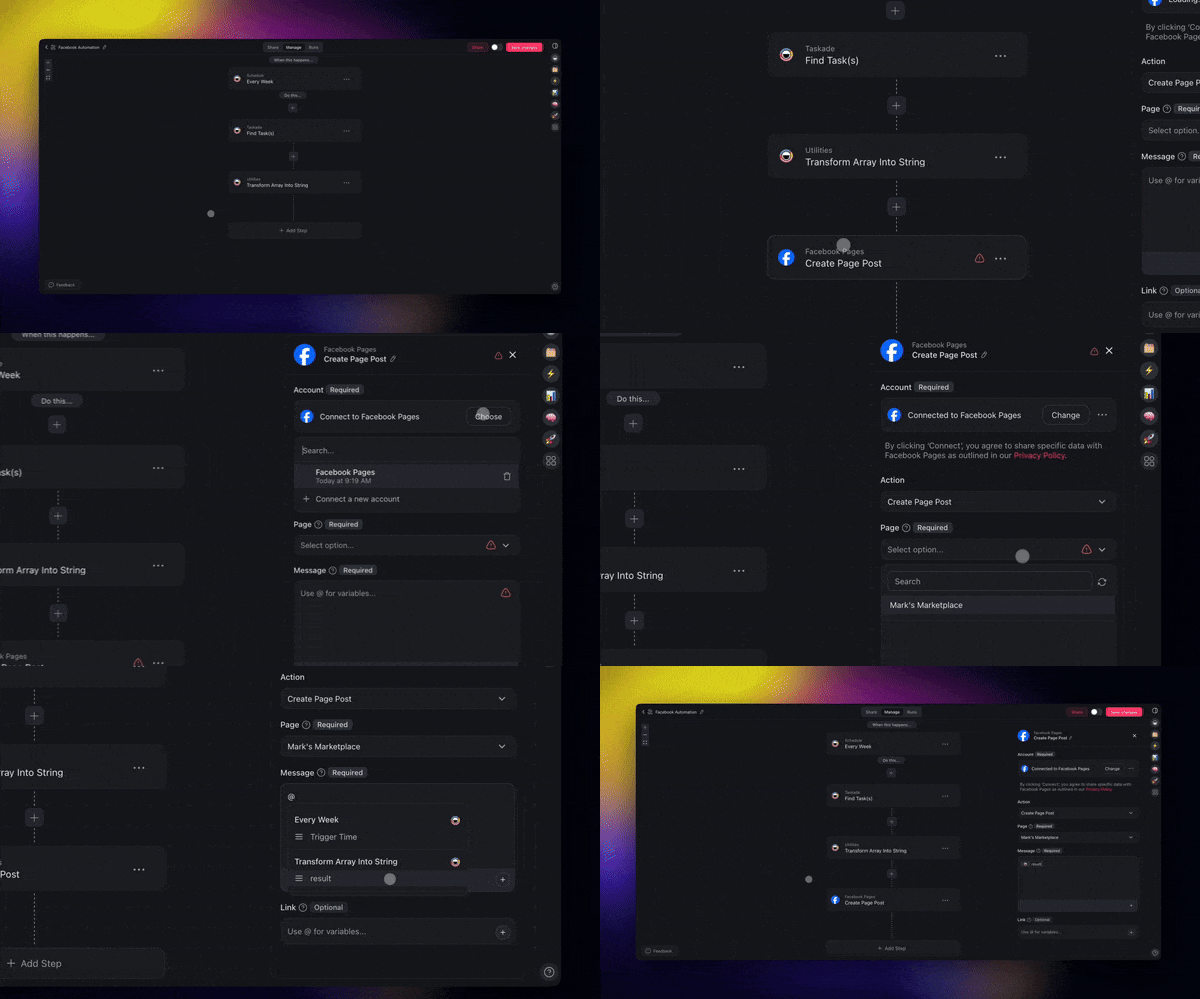
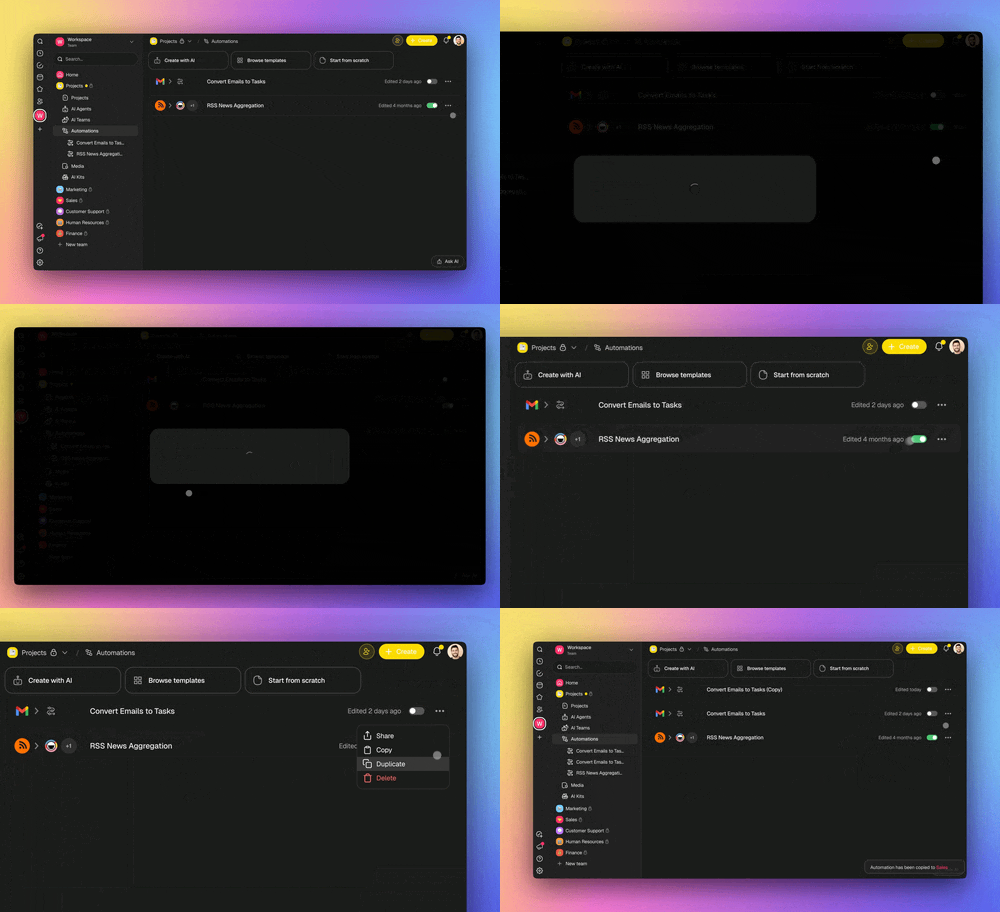
Building automations from scratch takes time. Taskade AI Kits are pre-packaged automation bundles that include AI agents, projects, and workflows designed specifically for social media. Each kit installs in one click and starts working immediately.
Under the hood, every kit uses Taskade's Model Context Protocol (MCP) to sync live data across your workspace and the social platforms you connect.
Taskade vs Buffer vs Hootsuite vs Later vs Sprout Social
Before exploring the kits, here is how Taskade compares to the four most popular social media management platforms:
| Feature | Taskade | Buffer | Hootsuite | Later | Sprout Social |
|---|---|---|---|---|---|
| AI content generation | Yes (AI agents) | Basic AI assistant | AI captions | AI captions | AI suggestions |
| Automated posting | Yes | Yes | Yes | Yes | Yes |
| Content calendar | Yes (7 project views) | Yes | Yes | Yes | Yes |
| AI agents (custom) | 22+ tools, persistent memory | No | No | No | No |
| Project management | Built-in (7 views) | No | No | No | No |
| Automation builder | Yes (100+ integrations) | No | Limited | No | Limited |
| Social listening | No | No | Yes | No | Yes |
| Analytics | Basic | Yes | Advanced | Yes | Advanced |
| Free tier | Yes | Yes (3 channels) | No | Limited | No |
| Paid from | $6/mo (all features) | $6/mo per channel | $99/mo | $25/mo | $249/mo |
| Team collaboration | Real-time, 7 RBAC tiers | Basic | Yes | Basic | Yes |
When to Choose Each Platform
| Scenario | Best Choice | Why |
|---|---|---|
| AI-powered content creation + posting | Taskade | AI agents draft and publish |
| Simple scheduling, one platform | Buffer | Clean UI, low per-channel cost |
| Enterprise social media management | Hootsuite | Advanced analytics + social listening |
| Visual-first (Instagram/Pinterest) | Later | Visual planning + link-in-bio |
| Large team with approval workflows | Sprout Social | Enterprise governance + analytics |
| Budget-conscious, need AI + PM | Taskade | Most complete free tier |
Cost Comparison for Managing 3 Social Channels
| Platform | Monthly Cost | Includes AI Writing? | Includes PM? |
|---|---|---|---|
| Taskade Free | $0 | Yes | Yes |
| Taskade Starter | $6/mo | Yes | Yes |
| Buffer Essentials | $18/mo (3 x $6) | Basic | No |
| Later Growth | $25/mo | Basic | No |
| Hootsuite Professional | $99/mo | Basic | No |
| Sprout Social Standard | $249/mo | Basic | Yes |
Buffer, Hootsuite, Later, and Sprout Social are scheduling-first tools. They require you to write the content before scheduling it. Taskade AI agents draft the content, format it for each platform, and publish it automatically.
Top Social Media Automation Kits at a Glance
| Kit | What It Does | Best For | Time Saved |
|---|---|---|---|
| AI Twitter/X Posting Kit | Publishes scheduled, AI-drafted tweets | Startups, creators, consultants | 20-40 min per post |
| AI LinkedIn Posting Kit | Automates thought leadership posts | B2B founders, marketing teams | 45-75 min per post |
| AI Facebook Page Kit | Keeps Pages active with scheduled content | Local businesses, ecommerce | 30-50 min per post |
| AI SEO Entity Research Kit | Generates keyword clusters and topic maps | SEO teams, content strategists | 60-90 min per topic |
Kit 1: Automate Twitter/X Content Posting
Time saved: 20-40 minutes per post on idea generation, writing, and formatting.
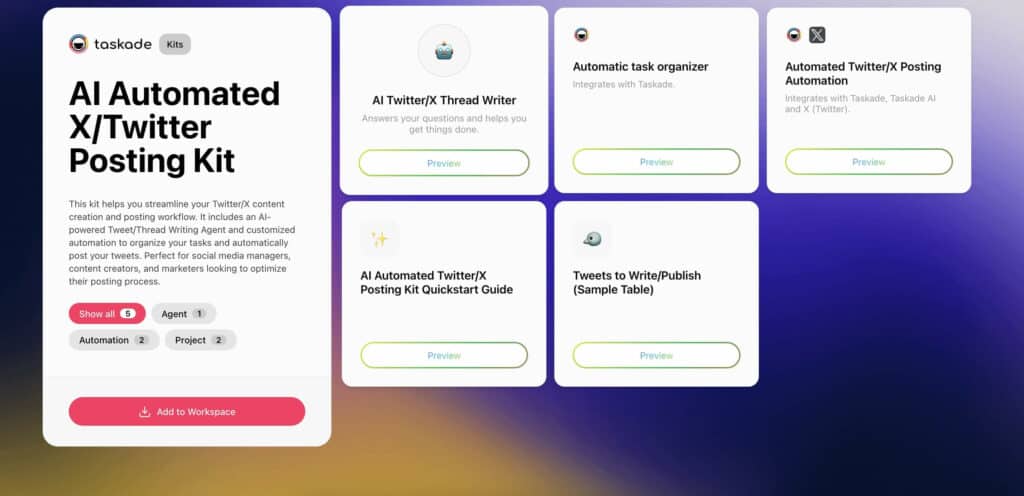
Writing tweets is easy. Writing them consistently, day after day, while maintaining quality and relevance, is where teams break down. The AI Automated Twitter/X Posting Kit eliminates the bottleneck by combining content planning, AI-assisted writing, and automated scheduling in one workflow.
Who It's For:
- Social media managers automating content creation and scheduling
- Content creators maintaining a regular posting cadence
- Marketing teams managing Twitter/X campaigns at scale
Kit Contents:
- Projects: Kit Quickstart Guide + Tweets to Write/Publish (sample table)
- Automations: Automatic Task Organizer + Automated Twitter/X Posting
- Agent: AI Twitter/X Thread Writer (drafts, formats, suggests hashtags)
Business Benefits:
- Automate tweet writing, scheduling, and posting from one place
- Maintain a consistent posting routine with less manual work
- Improve content quality using AI-powered writing assistance
- Eliminate time spent organizing drafts and tracking status
How it compares to Buffer for Twitter/X:
| Capability | Taskade Kit | Buffer |
|---|---|---|
| Drafts tweets with AI | Yes (custom agent) | Basic AI assist |
| Auto-publishes on schedule | Yes | Yes |
| Manages drafts as tasks | Yes (7 views) | No |
| Suggests hashtags | Yes (AI agent) | No |
| Free tier | Yes | Yes (1 channel) |
Add the AI Automated Twitter/X Posting Kit to your workspace
Kit 2: Publish LinkedIn Posts Automatically
Time saved: 45-75 minutes per post on copywriting, editing, and scheduling.
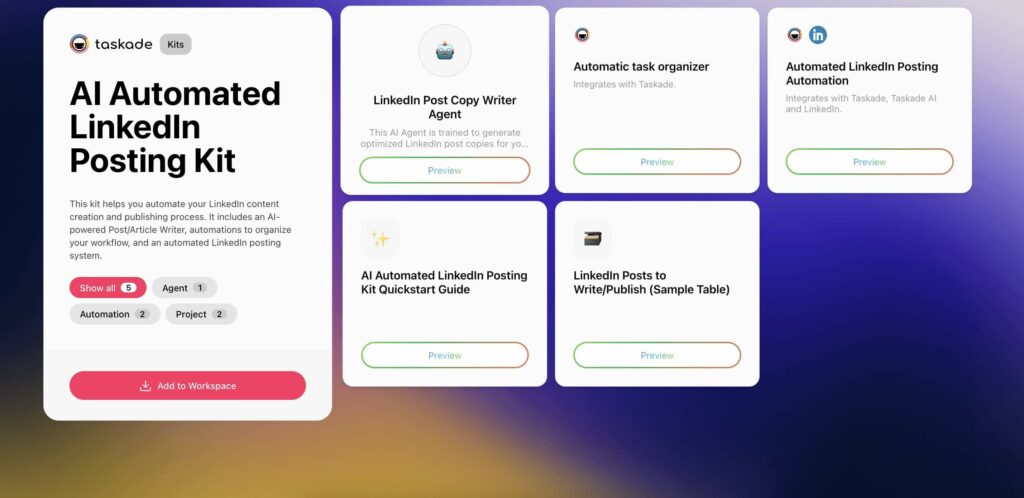
LinkedIn posting turns into a mini-project when every idea requires Slack threads, Google Docs, editing rounds, and a missed posting window. The AI Automated LinkedIn Posting Kit reduces that friction by bringing planning, writing, and scheduling into one place.
Who It's For:
- Professionals managing personal branding on LinkedIn
- Marketing teams and content strategists posting regularly
- Businesses scaling LinkedIn engagement
Kit Contents:
- Projects: LinkedIn Posts to Write/Publish (sample table) + Kit Quickstart Guide
- Automations: Automatic Task Organizer + Automated LinkedIn Posting
- Agent: LinkedIn Post Copy Writer Agent (tone-matched, professional formatting)
Business Benefits:
- Save hours on writing, organizing, and publishing posts
- Keep your brand voice consistent with AI-enhanced copy
- Automate scheduling to maintain an active presence
- Free up time for networking and higher-impact tasks
How it compares to Hootsuite for LinkedIn:
| Capability | Taskade Kit | Hootsuite |
|---|---|---|
| AI drafts LinkedIn posts | Yes (custom agent) | Basic captions |
| Auto-publishes on schedule | Yes | Yes |
| Content performance analytics | Basic | Advanced |
| Social listening | No | Yes |
| Pricing | From $0/mo | From $99/mo |
Add the AI Automated LinkedIn Posting Kit to your workspace
Kit 3: Keep Facebook Pages Active with Scheduled Posts
Time saved: 30-50 minutes per post by automating copy creation and publishing.
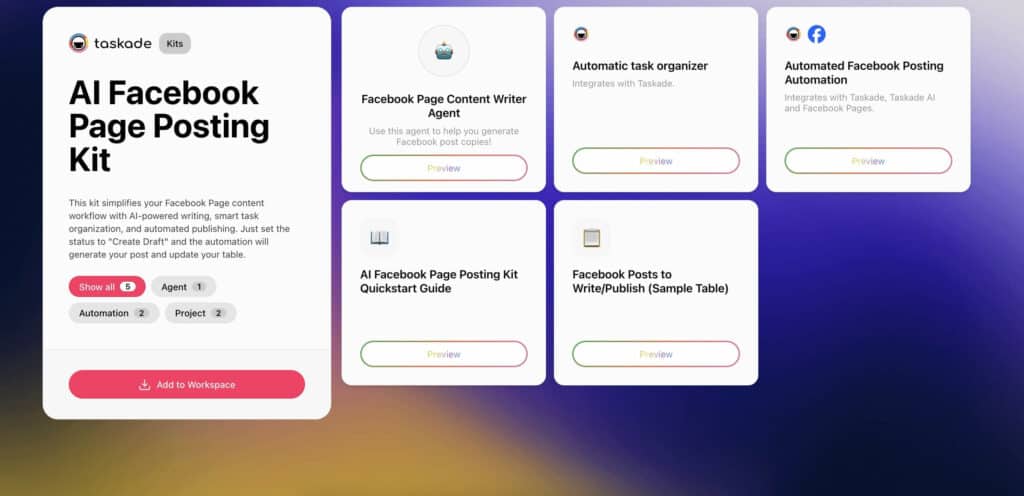
Average organic reach for Facebook Pages hovers around 1.2% in 2026. When content creation involves chasing drafts, editing cycles, and manual posting, most teams cannot sustain the volume needed to maintain reach. The AI Facebook Page Posting Kit automates the entire pipeline.
Who It's For:
- Social media managers handling Facebook Pages
- Small businesses and creators maintaining audience engagement
- Marketing teams automating post creation and publishing
Kit Contents:
- Projects: Kit Quickstart Guide + Facebook Posts to Write/Publish (sample table)
- Automations: Automatic Task Organizer + Automated Facebook Posting
- Agent: Facebook Page Content Writer Agent (engagement-optimized)
Business Benefits:
- Save time on content planning, writing, and posting
- Maintain consistency with AI-generated post drafts
- Keep your page active without daily manual effort
- Simplify collaboration with structured workflows
How it compares to Later for Facebook:
| Capability | Taskade Kit | Later |
|---|---|---|
| AI drafts Facebook posts | Yes (custom agent) | Basic AI captions |
| Auto-publishes on schedule | Yes | Yes |
| Visual content planning | Table view | Visual calendar |
| Link-in-bio tools | No | Yes |
| Pricing | From $0/mo | From $25/mo |
Add the AI Facebook Page Posting Kit to your workspace
Kit 4: Generate SEO Keyword Clusters from Any Topic
Time saved: 60-90 minutes per topic on manual keyword discovery and clustering.
Keyword research alone can take 6-12 hours for a small site. Agencies report spending 2-5 hours on keyword research for local businesses, with full SEO setups reaching 22-36 hours. The AI SEO Entity Research Kit compresses weeks of research into minutes.
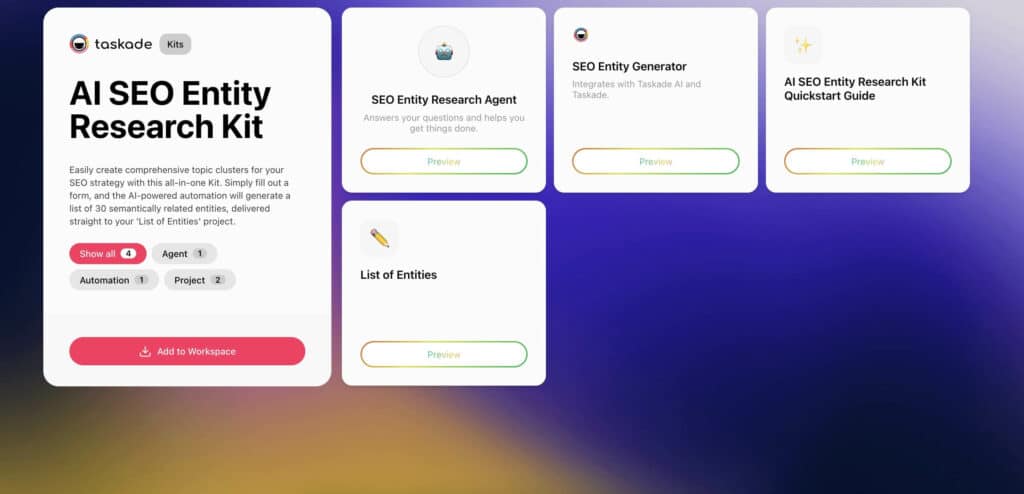
Enter a topic and receive a structured list of semantically related entities, ready for content briefs, blog outlines, or social media topic calendars. Everything connects to your existing Taskade workflow.
Who It's For:
- SEO specialists building topic clusters
- Content creators enhancing blog or video reach
- Marketers improving semantic SEO rankings
- Business owners targeting search intent effectively
Kit Contents:
- Projects: Kit Quickstart Guide + List of Entities
- Automation: SEO Entity Generator
- Agent: SEO Entity Research Agent (semantic analysis)
Business Benefits:
- Automate topic clustering with zero manual effort
- Discover related search terms in seconds
- Improve content strategy with Google-friendly keyword structures
- Cut research time and move from query to draft faster
Add the AI SEO Entity Research Kit to your workspace
Which Kit Should You Start With?
Social media workflows break down for different reasons. Use this decision matrix to find where the friction is and which kit fixes it:
| Your Biggest Challenge | Start With | Expected Impact |
|---|---|---|
| Running out of tweet ideas | AI Twitter/X Posting Kit | Consistent daily posting |
| LinkedIn posts take too long to write | AI LinkedIn Posting Kit | 75% reduction in post creation time |
| Facebook Page is inactive | AI Facebook Page Kit | Steady content without daily effort |
| No idea what topics to post about | AI SEO Entity Research Kit | Data-driven content strategy |
Multi-Platform Strategy
For teams managing all three platforms, install all four kits and connect them to a shared content calendar in Taskade. Use the SEO Entity Research Kit to identify topics, then adapt content across platforms using each kit's platform-specific AI agent.
Building a Custom Social Media Command Center
Beyond individual kits, Taskade Genesis builds complete social media command centers from a single prompt. Describe your needs and get a living app with:
- AI agents that draft, review, and adapt content across platforms
- Automations connected to 100+ integrations including X/Twitter, LinkedIn, Reddit, and Facebook
- Built-in database to track performance metrics across all channels
- Background agents (Pro+) that keep posting on schedule even when you are offline
- Custom domains and branded sign-in for client-facing dashboards
- Clone and share your entire setup with clients or across teams
Browse 150,000+ community-built apps for social media templates to clone and customize.
Advanced Social Media Automation Tips
Train AI Agents on Your Brand Voice
The default AI output is generic. To get platform-ready content, train your custom AI agents on:
- Example posts that performed well on each platform
- Brand style guide with tone, vocabulary, and formatting rules
- Audience personas describing who you are writing for
- Competitor examples showing what to differentiate from
Agents with persistent memory retain this training across conversations, so every draft reflects your brand from the start.
Connect to Your Full Workflow
Social media does not exist in isolation. Connect your kits to the rest of your workflow using Taskade's 100+ integrations:
| Integration | Use Case |
|---|---|
| Slack | Get notified when posts are published or need approval |
| Google Sheets | Log published posts and performance data |
| Gmail | Send content summaries to stakeholders |
| HubSpot | Sync social engagement data with CRM contacts |
| Google Calendar | Schedule content around product launches and events |
Use 7 Project Views for Content Management
Taskade's 7 project views give you multiple perspectives on your content pipeline:
| View | Best For |
|---|---|
| List | Detailed content briefs and drafts |
| Board | Kanban workflow (Draft, Review, Scheduled, Published) |
| Calendar | Visual content calendar by date |
| Table | Spreadsheet-style overview with custom fields |
| Mind Map | Brainstorming topic clusters |
| Gantt | Campaign timelines with dependencies |
| Org Chart | Team content responsibilities |
Frequently Asked Questions
How does AI social media automation work?
AI social media automation combines content generation, scheduling, and posting into a single workflow. AI agents draft posts matching your brand voice, schedule them at optimal times, and publish across Twitter/X, LinkedIn, and Facebook without manual intervention. Taskade AI Kits package these capabilities into one-click installable workflows.
Can AI write social media posts that sound authentic?
Yes, with proper training. AI agents learn your brand voice from example posts, style guides, and topic preferences. The key is providing context about your audience and tone rather than requesting generic content. Review initial outputs and iterate to improve quality over time.
What social media platforms can I automate with Taskade?
Taskade AI Kits include automation templates for Twitter/X, LinkedIn, and Facebook. Each kit handles platform-specific formatting, hashtag strategies, and posting schedules. The SEO Entity Research Kit complements social content by generating keyword clusters and topic maps for search-optimized posts.
How much time does social media automation save per week?
Most teams report saving 3-5 hours per week on content creation and scheduling. The bigger value is consistency. Over 60% of marketers say keeping up with posting schedules is a major challenge. Automation ensures regular publishing even when the team is focused on other priorities.
How does Taskade compare to Buffer for social media automation?
Buffer focuses on scheduling and analytics starting at $6/month per channel. Taskade includes AI agents that draft content, automations that publish posts, and project management with 7 views in a single platform starting at $0/month. Taskade generates content and publishes it; Buffer requires you to write the content first.
How does Taskade compare to Hootsuite for social media management?
Hootsuite is an enterprise social media management platform starting at $99/month. Taskade offers AI-powered content generation, scheduling, and publishing starting at $0/month. Hootsuite has stronger analytics and social listening; Taskade has built-in AI agents and project management.
Can I automate social media without coding skills?
Yes. Taskade AI Kits install in one click and come pre-configured with projects, automations, and AI agents. No coding, API setup, or technical configuration required. Connect your social accounts and the kit handles content planning, writing assistance, and automated posting.
What is the best free social media automation tool in 2026?
Taskade offers the most comprehensive free tier for social media automation: AI agents, automation workflows, and project management at $0/month. Buffer offers a free plan limited to 3 channels. Later and Hootsuite have removed or severely limited their free tiers in 2026.
How do AI agents improve social media content quality?
Taskade AI agents with 22+ built-in tools and persistent memory learn your brand voice, research trending topics, draft platform-specific content, and suggest hashtags. They maintain consistency across posts while adapting tone for each platform (professional for LinkedIn, concise for Twitter/X, engaging for Facebook).
Can I build a custom social media dashboard with Taskade Genesis?
Yes. Taskade Genesis builds complete social media command centers from a single prompt. Describe your needs and get a living app with AI agents that draft content, automations connected to 100+ integrations, built-in performance tracking, and custom domains for client-facing dashboards. Browse 150,000+ community-built apps for social media templates.
Wrapping Up
Social media does not need to feel like another full-time job. Taskade AI Kits automate the busywork of content creation, scheduling, and posting so your brand grows even when you are offline.
Unlike dedicated social media tools like Buffer ($6/channel), Hootsuite ($99/month), Later ($25/month), or Sprout Social ($249/month), Taskade bundles AI agents, automations, and project management in a single workspace starting at $0/month. Install the kits you need, connect your social accounts, and let AI handle the rest.
Build your social media command center with Taskade Genesis.
