







Imagine it's way past midnight. You're staring at your computer, combing through endless lines of code to spot that pesky bug throwing a wrench in your project. Sounds familiar? If only you had a magic wand to pinpoint exactly where things went wrong.
TL;DR: The best AI coding tools in 2026 are Cursor (AI-first editor with multi-file Composer), GitHub Copilot (inline suggestions), and Claude Code (terminal agent with full codebase access). We compare 12 tools on features and pricing below. To turn a prompt into a full running app, not just code, try Taskade Genesis free.
Now, let's flip the script. Imagine you've got an AI sidekick by your side — a super-smart friend who knows the solution to (almost) everything. Together, you crack it in no time. When used correctly, AI can be a collaborator that enhances your skills, speeds up your workflow, and even helps refine your ideas into polished, innovative solutions.
Today, we're diving into the top 10 AI tools that are changing the coding game. Whether you’re a coding guru or a beginner who’s just written their first line of “Hello, World”, this article will introduce you to AI tools that can help in your coding.
What Are AI Coding Tools?

AI coding tools are advanced software applications that incorporate artificial intelligence (AI) and machine learning algorithms to assist developers throughout the coding process. These tools are engineered to facilitate a wide array of tasks that developers encounter daily.
Among their capabilities, they excel in generating code snippets, offering a significant boost in productivity by automating the creation of complex code structures. Furthermore, they play a crucial role in debugging, capable of identifying and suggesting fixes for errors that can often consume a considerable amount of a developer's time.
In addition to writing and refining code, AI coding tools also specialize in analyzing code quality. They can scrutinize a codebase for potential improvements, ensuring that the software not only functions correctly but also adheres to best practices for maintainability and scalability.
By providing real-time feedback and suggestions for optimizing code, these tools empower developers to enhance their code's efficiency and reliability. As a result, developers can focus more on solving higher-level problems and innovating, rather than getting bogged down in routine tasks.
What to Look For in an AI Coding Tool
Selecting the right AI coding tool is crucial for harnessing the full potential of AI in your development projects. Here are key features to consider:
Code Generation & Suggestions: Look for tools that can generate code snippets and offer suggestions based on best practices and your specific requirements.
Natural Language Processing (NLP): A tool with strong NLP capabilities can understand and respond to queries in natural language, making it more intuitive to use.
Debugging & Optimization: The ability to identify and suggest fixes for bugs, as well as optimize code for performance and readability, is invaluable.
Integration with Development Environments: Seamless integration with your existing development environment ensures a smooth workflow and maximizes productivity.
Collaboration Features: Tools that facilitate collaboration among team members can significantly enhance project management and output quality.
12 of the Best AI Tools for Coding
Taskade
Taskade is a tool that helps with project management and collaboration, especially for coders and developers. It lets you organize ideas into structured plans like lists, mind maps, and boards. The interface is simple and helps you be creative and efficient.
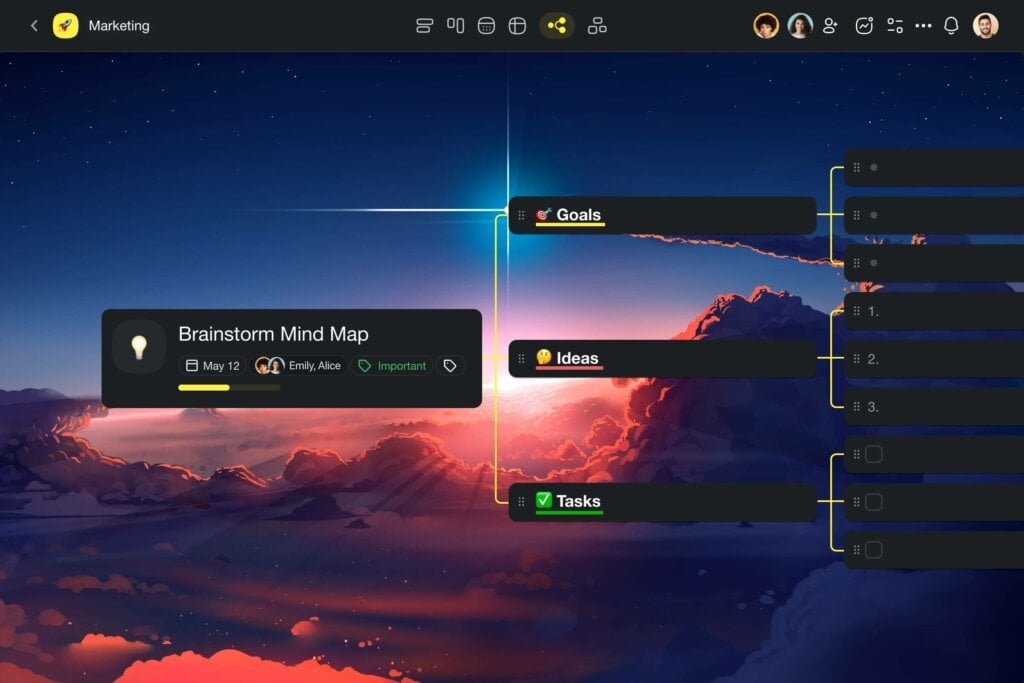
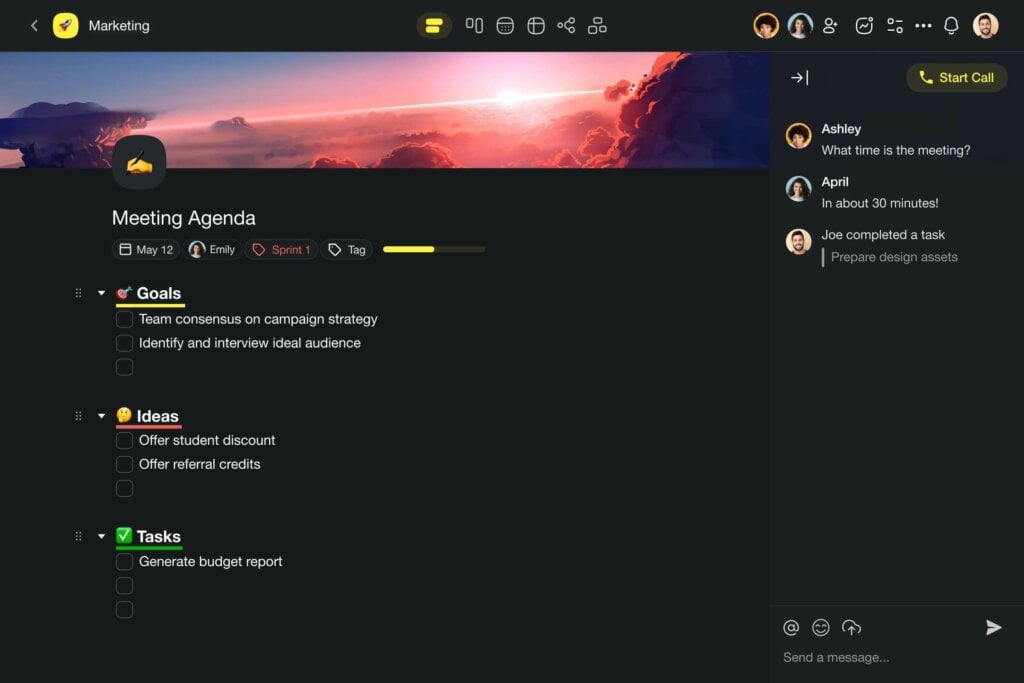

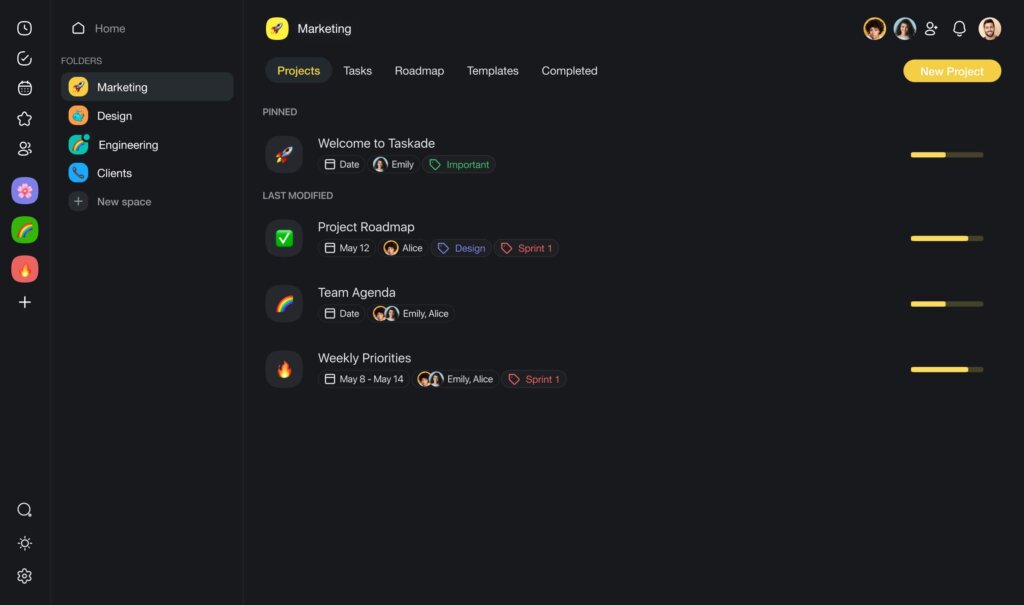
For developers, Taskade provides an easy way to brainstorm, track tasks, and visualize project structures from beginning to end.
What makes Taskade unique is its AI features. The AI can suggest code improvements, automate repetitive tasks, and even help with debugging. This AI integration means Taskade doesn't just organize tasks, but actively assists in the coding process.
The AI offers insights and AI Automation that can lead to higher quality code, faster development, and an easier workflow. Whether working alone or in a team, Taskade combines project management, real-time collaboration, and AI coding assistance into one comprehensive solution beyond traditional tools.
Features
AI-driven task automation. Taskade utilizes AI to automate repetitive tasks, enabling developers to focus on coding and creativity instead of getting bogged down by routine project management tasks.
Built-in AI chat for instant assistance. Incorporates an AI-powered chat feature that provides instant help, suggestions, and reminders, ensuring coding projects stay on track and teams remain aligned on their goals.
Smart project organization with AI. Leveraging AI to intelligently organize projects and tasks, Taskade helps identify priorities and set realistic timelines, making it easier for teams to meet their deadlines.
Seamless integration with coding tools and platforms. Taskade’s AI capabilities extend to integrating smoothly with popular coding environments and tools, enhancing the overall development process.
Best Suited For/Top Use Cases
Coding teams requiring AI-enhanced project management. Taskade's AI-driven features make it a top choice for development teams looking for efficient ways to manage complex coding projects.
Developers seeking smart collaboration tools. With built-in AI chat and task automation, developers can streamline communication and collaboration, focusing more on coding challenges.
Project managers in need of intelligent task organization. Taskade offers project managers AI tools for organizing tasks and managing timelines, ensuring projects are completed efficiently.
Startups to enterprises seeking scalable project management solutions. Its AI capabilities allow Taskade to scale from managing small team projects to handling large enterprise tasks with ease.
Unique Selling Points
Advanced AI features in a project management tool. Taskade leads the way in incorporating AI into every aspect of project management and team collaboration, setting a new standard for efficiency and productivity in coding projects.
Customizable AI-powered workflows. Teams can create custom workflows that leverage Taskade’s AI capabilities, ensuring a personalized and effective project management experience.
Enhances coding productivity with AI automation. By automating routine tasks, Taskade allows developers to devote more time to coding and problem-solving, significantly boosting productivity.
Unifies team collaboration with AI support. Taskade’s AI-driven chat and collaboration tools ensure that team members are always in sync, regardless of their physical location, making it a game-changer for remote and distributed coding teams.
Visit Taskade's pricing page for a breakdown of AI features and plans.
GitHub Copilot
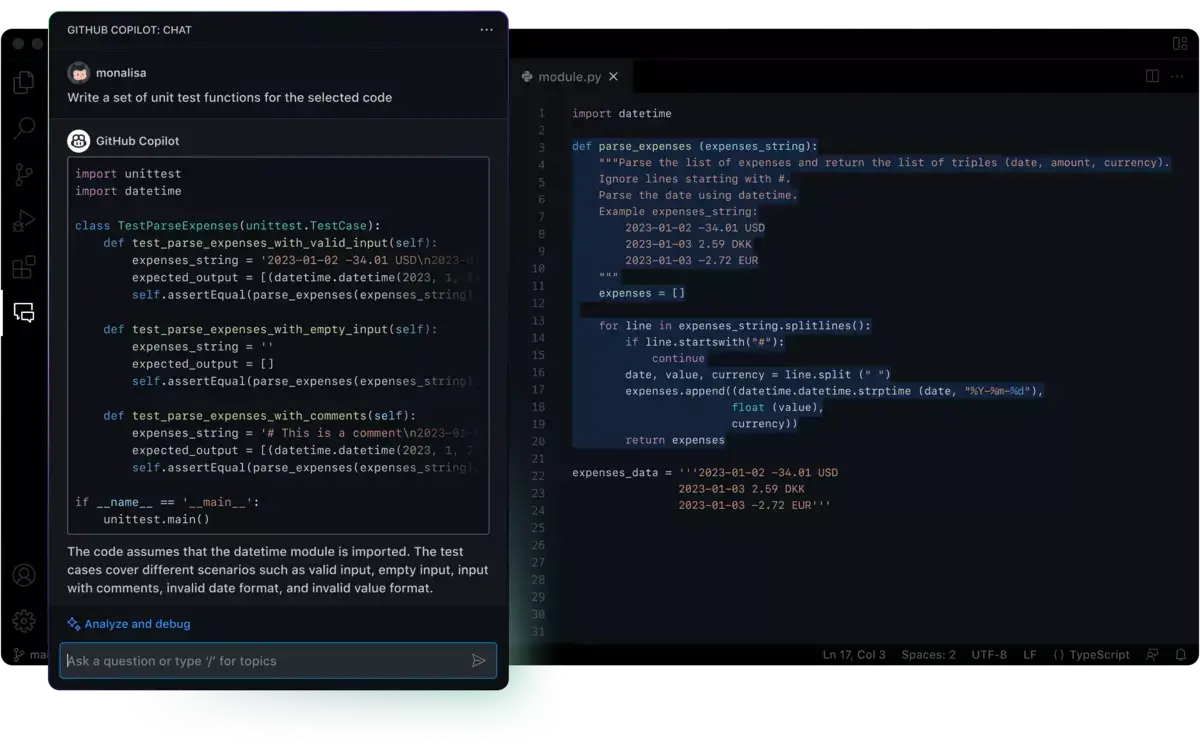
GitHub Copilot, powered by OpenAI, helps with coding by suggesting entire lines or blocks of code as developers type, making it one of the most innovative AI coding tools available. This virtual coding assistant learns from a vast repository of code to offer contextually relevant suggestions.
Features
Context-aware code suggestions. GitHub Copilot provides real-time, contextually relevant suggestions that can help complete lines of code or entire functions, based on the comments and code it's given.
Supports a multitude of programming languages. This tool is incredibly versatile, offering support for dozens of languages and frameworks, making it useful for a wide range of development projects.
Learns from the best coding practices. By analyzing millions of repositories, Copilot learns and suggests not just any code but the best practices in the coding community.
Integration with Visual Studio Code. Seamless integration with Visual Studio Code allows developers to use Copilot directly within their favorite development environment, enhancing productivity without disrupting workflows.
Best Suited For/Top Use Cases
Developers looking to speed up coding. Copilot is a game-changer for developers under tight deadlines, offering suggestions that can significantly cut down coding time.
Beginners seeking to learn coding practices. New programmers can learn from the high-quality code suggestions Copilot provides, helping them improve their coding skills.
Teams aiming for consistency in code quality. Copilot’s suggestions are based on best practices, helping maintain a high standard of code quality across team projects.
Solo developers working on side projects. Those working on personal projects can accelerate development times, making ambitious projects more manageable.
Unique Selling Points
Advanced AI trained on a vast codebase. GitHub Copilot’s suggestions are powered by one of the most extensive training sets available, offering unparalleled accuracy in its suggestions.
Real-time learning from user feedback. Copilot adapts to user feedback, constantly improving its suggestions for an even more personalized coding assistant experience.
Streamlines the coding process. By offering suggestions for both simple and complex code, Copilot can significantly streamline the coding process, making developers more productive.
Enhances learning through practice. For developers keen on improving their skills, Copilot provides an interactive learning experience that’s hard to match, presenting coding solutions that users may not have considered.
ChatGPT
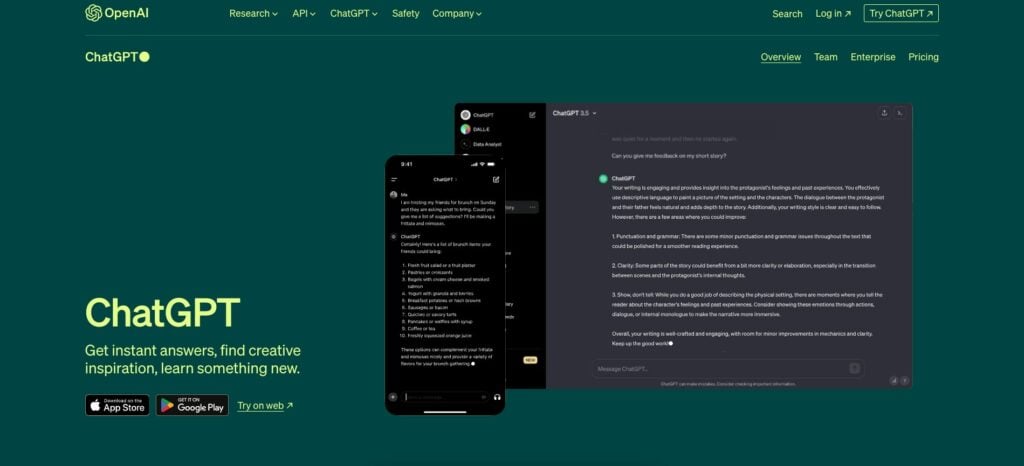
Developed by OpenAI, ChatGPT is capable of understanding and generating human-like text based on the prompts it receives. Its applications in coding range from generating code snippets to explaining complex programming concepts in simple terms, making it an invaluable resource for developers and educators alike.
Features
Generates code snippets on demand. ChatGPT can produce code snippets for a variety of programming tasks and languages, aiding developers in finding quick solutions.
Explains programming concepts clearly. This tool excels at breaking down complex programming ideas into easily understandable explanations, perfect for learning and teaching.
Supports debugging with intelligent suggestions. ChatGPT can offer insights into code errors and suggest fixes, acting as a first line of defense against bugs.
Customizable interactions for various programming needs. Whether it’s generating code, explaining concepts, or assisting with debugging, ChatGPT can be tailored to suit a wide range of programming-related interactions.
Best Suited For/Top Use Cases
Developers seeking quick solutions and explanations. ChatGPT is ideal for programmers who need instant assistance in understanding coding problems or generating code snippets.
Educators and students in programming courses. Its ability to explain concepts in simple terms makes ChatGPT a powerful tool for education, facilitating learning and teaching in computer science.
Teams needing a versatile coding assistant. For development teams, ChatGPT can serve as a shared resource for quick solutions, code explanations, and debugging assistance.
Solo programmers working on learning new languages. Individuals aiming to expand their programming language repertoire can use ChatGPT to get up to speed quickly with new syntaxes and paradigms.
Unique Selling Points
Versatile AI capable of understanding complex queries. ChatGPT’s ability to process and respond to a wide array of programming-related questions makes it an indispensable tool for developers.
Facilitates continuous learning and skill development. Through its explanations and code generation, ChatGPT aids in the continuous growth of programming skills.
Improves productivity by reducing debugging time. Its capacity to suggest fixes for common coding errors can significantly reduce the time spent on debugging.
Supports a broad range of programming languages and tasks. ChatGPT’s versatility in handling various languages and programming tasks ensures it can be a valuable asset to any developer’s toolkit.
OpenAI Codex
OpenAI Codex serves as the backbone for GitHub Copilot, offering an advanced AI capable of understanding and generating human-readable code. This technology powers several tools and platforms, facilitating a more intuitive interaction between humans and computers through natural language.
Features
Generates code from natural language descriptions. OpenAI Codex can translate plain English instructions into functional code in multiple programming languages, making coding more accessible.
Supports a wide range of programming languages. Its versatility extends to nearly all popular programming languages, ensuring developers can use it for a multitude of projects.
Interactive coding sessions. Developers can engage in interactive sessions where Codex suggests code in real-time, enabling a dynamic coding experience that accelerates development.
Integration capabilities with other software and tools. Codex can be integrated into various development environments and tools, enhancing its utility by bringing AI-powered code generation to your preferred platforms.
Best Suited For/Top Use Cases
Developers seeking efficient code generation. Codex is perfect for those looking to quickly translate ideas into code, significantly speeding up the development process.
Educators and learners in programming. Its ability to generate code from natural language makes Codex a powerful tool for education, simplifying the learning curve for beginners.
Teams needing to prototype rapidly. For teams that need to iterate quickly, Codex offers the ability to generate working prototypes from descriptions, facilitating faster feedback loops.
Innovators exploring new project ideas. Individuals and teams brainstorming new software concepts can use Codex to quickly translate their ideas into working code snippets or prototypes.
Unique Selling Points
Bridges the gap between natural language and code. Codex's advanced AI translates natural language descriptions into functional code, making it a bridge between human ideas and digital execution.
Accelerates the coding process. By generating code snippets and even whole functions, Codex drastically reduces the time needed to go from concept to working software.
Enhances the accessibility of coding. Its ability to understand plain English opens up coding to a broader audience, including those who may be new to programming.
Facilitates rapid prototyping and development. Codex's capacity for quick code generation makes it an invaluable tool for rapid prototyping, allowing teams to test and iterate on ideas swiftly.
Cursor.sh
Cursor.sh is an innovative AI coding assistant tool focused on streamlining the coding process. It facilitates real-time collaboration and code execution within the web browser environment. This platform enables developers to work together seamlessly, irrespective of their geographic locations, and observe the immediate effects of code changes as they are made.
Features
Real-time code collaboration and execution. Cursor.sh enables multiple developers to write, execute, and debug code together in real-time, directly in the browser.
Support for various programming languages. It offers robust support for numerous programming languages, making it suitable for a wide range of development projects.
Instant feedback with live code execution. Developers can see the effects of their code changes instantly, enhancing learning and debugging efficiency.
Integrated chat and video call features. The platform includes built-in communication tools, allowing team members to discuss and solve coding issues without leaving the environment.
Best Suited For/Top Use Cases
Teams distributed across different locations. Cursor.sh excels in connecting remote teams, providing a shared space for real-time coding and collaboration.
Educational settings for coding practice. Its live code execution feature makes it an excellent tool for teaching programming, as students can immediately see the results of their work.
Developers working on collaborative projects. For projects requiring teamwork, Cursor.sh offers a platform where code can be written and refined collectively, speeding up the development process.
Coding workshops and hackathons. The tool is ideal for events where participants need to collaborate on coding projects in real-time, fostering creativity and innovation.
Unique Selling Points
Facilitates collaboration in real-time coding environments. Cursor.sh stands out for its ability to bring developers together in a live coding environment, regardless of their location.
Enhances learning through immediate code execution. Its feature of executing code instantly provides immediate feedback, crucial for learning and troubleshooting.
Streamlines the development process. By allowing real-time collaboration and instant feedback, Cursor.sh helps streamline the coding and development process, making it more efficient.
Supports a seamless communication flow. With integrated chat and video calls, the platform ensures that communication remains fluid among team members, enhancing collaboration and productivity.
DeepCodeAI
DeepCodeAI is an AI code review tool that works similarly to Grammarly but for code instead of written content. DeepCodeAI analyzes your codebase to identify bugs, vulnerabilities, and areas of inefficiency. Leveraging AI, it then suggests improvements to enhance code quality and security. DeepCodeAI helps ensure your code is robust and free of issues.
Features
AI-powered code analysis for bugs and vulnerabilities. DeepCodeAI scans code in real-time, identifying potential issues and suggesting fixes to improve both security and performance.
Supports multiple programming languages. Compatible with several popular languages, this tool can seamlessly integrate into diverse coding projects, enhancing its versatility.
Automated suggestions for code improvement. Provides actionable recommendations on how to refine code, drawing from a vast database of known issues and best practices.
Easy integration with development environments. DeepCodeAI can be easily added to various IDEs and code repositories, making it a convenient addition to the development workflow.
Best Suited For/Top Use Cases
Developers focused on maintaining code quality. Perfect for programmers who prioritize high-quality, secure code, DeepCodeAI acts as an extra layer of review before deployment.
Teams looking for automated code review processes. For teams that aim to streamline their code review workflows, DeepCodeAI offers automated insights, saving time and resources.
Project managers seeking efficiency in code maintenance. Project leads can leverage DeepCodeAI to ensure codebases remain clean and maintainable, facilitating smoother project progression.
Educators and learners aiming to understand coding best practices. As a teaching tool, it offers valuable insights into how to improve code quality and avoid common mistakes.
Unique Selling Points
Advanced AI for deep code analysis. DeepCodeAI's use of sophisticated AI to analyze and suggest improvements sets it apart in the realm of code quality tools.
Comprehensive support for programming languages. Its ability to work across various languages makes it an indispensable tool for multi-language development projects.
Seamless integration enhances existing workflows. The ease with which it integrates into development environments ensures that incorporating DeepCodeAI into workflows is straightforward and beneficial.
Automates the tedious parts of code review. By automating the detection of bugs and vulnerabilities, DeepCodeAI frees up developers to focus on more complex and creative aspects of coding.
Amazon CodeWhisperer
Amazon CodeWhisperer, developed by Amazon Web Services (AWS), provides developers with an AI-powered coding companion designed to generate code recommendations and suggestions based on natural language comments or code snippets. This tool aims to boost productivity by offering real-time coding assistance.
Features
Real-time code generation from comments. CodeWhisperer translates natural language comments into code, helping developers turn ideas into implementation swiftly.
Support for multiple programming languages and frameworks. Its broad language support ensures developers can use CodeWhisperer across various projects and applications.
Integrates with popular IDEs. Designed to work within the most commonly used integrated development environments, this feature allows developers to access CodeWhisperer's capabilities without leaving their coding workflow.
Leverages AWS’s vast codebase for suggestions. Drawing from AWS's extensive codebase, CodeWhisperer provides well-informed, contextually relevant coding suggestions.
Best Suited For/Top Use Cases
Developers seeking to accelerate coding tasks. CodeWhisperer is ideal for programmers looking to speed up the development process with AI-generated code snippets.
Teams working on AWS-based projects. For projects that extensively use AWS services, CodeWhisperer can provide tailored suggestions that seamlessly integrate with AWS’s ecosystem.
Individuals learning to code or picking up a new language. Beginners can benefit from the tool’s suggestions, learning coding patterns and best practices as they build their projects.
Project managers aiming for faster project completion. With CodeWhisperer’s assistance, project timelines can be significantly reduced, making it a valuable tool for managers overseeing tight schedules.
Unique Selling Points
Harnesses AWS’s comprehensive codebase for accuracy. The use of AWS's rich code repository ensures CodeWhisperer's suggestions are not only relevant but also based on proven best practices.
Streamlines the development process with AI. By offering real-time code generation, CodeWhisperer helps eliminate the common bottlenecks in software development, enhancing productivity.
Facilitates learning and skill development. The tool provides an excellent opportunity for developers to learn from the AI-generated code, improving their coding skills over time.
Seamlessly integrates into developers' existing workflows. The ease of integration with popular IDEs ensures that adopting CodeWhisperer is a smooth process, fitting naturally into developers’ existing routines.
Replit AI
Replit AI is a coding platform that utilizes artificial intelligence to streamline the development process. This platform incorporates AI-driven tools and features, empowering developers to write code more efficiently. It facilitates debugging and allows the exploration of new ideas through AI-generated suggestions.
Features
AI-powered code completions and suggestions. Replit AI provides smart code completion, suggesting relevant code snippets and structures to help speed up coding tasks.
Integrated debugging tools with AI assistance. Developers can leverage AI to identify and resolve bugs quickly, making the debugging process more efficient.
Collaborative coding in real-time. The platform supports real-time collaboration among team members, facilitated by AI to ensure seamless integration of code contributions.
Learning and exploration tools for developers. With AI-driven educational features, Replit AI offers an avenue for developers to learn new programming languages and frameworks within the same environment.
Best Suited For/Top Use Cases
Developers seeking to boost productivity. Replit AI's code completions and suggestions are ideal for developers looking to streamline their coding workflow.
Teams collaborating on software projects. The platform's real-time collaboration features, enhanced by AI, make it perfect for teams working on joint projects.
Educators and learners in programming. Replit AI serves as a valuable learning tool, offering AI-powered insights and tutorials that facilitate the understanding of complex programming concepts.
Innovators experimenting with new ideas. For those looking to quickly prototype and test new concepts, Replit AI provides the tools and AI support necessary to bring ideas to life.
Unique Selling Points
Enhances coding efficiency with AI. Replit AI's smart code completion and suggestion features significantly reduce the time and effort required for coding tasks.
Streamlines the debugging process. AI-assisted debugging tools help developers identify and fix issues faster, improving code quality.
Facilitates real-time collaboration on coding projects. With features that support seamless team collaboration, Replit AI ensures that collective coding efforts are more productive and enjoyable.
Supports continuous learning and skill development. The platform's educational features, powered by AI, provide developers with opportunities to learn and grow within an integrated environment.
DeepSeek Coder
DeepSeek Coder is an AI tool that generates code snippets from natural language descriptions. It helps developers translate ideas into code efficiently, making coding more accessible and less time-consuming.
Features
Code generation from natural language inputs. DeepSeek Coder can convert plain English instructions into accurate code snippets, streamlining the development process.
Support for multiple programming languages. It offers flexibility by generating code in several popular programming languages, catering to a diverse range of development projects.
Integration with development environments. Developers can incorporate DeepSeek Coder into their preferred IDEs, enhancing productivity without disrupting existing workflows.
Learning tool for programming concepts. The tool also functions as a learning aid, providing examples and explanations that help developers understand new programming languages and concepts.
Best Suited For/Top Use Cases
Solo developers and small teams seeking efficiency. DeepSeek Coder is perfect for individuals and small teams looking to accelerate the coding process with AI-generated code snippets.
Educators and students in computer science. Its ability to explain and generate code makes DeepSeek Coder an excellent educational resource, simplifying the learning process for students.
Developers needing quick prototyping capabilities. For those working on prototypes and needing to quickly translate ideas into code, DeepSeek Coder offers an invaluable resource.
Non-experts looking to develop coding skills. Individuals without extensive coding experience can benefit from DeepSeek Coder's straightforward approach to generating and explaining code.
Unique Selling Points
Bridges the conceptual gap with code generation. DeepSeek Coder excels in turning natural language descriptions into functional code, making it easier for developers to bring their ideas to life.
Enhances productivity across programming languages. By supporting multiple languages, DeepSeek Coder ensures that developers can work efficiently, regardless of the project's language requirements.
Seamless integration into the developer's workflow. The tool's compatibility with various IDEs means that developers can enjoy the benefits of AI-assisted coding without needing to switch between tools.
Facilitates learning and exploration in coding. DeepSeek Coder not only aids in development tasks but also offers a valuable resource for learning new programming languages and concepts.
Codiga
Codiga is an AI coding assistant that enhances code quality and productivity through automated reviews and smart suggestions. It leverages AI to analyze code for best practices, vulnerabilities, and standards, helping maintain high-quality codebases.
Features
Automated code reviews for quality assurance. Codiga utilizes AI to conduct thorough code reviews, identifying issues related to code quality, security, and adherence to standards.
Smart suggestions to improve code. Offers actionable suggestions to optimize code, making it cleaner, more efficient, and more secure.
Coding standards and best practices enforcement. Helps teams maintain consistency in coding practices and adherence to standards across all projects.
Customizable coding rules and analysis. Teams can customize rules and analysis criteria to fit their specific project needs and preferences, ensuring a tailored code quality process.
Best Suited For/Top Use Cases
Development teams prioritizing code quality. Codiga is ideal for teams that strive to maintain high standards of code quality and security in their projects.
Developers seeking to enhance their coding skills. The platform's detailed reviews and suggestions serve as a learning tool, helping developers improve their coding practices.
Project managers overseeing multiple projects. Codiga’s automated reviews and enforcement of coding standards simplify the management of code quality across various projects.
Solo developers needing a code quality check. For independent developers, Codiga offers a quick and efficient way to ensure their code meets industry standards and best practices.
Unique Selling Points
Elevates code quality with minimal effort. Codiga’s automated review process ensures high-quality code without the need for extensive manual reviews.
Tailors the coding experience. The ability to customize rules and analyses allows teams to adapt Codiga’s features to their specific needs, enhancing the relevance and effectiveness of suggestions.
Streamlines the development process. By identifying and addressing code issues early, Codiga helps streamline the development cycle, reducing the time and cost associated with fixing problems later.
Supports continuous learning and improvement. Developers can continuously improve their coding skills through Codiga’s constructive feedback and recommendations, fostering professional growth.
Tabnine
Tabnine is an AI-powered code completion tool that accelerates coding while reducing errors. As developers type, Tabnine predicts and suggests relevant code snippets, seamlessly integrating into the coding workflow to boost productivity.
Features
AI-driven code completions. Tabnine offers highly accurate code completion suggestions, powered by advanced AI models that learn from the world's codebase.
Supports over 20 programming languages. Its versatility across programming languages makes it a valuable tool for developers working in diverse coding environments.
Easy integration with popular IDEs. Tabnine integrates smoothly with a variety of integrated development environments, ensuring developers can use it within their preferred coding setup.
Personalized code suggestions. The tool learns from individual coding patterns and preferences, offering personalized suggestions that improve over time.
Best Suited For/Top Use Cases
Developers looking to accelerate coding tasks. Tabnine is perfect for programmers who want to reduce coding time and effort with smart code completion.
Teams aiming for efficiency and consistency. For development teams, Tabnine ensures consistent coding practices and helps maintain a high pace of development.
Learners and educators in coding. Tabnine’s intuitive suggestions make it an excellent tool for those learning to code, providing real-time feedback and learning aids.
Freelancers and contractors juggling multiple projects. Freelancers can benefit from Tabnine’s efficiency, helping them deliver quality code across various projects more quickly.
Unique Selling Points
Enhances coding speed and accuracy. Tabnine’s AI-driven predictions allow developers to code faster while reducing the likelihood of errors.
Adapts to individual coding styles. The more developers use Tabnine, the better it becomes at providing personalized code suggestions, enhancing the coding experience.
Broad language support enhances versatility. With its support for numerous programming languages, Tabnine can be used across a wide range of projects and teams.
Seamless integration into the developer workflow. Its compatibility with popular IDEs means developers can enjoy the benefits of Tabnine without altering their preferred development environment.
CodeT5
CodeT5 is an AI model from Salesforce tailored for programming languages. It excels at code documentation, generation, and translation between languages. CodeT5 offers developers an AI-powered tool to improve code quality and efficiency.
Features
Code generation and documentation. CodeT5 can automatically generate code based on natural language descriptions and provide detailed documentation for existing code.
Translation between programming languages. This model is capable of translating code from one programming language to another, facilitating smoother transitions for projects needing language migration or multi-language support.
Automated code summarization. CodeT5 efficiently summarizes complex code blocks, making it easier to understand and maintain large codebases.
Syntax and logical error correction. By identifying potential errors in code, CodeT5 aids in debugging and ensures higher code quality through its advanced AI analysis.
Best Suited For/Top Use Cases
Developers requiring automated documentation. CodeT5 is invaluable for those looking to automate the generation of documentation, saving time and ensuring consistency.
Teams working on multi-language projects. For projects that span multiple programming languages, CodeT5’s translation capabilities streamline development efforts and enhance team collaboration.
Individuals learning new programming languages. Its ability to translate and summarize code makes CodeT5 a powerful learning aid, helping developers understand new syntaxes and concepts more quickly.
Software engineers focused on code quality. The model's capacity for error detection and correction supports developers in maintaining high-quality, error-free codebases.
Unique Selling Points
Facilitates cross-language development. CodeT5's unique ability to translate code between languages simplifies the development process for teams working with diverse technology stacks.
Streamlines the documentation process. By automatically generating accurate and comprehensive documentation, CodeT5 significantly reduces the workload involved in documenting code.
Enhances learning and code comprehension. The tool’s summarization and translation features provide developers with insights into complex code, facilitating better understanding and faster learning.
Improves code quality with error correction. CodeT5’s error detection and correction capabilities help developers identify and fix potential issues early in the development cycle, promoting higher overall code quality.
Parting Words
While all these tools bring something valuable to the table, Taskade stands out for its comprehensive approach to integrating AI for Coding within a collaborative project management environment.
It's not just about coding faster or more efficiently, but it's also about creating a seamless ecosystem where teams can collaborate, manage tasks, and bring projects to fruition in a more organized and productive manner.
Taskade's AI-driven features, such as AI Automation and AI Programming Agents, combined with its real-time collaboration capabilities, make it a compelling choice for teams looking to elevate their coding projects to new heights.
🧬 The Future: Vibe Coding with Genesis
Beyond traditional AI coding assistants, Taskade Genesis introduces a new paradigm: vibe coding. Instead of writing code line by line, describe what you want to build and Taskade creates complete living applications — including AI agents trained on your knowledge, databases, workflows, and automations — all wired up and ready to run. Explore AI apps in our community.
It's coding by intention, not syntax. Build live apps, dashboards, and tools without writing a single line of code.
Whether you're managing a complex software development project or looking to streamline your coding workflow, Taskade offers a versatile and powerful platform worth exploring.
Try Taskade for free today.
Frequently Asked Questions
What are the best AI coding tools for developers in 2026?
Top AI coding tools in 2026: 1) Cursor — AI-first code editor with Composer for multi-file edits and Agent Mode for autonomous feature development, 2) GitHub Copilot — inline code suggestions in VS Code and JetBrains with workspace context, 3) Claude Code (Anthropic) — terminal-based coding agent with full file system access and codebase understanding, 4) Replit Agent — builds entire applications from natural language in the browser, 5) Amazon Q Developer — AWS-integrated coding assistant with security scanning, 6) Tabnine — enterprise-focused AI completion that runs on your own infrastructure for privacy. For non-developers, Taskade Genesis enables building apps from descriptions without writing code.
How do AI coding tools improve developer productivity?
AI coding tools boost productivity in four measurable ways: 1) Faster code writing — AI auto-completes functions, boilerplate, and repetitive patterns, reducing typing by 30-50%, 2) Faster debugging — AI explains errors, identifies root causes, and suggests fixes with codebase context, 3) Faster learning — developers working in unfamiliar languages or frameworks use AI to understand patterns and conventions, 4) Reduced context switching — AI answers questions about your codebase without leaving the editor, eliminating trips to Stack Overflow or documentation. Studies show developers using AI coding tools complete tasks 25-55% faster, with the largest gains on unfamiliar codebases.
Is GitHub Copilot or Cursor better for coding?
They serve different needs. GitHub Copilot integrates as a plugin into your existing editor (VS Code, JetBrains) — best for developers who want AI suggestions without changing their workflow. It excels at inline completions and is deeply integrated with GitHub. Cursor is a standalone AI-first editor (VS Code fork) — best for developers who want deeper AI capabilities like multi-file Composer edits and Agent Mode for autonomous coding. Cursor generally offers more agentic features but requires switching editors. Many developers use Copilot for quick completions during normal coding and Cursor when tackling larger refactoring or feature-building tasks.
Can AI coding tools replace junior developers?
AI coding tools handle many tasks traditionally assigned to junior developers — writing boilerplate, implementing well-specified features, writing tests, and fixing straightforward bugs. However, AI cannot replace the learning and growth that junior developers provide to an organization. The shift is in how juniors contribute: instead of writing routine code, they focus on understanding systems, reviewing AI-generated code, communicating requirements, and learning architectural thinking. Teams that use AI effectively pair junior developers with AI tools, accelerating their learning curve while maintaining code quality through human review of AI output.