






The Upload Trap: Why Static Training Fails
The ritual of "AI training" today looks like this:
- Upload 50 PDFs to a "custom GPT."
- Ask it questions.
- Marvel as it spits your words back at you.
- A week later, it's stale, irrelevant, and dumb again.
This isn't training. It's document dumping. Like pouring water into sand. It soaks for a moment, then vanishes. It feels clever in a demo, but it collapses when real work begins.
Real training doesn't happen in a dump. It happens in a loop.
TL;DR: Taskade Genesis replaces static document uploads with living knowledge systems where AI agents learn continuously from your workspace — projects, workflows, and 100+ integrations. 150,000+ apps built since launch. Try it free →
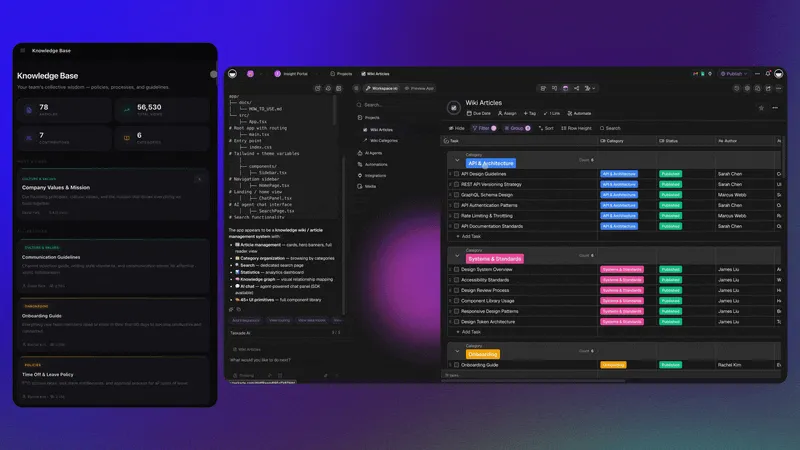
| Aspect | Static Upload | Living Knowledge |
|---|---|---|
| Data freshness | Snapshot that degrades within days | Updates automatically as work happens |
| Agent context | Limited to uploaded documents | Draws from live projects, workflows, and interactions |
| Maintenance | Manual re-uploads on a schedule | Zero maintenance — knowledge stays current by design |
| Scaling | More files = slower retrieval, more noise | More activity = deeper intelligence, stronger connections |
| Intelligence growth | Flat — agent never improves after upload | Compounding — every cycle makes the agent sharper |
Why Static RAG and Custom Instructions Fall Short
Static RAG (Retrieval-Augmented Generation) and custom instructions are the two most common approaches to "training" AI agents today. Both fail for the same fundamental reason: they treat knowledge as a snapshot, not a stream.
Static RAG limitations:
- Documents are chunked and embedded once — stale within days
- Retrieval scores degrade as the corpus grows without pruning
- No mechanism for the agent to learn which answers were useful
- Context windows are wasted on irrelevant chunks from outdated documents
Custom instructions limitations:
- Character limits force brutal compression of business context
- No connection to live data — every update requires manual editing
- No memory of past conversations or resolved edge cases
- Cannot execute actions — instructions only shape responses, not behavior
| Approach | Data Freshness | Action Capability | Learning Loop | Setup Effort | Cost |
|---|---|---|---|---|---|
| ChatGPT Custom GPTs | Static uploads | None — chat only | None | Low | $20/mo per user |
| Static RAG (LangChain/LlamaIndex) | Periodic re-indexing | Limited API calls | Manual | High (dev required) | Variable |
| Custom Instructions | Manual text updates | None | None | Minimal | Included in sub |
| Taskade Genesis | Live workspace sync | built-in tools + automations | Automatic compounding | No-code setup | Free to $25/mo |
For a deeper comparison of agent-building approaches, see our guide on what vibe coding means and how it changes the build-versus-buy equation.
The Taskade Genesis Way: Living Knowledge Systems

Taskade Genesis cultivates living knowledge systems that grow as your work grows. Think of it less like uploading a book into a chatbot, and more like planting a tree in a garden.
- Every form submission is sunlight.
- Every workflow is soil.
- Every interaction is rain.
Agents don't sit on a static archive. They live in your workspace, absorbing every drop and carrying it forward. That's the difference between chatbots and Taskade Genesis: one forgets, the other evolves.
This architecture is what we call Workspace DNA — the self-reinforcing loop where Memory (projects and databases) feeds Intelligence (AI agents), Intelligence triggers Execution (automations), and Execution creates new Memory. Every cycle compounds.
How Biological Learning Actually Works
The distinction between document dumping and living knowledge has a deep scientific basis.
In 1949, psychologist Donald Hebb proposed a rule that became the foundation of biological learning: neurons that fire together wire together. When two neurons are active simultaneously during an experience, the connection between them strengthens. This Hebbian learning is how the brain forms associations — not by storing files, but by strengthening pathways through repeated use.
Neuroscience has since confirmed that memories are stored as engrams — small ensembles of neurons selected through an excitability competition. The neurons that are most ready to fire at the moment of learning win the competition and get recruited into the memory trace. Crucially, this excitability fluctuates over time in windows of several hours.
This has a profound implication: timing matters. When two experiences happen within the same excitability window, they recruit overlapping neurons and become automatically linked. Separate them by more than 24 hours, and they form independent, non-overlapping traces.
Living knowledge systems mirror this biology:
- Hebbian learning = connections strengthen through use, not through manual uploads. The more your agents interact with specific workflows, the stronger those knowledge pathways become.
- Excitability windows = timing matters for knowledge connection. Information that flows through the system together gets linked together — just as neurons that fire together wire together.
- Continuous encoding = the brain doesn't batch-process memories in weekly uploads. It encodes continuously, in real time, as experiences happen. Living knowledge does the same.
This is why static document dumps fail. They bypass the compounding mechanism entirely. Real learning requires continuous exposure, association through use, and the time to let connections strengthen.
The Neuroscience-to-Workspace Mapping
| Biological Principle | Static Upload Equivalent | Living Knowledge Equivalent |
|---|---|---|
| Hebbian learning | One-time file index | Repeated agent-workflow interactions |
| Engram formation | Document chunk storage | Context crystallized through project activity |
| Excitability windows | No timing mechanism | Real-time data flow links related information |
| Synaptic pruning | Manual deletion | Automated relevance scoring and archival |
| Long-term potentiation | N/A — no reinforcement | Every successful interaction strengthens the pathway |
Knowledge That Compounds: Agent Specialization
Growth doesn't come from throwing more files at a chatbot.
Growth comes from knowledge that compounds.
- A Sales Agent learns which deals close, which stall, and why — then adjusts outreach strategies based on historical win rates.
- A Support Agent evolves with every resolved ticket, every customer conversation — building a knowledge base that handles 90% of inquiries without human intervention.
- A Growth Agent experiments, learns what worked, and adjusts the next run — turning A/B test results into actionable insights.
- A Research Agent monitors industry trends, competitor moves, and regulatory changes — surfacing relevant updates before your team asks.
This is how intelligence compounds, every cycle sharper than the last. Browse our agent templates to see dozens of specialized agents ready to clone and customize for your business.
| Agent Type | Week 1 Capability | Week 4 Capability | Week 12 Capability |
|---|---|---|---|
| Sales Agent | Answers basic product questions | Recommends next steps based on deal stage | Predicts close probability and suggests winning strategies |
| Support Agent | Routes tickets by category | Resolves common issues autonomously | Handles edge cases and proactively suggests product improvements |
| Growth Agent | Runs basic experiments | Identifies winning channels and messages | Designs and executes multi-channel campaigns with budget optimization |
| Research Agent | Summarizes uploaded reports | Monitors live feeds and flags relevant updates | Produces competitive intelligence briefings with trend analysis |
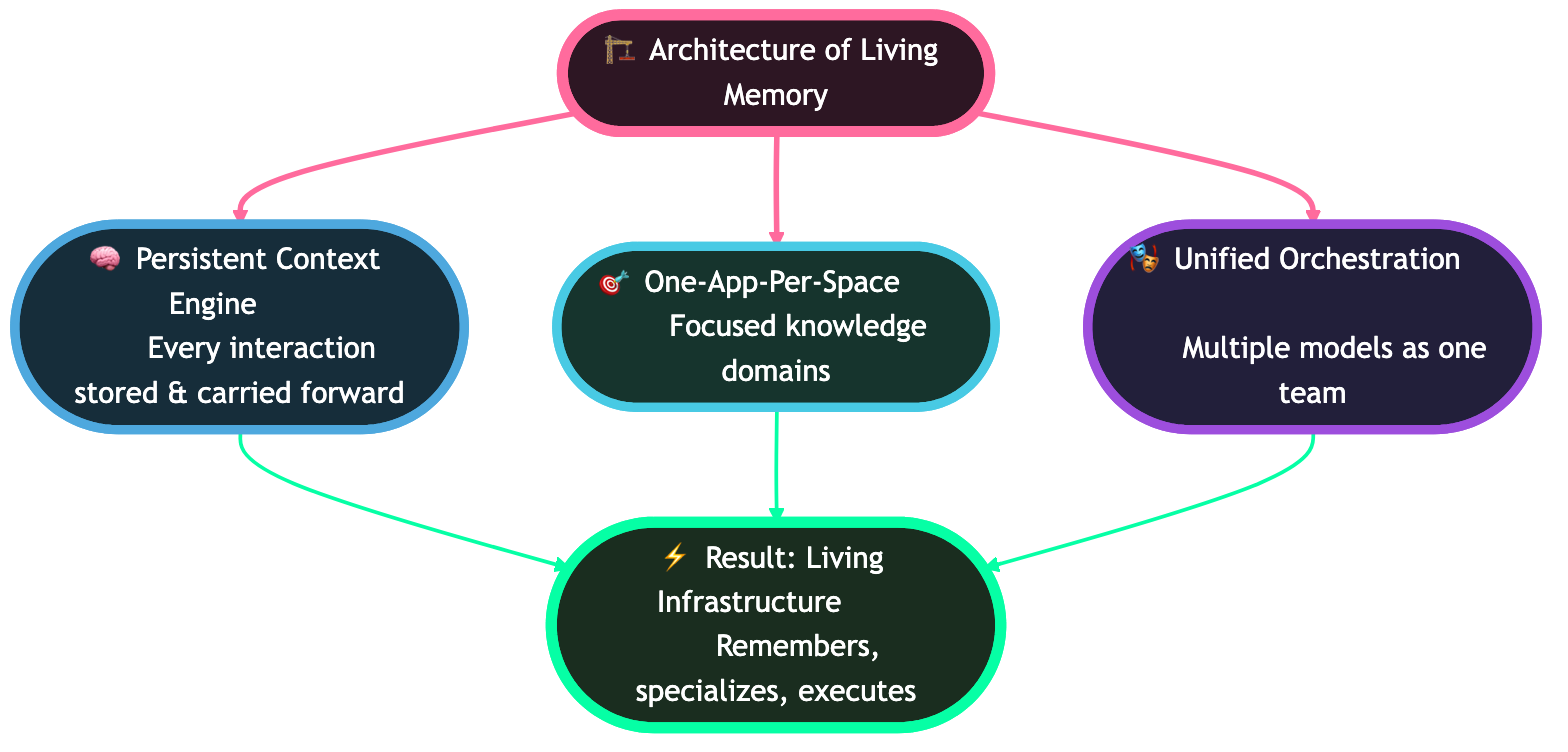
Architecture of Living Memory
So, what's the recipe for effective agent training?
The secret is structural.
- Persistent Context Engine → Every interaction is stored and carried forward, not forgotten. Learn how to set this up in our agent knowledge guide.
- One-App-Per-Space → Each Space is a focused knowledge domain. This isolation prevents context pollution across business functions.
- Unified Orchestration → Multiple models and tools coordinate as a single team of agents. Taskade supports frontier models from top AI labs.
The result is not a parlor trick. It's infrastructure. A system that remembers, specializes, and executes.
Two recent capabilities make this architecture dramatically more powerful:
Custom agent tools. Any automation workflow can be exposed as a tool that your agent invokes during conversations. Your Sales Agent doesn't just know about leads. It can check their Shopify order history, update their HubSpot record, and trigger a Slack notification, all from a single conversational exchange. The automation is the agent's hands. Configure custom tools in the automation triggers guide.
Background agents. On Pro plans ($10/mo) and above, agents run autonomously. They process new form submissions, monitor project changes, and execute workflows while you sleep. Knowledge doesn't just compound when you're using it. It compounds around the clock.
Workflows, Not Demos
The difference between chatbots and Taskade Genesis lies in how knowledge flows through the system.
- A Customer Portal App collects tickets and feedback that directly strengthen your Support Agent. Build one with the Genesis app builder.
- An Investor Dashboard feeds live metrics and Q&A into your Fundraising Agent. See dashboard examples.
- A CRM Dashboard teaches your Sales Agent which pitches convert. Connect it to your existing tools via 100+ integrations.
- A Growth Command Center runs experiments, tracks outcomes, and passes the lessons forward. Automate the entire loop with workflow automations.
We call this work engineering — designing systems where every action feeds intelligence, and every intelligence triggers action.
Living Knowledge vs. Traditional Knowledge Management
| Dimension | Traditional KM (Confluence, SharePoint) | Living Knowledge (Taskade Genesis) |
|---|---|---|
| Update mechanism | Manual wiki edits on a schedule | Automatic from workspace activity |
| Knowledge format | Static pages and documents | Structured projects, databases, and agent memory |
| Action capability | Read-only reference | Agents execute workflows from knowledge |
| Cross-domain linking | Manual hyperlinks | Automatic association through Workspace DNA |
| Learning loop | None — knowledge sits until someone updates it | Continuous — every interaction strengthens context |
| Access control | Folder-based permissions | Role-based access (Owner to Viewer) |
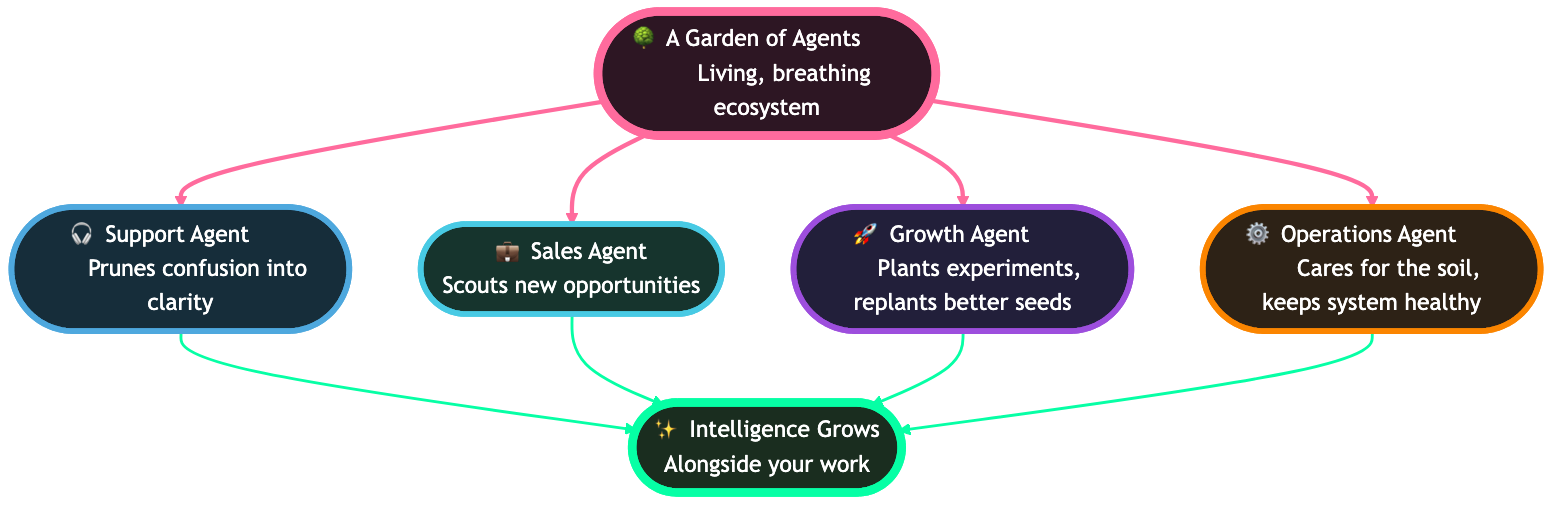
A Garden of Agents
Imagine your workspace as a garden, and your agents as its caretakers.
- The Support Agent prunes confusion into clarity.
- The Sales Agent scouts new paths and brings back opportunities.
- The Growth Agent plants experiments, measures what grows, and replants with better seeds.
- The Operations Agent cares for the soil, keeping the system healthy.
This is a living, breathing ecosystem where intelligence grows alongside your work. Explore what others have built in the Community Gallery.
From Knowledge to Execution
Knowledge without execution is trivia. Execution without knowledge is chaos.
Taskade Genesis closes the loop:
- Collect knowledge through Genesis Apps.
- Feed it into persistent agent memory.
- Let agents execute with living context via automations.
- Watch the system grow stronger with every cycle.
Each loop compounds. Each loop creates deeper intelligence. This is the Workspace DNA loop — Memory feeds Intelligence, Intelligence triggers Execution, Execution creates Memory.
Step-by-Step: Train Your First Agent
Here's how to build a living knowledge system in 10 minutes:
The 10-minute build is a living loop: a knowledge project feeds an agent, the agent powers an app, connected workflows pour new data back in, and context compounds.
1. Create a Knowledge Project
Start with a Taskade project containing your core documents, SOPs, or past work. This becomes your agent's foundational memory. Use any of the project views — List, Board, Calendar, Table, Mind Map, Gantt, or Org Chart — to organize your knowledge.
2. Build a Custom Agent
Navigate to AI Agents and create a new agent. Connect it to your knowledge project. Your agent now has context about your work. Configure with built-in tools and custom slash commands.
3. Deploy a Genesis App
Use a prompt like: "Build a customer FAQ portal powered by my knowledge base." Taskade Genesis creates the interface while your agent handles the intelligence. Need more prompt ideas? Browse our prompt templates for dozens of agent-ready starting points.
4. Connect Workflows
Add automations that feed new data back into your agent:
- Form submissions → Agent learns from customer questions
- Resolved tickets → Agent learns successful answers
- Meeting notes → Agent learns team decisions
- Integration triggers → External data flows into agent context
5. Watch It Compound
Every interaction makes your agent smarter. What starts as a simple FAQ becomes an expert system that knows your business better each week.
| Week | Agent Capability |
|---|---|
| Week 1 | Answers basic questions from uploaded docs |
| Week 4 | Handles edge cases from customer interactions |
| Week 8 | Proactively suggests improvements based on patterns |
| Week 12 | Operates as a domain expert trained on your specific context |
This is how you build AI agents that actually work.
Building Living Knowledge at Scale: Real Patterns
Here are three proven patterns teams use to build living knowledge systems with Taskade Genesis:
Pattern 1: The Customer Intelligence Loop
A SaaS company sets up a Support Agent connected to their ticket database. Every resolved ticket becomes training data. The agent learns which solutions work, which require escalation, and which indicate product gaps. After 8 weeks, the agent resolves 85% of Tier 1 tickets autonomously, and the product team receives weekly insight reports generated from ticket patterns.
Pattern 2: The Sales Enablement Garden
A B2B sales team creates a Sales Agent that connects to their CRM pipeline via Taskade integrations. The agent learns from won and lost deals — absorbing call notes, proposal feedback, and competitor mentions. Within a month, it generates personalized outreach drafts that reference specific pain points from similar companies, improving reply rates by 40%.
Pattern 3: The Knowledge Compounding Engine
A consulting firm builds a Research Agent that monitors industry publications, client deliverables, and internal case studies. Each project's lessons are automatically indexed into the agent's memory. New consultants query the agent for relevant precedents, turning decades of institutional knowledge into an accessible, always-current resource.
| Pattern | Primary Agent | Data Sources | Automation Trigger | Compounding Metric |
|---|---|---|---|---|
| Customer Intelligence | Support Agent | Tickets, feedback, product logs | Ticket resolved | Resolution rate |
| Sales Enablement | Sales Agent | CRM, call notes, proposals | Deal stage change | Win rate improvement |
| Knowledge Compounding | Research Agent | Publications, deliverables, case studies | New content published | Query accuracy over time |
Taskade Genesis vs. Other Agent Training Approaches
How does Taskade Genesis compare to the alternatives for building agents with persistent, evolving knowledge?
| Capability | Taskade Genesis | ChatGPT Custom GPTs | LangChain + RAG | Microsoft Copilot | Zapier AI |
|---|---|---|---|---|---|
| Live data sync | Automatic from workspace | Manual upload only | Manual re-indexing | M365 integration only | Trigger-based |
| Agent tools | built-in + custom | Code interpreter + DALL-E | Custom via API | M365 actions | Zap actions |
| Multi-agent | Native multi-agent teams | Single GPT per chat | Custom orchestration | Single copilot | No |
| Persistent memory | Workspace DNA | Conversation-only | External DB required | M365 data | No |
| No-code setup | Full no-code | Full no-code | Requires Python | Low-code | Low-code |
| Automation | 100+ integrations built-in | None | Custom API calls | Power Automate | 6,000+ apps |
| Custom domains | Yes — publish apps | No | Self-hosted only | No | No |
| Starting price | Free | $20/mo per user | Free (infra costs) | $30/mo per user | $20/mo |
For detailed alternatives comparisons, see our guides on Bolt alternatives, Cursor alternatives, and the ultimate Taskade Genesis guide.
Why This Matters
The AI industry is obsessed with the wrong metrics.
Every few months, we're told the next model will be "10x smarter" and "unlock" capabilities we couldn't access before. Companies debate which frontier model has the best reasoning scores.
But here's what no one wants to admit:
The next leap in AI isn't bigger models or flashier prompts.
It's systems that think, learn, and execute with humans.
That's what Taskade Genesis delivers: execution intelligence that grows with your company. With 150,000+ apps already built on the platform and pricing starting at $0, the barrier to building living knowledge systems has never been lower.
Stop Uploading PDFs. Start Building Systems.
The future of AI training isn't about dumping documents into a chatbot.
It's about cultivating living systems that learn with you, grow with you, and execute for you.
That's how you stop worshipping prompts, and start building workflows.
Start Growing with Taskade Genesis →
Read more: Stop Worshipping Prompts. Start Building Workflows | What Are AI Agents? | What Is Vibe Coding? | How Workspace DNA Works
Explore Taskade AI:
- AI App Builder - Build complete apps from one prompt
- AI Dashboard Builder - Generate dashboards instantly
- AI Workflow Automation - Automate any business process
- Browse Agent Templates - AI agents for every use case
- Browse Prompt Templates - Prompt ideas for every workflow
- Explore Community Apps - Clone and customize
- View All Integrations - 100+ connections
- Pricing Plans - Free to Business
Learn more:
- Custom Agents Guide - Build your first agent
- Automation Triggers - Connect data flows
- Custom Domains - Publish apps on your domain

Frequently Asked Questions
Why does uploading PDFs to a custom GPT stop working after a few days?
Static document uploads create a snapshot of knowledge that degrades over time. The information becomes stale as your business evolves, the AI lacks context about recent changes, and the retrieval system cannot distinguish between outdated and current information. This is the upload trap — document dumping feels productive but produces agents that are perpetually behind.
What is a living knowledge system for AI agents?
A living knowledge system connects AI agents to dynamic data sources — project databases, form submissions, workflow outputs, real-time collaboration — so the agent's knowledge updates automatically as work happens. Instead of periodic manual uploads, the agent learns continuously from the same workspace where your team operates.
How do I keep AI agent knowledge fresh without constant retraining?
Connect agents to live data sources rather than static uploads. In Taskade, agents draw knowledge from the same projects and databases your team actively uses. Every update, comment, or workflow output automatically becomes part of the agent's context. This eliminates the retraining cycle entirely.
How does biological learning explain why living knowledge systems work?
Biological learning follows Hebbian principles: neurons that fire together wire together. Connections strengthen through repeated co-activation, not bulk uploads. Memories are stored as engrams — sparse neuron ensembles selected through excitability competition. Living knowledge systems mirror this biology — connections strengthen through use, and encoding happens continuously rather than in batch uploads.
What is the difference between document dumping and knowledge gardening for AI?
Document dumping is uploading everything and hoping the AI figures it out. Knowledge gardening is intentionally cultivating what the agent knows — organizing by topic, connecting to live data flows, pruning outdated content, and designing feedback loops where agent interactions generate new knowledge. Gardening compounds over time while dumping degrades.
How does Taskade Genesis compare to ChatGPT custom instructions for agent training?
ChatGPT custom instructions are static text that must be manually updated and have a character limit. Taskade Genesis connects agents to live workspace data — projects, databases, automations, and 100+ integrations — so knowledge updates automatically. Genesis agents also execute workflows, not just answer questions.
Can AI agents learn from automation workflows?
Yes. In Taskade, any automation workflow can be exposed as a custom tool that agents invoke during conversations. A Sales Agent can check Shopify order history, update HubSpot records, and trigger Slack notifications from a single exchange. The automation becomes the agent's hands, and every execution adds to the agent's contextual knowledge.
What is the best way to train AI agents for business use in 2026?
Build a living knowledge system with three layers: persistent context (projects and databases as foundational memory), intelligent agents (built-in tools, custom slash commands, persistent memory), and automated workflows (100+ integrations feeding data back into agents). Taskade Genesis provides all three layers in a single workspace starting at $0 for the free tier.
How long does it take for a living knowledge agent to become useful?
Most teams see meaningful results within 1-2 weeks. Week 1 covers basic questions from uploaded docs. By week 4, agents handle edge cases from customer interactions. By week 8-12, agents proactively suggest improvements based on patterns. The key difference from static systems is that accuracy improves continuously without manual intervention.
What is Workspace DNA and how does it relate to agent training?
Workspace DNA is Taskade's architecture built on three pillars: Memory (projects and databases), Intelligence (AI agents), and Execution (automations). Together, they create a self-reinforcing loop where every workflow execution creates new memory, memory feeds agent intelligence, and intelligence triggers new executions. This loop is what makes agent knowledge compound automatically.