







Tony Buzan called mind maps the "ultimate organizational tool for the brain," and he might have been on to something. Multiple studies have shown that mind mapping can enhance memory, improve problem-solving, and boost creativity. In 2026, AI takes mind mapping further by generating, expanding, and reorganizing branches automatically.
This guide covers 10 free mind map templates you can use today, plus a comparison of AI mind mapping tools including Taskade, Miro, Whimsical, and MindMeister.
TL;DR: Taskade offers 10+ free mind map templates with AI-powered branch generation, multiple switchable project views (List, Board, Calendar, Table, Mind Map, Gantt, Org Chart), and custom AI agents that build out mind maps automatically. Generate entire mind maps from a single prompt. Starting free, with Pro at $10/month for teams. Try AI mind mapping free -->
What Are the Benefits of Using a Mind Map Template?
When Buzan advocated the use of mind maps in the 1980s, he based his arguments on the right brain/left brain theory proposed by neuropsychologist Roger Sperry. While Sperry's theory has since been debunked(1), there is still a ton of scientific evidence that supports mind mapping.
A 2002 study among 50 medical students found that using the mind mapping technique improved recall of factual information.(2) Other studies revealed improvements in critical thinking(3) and information retrieval(4), making mind mapping a versatile and powerful tool.
The only problem? Traditional (pen and paper) mind mapping has pesky limitations. It is time-consuming, gives you limited creative real estate, and makes it nearly impossible to rearrange branches once they are on the page.
A digital mind map template removes those limitations and adds several advantages:
| Benefit | Traditional Mind Map | Digital Mind Map Template | AI-Powered Mind Map (Taskade) |
|---|---|---|---|
| Setup time | 15-30 minutes | 2-5 minutes | Seconds (AI generates) |
| Flexibility | Limited (ink is permanent) | Drag-and-drop editing | AI restructures automatically |
| Collaboration | In-person only | Real-time sharing | Real-time + AI agent assistance |
| Views | Mind map only | Mind map + export | multiple views: List, Board, Calendar, Table, Mind Map, Gantt, Org Chart |
| Expansion | Manual brainstorming | Manual + copy-paste | AI generates branches from prompts |
AI Mind Mapping: Taskade vs Miro vs Whimsical vs MindMeister
Before we dive into templates, here is how the leading mind mapping tools compare on the features that matter most in 2026.
Feature Comparison
| Feature | Taskade | Miro | Whimsical | MindMeister |
|---|---|---|---|---|
| AI mind map generation | Full maps from prompts | Basic AI assist | Sticky note AI | None |
| AI branch expansion | /expand command + agents | Miro AI (beta) | Limited | None |
| Custom AI agents | Unlimited, built-in tools | None | None | None |
| Project views | multiple views | Canvas only | Boards, docs, wireframes | Mind map only |
| Real-time collaboration | Chat, video, AI | Cursors, comments | Cursors, comments | Comments |
| Automations | 100+ integrations | Limited | None | None |
| App building | Genesis apps from prompts | None | None | None |
| Free plan | Unlimited mind maps | 3 boards | 3 whiteboards | 3 maps |
| Paid plan | $10/mo (Pro) | $8/member/mo | $10/member/mo | $6.99/mo |
Best For
| Tool | Best For | Limitation |
|---|---|---|
| Taskade | AI-native mind mapping + project management | Fewer visual design tools than Miro |
| Miro | Visual collaboration with large teams | No AI agents, no project views |
| Whimsical | Quick wireframes and flowcharts | No AI generation, limited free plan |
| MindMeister | Dedicated mind mapping with presentation mode | No AI features, no project management |
10 Free Mind Map Templates
All templates below are free to use and fully customizable. Each one works across multiple project views in Taskade.
1. Brainstorm New Ideas Template
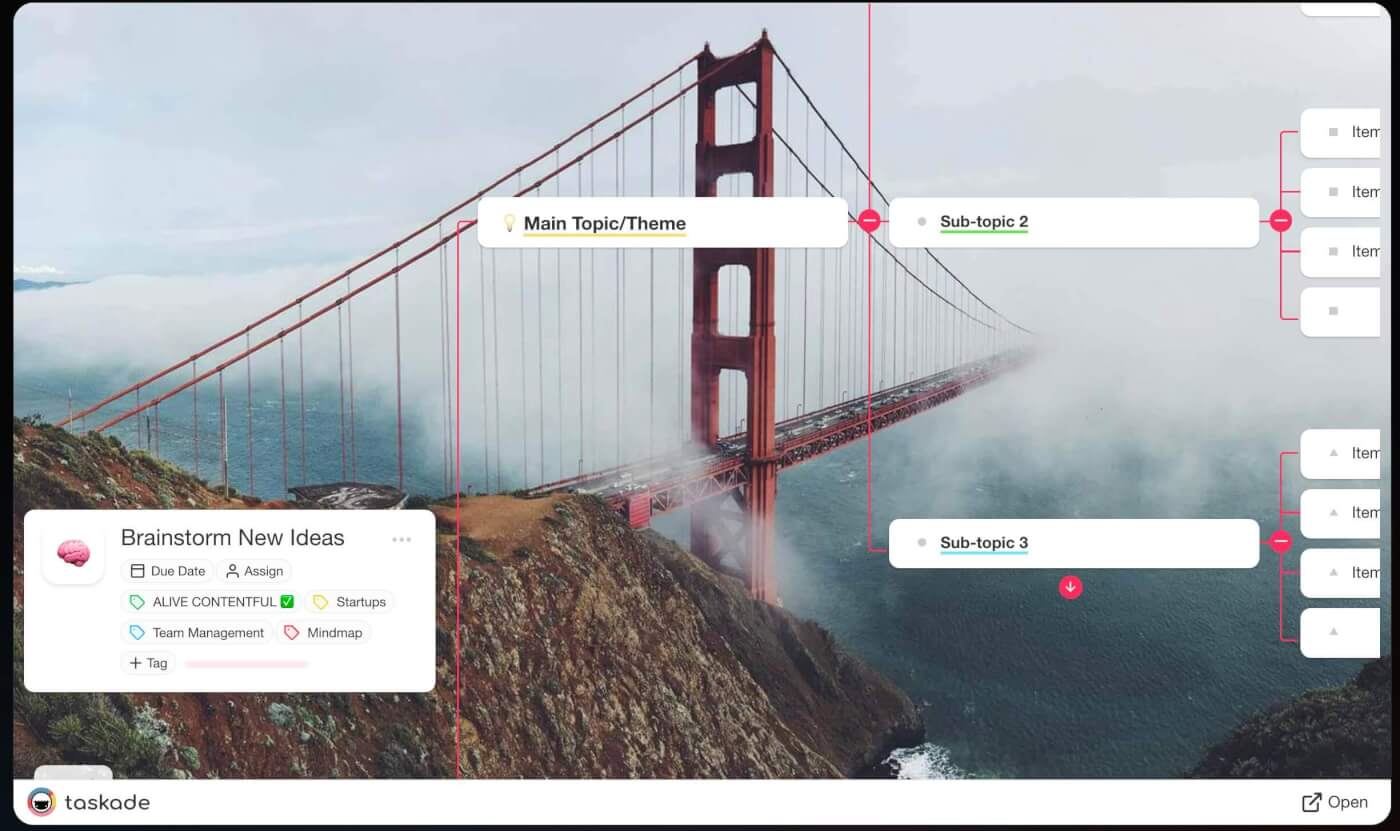
Are you tired of staring at a blank page and waiting for inspiration to strike? This template is the Swiss Army knife of brainstorming designed to help you generate, organize, and refine your ideas.
The template is divided into sections including tips and instructions as well as a set of questions (who, when, why, how, where) that help you flesh out ideas. Whether you are a creative, business owner, educator, or fall somewhere in between, this template is for you.
2. Minimalist Mind Map Template
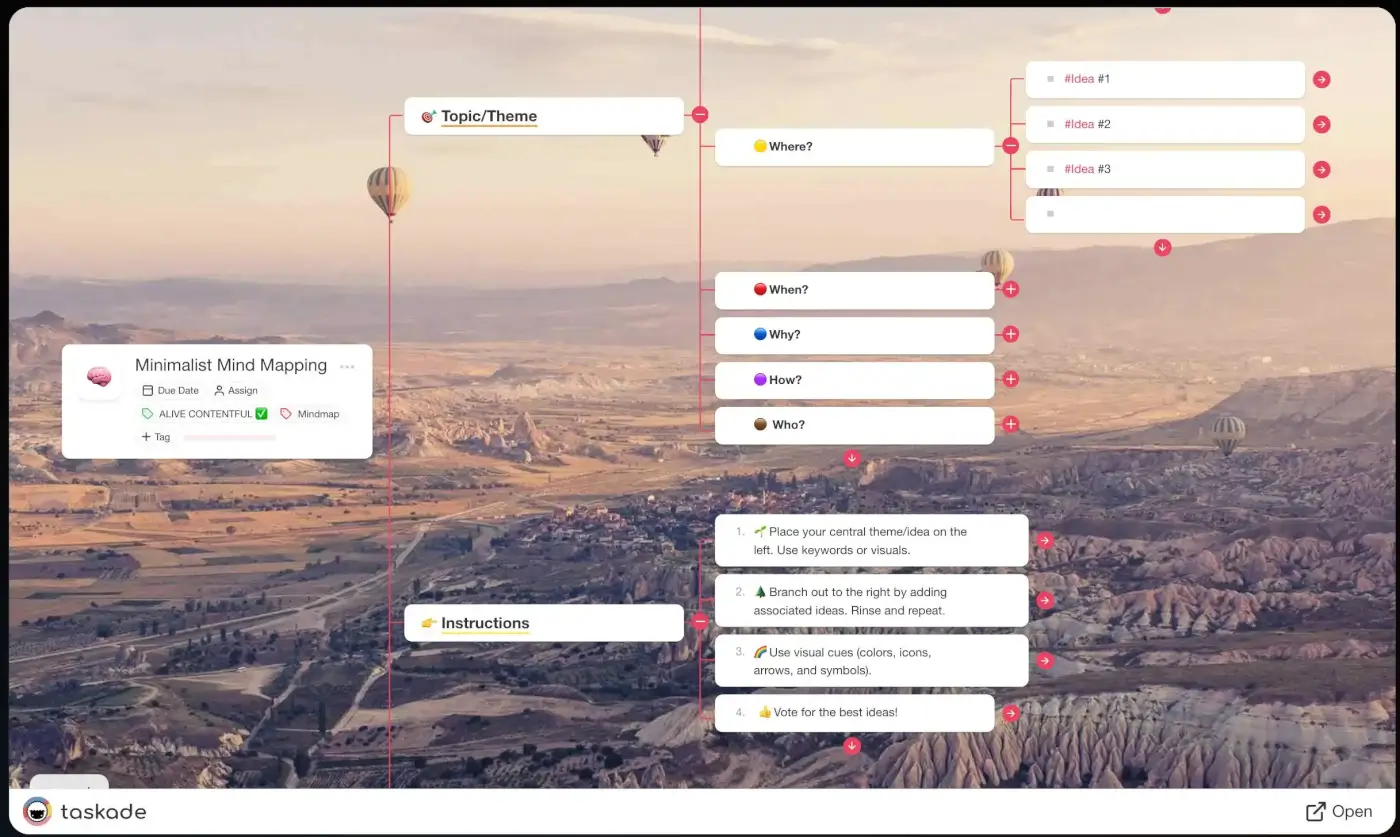
The 1929 Nobel Prize laureate Thomas Mann said: "Order and simplification are the first steps toward the mastery of a subject." If you want to keep your creative process effective AND organized, this template is for you.
Minimalist mind mapping blends uninhibited idea generation and structured thinking so you do not get overwhelmed or lose track of best ideas. The template features four areas of focus with customizable nodes for adding or removing elements.
3. Daily Stand-Up Meeting Template
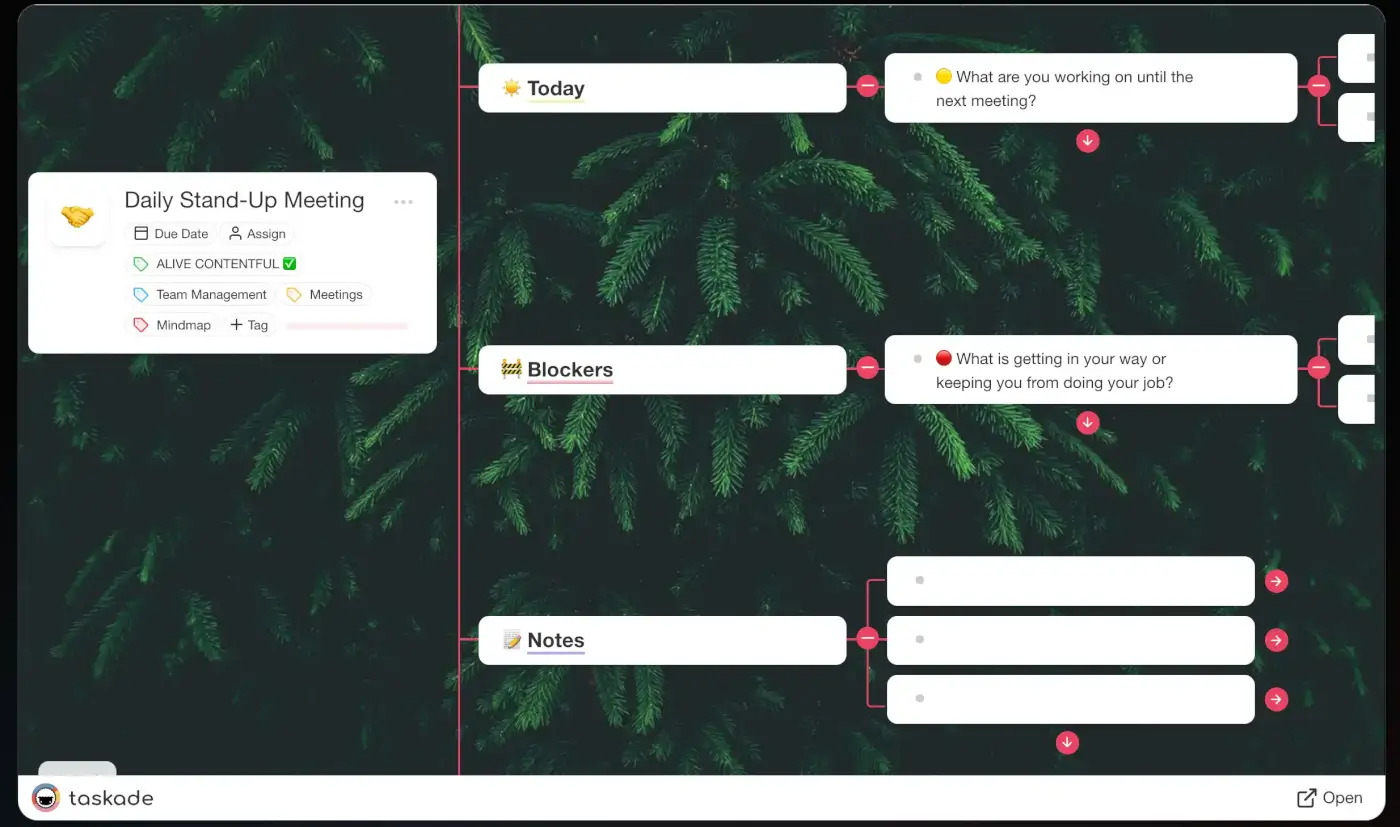
This daily standup meeting template provides a structured way to hold quick daily meetings with your team. The mind map workflow for daily stand-ups has two key benefits: it is easier to process in the limited time window than walls of text, and it provides a color-coded visual hierarchy of completed items, blockers, and plans for the next day.
This template is commonly used in Agile project management but works for any team including sales, marketing, and customer service.
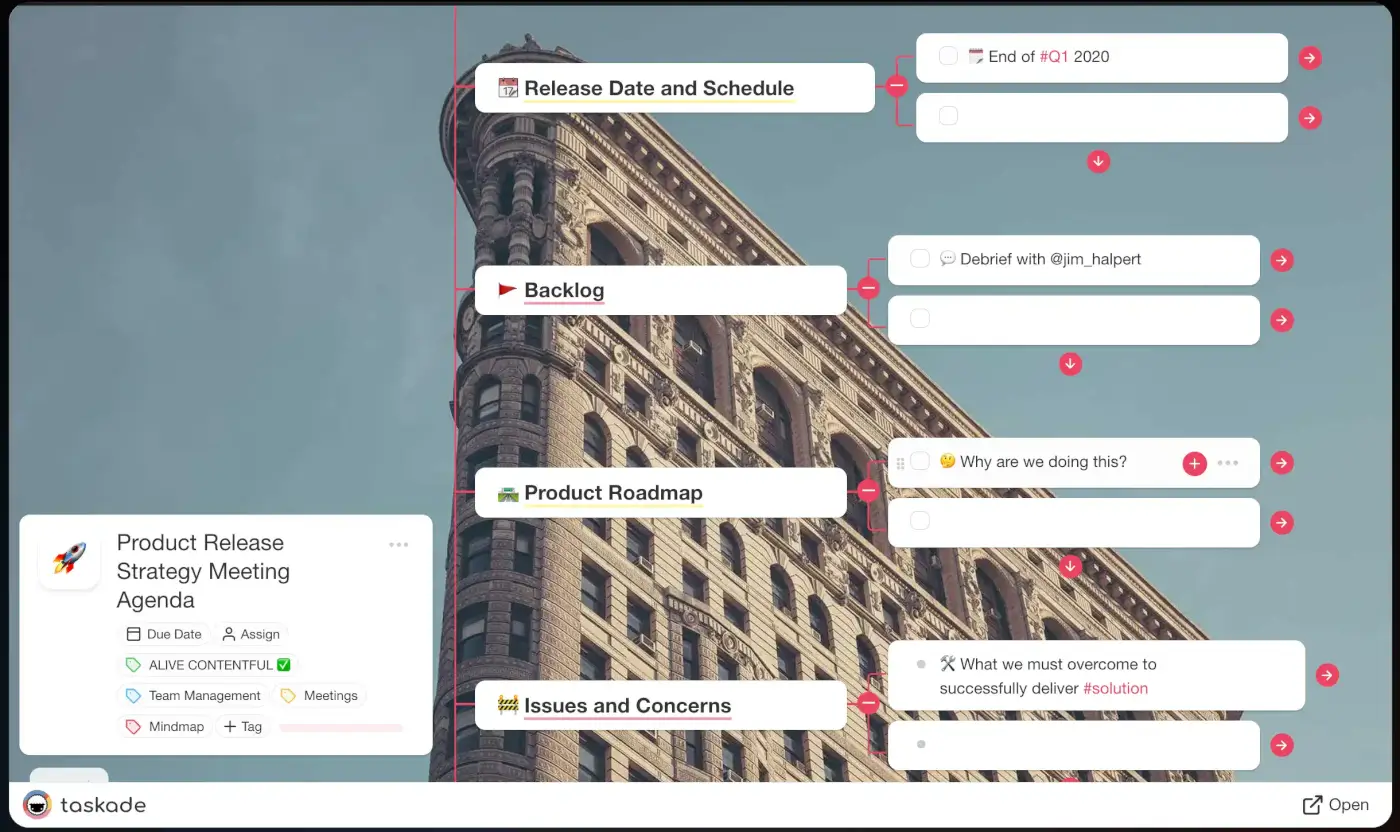
4. Product Release Strategy Meeting Agenda
Launching a product is like running a marathon. This template includes everything you need to present your product release strategy in an easily digestible format and present it when meeting stakeholders before the big day.
Use it for pricing strategy discussions, distribution channel decisions, success metrics, and launch timelines. Works for product development teams and solopreneurs alike.
5. Issue Tree Map
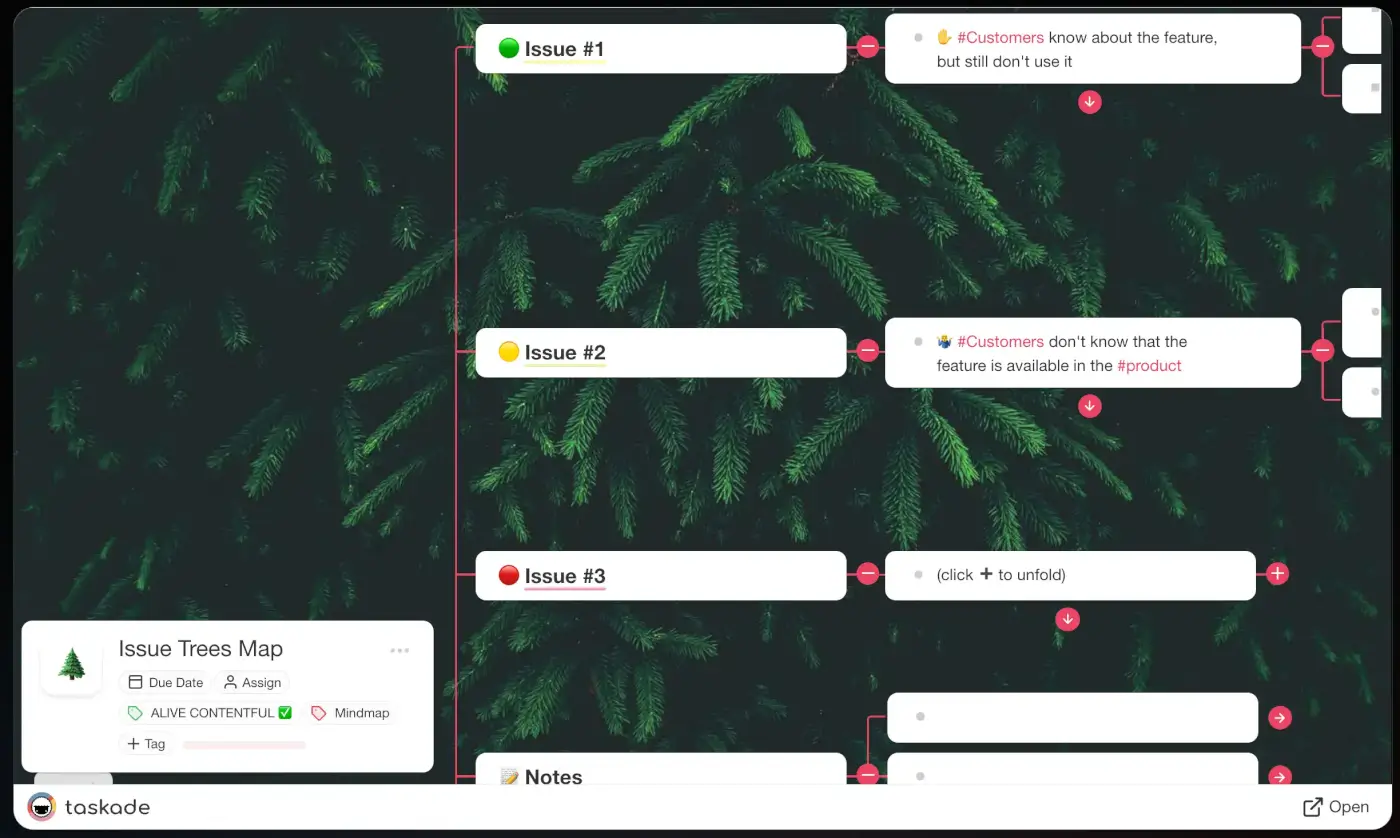
An issue tree map (also called a problem tree or logic tree) is a structured approach to breaking down a problem into smaller, more manageable components. Add your issues to the project and start branching out to the right to decompose the problem into actionable pieces.
This template uses Taskade's mind map workflow to help you find solutions to all kinds of problems, from business strategy to operational bottlenecks.
6. Risk Management Assessment Mapping
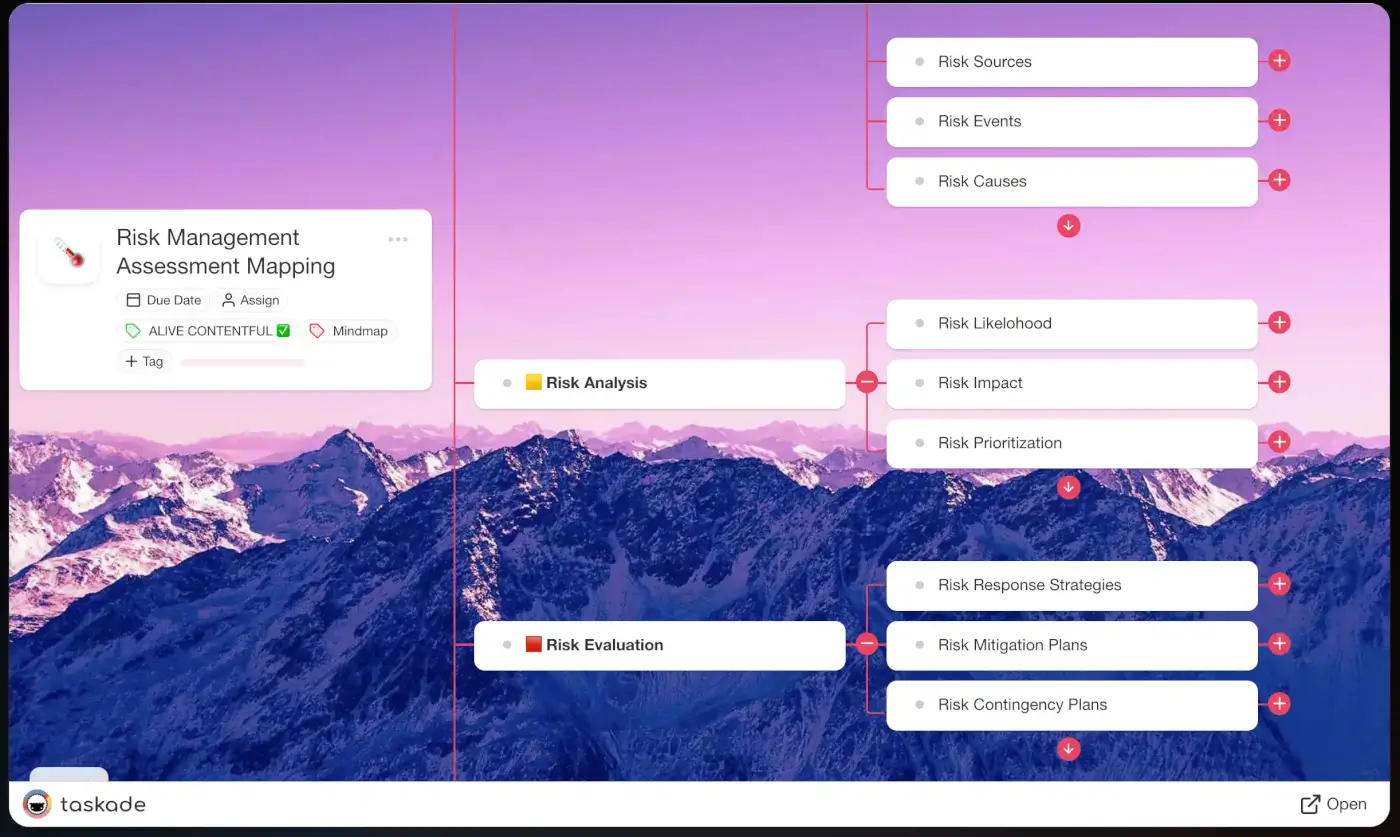
This template helps you and your team identify, analyze, and manage risk in both business and personal contexts. If you are a project manager, you can identify and manage risks like budget overruns and resource constraints.
The template packs customizable sections so you can tailor it to your project. Collaborate in real-time with stakeholders directly inside the mind map.
7. Product Development Decision Tree
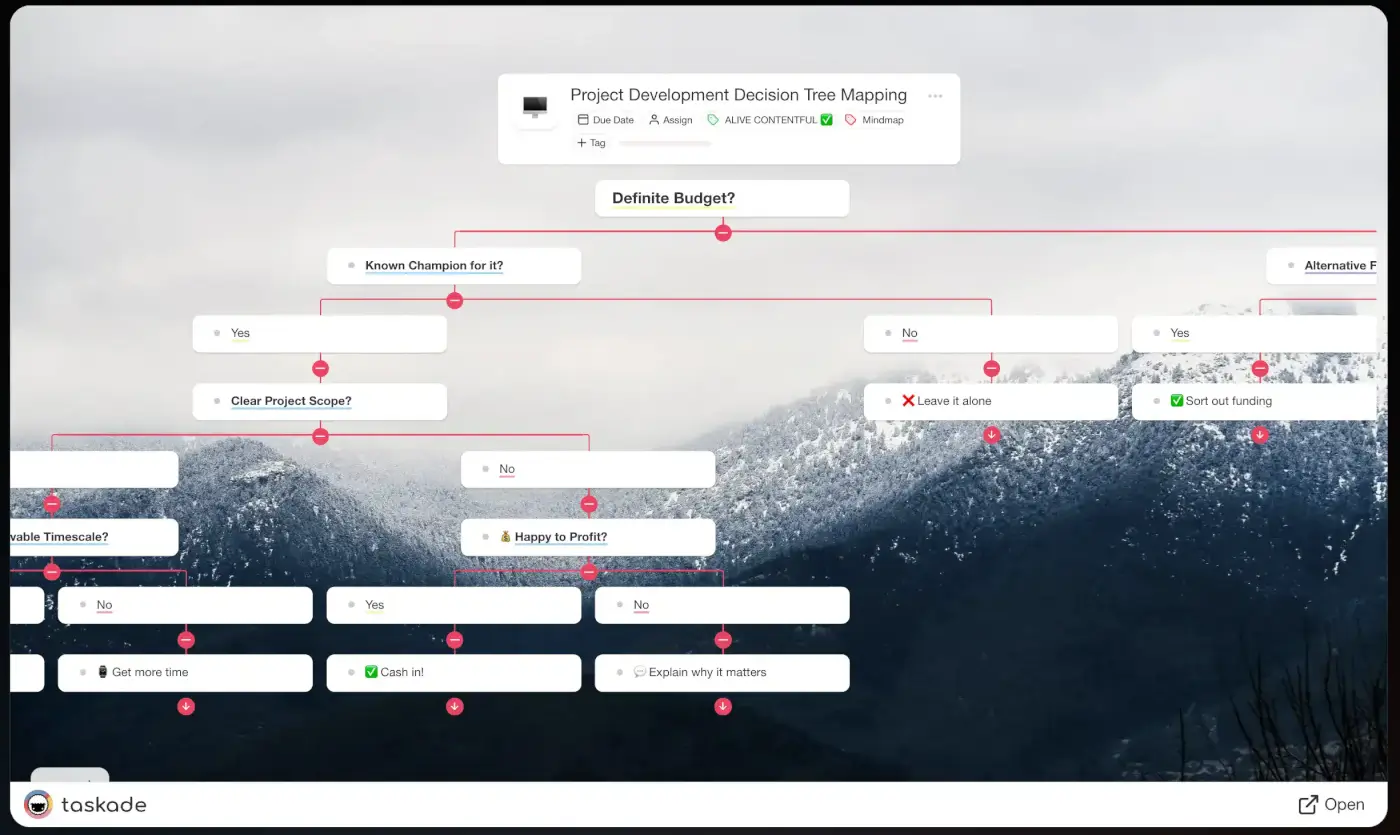
According to Professor Clayton Christensen from Harvard, almost 95% of products launched each year fail. Poor market research, lack of innovation, and half-hearted execution are common culprits. Use this decision tree template to evaluate product ideas systematically before committing resources.
8. SWOT Analysis Mind Map
Map your Strengths, Weaknesses, Opportunities, and Threats in a visual mind map format. This template helps teams conduct strategic analysis by branching each SWOT category into specific factors. Switch to Table view for a structured comparison or List view for action items.
9. Content Planning Mind Map
Plan your content strategy visually with branches for content types, channels, audiences, and publishing schedules. This template integrates with Taskade's content automation kits for teams that want to go from planning to execution in one workspace.
10. Project Scope Mind Map
Define project scope by mapping deliverables, milestones, dependencies, and stakeholders. Start in Mind Map view for brainstorming, then switch to Gantt view for timeline planning or Board view for task tracking.
AI Mind Map Generator: How It Works
Mind mapping is engaging, effective, and fun. But it can also be frustrating when you have been at it for hours and the ideas are not flowing. That is where Taskade AI comes in.
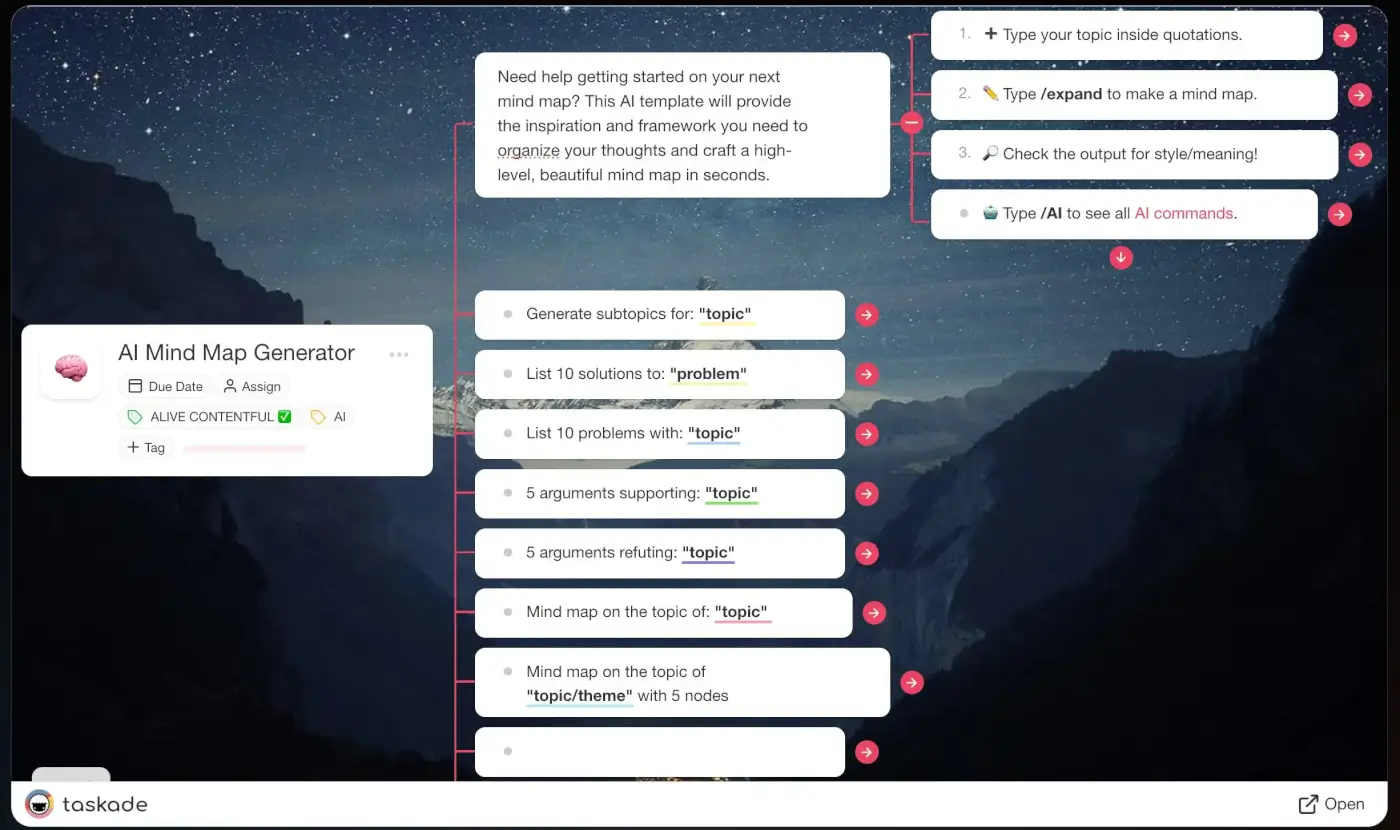
Taskade AI generates spanning mind maps based on natural-language prompts. Here is how it works:
- Type the topic of your mind map anywhere inside a Taskade project.
- Specify basic parameters like the number of branches or nodes.
- Type
/expand, press Enter, and let Taskade AI do the rest.
AI Generation vs Manual Creation
| Dimension | Manual Mind Mapping | AI-Powered Mind Mapping |
|---|---|---|
| Speed | 30-60 minutes for a detailed map | Seconds for a full structure |
| Coverage | Limited to your knowledge | AI suggests angles you might miss |
| Restructuring | Tedious drag-and-drop | AI reorganizes on command |
| Expansion | Think of each branch yourself | /expand generates sub-branches |
| Collaboration | Real-time co-editing | Real-time + AI agent assistance |
Using Custom AI Agents for Mind Mapping
Beyond the /expand command, you can build custom AI agents specifically for mind mapping workflows:
| Agent Type | What It Does | Use Case |
|---|---|---|
| Research Agent | Gathers data and generates branches from sources | Academic research, competitive analysis |
| Planning Agent | Creates project structures from descriptions | Sprint planning, event planning |
| Analysis Agent | Breaks down problems into issue trees | Root cause analysis, SWOT analysis |
| Content Agent | Maps content topics and outlines | Blog planning, course design |
Learn more about building agents in the custom AI agents guide.
How to Get the Most Out of Mind Map Templates
Best Practices
- Start with the central idea -- Keep it clear and specific. "Q3 Marketing Plan" is better than "Marketing."
- Use the template structure -- Do not reinvent the layout. Customize content, not structure.
- Let AI expand -- Type
/expandon any node to generate sub-branches automatically. - Switch views -- Use Mind Map for brainstorming, then switch to List for execution or Gantt for timelines.
- Collaborate -- Invite team members and brainstorm together in real time.
- Connect to automations -- Link your mind map project to automation flows to turn ideas into actions.
Mind Map to Action: The View-Switching Workflow
This is the power of Taskade's project views. A mind map is not an endpoint. It is the starting point for project execution, task management, and team coordination.
Parting Words
The technique of creating a visual hierarchy to aid intellectual work has been around for hundreds of years. In 2026, AI transforms mind mapping from a manual brainstorming exercise into a dynamic system for planning, decision-making, and project execution.
Whether you are a business owner, team manager, or student, mind mapping with AI should be a staple in your productivity toolbox. The templates in this guide give you a head start, and Taskade's AI features take you further than any whiteboard ever could.
Create a Taskade account and get started today with:
- An infinite digital space to develop your ideas
- Intuitive drag-and-drop workflow with multiple project views
- AI-powered branch generation and expansion
- Custom AI agents for automated mind mapping workflows
- Real-time collaboration and communication
- Workflow automations with 100+ integrations
- Full project customization with color-coded nodes
Want to learn more about mind mapping? Check our ultimate guide to mind mapping for extra tips.
Sign up to supercharge your mind maps with Taskade AI!
- Custom AI Agents: Set up AI agents to automatically build out mind mapping workflows.
- AI Generator: Generate mind maps from natural-language descriptions.
- AI Assistant: Speed up writing and guide topic exploration in the project editor.
- AI Prompt Templates Library: Explore prompt templates for personal and business use cases.
- AI Chat: Discuss and refine each node in your mind map with conversational AI feedback.
- Media Q&A: Use AI to analyze documents and resources for key mind mapping insights.
Related Resources
- 11 Best Mind Mapping Apps and Tools for Brainstorming -- Full tool comparison
- Mind Map: The Ultimate Guide to Mind Mapping -- Comprehensive techniques
- Mind Maps Use Cases and Examples -- Real-world applications
- 9 Best Mind Map Apps for Mac -- Mac-specific tools
- How to Build Your First AI Agent in 60 Seconds -- Agent setup guide
- Browse community mind map templates -- Ready-made templates

Resources
- https://healthcare.utah.edu/publicaffairs/news/2013/08/08-14-2013_brain_personality_traits.php
- https://pubmed.ncbi.nlm.nih.gov/12028392/
- https://www.ncbi.nlm.nih.gov/pmc/articles/PMC8188091/
- https://www.ncbi.nlm.nih.gov/pmc/articles/PMC5348998/
Frequently Asked Questions
Where can I find free mind map templates?
Taskade offers a library of free mind map templates for project planning, brainstorming, study notes, business strategy, and content planning. Each template is fully customizable and can be expanded with AI. Describe what you want to add and AI generates new branches and sub-topics automatically. No account upgrade is required for basic templates.
What are the best mind map templates for students?
The best mind map templates for students include study guides for organizing course material by topic, research paper outlines for structuring arguments and sources, exam preparation maps for connecting key concepts, and book summary templates for capturing main ideas and themes. Taskade templates support AI expansion so students can generate sub-topics and connections from their notes automatically.
How do I use a mind map template effectively?
Start by selecting a template that matches your goal such as brainstorming, planning, or studying. Replace the placeholder content with your own ideas. Expand branches that need more detail and remove irrelevant ones. Use color coding or icons to categorize items. With AI-powered templates like Taskade's, you can ask AI to expand any branch, suggest related concepts, or reorganize the structure.
Can mind map templates be used for project management?
Yes. Mind map templates are excellent for project management. They help visualize project scope, break work into tasks, identify dependencies, and assign responsibilities. In Taskade, you can switch a mind map into any of the project views including List, Board, Gantt, and Table to track progress, making templates a versatile starting point for any project.
What is the best AI mind mapping tool in 2026?
Taskade is the best AI mind mapping tool in 2026. It generates full mind maps from natural-language prompts, expands branches with AI, and lets you switch between multiple project views including Mind Map, List, Board, Calendar, Table, Gantt, and Org Chart. Custom AI agents can also build out mind mapping workflows automatically. Alternatives like Miro, Whimsical, and MindMeister offer mind mapping but lack AI-native generation and agent capabilities.
How does AI-powered mind mapping compare to traditional mind mapping?
Traditional mind mapping is manual, limited by physical space, and difficult to reorganize. AI-powered mind mapping in Taskade generates branches automatically from prompts, suggests connections you might miss, and lets you restructure entire maps instantly. AI mind maps also integrate with project management, automations, and collaboration features that pen-and-paper or basic digital tools cannot match.
Can I collaborate on mind maps in real time?
Yes. Taskade supports real-time collaboration on mind maps. Multiple team members can co-create diagrams, add comments, chat, and video conference with every edit syncing instantly. Miro and Whimsical also support real-time collaboration on visual boards, but Taskade adds AI agents and multiple switchable project views to the collaboration experience.
Which mind mapping tool is best for teams?
Taskade is the best mind mapping tool for teams in 2026. It combines real-time collaboration, AI-powered branch generation, multiple switchable project views, custom AI agents, and workflow automations, free to start, with Pro from $10 per month billed annually. Miro is a strong alternative for teams focused on visual design but costs $8 per member per month and lacks AI agents.
Can I convert a mind map into a task list or project plan?
Yes. In Taskade, every mind map can be instantly switched to List, Board, Calendar, Table, Gantt, or Org Chart view with one click. All nodes, branches, and sub-topics become actionable tasks that you can assign, schedule, and track. This makes mind maps a natural starting point for project planning.
How do Taskade mind maps compare to Miro and MindMeister?
Taskade offers AI-native mind mapping with prompt-based generation, agent tools, and multiple switchable project views starting for free. Miro is a visual collaboration platform at $8 per member per month with basic AI features but no custom agents. MindMeister specializes in mind mapping at $6.99 per month but lacks AI generation, project management views, and automation capabilities.