Looking for alternatives to Replit?
Replit revolutionized browser-based coding with built-in hosting and AI features. But it's not the only option.
Whether you need more powerful AI, better no-code capabilities, or a different approach entirely, this guide covers the best alternatives.
TL;DR: The best Replit alternative depends on whether you want to write code or skip it. For non-coders, Taskade Genesis turns one prompt into a live app — agents, database, and automations included — with 150,000+ apps already built. For pro developers, Cursor and GitHub Codespaces lead the IDE-first pack. Build your first app free →
June 2026 update: the frontier-model race jumped again — Anthropic shipped Claude Fable 5 on June 9, its most capable model yet (powerful but $10/$50 per million tokens, and locked to one vendor). The takeaway every launch reinforces: build on a platform that routes frontier models per task instead of locking you to one, so a better model next quarter is a setting, not a migration.
📊 Quick Comparison: Replit vs Alternatives
| Platform | Best For | Code Required | AI Features | Pricing |
|---|---|---|---|---|
| Taskade Genesis | No-code AI apps | ❌ No code | ✅ AI agents | Free / $10/mo |
| Replit | Browser coding | ✅ Yes | ✅ Agent 4 | $20/mo (annual) |
| Cursor | Local IDE | ✅ Yes | ✅ Codebase-aware | $20/mo |
| GitHub Codespaces | VS Code in browser | ✅ Yes | ✅ Copilot | $9+/mo |
| Lovable | Vibe coding | Minimal | ✅ Full gen | $25/mo |
| Bolt.new | Quick prototypes | Minimal | ✅ Full gen | $25/mo |
| Glitch | Social coding | ✅ Yes | Limited | Free / $10/mo |
🤔 Why Look for Replit Alternatives?
Replit is excellent for quick coding in the browser, but has some limitations:
| Limitation | Impact |
|---|---|
| Requires coding knowledge | Not accessible for non-developers |
| No built-in AI agents | Apps can't act autonomously |
| Limited free tier | Compute limits hit quickly |
| Resource-heavy projects | Performance can lag |
| Not true no-code | Still need to write/understand code |
If you want to build apps without coding, or need apps with built-in AI intelligence, there are better options.
🏆 The 7 Best Replit Alternatives in 2026
#1 Taskade Genesis ⭐ Best for No-Code AI Apps

Taskade Genesis takes a completely different approach.
Instead of an AI that helps you write code, Taskade Genesis builds complete apps from natural language. No coding required.
Key difference: Replit helps you code faster. Taskade Genesis eliminates the need to code entirely.
💡 Game Changer: With Taskade Genesis, describe your app in plain English. Get a working application with AI agents built-in. No deployment, no infrastructure setup, no coding required.
Taskade Genesis vs Replit:
| Feature | Replit | Taskade Genesis |
|---|---|---|
| Code required | ✅ Yes | ❌ No |
| AI assistance | Ghostwriter | Full app generation |
| Built-in AI agents | ❌ | ✅ Train on your data |
| Database | ✅ (separate) | ✅ Projects as databases |
| 100+ integrations | Limited | ✅ Native |
| Hosting | ✅ | ✅ One-click publish |
| Learning curve | Medium | Minimal |
What makes Taskade Genesis different:
When you prompt Replit's AI, you still need to understand and work with code. (For ready-made starting points, see our AI prompt templates.)
When you prompt Taskade Genesis, you get a complete working app powered by four interconnected layers (Workspace DNA):
- 🧠 Projects (Memory) — Built-in database from day one. No separate setup.
- 🤖 Agents (Intelligence) — AI chat trained on your data with persistent memory and custom slash commands.
- ⚡ Flows (Execution) — 100+ bidirectional integrations with schedule, webhook, form, and manual triggers; triggers pull events in, actions push data out.
- 🎨 App UI (Interface) — Published app with custom domains, built-in sign-in, and password protection.
These layers feed each other in a loop — the difference between a code editor that hands you files and a workspace that runs the finished system:
Replit gives you a coding environment. Taskade Genesis gives you the running system — databases, AI agents, automation, and a published app from a single prompt.
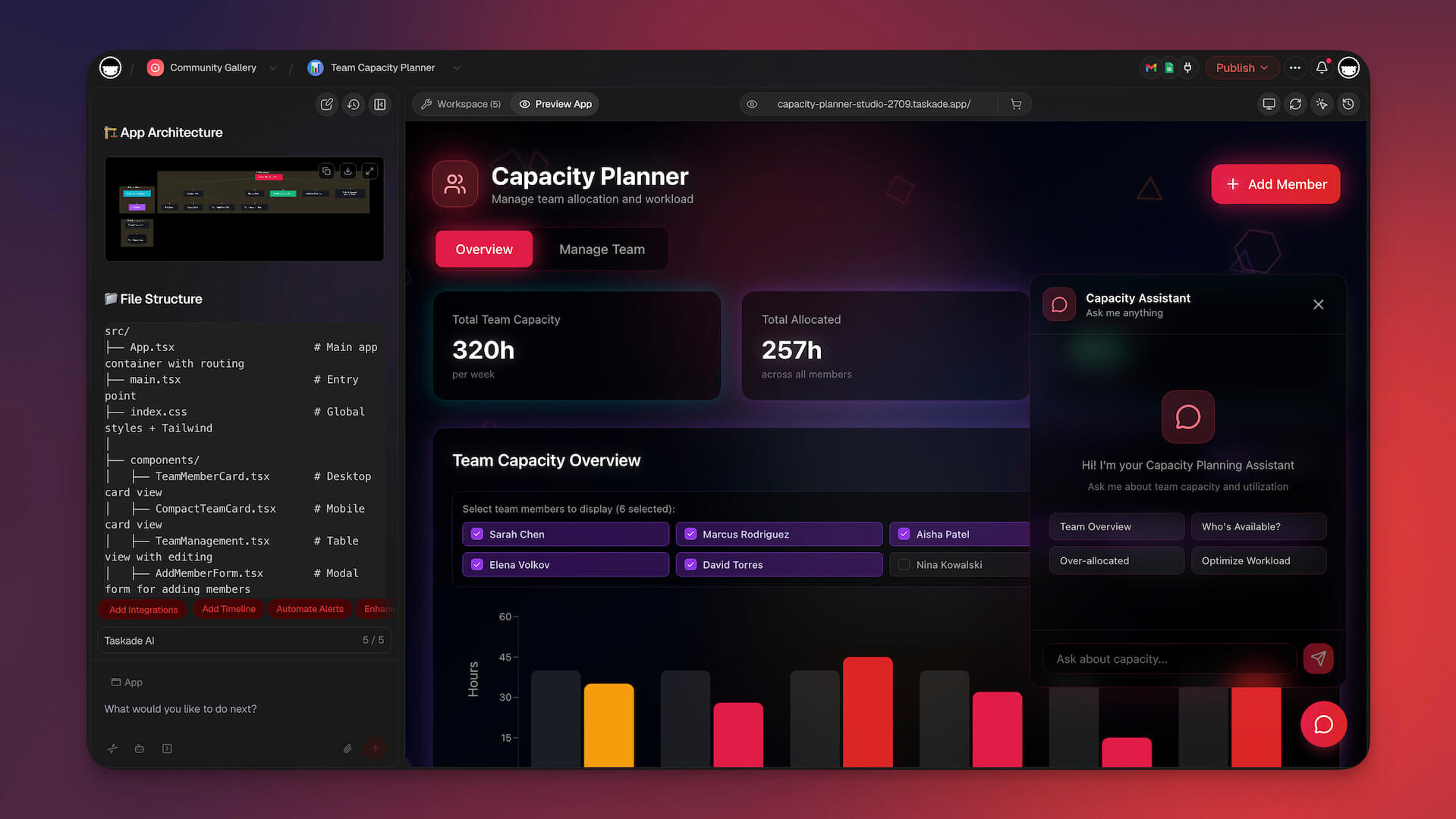
What you get with Taskade Genesis: one-prompt live apps, AI agents with built-in tools, multi-agent collaboration, frontier models from top AI labs, 100+ bidirectional integrations (triggers pull events in, actions push data out — native Shopify and Stripe), reliable automation workflows that branch, loop, filter, and resume from failure, and multiple project views (List, Board, Calendar, Table, Mind Map, Gantt, Org Chart). This is what lets non-coders ship real software: David, an IT program manager with no engineering team, used Taskade Genesis to build a production project dashboard tracking Customers, Jobs, Invoices, and his Team — the kind of internal tool that used to mean a developer ticket and a three-month wait.

Example: Building a CRM
| Approach | Replit | Taskade Genesis |
|---|---|---|
| Input | "Help me build a CRM" | "Build a CRM for tracking sales leads" |
| Output | Code snippets, guidance | Complete working CRM |
| Time | Hours of coding | Minutes |
| AI built-in | No | Yes (AI lead scoring, etc.) |
Taskade Genesis Pricing 💸 (annual billing)
- 🟢 Free: Build apps and test the workflow
- 🟣 Pro ($10/mo, Popular ★): More AI generations and power features
- 🟠 Business ($25/mo): Team features, custom domains, built-in sign-in
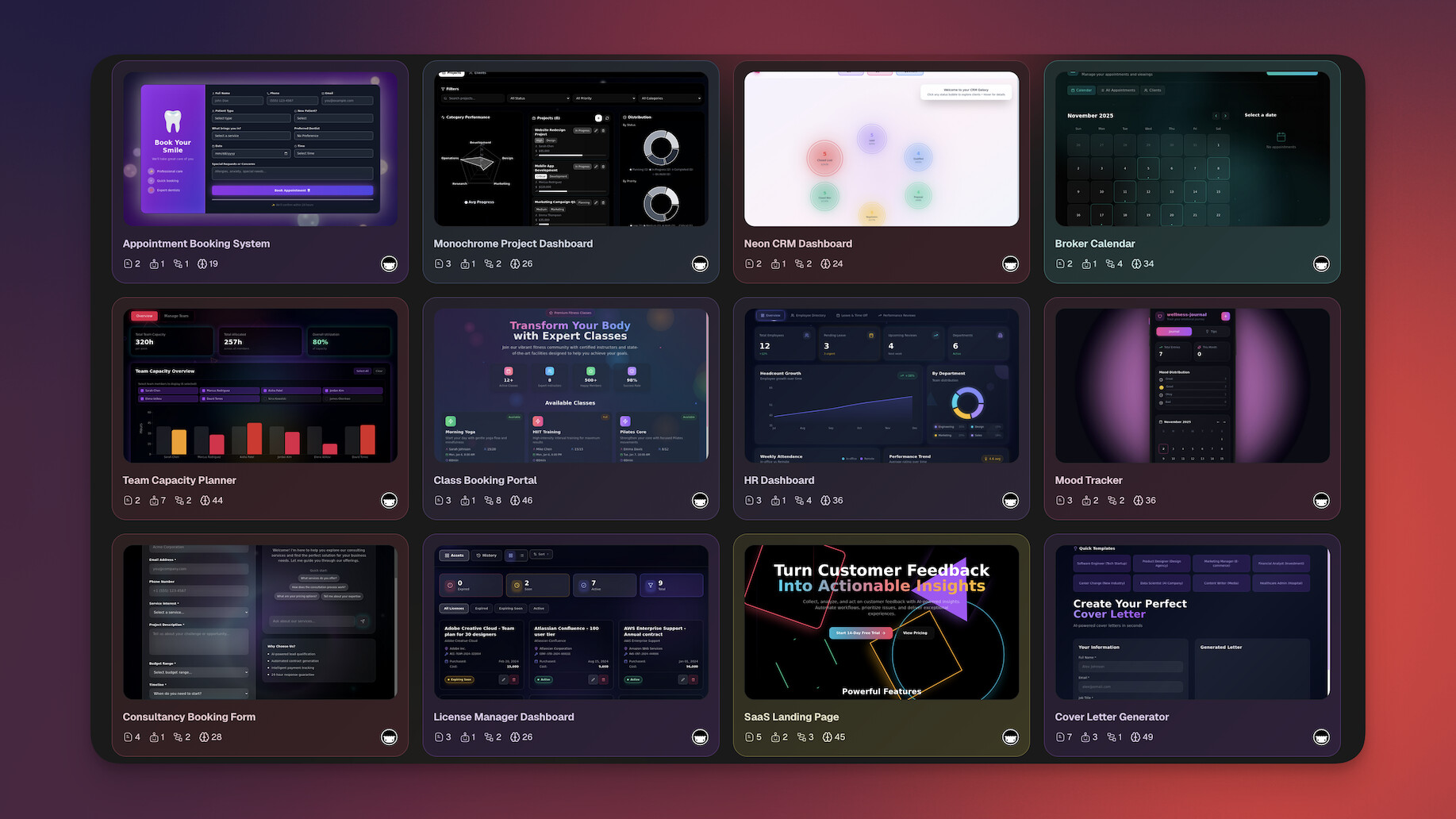
Clone these Genesis apps:
| App Type | Description | Clone |
|---|---|---|
| Sales CRM | Neon CRM with deal tracking | Clone → |
| Project Dashboard | Visual project tracker | Clone → |
| AI Chatbot | Custom trained assistant | Clone → |
| Booking System | Room/resource scheduler | Clone → |
👉 Build your first app with Taskade Genesis
#2 Cursor

Cursor is an AI-powered code editor built on VS Code.
Unlike Replit's browser environment, Cursor runs locally with deeper codebase understanding.
Why Developers Love Cursor
Context-aware AI that understands your entire codebase.
"Cmd+K" inline editing makes refactoring effortless.
Cursor vs Replit:
| Feature | Cursor | Replit |
|---|---|---|
| Environment | Local IDE | Browser |
| Codebase-aware | ✅ Deep | Basic |
| "Cmd+K" editing | ✅ | ❌ |
| Hosting | ❌ (use separately) | ✅ Built-in |
| Collaboration | ❌ | ✅ Multiplayer |
Best for: Professional developers who want AI assistance while working in a full IDE environment.
✅ Choose Cursor if: You're a pro developer who wants the best AI coding assistant.
❌ Skip it if: You prefer browser-based coding or need hosting built-in.
Cursor Pricing 💸
- 🟢 Hobby (Free): Limited Agent requests, access to Composer
- 🔵 Pro ($20/month): Extended Agent limits, frontier models
#3 GitHub Codespaces

GitHub Codespaces provides full VS Code environments in the browser.
Integrated with your GitHub repos. With Copilot, you get AI assistance too.
The GitHub Native Choice
Perfect if your workflow already lives in GitHub.
Full VS Code in your browser with container-based dev environments.
Codespaces vs Replit:
| Feature | Codespaces | Replit |
|---|---|---|
| VS Code features | ✅ Full | Limited |
| GitHub integration | ✅ Native | Manual |
| AI (Copilot) | ✅ Available | ✅ Ghostwriter |
| Hosting | ❌ (use Vercel, etc.) | ✅ Built-in |
| Dev containers | ✅ | Limited |
Best for: Developers already in the GitHub ecosystem who want consistent environments.
🎯 Perfect Match: If your code lives in GitHub, Codespaces is the natural choice. Seamless integration with repos, actions, and CI/CD.
Codespaces Pricing 💸
- 🟢 Free: 60 hours/month (Free tier)
- 🔵 Usage-based: From $0.18/hour
#4 Lovable (GPT Engineer)

Lovable generates full applications from natural language.
Similar to Replit's AI features but focused purely on app generation.
The Code Generator
Produces React/TypeScript applications, hosted on Lovable Cloud or exported to deploy yourself.
Minimal coding required, but deployment knowledge needed.
Lovable vs Replit:
| Feature | Lovable | Replit |
|---|---|---|
| Focus | App generation | Coding environment |
| Code required | Minimal | Yes |
| Hosting | 🟡 Lovable Cloud | ✅ Built-in |
| Full IDE | ❌ | ✅ |
| Collaboration | Limited | ✅ Multiplayer |
Best for: People who want AI-generated code without a full coding environment.
✅ Choose Lovable if: You want clean React code to deploy on your own infrastructure.
❌ Skip it if: You need apps that work immediately without deployment.
Lovable Pricing 💸
- 🟢 Free: 5 credits/day, up to 30/month
- 🔵 Pro (from $25/month): 100 credits/month plus 5/day
#5 Bolt.new (StackBlitz)
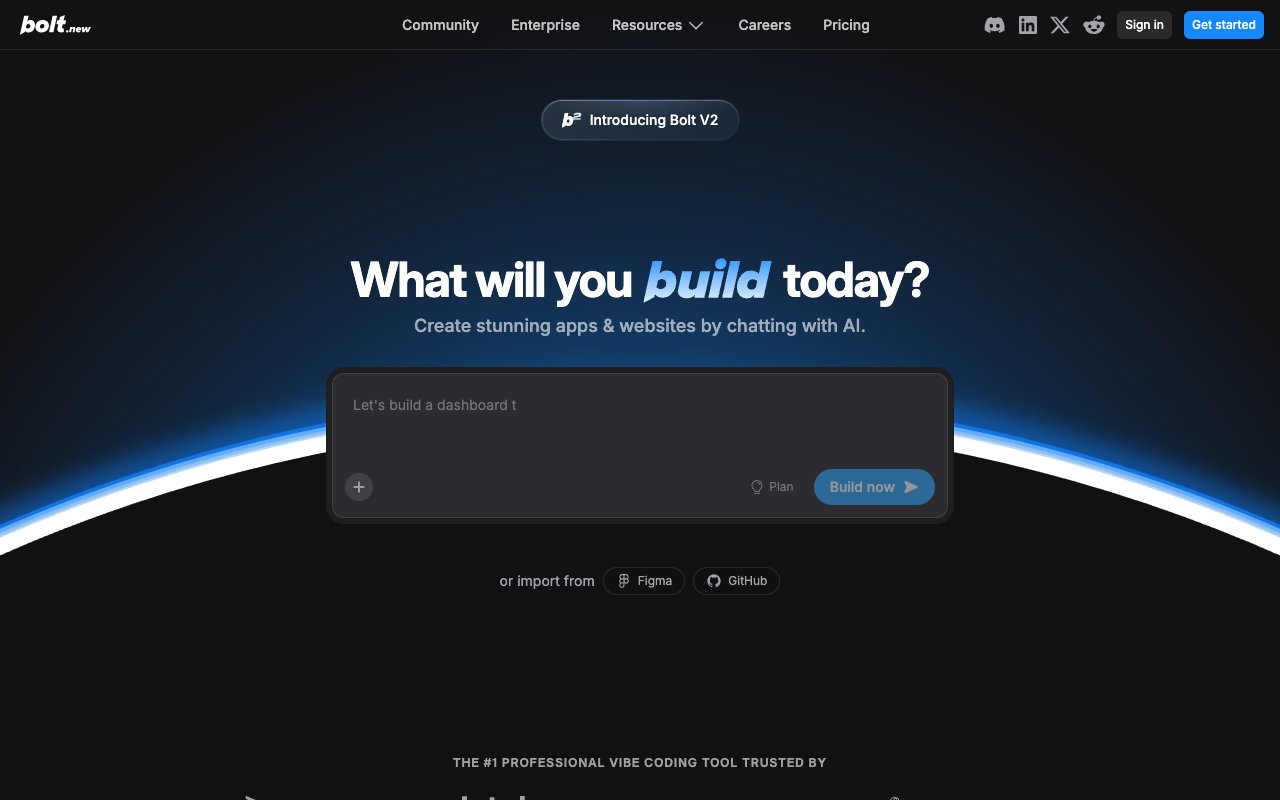
Bolt.new generates full-stack apps in a browser-based environment.
Powered by StackBlitz's WebContainers.
The Speed Demon
Fastest AI app generation available.
Bolt Cloud now hosts the app and its database, but logic beyond the initial prompt is still code you write.
Bolt.new vs Replit:
| Feature | Bolt.new | Replit |
|---|---|---|
| Focus | AI generation | Coding |
| Speed | Very fast | Fast |
| Persistence | 🟡 Bolt Cloud | Persistent |
| Hosting | 🟡 Bolt Cloud | ✅ Built-in |
| Database | 🟡 Bolt Cloud | ✅ |
Best for: Quick prototypes and demos.
✅ Choose Bolt.new if: You need the fastest way to visualize an idea.
❌ Skip it if: You want agents and automations inside the app without writing code.
Bolt.new Pricing 💸
- 🟢 Free: 1M tokens/month, 300K daily cap
- 🔵 Pro ($25/month): 10M tokens/month, no daily cap
#6 Glitch

Glitch is a collaborative browser-based coding platform.
Known for its social features and easy remixing of projects.
The Community Platform
Perfect for learning and sharing.
Strong educational focus with excellent community support.
Glitch vs Replit:
| Feature | Glitch | Replit |
|---|---|---|
| Social features | ✅ Strong | Basic |
| Remixing | ✅ Easy | ✅ |
| AI features | Limited | ✅ Ghostwriter |
| Hosting | ✅ | ✅ |
| Community | ✅ Active | ✅ Active |
Best for: Beginners and educators who value community and easy project sharing.
✅ Choose Glitch if: You're learning to code and want a friendly community.
❌ Skip it if: You need advanced AI features or no-code building.
Glitch Pricing 💸
- 🟢 Free: 1,000 project hours
- 🔵 Pro ($10/month): Always-on apps
#7 CodeSandbox

CodeSandbox provides cloud development environments with fast startup times.
VSCode support included.
The Frontend Specialist
Optimized for React, Vue, and frontend frameworks.
Lightning-fast startup times for quick iterations.
CodeSandbox vs Replit:
| Feature | CodeSandbox | Replit |
|---|---|---|
| Startup speed | Very fast | Fast |
| VSCode | ✅ Integration | Limited |
| Templates | ✅ Many | ✅ Many |
| AI features | Limited | ✅ Ghostwriter |
| Collaboration | ✅ Live | ✅ Multiplayer |
Best for: Frontend developers who want fast cloud environments.
✅ Choose CodeSandbox if: You build frontend apps and want instant dev environments.
❌ Skip it if: You need strong AI features or full-stack development.
CodeSandbox Pricing 💸
- 🟢 Free: Basic features
- 🔵 Pro ($12/month): More credits
🤔 How to Choose the Right Replit Alternative
Decision Framework
Match your skill level and needs with the right platform. Start with one question — do you want to write code, or skip it?
By Your Coding Skill
| If You Are... | Best Choice |
|---|---|
| Non-coder | Taskade Genesis |
| Beginner | Glitch or Replit |
| Intermediate | Replit, Cursor, or Codespaces |
| Professional | Cursor or GitHub Codespaces |
By What You Need
| If You Need... | Best Choice |
|---|---|
| No-code AI apps | Taskade Genesis |
| AI coding assistance | Cursor |
| Browser-based IDE | Replit, Codespaces, or CodeSandbox |
| AI-generated code | Lovable or Bolt.new |
| Social coding | Glitch |
📊 Feature Comparison Matrix
| Feature | Taskade Genesis | Replit | Cursor | Codespaces | Lovable | Bolt |
|---|---|---|---|---|---|---|
| No code required | ✅ | ❌ | ❌ | ❌ | ~✅ | ~✅ |
| Full IDE | ❌ | ✅ | ✅ | ✅ | ❌ | ❌ |
| AI agents | ✅ | ❌ | ❌ | ❌ | ❌ | ❌ |
| Database | ✅ | ✅ | ❌ | ❌ | 🟡 Cloud | 🟡 Cloud |
| Hosting | ✅ | ✅ | ❌ | ❌ | 🟡 Cloud | 🟡 Cloud |
| 100+ Integrations | ✅ | ❌ | ❌ | ❌ | ❌ | ❌ |
| Collaboration | ✅ | ✅ | ❌ | ✅ | ❌ | ❌ |
| Free tier | ✅ | ✅ | ✅ | ✅ | ✅ | ✅ |
🚀 The Bottom Line
Choose based on your goal:
| Your Goal | Best Platform |
|---|---|
| Build apps without coding | Taskade Genesis |
| Code with AI help | Cursor |
| Browser-based coding | Replit or Codespaces |
| Quick AI prototypes | Bolt.new |
| Learn with community | Glitch |
For non-developers who need working apps, Taskade Genesis offers the most complete solution. Apps come with AI agents, databases, and reliable automation workflows out of the box, no coding required. Want to compare the no-code builders head-to-head first? See our Cursor alternatives, Bolt.new alternatives, and Lovable alternatives guides.
▲ ■ ● Taskade Genesis is built on Workspace DNA — Memory, Intelligence, and Execution working as one self-reinforcing loop. That's why one prompt turns into a living app instead of a folder of files you still have to deploy.
Ready to build without coding?
👉 Create your first Taskade Genesis app →
👉 Browse 150,000+ apps in the community →
👉 Learn how Taskade Genesis works →
💬 Frequently Asked Questions
Common Questions About Replit Alternatives
Is Replit still good in 2026?
Replit remains excellent for browser-based coding with AI assistance.
However, for non-developers or those wanting AI-powered apps without coding, platforms like Taskade Genesis offer more accessible options.
💡 Key Insight: Replit is for coders who want AI help. Taskade Genesis is for builders who want AI to handle the coding.
What's the best free Replit alternative?
Taskade Genesis offers a generous free tier so you can experiment with app building, with reasonable limits on AI generations.
Unlike Replit's compute-limited free tier, you can still build and host a real app before you decide to upgrade. Paid plans start at $10/month (annual billing).
💰 Free Tier Winner: Taskade Genesis free lets you build a working app. Replit free runs into compute limits fast. Big difference for active builders.
Can I use Replit alternatives for professional development?
Yes. Cursor and GitHub Codespaces are popular choices for professional developers.
They offer deeper AI integration and better support for large codebases compared to Replit.
🎯 Pro Tip: Many professional teams use Cursor for local development and Codespaces for cloud environments. Both beat Replit for serious work.
Which alternative is best for beginners?
For learning to code: Glitch or Replit.
For building apps without coding: Taskade Genesis.
Taskade Genesis has the gentlest learning curve because you describe what you want in plain English.
🎓 Learning Path: Start with Glitch to learn coding fundamentals. Graduate to Taskade Genesis when you want to build real apps faster.
What if I need both coding AND no-code capabilities?
You might use multiple tools: Taskade Genesis for rapid no-code apps, and Cursor or Codespaces when you need custom code.
Many teams use both approaches depending on the project.
✅ Hybrid Approach: Use Taskade Genesis for 80% of internal tools (CRMs, dashboards, portals). Use Cursor for the 20% that needs custom code. Best of both worlds.
📚 More Resources
🔗 Related Resources
Explore more comparisons:
- Best Free AI App Builders in 2026 — 15 tested, no credit card
- 17 Best AI App Builders in 2026
- 7 Best Lovable Alternatives
- What is Vibe Coding?
- Best Bolt.new Alternatives
- Best Devin AI Alternatives
- Best Vibe Coding Tools in 2026
- Best Cursor Alternatives
- Best Windsurf Alternatives
- Taskade vs Replit — Side-by-side comparison
- Taskade vs Bolt — AI app builders compared
- Taskade vs Cursor — Coding platforms compared
Start building:
- Clone a ready-made app template — Customize and deploy instantly
- AI App Builder — Build complete apps from one prompt
- Browse Community Apps — Clone real Genesis apps
Learn about Taskade Genesis: