






OpenAI Codex Sites is the headline feature of OpenAI's June 2026 push to turn its coding agent into a tool for everyone. It builds and hosts a working web app from a single prompt. It's genuinely impressive, and genuinely walled in. This is the plain-English explainer: what Codex Sites is, exactly who can use it, the limits the launch coverage skips, and the open alternative for the majority who are locked out.
TL;DR: OpenAI Codex Sites (launched June 2, 2026) turns a prompt into a deployed web app, hosted by OpenAI. But it's Business/Enterprise-only, with no public URL, no custom domain, no code export, and no payments. Taskade Genesis does prompt-to-app for everyone, a free tier with public URLs and client logins, plus custom domains on Pro and up, and Stripe monetization on paid plans. Build one free →
What Is OpenAI Codex Sites?
OpenAI Codex Sites is a feature of OpenAI Codex that creates, deploys, and hosts interactive websites, web apps, dashboards, and games from a plain-language prompt. You invoke it with the @Sites plugin: describe the app, and Codex builds it, runs it to test, deploys it to an OpenAI-hosted URL, and shares it inside your workspace. It launched in preview on June 2, 2026 alongside OpenAI's "Codex for every role, tool, and workflow" update.
The pitch is real: describe an onboarding hub, an intake form, or a KPI dashboard, and minutes later it exists at a URL. The catch is everything around that URL, who can build, who can open it, and what you're allowed to do with it.
Who can use Codex Sites?
This is the first thing to check, and the #1 frustration in early coverage:
| Plan | Can use Codex Sites? |
|---|---|
| ChatGPT Business | ✅ On by default |
| ChatGPT Enterprise | ✅ Admin enables it per role (RBAC) |
| ChatGPT Pro ($200/mo) | ❌ Not at launch |
| ChatGPT Plus ($20/mo) | ❌ Not at launch |
| ChatGPT Go / Free | ❌ Not at launch |
If you're a solo builder, a freelancer, or on Plus or Pro, you cannot use Codex Sites today, even though Codex itself is on your plan. OpenAI says "more plans rolling out later," with no date.
How Codex Sites Works
Codex Sites follows a prompt → build → deploy → share loop, with a "save a version before you deploy" checkpoint:
Under the hood, the app is built as a Cloudflare Worker-compatible bundle with a relational database and object storage that OpenAI provisions and governs inside your workspace. You don't connect your own infrastructure, and there's no documented way to export the code or data.
What You Can Build with Codex Sites
OpenAI positions Sites for internal knowledge work, turning "ideas, analysis, and plans into dashboards, planners, review workspaces, project boards, galleries, and lightweight tools." Common demos:
| Use case | What it does |
|---|---|
| Onboarding hub | Tracks a new hire's first-week progress, meetings, and tasks |
| Intake / quote form | Generates fields, types, and validation from a description |
| Sales dashboard / CRM | High-priority accounts, meeting prep, deals at risk |
| KPI / executive dashboard | Targets and health signals, refreshed on a schedule |
| Enablement library | Searchable learning paths for a team |
| Sparkboard | Idea intake with voting, comments, and rankings |
Every one of these is an internal tool. That's not an accident. It's the boundary of the product.
The Limits Nobody Mentions
Here's the honest reality check that the launch-day tutorials gloss over:
| What you'd expect | Codex Sites reality |
|---|---|
| A public link | ❌ No public URL — workspace-scoped only |
| Your own domain | ❌ No custom domain |
| External clients can open it | ❌ Viewers must be in your OpenAI workspace / IdP |
| Download or export the code | ❌ No code or data export (Cloudflare-Worker lock-in) |
| Take payments | ❌ Prohibited by the Sites policy |
| Real-time co-editing | ❌ Share-a-link + async save → review → deploy |
| Use it on Plus / Pro / Free | ❌ Business / Enterprise only |
   CODEX SITES = a beautiful app, inside a locked room
   ┌─────────────────────────────────────────────┐
   │  your OpenAI Business/Enterprise workspace    │
   │                                               │
   │     [ your deployed app ]  ← only coworkers   │
   │                              can open it      │
   │   ✗ no public URL   ✗ no custom domain        │
   │   ✗ no export       ✗ no payments             │
   └─────────────────────────────────────────────┘
        a client / the public stands outside ────►  ✗
Independent reviewers reached the same verdict: Codex Sites is an internal-tool builder, not a public app publisher. Which leaves an obvious question for the ~20% of Codex users who aren't developers, and everyone locked out on Plus or Free: what turns a prompt into an app you can actually publish, own, and charge for?
Codex Sites vs the Open Alternative
Taskade Genesis is the workspace-native answer to exactly the half of the loop Codex Sites walls off, publishing, ownership, and monetization:
| Capability | OpenAI Codex Sites | Taskade Genesis |
|---|---|---|
| Who can build | Business / Enterprise only | Every tier, free included |
| Public URL | ❌ | ✅ Public publish |
| Custom domain | ❌ | ✅ Pro+ |
| External client logins | ❌ workspace members only | ✅ GenesisAuth (email) |
| Own / clone the build | ❌ no export | ✅ cloneable Workspace DNA |
| Charge for it | ❌ prohibited | ✅ Stripe App Kits |
| Real-time multiplayer | ❌ | ✅ by default |
| Pricing | token credits (~$100–200/mo) | flat, from $0 |
| Built-in agents + automations | partial (Automations re-run a prompt) | ✅ AI agents + durable automations |
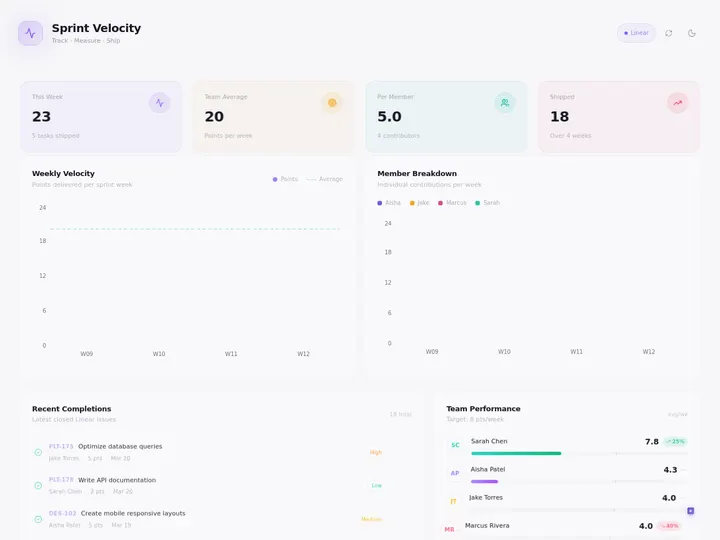
A live dashboard published with Taskade Genesis, the kind of app you can put on a public URL with external client logins on any plan, and on your own custom domain with Pro and up. Browse hundreds more in the Community Gallery.
To be fair to OpenAI: Codex ships native GPT Image 2 image generation, sharp in-harness QA, and reaches 5M+ users a week. Those are real strengths Taskade doesn't claim to match head-on. The wedge isn't "more AI". It's openness. OpenAI built the internal tool; Taskade Genesis ships the part that touches your customers.
How to Turn a Prompt Into a Public App (For Everyone)
You don't need a Business seat to go from prompt to live, shareable app. Here's the path with Taskade Genesis:
- Describe it. Open Taskade Genesis and describe the dashboard, portal, CRM, or tool you want, in plain language.
- Get a living app. Taskade Genesis builds a real app backed by frontier models from top AI labs, with AI agents, automations, databases, and 100+ integrations.
- Publish how you want. Private, Secret-link, or fully Public. Add GenesisAuth client logins and password protection for client work, no upgrade needed, then on Pro and up put the whole thing on your own custom domain.
- Share and clone. Publish to the Community Gallery so anyone can find and clone it, every app ships as cloneable Workspace DNA.
- Charge for it. Monetize with Stripe-powered App Kits.
Watch: Taskade Genesis turns a prompt into a live, shareable app, with agents and automations, on any plan.
This is the Workspace DNA loop that makes Taskade Genesis apps different from one-shot builds: Memory (your Projects and databases) feeds Intelligence (your agents), Intelligence triggers Execution (your automations), and Execution writes back to Memory. So the next build is smarter than the last. A Codex Sites app is a static deploy; a Taskade Genesis app is a living system.
Related Reading
- What Is OpenAI Codex? From 2021 Code Model to Codex Sites, the full history and context
- Best OpenAI Codex Alternative (Taskade Genesis), the prompt-to-app comparison
- Taskade Genesis vs Claude Live Artifacts, the other self-updating-app surface
- Claude Code vs Cursor vs Taskade Genesis, code tools vs app builders
- What Are AI Coding Agents?, the agent loop, explained
- Best Vibe Coding Tools in 2026, the prompt-to-app field
- OpenAI Codex Pricing Explained, what Codex (and Codex Sites credits) actually cost
- Codex Sites vs Lovable, prompt-to-app, head-to-head
- Best OpenAI Codex Alternatives, for coders and non-coders
Frequently Asked Questions
What is OpenAI Codex Sites?
A June 2026 feature that builds, deploys, and hosts a web app from a prompt via the @Sites plugin, hosted by OpenAI, shared inside your workspace. It's a preview for ChatGPT Business and Enterprise.
Who can use Codex Sites?
Only ChatGPT Business (default) and Enterprise (admin-enabled). Plus, Pro, Go, and Free are excluded at launch.
Can I use Codex Sites for free or on Plus?
No. If you want prompt-to-app on a free plan, Taskade Genesis builds and publishes a live app on every tier.
Can a client outside my company open a Codex Sites app?
Generally no, viewers must be in your OpenAI workspace. Taskade Genesis publishes public apps and supports external client logins via GenesisAuth.
Can I charge money through a Codex Sites app?
No, payments are prohibited by policy. Taskade Genesis supports Stripe-powered App Kits.
Is Codex Sites a Lovable or Replit killer?
For internal tools, it's compelling. For public, ownable, monetizable apps, it isn't, no public URL, no custom domain, no export. See the full alternatives breakdown.
Codex Sites proves the prompt-to-app future is here. The question it leaves open is the one that matters most for everyone outside an OpenAI Business plan: can you publish it, own it, and charge for it? That's the line Taskade Genesis is built on. Start building free →
▲ Memory · ■ Intelligence · ● Execution