

TL;DR: Firebase Studio is sunsetting. Google disabled new workspaces and signups on June 22, 2026, and shuts the product down on March 22, 2027, when remaining data is deleted. Taskade Genesis ships a deployed app inside your workspace from one prompt, with AI agents, automations, and hosting included. Free Forever to start, Pro $10/mo billed annually. Try Taskade Genesis free →
See the alternative working — clone in 60 seconds
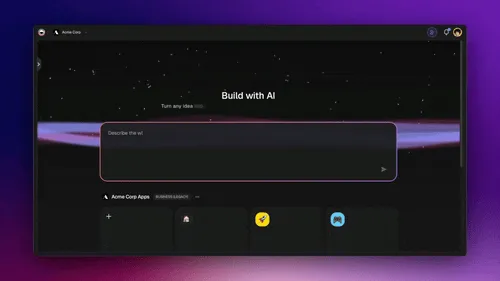
No signup, no credit card. Live storefront app
| Capability | Firebase Studio | Taskade Genesis |
|---|---|---|
| Pricing (starting) | Closed to new users; Firebase backends on Spark or Blaze | $0 Free · $10/mo Pro billed annually (10 seats) |
| Cloneable live demo | ❌ | ✅ |
| Built-in AI agents | Gemini code assistance | ✅ built-in tools |
| Automation engine | No workspace automation engine | ✅ Durable runtime, 100+ integrations |
| Workspace DNA loop | ❌ | ✅ ▲ Memory · ■ Intelligence · ● Execution |
What is Taskade Genesis?
Taskade Genesis is the AI app builder inside the Taskade workspace, built by the Y Combinator-backed team that has run Taskade since 2017. It sits outside any one cloud vendor's lifecycle: the app it produces is hosted, versioned, and kept running by Taskade, so a platform roadmap change is not your migration project.
A single description yields a working internal tool, customer portal, ops dashboard, or knowledge base — data layer included. App sign-in comes from GenesisAuth, publishing to the Community Gallery takes one click, and there is no project to provision, no billing account to attach, and no console to learn.
What Taskade Genesis actually builds
The output is a running application with its data layer, agents, and automations attached — nothing to deploy, nothing to bill through a cloud project. The TSK-1 Benchmark records how competing AI models handle one identical job, scored on whether the app opens, matches what was asked for, and saves your data.
What is Firebase Studio?
Firebase Studio is Google's full-stack AI workspace, now in its sunset period. It pairs Gemini-powered coding, debugging, and testing with an App Prototyping agent that turns natural language, mockups, and screenshots into working code, plus preview URLs for early testers and one-click deployment to Firebase App Hosting or Cloud Run.
Firebase Studio at a glance (October 2026): A Gemini-powered workspace where AI assists across the build, test, preview, and deploy steps. Google's sunset page lists the timeline: announced March 19, 2026, new workspaces and signups disabled June 22, 2026, and shutdown with permanent data deletion on March 22, 2027. The sunset covers only the development environment, and Firebase services such as Firestore and Authentication continue.
The Firebase Studio sunset timeline
| Date | What happens |
|---|---|
| March 19, 2026 | Google announces the sunset, and migration tools start rolling out |
| June 22, 2026 | New workspace creation and new user signups are disabled |
| Until March 22, 2027 | Existing workspaces keep working, so you can finish and export |
| March 22, 2027 | Firebase Studio shuts down, and all remaining data is permanently deleted |
Google points two kinds of users to two successors. Google AI Studio is the browser-based, prompt-first option, aimed at people who built with the App Prototyping agent. Google Antigravity is the local, code-first option, aimed at people who worked mainly in Code view or imported a repository.
Where each tool wins
A Gemini-assisted workspace for code you deploy — Firebase Studio
If your team already ships on Firebase and Google Cloud and has an existing Firebase Studio workspace, it still puts a capable AI assistant into that pipeline until March 22, 2027. For new work, Google's own successors, Google AI Studio and Google Antigravity, keep you inside Google's ecosystem.
Working app right now — Taskade Genesis
If the app matters more than the pipeline that produced it, Taskade Genesis returns it working on the first prompt — data layer, agents, and integrations connected, hosted by Taskade, and unaffected by any one cloud vendor's product roadmap.
The Workspace DNA advantage
Firebase Studio's mental model is "AI assists inside a development workspace, the team deploys." Taskade Genesis's mental model is Workspace DNA: a self-reinforcing loop between three pillars.
- Memory (Projects) — Requirements, notes, files, and structured tables sit in the workspace the agents reason over, so context does not live in a chat history you will lose. Read How Workspace DNA Works.
- Intelligence (Agents) — AI Agents v2 run frontier models from top AI labs, keep persistent memory, take custom tools, and can be embedded in a published app.
- Execution (Automations) — Durable workflows fire on GitHub activity, Gmail, Slack, Stripe, webhooks, or a schedule, and record what they did back in the workspace.
Firebase Studio is excellent at one slice of that: assisting a developer inside a workspace. Taskade Genesis keeps the three pillars running together, so context compounds instead of resetting with each new session.
Pricing comparison
| Plan | Taskade Genesis | Firebase Studio |
|---|---|---|
| Free | Free Forever: unlimited projects, 1 agent, 3 Taskade Genesis apps | No new workspaces since June 22, 2026 |
| Entry | Free Forever, upgrade to Pro when ready | Existing workspaces usable until March 22, 2027 |
| Most popular | Pro $10/mo billed annually ($20 monthly): 10 seats, unlimited apps, up to 10 custom domains | Firebase backend usage on Spark (no cost) or Blaze (pay as you go) |
| Team | Business $25/mo billed annually ($50 monthly): unlimited seats, SSO | Blaze pay as you go |
| High capacity | Max $100/mo · Enterprise $250/mo, both billed annually | Google Cloud billing |
Firebase plan names come from firebase.google.com/pricing, checked in October 2026. Firebase Studio itself never had a paid plan, so the real cost of an app built in it is the Firebase or Google Cloud usage behind it. Taskade Genesis bundles hosting, the data layer, agents, and automations into one subscription.
Moving a Firebase Studio project to Taskade Genesis
Taskade Genesis does not import Firebase Studio code. It rebuilds the app from a description, so it fits best when the app matters more than its source. A typical move takes five steps:
- Export first. Download your code and data from Firebase Studio before March 22, 2027. Google's sunset page says that projects you want to keep must be migrated before that date.
- Describe the app. Paste the purpose, screens, and fields into Taskade Genesis, for example "a bug intake portal with a status board and a weekly summary."
- Bring the data. Import records as a CSV file into a Taskade project, which becomes the app's data layer.
- Wire the automations. The GitHub connector starts a flow on "New Issue," a custom AI agent labels severity with the AI Categorize action, and the Slack "Send Channel Message" action alerts the on-call channel.
- Publish. Share the app at its URL with GenesisAuth email-and-password sign-in on any plan, add password protection on Pro, or a custom domain on Pro and up.
If you need the code itself, follow Google's migration guide to Google AI Studio or Google Antigravity instead, and use Taskade for the release checklist and team board around it.
Choose Taskade Genesis if
- You want the app hosted and running the moment it is generated
- You would rather not attach a billing account or provision a project first
- You want agents and automations included, not assembled from separate services
- You need a builder that is open for new signups today, with no shutdown date
- Non-engineers on your team need to build alongside engineers
Choose Firebase Studio (or its Google successors) if
- You already have a Firebase Studio workspace and want to finish the work there before March 22, 2027
- Your stack lives on Firebase and Google Cloud, and you want Google AI Studio or Google Antigravity to keep you inside that ecosystem
- You want code you own and deploy yourself, with Gemini assistance in a code-first editor
Frequently asked questions
Is Taskade Genesis a good Firebase Studio alternative?
Yes, when the job is a deployed app you can ship today. Firebase Studio closed to new users on June 22, 2026. When the job is Gemini-assisted development of code you deploy on Google infrastructure, Google AI Studio or Google Antigravity is the closer fit.
Is Firebase Studio shutting down?
Yes. New workspaces and signups were disabled on June 22, 2026, and Firebase Studio shuts down on March 22, 2027, when all remaining data is permanently deleted. Firebase services such as Firestore and Authentication continue.
Where should I move a Firebase Studio project?
Google recommends Google AI Studio for browser-based, prompt-first work and Google Antigravity for code-first, local work. If you need the running app rather than the code, Taskade Genesis rebuilds it from a description with hosting, agents, and automations included.
How does Taskade Genesis pricing compare to Firebase Studio?
Taskade Genesis is Free Forever, with Pro at $10 per month billed annually for unlimited apps and 10 seats, and Business at $25 per month billed annually for unlimited seats. Firebase Studio no longer accepts new users, and apps built in it run on Firebase backends billed on the Spark or Blaze plan.
Can I keep Firebase and use Taskade Genesis too?
Yes. The sunset covers only the Firebase Studio editor. Many teams keep the production app on Firebase and run triage, release checklists, and dashboards in Taskade, connected through GitHub and Slack automations.
Does Taskade Genesis include AI agents?
Yes. AI Agents v2 come with persistent memory, built-in tools for web search, code execution, and file analysis, custom tools, and public embedding.
Does Taskade Genesis include workflow automations?
Yes — durable workflows across 100+ bidirectional integrations, with no functions to write, deploy, or meter.
Do I own the code that powers a Taskade Genesis app?
Taskade Genesis is a managed platform: hosting, deployment, and agent infrastructure are included, and you can export your Taskade Projects to Markdown or text at any time. If full code ownership is the goal, Google Antigravity is the code-first fit.
Which AI models power Taskade Genesis?
Taskade Genesis runs frontier models from top AI labs, with TSK-Auto as the default. Paid plans pick OpenAI GPT, xAI Grok and open-weight models built in, with no key, and on Pro and up you can bring your own OpenAI, Anthropic or Google Vertex AI key (BYOK).
Can a non-technical user build with Taskade Genesis?
Yes — no console, no project setup, no CLI.
Can I publish a Taskade Genesis app to a custom domain?
Yes, and there is no DNS project or hosting bill involved. Custom domains are available on Pro ($10/mo billed annually) and above; GenesisAuth email sign-in works on every plan including Free, and password protection starts at Pro.
Build without permission
Firebase Studio gave Google Cloud teams an AI-assisted workspace, and its successors carry that forward. Taskade Genesis gives every team — engineers and non-engineers alike — a workshop where apps come out finished, hosted, and ready for users.
- Start with Taskade Genesis — One prompt, one hosted app
- Browse the Community Gallery — Clone something already running
- Read the Workspace DNA explainer — How the three pillars feed each other
Explore Taskade Genesis
- AI App Builder — An app that is already hosted when it appears
- AI Agent Platform — Multi-provider agents with persistent memory
- Workflow Automation — Event-driven workflows, no functions to deploy
- AI Website Builder — Sites with no project to provision
- Vibe Coding — Natural-language software, end to end
Build without code
- AI App Generator — Applications from a description
- AI Dashboard Generator — Dashboards for the team, not the console
- AI Internal Tools Generator — Internal tools without a sprint
- AI Form Generator — Forms with storage attached
- Browse Community Apps — Clone and customize
Related reading
- The Build Without Permission article — Our manifesto
- Best Vibe Coding Tools in 2026 — The category, compared
- Best Cursor Alternatives in 2026 — AI code editors compared
- Vibe Coding for Teams — Building without a handoff
- How Workspace DNA Works — Why context compounds
- Origin of Living Software — Apps that outlive a platform roadmap
- AI Tools Built With Taskade Genesis — Apps you can open and clone